Tenkeyless keyboards give you a full typing layout while saving desk space, and this roundup pits 12 models against each other, from a $13.99 entry board to a $319.99 contender. The SteelSeries Apex 9 TKL has a durability rating of 100 million keystrokes and a polling rate of up to 8000 Hz, whereas the Rii RK104 has gathered user feedback with 2,401 reviews. Ratings across the set range from 4.1/5 to a top‑rated 4.7/5.
To simplify buying, we’ve grouped the keyboards into the three price tiers. Budget picks are the $13.99 Rii RK104 with three RGB modes, the $31.99 SteelSeries Apex 3 TKL (IP32 rating), the $44.99 Corsair K55 CORE TKL with 8‑zone RGB and 300 mL spill resistance, and the $54.99 Keychron C3 Pro offering an 8000 Hz polling rate. Mid‑range options include the $79.99 Keychron K8‑A3 (4.4/5) and the $89.99 Corsair K70 CORE TKL, both mechanical with full NKRO. Premium models – the $93.42 Roccat Vulcan TKL, $94.99 Razer BlackWidow V3 TKL Yellow, $104.99 SteelSeries Apex 9 TKL and the $319.99 IQUNIX EZ80 (4.7/5) – add aluminum frames, hot‑swap or Hall‑Effect switches and per‑key RGB.
Next, we examine each model’s strengths and drawbacks so you can pick the right TKL for your setup.

SteelSeries Apex 9 TKL
Its polling rate of up to 8000 Hz ensures ultra‑responsive input, supporting fast gaming and precise typing.
Rii RK104
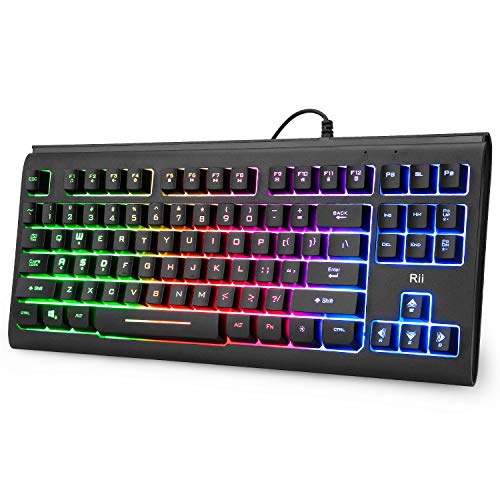
Ideal for budget‑conscious gamers or office setups, the Rii RK104 comes in at $13.99—about $91 cheaper than the Apex 9 TKL.

SteelSeries Apex 3 TKL
The compact 39.9 mm height gives a slimmer profile, fitting tighter desk spaces that larger TKLs can’t accommodate.
Also considered
Score Analysis
Key score advantages vs. runner-up (Rii RK104)
Price Range
SteelSeries Apex 9 TKL
$139.99
Rii RK104
$13.99
SteelSeries Apex 3 TKL
$31.99

Razer BlackWidow V3 TKL Yellow
$99.99

Keychron K8-A3
$63.99

Corsair K55 CORE TKL
$44.99

Corsair K70 CORE TKL
$79.99

Keychron C3 Pro
$54.99

Roccat Vulcan TKL
$92.37
IQUNIX EZ80
$319.99
Glorious GMMK TKL
$44.99

MageGee MK-Star Blue
$29.99
Spec Comparison
TL;DR: The SteelSeries Apex 9 TKL blends a 2‑point actuation system, 0.2 ms response and an 8000 Hz polling rate with a sturdy aluminum frame for competitive gamers willing to pay a premium.
What really sets this keyboard apart is its dual‑actuation optical switches: a 1.0 mm point for lightning‑quick gaming bursts and a 1.5 mm point for smoother typing. Coupled with a 0.2 ms response time and Up to 8000 Hz polling, the Apex 9 TKL delivers the speed pros crave. The board weighs 2.3Pounds and sits on an aircraft‑grade Series 5000 aluminum top plate, while double‑shot PBT keycaps keep the lettering fade‑proof.
Compared with the other eleven entries, the Apex 9 TKL is heavier than the Razer BlackWidow V3 TKL Yellow (1.85Pounds) and the Corsair K70 CORE TKL (1.6380346pounds), yet lighter than the Keychron K8‑A3 (2.20462262pounds). Its Up to 8000 Hz polling outpaces the typical 1000 Hz that many peers use, and the hot‑swappable OptiPoint switches give you customization freedom that most rivals lack.
In practice, users rave about the keyboard’s “tank‑like” durability, vivid per‑key RGB, and the noticeable edge it gives in fast‑paced shooters. Professional reviewers highlight the two‑point actuation as a genuine performance boost, while common complaints focus on the limited compatibility with third‑party optical switches, the absence of dedicated media keys, and occasional software hiccups.
Pros
Cons
Best for: Competitive gamers who need ultra‑fast response, customizable switches and a premium tenkeyless build.
Avoid if: You prefer a broader range of mechanical switches, require built‑in media keys or an OLED screen, or are constrained by a tight budget.
“feels like a tank”
“very solidly built with no wobble or flex”
TL;DR: The Rii RK104 delivers full‑RGB backlighting, a compact tenkeyless layout and quiet membrane switches for just $13.99, making it a solid entry‑level choice for budget‑focused setups.
The standout feature is its Full RGB lighting with three selectable modes (static, breathing, off) and three brightness levels, all controlled via a dedicated backlight button or Fn combos. The keyboard packs 87 keys in a tenkeyless form factor, measures 33 mm in thickness, 365 mm in length and 162 mm in width, and weighs only 0.77 pounds (349 g), keeping your desk uncluttered.
Compared with other tenkeyless options in this roundup, the RK104 is noticeably lighter than the SteelSeries Apex 3 TKL at 1.4 pounds and considerably narrower than its 363 mm width. It also undercuts the Corsair K55 CORE TKL’s 617 g weight, giving you a truly lightweight wired keyboard without the bulk of higher‑priced rivals.
Users praise the quiet, silent‑keystroke membrane for home‑office and HTPC use, while noting the ABS plastic feels cheap and the backlighting appears uneven, with some light bleed in darker areas. Professional reviewers highlight the attractive RGB and plug‑and‑play USB‑A connection as strong points, but they also point out the lack of software customization and the membrane switches’ limited appeal for competitive gaming.
The RK104 offers a 5 million‑keystroke lifespan, 19‑key rollover and 12 multimedia shortcut keys, plus interchangeable WASD modules and foldable feet for a modest ergonomic tweak. It runs on a 5 V USB‑powered cable that’s approximately 1.5 m long, so you won’t need extra adapters for most PCs, laptops or even Raspberry Pi devices.
Pros
Cons
Best for: Budget-conscious buyers seeking a reliable entry-level option
Avoid if: You need mechanical switches, competitive‑gaming performance, or extensive ergonomic features
“Perfect for my home office setup — small, quiet, and the RGB looks great at night.”
“Works flawlessly with my Raspberry Pi and Android TV box.”
TL;DR: The SteelSeries Apex 3 TKL offers whisper‑quiet mechanical switches, 8‑zone RGB and IP32 resistance at $31.99, delivering solid durability (20 million keystrokes) for a budget‑friendly tenkeyless keyboard.
The Apex 3 TKL’s standout feature is its Whisper‑quiet mechanical switches, which reviewers consistently note as ideal for shared spaces. It pairs those silent actuations with 8‑zone RGB illumination via PrismSync, and an IP32 rating that guards against dust and light spills. The chassis houses double‑shot PBT keycaps and supports 20 million keystrokes, promising a long‑lasting typing experience.
At $31.99, the keyboard lands between the sub‑$15 Rii RK104 and the $45‑plus Corsair K55 CORE TKL and Glorious GMMK TKL, making it pricier than the MageGee MK‑Star Blue but cheaper than most mid‑range options. Weighing 634 g (about 1.4 lb), it's slightly heavier than the Corsair’s 617 g frame yet noticeably heftier than the Rii’s 349 g model. Unlike the Glorious GMMK’s detachable USB‑C cable, the Apex 3’s cable features a fixed design, limiting portability for some users.
Users highlight the quiet switches and spill‑resistant build as major wins, while the fixed cable and the perception of “lower value‑per‑dollar” compared to similarly priced rivals appears as a common critique. Professional reviewers also note the solid construction and reliable backlighting as reasons the Apex 3 holds its own in a crowded budget segment.
Pros
Cons
Best for: Budget-conscious buyers seeking a reliable entry-level option
Avoid if: You want the best value‑per‑dollar in its price range
“feels like a tank”
“very solidly built with no wobble or flex”
TL;DR: At $94.99 and a 4.6/5 rating from over a thousand reviewers, the Razer BlackWidow V3 TKL Yellow delivers fast, quiet linear switches and vibrant RGB, though its cheap cable and missing media controls draw criticism.
The Razer BlackWidow V3 TKL Yellow sits at the $95 price tier and earned a 4.6‑star rating from 1,130 users, placing it fourth in our twelve‑product Tenkeyless roundup. Razer’s reputation for gaming peripherals gives the board a solid pedigree, and the price positions it between budget‑friendly options and premium‑priced rivals.
Reviewers consistently praise the keyboard’s rapid, silent linear switches and the per‑key Chroma lighting that can sync with games. The tenkeyless layout frees up desk space, and the pre‑installed dampening foam produces clean acoustics. Users also like the Snap Tap feature that prioritises directional inputs for competitive play. On the downside, many point out the non‑braided rubber cable as feeling cheap, the absence of onboard memory or dedicated media keys, and the lack of an included wrist rest. Users report the ABS keycaps develop shine over time, and the advertised glowing Razer logo is missing on the actual unit.
Given its strong rating and brand cachet, it's a reliable choice for gamers who value speed and RGB flair without breaking the bank. It sits comfortably above entry‑level models while still undercutting some higher‑priced competitors, making it a balanced option for those who prioritize performance over extra accessories.
Pros
Cons
Best for: Buyers willing to invest in a proven, high‑quality option
“The acoustics are better on the TKL than the full-sized board... no ping whatsoever after lubing stabilizers.”
“The rubber cable at the $100 bracket is simply unacceptable... makes the board look cheap.”
TL;DR: At $79.99, the Keychron K8‑A3 earns a 4.4‑star rating from 914 reviewers, praised for its long battery life, Mac‑friendly layout, and hot‑swappable switches, making it a solid mid‑range TKL choice.
Keychron’s K8‑A3 lands in the middle of our twelve‑product Tenkeyless roundup, priced at $79.99 and carrying a 4.4‑star average from 914 user reviews. It ranks fifth, indicating a respectable position among well‑known rivals.
Customers repeatedly highlight the keyboard’s impressive battery endurance, sturdy feel, and the convenience of hot‑swappable switches that let you change feel without soldering. The Mac‑optimized layout and dedicated media keys earn particular praise from Apple users. On the downside, several owners note that the ABS keycaps can develop a shine, the lack of a built‑in wrist rest feels noticeable during long sessions, and occasional Bluetooth pairing drops occur.
Given its price, the K8‑A3 offers a blend of features that sit comfortably between budget‑oriented options and premium‑priced competitors. Its rating suggests broad satisfaction, though the absence of a numeric keypad may steer data‑heavy users toward larger boards.
Pros
Cons
Best for: Most users looking for a well‑reviewed, reliable mainstream option
“I REALLY FUCKING LOVE THIS KEYBOARD”
“battery lasts “months””
TL;DR: The Corsair K55 CORE TKL offers 8‑zone RGB lighting, 1000 Hz polling and 300 mL spill resistance in a compact tenkeyless design for $44.99, but its plastic build and membrane switches feel budget‑oriented.
The standout spec features an 8‑zone RGB system with 16.8 million colors, paired with a 1000 Hz polling rate that promises low‑latency response. It also sports 12‑key selective rollover and a spill‑resistance rating of 300 mL, which is rare at this price point. Weighing 1.3602522 pounds (617 g) and measuring 35 mm in height, the keyboard feels light enough for desk‑side use without feeling flimsy.
At 1.3602522 pounds, it's lighter than the Glorious GMMK TKL (1.5 pounds) and the Keychron K8‑A3 (2.20462262 pounds), yet a bit heavier than the Rii RK104 (0.77 pounds). Its 1.82 m cable is essentially the same length as the Glorious GMMK TKL’s 1830 mm cable and longer than the Rii RK104’s roughly 1.5 m lead. The 35 mm profile is marginally slimmer than the Glorious GMMK TKL’s 35.56 mm height and the SteelSeries Apex 3 TKL’s 39.9 mm, but a touch taller than the Rii RK104’s 33 mm.
Reviewers praise the quiet membrane action and the bright, programmable lighting that syncs with iCUE, noting the spill‑resistant design as a practical safety net for students and streamers. However, many users call out the plastic chassis for flexing under heavy typing and the ABS keycaps for developing shine over time. The non‑detachable USB‑A cable also draws criticism from those who value easy transport.
The keyboard employs a membrane (rubber‑dome) switch array beneath non‑removable ABS keycaps, and the tenkeyless layout packs 87 keys into a 369.8 mm width. Flip‑up plastic feet provide a modest angle, while onboard memory stores a single lighting profile for quick plug‑and‑play.
Pros
Cons
Best for: Entry‑level buyers or those on a tight budget
Avoid if: You need powerful performance or professional‑grade features
TL;DR: The Corsair K70 CORE TKL offers pre‑lubed linear switches, per‑key RGB and a rotary dial at $89.99, delivering a solid mid‑range gaming experience in a compact tenkeyless form.
The standout feature is the CORSAIR MLX Red v2 linear switch, pre‑lubed for a smooth feel with a 45 g actuation force and 4.0 mm travel distance. Combined with a 1000 Hz polling rate, full 100% anti‑ghosting (NKRO) and 8 MB of onboard memory for five profiles, the keyboard packs high‑end gaming performance into a tenkeyless chassis.
At $89.99, it sits above the budget‑friendly Corsair K55 CORE TKL but costs about the same as the Razer BlackWidow V3 TKL Yellow. Its 1.6380346 pounds weight makes it heavier than the Keychron K8‑A3, yet lighter than the SteelSeries Apex 9 TKL. While the aluminum frame reinforcement adds rigidity, the plastic chassis feels less premium than some higher‑priced rivals.
Reviewers consistently praise the rotary dial for quick volume and RGB adjustments, and many note the quiet, buttery keystroke feel of the pre‑lubed switches. On the downside, users mention the ABS double‑shot keycaps tend to develop shine over time, and the lack of a wrist rest or hot‑swap capability limits customization. Professional reviewers also point out the solid construction despite the plastic body.
The keyboard measures 39.4 mm in height, 365.6 mm in length and 135.0 mm in width, with a detachable 1830 mm (6 ft) USB‑C to USB‑A cable. Two‑stage adjustable feet let you tweak the tilt, and the brushed‑metal front plate adds a touch of style without adding weight.
Pros
Cons
Best for: Most users seeking a balanced, mainstream option
Avoid if: You need wireless connectivity, hot‑swap switches, or premium PBT keycaps
TL;DR: The Keychron C3 Pro delivers an 8000 Hz polling rate, gasket‑mount build and hot‑swappable PBT keycaps at $54.99, making it a quiet, fast TKL option for gamers and typists alike.
The standout spec is the 8000 Hz maximum polling rate, far above the 1000 Hz default most keyboards offer. Combined with a gasket‑mount chassis that layers IXPE foam, PET film, a silicone bottom pad and acoustic foam, the C3 Pro feels notably quiet and premium. It also supports hot‑swappable MX‑style 3‑pin and 5‑pin switches, so you can swap switches without soldering. The board measures 364.6 mm in length, 137.8 mm in width, with a back height of 29.9 mm and front height of 20.6 mm, and it weighs 830 g.
At 830 g, the C3 Pro is heavier than the 617 g Corsair K55 CORE TKL and the 634 g SteelSeries Apex 3 TKL, yet lighter than the 2.204 lb Keychron K8‑A3 and the 1.638 lb Corsair K70 CORE TKL. It also sits above the 680 g Glorious GMMK TKL in weight, placing it in the mid‑range of the roundup’s heft spectrum.
Users consistently praise the quiet, tactile feel that the foam‑damped gasket mount provides and the durability of the double‑shot PBT keycaps. Professional reviewers highlight the ultra‑low latency from the 8K polling and the smooth action of the pre‑lubed Keychron Super Switches. The main complaints revolve around the ABS plastic case, which feels less premium than metal alternatives, and the fact that VIA integration requires a manual JSON import rather than plug‑and‑play support.
The keyboard runs on an ARM Cortex‑M4 32‑bit microcontroller, offers four programmable layers (two for macOS, two for Windows), and supports QMK and VIA via the Keychron Launcher web app. RGB north‑facing LEDs provide multiple lighting effects, and it's backed by the included USB‑C to USB‑C cable and USB‑A to USB‑C adapter, keeping the setup wired and reliable.
Pros
Cons
Best for: Gamers needing ultra‑low latency, programmers and writers who want a quiet, ergonomic typing experience.
Avoid if: You need a full numeric keypad, prefer a metal chassis, or want seamless VIA integration without manual setup.
“designed for gamers and users with high‑performance needs”
“zero latency during gaming”
TL;DR: The Roccat Vulcan TKL costs $93.42, carries a 4.3‑star rating from 684 reviews, and is praised for its solid build and fast switches but criticized for keycap wear and software quirks.
Roccat’s Vulcan TKL is a tenkeyless mechanical keyboard that sits in the mid‑price range of our twelve‑product roundup. At $93.42 it lands a respectable 4.3‑star rating based on 684 user reviews, placing it solidly among the higher‑rated options.
Reviewers consistently highlight the keyboard’s sturdy aluminum top plate, the quick response of its Titan switches, and the convenience of dedicated media controls like a volume dial and mute button. The per‑key RGB lighting and detachable USB‑C cable also earn frequent compliments. On the downside, users note that the thin ABS keycaps tend to shine and wear quickly, the stabilizers can be noisy, and the Roccat Swarm software sometimes fails to retain lighting or macro settings unless it stays open.
Considering its price and rating, the Vulcan TKL offers a premium feel without reaching flagship cost levels. Roccat’s reputation for durable gaming gear supports the keyboard’s solid construction, while the mixed feedback on keycaps and software suggests it’s best suited for users who value performance and aesthetics over flawless software integration.
Pros
Cons
Best for: Buyers willing to invest in a proven, high-quality option
“one of the best gaming keyboards out there”
“very disappointing”
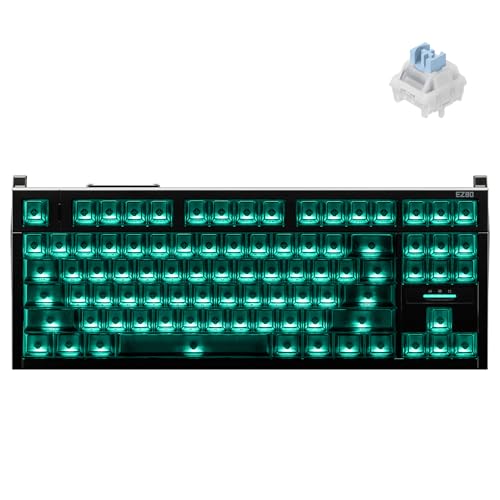
TL;DR: At $319.99 the IQUNIX EZ80 scores 4.7 / 5 from 136 reviewers, lauded for its ultra‑fast response and premium build while drawing criticism for its echoey sound and limited software.
The IQUNIX EZ80 is Iqunix’s flagship tenkeyless mechanical keyboard that positions itself at the high‑end price point of $319.99. It sits near the top of the twelve‑product roundup with a 4.7‑star rating and a score of 40 out of 100, landing at rank #10 among its peers.
Reviewers consistently highlight the keyboard’s blistering responsiveness and the solid feel of its aluminum chassis. The per‑key actuation tuning and bright south‑facing RGB lighting earn particular praise from gamers and RGB enthusiasts alike. At the same time, many users note the hollow, resonant sound that can feel too echoey for quiet environments, and they point out that the software only supports a single custom profile and wipes settings after firmware updates. The lack of any wireless option also appears as a common drawback.
In context, the EZ80’s premium price places it well above many mainstream TKL options, which reflects its strong rating but modest ranking. Buyers who value cutting‑edge speed and a high‑quality build may find the cost justified, while those sensitive to sound or seeking flexible software and wireless connectivity might look elsewhere.
Pros
Cons
Best for: Those prioritizing quality and willing to pay for premium performance
“one of the most hyped Hall Effect keyboards of the year”
“The Demon of Speed”
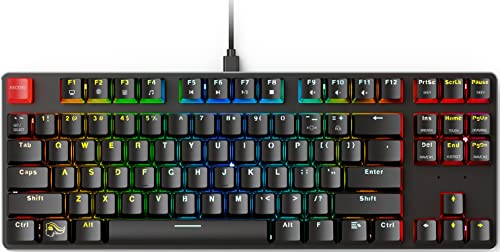
TL;DR: The Glorious GMMK TKL offers a fully hot‑swap MX‑compatible layout, sturdy aluminum construction, and 100 % N‑Key rollover at a modest $44.99 price point.
The standout feature is the 3‑pin hot‑swap socket system, which lets you swap Cherry MX‑style switches without soldering. The keyboard weighs 1.5 pounds (680 g) and comes with a detachable 1830 mm braided USB‑C cable, while the sandblasted aluminum top plate adds a solid, minimalist look. Full 100 % N‑Key rollover and a 1000 Hz polling rate ensure every keystroke registers accurately.
At 1.5 pounds, the GMMK TKL sits just above the SteelSeries Apex 3 TKL (1.4 pounds) and is noticeably heavier than the ultra‑light Rii RK104 (0.77 pounds). Its 1830 mm cable is marginally longer than the Corsair K55 CORE TKL’s 1.82 m cable, giving you a bit more reach on a desk. Compared with the Keychron C3 Pro, the GMMK’s dimensions (355.6 mm × 129.54 mm × 35.56 mm) are slightly shorter in length but similar in width, placing it comfortably in the mid‑range of the tenkeyless crowd.
Reviewers consistently praise the keyboard’s custom‑friendly design – professional outlets note the “beefy” aluminum build and the ease of swapping switches. Users love the vibrant RGB palette of 16.8 million colors across 18 built‑in effects, though some mention uneven lighting on longer keys. The Windows‑only software functions but limits you to three profiles and lacks macro editing, a point both experts and everyday owners highlight. It also lacks dedicated media keys or USB/audio passthrough ports, another common trade‑off.
Pros
Cons
Best for: Entry-level buyers or those on a tight budget
Avoid if: You need powerful performance or professional‑grade features
TL;DR: At $29.99 the MageGee MK-Star Blue earns a 4.2‑star rating from over four thousand reviewers, offering clicky blue switches and a solid build for a very low price.
The MageGee MK-Star Blue is a budget‑focused tenkeyless keyboard priced at $29.99 and carries a 4.2‑star rating based on 4,078 reviews, placing it toward the lower end of the twelve‑product roundup.
Users consistently praise the tactile, clicky feel of the blue switches and the sturdy metal top plate, noting that the keyboard feels more premium than its price suggests. The blue LED backlight, extra keycaps, splash‑proof design, and plug‑and‑play compatibility across major operating systems highlight strong points. Common complaints revolve around a loud spacebar, a static blue lighting scheme that doesn’t change color, and a fixed USB‑A cable that limits cable‑management options.
In context, this model is the most affordable option in the list and its rating trails many higher‑priced competitors. It fits well for gamers or typists who want clicky feedback without spending much, but it lacks modern features such as RGB lighting or a detachable USB‑C cable that higher‑priced keyboards provide.
Pros
Cons
Best for: Entry‑level buyers or those on a tight budget
Breakdown
SteelSeries Apex 9 TKL
Pros
Rii RK104
Pros
SteelSeries Apex 3 TKL
Pros
Cons
Razer BlackWidow V3 TKL Yellow
Pros
Based on scoring data and product specs
Personalized picks
Best Overall Pick
SteelSeries Apex 9 TKL
Best OverallBest for: Buyers willing to invest in a proven, high-quality option
Rii RK104
Best for: Budget-conscious buyers seeking a reliable entry-level option
$13.99-$126.00 vs winner
Skip MageGee MK-Star Blue if…
Reliability and user satisfaction are your top concerns
The SteelSeries Apex 9 TKL takes the top spot thanks to its premium aluminum‑Series 5000 frame, per‑key RGB lighting and hot‑swappable OptiPoint optical switches. It scores a 4.6‑star rating from 787 reviewers, offers an 8000 Hz polling rate, and features a 100 million‑keystroke rating for durability—all for $104.99.
The Rii RK104 lands as the runner‑up and shines when you need an ultra‑affordable, plug‑and‑play keyboard for a media PC or casual gaming setup. At just $13.99 it delivers full‑RGB backlighting, a 19‑key rollover, fold‑able feet and a 4.4‑star rating from 2,401 reviews, making it hard to beat on price.
For shoppers focused on budget, mid‑range or premium tiers, the alternatives line up neatly:
Pick the SteelSeries Apex 9 TKL for the most capable Tenkeyless experience and enjoy a keyboard that delivers performance.
The SteelSeries Apex 3 TKL is designed with whisper‑quiet mechanical switches and an IP32 water‑ and dust‑resistant rating, making it one of the quietest options while still offering 8‑zone RGB lighting. Its fixed USB‑C cable and solid ABS case keep the profile low‑profile and unobtrusive.
Please sign in to leave a review
No reviews yet. Be the first to review!
