⚡ Quick Answer
If you’re chasing buttery‑smooth video for streaming, video calls or gaming, a webcam that can deliver true 60 fps is essential. In this roundup we compared 12 models that promise high frame rates, and the prices stretch from a pocket‑friendly $33.98 for the EMEET C950 4K up to $269.00 for the OBSBOT Tiny 2. Many of the contenders, like the Logitech C922x with its 78° field of view and a 4.6‑star rating from 38,539 reviews, cap out at 60 fps, giving you fluid motion without motion blur.
The selection spans three price tiers. Budget‑focused picks such as the EMEET C950 4K, NexiGo N980P, EMEET S600 4K and NexiGo N660P keep costs low while still hitting 60 fps. Mid‑range options like the OBSBOT Meet SE and NexiGo N960E add extra features without breaking the bank. Premium choices – the Logitech C922x, OBSBOT Meet, Logitech MX Brio and OBSBOT Tiny 2 – combine higher‑resolution sensors, AI framing or PTZ capabilities for pros who demand more. Read on to see how each model balances price, performance and practicality, and find the webcam that fits your setup.

Logitech C922x
Its 78° field of view captures more of the scene, making it ideal for group calls and streaming at 60 fps.

OBSBOT Meet
Audiophiles and streamers who value premium sound will see it’s $29.01 more than the Logitech C922x, which is $129.00.
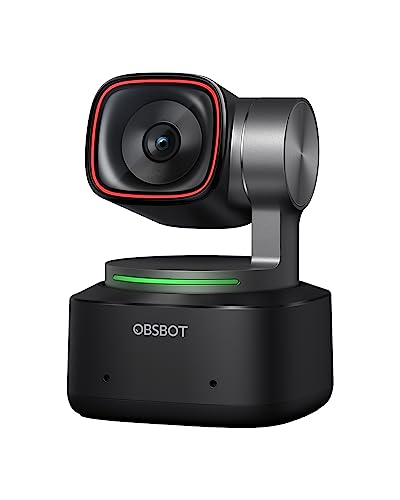
OBSBOT Tiny 2
Equipped with a 4.7 mm depth sensor, it enables AI‑powered framing, setting it apart from the other two while keeping 60 fps video.
Also considered
Score Analysis
Key score advantages vs. runner-up (OBSBOT Meet)
Price Range
Logitech C922x
$99.99
OBSBOT Meet
$129.00
OBSBOT Tiny 2
$299.00

NexiGo N960E
$59.99

EMEET S600 4K
$53.18

NexiGo N980P
$54.99
NexiGo N660P
$49.99
EMEET C950 4K
$33.98

OBSBOT Meet SE
$69.00

Logitech MX Brio
$198.90

Elgato Facecam 4K
$199.99

OBSBOT Tiny 2 Lite
$119.00
Spec Comparison
TL;DR: The Logitech C922x streams 720p at a buttery‑smooth 60 fps, offers a 78° field of view and dual microphones for $99.99, making it a solid, well‑reviewed choice for serious creators.
The C922x’s standout spec is its 60 fps maximum frame rate paired with a 78° diagonal field of view, letting fast‑moving gameplay look fluid without sacrificing breadth of scene. It weighs 0.36 pounds (163 g) and plugs into any USB‑A 2.0 port, so you won’t need extra power bricks.
When you line it up against the other eleven webcams, the C922x sits in the mid‑range of size and weight. For example, the ultra‑compact OBSBOT Meet SE is only 60 g and 36 mm tall, making it far lighter than the C922x’s 163 g and 95 mm height, but the C922x compensates with a wider 78° view that matches the NexiGo N660P’s diagonal FOV. Its 1.5 m cable is shorter than the 2 m cables found on some rivals, which can be a plus for tidy desk setups.
Users consistently praise the webcam’s smooth 720p / 60 fps output and reliable autofocus, which works with an f/2.8 aperture and automatic low‑light correction to keep faces clear even in dim rooms. Professional reviewers note Logitech Capture software adds background replacement and basic editing without extra hardware. On the downside, without optical or digital zoom, framing flexibility suffers, and the 1080p mode tops out at 30 fps, which can feel less fluid for high‑action streams.
Pros
Cons
Best for: Serious streamers, gamers, and content creators who need reliable HD video and smooth 720p / 60 fps performance.
Avoid if: You require ultra‑high resolution, optical zoom, or a ultra‑lightweight clip for very thin or curved monitors.
TL;DR: The OBSBOT Meet delivers 4K video at 60 fps in an ultra‑compact 40.5 g body, with AI auto‑framing and dual microphones, making it a strong portable webcam for remote work and streaming.
The standout spec is its 3840 × 2160 resolution paired with a 60 fps frame rate, captured by a 1/2‑inch CMOS sensor. At just 10.3 mm tall, 10.9 mm long and 5.0 mm wide, it weighs only 40.5 g (0.08928721611 lb), so it slides onto a laptop like a thumb drive.
Compared with the other eleven webcams in this roundup, the Meet is markedly lighter than the Logitech C922x (0.36 lb) and far slimmer than the OBSBOT Tiny 2 Lite, which stands 64.2 mm tall. It also undercuts the bulk of the Logitech MX Brio (0.79 lb) and the NexiGo N960E (0.51 lb). While its price sits in the premium tier, it offers more advanced AI features than many budget‑oriented models.
User sentiment praises the webcam’s tiny footprint and crisp 4K output, noting that the AI auto‑framing works reliably in both landscape and portrait modes. Professional reviewers highlight the AI tracking and HDR support as strong points, but they also point out the detachable 60‑inch USB‑C cable feels short for larger desks, and the USB 2.0 interface limits bandwidth, preventing higher‑frame‑rate 4K capture. Reviewers also note the lack of built‑in lighting and a fixed field of view as drawbacks in low‑light or wide‑scene scenarios.
The Meet packs HDR, beauty mode, gesture control and dual microphones, all powered by its 1/2‑inch CMOS sensor. Its AI framing adapts to single or multiple subjects, and the autofocus keeps the image sharp across the 4K resolution.
Pros
Cons
Best for: Mobile professionals, remote workers, streamers, and content creators who need a portable 4K webcam.
Avoid if: You require an ultra‑wide field of view, built‑in lighting, or unrestricted 4K capture at 60 fps without bandwidth limits.
“thumbdrives weigh more”
“affordable & adorable”
TL;DR: The OBSBOT Tiny 2 delivers 4K video at 60 fps with a large 1/1.5″ sensor and AI‑driven PTZ tracking, but its premium $269 price and 143 g weight make it a higher‑end choice.
What really sets the Tiny 2 apart is its 3840 × 2160 4K sensor paired with a 1/1.5″ CMOS chip, delivering sharper images than many competing webcams. It captures fluid motion at 60 fps and can lock focus in just 0.3 seconds, which is fast enough for fast‑moving presentations or gaming streams. The built‑in HDR light correction and a suite of AI tracking modes (upper body, close‑up, hand, zone) let you stay centered without manual adjustments.
Compared with the other eleven webcams in this roundup, the Tiny 2 sits at the higher end of the price spectrum, while still offering more advanced AI features than the budget‑focused models. Its 143 g weight makes it lighter than the Logitech MX Brio (358 g) but heavier than the Elgato Facecam (112 g) and far heavier than the OBSBOT Meet, which tips the scales at just 40.5 g. In terms of frame rate, it matches the 60 fps capability of the OBSBOT Meet and the Logitech C922x, giving it a smooth look that many 30 fps rivals can’t match.
Professional reviewers have praised the Tiny 2’s large sensor for delivering vivid 4K video and noted the AI‑driven auto‑framing as a “performance leap” over typical webcams. Users appreciate the hands‑free operation via gesture and voice controls, and the HDR correction helps keep faces clear in mixed lighting. The device’s dimensions—approximately 62.02 × 47 × 44 mm (2.44 × 1.85 × 1.73 in)—fit comfortably on most desks, though the added mount adds a bit of bulk.
Pros
Cons
Best for: Content creators, streamers, remote educators, and esports professionals who need high‑quality 4K video with AI‑driven tracking and hands‑free controls.
Avoid if: You're shopping on a tight budget — it's priced at $269.00.
TL;DR: The NexiGo N960E delivers 1080p video at 60 FPS with a built‑in three‑level ring light, dual noise‑reduction mics and a 10 m microphone pickup range for $69.99, making it a solid mid‑range webcam for smooth streaming and video calls.
This model’s standout spec is its 1080p resolution at up to 60 FPS, paired with an f/2.0 aperture and a 1/2.9‑inch CMOS sensor. The 4.35 mm focal length and autofocus keep you in focus even when you move, while the three‑level touch‑controlled ring light adds up to three brightness settings for low‑light rooms. A 2 m USB‑A cable (with an included USB‑C adapter) means you’ll place the webcam up to six feet from your computer.
Compared with the other eleven webcams in this roundup, the N960E is heavier than the OBSBOT Meet SE (≈0.13 lb) and the EMEET S600 (0.22 lb), but lighter than the NexiGo N660P (≈0.44 lb). Its depth of 59.9 mm is shallower than the EMEET S600’s 71 mm and the Logitech C922x’s 71 mm, yet deeper than the OBSBOT’s 22 mm. Height‑wise it sits at 87.1 mm, taller than the OBSBOT (36 mm) and the EMEET S600 (52 mm) but shorter than the Logitech C922x (95 mm). Width is 45.2 mm, essentially the same as the OBSBOT’s 45 mm and narrower than the EMEET S600’s 75 mm.
Professional reviewers highlight the 60 FPS 1080p video as delivering sharp, smooth footage ideal for streaming, and everyday users rave about the built‑in ring light that brightens dim rooms without extra gear. The dual noise‑reduction microphones cover a 10 m pickup range, though several users note occasional audio artifacts and that the mic quality feels lower than some competitors. The 78° diagonal field of view is praised for framing most head‑and‑shoulder shots, yet a few reviewers point out inconsistent FOV listings across sources.
Additional technical context includes low‑light correction that works with the f/2.0 aperture, a 360° rotation and 45° tilt for flexible positioning, and a 1/4" tripod thread for optional mounting. Plug‑and‑play USB connectivity means you won’t need driver installation, and the privacy cover adds a simple hardware shutter for security.
Pros
Cons
Best for: Budget‑conscious streamers, remote workers, and video callers who prioritize smooth 60 FPS video and an integrated lighting solution.
Avoid if: High‑fidelity audio is essential, you require 4K video, or you need professional‑grade webcam performance.
TL;DR: The EMEET S600 delivers true 4K video at 30 fps with an 88° adjustable field of view, lightweight design, and dual noise‑canceling mics for clear, professional‑grade streaming.
The standout spec is its 1/2" Sony 8 MP sensor that records 3840 × 2160 pixels at 30 fps, giving you crisp 4K detail. A 4× digital zoom and an adjustable field of view ranging from 40° to 73°, reaching up to 88° at the widest, let you frame yourself precisely. The webcam also packs two noise‑canceling microphones and a built‑in rotary privacy cover, drawing only a modest 2.5 W.
At 0.22 lb (100 g), the S600 is roughly half the weight of the NexiGo N660P (0.44 lb) and about 70 % heavier than the OBSBOT Meet SE (0.13 lb). Its 5‑ft (1524 mm) cable is shorter than the NexiGo N660P’s 2 m lead, which can help keep your desk tidy. With a maximum 88° view, it out‑angles the NexiGo N660P’s 78° diagonal but sits below the NexiGo N980P’s 120° ultra‑wide perspective. The S600’s depth (71 mm) and height (52 mm) are shallower than the NexiGo N660P’s 92 mm depth and 60 mm height, making it a low‑profile choice.
Users consistently praise the webcam’s 4K clarity and the convenience of plug‑and‑play USB‑C connectivity. Reviewers note the built‑in privacy cover and tripod‑mount thread as handy for home‑office setups. Professional reviewers highlight the fast PDAF autofocus for smooth focus shifts, while also pointing out that the default exposure can appear overly bright, requiring manual tweaking. The 60 fps mode limits you to 1080p, so you lose the 4K detail when chasing higher frame rates.
Pros
Cons
Best for: Content creators and streamers needing 4K video, professional video‑conference participants who value clarity and privacy.
Avoid if: You want the best value‑per‑dollar in its price range, need 60 fps at 4K resolution, or require superior low‑light performance.
TL;DR: The NexiGo N980P streams 1080p video at 60 FPS with a 120° ultra‑wide view, dual omnidirectional mics, and manual focus, making it a solid mid‑range choice for creators who don’t need a privacy cover.
The standout spec is the 120° field of view paired with an f/2.1 aperture, which together deliver a broad, bright image even in dim rooms. At 60 FPS you’ll get fluid motion for fast‑paced gaming or lively presentations, and the 10 m microphone pickup range captures clear audio from across the desk.
Compared with the other eleven webcams in this roundup, the N980P offers the widest view—far beyond the 88° max of the EMEET S600 and the 78° of the NexiGo N660P and Logitech C922x. Its cable measures 1615.44 mm, slightly longer than the 1524 mm cable on the EMEET S600, giving you a bit more reach. At 0.44 lb (200 g) it is heavier than the ultra‑light OBSBOT Meet SE (0.13 lb) and the EMEET C950 (0.19 lb), but still portable enough for a desktop setup.
Professional reviewers praise the webcam’s smooth 1080p60 video and the dual omnidirectional microphones for clear, room‑filling sound. Everyday users echo this sentiment, noting the “crisp” picture and “smooth” motion during Zoom calls and streams. Reviewers point out the main drawbacks: the need to set focus manually and the lack of a built‑in privacy cover, which some users find inconvenient for on‑the‑go or shared‑space use.
Pros
Cons
Best for: Remote professionals, content creators, and gamers who want smooth 1080p60 video with a wide view and solid built‑in audio.
Avoid if: You need autofocus, a privacy cover, or the lightest possible webcam for mobile use.
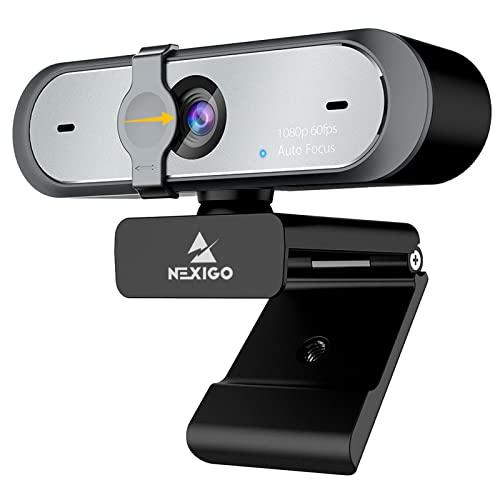
TL;DR: The NexiGo N660P costs $59.99, shoots 1080p video at 60 fps with a 78° field of view, and includes dual noise‑reducing mics and a privacy cover for solid budget‑level streaming.
Its native 60 fps full‑HD capture stands out, keeping motion smooth and reducing blur during fast‑moving scenes. It pairs a 78° diagonal field of view with an f/2.0 aperture and a 1/2.9" CMOS sensor, so you get a decent amount of light even in dim rooms. Dual stereo omnidirectional microphones reach up to 10 m, and the built‑in privacy cover lets you block the lens when you’re not on camera.
Among the eleven webcams in this roundup, the N660P lands in the mid‑weight range: it’s heavier than the OBSBOT Meet SE (≈0.13 lb) but lighter than the NexiGo N960E (≈0.51 lb). Its 78° field of view is wider than the Logitech C922x’s 78° (same) and narrower than the NexiGo N980P’s 120°, yet broader than the EMEET S600’s 40°‑73° adjustable range. The 2 m cable is longer than the OBSBOT’s 1.5 m lead but shorter than the EMEET S600’s 5‑ft cable, giving you enough slack for most desk setups.
Users consistently praise the plug‑and‑play simplicity and the fluid 60 fps footage, noting that the dual microphones capture clear voice even across a room. Professional reviewers note the reliable autofocus works from about 7 cm to infinity, and the low‑light correction keeps the image usable in modest lighting. Critics point to lower brightness and contrast versus premium models like the Logitech C922x, and note the lack of a tilt mechanism or built‑in ring light.
Pros
Cons
Best for: Budget‑conscious buyers seeking a reliable entry‑level option
Avoid if: You want the best value‑per‑dollar in its price range
“clear images and high-definition video at 60fps even in dim settings”
“This One We Like!”
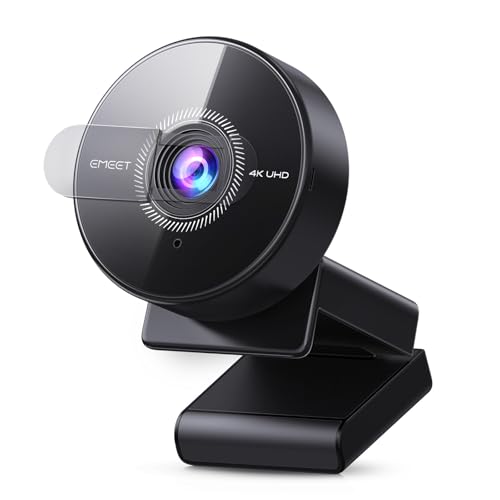
TL;DR: The EMEET C950 4K offers 4K/30 fps video, a 70° view and noise‑canceling mic at a $33.98 price, making it a lightweight, plug‑and‑play option for budget‑friendly remote work.
The webcam packs an 8‑megapixel CMOS sensor and can stream at 4K @ 30 fps or 1080P @ 60 fps, giving you crystal‑clear video for meetings. Its fixed‑focus lens optimizes a focus range of 80‑100 cm, and auto light correction helps keep the picture bright in dim rooms. At just 0.19 lb (86.2 g) it’s easy to slip into a laptop bag, and the included privacy cover adds a touch of security.
Compared with the other eleven contenders, the C950 is significantly lighter than the NexiGo N980P (0.44 lb) and the Logitech C922x (0.36 lb), though a bit heavier than the OBSBOT Meet SE (0.13 lb). Its 70° field of view is narrower than the NexiGo N980P’s 120° and the Logitech’s 78°, but still broader than many narrow‑angle webcams. Unlike the EMEET S600 4K, which uses PDAF autofocus, the C950 relies on a fixed focus, so you’ll need to stay within the 80‑100 cm sweet spot for sharpness.
Users repeatedly praise the webcam’s plug‑and‑play simplicity, the noticeable jump in clarity when moving from 1080P to 4K, and the effectiveness of the noise‑canceling microphone up to 1.8 m away. Professional reviewers highlight the 70° view as a clear improvement over tighter‑angle rivals, while also noting the fixed‑focus limitation and the lack of a tripod mounting point as drawbacks. Some users mention that software can cap the resolution, so you may not always get full 4K output.
Technical details include a USB‑A 2.0 connection with UVC 1.0~1.5 compatibility, drawing 5 V at 500 mA directly from the host. The built‑in noise‑canceling mic captures clear audio within a 1.8 m range, and the webcam auto‑adjusts lighting without any driver installation.
Pros
Cons
Best for: Budget‑conscious remote‑work professionals, online educators and frequent travelers who need a simple, high‑resolution webcam.
Avoid if: You require auto‑focus tracking, dual microphones, a wide‑angle view or a tripod‑mountable design for content creation or gaming.
TL;DR: The OBSBOT Meet SE delivers ultra‑smooth 1080p video at up to 100 fps, AI‑driven framing and a feather‑light 0.13‑lb body, making it a top‑rated, mid‑range webcam for clear, dynamic calls.
What really sets the Meet SE apart is its frame‑rate capability: it records 1080p video at a maximum of 100 fps and can push 720p up to 150 fps, far beyond the 60 fps ceiling most webcams in this roundup offer. Combined with AI framing that automatically keeps participants in view and a 2.9 µm pixel sensor, the result is buttery‑smooth motion and consistent composition.
At roughly 0.13 lb (60 g) and only 22 mm deep, the Meet SE is lighter and slimmer than the NexiGo N960E (about 0.51 lb) and considerably shallower than the NexiGo N660P’s 92 mm depth. While its price point sits alongside the NexiGo N960E, it sits above ultra‑budget options such as the EMEET C950 4K, which target the low‑cost segment. Most competitors list a 60 fps maximum, so OBSBOT’s higher frame rates give it a clear performance edge.
Reviewers consistently highlight the AI framing and the ultra‑smooth motion for video calls, noting that the webcam “never drops the person out of the frame” and that the high frame rate “makes screen sharing feel natural.” A few users point out that the spec sheet doesn’t list a built‑in microphone or a privacy cover, which some competing models provide.
Pros
Cons
Best for: Most users looking for a well‑reviewed, reliable mainstream option
Avoid if: You have limited desk space or need portability
“thumbdrives weigh more”
“affordable & adorable”
TL;DR: The Logitech MX Brio delivers 4K video with an 8‑MP sensor, AI‑enhanced imaging, and dual beamforming mics, but its bulk and 30 fps ceiling at 4K keep it in the premium niche.
The standout hardware is an 8 MP sensor whose pixels are 70 % larger than previous models, paired with a glass lens and advanced autofocus. Logitech markets AI image enhancement that promises 2× better face visibility, auto‑exposure, auto white‑balance, and noise reduction. Video output reaches 4K Ultra HD (3840×2160) at 30 fps and 1080p at 60 fps, giving you crisp detail for meetings or streams.
At roughly 0.79 lb, the MX Brio is heavier than the Elgato Facecam 4K (about 0.25 lb) and considerably bulkier than the OBSBOT Meet (around 0.09 lb). Its price tag of $169.99 also sits above the $129‑range OBSBOT Meet and the $99.99 Logitech C922x, so you’re paying a premium for the larger sensor and AI features. While the OBSBOT Meet can record 4K at 60 fps, the Brio caps 4K at 30 fps, which may feel less fluid for fast‑moving content.
User feedback highlights the clarity of the 4K image and the usefulness of the dual beamforming microphones, which capture clear audio up to 1.5 m away thanks to AI‑driven noise reduction. Reviewers also appreciate the tilt‑down “Show Mode” for desk sharing and the included webcam cover for privacy. However, many note that the unit’s 0.79 lb weight (234.3 g with cable) can feel bulky on thin laptop screens, and the lack of a wireless option ties you to the 1.5 m USB‑C cable.
Pros
Cons
Best for: Buyers willing to invest in a proven, high‑quality option
Avoid if: You need ultra‑light webcams, 4K at 60 fps, or wireless/battery‑operated solutions
TL;DR: The Elgato Facecam 4K packs a 1/1.8‑inch Sony Starvis sensor, 90° field of view and true 4K 60 fps video in a compact 112 g body, but it carries a premium price tag.
What sets this webcam apart is its ability to deliver uncompressed 4K video at 60 fps while supporting HDR up to 4K 30 fps. The 90° field of view and f/4.0 aperture work with a 49 mm filter thread, letting you attach creative lenses or ND filters. At just 104 mm × 54 mm × 52 mm and weighing 112 g (≈0.25 lb), it’s light enough to sit comfortably on any monitor.
Compared with the other eleven contenders, the Facecam is lighter than the Logitech MX Brio (358 g) and the Logitech C922x (163 g), yet it’s heavier than the ultra‑compact OBSBOT Meet (40.5 g). Its dimensions are far slimmer than the MX Brio’s 139.7 mm width and 139.7 mm depth, though it isn’t as pocket‑sized as the OBSBOT Tiny 2 (4.4 mm × 4.4 mm × 6.2 mm). While its $199.99 price places it at the higher end of the lineup, the feature set justifies the premium for many creators.
Users consistently praise the razor‑sharp 4K streaming and the DSLR‑style Elgato Camera Hub, which offers granular control over exposure, white balance and noise reduction. Reviewers also like the included privacy cap and the ability to mount filters. The most common complaints focus on the fixed focus range of 30–120 cm, which limits flexibility for close‑up shots, and the absence of a built‑in microphone, meaning you’ll need a separate audio solution.
Under the hood, the webcam houses a 1/1.8‑inch Sony Starvis 2 CMOS sensor paired with the Elgato Prime lens. Fixed focus simplifies setup, and USB‑C connectivity ensures plug‑and‑play operation on Windows 11 or macOS 13.3+. The two‑year manufacturer warranty adds peace of mind for long‑term use.
Pros
Cons
Best for: Streamers, content creators, and professionals who need high‑end 4K video without a DSLR.
Avoid if: You require autofocus, integrated audio capture, or a more premium metal construction.
TL;DR: The OBSBOT Tiny 2 Lite delivers 4K video at 60 FPS with AI‑driven tracking and voice control for $119, though its higher price and undisclosed weight may give budget‑focused buyers pause.
What really sets the Tiny 2 Lite apart is its ability to stream crisp 4K (3840×2160) footage at a buttery‑smooth 60 FPS, backed by HDR and a 1/2" CMOS sensor. Its compact chassis measures just 64.2 mm tall, 46.6 mm long and 48.3 mm wide, making it easy to slip onto a laptop or monitor without crowding the desk.
Compared with the other eleven webcams in this roundup, the Tiny 2 Lite shares the 60 FPS frame rate of the OBSBOT Meet and Logitech C922x, but it is noticeably taller than the Meet’s 10.3 mm height while still shorter than the C922x’s 95 mm profile. Unlike many rivals, OBSBOT does not list a weight, whereas the Meet weighs 40.5 g and the Logitech C922x tips in at 163 g, leaving portability a bit of an unknown. In terms of price, the Tiny 2 Lite sits above entry‑level options such as the NexiGo N660P, which many users cite for its lower cost.
Reviewers consistently highlight the AI tracking and Dynamic 2.0 gesture control as highly useful for video calls and streaming, noting that the webcam can follow upper‑body movement or hand gestures without manual adjustment. The built‑in microphones also receive praise for clear voice capture. However, a recurring theme is the premium price tag; several users feel the $119 price is steep compared with other 60 FPS models that lack the same AI features.
Pros
Cons
Best for: Most users looking for a well‑reviewed, reliable mainstream option
Avoid if: You need advanced features or professional‑grade performance
Breakdown
Logitech C922x
Pros
OBSBOT Meet
Pros
OBSBOT Tiny 2
Pros
Cons
NexiGo N960E
Pros
Cons
Based on scoring data and product specs
Personalized picks
Best Overall Pick
Logitech C922x
Best OverallBest for: Most users looking for a well-reviewed, reliable mainstream option
OBSBOT Meet
Best for: Audiophiles and enthusiasts seeking premium sound quality and advanced features
$129.00+$29.01 vs winner
Skip OBSBOT Tiny 2 Lite if…
You need advanced features or professional-grade performance
Logitech’s C922x takes the top spot with its solid 4.6 / 5 rating from 38,539 reviewers, a bus‑powered USB‑A connection and a full 60 fps maximum frame rate. At $99.99 it also provides a wide 78° field of view and 720p video at 60 fps, making it a reliable all‑rounder for smooth streaming.
The OBSBOT Meet ranks as the runner‑up, especially if you need 4K resolution at 60 fps for professional video calls. Priced at $129.00 it scores 4.5 / 5 from 1,890 reviews and adds AI framing, autofocus and HDR, giving you a polished look without extra software.
For tighter budgets, the EMEET C950 4K at $33.98 delivers crisp 4K video without breaking the bank; if you’re willing to spend more for premium features, the OBSBOT Tiny 2 at $269.00 offers top‑tier AI tracking and ultra‑high‑definition video.
Choose the Logitech C922x now to lock in smooth 60 fps streaming.
The Logitech C922x, priced at $99.99, packs dual omnidirectional microphones, autofocus, automatic low‑light correction, a f/2.8 aperture and a 78° field of view, and it can deliver 720p video at a smooth 60 fps. Its USB‑A 2.0 bus‑powered design also makes it easy to set up on most PCs.
No reviews yet — be the first to share your experience.
Please sign in to leave a review



