⚡ Quick Answer
AI‑powered auto‑framing webcams have become essential for anyone who needs to stay on camera without constant manual adjustments. The review compared eight models that all promise AI tracking, from compact 4K units to full‑size PTZ rigs. Prices stretch from $69 for the OBSBOT Meet SE up to $269 for the OBSBOT Tiny 2, while ratings hover around 4.5 / 5, with the OBSBOT Meet scoring 4.5 stars from 1,890 reviewers. Key specs like 4K resolution (3840 × 2160) and 60 fps frame rates appear across the range, giving you crisp motion no matter the price point.
If you travel with a laptop, the budget tier – the $69 OBSBOT Meet SE and the $99.99 Insta360 Link 2 C – offers 1080p‑plus video in a pocket‑sized body. Mid‑range choices like the $129 OBSBOT Meet and the $119 OBSBOT Tiny 2 Lite deliver true 4K, built‑in mics and AI framing while staying lightweight. Premium options such as the $269 OBSBOT Tiny 2 with a 1/1.5‑inch sensor or the $149.99 Razer Kiyo V2 with a 93° ultra‑wide view give the most flexibility. The next sections show which camera fits a home office desk, a small studio or a conference‑room table.

OBSBOT Meet
Its 60 fps frame rate ensures smooth video, making it a reliable mainstream choice for most users.

OBSBOT Meet SE
Ideal for budget‑conscious creators, it costs $69—about $60 less than the Meet, while still offering high‑speed 1080p at up to 100 fps.
OBSBOT Tiny 2
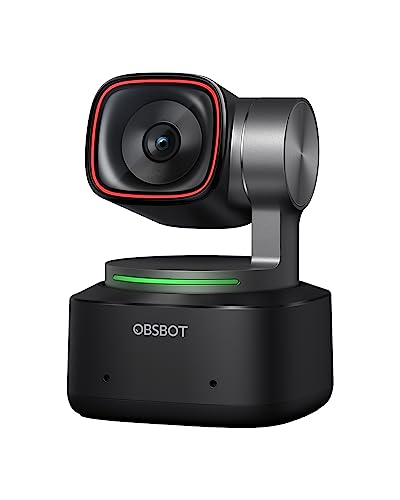
Stands out with an ultra‑thin 4.7 mm depth, delivering a compact design that fits tight spaces where larger webcams can’t.
Also considered
Score Analysis
Key score advantages vs. runner-up (OBSBOT Meet SE)
Price Range
OBSBOT Meet
$99.00
OBSBOT Meet SE
$69.00
OBSBOT Tiny 2
$299.00
Insta360 Link 2
$199.99

Insta360 Link 2 C
$119.99
Razer Kiyo V2
$129.99

OBSBOT Tiny 2 Lite
$119.00

Anker AnkerWork C310
$99.99
Spec Comparison
TL;DR: The OBSBOT Meet delivers ultra‑compact 4K video with AI auto‑framing, dual mics and a feather‑light 40.5 g body for $129, making it a solid mid‑range choice for mobile creators.
At the heart of the Meet is a 0.5‑inch 1/2" CMOS sensor that captures 3840 × 2160 pixels – roughly 8.29 MP – and it ships with HDR support, autofocus and a dedicated beauty mode. Two built‑in microphones round out the audio capture, while AI framing and gesture control let the camera track you in both landscape and portrait layouts without a physical gimbal.
Compared with the other seven contenders, the Meet is dramatically lighter than the Razer Kiyo V2 (about 1.10 lb vs 0.09 lb) and far more compact than the OBSBOT Tiny 2 Lite, which lists a height of 64.2 mm versus the Meet’s 10.3 mm. It also occupies less space than the Anker Work C310 (53.4 mm height) and the Insta360 Link 2 models (around 63 mm height). While its $129 price tag sits above budget‑focused options, it offers more advanced AI features than many peers that list fewer capabilities.
Users consistently praise how the webcam feels like a thumb drive, noting the sharp 4K picture and reliable AI tracking during video calls. Professional reviewers from XDA and GamingTrend call it “impossibly small” and commend the combination of 4K output with AI‑driven framing. However, they also point out the detachable cable is relatively short for larger desks and the USB 2.0 connection limits bandwidth, preventing higher‑frame‑rate 4K capture. Editors mention the lack of integrated lighting and a fixed 79.4° field of view as additional trade‑offs.
Beyond AI framing, the Meet includes HDR processing, a fast autofocus system and a beauty mode that smooths skin tones on the fly. Gesture control lets you start or stop recording with a wave, and the dual microphones help capture clear voice audio in typical office lighting.
Pros
Cons
Best for: Mobile professionals, remote workers, streamers and content creators who need a portable 4K webcam with AI tracking.
Avoid if: You're shopping on a tight budget — it's priced at $129.00.
“thumbdrives weigh more”
“affordable & adorable”
TL;DR: The OBSBOT Meet SE offers AI‑driven auto‑framing, 150 fps 720p video and a feather‑light 60 g body for just $69, making it a solid entry‑level webcam for budget‑savvy users.
What really sets the Meet SE apart is its AI Framing system, which provides an “intelligent group mode” that keeps participants centered without manual adjustment. The camera can push 150 fps at 720p and up to 100 fps (max) at 1080p, giving you ultra‑smooth motion for fast‑paced video calls. Its 2.9 µm pixel size and Dual Native ISO help maintain colour fidelity even when lighting shifts.
In the context of the eight‑product roundup, the Meet SE is the lightest of the lot at 60 g, noticeably slimmer than the Anker Work C310 (141 g) and the Insta360 Link 2 C (106 g). It also lands at the lowest price point, undercutting most rivals while still delivering AI‑based auto‑framing that many higher‑priced models only promise. Compared with the full‑size OBSBOT Meet, it trades a larger body for a more compact form factor, but retains the core AI features.
Users consistently rate the webcam at 4.5 / 5 stars across 1,335 reviews, highlighting the ease of enabling AI framing and the responsiveness of the 2.0 dynamic gesture controls for zoom and framing toggles. Reviewers also appreciate the built‑in Beauty Mode, which smooths skin tones without a noticeable lag. High frame rates and lightweight design make it a favorite for home‑office setups where desk real‑estate is at a premium.
Pros
Cons
Best for: Budget-conscious buyers seeking a reliable entry-level option
Avoid if: You have limited desk space or need portability
“thumbdrives weigh more”
“affordable & adorable”
TL;DR: The OBSBOT Tiny 2 delivers 4K video at 60 fps with AI‑driven auto‑tracking and fast 0.30 s autofocus, but its $269 price and 143 g weight place it in the premium tier.
The standout spec is its 4K video (3840 × 2160, about 8.29 MP) captured at a smooth 60 fps, paired with a rapid 0.30‑second autofocus that keeps you in focus even when you move around the room. Its 1/1.5‑inch sensor is larger than many rivals, giving richer colour and better low‑light performance.
Compared with the other seven webcams in this roundup, the Tiny 2 sits at the higher end of the price spectrum, making it pricier than the Insta360 Link 2 and Razer Kiyo V2. It also packs more AI tracking modes (Upper Body, Close‑Up, Hand, Zone) than the Razer Kiyo V2, which only lists a built‑in microphone and no tracking features. While the OBSBOT Meet and Meet SE focus on compact size, the Tiny 2’s 143 g weight makes it heavier than the ultra‑light OBSBOT Meet SE, though still lighter than the Razer Kiyo V2’s 1.10 lb.
Reviewers praise the large sensor and AI‑driven PTZ system for delivering “sharper, more vivid 4K video” and “smooth auto‑tracking” that works well for presentations and streaming. Users appreciate the gesture and voice controls that let you switch modes hands‑free, and the built‑in microphone provides a simple audio solution. However, several reviewers note the lack of built‑in illumination and the premium price as trade‑offs.
Pros
Cons
Best for: Buyers willing to invest in a proven, high‑quality option
Avoid if: You're shopping on a tight budget — it's priced at $269.00
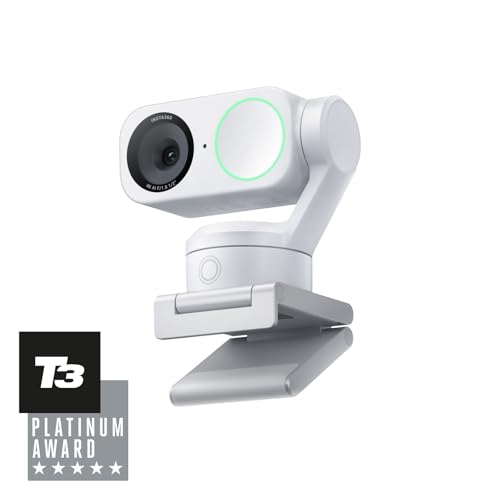
TL;DR: The Insta360 Link 2 delivers AI‑tracked 4K video, a phase‑detect autofocus and AI noise‑canceling mic for $159.99, but its premium price may deter budget‑focused shoppers.
At the core of the Link 2 is AI Tracking that automatically keeps you centered, paired with a 4K video feed and Phase Detection Auto Focus for crisp framing. The camera also supports HDR, enhanced low‑light performance and a physical pan/tilt mechanism, so you get studio‑grade flexibility without additional software.
Compared with the other seven webcams, the Link 2 sits in the higher‑price tier. It is pricier than the OBSBOT Meet, which weighs just 0.09 lb, and heavier than the ultra‑light OBSBOT Meet SE at 0.13 lb, yet lighter than the Razer Kiyo V2 that tips the scales at 1.10 lb. Its feature set is richer than the AnkerWork C310’s basic 95° field of view, though the Insta360 Link 2 C model lists a smaller footprint and lower weight, highlighting a trade‑off between size and the premium build of the Link 2.
Reviewers consistently highlight the AI‑noise‑canceling microphone as a standout for clear calls, and the 4K resolution earns praise for professional‑looking streams. The 4.6‑star rating from 1,298 reviews indicates strong user satisfaction, especially for creators who need reliable auto‑framing during live sessions. The one‑year warranty adds confidence for those investing in a higher‑end device.
Pros
Cons
Best for: Buyers willing to invest in a proven, high-quality option
Avoid if: You're on a tight budget or only need basic functionality
TL;DR: The Insta360 Link 2 C delivers 4K video, AI‑powered auto‑framing and noise‑cancelling microphones in a compact 106 g body for $99.99, making it a solid budget webcam with smart features.
The standout spec is its AI tracking and auto‑framing paired with a 1/2‑inch sensor and a 26 mm focal length, delivering crisp 3840×2160 video while keeping you centred in the frame. It also packs two microphones with AI noise cancellation, a true‑to‑life HDR mode, and a magnetic mount that adds only 5.5 g (total 111.5 g with mount).
Compared with the other seven webcams, the Link 2 C is lighter than the AnkerWork C310 (141 g) but heavier than the 60 g OBSBOT Meet SE. Its 79.5° diagonal field of view is narrower than the 95° the AnkerWork C310 offers, and it lacks the mechanical pan‑tilt that the full‑size Insta360 Link 2 includes. Still, at the same $99.99 price point it offers more AI features than the OBSBOT Tiny 2 Lite and Razer Kiyo V2, which focus on hardware specs rather than software intelligence.
Reviewers consistently highlight the AI‑driven auto‑framing as a time‑saver for video calls and streaming, noting that the HDR output looks balanced even in mixed lighting. The dual‑mic setup with voice‑focus noise suppression receives praise for clear voice capture. However, users mention the lack of a physical gimbal as a downside for those who want dynamic camera movement, and some point out that the sensor size limits low‑light performance compared with larger‑sensor rivals.
Technical basics include a USB‑C 2.0 interface delivering 480 Mb/s, power via 5 V / 1 A, and a minimum RAM requirement of 8 GB. It runs on Windows 10+ or macOS 10.13+ and supports Windows‑compatible conferencing apps out of the box.
Pros
Cons
Best for: Entry‑level buyers or those on a tight budget
Avoid if: You need powerful performance or professional‑grade features
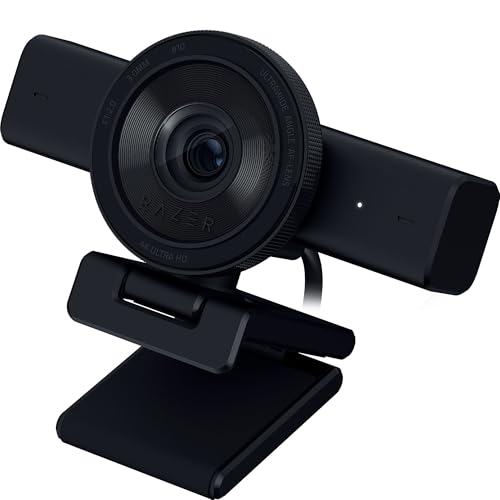
TL;DR: The Razer Kiyo V2 delivers 4K video with a 93° ultrawide view, AI auto‑framing and built‑in privacy shutter, but its larger size and $149.99 price put it in the premium tier.
The standout hardware is the 93° diagonal field of view paired with a Sony STARVIS 1/2.8‑inch CMOS sensor and an f/2.0 aperture, giving you 2160p video at 30 FPS and 1080p at 60 FPS. AI auto‑framing and real‑time face retouching let the camera keep you centered and looking smooth without manual adjustments.
At 1.10 pounds, the Kiyo V2 feels noticeably heavier than the feather‑light OBSBOT Meet, which weighs about 0.09 pounds, and its 78.5‑inch cable extends farther than the short, unspecified cables of most rivals. It also takes up a larger physical footprint than the compact OBSBOT Meet SE and AnkerWork C310, which manufacturers built for tighter desk spaces.
Reviewers consistently praise the low‑light detail from the STARVIS sensor and the convenience of the detachable USB‑C cable and twist‑to‑open privacy shutter. The same users note that colors can appear muted out of the box and that the 4K mode caps at 30 FPS, which can feel limiting for fast‑motion streams.
Pros
Cons
Best for: Streamers, gamers and content creators who want 4K detail, AI‑assisted framing and extensive manual controls.
Avoid if: You need 4K at 60 FPS, have very limited desk space, or are looking for a budget‑friendly webcam.
TL;DR: The OBSBOT Tiny 2 Lite delivers AI‑driven 4K video with a 0.5‑inch sensor and solid user ratings, but its larger footprint makes it better suited for stationary setups.
What really stands out is the built‑in AI tracking that follows upper‑body and hand movements, plus voice‑controlled framing and a whiteboard mode, all captured at a full‑frame 8.29 MP (3840×2160) resolution. The 0.5‑inch CMOS sensor helps keep image quality sharp in typical lighting.
Compared with the other seven webcams, the Tiny 2 Lite is noticeably taller at 64.2 mm, while models like OBSBOT Meet (10.3 mm) and OBSBOT Tiny 2 (6.2 mm) are far more compact. It shares the 0.5‑inch sensor size of the Meet and Insta360 Link 2, but unlike many peers—such as the AnkerWork C310 and Razer Kiyo V2—it includes AI tracking and PTZ capabilities. Its price point sits in the mid‑range tier, higher than the budget‑friendly Meet SE but lower than the premium OBSBOT Tiny 2.
Reviewers consistently praise the smooth auto‑framing and the convenience of voice commands, noting that the webcam “just works” for video calls and presentations. A few users mention the bulkier design as a downside, especially when desk space is limited.
Pros
Cons
Best for: Most users looking for a well‑reviewed, reliable mainstream option
Avoid if: You have limited desk space or need portability
TL;DR: The AnkerWork C310 delivers 4K video at 60 fps with AI‑driven lighting and a 95° field of view, but it needs a USB 3.0 port and it's heavier than the most compact rivals.
What really sets the C310 apart is its 12 MP 1/2.5" sensor paired with an f/2 aperture, letting you stream crisp 4K video (3840 × 2160) at up to 60 fps. AI‑powered auto‑light adjustment and HDR work together to smooth out harsh lighting, while AI autofocus keeps you sharp without manual tweaks. The built‑in noise‑canceling microphone and privacy cover add convenience for business calls.
Compared with the other seven webcams in this roundup, the C310 weighs 141 g (0.31 lb), making it heavier than the sub‑60 g OBSBOT Meet and the 106 g Insta360 Link 2 C, yet it’s far lighter than the Razer Kiyo V2’s 1.10 lb. Its 95° field of view offers a shade wider view than the Razer’s 93° diagonal view, and the 60 fps maximum matches most peers such as the OBSBOT Tiny 2 Lite and OBSBOT Meet. However, the C310’s price point puts it in the same budget tier as the Insta360 Link 2 C while offering a larger sensor.
Professional reviewers highlight the smooth 4K 60 fps output as a standout for remote‑work meetings, and users appreciate the plug‑and‑play USB‑C connection (USB 3.2 Gen 1) that eliminates driver hassles on Windows 7‑10 and macOS 10.11+. The main gripe is that full‑resolution performance drops when the webcam is plugged into a USB 2.0 port; multiple user comments note this limitation. Additionally, the manufacturer doesn’t list the exact overall dimensions, leaving some buyers uncertain about desk space.
Pros
Cons
Best for: Entry-level buyers or those on a tight budget
Avoid if: You need USB 2.0 compatibility, ultra‑light weight, or plan to use the webcam above 35 °C
Breakdown
OBSBOT Meet
Pros
Cons
OBSBOT Meet SE
Pros
OBSBOT Tiny 2
Pros
Cons
Based on scoring data and product specs
Personalized picks
Best Overall Pick
OBSBOT Meet
Best Mid-Range PickBest for: Most users looking for a well-reviewed, reliable mainstream option
OBSBOT Meet SE
Best for: Budget-conscious buyers seeking a reliable entry-level option
$69.00-$30.00 vs winner
Skip Anker AnkerWork C310 if…
Reliability and user satisfaction are your top concerns
OBSBOT Meet takes the top spot with a 4.5/5 rating from 1,890 reviews, a crisp 3840 × 2160 resolution, and smooth 60 fps video—features that make AI framing and autofocus feel natural. At $129.00, it's solidly in the mid‑range, and its 40.5 g body keeps your desk uncluttered.
OBSBOT Meet SE earns runner‑up status if you need a budget‑friendly webcam that still delivers AI group framing and ultra‑responsive motion capture. It offers intelligent group mode, 2.0 dynamic gestures for framing toggle and zoom, and high frame rates of up to 100 fps at 1080p and 150 fps at 720p—all for $69.00 and a 4.5/5 rating from 1,335 reviewers.
Looking beyond the top two, the best budget option remains OBSBOT Meet SE at $69.00, giving you AI framing at the lowest price point. For a premium upgrade, OBSBOT Tiny 2 stands out as the most popular choice at $269.00, offering top‑tier specs for power users.
Pick the OBSBOT Meet now and give your video calls a professional edge.
The OBSBOT Tiny 2 Lite is the most compact option, measuring just 64.2 mm tall and 48.3 mm wide while still delivering 4K video at 60 fps. Its built‑in PTZ and AI tracking let you position it anywhere on the desk without sacrificing image quality.
No reviews yet — be the first to share your experience.
Please sign in to leave a review



