⚡ Quick Answer
Among 12 wireless keyboards, the $19.95 Logitech K270 – the cheapest entry in the list – still enjoys a solid 4.4‑star rating from a massive 117,008 reviewers. That kind of confidence from budget shoppers rivals the 4.6‑star scores seen on premium models, proving price isn’t the only driver of satisfaction.
The roundup spans three clear tiers. On the budget side are the Logitech K270, Redragon K745 PRO at $59.99 and the Redragon K503 for $25.64, all delivering solid wireless range and decent battery life. Mid‑range options like the Aula F99 Wireless ($68.25) and RK Royal Kludge S98 ($75.99) bring hot‑swappable switches and larger batteries. Premium picks – the Apple Magic Keyboard with Touch ID ($187.99), Apple Magic Keyboard ($97.00), Keychron K2 75% ($79.99), and Logitech MX Keys S ($119.99) – focus on refined scissor mechanisms, longer battery endurance, and premium build quality.
The following sections break down each keyboard’s strengths, quirks, and ideal use‑cases, helping you match a wireless typing experience to your desk, workflow, and wallet.

Aula F99 Wireless
Its massive 8000 mAh battery lets you work days without recharging.
Redragon K745 PRO
Ideal for gamers on a budget, it’s $8.26 cheaper than the Aula, delivering solid performance at $59.99.

Logitech K270
At just 498 g and 149 mm tall, it’s a lightweight, space‑saving option the bulkier Aula and Redragon can’t match.
Also considered
Score Analysis
Key score advantages vs. runner-up (Redragon K745 PRO)
Price Range
Aula F99 Wireless
$68.99
Redragon K745 PRO
$64.99
Logitech K270
$19.95

Apple Magic Keyboard with Touch ID Black
$187.99

Apple Magic Keyboard
$79.99

Logitech MX Keys S
$129.99

RK Royal Kludge S98 with Smart Display
$74.99

Logitech Wave Keys
$69.99

Redragon K503
$25.64
Keychron K2 75%
$79.99

Arteck 2.4G Wireless Keyboard
$33.99
Macally Mini Compact Keyboard
$19.99
Spec Comparison
TL;DR: The Aula F99 Wireless packs a massive 8000 mAh battery, hot‑swappable 99‑key layout and smooth 1.5 mm linear switches into a solid 3.31‑lb chassis for a feature‑rich, budget‑friendly mechanical experience.
Its 8000 mAh rechargeable battery stands out, dwarfing the 4000 mAh cells found in many rivals. Coupled with a 1.5 mm actuation distance and a 40 gf operating force, the pre‑lubed Graywood linear switches feel smooth and responsive, while the 60 million keystroke lifespan promises durability. The board measures 390.63 mm × 146.78 mm × 42.57 mm and weighs about 3.31 lb (1500 g), offering a full‑size 99‑key (98% layout) experience with double‑shot PBT keycaps and a five‑layer gasket mount for a quieter, more stable feel.
Compared with the other eleven keyboards, the Aula is heavier than the Redragon K745 PRO (≈1.94 lb) and the Apple Magic Keyboard (≈0.9 lb), and even a touch heavier than the RK Royal Kludge S98 (≈3.0 lb). Its battery capacity is double that of the Redragon and Keychron K2, both of which list 4000 mAh cells. While the Arteck 2.4G model is feather‑light, it offers far fewer keys and no RGB lighting, making the Aula a more complete workstation solution despite the added heft.
Professional reviewers note the factory‑lubed Graywood switches deliver a pleasant “clack” and smooth 1.5 mm travel, ideal for both gaming and long‑form typing. Users on forums praise the long‑lasting battery, but many flag the 3.31‑lb weight as a portability drawback and the clacky linear sound as less suitable for quiet environments. The keyboard’s tri‑mode connectivity (USB‑C wired, 2.4 GHz wireless, Bluetooth 5.0) and support for up to five devices adds flexibility for multi‑device setups.
Pros
Cons
Best for: Budget‑conscious typists and gamers who want a wireless, hot‑swappable mechanical keyboard with long battery life.
Avoid if: You have limited desk space, need high portability, or prefer tactile or silent switch types.
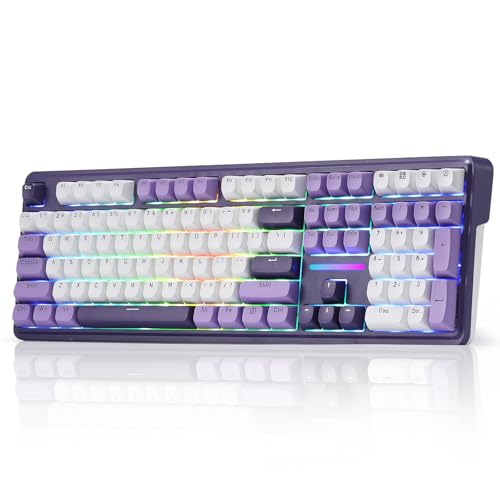
TL;DR: The Redragon K745 PRO offers a gasket‑mounted full‑size board with five‑layer dampening, 40 g Mint Mambo linear switches, 4000 mAh battery and tri‑mode wireless for $59.99.
This keyboard’s standout feature is its gasket‑mounted construction paired with five layers of sound‑dampening foam, which professional reviewers say delivers a clean, creak‑free typing feel. The board houses 108 keys, uses PBT round keycaps, and sports south‑facing RGB that can be customized via software. Its 40 g Mint Mambo linear switches are praised for a silky, fast keystroke, while the 4000 mAh battery promises long sessions without a charger.
At 1.94 pounds (880 g), the K745 PRO outweighs the ultra‑light Arteck 2.4G (0.00220462262 pounds) but sits right alongside the Keychron K2 (1.92875 pounds). It's noticeably lighter than the Aula F99 Wireless (3.30693393 pounds) and the RK Royal Kludge S98 (3.0 pounds). Compared with peers, its tri‑mode connectivity—USB‑C wired, Bluetooth 5.0, and 2.4 GHz dongle—covers more use cases than keyboards that only offer a single wireless option.
Everyday users love the “silky, creamy” feel of the Mint Mambo switches and the vivid spill‑around RGB lighting. However, they also note that the two‑stage flip feet can slip under pressure, and the spacebar sounds slightly hollow despite the extensive dampening. The 1‑year warranty and included eight extra switches add confidence, but the weight's a drawback for anyone needing a truly portable setup.
Pros
Cons
Best for: Gaming enthusiasts and mechanical‑keyboard beginners who want a full‑size board with wireless freedom and premium feel.
Avoid if: You need ultra‑lightweight portability or a minimalist design without extra foot stability concerns.
“"silky creamy" typing sound”
TL;DR: The Logitech K270 delivers full‑size typing, up to 33 ft (10 m) wireless range and 18‑24 months of battery life for just $19.95, making it a solid budget pick for Windows desks.
The standout spec is its 2.4 GHz Unifying receiver that reaches up to 33 ft (10 m), letting you place the keyboard far from the PC without lag. It runs on two AAA cells that the manufacturer says last 18‑24 months, so you won’t be swapping batteries every few weeks.
Compared with the other eleven keyboards in this roundup, the K270 sits on the affordable side—generally cheaper than options like the Logitech Wave Keys or Redragon K745 PRO. At 1.1 lb (498 g) it’s heavier than the ultra‑light Arteck 2.4G Wireless Keyboard, but still lighter than the 1.94‑lb Redragon K745 PRO. Its full‑size 108‑key layout is larger than the 78‑key mini compact Macally keyboard and considerably wider than the 200.5 mm‑wide Redragon K503.
User sentiment highlights the 18‑24 month battery life and the spill‑resistant design with UV‑coated key printing as durability wins. Reviewers consistently praise the plug‑and‑play setup and stable connection, though many note the membrane key feel is less tactile than mechanical alternatives and the lack of backlighting can be a drawback in dim rooms.
Additional technical context includes a key life of 5 million keystrokes, eight dedicated media shortcut keys, and adjustable tilt legs for a more ergonomic typing angle. The keyboard requires no drivers and works with Windows XP through Windows 11, reinforcing its “just works” appeal.
Pros
Cons
Best for: Budget-conscious buyers seeking a reliable entry-level option
Avoid if: You have limited desk space or need portability
TL;DR: The Apple Magic Keyboard with Touch ID Black offers a full‑size layout, integrated Touch ID and a month‑long rechargeable battery, but its premium $187.99 price and larger footprint may deter budget‑focused or portable users.
The standout spec is the built‑in Touch ID sensor, letting you unlock macOS and approve purchases with a fingerprint while you type on a low‑profile scissor‑mechanism keyboard. The board measures 16.48 in wide, 4.52 in deep and only 0.75 in tall, and it weighs 0.81 lb (369 g), making it slim enough for a desk but noticeably larger than many tenkeyless options.
Compared with the other eleven keyboards in this roundup, the Magic Keyboard sits at the higher end of the price spectrum. It is lighter than the Logitech MX Keys S (which weighs 810 g) and far lighter than the Keychron K2, RK Royal Kludge S98, Aula F99 and Redragon K745 PRO, all of which tip the scales at around 2 lb or more. Its width of 16.48 in also dwarfs the Logitech’s 152.4 mm (about 6 in) and the compact Apple Magic Keyboard’s 5.04 in, giving you a full numeric keypad that many competitors lack. However, its battery life of about a month falls short of the Logitech’s five‑month endurance.
User sentiment highlights the smooth Bluetooth pairing and the convenience of Touch ID for secure logins. Professional reviewers praise the dedicated multimedia keys and the optimized key travel for comfortable typing sessions. On the flip side, a few users note the key feel can seem “soft” compared with mechanical switches, and the larger dimensions make the keyboard less portable for on‑the‑go setups.
Pros
Cons
Best for: Buyers willing to invest in a proven, high‑quality option
Avoid if: You're shopping on a tight budget — it's priced at $187.99
TL;DR: The Apple Magic Keyboard offers a low‑profile scissor mechanism, month‑long rechargeable battery and ultra‑light 0.9 lb build for a premium $97.00 macOS‑focused typing experience.
Apple’s most distinctive spec is the ultra‑thin 0.73 in height combined with a scissor key mechanism that delivers a stable, precise feel across its 78‑key compact layout. At just 0.9 lb (0.408 kg) and measuring 12.13 in long by 5.04 in wide, the keyboard feels feather‑light on any desk while still providing a solid typing platform. The built‑in rechargeable battery lasts about a month per charge, and the USB‑C port makes topping up quick and cable‑friendly.
Compared with the other eleven keyboards in this roundup, the Magic Keyboard is the lightest—well under the Keychron K2’s 1.92875 lb and the RK Royal Kludge S98’s 3.0 lb. Its month‑long battery life outlasts the Keychron K2’s 7‑day claim, though it doesn’t reach the Logitech MX Keys S multi‑month endurance. Automatic Bluetooth pairing and native macOS 15.1+ support give it a smoother connection experience than many peers that list only generic Bluetooth versions.
Reviewers consistently praise the comfortable, low‑travel typing feel and the long‑lasting battery, noting that at 0.9 lb the keyboard feels lightweight right out of the box. Professional commentary highlights the scissor mechanism’s 33 % stability boost over previous models. The main trade‑offs surface in the lack of backlit keys and the absence of an integrated trackpad—features that some users miss when working in dim lighting or needing on‑the‑fly cursor control.
Beyond the core specs, the Magic Keyboard integrates smoothly with macOS, offering volume and media controls that work without extra software. The included USB‑C charging cable aligns with Apple’s 2024 redesign, eliminating the need for legacy Lightning adapters.
Pros
Cons
Best for: Buyers willing to invest in a proven, high‑quality option
Avoid if: You're on a tight budget or only need basic functionality
TL;DR: The Logitech MX Keys S costs $119.99, offers a 5‑month battery life on a 1500 mAh rechargeable cell, and delivers a premium, low‑profile typing experience with smart backlighting.
What sets the MX Keys S apart is its impressive power budget: a 1500 mAh rechargeable lithium battery delivers up to 5 months of use when the backlight is off. Coupled with a 10 m (33 ft) wireless range via Logi Bolt or Bluetooth Low Energy, the keyboard stays connected across a typical office desk without any lag.
In the context of the twelve‑product roundup, the MX Keys S sits toward the premium end of the price spectrum, making it pricier than the budget‑friendly Redragon K745 PRO and Aula F99, yet lighter than the heavyweight RK Royal Kludge S98 (1361 g). It also outweighs the Apple Magic Keyboard (≈0.9 lb) at 810 g, which some users cite as a portability advantage. Battery‑life-wise, its 5‑month claim far exceeds the Apple Magic Keyboard’s roughly 1‑month runtime, positioning it as a strong contender for long‑haul productivity.
Reviewers consistently praise the low‑profile scissor keys, noting the 60 g actuation force and 1.8 mm travel produce a quiet, precise feel that many describe as “low‑profile perfection.” The smart white LED backlighting, which uses proximity and ambient light sensors, automatically brightens when hands approach—professional reviewers highlight this ergonomic touch. However, critics draw criticism for the fixed‑angle design without adjustable feet, which can cause wrist fatigue during extended sessions, and many note the 810 g weight as a drawback for users who move their setup often. Additionally, power users miss dedicated macro keys for deeper customization.
Beyond the hardware, the MX Keys S integrates with Logitech Options+ software, offering Flow support for seamless control across up to three paired devices. The inclusion of a Logi Bolt USB receiver ensures low‑latency connectivity, while the Bluetooth Low Energy option adds flexibility for laptops and tablets.
Pros
Cons
Best for: Buyers willing to invest in a proven, high‑quality option
Avoid if: You need advanced features or professional‑grade performance
TL;DR: The RK Royal Kludge S98 packs a 98‑key 96% layout, a custom smart display and hot‑swappable linear cream switches in a sturdy 3.0‑pound, sky‑blue chassis for $75.99.
The standout feature is its Smart Display, which can show a custom GIF, date, connection mode, Windows/Mac layout indicator and battery status—all controllable via the dedicated knob. Combined with hot‑swappable Linear Cream switches, users can swap out switches without soldering, while IXPE dampener pads, two layers of foam and a silicone pad back the keyboard’s 40% noise reduction and 80% hollow‑sound removal for a noticeably quieter typing experience. The 42 mm height, 410 mm length and 140 mm width give it a solid presence without being overly bulky.
At 3.0 Pounds (1361 g), the S98 is heavier than the Keychron K2 (≈1.93 lb) and the Redragon K745 PRO (≈1.94 lb), but lighter than the Aula F99 (≈3.31 lb). Its 410 mm length outpaces the Aula’s 390.63 mm frame yet is shorter than the Redragon’s roughly 445 mm chassis. Compared with the ultra‑light Arteck (≈0.0022 lb) and the Apple Magic Keyboard (0.9 lb), the S98 feels more substantial, which many users associate with durability. The price point of $75.99 places it above the Logitech Wave Keys and Arteck options, but below premium Apple and some higher‑end models.
Reviewers consistently highlight the smart display’s usefulness for quick status checks and the pleasant “creamy” feel of the linear switches. The extensive sound‑dampening measures receive frequent praise for reducing echo in shared spaces. A common criticism points to the higher price relative to lighter, less feature‑rich keyboards, and the lack of listed battery capacity or runtime leaves some buyers uncertain about long‑term wireless use.
Pros
Cons
Best for: Most users looking for a well‑reviewed, reliable mainstream option
Avoid if: You're shopping on a tight budget — it's priced at $75.99
TL;DR: The Logitech Wave Keys offers a wavy ergonomic layout, a three‑layer memory‑foam palm rest and a 3‑year battery life for $52.49, making it a comfortable mid‑range wireless keyboard.
The standout feature is the integrated 3‑layer memory‑foam palm rest that measures 82.55 mm deep, which Logitech’s own lab says improves wrist support by 57 %. The keyboard keeps a compact footprint—219 mm wide, 376 mm deep and only 30 mm high—while still providing a full 99‑key layout with a ten‑key numpad. Logitech lists battery life at up to 36 months on two AAA alkaline cells, and a battery indicator lets you track remaining power.
At 750 g, the Wave Keys is lighter than the Redragon K745 PRO (880 g) and considerably lighter than the Aula F99 (1.5 kg). Its Bluetooth 5.1 connectivity and up to three‑device pairing edge out the 5.0 Bluetooth found in the Redragon and RK Royal Kludge models. The 10 m (32.81 ft) wireless range matches the Arteck 2.4G keyboard, but Wave Keys wins on battery longevity—three years versus Arteck’s six‑month claim. The recycled‑plastic content of 46 % also gives it a greener edge over peers that don’t list such material data.
Professional reviewers note the wave‑shaped frame reduces ulnar deviation and that the memory‑foam rest “improves wrist posture” (Ergocanada). However, the 18.5 mm key pitch feels cramped for larger hands, a point echoed by both Ergocanada and B&H Photo, and many users find the lack of backlighting doesn't work well in dim environments. Users who type four or more hours a day appreciate the comfort, but may find the right‑edge reach of the compact numpad a bit far.
Pros
Cons
Best for: Office workers and anyone who types many hours daily and wants ergonomic support without breaking the bank.
Avoid if: You have large hands, need generous key spacing, or require backlit keys for low‑light work.
TL;DR: The Redragon K503 packs a 4000 mAh battery and 300‑hour (RGB off) life into a compact 30 mm‑high board with Bluetooth, 2.4 GHz, USB‑C wired options and six lighting modes for under $30.
The standout spec is the 4000 mAh battery that delivers up to 300 hours of use when you turn off the RGB lighting, giving you weeks of unplugged productivity. At just 30 mm tall, 444.5 mm long and 200.5 mm wide, the keyboard stays low‑profile while still offering a full‑size layout.
Compared with the other eleven keyboards in this roundup, the K503 is notably slimmer than the Logitech K270, which measures 149 mm in height and 441.5 mm in width. It also sports a longer length than the Arteck 2.4G (428 mm) while remaining narrower than the same model’s 125 mm width. Its 6‑ft cable is longer than the wireless‑only range of the Macally Mini Compact, which lists a 2.4 GHz frequency but no cable. The K503 shares a 4000 mAh battery capacity with the higher‑priced Redragon K745 PRO, yet it comes at a budget‑friendly price point. Unlike many peers that rely solely on 2.4 GHz (e.g., Logitech K270, Arteck 2.4G), the K503 adds Bluetooth and USB‑C wired connectivity, giving you three ways to link to a PC or tablet.
Reviewers consistently praise the long battery life and the ability to switch between Bluetooth, wireless dongle, and wired modes without hassle. Users also like the six lighting presets for a bit of flair on a budget desk. A few comments note that the lack of a dedicated numeric keypad can be a drawback for spreadsheet work, and the rating of 4.3 / 5 suggests some buyers wish for a sturdier build.
Pros
Cons
Best for: Budget‑conscious buyers seeking a reliable entry‑level option
Avoid if: You have limited desk space or need portability
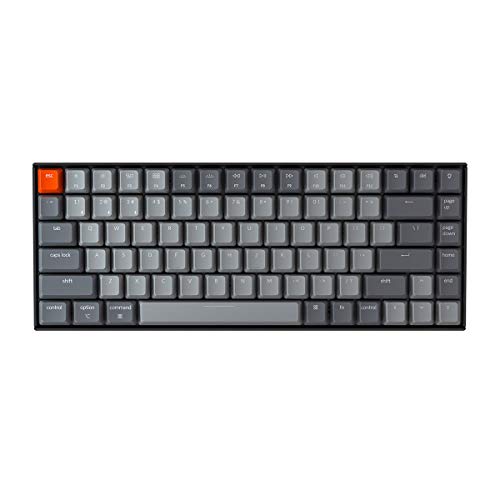
TL;DR: The Keychron K2 75% offers a solid 84‑key mechanical layout with 4000 mAh battery, 7‑day standby life, and adjustable angles, but its heft and side‑mounted USB‑C may deter travelers.
The standout spec is the 4000 mAh rechargeable battery, which the manufacturer lists as providing up to 7 days of normal use and 72 hours of continuous typing. Bluetooth 5.2 lets you pair three devices, while a wired USB‑C connection runs at a 1000 Hz polling rate for low‑latency work or play. It also features a 125 Hz wireless polling rate, which is respectable for a compact mechanical board.
At 1.92875 lb, the K2's heavier than the Apple Magic Keyboard’s 0.9 lb but lighter than the RK Royal Kludge S98’s 3.0 lb. Its weight's almost identical to the Redragon K745 PRO (≈1.94 lb) and far below the bulkier competitors. Battery capacity matches the Redragon K745 PRO’s 4000 mAh but is half of the Aula F99’s 8000 mAh, giving you a middle‑ground endurance without sacrificing portability.
Reviewers consistently praise the acoustic foams (IXPE, EPDM, PET) and double‑shot PBT keycaps for a quiet, stable typing feel, and they've noted the Gateron Brown switches as smooth and tactile. Professional reviewers highlight the low‑latency wired polling and the three‑position ergonomic tilt (5°, 9°, 13°) as ergonomic wins. Common complaints focus on the keyboard’s 1.92875 lb weight, the side‑mounted USB‑C that often needs a right‑angle cable, and the single‑color white backlight that some find limiting.
Pros
Cons
Best for: Buyers willing to invest in a proven, high-quality option
Avoid if: You need an ultra‑lightweight, hot‑swap‑friendly keyboard
“Excellent typing sound and feel from acoustic foams and stabilizers.”
TL;DR: The Arteck HW192 offers a sleek stainless‑steel, ultra‑thin full‑size keyboard with a 10 m 2.4 GHz range and up to six months of battery life for $37.99.
The standout feature is its ultra‑thin stainless‑steel chassis, measuring just 14 mm in thickness and 428 mm in length. At only 0.0022 lb (manufacturer‑claimed), it feels almost weightless on a desk. A 2.4 GHz nano receiver gives a reliable 10‑meter wireless range, and the built‑in lithium‑polymer battery lasts up to six months with two hours of daily use.
Compared with the other eleven keyboards, Arteck sits on the lighter side—far lighter than the Logitech K270’s 1.1 lb build and considerably lighter than the Redragon K745’s 1.94 lb frame. It costs more than the Redragon K503, which targets the budget tier, and it offers fewer connectivity options than the Logitech Wave Keys, which adds Bluetooth to its 2.4 GHz link.
Reviewers consistently praise the stainless‑steel backplate for its durability and the long battery life that lets you forget about recharging for months. The low‑profile scissors‑switch keys, which rate for over 3 million keystrokes, earn compliments for quiet, comfortable typing. Professional reviewers highlight the full‑size layout with 110 keys—including a numeric keypad—and single‑color backlighting as solid value for office or study setups. The lack of Bluetooth and multi‑device pairing draws criticism, as some users find it limiting.
Pros
Cons
Best for: Budget‑conscious buyers seeking a reliable entry‑level option
Avoid if: You need advanced features or professional‑grade performance
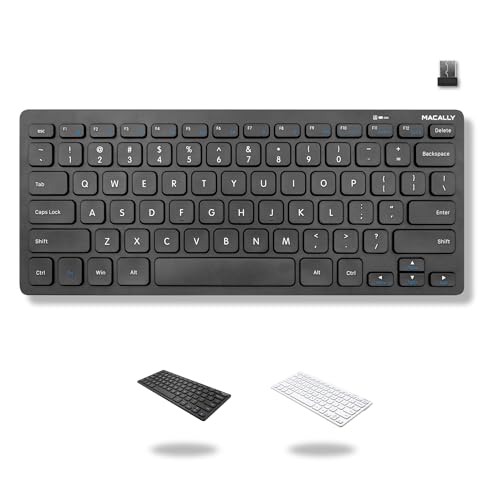
TL;DR: The Macally Mini Compact Keyboard packs 78 keys, a 2.4 GHz wireless link and an on/off switch into a $19.99, plug‑and‑play package that’s solid for tight desks and budget shoppers.
This keyboard’s most distinctive spec is its ultra‑compact 78‑key layout, which lets you keep a full‑size laptop or tablet close by without sacrificing essential typing comfort. It runs on a single AAA battery and switches on and off with a dedicated toggle, so you never waste power. At $19.99 and a 4.3/5 rating from 3,107 reviewers, it lands squarely in the entry‑level price tier while still delivering a reliable 2.4 GHz wireless connection.
When you line it up against the other eleven keyboards in this roundup, the Macally shares the same 2.4 GHz band as the Logitech K270 and Arteck 2.4G Wireless Keyboard, meaning you won’t notice a frequency disadvantage. Unlike the Arteck’s nano USB receiver, the Macally uses a standard USB‑A dongle, which can be a plus if you have an older laptop. Its mini‑compact form factor makes it noticeably smaller than full‑size peers such as the Logitech K270, while offering the same number of shortcut keys (12) that the Redragon K503 advertises for its multimedia shortcuts. However, the Redragon includes extra independent multimedia keys and a larger battery, which the Macally lacks, so power‑users looking for extensive hot‑keys may find it a bit sparse.
Reviewers consistently praise the keyboard’s “instant plug‑and‑play” setup and the convenience of the on/off switch, noting that the 2.4 GHz link stays stable even across a modest desk. A common theme in the feedback is the desire for a numeric keypad, which the Macally omits to keep its footprint tiny. Some users also mention that the key travel feels lighter than they’d like, a trade‑off that comes with the compact design. Reviewers say the keyboard delivers reliable everyday typing at a price that won’t break the bank.
Pros
Cons
Best for: Budget-conscious buyers seeking a reliable entry-level option
Breakdown
Aula F99 Wireless
Pros
Redragon K745 PRO
Pros
Logitech K270
Pros
Apple Magic Keyboard with Touch ID Black
Pros
Cons
Based on scoring data and product specs
Personalized picks
Best Overall Pick
Aula F99 Wireless
Best OverallBest for: Home and office users seeking a balance of features and value
Redragon K745 PRO
Best for: Most users looking for a well-reviewed, reliable mainstream option
$64.99-$4.00 vs winner
Skip Arteck 2.4G Wireless Keyboard if…
You need advanced features or professional-grade performance
The Aula F99 Wireless earns the top spot with a solid 4.6/5 rating from 2,795 reviews, a full‑size 99‑key layout and support for up to five devices via Bluetooth 5.0, 2.4 GHz wireless or USB‑C wired. Its 8 000 mAh battery keeps you typing for days, while the RGB backlight offers 16.8 million colors and 16 lighting effects. Hot‑swappable linear Graywood switches, a five‑layer sound‑dampening gasket and a built‑in ergonomic kickstand round out a premium feature set for just $68.25.
The Redragon K745 PRO lands as the runner‑up, perfect if you need a full‑size 108‑key board with hot‑swappable Mint Mambo linear switches for custom feel. It packs a 4 000 mAh battery, south‑facing RGB lighting and five sound‑dampening layers, plus a recessed dongle storage slot and 2‑stage adjustable flip feet for comfortable typing. At $59.99 it delivers a solid, macro‑ready experience without breaking the bank.
For tighter budgets and premium tastes, consider these alternatives:
Pick the Aula F99 Wireless today and you'll enjoy a feature‑rich, versatile typing experience right out of the box.
The Aula F99 Wireless lists an 8000 mAh battery, which is double the 4000 mAh found in the Redragon K745 PRO and far larger than the AAA cells used by the Logitech K270. While the K270 advertises up to 24 months of use, the Aula’s higher capacity gives it the longest raw power reserve.
No reviews yet — be the first to share your experience.
Please sign in to leave a review



