
⚡ Quick Answer
We compared 12 wireless mice to help you find a model that fits your desk, laptop or travel bag. The lineup stretches from the $9.58 Seenda Wireless Mouse up to the $26.99 Logitech G305 LIGHTSPEED, and every product carries a rating of at least 4.5 / 5 from thousands of reviewers.
To make sense of the spread, we grouped the picks into three price tiers. Budget‑friendly options—Seenda ($9.58), Tecknet ($9.99), Amazon Basics ($11.38) and the Logitech M240 Bluetooth ($11.50)—all sit under $12 and have 4.5 / 5 or higher scores. The mid‑range camp features the Logitech M170 ($11.99) and M317 ($11.59), which deliver up to 12 months of AA‑battery life and ergonomic shapes for small‑to‑medium hands. Premium choices include the G305 at $26.99 with a 250‑hour battery and 12,000 DPI sensor, the HP X3000 G3 ($18.99) with 15‑month battery life, the Lenovo 530 ($15.99) and the Logitech M185 ($12.99), each offering extra DPI or connectivity tweaks.
Next we break down each model’s strengths, battery life and ergonomics so you can match the right mouse to your workflow and budget.

Logitech G305 LIGHTSPEED Black
Its 1000 Hz report rate (1 ms response) delivers ultra‑responsive tracking, a key factor behind its top rating and popularity.

Logitech M170 Wireless
Ideal for budget‑conscious users who need a reliable everyday mouse; at $11.99 it’s $15 cheaper than the Best Overall.
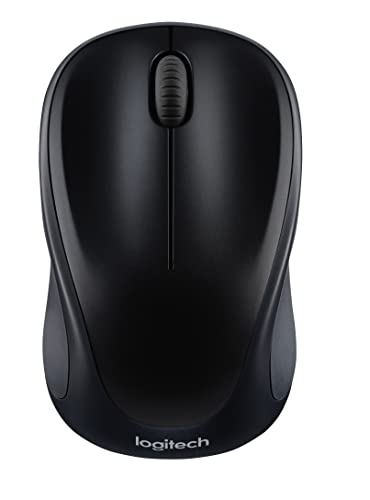
Logitech M317 Wireless
Stands out with a 2.4 GHz wireless frequency and 10 m range, offering a solid connection for users who prioritize stable long‑range performance.
Also considered
Score Analysis
Key score advantages vs. runner-up (Logitech M170 Wireless)
Price Range
Logitech G305 LIGHTSPEED Black
$26.99
Logitech M170 Wireless
$11.99
Logitech M317 Wireless
$11.59
Seenda Wireless Mouse
$11.98

Tecknet Wireless Mouse
$9.99

HP X3000 G3 Wireless Mouse
$18.99

Amazon Basics Wireless Mouse Silver
$11.30

Logitech M240 Bluetooth
$19.99

Lenovo 530 Wireless
$15.99

Logitech M185 Wireless
$14.99

Anker Wireless Vertical Ergonomic Mouse
$29.99

Peibo Bluetooth Mouse
$11.96
Spec Comparison
TL;DR: The Logitech G305 LIGHTSPEED delivers a 12,000 DPI HERO sensor, 1 ms LIGHTSPEED wireless, and 250 hour battery life, but its 0.21 lb weight and $26.99 price place it above budget alternatives.
The standout spec is the HERO optical sensor with a maximum of 12,000 DPI, >400 IPS speed and >40 G acceleration, giving precise tracking for fast‑paced games. Combined with a 1000 Hz (1 ms) LIGHTSPEED report rate, professional reviewers applaud the mouse’s ultra‑low latency.
At $26.99, the G305 sits in a higher price tier than the Lenovo 530, HP X3000, and the Logitech M170, which all list lower price points. It weighs 0.21 lb (95.25 g), making it lighter than the Anker vertical ergonomic mouse but heavier than the Lenovo 530 and Logitech M185. Its 250‑hour battery life outlasts the 12‑month battery claims of the Lenovo 530, M185 and M170, meaning you’ll change the AA cell far less often.
Everyday users rave about the long battery endurance and the reliable 1 ms wireless response, while many note the 0.21 lb weight feels hefty compared with newer ultralight gaming mice. Larger hands may find the compact 116.6 mm × 62.23 mm × 2.54 mm shape cramped, and the lack of a free‑scroll wheel limits productivity scrolling. Still, six programmable buttons, onboard memory for one profile (expandable to five via Logitech G HUB), and a modest carbon footprint of 8.76 kg CO₂e round out a solid feature set.
Pros
Cons
Best for: Buyers willing to invest in a proven, high‑quality option
Avoid if: You're shopping on a tight budget — it's priced at $26.99
TL;DR: The Logitech M170 offers a 12‑month AA‑battery life, 10 m 2.4 GHz range, and a feather‑light 0.155625‑lb ambidextrous design for reliable everyday use.
The mouse’s standout spec is its year‑long battery life—12 months on a single AA cell—paired with a solid 10 m (3280.84 ft) 2.4 GHz wireless range. At just 0.155625 pounds, it feels almost weightless on the desk, and the 1000 DPI optical sensor delivers consistent tracking for typical office tasks.
Compared with the other eleven entries, the M170 is lighter than the Logitech M185 Wireless (0.165625 pounds) and the Peibo Bluetooth Mouse (3.2 oz), yet its weight is comparable to the Amazon Basics Wireless Mouse (0.149999877517656 pounds). Its 2.4 GHz frequency matches the Logitech M317 Wireless and the Tecknet Wireless Mouse, while its 10 m range is on par with the M185 and exceeds the Tecknet’s 49‑ft claim. The ambidextrous shape gives it a versatility the ergonomic‑focused Peibo lacks.
Users consistently praise the plug‑and‑play simplicity and the “no‑dropout” reliability of the 2.4 GHz link, noting the mouse feels comfortable in small to medium hands. Professional reviewers highlight the long battery life and the 0.155625‑pound lightweight build as cost‑saving and travel‑friendly attributes. The main criticisms focus on the fixed 1000 DPI resolution and the three‑button layout, which power users find limiting. The design’s carbon footprint of 4.05 kg CO₂e and up to 75 % recycled plastic content also earn positive remarks for sustainability.
Pros
Cons
Best for: Most users looking for a well‑reviewed, reliable mainstream option
Avoid if: You need advanced features or professional‑grade performance
“Fits well in hand, left or right. Smooth and sturdy”
“Light weight and works fine”
TL;DR: At $11.59, the Logitech M317 offers a lightweight 85.2 g, 10‑meter 2.4 GHz wireless mouse with 12‑month battery life, but its fixed 1000 DPI sensor and 125 Hz polling keep it in the basic‑performance camp.
The M317’s most notable spec is its compact footprint: a 56 mm width, 38 mm depth and 94 mm height combine into a 207 cm³ volume that fits easily in a laptop bag. Weighing just 85.2 g, it stays light enough for extended use without tiring the hand, and its 2.4 GHz nano receiver delivers a reliable link up to 10 meters.
Compared with the other eleven mice in this roundup, the M317 sits in the middle of the weight spectrum—lighter than the Logitech M240 Bluetooth (73.8 g) and the Amazon Basics model (68 g), but a touch heavier than the Logitech M170 (70.5 g) and M185 (75.2 g). Its 12‑month AA‑battery life matches the M170 and M185, yet falls short of the M240’s 18‑month claim and the Tecknet’s 24‑month rating. In terms of range, the M317’s 10‑meter reach is comparable to most peers, though Tecknet lists a longer 49‑foot range.
User feedback highlights the mouse’s portability and comfort for small‑hand users, with many praising the plug‑and‑play setup and long battery life. Professional reviewers note a solid build despite minor flex in the rubber grips and a rattling scroll wheel, and they point out that the fixed 1000 DPI sensor and 125 Hz polling rate limit its suitability for precision‑heavy tasks. The lack of Bluetooth also means it’s reliant on a USB‑A port for connectivity.
Pros
Cons
Best for: Most users looking for a well‑reviewed, reliable mainstream option
Avoid if: You need advanced features or professional‑grade performance
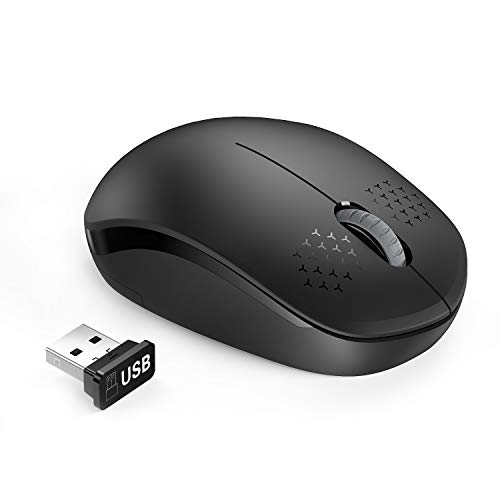
TL;DR: The Seenda Wireless Mouse costs $9.58, weighs just 0.110231131 lb, and offers a 33‑ft (10 m) range with soft clicks, making it a solid budget pick for everyday use.
This mouse’s most eye‑catching spec is its ultra‑light weight of 0.110231131 lb (about 50 g) and a compact 1.2‑in height, 4.0‑in length, and 2.0‑in width that fit comfortably on a desk. It connects via a USB Nano Receiver, runs on a 2.4 GHz band, and promises a 33‑ft (10 m) wireless range plus a 10‑minute sleep‑mode timeout. Plug‑and‑play operation means you can start using it straight out of the box.
Compared with the other eleven mice in this roundup, the Seenda is the lightest – every peer listed (Tecknet, Amazon Basics, Logitech M240, M317, and M170) weighs more than 0.11 lb. Its 33‑ft range is shorter than Tecknet’s 49‑ft reach but matches the 10‑m range of the Logitech M317 and M170. Like Amazon Basics, it also uses a USB Nano Receiver, giving it a similar set‑up simplicity while staying cheaper.
Users have given it a solid 4.5‑star rating across 122,696 reviews, frequently praising the soft, low‑noise clicks and the hassle‑free plug‑and‑play experience. A common note in reviews is that the required AA battery isn’t included, so you’ll need to have one handy before first use.
Pros
Cons
Best for: Budget‑conscious buyers seeking a reliable entry‑level option
Avoid if: You need advanced features or professional‑grade performance
TL;DR: The Tecknet Wireless Mouse offers a 49‑foot range, up to 2600 dpi resolution and a 24‑month battery life for just $9.99, making it a solid budget choice despite being a bit heavier than many rivals.
The standout spec offers a 2600 dpi maximum sensitivity, which tops the DPI range of most entry‑level mice in this roundup. Coupled with a 49‑foot (≈15 m) 2.4 GHz wireless range, you’ll stay connected even when the receiver is tucked behind a monitor or on a nearby desk.
When you line it up against the other eleven contenders, the Tecknet feels a touch heavier – at about 0.19 lb (85 g) it outweighs the Seenda (0.11 lb) and Amazon Basics (0.15 lb) models. Its dimensions (107 mm × 68 mm × 39 mm) are also larger than several compact options, so it isn’t the lightest or smallest choice. However, its 49‑foot range outstrips the Seenda’s 33‑foot range and the roughly 33‑foot ranges listed for Logitech’s M317 and M170, giving it an edge in connectivity distance.
Reviewers have rewarded the mouse with a 4.5‑star average from over 76 k users, indicating broad approval. The high rating reflects praise for the comfortable rubber side grips and the ergonomic shape, which many users say reduces fatigue during long sessions. The 24‑month battery life also draws positive comments, as it means you won’t be swapping cells often.
Pros
Cons
Best for: Budget-conscious buyers seeking a reliable entry-level option
Avoid if: You have limited desk space or need portability
TL;DR: The HP X3000 G3 Wireless Mouse offers a 30‑ft range, 15‑month battery life and 1600 DPI tracking in a compact ambidextrous design for everyday office and study use.
What really stands out is the 30 ft wireless range paired with a 2.4 GHz connection, letting you work from across a desk without lag. The mouse runs on a single AA battery that the manufacturer says lasts up to 15 months, so you’ll rarely need to replace it. Its 1600 DPI blue‑LED optical sensor delivers precise cursor movement on most surfaces, and the integrated LED multi‑surface technology promises smooth tracking on virtually any material.
Compared with the other eleven entries, the HP X3000 G3 sits in a premium price tier but still feels more compact than the Anker Wireless Vertical Ergonomic Mouse, which is taller and longer in its specifications. It also offers a longer advertised range than the Logitech M185 and M170, both of which list a 10‑meter (about 33 ft) limit, while the HP’s 30 ft range gives a bit more wiggle room. In terms of ergonomics, the HP’s ambidextrous contour resembles the Lenovo 530 Wireless, yet the HP provides three buttons versus the Lenovo’s basic layout.
Everyday users praise the mouse’s comfortable size and the “no‑fuss” feel of its lightweight build. Professional reviewers note the stable wireless link and the reliable 1600 DPI tracking for routine tasks. A recurring theme in consumer feedback is the occasional scroll‑wheel hiccup, which some users find mildly annoying. Reviewers also note that the AA battery isn’t included, so you’ll need to source one yourself.
Pros
Cons
Best for: Buyers willing to invest in a proven, high‑quality option
Avoid if: You need advanced features or professional‑grade performance
TL;DR: The Amazon Basics Wireless Mouse Silver offers a 2.4 GHz optical sensor, three‑button layout and plug‑and‑play USB nano receiver for $11.38, weighing just 0.15 lb and earning 4.5‑star ratings from over 64 k reviewers.
This mouse’s most concrete spec is its compact footprint: a 100.8 mm length, 57.9 mm height and 39.9 mm width combine with a lightweight 68.0 g (0.15 lb) chassis. The tiny USB nano receiver means you won’t need a bulky dongle sticking out of a laptop port.
Compared with other budget options in the roundup, the Amazon Basics model weighs less than the Logitech M240 Bluetooth (≈0.16 lb) and matches the Logitech M170 (≈0.16 lb). Its dimensions sit between the Tecknet Wireless Mouse’s 68 mm length and the Logitech M317’s 94 mm height, giving it a balanced size for both palm and claw grips.
Reviewers repeatedly note the mouse’s “plug‑and‑play” convenience and reliable 2.4 GHz link, praising it for everyday tasks like web browsing and office work. Professional reviewers highlight the simple three‑button layout and the absence of driver installation. However, users also point out that the manufacturer doesn’t list DPI settings, battery type or lifespan, which limits precision for design work or gaming.
Pros
Cons
Best for: Budget‑conscious buyers seeking a reliable entry‑level option
Avoid if: You want the best value‑per‑dollar in its price range
TL;DR: The Logitech M240 Silent packs Bluetooth Low Energy, 90 % quieter clicks and an 18‑month AA battery into an ultra‑compact, 73.8 g mouse that’s ideal for travel and quiet workspaces.
What really sets the M240 apart is its SilentTouch technology, which cuts click noise by 90 % and lets you work in libraries or shared offices without disturbing anyone. The mouse runs on a single AA cell that the manufacturer claims lasts 18 months, so you’ll hardly ever need to replace it. Its dimensions—99 mm × 60 mm × 39 mm—make it one of the smallest Bluetooth mice in the market, and at 73.8 g (about 0.16 lb) it feels light enough for long‑haul travel.
Compared with the other eleven mice in this roundup, the M240 sits in the middle of the weight spectrum: it’s lighter than the Logitech M317 (85.2 g) and the Tecknet model (85 g), but a touch heavier than the Amazon Basics Wireless Mouse (68 g) and the Logitech M170 (70.5 g). Its 10 m (33 ft) wireless range matches most Bluetooth and 2.4 GHz peers, though the Tecknet mouse reaches a longer 49 ft. With only three buttons, it offers the same button count as the Amazon Basics mouse and fewer than the six‑button Tecknet, which may matter to power users.
Users consistently praise the whisper‑quiet clicks and the hassle‑free 18‑month battery life, calling the mouse “ideal for coffee‑shop work” and “great for cramped desks.” Professional reviewers highlight the near‑silent operation and note that the optical sensor tracks reliably on a variety of surfaces. On the flip side, several reviewers mention that the compact shape can cause hand fatigue for larger hands, and a few have experienced occasional Bluetooth drop‑outs in crowded wireless environments.
The M240’s optical sensor offers a nominal 1000 DPI, which suffices for everyday tasks but may feel limited for high‑precision work. Logitech adds FIPS‑secure encryption and an 8× lower latency mode for congested spaces, plus an LED indicator that shows power and connection status. All of these features come without a dongle if you prefer direct Bluetooth pairing.
Pros
Cons
Best for: Travelers, students, and remote workers with small‑to‑medium hands who value a quiet, portable mouse.
Avoid if: You want the best value‑per‑dollar in its price range or need programmable side buttons for gaming or advanced workflows.
“neighbors can't hear”
“forgot to change for over a year”
TL;DR: The Lenovo 530 Wireless offers a 1200 DPI sensor, 12‑month battery life and a feather‑light 0.14 lb ambidextrous design for under $16, making it a solid everyday mouse.
What really stands out is the 1200 DPI optical sensor paired with a click lifespan of 8 million clicks, giving you precise tracking that lasts far beyond the average office mouse. The mouse runs on a 2.4 GHz nano USB receiver and promises up to 12 months of battery life, so you’ll rarely need to swap batteries. At just 0.14 pounds (65 g) and a slim 2.54 mm height, it feels almost weightless in the hand, while the full‑size 105.9 mm length and 63.0 mm width keep it comfortable for both left‑ and right‑handed users.
Compared with the other contenders in the roundup, the Lenovo 530 is lighter than the Logitech M185 (0.1656 pounds) and the Logitech M170 (0.1556 pounds), yet it matches the Peibo Bluetooth mouse’s lightweight feel (3.2 oz). Its 1200 DPI resolution also edges out the Logitech M185’s 1000 DPI, though the HP X3000 G3 pushes a higher 1600 DPI. Feature‑wise, the 530 sticks to the basics – a single‑click button layout and a fixed DPI – whereas some peers list extra buttons or adjustable DPI settings. Still, its ambidextrous shape and solid build give it a more versatile profile than the single‑handed designs of a few rivals.
Reviewers consistently highlight the hassle‑free battery life, noting that the 12‑month claim translates to “set‑and‑forget” convenience. Users praise the nano receiver for maintaining a steady connection even in cluttered desk setups, and the black Raven finish blends well with most workstations. A few users mention that the mouse feels a bit plain compared with more feature‑rich models, but most appreciate the straightforward reliability for everyday tasks.
Pros
Cons
Best for: Buyers willing to invest in a proven, high‑quality option
Avoid if: You're on a tight budget or only need basic functionality
TL;DR: The Logitech M185 offers a 2.4 GHz nano receiver, 12‑month battery life and a 1000 DPI sensor in a compact ambidextrous shape for just $12.99, making it a solid everyday mouse.
A standout spec is its 10 m (≈32 ft) 2.4 GHz wireless range, which lets you work from across a typical desk without lag. Coupled with a 1000 DPI optical sensor, the mouse delivers reliable tracking for basic tasks while staying lightweight at about 0.17 lb (75.2 g).
Compared with the other eleven contenders, the M185 is a touch heavier than the Logitech M170 (0.16 lb) but still lighter than the Amazon Basics model (≈0.15 lb) and the Tecknet mouse (≈0.19 lb). Its 12‑month battery life matches the M170 and falls short of the M240’s 18‑month claim, yet it outlasts many Bluetooth‑only options. All the peers share the same 2.4 GHz frequency, but only the M317 and M185 list a 1000 DPI sensor, keeping the resolution on par with that higher‑priced sibling.
Users repeatedly praise the instant plug‑and‑play setup and the long‑lasting AA battery, noting that the ambidextrous contoured shape feels comfortable for both left‑ and right‑handed users. Professional reviewers echo that sentiment, highlighting the solid build quality and the line‑by‑line scroll wheel, while also flagging the light scroll detents as a minor annoyance. The mouse’s modest size (99 mm × 60 mm × 39 mm) makes it a good travel companion.
Pros
Cons
Best for: Most users looking for a well‑reviewed, reliable mainstream option
Avoid if: You need advanced features or professional‑grade performance
“just insert receiver and go”
“lasts longer than other mice”
TL;DR: The Anker Wireless Vertical Ergonomic Mouse costs $19.99, weighs 0.28 lb, and offers a neutral‑handshake design with three DPI levels, making it a solid mid‑range choice for comfort‑focused users.
This mouse’s standout feature is its scientific ergonomic shape that promotes a neutral wrist and arm posture. It measures 80 mm tall, 101 mm long and 82 mm wide, and the 0.28 lb (127 g) weight keeps it light enough for long sessions. You’ll get five buttons, three DPI options (800 / 1200 / 1600), and a 2.4 GHz USB receiver that supports multi‑device switching.
At $19.99 it sits above the basic Logitech M185 and M170 (both under $13) but below the higher‑priced Logitech G305 ($26.99). Compared with the Lenovo 530 Wireless, the Anker is heavier than the 0.14 lb model and slightly shorter at 101 mm versus 105.9 mm. It’s taller than the HP X3000 G3’s 39.1 mm height, yet its weight (0.28 lb) exceeds the Lenovo and Logitech M‑series but is still lighter than the Logitech G305’s 0.21 lb. The 2.4 GHz frequency matches the HP, Lenovo, and Logitech options, ensuring comparable wireless reliability.
Reviewers frequently praise the vertical design for reducing wrist strain during extended use, and many note the five‑button layout feels intuitive. A common complaint is that the mouse requires two AAA batteries, which aren’t included, adding an extra step before first use. Some users say the 8‑minute power‑saving idle timeout feels short.
Pros
Cons
Best for: Those prioritizing quality and willing to pay for premium performance
Avoid if: You're on a tight budget or only need basic functionality
TL;DR: The Peibo Bluetooth Mouse packs a 4.65‑inch body, 3.2 oz weight and three DPI settings into a $11.96, 4.3‑star package that’s ideal for portable setups.
The mouse’s most eye‑catching spec is its adjustable DPI range of 800 / 1200 / 1600, giving you three sensitivity options without needing software. Its physical footprint—4.65 in long, 2.28 in wide and only 0.91 in tall—makes it among the smallest Bluetooth mice, at just those dimensions, and at 3.2 oz it feels feather‑light in hand.
Compared with the eleven other contenders, the Peibo sits at a similar price point to the Logitech M170 and Amazon Basics Wireless Mouse, but it offers a Bluetooth 5.2 link instead of a simple 2.4 GHz dongle‑only design. In weight terms, its 3.2 oz mass is lighter than the Logitech M317’s listed 0.2 pounds and comparable to the Logitech M240 Bluetooth’s 0.1627 pounds. Its length exceeds the compact dimensions many peers list in millimetres, giving a longer surface for palm support while still staying portable.
User feedback highlights the mouse’s “compact dimensions” and “lightweight design” as major pluses, especially for travelers and small‑desk users. Reviewers also appreciate the mute‑click feature that reduces audible clicks in quiet environments. On the downside, several commenters note that the manufacturer doesn’t list details like battery life or wireless range, so they can’t gauge endurance compared with the Logitech M170’s 12‑month battery claim.
Pros
Cons
Best for: Most users looking for a well‑reviewed, reliable mainstream option
Avoid if: You have limited desk space or need portability
Breakdown
Logitech G305 LIGHTSPEED Black
Pros
Cons
Logitech M170 Wireless
Pros
Logitech M317 Wireless
Pros
Seenda Wireless Mouse
Pros
Based on scoring data and product specs
Personalized picks
Best Overall Pick
Logitech G305 LIGHTSPEED Black
Best OverallBest for: Buyers willing to invest in a proven, high-quality option
Logitech M170 Wireless
Best for: Most users looking for a well-reviewed, reliable mainstream option
$11.99-$15.00 vs winner
Skip Peibo Bluetooth Mouse if…
You have limited desk space or need portability
Logitech’s G305 LIGHTSPEED takes the top spot thanks to its high‑performance HERO sensor with up to 12,000 DPI, a rapid 1000 Hz report rate, and a solid 4.6‑star rating from 37,639 reviews—all for a list price of $26.99. It’s lightweight 0.21 lb chassis and 250‑hour AA‑battery life make it a nimble, long‑lasting choice for serious gamers and power users.
The runner‑up is the Logitech M170 Wireless, ideal if you need an ultra‑affordable, plug‑and‑play mouse for everyday tasks. It delivers a dependable 12‑month battery span, a 3‑button ambidextrous layout, and a respectable 4.5‑star rating from 65,207 reviews, all at just $11.99.
For tighter budgets, the Seenda Wireless Mouse stands out as the best value at $9.58, offering the lowest price in the field. If you prefer a solid mid‑range option, the M170 already proves its worth with its reliable performance and eco‑friendly build (up to 75 % recycled plastic). For those willing to spend a bit more on ergonomics, the Anker Wireless Vertical Ergonomic Mouse provides a premium vertical design at $19.99.
Pick the Logitech G305 LIGHTSPEED today and you’ll enjoy top‑tier speed and precision without compromise.
The Logitech G305 LIGHTSPEED stands out for gaming thanks to its HERO optical sensor with up to 12,000 DPI and a 1000 Hz (1 ms) report rate, delivering ultra‑responsive tracking. Its lightweight design at 95.25 g also helps reduce hand fatigue during long sessions.
No reviews yet — be the first to share your experience.
Please sign in to leave a review



