Kinesis
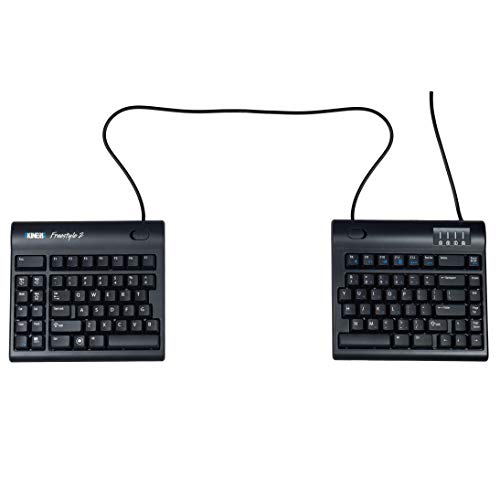
The Kinesis Freestyle2 is a split, adjustable ergonomic keyboard with a flat zero‑degree slope and low‑force membrane switches, offering customizable hand positioning via 9" or 20" separation cables. It provides driverless hotkeys, optional tenting accessories, and a tenkeyless layout with an embedded numeric keypad, aiming to reduce wrist, forearm, and shoulder strain.
Pros
Current
$99.00
Average
$92.56
Lowest
$89.00
Highest
$99.00
Lower = better sales rank

KINESIS
KINESIS

KINESIS

KINESIS

KINESIS

KINESIS

KINESIS

Logitech

Cloud Nine

Perixx

DeLUX

ProtoArc

RK ROYAL KLUDGE
![Perixx PERIBOARD-524B US, [Firmware Updated] Wired Ergonomic Split Keyboard - Up to 2 Ft Seperation - Adjustable Tilt Angle - Low Profile Membrane Keys - Black - US English](https://m.media-amazon.com/images/I/31-89Egm45L._SL500_.jpg)
Perixx

Mistel

R-Go Tools
Please sign in to leave a review
No reviews yet. Be the first to review!
Get notified when the price drops. Track this product on BigBangPrice, our price tracking partner.
Cons
From Expert Reviews
Praised by Experts
From User Reviews
Users Love
Users Complain About
Best For
Office workers spending 6+ hours daily at a computer, individuals with wrist or shoulder pain, tall or broad‑shouldered users needing a wide split, travelers and hybrid workers who need a portable ergonomic solution, programmers and writers with high typing volume, and users requiring extreme tenting for limited wrist mobility.
Not Ideal For
Users who prefer mechanical switches with tactile feedback, those needing built‑in backlighting or wireless connectivity, people who cannot or do not want to purchase additional tenting accessories, and users who find plastic build quality insufficient for premium expectations.
Expert Opinion
Professional ergonomics experts and tech reviewers praise the Freestyle2 for its exceptional adaptability, zero-degree slope, and compatibility with tenting accessories, noting measurable health benefits such as reduced neck discomfort and improved posture. They highlight its durable construction, plug‑and‑play simplicity, and the ability to customize hand positioning as key differentiators in the ergonomic keyboard market.
What Users Say
Everyday users consistently report reduced wrist and shoulder pain, especially with the 20" model for wider shoulders, and appreciate the familiar layout and embedded numeric keypad. Common complaints focus on the lack of built‑in tenting, the flat design causing forearm pronation for some, the plastic feel, absence of backlighting, and the need to manage the long cable.
Common Complaints
Flat untented design still causing forearm pronation, lightweight plastic feel, no backlighting, initial typing accuracy issues during adaptation, and cable management challenges due to the fixed 6‑foot USB cable.
How It Compares
vs. Microsoft Sculpt Ergonomic
Advantages
Disadvantages
Choose the Sculpt if you want an all‑in‑one ergonomic keyboard with built‑in tenting and palm rest, but prefer the Freestyle2 for greater split adjustability and portability.
vs. ErgoDox EZ
Advantages
Disadvantages
Opt for the ErgoDox EZ if you need mechanical keys and deep programmability; select the Freestyle2 for a more affordable, lightweight, and plug‑and‑play ergonomic solution.
vs. Logitech ERGO K860
Advantages
Disadvantages
The K860 is ideal for users who want a ready‑to‑use ergonomic keyboard with wireless and backlighting, while the Freestyle2 is better for those who need modular split distances and optional extreme tenting.