RK Royal Kludge
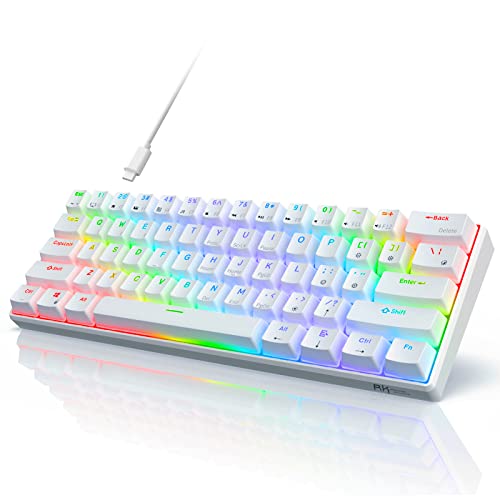
The Royal Kludge RK61 is a budget‑friendly 60% mechanical keyboard offering both wired USB‑C and Bluetooth 3.0 connectivity, with a choice of linear, tactile or clicky RK switches. Its compact design, decent battery life and multi‑device support make it attractive for portable and minimalist setups.
Pros
Cons
Current
$56.99
Average
$55.21
Lowest
$38.75
Highest
$85.99
Lower = better sales rank
RK ROYAL KLUDGE

AULA

Keychron

CORBOBO
Please sign in to leave a review
No reviews yet. Be the first to review!
Get notified when the price drops. Track this product on BigBangPrice, our price tracking partner.
From Expert Reviews
Praised by Experts
Criticized by Experts
From User Reviews
Users Love
Users Complain About
Best For
Budget‑conscious gamers, remote workers, students and travelers who need a lightweight, wireless‑capable 60% keyboard for laptops, tablets or phones; ideal for desk‑space optimization and multi‑device setups.
Not Ideal For
Users who require extensive ergonomic adjustments, dedicated media controls, or the lowest possible wireless latency for high‑level competitive gaming; also not suited for those who prefer premium keycap materials like PBT.
Expert Opinion
Professional reviewers praise the RK61 for its unbeatable price‑to‑performance ratio, solid typing feel and decent portability, noting a surprisingly premium feel for a budget board. However, they criticize the lack of modern Bluetooth, missing ergonomic features, and a lower build‑quality score compared with higher‑priced rivals, warning that wireless latency may be noticeable in competitive gaming.
What Users Say
Everyday users love the RK61’s compact footprint, smooth switches and the ability to toggle between multiple devices, calling it an excellent entry‑level mechanical keyboard. Common frustrations revolve around the short non‑braided cable, the absence of tilt legs and media keys, and a pairing process that many find confusing.
Common Complaints
Short non‑braided cable, lack of adjustable feet, outdated Bluetooth 3.0, ABS keycaps developing shine, and confusing Bluetooth pairing instructions.
What People Are Saying
“Perfect for small desks—saves so much space.”
“Switches are smooth and quiet (I have browns).”
“Love being able to switch between my laptop, tablet, and phone.”
“Backlighting is bright and looks great at night.”
“Great first mechanical keyboard for the price.”
“No wrist rest or tilt legs—typing gets tiring.”
“Bluetooth pairing was a hassle; had to look up instructions online.”
“Cable is too short and feels cheap.”
“After a few months, the spacebar and WASD keys started to shine.”
“No media controls—why not include them?”
How It Compares
vs. Redragon K530 Draconic
Advantages
Disadvantages
Choose the Draconic if you need ergonomic adjustments, media keys and newer Bluetooth; stick with the RK61 for the lowest cost and best portability.
vs. Keychron V4
Advantages
Disadvantages
Opt for the V4 when you prioritize premium materials and a solid wired experience; the RK61 remains the better choice for budget‑focused users who need wireless flexibility.