RK Royal Kludge
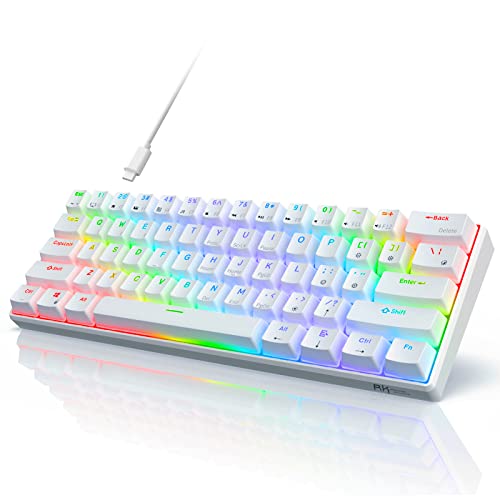
The Royal Kludge RK61 is a budget‑friendly 60% mechanical keyboard offering triple connectivity (wired USB‑C, Bluetooth 5.1, and 2.4 GHz dongle), hot‑swappable switches, and programmable lighting. It targets users who need a compact, portable layout with multi‑device support.
Pros
Cons
Current
$49.99
Average
$45.04
Lowest
$39.99
Highest
$69.99
Lower = better sales rank
Please sign in to leave a review
No reviews yet. Be the first to review!
Get notified when the price drops. Track this product on BigBangPrice, our price tracking partner.
From Expert Reviews
Praised by Experts
From User Reviews
Users Love
Users Complain About
Best For
Gamers, programmers, writers, and students who need a portable, space‑saving keyboard with wireless flexibility and the ability to swap switches; ideal for multi‑device setups (PC, Mac, tablet, phone) and DIY enthusiasts.
Not Ideal For
Users who require extensive ergonomic adjustments, premium keycap materials (e.g., PBT), full RGB lighting, or a heavier, more solid build for desk‑bound use.
Expert Opinion
Professional reviewers, such as EnosTech, praise the RK61 for its clean aesthetic, responsive RK switches, and solid performance that exceeds its low price point. The ice‑blue backlight and laser‑etched legends are highlighted as premium touches, while the lack of a steep learning curve makes the transition from full‑size keyboards smooth. Firmware inconsistencies are noted but not a major detractor.
What Users Say
Everyday users love the keyboard’s tiny footprint, hot‑swap capability, and seamless multi‑device connectivity, often calling it a perfect fit for cramped desks and travel. Common complaints revolve around the flat typing angle, shiny ABS caps, occasional Bluetooth pairing hiccups, and the absence of RGB on certain units.
Common Complaints
Lack of adjustable feet, ABS caps becoming glossy, Bluetooth pairing issues on older firmware, limited RGB options, short USB‑C cable, and older models shipping with Micro‑USB.
What People Are Saying
“Perfect size for my small desk—finally freed up mouse space.”
“Wish it had tilt legs—typing feels awkward flat on the desk.”
How It Compares
vs. Keychron V4
Advantages
Disadvantages
Choose Keychron V4 if you prioritize premium keycaps and open‑source firmware and don’t need wireless; stick with RK61 for travel and multi‑device use.
vs. Keychron V2
Advantages
Disadvantages
Keychron V2 is better for users who want a larger layout with full RGB and open‑source software, while RK61 remains the go‑to for compact, wireless, budget‑focused users.
Best Budget Gaming Keyboards Under $50
roundup