Koorui
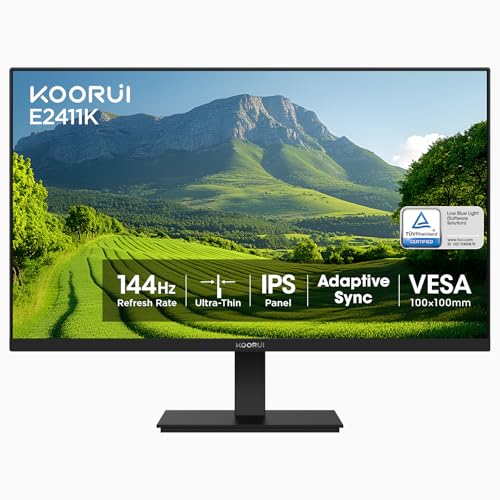
The KOORUI E2411K is a 24‑inch Full HD IPS monitor that offers a 144 Hz refresh rate and eye‑care features at a budget‑friendly price. It targets gamers and everyday users who need smooth motion, vibrant colors, and flexible mounting options.
Pros
Cons
Current
$89.99
Average
$100.11
Lowest
$70.49
Highest
$159.29
Lower = better sales rank

HUANUO
KOORUI

KOORUI

KOORUI

KTC

acer

Viyivwine

Dell

KOORUI

KOORUI
Please sign in to leave a review
No reviews yet. Be the first to review!
Get notified when the price drops. Track this product on BigBangPrice, our price tracking partner.
From Expert Reviews
Praised by Experts
Criticized by Experts
From User Reviews
Users Love
Users Complain About
Best For
Casual and competitive gamers on a budget who need 144 Hz performance, remote workers or students needing an eye‑friendly display, console gamers (PS5, Xbox) seeking a compact 1080p monitor, and multimedia viewers who value color vibrancy and wide viewing angles.
Not Ideal For
Professional color‑critical work such as photo or video editing, users requiring extensive connectivity like DisplayPort or USB hubs, and anyone who expects built‑in speakers.
Expert Opinion
Professional reviewers note that the E2411K delivers entry‑level gaming performance with an IPS panel that provides superior color and viewing angles compared to typical VA budget monitors. While its feature set—144 Hz, FreeSync, and eye‑care technologies—matches recommendations for affordable gaming displays, the lack of DisplayPort and USB connectivity is seen as a drawback for users seeking more versatile setups.
What Users Say
Everyday users praise the monitor for its affordable price, vivid colors, thin bezels, and smooth 144 Hz gameplay, especially when Adaptive Sync is enabled. Common complaints revolve around the limited tilt range, occasional out‑of‑box damage, and the need to adjust OverDrive to eliminate ghosting, as well as the absence of built‑in speakers and USB ports.
Common Complaints
Tilt mechanism often feels limited or non‑functional, some units arrive with physical damage, ghosting or motion blur appears until OverDrive is enabled, and the monitor lacks USB ports and built‑in speakers.
What People Are Saying
“Out of the box, there was noticeable ghosting... until I turned OD on!”
“No USB attachments — couldn’t plug my mouse in, which was inconvenient.”
How It Compares
vs. KOORUI 24E4
Advantages
Disadvantages
Choose the 24E4 if you prioritize higher refresh rates and deeper blacks; stick with the E2411K for better color and viewing angles.
vs. onn 24" 180Hz
Advantages
Disadvantages
The onn model suits ultra‑high‑refresh gamers who accept VA trade‑offs; the E2411K is better for those valuing IPS color fidelity.
vs. MSI G242LW
Advantages
Disadvantages
Select the MSI G242LW if you need the fastest response and DisplayPort; the E2411K remains a solid, more affordable IPS option.
Best Budget Desktop Displays Under $200
roundup