Razer
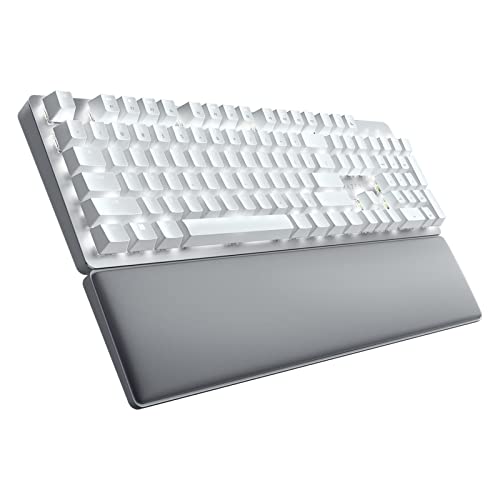
The Razer Pro Type Ultra Wireless Mechanical Keyboard is a full‑size, aluminum‑capped keyboard aimed at productivity professionals, featuring low‑actuation linear Razer Yellow switches, long‑lasting battery life, and multi‑device wireless connectivity. It markets itself as a silent mechanical keyboard but its stabilizer noise and ABS keycaps draw mixed reactions.
Pros
Current
$158.99
Average
$153.88
Lowest
$109.99
Highest
$199.99
Lower = better sales rank
Please sign in to leave a review
No reviews yet. Be the first to review!
Get notified when the price drops. Track this product on BigBangPrice, our price tracking partner.
Cons
From Expert Reviews
Praised by Experts
Criticized by Experts
From User Reviews
Users Love
Users Complain About
Best For
Fast typists and productivity power users who need low‑actuation linear switches, hybrid workers who switch between multiple devices, private or semi‑private office settings where some noise is acceptable, gamers who also work and want a single high‑performance keyboard, and anyone who prefers linear switches over tactile or clicky options.
Not Ideal For
Open‑plan offices or shared workspaces where the ~50 dBA noise is disruptive, users who require absolute silence, those who prefer low‑profile or clicky switches, people who want hot‑swappable switches or PBT keycaps, and budget‑conscious buyers unwilling to pay a premium for premium materials.
Expert Opinion
Professional reviewers praise the Pro Type Ultra for its low‑actuation linear switches, long battery endurance, premium aluminum build and smooth multi‑device connectivity, often awarding it high scores for performance and ergonomics. However, they consistently criticize the noise from stabilizers and the ABS keycaps, noting that the keyboard is not as silent as marketed and that the price is steep for an office‑focused device.
What Users Say
Everyday users love the fast, comfortable typing experience, the plush wrist rest, and the ability to toggle between several devices, but many echo the professional concerns about audible clicks, fingerprint‑prone ABS caps, a wrist rest that drifts, and occasional shortfalls in real‑world battery life. The software’s mandatory account and ads also draw frequent complaints.
Common Complaints
Noise level (especially stabilizer ping and spacebar rattle), ABS keycaps fingerprinting and wear, unattached wrist rest shifting, intrusive Synapse software with ads and mandatory account, and battery life occasionally not meeting the advertised 214 hours.
How It Compares
vs. Logitech MX Keys S
Advantages
Disadvantages
Choose MX Keys S for ultra‑quiet office work and extreme battery life; choose Razer for mechanical feel and productivity‑oriented ergonomics.
vs. Keychron V5 Max
Advantages
Disadvantages
Pick Keychron V5 Max if you value switch customizability and RGB; pick Razer if you prefer a solid aluminum chassis, longer battery life, and a built‑in wrist rest.
vs. Logitech G915 TKL
Advantages
Disadvantages
Opt for G915 TKL for a quieter, lightweight low‑profile experience; opt for Razer Pro Type Ultra for full‑size layout, premium build, and productivity‑focused features.