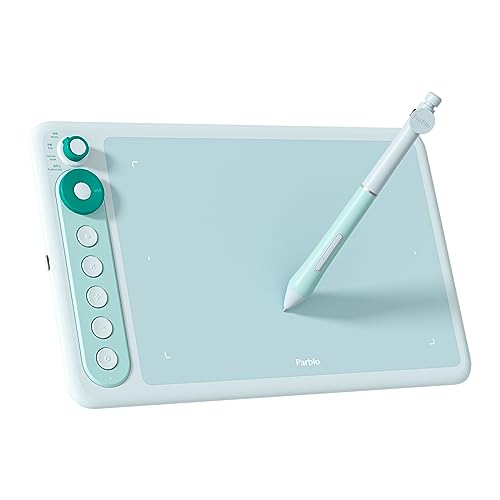
Parblo
The Parblo Intangbo X7 is a compact, entry‑level graphics tablet with a 7.2 × 4.5‑inch active area, ultra‑thin 7.2 mm profile and a battery‑free S01 pen offering 8192 pressure levels, ±60° tilt and a fast 266 RPS report rate. It connects via USB‑C and supports Windows, macOS, Android, HarmonyOS and Chrome OS, making it a portable option for beginners and mobile creators.
Pros
Current
$59.99
Average
$54.30
Lowest
$53.99
Highest
$59.99
Lower = better sales rank

XP-PEN

HUION

XP-Pen
HUION

HUION

HUION

XP-Pen

GAOMON

XPPen

XP-Pen

XPPen

XP-Pen

XPPen

XENCELABS
Please sign in to leave a review
No reviews yet. Be the first to review!
Get notified when the price drops. Track this product on BigBangPrice, our price tracking partner.
Cons
From Expert Reviews
Praised by Experts
Criticized by Experts
From User Reviews
Users Love
Users Complain About
Expert Opinion
Professional reviewers commend the Intangbo X7 for its sleek, ultra‑thin chassis, high‑resolution 5080 LPI sensor, 8192 pressure levels and fast 266 RPS report rate, which together deliver a surprisingly capable drawing experience for its price. They also appreciate the USB‑C connectivity and the Android/Chromebook mode switch, but consistently note that the limited active area and lack of rubber feet keep it from being a serious contender for power users.
What Users Say
Everyday users love how portable and lightweight the X7 is, praising its plug‑and‑play setup and the ergonomic, battery‑free pen with handy side buttons. The most common complaints revolve around the small drawing surface, the tablet sliding on desks, and occasional confusion over weight specifications.
Common Complaints
Small active area limiting drawing comfort, bottom surface sliding without rubber feet, inconsistent weight/thickness data across listings, and absence of a built‑in stand.
How It Compares
vs. XP-Pen Star G640
Advantages
Disadvantages
Choose the X7 for a larger area, faster report rate and USB‑C; stick with the G640 if you prefer a proven micro‑USB design and lower price.
vs. Huion HS64
Advantages
Disadvantages
Pick the Intangbo X7 if tilt, faster reporting and cross‑platform USB‑C are priorities; opt for the HS64 if you need more shortcut keys and a marginally larger drawing surface.
