HP
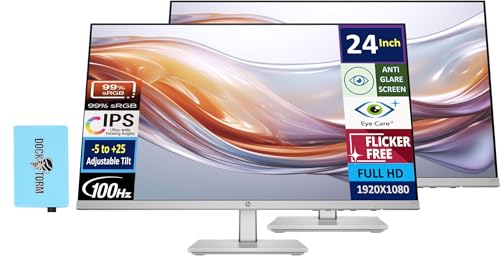
[Features]: 24-inch FHD IPS (1920x1080), 1x HDMI 1.4, 1x VGA, -5 to +25 degrees Adjustable Tilt, Flicker Free, Anti-glare, No VESA Support, Brightness 300 nits. [Life-like color. Deeper detail] – Upgrade your every day with a vibrant 24" FHD monitor. Enjoy all you see as it was meant to be seen with an enhanced 99% sRGB, and 1500:1 contrast ratio. [Thin. Light. Exactly right] – Discover a beautiful 24" FHD monitor with a thin-and-light design and simplified cable management that fits your style and maximizes your space. Its sleek, 3-sided ultra-thin bezel lets you stay immersed and focused on what’s on screen. Pair a second monitor to create a virtually seamless expansive view, while keeping every device connected and ready with HDMI and VGA ports.
The HP 24" 100 Hz IPS FHD monitor offers a smooth 100 Hz refresh rate, vibrant IPS colors covering 99% sRGB, and ergonomic height‑adjustable stand, targeting productivity and light‑gaming users while emphasizing eye comfort and sustainability.
Pros
Lower = better sales rank
Please sign in to leave a review
No reviews yet. Be the first to review!
Get notified when the price drops. Track this product on BigBangPrice, our price tracking partner.
Cons
From Expert Reviews
Praised by Experts
Criticized by Experts
From User Reviews
Users Love
Users Complain About
Best For
Remote and hybrid workers who need ergonomic flexibility and eye‑comfort; students and educators for research and video calls; casual content consumers and light gamers; eco‑conscious buyers who value recycled materials and energy certifications. Ideal for dual‑monitor office setups, home offices with long screen time, and secondary media displays.
Not Ideal For
Competitive gamers requiring high refresh rates and adaptive sync; professional color‑grading or photography work needing wider gamuts like DCI‑P3 or Adobe RGB; users with space‑constrained desks that rely on VESA mounting or monitor arms.
Expert Opinion
Professional reviewers commend the HP 24" monitor for its 100 Hz refresh rate, IPS color fidelity, and ergonomic stand, noting that HP Eye Ease offers effective blue‑light reduction without tint. However, they criticize the outdated connectivity options and absence of VESA mounting, calling it a missed chance to broaden its appeal to gamers and minimalist desk setups.
What Users Say
Everyday users praise the monitor’s bright, colorful display, smooth 100 Hz performance, and especially the height‑adjustable stand and eye‑comfort features. Common complaints focus on the lack of VESA mounting, limited ports (no DisplayPort or HDMI 2.0), modest built‑in speakers, and occasional backlight uniformity issues.
Common Complaints
Missing VESA mount, limited HDMI 1.4/VGA connectivity, underpowered built‑in speakers, minor ghosting from 5 ms response time, and occasional backlight bleed or brightness uniformity problems.
What People Are Saying
“The screen is bright, colors pop, and the 100 Hz makes everything feel snappier.”
“Love the height adjustment — finally a monitor that fits my seated and standing positions.”
“HP Eye Ease really helps with eye fatigue during long Zoom meetings.”
“Looks great in a dual-monitor setup — the thin bezels make it nearly seamless.”
“Appreciate the eco-friendly packaging and recycled materials.”
“No VESA mount is a dealbreaker — I can’t use my monitor arm.”
“Wish it had HDMI 2.0 or DisplayPort for better signal quality.”
“Speakers are okay for system sounds, but you’ll need external ones for videos.”
“VGA port feels outdated — why include it instead of a second HDMI?”
“Some backlight bleed in dark rooms, especially at the bottom edge.”
How It Compares
vs. Dell S2421HS
Advantages
Disadvantages
Choose HP for smoother motion and better ergonomics; choose Dell if you need VESA mounting.
vs. AOC 24G2
Advantages
Disadvantages
Pick AOC for competitive gaming; pick HP for office ergonomics and eye comfort.
vs. ViewSonic VA2432
Advantages
Disadvantages
Select HP for smoother refresh and ergonomic features; select ViewSonic if VESA mounting is essential.