J-Tech Digital
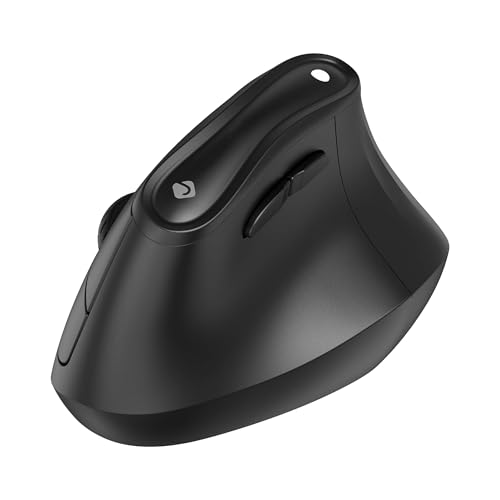
The J‑Tech Digital Wireless Vertical Ergonomic Mouse offers a vertical handshake grip, dual 2.4 GHz and Bluetooth 5.0 connectivity, and up to 4000 DPI adjustable sensitivity. It targets right‑handed users seeking wrist‑friendly ergonomics at a budget‑friendly price, with optional rechargeable (V638W) or AAA‑battery (M001) power options.
Pros
Cons
Current
$23.65
Average
$18.16
Lowest
$15.99
Highest
$24.89
Lower = better sales rank
Please sign in to leave a review
No reviews yet. Be the first to review!
Get notified when the price drops. Track this product on BigBangPrice, our price tracking partner.
From Expert Reviews
Praised by Experts
From User Reviews
Users Love
Users Complain About
Best For
Office professionals, remote workers, freelancers, and students who spend long hours at a computer and want an affordable ergonomic solution; especially suitable for users with RSI or carpal‑tunnel who need multi‑device connectivity and a vertical grip.
Not Ideal For
Gamers needing high polling rates, left‑handed users, and individuals with very large hands (unless using the V638W variant).
Expert Opinion
Professional reviewers and editors highlight the mouse’s vertical design as a key differentiator for users with carpal tunnel or RSI, noting its durable matte build and responsive optical sensor. They commend the removable palm rest and USB‑C charging on the V638W as modern, ergonomic touches, while positioning it as a budget‑friendly alternative to premium ergonomic mice.
What Users Say
Everyday users consistently praise the mouse for alleviating wrist pain, smooth tracking, and hassle‑free plug‑and‑play setup. Common themes include appreciation for the sleek color options and occasional complaints about the learning curve, the inconvenient receiver storage in the battery compartment, soft button feel, and the lack of a left‑handed version.
Common Complaints
Adjustment period to the vertical grip, inconvenient USB‑receiver storage inside the battery compartment, soft/mushy button clicks, and the absence of a left‑handed model.
What People Are Saying
“Many users report reduced wrist pain and improved comfort after switching from traditional mice.”
“Plug-and-play functionality works instantly with laptops and desktops.”
“Clicks are described as slightly soft or mushy compared to premium brands like Logitech.”
How It Compares
vs. Logitech MX Vertical
Advantages
Disadvantages
Choose J‑Tech for budget‑friendly ergonomics and multi‑device flexibility; choose Logitech MX Vertical for premium build and higher polling rate.
vs. Anker Vertical Ergonomic Mouse
Advantages
Disadvantages
J‑Tech is the better choice when you need higher DPI and multi‑device support at a lower price; Anker may suit users who prefer a simpler design.
vs. Microsoft Sculpt Ergonomic Mouse
Advantages
Disadvantages
Select J‑Tech for a true vertical ergonomic grip and higher DPI; opt for Microsoft Sculpt if you prefer a traditional ergonomic shape with a fixed palm rest.