Fusion5
Get notified when the price drops. Track this product on BigBangPrice, our price tracking partner.
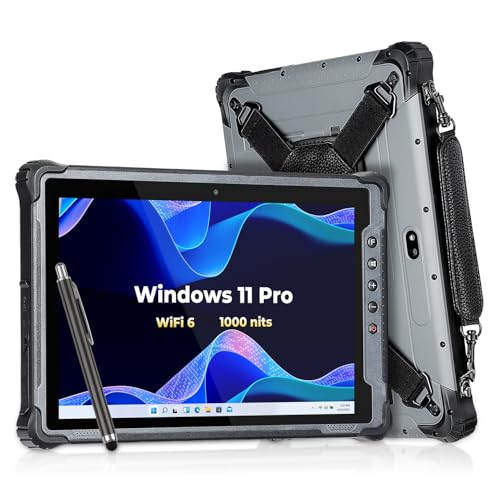
The Fusion5 FWIN232 PRO N5 is a rugged 10.1" Windows 11 tablet powered by an Intel N100 processor, offering full PC functionality in a lightweight, ultra‑slim form factor with expandable storage and multiple I/O ports.
Pros
Cons
Current
$439.99
Average
$407.89
Lowest
$399.99
Highest
$439.99
Lower = better sales rank
MUNBYN
Please sign in to leave a review
No reviews yet. Be the first to review!
From Expert Reviews
Praised by Experts
Criticized by Experts
From User Reviews
Users Love
Users Complain About
Best For
Remote workers, field technicians, and students who need a durable, lightweight Windows device for data entry, inspections, presentations, or online classes. Ideal for use as a portable point‑of‑sale terminal, secondary work device, or mini‑laptop when paired with a docking keyboard.
Not Ideal For
Heavy gamers, content creators, or power users who require high‑end CPU/GPU performance, long battery endurance, or a premium metal chassis. Also not suited for users who prefer USB‑C charging or need high‑resolution cameras.
Expert Opinion
Professional reviewers note that the Fusion5’s Intel N100 processor delivers efficient performance for everyday tasks, while the LPDDR5 memory and 1920×1200 IPS panel give it a responsive feel and sharp visuals. They appreciate the full Windows 11 experience, which outclasses many ARM tablets, but caution that the device’s modest CPU and small screen can feel limiting for power users or heavy multitasking.
What Users Say
Everyday users praise the tablet’s price‑to‑performance ratio, describing it as a "full PC in tablet form" that runs Office, Chrome, and Zoom smoothly. Expandable storage and keyboard docking are frequently highlighted as wins, while the S‑mode requirement, non‑USB‑C charging, and short battery life under load generate consistent complaints.
Common Complaints
Windows 11 S mode setup confusion. Coaxial power connector inconvenience. Battery life dropping below 5 hours during intensive use. Initial boot issues that needed firmware updates
What People Are Saying
“"bang for the buck"”
“"full PC in tablet form"”
“"annoying but manageable" (referring to switching out of S mode)”
How It Compares
vs. Microsoft Surface Go 4
Advantages
Disadvantages
Choose Fusion5 for ruggedness and storage flexibility; choose Surface Go 4 for premium feel and longer battery.
vs. Lenovo Miix 510
Advantages
Disadvantages
Fusion5 is better for users needing ruggedness and versatile ports; Miix 510 suits those preferring a more conventional laptop‑tablet feel.
vs. Samsung Galaxy Book4 360
Advantages
Disadvantages
Select Fusion5 for durability and expandability; select Galaxy Book4 360 for premium display and battery endurance.