Samsung
Get notified when the price drops. Track this product on BigBangPrice, our price tracking partner.
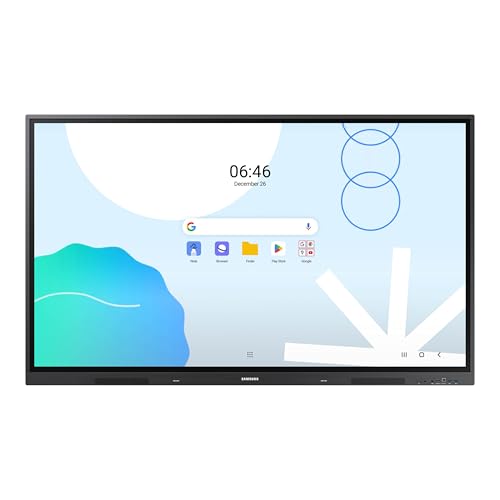
UNLIMITED LEARNING POSSIBILITIES: Introducing the Interactive Display WAD series, which offers engaging educational experiences. Based on Android OS, it provides a familiar and intuitive user experience. AN INTUITIVE UX THAT FITS YOUR NEEDS: The WAD series offers familiarity to its users. It’s compatible with other Android devices and provides a variety of widgets and an easily customizable home screen. EFFORTLESS ACCESS TO GOOGLE SERVICES: With an EDLA certification, the WAD series supports a variety of Google services like Google Play, YouTube, and Google Classroom.
The Samsung 65” WAD Interactive Display is an Android 13‑powered 4K touchscreen designed for education and business collaboration, featuring EDLA certification for full Google service access and a suite of connectivity options including a 3‑in‑1 USB‑C and HDMI‑out. It supports up to 40 simultaneous touch points, dual‑pen input, and optional Windows integration via an OPS module.
Pros
Current
$1,598.94
Average
$1,598.94
Lowest
$1,598.94
Highest
$1,598.94
Lower = better sales rank
Please sign in to leave a review
No reviews yet. Be the first to review!
Cons
From Expert Reviews
Praised by Experts
Criticized by Experts
From User Reviews
Users Love
Best For
Large classrooms, lecture halls, and collaborative corporate meeting spaces that rely heavily on Google Workspace and need multi‑user touch interaction.
Not Ideal For
Organizations that require a native Windows environment out of the box, lightweight installations, advanced audio setups, or NFC‑based device pairing.
Expert Opinion
Professional reviewers commend the WAD display for its extensive connectivity, especially the 3‑in‑1 USB‑C, and its dual‑pen, 40‑point touch capabilities that boost classroom interactivity. The EDLA certification is repeatedly highlighted as a differentiator that guarantees stable access to Google services. However, critics point out that the newer WAF series offers Android 14 and a more powerful processor, making the WAD feel a step behind in software freshness.
What Users Say
Everyday users rave about the seamless Google Classroom experience, the convenience of dual pens, and the bright 4K picture that remains visible in bright environments. The HDMI‑Out feature is frequently mentioned as a practical way to extend content to larger rooms, and the built‑in DMS is praised for reducing IT workload.
What People Are Saying
“The Google Classroom integration is flawless—students join instantly.”
“Love the dual pens—no more stopping to change colors during lessons.”
“HDMI-Out lets us project to a second screen in the back of the classroom.”
“The 4K screen is bright and clear even in sunny rooms.”
How It Compares
vs. Samsung WAF series
Advantages
Disadvantages
Choose the WAD for maximum connectivity and Google EDLA certification; choose the WAF if you need the latest Android version and a newer processor.

Best Interactive Displays with Pen Support
roundup