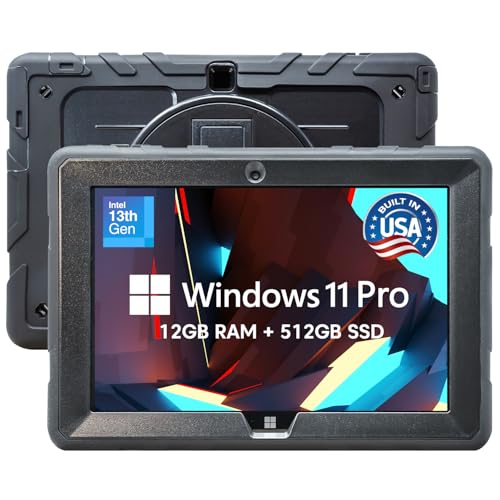
Fusion5
The Fusion5 FWIN232 PRO N5 is a U.S.-assembled 10.1" rugged Windows 11 Pro tablet powered by an Intel 13th‑Gen N100 processor. It offers expandable storage, full‑size USB ports, and a durable G+G touchscreen, targeting professional and field‑service use.
Pros
Cons
Current
$451.24
Average
$541.53
Lowest
$451.24
Highest
$599.99
Lower = better sales rank
Please sign in to leave a review
No reviews yet. Be the first to review!
Get notified when the price drops. Track this product on BigBangPrice, our price tracking partner.
From Expert Reviews
Praised by Experts
Criticized by Experts
From User Reviews
Users Love
Users Complain About
Best For
Field service workers (technicians, inspectors, delivery staff) needing a rugged Windows device for data entry, barcode scanning, and reporting; remote/hybrid professionals requiring full Windows apps and peripheral support; educators and students who need a full Windows environment for coding and legacy software; small business owners and government agencies that value U.S. assembly and expandable storage. Specific use cases include mobile POS, inventory management, on‑site inspections, light CAD viewing, and classroom computing.
Not Ideal For
Users who prioritize long battery life or all‑day outdoor use, consumers needing LTE connectivity, gamers or professionals requiring high‑end graphics performance, and buyers expecting an included keyboard or ultra‑light tablet form factor.
Expert Opinion
Professional reviewers note that the Fusion5 tablet’s combination of Windows 11 Pro, full‑size USB ports, and a rugged G+G touchscreen makes it a strong contender for enterprise and field‑service environments, especially where domestic assembly is valued. However, they point out the absence of LTE and the modest battery life as significant limitations for truly mobile use cases.
What Users Say
Everyday users appreciate the tablet’s durability, native Windows experience, and the convenience of full USB connectivity, often highlighting its suitability for warehouse and office tasks. Common complaints focus on short battery life, insufficient screen brightness outdoors, and the lack of an included LTE option or keyboard.
Common Complaints
Short 5–7 hour battery life, dim screen in bright sunlight, no LTE option, and the docking keyboard being sold separately.
What People Are Saying
“Perfect for my warehouse job—durable and runs all my Windows apps.”
“Love that it has a full USB port—connects to my scanner and printer easily.”
“Fast boot time and smooth performance with Office and Zoom.”
“The fact that it’s made in the USA gives me peace of mind.”
“Battery dies too fast when using Wi‑Fi and camera all day.”
“Screen is good but not very bright outdoors.”
“Wish it had LTE for remote sites without Wi‑Fi.”
“Docking keyboard is sold separately—should be included.”
How It Compares
vs. Microsoft Surface Go 4
Advantages
Disadvantages
Choose Fusion5 for rugged, expandable, and enterprise‑focused needs; choose Surface Go for lighter, brighter, and LTE‑enabled scenarios.
vs. Lenovo MIIX 510
Advantages
Disadvantages
Fusion5 is better for users needing ruggedness, U.S. assembly, and Windows 11 Pro; Lenovo MIIX suits those prioritizing higher RAM and integrated keyboard options.
vs. Samsung Galaxy Tab S9 (Windows Emulation via App)
Advantages
Disadvantages
Select Fusion5 when native Windows and ruggedness are essential; choose Tab S9 for premium media consumption, longer battery, and cellular connectivity.