Wacom Cintiq DTK2200
Score: 79/100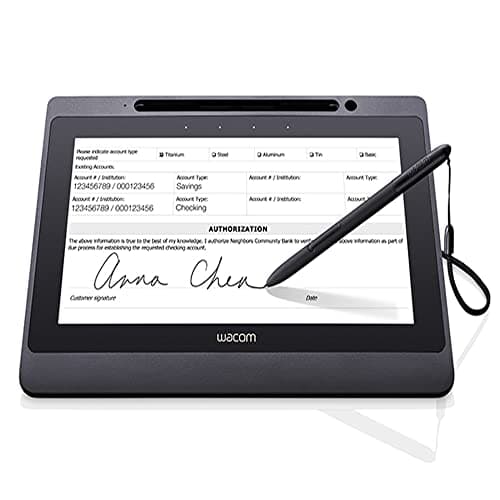
Wacom DTU-1141B
Score: 58/100Rankings
The Wacom DTK2200 Cintiq 22HD is a 21.5" Full HD pen display targeting professional artists who need a large drawing surface and solid pen performance. It offers 2048 pressure levels, an adjustable stand and extensive shortcut keys, but lacks touch input and uses an older DVI connection.
The Wacom DTU-1141B is a 10.1" Full-HD interactive pen display designed for secure electronic signature capture. It combines a battery-free EMR pen, single-cable USB-2.0 connectivity and built-in encryption, but its modest brightness, lack of tilt and small active area limit artistic use.
| Attribute | Wacom Cintiq DTK2200 | |
|---|---|---|
21.5 inchesbest | 10.1 inches | |
230 nitsbest | 200 nits | |
1,000best | 1,000best | |
| ↓ lower better | 14 msbest | 25 ms |
72 %best | — | |
1best | 1best | |
— | 5 Wbest | |
| ↓ lower better | — | 1 Wbest |
Click an attribute name to sort · Green = best, red = worst (relative to this comparison)
| Attribute | Wacom Cintiq DTK2200 | |
|---|---|---|
Display(3) | ||
Screen Size (inches) | 21.5 inches | 10.1 inches |
Brightness (nits) | 230 nits | 200 nits |
Response Time (ms) | 14 ms | 25 ms |
Warranty(1) | ||
Warranty Period (years) | 2 years | 1 years |
Build & Design(1) | ||
Weight (kg) | 8.5 kg | 1.3 kg |
Products in the top-left offer the best value (high score, low price).
Professional reviewers praise the Cintiq 22HD for its natural drawing experience, large yet affordable screen size, and precise tilt-and-pressure pen performance, while noting the outdated DVI-only video input and lack of touch as drawbacks for modern workflows.
Everyday users love the natural feel, large active area, and workflow shortcuts provided by the ExpressKeys and touch strips, but many complain about the grainy screen texture, DVI-only connectivity, occasional driver glitches, and heat buildup during long sessions.
Professional reviewers praise the DTU-1141B for its precise, responsive EMR pen, vibrant full-HD display and solid build quality, highlighting its suitability for business and enterprise signature capture. They note the absence of tilt support and the modest 200 nits brightness as drawbacks, especially for artistic work, and point out the reliance on USB 2.0 rather than newer connectivity standards.
Everyday users consistently commend the device's natural, paper-like writing feel, the convenience of a battery-free pen, and the straightforward USB-only setup. Common complaints revolve around the dim screen in bright settings, occasional driver hiccups, and the missing tilt function, with a few noting that the ExpressKeys can be too sensitive.
