
Wacom One HD
Score: 77/100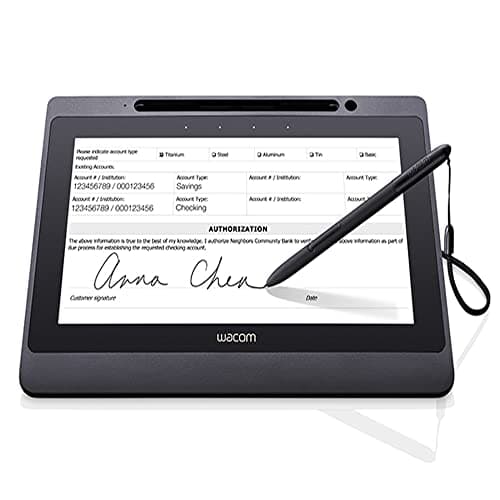
Wacom DTU-1141B
Score: 58/100Rankings
The Wacom One HD Creative Pen Display is a compact 13.3" Full HD pen display aimed at beginners and students. It offers a straightforward single-cable setup, a battery-free pen, and useful software bundles, but lacks multi-touch, adjustable tilt and extensive shortcut keys.
The Wacom DTU-1141B is a 10.1" Full-HD interactive pen display designed for secure electronic signature capture. It combines a battery-free EMR pen, single-cable USB-2.0 connectivity and built-in encryption, but its modest brightness, lack of tilt and small active area limit artistic use.
| Attribute | | |
|---|---|---|
13.3 inchesbest | 10.1 inches | |
200 nitsbest | 200 nitsbest | |
1,000best | 1,000best | |
| ↓ lower better | — | 25 msbest |
91.7 %best | — | |
2best | 1 | |
10 Wbest | 5 W | |
| ↓ lower better | — | 1 Wbest |
Click an attribute name to sort · Green = best, red = worst (relative to this comparison)
| Attribute | | |
|---|---|---|
Display(1) | ||
Screen Size (inches) | 13.3 inches | 10.1 inches |
Connectivity(1) | ||
USB Ports | 2 | 1 |
Power & Energy(1) | ||
Power Consumption (W) | 10 W | 5 W |
Build & Design(1) | ||
Weight (kg) | 2.0 kg | 1.3 kg |
Products in the top-left offer the best value (high score, low price).
Professional reviewers praise the Wacom One HD for its straightforward setup, accurate low-latency pen response, and solid software bundle, positioning it as a strong entry-level option for students and hobbyists. However, they note the absence of multi-touch, limited ergonomics, and a short warranty as notable drawbacks compared to higher-end models.
Everyday users overwhelmingly rate the device 4-5 stars, highlighting its natural drawing feel, ease of use, and portability. Common praise centers on the battery-free pen and useful software trials, while recurring complaints involve occasional lag, driver hiccups, and confusion about the need for a host computer.
Professional reviewers praise the DTU-1141B for its precise, responsive EMR pen, vibrant full-HD display and solid build quality, highlighting its suitability for business and enterprise signature capture. They note the absence of tilt support and the modest 200 nits brightness as drawbacks, especially for artistic work, and point out the reliance on USB 2.0 rather than newer connectivity standards.
Everyday users consistently commend the device's natural, paper-like writing feel, the convenience of a battery-free pen, and the straightforward USB-only setup. Common complaints revolve around the dim screen in bright settings, occasional driver hiccups, and the missing tilt function, with a few noting that the ExpressKeys can be too sensitive.
“great, no-frills drawing tablet for budding artists”
“great starter tablet for digital art”
“natural drawing feel and easy setup”
