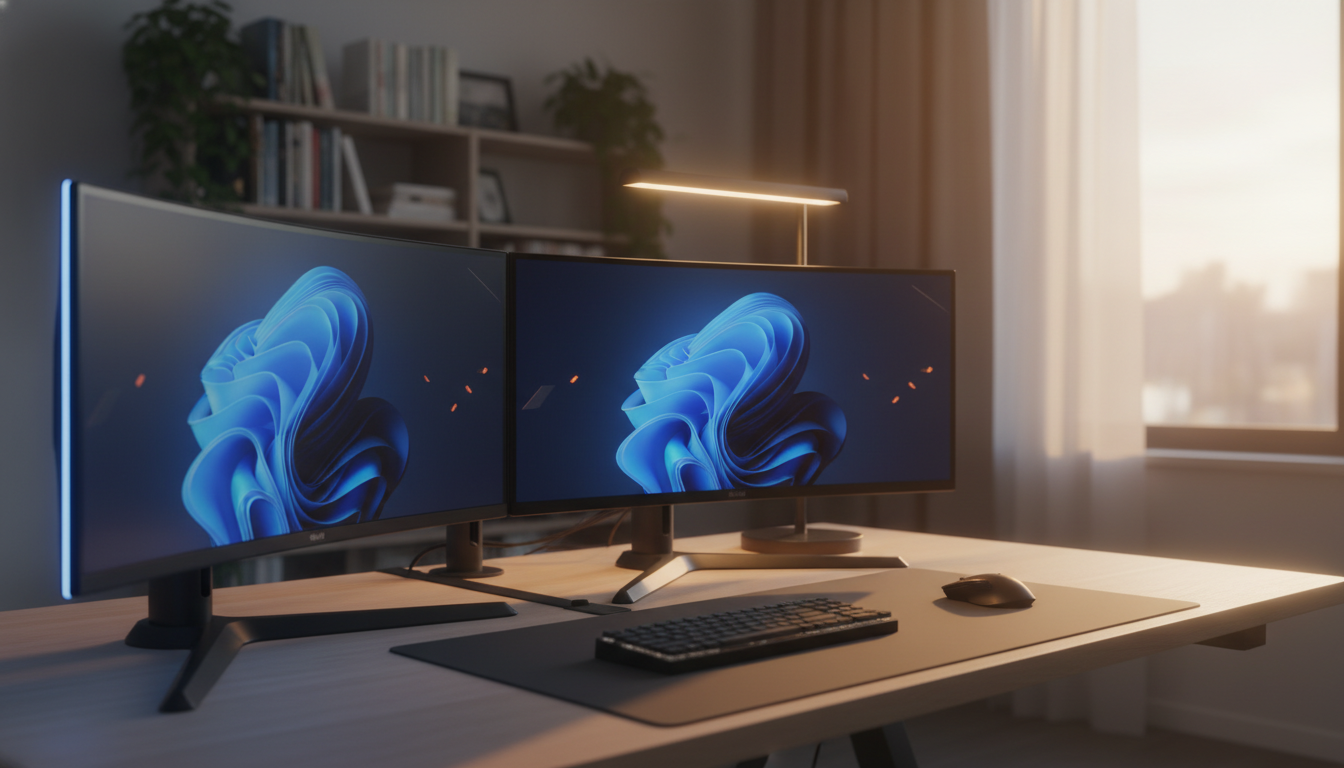
Finding a solid monitor under $150 can feel like hunting for a needle in a haystack, especially when you want good size, smooth motion and at least a 4.4‑star rating. We compared 10 monitors that all sit below $150, spreading them across three price tiers. The budget tier includes the Sansui 22‑inch ($67.47), Philips 221V8LB ($69.90), Sansui 24‑inch ($79.99) and Koorui 24‑inch ($79.99). Mid‑range options are the Sansui 24‑inch ($79.99) and the Sceptre 24‑inch Prime ($87.97). Premium picks are the Sceptre E275W ($98.97), Sceptre Curved 27‑inch Prime ($99.97), Sceptre Curved 27‑inch Gaming ($104.94) and HP Series 3 ($119.99).
Every model holds at least a 4.4‑star rating, with the HP Series 3 topping the pack at 4.6/5 from 25,462 reviews. If you crave a larger, immersive screen, the Sceptre Curved 27‑inch Gaming Monitor delivers a 100 Hz refresh rate and weighs 8.33 lb for $104.94, while the Philips 221V8LB offers a crisp 102 PPI at a modest $69.90. For those who need a lightweight option, the Sceptre Curved 27‑inch Prime Monitor comes in at just 5.5 lb and still hits up to 100 Hz.
Below we break down each tier and highlight which models shine for gaming, office work or mixed‑use scenarios, so you'll pick the right screen for your desk.

Sceptre Curved 27-inch Gaming Monitor
With a 100 Hz refresh rate, it delivers smoother motion for gaming and video at a budget price.

Sceptre Curved 27-inch Prime Monitor
Great for tight desks or small spaces, its compact 15.09‑inch depth fits snugly, and it’s $5 cheaper than the Best Overall model.

HP Series 3
The ultra‑slim 57 mm depth lets you stack monitors without crowding your desk, a niche the Sceptre models lack, though it comes at $119.99.
Also considered
Score Analysis
Key score advantages vs. runner-up (Sceptre Curved 27-inch)
Price Range
Sceptre Curved 27-inch Gaming Monitor
$104.94
Sceptre Curved 27-inch Prime Monitor
$99.97
HP Series 3
$119.99

Philips 221V8LB
$69.90
Koorui 24-inch Monitor
$79.99

Sceptre E275W
$98.97

Sceptre 24-inch Prime Monitor
$87.97

Sansui Computer Monitor 22-inch
$67.47

Sansui Computer Monitor 24-inch
$79.99

Sansui 24-inch Monitor
$79.98
Spec Comparison
TL;DR: The Sceptre 27‑inch curved VA monitor offers a 1500R curve, 100 Hz refresh and built‑in speakers for under $110, but its low 82 PPI pixel density can make text look fuzzy.
The standout feature is the 1500R curvature on a full‑size 27‑inch VA panel, delivering an immersive field of view that many users say eases eye strain. It runs at a 100 Hz refresh rate and an 8 ms response time, while the blur‑reduction mode adds a 1 ms boost for smoother motion.
Compared with the other nine monitors in this budget roundup, this model is heavier than the Sceptre Curved 27‑inch Prime (5.5 pounds) but lighter than the Sceptre E275W (8.8 pounds). Its 27‑inch screen matches the Prime and E275W, out-sizing the 24‑inch options. The 100 Hz refresh aligns with the Prime’s “up to 100 Hz” spec and exceeds the 75 Hz panels found in the E275W and several 24‑inch rivals.
Reviewers love the immersive curve and the VA panel’s deep blacks, noting the 100 % sRGB coverage produces vivid colors for movies and casual games. Reviewers praise the built‑in blue‑light filter, rated up to 40 % reduction, for reducing eye fatigue during long sessions. However, users frequently mention the low 82 PPI pixel density makes text appear fuzzy, and the 8 ms response time leads to noticeable ghosting. Reviewers also cite the lack of adaptive sync as a source of occasional screen tearing.
Pros
Cons
Best for: Budget‑conscious gamers and media lovers who want a large curved display with decent refresh and built‑in audio.
Avoid if: Competitive gamers, professionals needing razor‑sharp text or color‑critical accuracy, and anyone who cannot tolerate occasional ghosting.
TL;DR: At $99.97, the Sceptre Curved 27‑inch Prime offers a 1500R VA panel with 1080p resolution, up to 100 Hz refresh, built‑in speakers, and a lightweight 5.5‑lb design—solid value for budget‑focused users.
The standout feature is its 1500R curvature combined with a generous 27‑inch VA screen, delivering a full‑HD 1920 × 1080 image at a brightness of 250 cd/m². With a refresh rate of up to 100 Hz and an 8 ms response time, motion looks smoother than many 75 Hz rivals, and the monitor still carries a strong 4.6‑star rating from 14,496 reviewers.
Compared with the other nine monitors in this roundup, the Sceptre weighs only 5.5 lb, making it lighter than the 8.8‑lb Sceptre E275W and the 8.33‑lb Curved Gaming Monitor, yet comparable to the 5.77‑lb 24‑inch Prime. Its depth of 15.09 inches is deeper than the 8.27‑inch depth of the E275W and the 7.03‑inch depth of the 24‑inch Prime, but shallower than the 21.18‑inch depth of the larger Sansui model. Width-wise, at 19.93 inches it sits between the 24.56‑inch width of the E275W and the 21.25‑inch width of the 24‑inch Prime, while its height of 7.02 inches is lower than the 18‑inch height of the E275W and the 15.53‑inch height of the 24‑inch Prime.
User feedback highlights the immersive feel of the 1500R curve and the fluid 100 Hz refresh for casual gaming and office work. Reviewers appreciate the lightweight build for easy desk placement, but many note that users find the rear control buttons hard to reach when the monitor sits in a multi‑monitor array. The stand only tilts (‑5° to +15°), so it lacks height or swivel adjustments, and the base model lacks FreeSync‑type frame‑sync, which competitive gamers may miss.
Technically, the monitor uses a VA panel with 99 % sRGB coverage, offering decent colour accuracy for the price. It supports Adaptive Sync, and blue‑light reduction helps reduce eye strain during long sessions. Built‑in speakers provide basic audio without extra peripherals, and connectivity includes two HDMI ports, a DisplayPort, and a VGA input, covering most legacy and modern setups.
Pros
Cons
Best for: Budget‑conscious consumers who need a 27" curved 1080p display for office work, casual gaming, and video watching.
Avoid if: You are a competitive esports gamer, need colour‑critical performance, or require refresh rates above 120 Hz and advanced ergonomic adjustments.
TL;DR: The HP Series 3 delivers a 27‑inch IPS panel with a 100 Hz refresh rate, eye‑care features and solid build quality at $119.99, making it a reliable choice for budget‑friendly work or casual gaming.
This monitor’s standout spec is its 27‑inch IPS screen paired with a 100 Hz refresh rate and a 5 ms response time, which together provide fluid motion for video playback and light gaming. The panel reaches a 1300:1 contrast ratio and 250 nits brightness, while the 99% sRGB coverage and 81 PPI density keep colors consistent across its 178° viewing angles.
Compared with the other nine monitors in this roundup, the HP Series 3 sits at the higher end of the price band. It is pricier than the Sceptre Curved 27‑inch Gaming Monitor, which weighs 8.33 pounds, and its 57 mm depth is noticeably slimmer than that model’s 195 mm depth. However, the HP’s weight with stand at 5050 g makes it heavier than the Sceptre Curved 27‑inch Prime Monitor, which lists at 5.5 pounds. Its micro‑edge bezel and VESA‑mount compatibility also give it a more premium look than the bulkier Sceptre 24‑inch Prime Monitor.
Users consistently praise the monitor’s easy setup, clear 1080p picture and the smooth 100 Hz performance for casual gaming. Professional reviewers highlight the anti‑glare coating, low‑blue‑light and flicker‑free technology as strong eye‑care benefits for long work sessions. The main criticisms focus on the modest 250‑nit brightness in bright rooms, the stand’s limited tilt‑only adjustment, and the modest port selection of a single HDMI 1.4 and one DisplayPort 1.2.
Pros
Cons
Best for: Buyers willing to invest in a proven, high‑quality option
Avoid if: You're shopping on a tight budget — it costs $119.99
TL;DR: At $69.90, the Philips 221V8LB delivers a 22‑inch VA panel with 100 Hz refresh, 3000:1 contrast and eye‑care features, making it a solid entry‑level monitor for tight budgets.
The standout spec is its 3000:1 static contrast ratio, which Philips says produces deep blacks and vivid dark‑scene detail on a 22‑inch (21.5" viewable) screen. Coupled with a native 100 Hz refresh rate—overclockable to 120 Hz—the monitor can handle smooth motion in light gaming and video playback. It also offers a true 8‑bit colour depth (16.7 million colours) and a brightness of 250 cd/m².
Compared with the other nine monitors in this roundup, the Philips model weighs the most at 9.29 lbs, out‑weighing the Sansui 22‑inch (6.65 lbs) and the Sceptre Curved 27‑inch Prime (5.5 lbs). Its 100 Hz refresh sits between the 120 Hz offered by the Sansui 22‑inch and the 75 Hz found on the Sceptre 24‑inch Prime, while matching the 100 Hz of several 24‑inch peers such as the Koorui and the second Sansui 24‑inch. The monitor provides a single HDMI 1.4 input and a VGA port, offering fewer connectivity options than rivals that include multiple HDMI ports.
Professional reviewers praise the VA panel’s contrast and the flicker‑free backlight combined with LowBlue Mode for reducing eye strain during long sessions. Users echo this sentiment, noting the smooth motion and deep blacks as strong points for everyday computing and casual gaming. However, the stand only tilts from –5° to 20°, and lacks height, swivel or rotate adjustments, which many users find limiting for ergonomic setups. The modest 250 cd/m² brightness may also struggle in bright‑room environments, and the absence of a DisplayPort input restricts compatibility with newer graphics cards.
Pros
Cons
Best for: Budget-conscious buyers seeking a reliable entry-level option
Avoid if: You need advanced features or professional‑grade performance
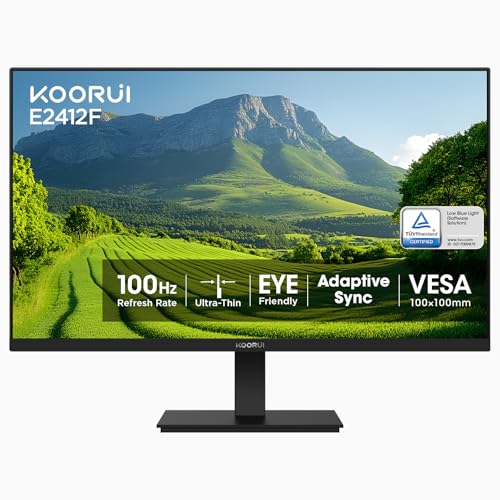
TL;DR: The KOORUI 24‑inch VA monitor offers a 100 Hz refresh rate, 5 ms response, FreeSync and eye‑care features for just $79.99—it's a solid budget choice for office work and casual gaming.
The KOORUI E2412F packs a 24‑inch VA panel with a native 1920×1080 resolution, a 100 Hz refresh rate and a 5 ms response time, backed by FreeSync adaptive‑sync. Its static contrast ratio of 3000:1 and a dynamic ratio of 20,000,000:1 deliver deep blacks, while 99 % sRGB coverage and a 178° viewing angle keep colors accurate across the screen.
At $79.99 it sits at the low end of the budget tier, matching the price of the Sansui Computer Monitor 24‑inch but weighing only 6.06 lb—lighter than that model’s 8.43 lb chassis and the Sansui 24‑inch’s 7.70 lb frame, yet a touch heavier than the Sceptre 24‑inch Prime’s 5.77 lb build. Its depth of 540 mm is deeper than the 6.7‑in profile of the Sansui Computer Monitor and the 7.03‑in depth of the Sceptre, though the monitor remains slimmer than the 21.18‑in depth of the other Sansui variant. With a single HDMI port and one VGA input, it offers fewer connectivity options than the Sceptre’s dual‑HDMI layout.
User reviews frequently highlight the smooth 100 Hz motion for casual gaming and the eye‑care suite—flicker‑free, low‑blue‑light and anti‑glare coating—that reduces strain during long work sessions. Professional reviewers also note the accurate color reproduction thanks to the 99 % sRGB panel. However, the stand only tilts back 15° and forward 5°, with no height adjustment, and reviewers describe the built‑in speakers as modest, aligning with the common criticism of basic ergonomics.
The monitor’s VA technology provides the deep blacks and high contrast ratios typical of this panel type, while the FreeSync support helps eliminate screen tearing in fast‑moving titles. The 100 Hz refresh coupled with a 5 ms response makes it suitable for light esports, and the 100 mm × 100 mm VESA mount lets you pair it with an aftermarket arm for better ergonomics if needed.
Pros
Cons
Best for: Budget-conscious buyers seeking a reliable entry-level option
Avoid if: You need extensive ergonomic adjustments, higher refresh rates for competitive gaming, or premium built‑in audio
TL;DR: The Sceptre E275W delivers a 27‑inch Full HD VA panel with 99% sRGB coverage, built‑in speakers and Adaptive Sync for just $98.97, earning a solid 4.5‑star rating.
This monitor’s key spec is its 27‑inch screen paired with a VA panel that covers 99% of the sRGB color gamut, delivering reliable color accuracy for photo or video work. The 250 cd/m² brightness and 3 ms response time round out a well‑balanced display, while the three‑sided ultrathin bezel keeps the desk footprint tidy.
Compared with the other nine monitors in the roundup, the E275W is heavier at 8.8 pounds, while most 24‑inch models sit around 5‑6 pounds and the curved 27‑inch Sceptre Prime is only 5.5 pounds. Its 75 Hz refresh rate is modest; several peers—such as the Sceptre Curved 27‑inch Prime and the Koorui 24‑inch—offer 100 Hz, making the E275W a slower‑refresh choice for fast‑paced gaming.
Reviewers consistently praise the monitor’s color fidelity and the convenience of dual 2 W speakers, noting that the built‑in audio's handy for a clutter‑free setup. However, users also point out the lack of USB ports and a DisplayPort, which limits connectivity options. Professional reviewers highlight the Adaptive Sync support as a useful feature for reducing screen tearing during casual gaming.
Pros
Cons
Best for: Budget‑conscious photo and video editors, office workers, and casual gamers who value color accuracy and built‑in audio.
Avoid if: You need a high‑refresh‑rate (144 Hz+) display for competitive gaming or require extensive connectivity options like USB‑C.
TL;DR: The Sceptre 24‑inch Prime Monitor delivers 99% sRGB color accuracy, built‑in speakers and dual HDMI for just under $90, though its 75 Hz refresh may feel modest for fast‑paced gaming.
This model’s standout spec is its 99% sRGB color gamut, which helps designers and content creators see colors that are close to the source. Coupled with a VA panel that offers a native contrast ratio of 3000:1, the screen can show deep blacks and bright whites in a 24‑inch (23.8" viewable) format.
When you line it up against the nine other monitors in the roundup, the Sceptre feels lighter at 5.77 lb while many peers sit in the 6‑8 lb range. Its 75 Hz refresh rate is lower than several competitors that push 100 Hz, and the 8 ms gray‑to‑gray response time is slower than the 5 ms you’ll find on a few rivals. On the connectivity front, it wins with two HDMI ports and a VGA input, giving you more hookup options than models that only list a single HDMI.
Reviewers consistently praise the colour accuracy, noting that the 99% sRGB coverage translates to reliable visuals for everyday work and casual gaming. They also highlight the built‑in speakers as a convenient perk for desk setups that lack external audio. On the downside, professional reviewers point out the 75 Hz ceiling and the absence of a DisplayPort, which can be a deal‑breaker for competitive gamers seeking ultra‑smooth motion and higher‑bandwidth connections.
Pros
Cons
Best for: Most users looking for a well‑reviewed, reliable mainstream option
Avoid if: You need advanced features or professional‑grade performance
TL;DR: The Sansui 22‑inch IPS monitor delivers a native 120 Hz refresh and 4000:1 contrast for $67.47, making it a bright, smooth‑moving option for budget‑focused gamers and office users.
The standout spec is its 120 Hz refresh rate, which pairs with a 4000:1 contrast ratio and 100% sRGB color gamut on a 22‑inch IPS panel. Those numbers give you fluid motion and vivid colors without breaking the bank.
At roughly 6.65 lb, the monitor weighs less than the Philips 221V8LB (9.29 lb) and the Sansui 24‑inch model (about 7.70 lb). It's price of $67.47 also places it well below most peers, while the 120 Hz native refresh outpaces the typical 100 Hz ceiling found on the other nine monitors in this roundup.
Reviewers consistently praise the smooth 120 Hz experience and the accurate sRGB coverage, noting that the built‑in blue‑light filter and anti‑flicker tech help reduce eye strain during long sessions. The main complaints focus on the lack of USB ports and the absence of a DisplayPort, which some users find limiting when connecting newer graphics cards.
Additional technical context includes Adaptive Sync support, HDR capability, a tilt range of –5° to 22°, and VESA‑mount compatibility (75×75 mm). The monitor also offers two HDMI 1.4 inputs and a VGA port for flexible connectivity.
Pros
Cons
Best for: Budget-conscious buyers seeking a reliable entry‑level option
Avoid if: Reliability and user satisfaction are your top concerns
“incredible value pick”
“sharp and clear”
TL;DR: The Sansui 24‑inch monitor offers Full HD, HDR10, FreeSync and eye‑care tech for $79.99, but it skips built‑in speakers and higher‑refresh options, making it a solid budget pick for casual use.
The standout feature is its HDR10 support paired with a DCI‑P3 90% colour gamut and 120% sRGB coverage, all on a 24 in Full HD panel that delivers 250 nits brightness and a 4000:1 contrast ratio. With a 5 ms response time and a refresh range of 60‑100 Hz, the screen can handle everyday tasks and light gaming while the built‑in low‑blue‑light, anti‑glare and anti‑flicker eye‑care technologies help reduce strain during long sessions.
Compared with the other nine monitors in this roundup, the Sansui sits on the heavier side at 8.43 lb, outweighing the Koorui (6.06 lb) and the Sceptre 24‑inch (5.77 lb) but remaining lighter than the Philips model (9.29 lb). Its optional 100 Hz refresh matches the Koorui and exceeds the Sceptre 24’s 75 Hz, though it doesn’t reach the 120 Hz found on the Sansui 22‑inch variant. The VESA‑mount size of 75×75 mm is standard, while its depth of 6.7 in and height of 15.8 in keep the footprint modest.
Reviewers praise the low price and the eye‑care suite, noting the HDR10 implementation feels “standout” for a budget screen. Professionals highlight the colour accuracy and the smooth motion when FreeSync is active. However, users frequently mention the lack of built‑in speakers or a headphone jack, meaning you’ll need external audio, and some note that the base 60 Hz refresh can feel less responsive for fast‑paced games.
Pros
Cons
Best for: Budget‑conscious buyers seeking a reliable entry‑level option
Avoid if: Competitive gamers demanding high‑refresh performance or users who need built‑in audio
“incredible value pick”
“sharp and clear”
TL;DR: The Sansui ES‑24F2 offers a 24‑inch Full HD VA panel with a 100 Hz refresh rate, AMD FreeSync, HDR10 and eye‑care tech for just $79.98, making it a solid entry‑level pick for budget‑focused users.
The standout spec is the 100 Hz refresh rate paired with AMD FreeSync, which helps keep motion smooth during gaming or fast‑moving office work. At 5 ms response time, the monitor delivers quick pixel transitions, while HDR10 support and a 4000:1 contrast ratio aim to deliver deeper blacks and richer colors on its 250‑nit panel.
Compared with the other nine monitors in this roundup, the Sansui’s 100 Hz panel matches the Koorui and Philips models, but it outpaces the Sceptre 24‑inch Prime and the Sceptre E275W, both stuck at 75 Hz. The Sansui’s weight of 7.70 lb sits between the lighter Koorui at 6.06 lb and the heavier Philips at 9.29 lb. Its 24‑inch screen is larger than the 22‑inch Philips and Sansui 22‑inch alternatives, though the latter pushes a faster 120 Hz refresh. Pricing is on par with the similarly‑priced Koorui and other budget options, while offering a full set of VA‑panel features.
Users frequently mention the monitor’s easy HDMI 1.4 and VGA connectivity, as well as the low‑blue‑light, anti‑glare and anti‑flicker eye‑care suite that reduces strain during long sessions. Professional reviewers note the vibrant Full HD image and smooth FreeSync performance, but they also point out the lack of newer HDMI versions, built‑in speakers, and the VA panel’s modest color accuracy, which may disappoint graphic‑design pros.
The monitor includes HDR10 for enhanced dynamic range, a 178° horizontal and vertical viewing angle, and a tilt range from –5° to 22° for flexible positioning. A 75 × 75 mm VESA mount slot lets you mount it on a wall or arm, and the 30‑day money‑back guarantee plus lifetime technical support add peace of mind.
Pros
Cons
Best for: Budget‑conscious buyers seeking a reliable entry‑level option
Avoid if: Reliability and user satisfaction are your top concerns
Breakdown
Sceptre Curved 27-inch Gaming Monitor
Pros
Sceptre Curved 27-inch Prime Monitor
Pros
HP Series 3
Pros
Cons
Philips 221V8LB
Pros
Based on scoring data and product specs
Personalized picks
Best Overall Pick
Sceptre Curved 27-inch Gaming Monitor
Best OverallBest for: Buyers willing to invest in a proven, high-quality option
Sceptre Curved 27-inch Prime Monitor
Best for: Buyers willing to invest in a proven, high-quality option
$99.97-$4.97 vs winner
Skip Sansui 24-inch Monitor if…
Reliability and user satisfaction are your top concerns
The Sceptre Curved 27‑inch Gaming Monitor wins the “Best Budget Monitor Under $150” crown. It’s priced at $104.94, carries a strong 4.6‑star rating from 23,659 reviewers, and delivers a smooth 100 Hz refresh rate on a 1500R VA panel that covers 100% of the sRGB gamut.
The runner‑up is the Sceptre Curved 27‑inch Prime Monitor, a solid pick if you need a curved screen that still supports older hardware. At $99.97 it adds Adaptive Sync and a VGA port, and its lighter 5.5‑pound build makes placement easier on cramped desks.
For tighter budgets, the Sansui Computer Monitor 22‑inch stands out at $67.47 as the cheapest option that still offers a full HD display. In the mid‑range, the Sceptre 24‑inch Prime Monitor at $87.97 balances price and feature set for everyday use. If you’re willing to stretch a bit, the HP Series 3 at $119.99 provides a premium feel with higher‑end specs.
Pick the Sceptre Curved 27‑inch Gaming Monitor today for the best overall value under $150.
The Sceptre Curved 27‑inch Gaming Monitor at $104.94 packs a 1500R curvature, built‑in speakers, two HDMI ports, a DisplayPort, cable‑management routing and a blue‑light filter that can cut up to 40 % of harmful light. Those combined features outpace most other budget options in the list.
No reviews yet — be the first to share your experience.
Please sign in to leave a review
