⚡ Quick Answer
Finding the perfect 1440p gaming monitor can feel like a maze, especially when you want the right blend of speed, color and price. The review compared 9 monitors spanning budget‑friendly to premium flagship models, examining refresh rates, response times, brightness and user ratings to identify which ones deliver.
At the budget end, the Gigabyte GS27QA SA Black ($159.99) and MSI G273CQ ($172.99) both push 180 Hz and 170 Hz respectively, while the Alienware AW2725DM ($199.99) adds a 400 cd/m² panel and dual‑VRR support. Mid‑range choices like the Lenovo Legion 27QD‑10 ($239.99, 4.7/5 rating) and HP OMEN 32c ($249.99) give you 240 Hz or 165 Hz with solid color coverage. Premium contenders such as the Samsung Odyssey G50D ($291.44) and LG 27G640A‑B ($296.99) raise the refresh rate to 180 Hz and 300 Hz, and the Asus ROG Strix XG27ACDNG offers a blistering 360 Hz and 0.03 ms response.
Next, the guide breaks down each tier, weighs the strengths and weaknesses, and helps you match a monitor to your gaming setup, whether you’re chasing esports precision or immersive single‑player worlds.

Asus ROG Strix XG27ACDNG
Its generous 509.4 mm maximum height provides a roomy ergonomic setup and reflects the brand’s reputation for premium sound and advanced features.
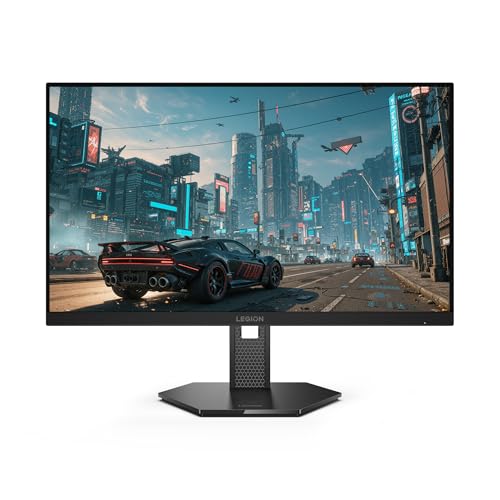
Lenovo Legion 27QD-10
Ideal for gamers on a tighter budget, the Legion 27QD‑10 delivers balanced performance at $239.99, far cheaper than the $669.00 Best Value pick.
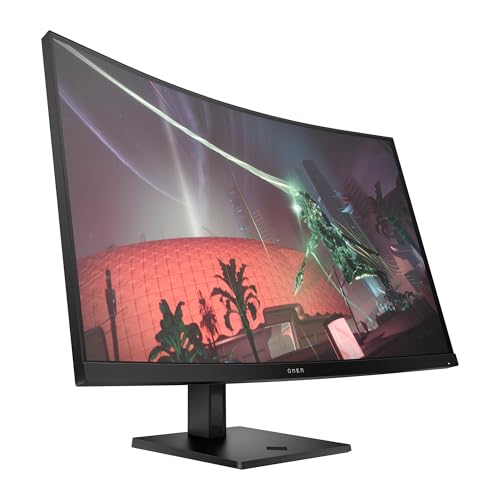
HP OMEN 32c
Stands out with a 1500R curvature and 400 cd/m² brightness, offering an immersive 32‑inch experience that the other two flat‑panel picks lack.
Also considered
Score Analysis
Key score advantages vs. runner-up (Lenovo Legion 27QD-10)
Price Range
Asus ROG Strix XG27ACDNG
$719.99
Lenovo Legion 27QD-10
$239.99
HP OMEN 32c
$249.99

Samsung Odyssey G50D 32-inch
$329.99

MSI G273CQ
$172.99

Alienware AW2725DM
$219.99
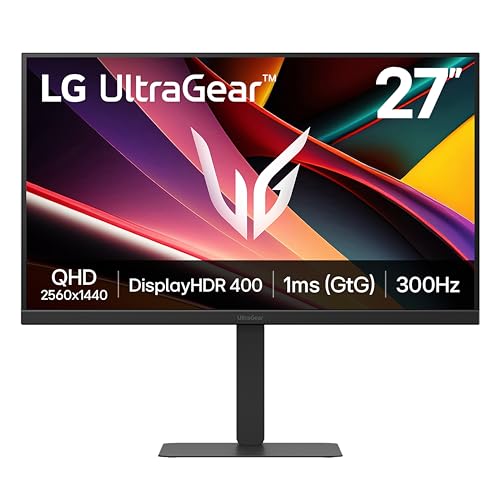
LG 27G640A-B
$276.99

Samsung Odyssey G55C
$270.00
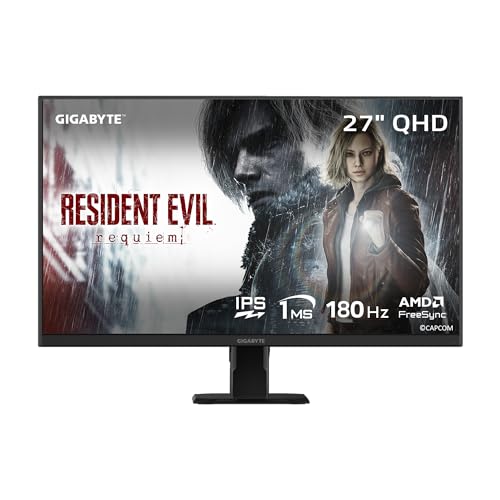
Gigabyte GS27QA SA Black
$159.99
Spec Comparison
TL;DR: The Asus ROG Strix XG27ACDNG packs a 26.5‑inch QD‑OLED panel with a blistering 360 Hz refresh rate, 0.03 ms response time, and 1,500,000:1 contrast, but its $669 price tags it as a premium choice.
What really sets this monitor apart is its 360 Hz refresh rate paired with a 0.03 ms GTG response time, delivering motion that feels almost instantaneous. The QD‑OLED panel offers a contrast ratio of 1,500,000:1 and an HDR peak brightness of 1000 cd/m², while the typical brightness sits at 250 nits. With a pixel pitch of 0.229 mm and true 10‑bit color covering 99% DCI‑P3, the visual fidelity is designed for competitive gamers who also want vivid HDR performance.
Compared with the other eight monitors in this roundup, the XG27ACDNG’s 360 Hz outpaces the LG 27G640A‑B’s 300 Hz and the Samsung Odyssey G50D’s 180 Hz, and it also exceeds the 240 Hz of the Lenovo Legion 27QD‑10. At 16.4 pounds, it weighs more than the 12.1‑pound LG but less than the 16.3‑pound Samsung G50D. Its typical brightness of 250 nits is lower than the 350 nits of the Samsung G50D and the 400 nits seen on several peers, but the HDR peak of 1000 cd/m² is markedly higher than the 300 cd/m²‑400 cd/m² range of most competitors.
Reviewers consistently praise the ultra‑smooth motion and the near‑instant response, noting that professional testers highlight the 360 Hz refresh as a standout for esports. However, the same reviews flag OLED burn‑in risk despite ASUS’s OLED Care+ and custom heatsink cooling. Power consumption can climb to <75 W during active use, which is higher than the sub‑60 W draws of many LED alternatives.
The monitor includes a full connectivity suite: one DisplayPort 1.4 (DSC), two HDMI 2.1 ports, a USB‑C with DP Alt Mode and 90 W Power Delivery, three USB‑3.2 Gen 1 Type‑A ports, and an earphone jack. Built‑in KVM lets you switch between two PCs without moving cables, and the stand offers height adjustment up to 120 mm, swivel ±45°, tilt –5° to +20°, and a full ±90° pivot.
Pros
Cons
Best for: Competitive esports gamers who demand the fastest possible refresh rates and minimal input lag.
Avoid if: You're shopping on a tight budget — it's priced at $669.00.
TL;DR: The Lenovo Legion 27QD-10 delivers a 27‑inch QHD IPS panel with a blistering 240 Hz refresh rate, 0.5 ms MPRT response and vibrant 99 % sRGB color coverage, all for $239.99.
At the heart of this monitor is a 27‑inch IPS screen that packs a 2560 × 1440 resolution and a rapid 240 Hz refresh rate. The panel delivers a 0.5 ms MPRT response time and a standard 1 ms GTG figure, while the static contrast sits at 1000:1 and a dynamic contrast of 3,000,000:1. Brightness reaches 300 nits, and the 10‑bit color depth (8‑bit + FRC) covers 99 % sRGB and 90 % DCI‑P3.
Compared with the other eight monitors in this roundup, the Legion’s 240 Hz outpaces the 165 Hz of the HP OMEN 32c and Samsung Odyssey G55C, and also beats the 180 Hz of the Alienware AW2725DM and Samsung Odyssey G50D. Its 300‑nit brightness is lower than the 400‑nit panels of the HP OMEN and Alienware, but matches the typical 300‑nit output of the Samsung G55C and Gigabyte GS27QA. Weighing 12.3 lb, it’s lighter than the hefty 22.88‑lb HP OMEN, yet comparable to the 11.5‑lb Samsung G55C and 12.1‑lb LG 27G640A‑B.
Reviewers consistently praise the ultra‑smooth motion from the 240 Hz/0.5 ms combo and the accurate colors delivered by the 10‑bit panel. Professional outlets note the HDR10 support and the dual HDMI 2.1 ports that make console gaming easy. However, users point out that the 300‑nit peak brightness can feel underwhelming in very bright rooms, and the lack of listed VESA‑mount dimensions makes custom mounting a bit uncertain.
Pros
Cons
Best for: Competitive gamers, esports enthusiasts, and PC‑console hybrid users who need a high refresh rate and low latency.
Avoid if: You want the best value‑per‑dollar in its price range.
TL;DR: The HP OMEN 32c delivers an immersive 31.5‑inch 1500R curved QHD experience with 165 Hz refresh, 1 ms GtG response, 400 nits brightness, and a solid 3000:1 contrast ratio, though its large footprint and HDMI 1.4 ports may limit some setups.
The monitor’s standout feature is its 1500R curvature paired with a 31.5‑inch QHD VA panel, offering a deep 3000:1 contrast ratio and 400 nits of brightness. A 165 Hz refresh rate and 1 ms GTG response time aim to keep fast‑paced games buttery‑smooth, while 90% DCI‑P3 and 99% sRGB coverage promise vivid colors.
At 22.88 lb, the OMEN 32c is noticeably heavier than the Lenovo Legion 27QD‑10 (12.3 lb) and Samsung Odyssey G55C (11.5 lb), and its 31.5‑inch screen is larger than most peers, which mostly sit at 27 inches. Its 165 Hz panel sits between the 240 Hz of the Lenovo and the 300 Hz of the LG model, providing a balanced refresh rate without reaching the ultra‑high speeds of the Asus ROG Strix’s 360 Hz panel.
Reviewers praise the monitor’s immersive curvature and the lack of motion blur, noting that the adjustable stand and Eye Ease certification help reduce eye strain during long sessions. However, users point out the HDMI 1.4 ports limit next‑gen console bandwidth, and the built‑in 2 × 2 W speakers underpower a dedicated gaming setup. The large base and total depth of 32.36 inches mean you’ll need ample desk space.
Additional technical touches include an anti‑glare coating, Energy Star certification, and FreeSync Premium support to eliminate tearing. Connectivity options feature two HDMI 1.4 ports, a DisplayPort 1.4, VGA, and 3.5 mm audio in/out, giving you flexibility for various rigs.
Pros
Cons
Best for: Enthusiast gamers who want an immersive QHD curved experience on a PC setup.
Avoid if: You have limited desk space, need HDMI 2.1 for next‑gen consoles, or require color‑critical performance for professional work.
“no more blur or stuttering”
TL;DR: The Samsung Odyssey G50D delivers a 32‑inch Fast IPS panel with 180 Hz refresh, 1 ms GTG response and 350 nits brightness, offering smooth, colorful gaming for $291.44.
The standout spec is its 180 Hz refresh rate paired with a 1 ms (GtG) response time on a 32‑inch Fast IPS screen. With 350 nits brightness and a 1000:1 static contrast ratio, it promises fluid motion and vivid colors while keeping input lag low.
Compared with the other eight monitors, the G50D is larger than the 27‑inch LG 27G640A‑B, Lenovo Legion 27QD‑10, Alienware AW2725DM, MSI G273CQ, Gigabyte GS27QA SA and Asus ROG Strix XG27ACDNG, and roughly the same size as the HP OMEN 32c. Its 180 Hz refresh sits between the LG’s 300 Hz and the Asus’s 360 Hz, matching the Alienware’s 180 Hz and outpacing the Samsung G55C’s 165 Hz, the HP’s 165 Hz, and the MSI’s 170 Hz. At 16.3 lbs, it's heavier than the LG (12.1 lbs) and Lenovo (12.3 lbs) but lighter than the HP OMEN (22.88 lbs) and slightly lighter than the Asus (16.4 lbs).
Professional reviewers highlight the ultra‑smooth 180 Hz experience and the Fast IPS panel’s 99% sRGB coverage, noting the wide 178° viewing angles as a plus for content creation. Everyday users love the responsive feel and vibrant palette, yet many point out the modest 1000:1 contrast that makes blacks look gray, and the DisplayHDR 400 implementation that falls short of a true HDR impact.
Technical details round out the package: an 8‑bit color depth, HDR10 support, FreeSync Premium and G‑Sync compatibility, plus eye‑saver features like flicker‑free operation and low blue light mode. The stand offers swivel, tilt and height adjustments, and the monitor fits standard VESA mounts.
Pros
Cons
Best for: Buyers willing to invest in a proven, high‑quality option
Avoid if: You need deep black levels, premium HDR performance, 4K resolution, or extensive connectivity options
TL;DR: The MSI G273CQ delivers a 27‑inch curved VA panel with a 170 Hz refresh rate and 1 ms MPRT response, offering smooth gameplay at a budget‑friendly price.
The standout spec is the 170 Hz refresh rate paired with a 1 ms MPRT response time, which together aim to keep motion blur to a minimum on fast‑paced titles. The 27‑inch screen curves at 1500R, uses a VA panel with 3000:1 contrast, and reaches 115 % sRGB coverage, giving vivid colors and deep blacks for immersive gaming.
Compared with the eight other monitors in this roundup, the G273CQ’s 170 Hz sits above the 165 Hz panels found in the HP OMEN 32c and Samsung Odyssey G55C, yet below the 240 Hz of the Lenovo Legion 27QD‑10 and the 300 Hz of the LG 27G640A‑B. Its 300 cd/m² brightness matches the Gigabyte GS27QA and Lenovo Legion, but falls short of the 400 cd/m² brightness quoted for the Alienware AW2725DM and HP OMEN 32c. The 1 ms MPRT response aligns with the Gigabyte and Samsung G55C, though it isn’t as fast as Lenovo’s 0.5 ms MPRT. In terms of color gamut, MSI’s 115 % sRGB exceeds the 99 % sRGB coverage listed for the HP model.
User feedback highlights the high refresh rate and quick response as major wins for competitive shooters and fast‑action games. Reviewers also note the lack of built‑in speakers, meaning you’ll need external audio for game sound. The “HDR Ready” label denotes a modest HDR implementation, not a full certification, which some users find underwhelming. Features like Anti‑Flicker, Less Blue Light Pro, and Night Vision reduce eye strain during long sessions.
Pros
Cons
Best for: Budget-conscious buyers seeking a reliable entry-level option
Avoid if: You need advanced features or professional‑grade performance
TL;DR: The Alienware AW2725DM delivers a 27‑inch QHD IPS panel with a 180 Hz refresh rate, 1 ms GTG response and solid VRR support for budget‑friendly high‑speed gaming.
The monitor’s headline spec is its 180 Hz refresh rate paired with a 1 ms GTG (Extreme) response time, which delivers ultra‑smooth motion on fast‑paced titles. At 27 in and a pixel density of 109 ppi, the display offers crisp 2560 × 1440 imagery while keeping the panel flat for a traditional desktop look.
Compared with the other eight monitors, the AW2725DM sits in the mid‑range for speed: MSI’s G273CQ tops out at 170 Hz, while Lenovo’s Legion 27QD‑10 pushes 240 Hz, and Samsung’s G50D matches the 180 Hz figure. Brightness is 400 cd/m², higher than MSI’s 300 cd/m² and Gigabyte’s 300 nits, but below Asus’s HDR peak of 1000 cd/m². In weight, the Alienware unit is 6.57 kg (14.48 lb), making it heavier than MSI’s 4550 g and Gigabyte’s 5.26 kg, yet lighter than HP’s 22.88 lb and Samsung’s 16.3 lb G50D.
Users repeatedly praise the high refresh rate and low input lag, noting the monitor’s vibrant DCI‑P3 95% color gamut. Professional reviewers highlight the broad VRR ecosystem—G‑SYNC Compatible, FreeSync Premium and VESA AdaptiveSync—as a strong point for frame‑rate stability. However, the 1000:1 contrast ratio and modest HDR10/DisplayHDR 400 implementation draw criticism for muted blacks and limited HDR impact, especially in dark scenes. The stand’s 110 mm height adjustment, ±90° pivot and ±20° swivel earn positive remarks for ergonomic flexibility.
Pros
Cons
Best for: Entry-level buyers or those on a tight budget
Avoid if: You need advanced features or professional‑grade performance, especially deep blacks and strong HDR.
TL;DR: The LG 27G640A‑B delivers a blistering 300 Hz refresh rate on a 27‑inch IPS QHD panel, but you’ll need a high‑end GPU to unlock its full speed.
What really sets this monitor apart is its 300 Hz refresh rate paired with a 1 ms gray‑to‑gray response time. On paper, that combination promises ultra‑smooth motion and almost no ghosting, which competitive gamers crave. The panel also supports VESA DisplayHDR 400 and covers 95% of the DCI‑P3 color gamut, giving games a richer look.
Compared with the eight other monitors in this roundup, the LG sits near the top for speed. Its 300 Hz outpaces the Samsung Odyssey G50D (180 Hz) and the MSI G273CQ (170 Hz), while only the Asus ROG Strix XG27ACDNG pushes a higher 360 Hz. In terms of heft, the LG’s 12.1 pounds is lighter than the Samsung G50D’s 16.3 pounds but a touch heavier than the Samsung G55C’s 11.5 pounds and the Lenovo Legion 27QD‑10’s 12.3 pounds. The 27‑inch screen matches the size of the Alienware AW2725DM and MSI G273CQ, offering a familiar footprint for most desks.
Reviewers consistently praise the monitor’s lightning‑fast refresh and the crisp IPS colors, noting that the 95% DCI‑P3 coverage makes HDR‑400 content feel vivid. The downside that keeps popping up is the GPU demand: users with mid‑range cards can’t sustain 300 Hz, so they drop to lower refresh rates. Another common gripe is the lack of disclosed brightness and contrast numbers, leaving the HDR performance a bit of a mystery.
Pros
Cons
Best for: Competitive gamers and esports enthusiasts who need ultra‑high refresh rates on a QHD display.
Avoid if: You have a mid‑range graphics card that can’t sustain 300 Hz, or you prefer a monitor with fully disclosed brightness and contrast specs.
TL;DR: The Samsung Odyssey G55C offers a 32‑inch 1000R curved VA panel with 165 Hz refresh and 1 ms MPRT response, delivering immersive gaming at a budget‑friendly $279.49 price.
Its standout feature is the 1000R curvature combined with a 32‑inch QHD VA panel that provides a 2500:1 static contrast ratio and HDR10 support. At 165 Hz and 1 ms MPRT response, the monitor delivers ultra‑smooth motion, while the typical brightness of 300 cd/m² keeps images clear for most indoor setups.
Compared with the eight rivals in this roundup, the G55C’s 165 Hz refresh sits below the ultra‑high rates of the LG’s 300 Hz and the Lenovo’s 240 Hz, but matches the HP OMEN’s 165 Hz. Its typical brightness of 300 cd/m² is lower than the G50D’s 350 nits and the HP and Alienware models’ 400 cd/m², yet equal to the MSI’s 300 cd/m² and brighter than the Asus’s 250 nits. Weighing 11.5 pounds, it’s lighter than the G50D (16.3 pounds), HP OMEN (22.88 pounds), Lenovo (12.3 pounds) and Alienware (14.48 pounds), and only marginally lighter than the LG (12.1 pounds).
Reviewers repeatedly praise the immersive curve and fluid gameplay, noting the low input lag and flicker‑free WLED backlight as real‑world benefits. Users commonly complain about the tilt‑only stand and external power brick, especially when they want height or swivel adjustments. The modest 300 cd/m² brightness also limits HDR performance in very bright rooms.
Pros
Cons
Best for: Budget‑conscious gamers who want a large 32‑inch curved QHD display with high refresh rates and solid contrast.
Avoid if: You need advanced ergonomic adjustments, a brighter HDR panel, or professional‑grade color accuracy.
TL;DR: The Gigabyte GS27QA SA delivers a 27‑inch QHD IPS panel with up to 180 Hz refresh and 1 ms MPRT response, offering vibrant colors and solid eye‑care features at a budget‑friendly price.
This monitor’s standout spec is its 48‑180 Hz adaptive‑sync range paired with a 1 ms (MPRT) response time on a Super Speed IPS panel. The 27‑inch screen resolves 2560 × 1440 pixels and covers 100 % of the sRGB gamut, while 300 nits of brightness keeps colors vivid during long gaming sessions.
At 15.6 pounds (5.26 kg with stand), the GS27QA's weight tops the MSI G273CQ (4550 g) and the Samsung Odyssey G55C (11.5 lb), but it sits in a similar weight class to many mid‑range gaming monitors. Its 180 Hz top refresh sits a touch higher than the MSI’s 170 Hz, though it trails the Lenovo Legion’s 240 Hz capability. The monitor also offers HDR10 support, albeit with the same 300‑nit peak brightness that several peers list, which limits true HDR impact.
Users consistently praise the fluid gameplay that the 180 Hz/1 ms combo provides, noting the vibrant color reproduction and the eye‑care suite—Flicker‑Free, Low Blue Light, and TÜV Rheinland certification. Professional reviewers highlight the same refresh‑rate and response‑time pairing as a strong point for competitive FPS titles. The main complaints focus on the stand’s limited tilt‑only adjustment and the modest 1000:1 static contrast ratio, which makes deep blacks harder to achieve, especially in HDR content.
Pros
Cons
Best for: Entry‑level buyers or those on a tight budget who want a high‑refresh QHD display for fast‑paced gaming.
Avoid if: You need advanced ergonomic adjustments, professional‑grade color accuracy, or a monitor with strong HDR performance.
Breakdown
Asus ROG Strix XG27ACDNG
Pros
Cons
Lenovo Legion 27QD-10
Pros
Cons
HP OMEN 32c
Pros
Samsung Odyssey G50D 32-inch
Pros
Based on scoring data and product specs
Personalized picks
Best Overall Pick
Asus ROG Strix XG27ACDNG
Best ValueBest for: Audiophiles and enthusiasts seeking premium sound quality and advanced features
Lenovo Legion 27QD-10
Best for: Most users seeking a balanced, mainstream option
$239.99-$480.00 vs winner
Skip Gigabyte GS27QA SA Black if…
You need advanced features or professional-grade performance
The Asus ROG Strix XG27ACDNG takes the top spot thanks to its 360 Hz refresh rate, ultra‑fast 0.03 ms response time, and a QD‑OLED panel that delivers a 1000 cd/m² HDR peak brightness and a 1,500,000:1 contrast ratio. Coupled with true 10‑bit color and a 4.4/5 rating from 277 reviews, it offers these specs for its $669.00 price tag and comes with a three‑year warranty.
The Lenovo Legion 27QD‑10 lands as the runner‑up, ideal if you need a high‑refresh 1440p monitor without breaking the bank. Its 240 Hz IPS panel, 27‑inch screen and 10‑bit (8‑bit + FRC) color depth provide smooth, vibrant gameplay, while the near‑edgeless design and $239.99 price make it a solid choice for competitive shooters on a tighter budget.
For tighter wallets, the Gigabyte GS27QA SA Black is the best budget pick at $159.99, delivering 1440p resolution in a compact package. If you prefer a balanced mid‑range option, the Lenovo Legion 27QD‑10 (already highlighted above) offers the best mix of performance and price, sitting comfortably between the entry‑level and premium tiers.
Pick the Asus ROG Strix XG27ACDNG now for your 1440p gaming setup.
The Asus ROG Strix XG27ACDNG is listed with a 0.03 ms response time, which is significantly quicker than the 0.5 ms (MPRT) or 1 ms (GtG) response times of the other models. This ultra‑low latency makes it the top choice for fast‑paced, reaction‑critical games.
No reviews yet — be the first to share your experience.
Please sign in to leave a review



