When you need a Windows 11 Pro convertible that can handle spreadsheets in a coffee shop and presentations in a conference room, the right 2‑in‑1 matters. We’ve narrowed the field to 12 models that span ultra‑compact tablets, full‑size laptops, and rugged field devices, each offering the flip‑and‑fold design businesses rely on.
Our selection covers every budget. On the low end, the Toshiba Dynabook K50 10.1‑inch starts at $92 and carries a 3.8‑star rating from four reviewers, while the Dell Latitude 7420 delivers a 2.9‑lb chassis and up to 16 hours of battery life for $435.87. Mid‑range options include the Kooforway P8 at $499 with a 4.0‑star rating and a feather‑light 1.7‑pound body, and the Panasonic Toughbook CF‑20 MK2 for $508.98, designed for rugged use. Premium picks such as the Lenovo Yoga 7i 16‑inch ($754, 4.4‑star rating) and the HP OmniBook 5 14‑inch ($619, 4.9‑star rating) give you larger screens, higher‑resolution displays and longer endurance.
Below we break down each model’s strengths, so you can match the device that fits your workflow, travel habits, and budget.

Kooforway P8
Offers a 36.48 Wh battery at $499, delivering solid value for business use.

Lenovo Yoga 7i 16-inch 83DL
Ideal for professionals who need a larger 16‑inch display and premium build, even though it costs $255 more than the Kooforway P8.

Dell Inspiron 14 7440
Stands out with ≈ 82.5 dB speaker output, giving clearer audio for conference calls, a feature the other two lack.
Also considered
Score Analysis
Key score advantages vs. runner-up (Lenovo Yoga 7i)
Price Range
Kooforway P8
$499.00
Lenovo Yoga 7i 16-inch 83DL
$789.00
Dell Inspiron 14 7440
$699.99

Toshiba Dynabook K50 10.1-inch
$92.00

Dell Latitude 7420
$435.99
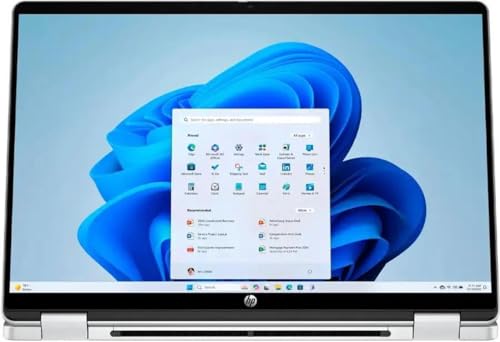
HP OmniBook 5 14-inch
$654.99

Dell Latitude 5300
$320.00
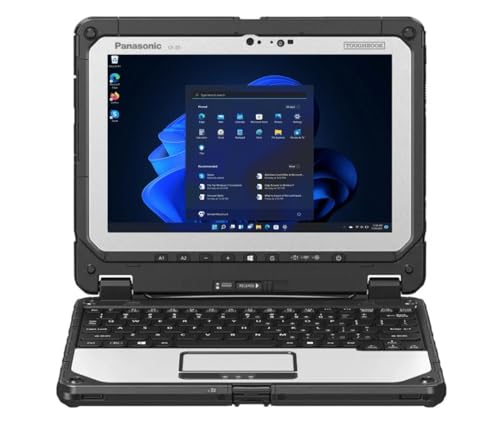
Panasonic Toughbook CF-20 MK2
$508.98
Dell Latitude 5300 13-inch
$265.60

Dell Inspiron 14 7445
$699.99

Fujitsu Tablet Stylistic Q5010 10.1-inch
$72.00

Lenovo Yoga 7i 16-inch 83JT
$788.00
Spec Comparison
TL;DR: The Kooforway P8 packs a rotatable 8‑inch HD touchscreen, 12 GB of LPDDR5 RAM and a 1 TB SSD into a 1.7‑pound metal chassis, but its 5‑hour battery and tiny keyboard keep it from replacing a full‑size laptop.
The standout feature is the 180° rotatable 8‑inch LCD touchscreen with 1280 × 800 resolution and 1024‑level pressure‑sensitive stylus support, all housed in a 1.7 lb (771 g) metal body. Under the hood sits an Intel N150 processor (4 cores, 1.0 GHz base, 3.4 GHz turbo, 6 W TDP), 12 GB LPDDR5 RAM running at 4800 MHz, and a spacious 1 TB M.2 NVMe SSD. The battery packs 36.48 Wh and delivers about 5 hours of typical use, while Wi‑Fi 6 and Bluetooth 5.2 keep connectivity fast.
At 1.7 pounds, the P8 is noticeably lighter than the Panasonic Toughbook CF‑20 MK2 (4.2 pounds) and the Dell Latitude 7420 (2.9 pounds), making it the most portable option in this 12‑product roundup. However, its 5‑hour battery life falls short of the Dell Latitude 7420’s 11‑hour PCMark rating, so you’ll need to recharge more often on the road. Storage-wise, the 1 TB SSD outstrips many competitors that typically ship with smaller drives, though exact capacities aren’t listed for those models.
Users and professional reviewers alike praise the ultra‑light chassis and the flexibility of the 180° hinge for note‑taking and quick presentations. The 12 GB of RAM delivers smooth multitasking for Office apps, and the stylus feels precise thanks to its 1024 pressure levels. On the downside, the compact keyboard is cramped for larger hands, the 1280 × 800 display feels low‑resolution for extended work, and the modest battery limits all‑day travel. The Intel N150 chip also struggles with demanding workloads, so the P8 serves best as a secondary or travel machine rather than a primary workstation.
Pros
Cons
Best for: Value‑conscious buyers seeking quality at $499.00
Avoid if: You need advanced features or professional‑grade performance
“it handles Chrome, Office, and Zoom without lag”
“Precise handwriting”
TL;DR: The Lenovo Yoga 7i 16‑inch 83DL offers a 12‑core Intel Ultra processor, 71 Wh battery and a 16‑inch touchscreen in a premium aluminum chassis for $754, delivering solid business performance with a few trade‑offs.
This convertible packs a 12‑core Intel Core Ultra 7 155U that can boost up to 4.8 GHz, paired with 16 GB of LPDDR5 RAM and a fast 1 TB PCIe 4.0 NVMe SSD. The 71 Wh battery gives it the longest capacity in the lineup, while the 16.0‑inch IPS LCD touchscreen (1920×1200) fills most of the chassis with a 91 % screen‑to‑body ratio.
At 4.63 pounds, the Yoga is heavier than the Dell Inspiron 14 7445 (3.77 pounds) and the HP OmniBook 5 14‑inch (3.6 pounds), but lighter than the sibling Lenovo Yoga 7i 83JT (5.0 pounds). Its 71 Wh battery also outpaces the 54 Wh found in the Dell Inspiron 14 7445 and the 64 Wh units in the Dell Inspiron 14 7440 and HP OmniBook, though the battery capacity matches the 71 Wh of the Yoga 83JT. The display’s typical 300 nits brightness aligns with the HP OmniBook and Yoga 83JT, but reviewers note the glossy finish can feel dim in bright rooms.
Professional reviewers praise the smooth multitasking thanks to the 12‑core CPU and the premium CNC‑milled aluminum build, while everyday users love the long‑lasting battery and the backlit keyboard with 1.3 mm key travel. Common complaints focus on the dim, reflective screen, the 4.63‑pound weight making tablet mode less comfortable, occasional Bluetooth 5.2 dropouts, and audible fan noise when the processor pushes its 4.8 GHz limit.
Additional technical highlights include a full‑size SD card reader, two USB‑A 3.2 ports, two Thunder‑bolt 4 USB‑C ports, an HDMI port (version not listed), a 1080p IR webcam with Windows Hello, and Dolby Atmos‑enabled four‑speaker audio. The keyboard features a numeric keypad and a built‑in fingerprint reader on the power button.
Pros
Cons
Best for: Business professionals who need a large, touch‑enabled screen, solid CPU performance and a premium build for office and hybrid work.
Avoid if: You need a lightweight tablet experience, a bright outdoor‑readable display, or dedicated graphics for gaming.
TL;DR: The Dell Inspiron 14 7440 is a 14‑inch 2‑in‑1 with a 1920×1200 touchscreen, up to 10.2 hours of battery life, and a premium aluminum build for $665.99.
What really stands out is the 14.0‑in IPS LCD with a 1920×1200 resolution, 16:10 aspect ratio and an ≈ 80 % screen‑to‑body ratio, all protected by a glossy coating and ComfortView blue‑light reduction. At just 3.77 lbs (1,710 g) it stays light enough for a full‑day commute, and the 360° hinge lets you flip it into tablet mode for note‑taking or presentations. The battery delivers up to 10.2 hours of real‑world use and can hit roughly 80 % charge in 60 minutes thanks to ExpressCharge.
Compared with the other eleven laptops in this roundup, the Inspiron matches the Dell Inspiron 14 7445 in weight (both 3.77 lbs) and battery life (10.2 hours), but the 7445’s Bluetooth is a generation older (5.3 vs. 5.4). It's a touch heavier than the HP OmniBook 5 (3.6 lbs) and the ultra‑light Kooforway P8 (1.7 lbs), yet it stays lighter than the Lenovo Yoga 7i 16‑inch models (4.63 lbs and 5.0 lbs). Its optional 64 Wh battery matches the HP’s capacity, but the standard 54 Wh is lower than the Yoga’s 71 Wh. The 250‑nit brightness trails the HP’s 300 nits and the Yoga’s up to 400 nits, making outdoor use less comfortable.
In practice, users praise the lightweight aluminum chassis in Ice Blue, the responsive 10‑point touchscreen, and the 10.2‑hour battery that gets them through meetings and travel. Professional reviewers highlight the upgradeable DDR5 memory up to 32 GB at 5200 MHz and the solid build quality. Common complaints focus on the modest 250‑nit screen brightness, which can look washed out in bright rooms, and the bottom‑firing speakers that deliver 2 W per driver but lack deep bass. The integrated Intel UHD Graphics (300 MHz base, 1.25 GHz boost, 1.3 TFLOPS) is fine for office apps but not for heavy gaming or intensive creative workloads.
Pros
Cons
Best for: Those prioritizing quality and willing to pay for premium performance
Avoid if: You need advanced features or professional‑grade performance
TL;DR: The Toshiba Dynabook K50 offers a 10.1‑inch Windows 11 Pro tablet with a detachable keyboard, 16‑hour battery life, and enterprise security for just $92, but its modest RAM and storage keep it in the entry‑level tier.
The standout spec is the detachable keyboard dock paired with a 10.1‑inch capacitive touchscreen that runs Windows 11 Pro. The tablet itself weighs 2.6 pounds and the manufacturer claims up to 16 hours of battery life on a lithium‑ion pack, making it easy to carry around all day.
In the context of the other eleven contenders, the K50 is lighter than the Dell Latitude 5300 at 5.0 pounds but heavier than the Fujitsu Tablet Stylistic Q5010, which lists at 0.65 kg. It also undercuts the Dell Latitude 7420’s 2.9‑pound weight, yet remains heavier than the Kooforway P8 at 1.7 pounds. Price‑wise it sits well below the Dell and Panasonic options, positioning it as a budget‑friendly choice.
User feedback highlights the tablet’s portability and its up to 16‑hour battery life as major wins, with many noting the sturdy feel of the keyboard dock and the convenience of stylus support. The same reviewers point out that 4 GB of DDR4 RAM and 64 GB of eMMC storage fill up quickly, and the 1280 × 800 pixel display can feel cramped for extended productivity work. Professional reviewers echo that the Intel Celeron N4020 processor handles basic tasks but shows its limits when multiple browser tabs or heavier apps are opened.
The K50 runs on an Intel Celeron N4020 dual‑core CPU with a 1.1 GHz base clock and a 2.8 GHz turbo boost, paired with 4 GB of soldered DDR4 RAM and a microSD slot that expands storage up to 512 GB. Connectivity includes Bluetooth 5.0, dual‑band Wi‑Fi (802.11ac), a USB‑C port for data and charging, two USB‑A ports on the dock, HDMI out, and a headphone/mic combo jack. Security features such as TPM 2.0 (Intel Platform Trust Technology) bring enterprise‑grade protection to a low‑cost device.
Pros
Cons
Best for: Entry‑level buyers or those on a tight budget
Avoid if: You need advanced features or professional‑grade performance
“Perfect for my daughter’s online classes – lightweight and lasts all day.”
“Surprisingly good build quality for a budget device.”
TL;DR: The Dell Latitude 7420 2‑in‑1 packs a 14‑inch FHD touchscreen, 63 Wh battery and 16 GB RAM into a 2.9‑lb carbon‑fiber chassis for $435.87, delivering solid performance and long endurance for business users.
One of the standout specs is the 63 Wh battery, which Dell says can deliver up to 16 h 40 min of web browsing and 13 h 9 min of video playback, far exceeding the endurance of many comparable convertibles. The laptop also features a 14.0‑in FHD IPS panel with 300 nits brightness and 157 PPI, plus active pen support for note‑taking on the go.
Compared with the other eleven models in this roundup, the Latitude 7420 is heavier than the ultra‑light Kooforway P8 but lighter than the Panasonic Toughbook CF‑20 MK2 and the Dell Latitude 5300, positioning it in the mid‑weight segment. Its $435.87 price point lands it below several premium 2‑in‑1s, yet its 63 Wh battery and 16 GB of soldered LPDDR4x RAM give it more on‑board capacity than many of the lower‑priced peers.
Professional reviewers praise the carbon‑fiber chassis for feeling sturdy yet light, and users consistently note the long battery life as a daily productivity boost. The only recurring complaint is the audible fan under sustained CPU load, and Dell soldered the 16 GB of RAM, so you can’t upgrade it later. The integrated Intel Iris Xe G7 graphics handle typical office tasks well but aren’t aimed at demanding creative workloads.
Pros
Cons
Best for: Enterprise professionals and remote workers who value a lightweight, secure convertible with long battery life at $435.87.
Avoid if: You need upgradable RAM, high‑performance graphics, or a completely silent cooling system.
TL;DR: The HP OmniBook 5 14‑inch delivers up to 16.75 hours of video playback on a 64 Wh battery, a bright 1920×1200 IPS touchscreen, and a lightweight 3.6‑pound design for business pros.
The standout spec is its 64 Wh battery paired with 65 W USB‑C fast charging; the manufacturer says it can sustain up to 16.75 hours of video playback. That endurance is notably higher than the Dell Inspiron 14 7440’s listed 10.2‑hour real‑world runtime, even though both offer a 64 Wh option.
At 3.6 pounds, the OmniBook is lighter than the Dell Inspiron 14 7440 (3.77 pounds) and the Lenovo Yoga 7i 16‑inch models (4.63 pounds and 5.0 pounds), but it does weigh more than the ultra‑light Kooforway P8 (1.7 pounds). Its Bluetooth 5.4 module is a step ahead of the Dell Inspiron 14 7445’s Bluetooth 5.3, while the Panasonic Toughbook CF‑20 MK2 lags behind at Bluetooth 4.1. The 14‑inch 1920×1200 IPS panel delivers 300 nits of brightness, matching the typical 300‑nits rating of the Lenovo Yoga 7i 16‑inch but falling short of the Yoga’s 400‑nits peak brightness.
Reviewers consistently praise the all‑day battery life, the crisp 2K‑class touchscreen, and the 360° hinge that lets the device flip into tablet mode. Professional reviewers also note the AI‑enhanced Intel Core i7‑150U processor provides snappy performance for everyday tasks. On the downside, users mention the HP Rechargeable Pen requires a separate charging cable, there’s no SD card reader, and the 62.5% sRGB color gamut limits color‑critical work. Keyboard travel feels shallow compared with higher‑end convertibles, and the trackpad click can feel louder than expected.
The OmniBook packs 16 GB of DDR5 RAM, a 512 GB PCIe NVMe SSD, and a suite of ports—including HDMI 2.1, two Thunderbolt 4 (USB‑C) ports, a headphone/microphone combo jack, and optional USB‑A and non‑Thunderbolt USB‑C connectors. An 8.3 MP IR webcam with a manual privacy shutter rounds out the feature set, while Windows 11 Pro and a built‑in fingerprint reader address security needs for business users.
Pros
Cons
Best for: Business professionals and students who need a lightweight, secure laptop with all‑day battery life and a versatile 2‑in‑1 form factor.
Avoid if: You need a wide‑gamut display for professional photo/video editing or a stylus that charges directly from the laptop.
“Battery lasts all day, even with video calls.”
“Screen is bright and perfect for watching videos.”
TL;DR: The Dell Latitude 5300 is a 13.3‑inch 2‑in‑1 with a 360° hinge, 16 GB RAM, up to 14 hours of battery life, and enterprise‑grade security, all for $299.99.
The standout feature is its convertible design: a 13.3‑inch IPS touchscreen (1920×1080) that folds 360° for tablet, tent or stand use, paired with a backlit keyboard and 10‑point multi‑touch. Under the hood you get an 8th‑gen Intel Core i7‑8665U (1.9 GHz base, up to 4.8 GHz turbo) and 16 GB of DDR4 RAM running at 2666 MHz, while the 60 Whr battery promises up to 14 hours of unplugged work.
Compared with other models in this business roundup, the Latitude 5300 is notably heavier. The Dell Latitude 7420 tips the scales at 2.9 lb, whereas this unit weighs 5.0 lb (2268 g). Even the other 13‑inch Latitude 5300 variant listed at 1430 g is lighter, and the Kooforway P8 comes in at just 1.7 pounds. On the bright‑side, its 300‑nit display matches the 7420’s brightness, but it outpaces many tablets that claim up to 500 nits.
Professional reviewers praise the solid magnesium‑alloy chassis and the full port selection—including Ethernet, HDMI 1.4b, two USB‑A, and a USB‑C with Power Delivery. Users consistently note the robust security suite (TPM 2.0, fingerprint reader, optional vPro) as a major plus for corporate environments. However, the integrated Intel UHD 620 graphics are modest, and several owners mention the screen’s 300‑nit ceiling makes outdoor use a challenge. Thermal throttling under sustained CPU loads and audible fan noise also surface in user feedback.
Beyond the core specs, the laptop offers 2 × 2 W Dolby‑Audio speakers, a microSD 4.0 card reader, and optional LTE connectivity. You can expand storage to a 1 TB NVMe SSD, and the device supports up to 32 GB of RAM (64 GB chipset‑dependent). The included 65 W power adapter (optional 90 W) powers both charging and the USB‑C port, keeping the workstation ready for long days.
Pros
Cons
Best for: Entry-level buyers or those on a tight budget
Avoid if: You want the best value-per-dollar in its price range
TL;DR: Panasonic’s Toughbook CF‑20 MK2 delivers a rugged 10.1‑inch Windows 11 Pro tablet with 800‑nit sunlight‑readable display, hot‑swappable batteries and extensive ports, but its older i5 CPU and weight keep it niche.
Panasonic built the CF‑20 MK2 to survive the harshest field conditions; it carries an IP65 seal, MIL‑STD‑810G certification and can operate from –20 °C to 60 °C. Its 10.1‑inch IPS panel offers a sharp 1920×1200 resolution and a peak brightness of 800 nits, making it readable in direct sunlight. A dual‑bridge battery system provides up to 510 minutes of run‑time and lets you swap modules without powering down, while the device weighs 4.2 pounds.
Compared with the other 2‑in‑1s in this roundup, the Toughbook is noticeably heavier than the 1.7‑pound Kooforway P8, the 2.9‑pound Dell Latitude 7420 and the 3.6‑pound HP OmniBook. Its display is also much brighter than the 300‑nit panels found on the Dell Latitude 7420 and HP OmniBook. Battery life sits between the 5‑hour endurance of the Kooforway and the 11‑hour runtime of the Dell Latitude 7420, providing a balanced runtime for field workers.
Professional reviewers highlight the device’s extreme durability and the convenience of its hot‑swappable batteries, while everyday users praise the IR‑enabled 1080p front camera for secure Windows Hello logins. The most common complaints revolve around the low‑power 7th‑gen i5‑7Y57 processor, soldered 8 GB DDR3L RAM that can’t be upgraded, and a SATA‑based 256 GB SSD that lags behind NVMe options in speed.
Under the hood, the Toughbook runs an Intel Core i5‑7Y57 with a 1.2 GHz base clock and a 3.3 GHz Turbo Boost, paired with 8 GB DDR3L memory at 1600‑1866 MHz. Storage is a removable 256 GB M.2 SATA SSD, and connectivity includes Intel Dual‑Band AC Wi‑Fi, Bluetooth 4.1, integrated 4G LTE and a full suite of ports: USB‑C, USB‑3.0, HDMI, VGA, Ethernet, SDXC and optional serial. An active Wacom stylus and a 10‑point glove‑compatible touch screen round out the feature set.
Pros
Cons
Best for: Field technicians, first responders, and industrial workers who need a rugged, network‑ready Windows 11 Pro tablet with long‑lasting batteries.
Avoid if: You require high‑performance computing, lightweight portability, or the fastest storage options.
“Used it in Arctic conditions—still boots at -20°C.”
“Survived a 6-foot drop onto concrete—no damage.”
TL;DR: The Dell Latitude 5300 13‑inch 2‑in‑1 offers a 13.3″ Full HD IPS screen, up to 14 hours of battery life, and a lightweight carbon‑fiber chassis for $308, making it a solid business travel companion.
The standout spec is its 60 Wh (4‑cell lithium‑ion) battery that Dell claims can last up to 14 hours on a single charge, and the ExpressCharge feature reaches 80 % in just 60 minutes. At 1240 g for the standard clamshell (1430 g for the convertible) the laptop feels featherlight for a 13‑inch business machine, and the carbon‑fiber composite with magnesium‑alloy frame adds a premium, durable feel.
Compared with the other eleven entries, this Latitude is priced slightly above the similarly named Dell Latitude 5300 (B0FB5LFLBK) but well below the Dell Latitude 7420 and the Kooforway P8. It’s lighter than the Panasonic Toughbook CF‑20 MK2 and the Toshiba Dynabook K50, yet heavier than the ultra‑light Fujitsu Tablet Stylistic. In terms of brightness, its 300‑nit display matches the Latitude 7420 and the base Latitude 5300, but falls short of the 500‑nit panel on the Fujitsu tablet.
Professional reviewers praise the fast ExpressCharge and the sturdy carbon‑fiber build, while everyday users consistently highlight the laptop’s portability, all‑day battery endurance, and the comfort of its keyboard. The integrated Intel UHD Graphics 620 handles typical office tasks adequately, though users note the fan becomes audible during sustained CPU loads. The 13.3‑inch IPS panel delivers a crisp 1920×1080 resolution and 100 % sRGB coverage, making it suitable for document work and video calls.
Under the hood sits an 8th‑gen Intel Core i5‑8265U processor (1.6 GHz base, 3.9 GHz turbo, 4 cores, 8 threads) paired with 8 GB DDR4 SDRAM as standard, and the machine supports up to 32 GB via two SO‑DIMM slots at 2400 MHz. Storage starts at a 256 GB PCIe NVMe SSD, with room for a secondary M.2 2230 drive and up to 1 TB total. Connectivity includes Wi‑Fi 5, Bluetooth 5.0, a HDMI 1.4b port, two USB‑A 3.1 Gen 1 ports (one with PowerShare), and a USB‑C 3.1 Gen 2 port that can add optional Thunderbolt 3. Security features such as TPM 2.0, Dell ControlVault 2.0, and optional fingerprint or IR camera round out the business‑focused package.
Pros
Cons
Best for: Mobile business professionals, frequent travelers, and field engineers who need durability, long battery life, and a portable 2‑in‑1 form factor.
Avoid if: You need high‑performance graphics, intensive video editing, or a tighter budget.
TL;DR: The Dell Inspiron 14 7445 packs a 14‑inch 1920×1200 touchscreen, AMD Ryzen 5 8640HS CPU and 16 GB DDR5X RAM into a lightweight aluminum chassis that lasts about 10 hours on a 54 Wh battery.
What really stands out is the combination of a 14.0‑inch IPS WVA display with a 16:10 aspect ratio and a 6‑core AMD Ryzen 5 8640HS that boosts up to 4.9 GHz. Paired with 16 GB DDR5X running at 4800 MHz and a fast 512 GB PCIe Gen 4.0 NVMe SSD, the machine feels snappy for business apps and multitasking.
Compared with the other eleven entries, the Inspiron is a bit heavier than the HP OmniBook 5 but lighter than the Lenovo Yoga 7i 16‑inch models. Its 54 Wh battery matches the Dell 7440’s capacity yet falls short of the 71 Wh packs in the Yoga 7i, and its 250‑nits screen brightness is lower than the 300‑nits panels found on the HP OmniBook and Yoga 7i. The HDMI 1.4 port caps external displays at 1080p, which is more limited than the higher‑resolution options some rivals can drive.
User chatter highlights the convertible 360° hinge, the backlit keyboard with a dedicated Copilot key, and the privacy shutter as daily conveniences. Reviewers praise the aluminum chassis, which the manufacturer states passed military‑grade durability tests, while noting the fan becomes audible even under light workloads and Bluetooth 5.3 sometimes drops connections. The built‑in AI camera features like auto‑framing and eye‑contact correction also earn positive remarks.
Pros
Cons
Best for: Those prioritizing quality and willing to pay for premium performance
Avoid if: You need advanced features or professional‑grade performance
TL;DR: The Fujitsu Stylistic Q5010 offers a rugged 10.1‑inch Windows 11 Pro tablet with a 500‑nit anti‑glare screen, active‑pen support and 10.5‑hour battery life at a very low $77 price point.
Durability headlines the tablet: it carries an IP54 rating, MIL‑STD‑810H certification and a drop resistance of up to 1.2 meters, so it can survive the bumps and dust of field work while still delivering a bright 500‑nit IPS display.
Compared with the other devices in this roundup, the Q5010 is dramatically lighter than the Dell Latitude 5300’s 5.0‑pound chassis and far slimmer than the Toshiba Dynabook K50’s 12.7 mm thickness. Its 31 Wh battery is smaller than the Dell Latitude 5300’s 60 Wh pack, which explains the shorter 10.5‑hour runtime versus the Toshiba’s claimed 16‑hour endurance. The tablet’s Bluetooth 5.0 is a step behind the Kooforway P8’s Bluetooth 5.2, yet newer than the Panasonic Toughbook CF‑20’s 4.1 version. Finally, its 500‑nit screen outshines the Dell Latitude 7420’s 300‑nit panel, giving better outdoor readability.
Users consistently praise the rugged build and the outdoor‑readable screen, noting that the integrated pen garage makes stylus work easy even when wearing gloves. Professional reviewers also highlight the IP54 and MIL‑STD‑810H certifications as strong points for field service roles. At the same time, the Intel Celeron N4020 processor and 64 GB eMMC storage draw criticism for limiting multitasking and slower file access, especially when compared with higher‑end CPUs and SSDs in pricier competitors.
Additional technical details include a 1920 × 1200 pixel resolution, 4 GB of RAM, dual‑camera setup (2 MP front, 8 MP rear), and a full suite of ports: USB‑C 3.2 Gen 2 with Power Delivery, USB‑A 3.2 Gen 1, RJ‑45 Ethernet, and a combo audio jack. The device ships with Windows 11 Pro, TPM 2.0, and optional fingerprint or cradle security, making it ready for enterprise deployment.
Pros
Cons
Best for: Entry-level buyers or those on a tight budget
Avoid if: Reliability and user satisfaction are your top concerns
TL;DR: The Lenovo Yoga 7i 16‑inch 83JT packs an Intel Core Ultra 5 CPU, 16 GB of 5200 MHz LPDDR5X RAM and a 512 GB PCIe Gen4 SSD into a sturdy 360° aluminum chassis with AI‑driven features and up to 13 hours of claimed battery life.
What really sets this Yoga apart is the on‑device AI engine: a 40+ TOPS neural processing unit works alongside the Intel Core Ultra 5 125U (2.1 GHz base, 4.5 GHz boost, 10 cores/12 threads) and 16 GB of LPDDR5X RAM running at 5200 MHz. The combination delivers smooth multitasking for office suites, video calls and light content creation, while AI Copilot+ adds live captions and Windows Studio Effects without taxing the CPU.
In the business lineup, the Yoga 7i offers a longer claimed battery life of 13 hours compared with the Dell Inspiron 14 7445’s 10.2‑hour runtime, and its rapid‑charge capability can add roughly three hours of use in just 15 minutes. However, it does weigh more than the Dell’s 3.77‑pound model, and its 300‑nit display is dimmer than the 400‑nit peak found on some Lenovo Yoga 7i 83DL configurations. Port‑wise the Yoga leads the pack with two Thunderbolt 4 (USB‑C) ports, two USB‑A 3.2 Gen 1 ports, an HDMI 2.1 output, a headphone/mic combo jack and a microSD reader, outmatching many competitors that list fewer connectivity options.
Professional reviewers consistently praise the premium aluminum shell and the solid 360° hinge, noting that the device feels sturdy enough for daily travel. Users echo the battery endurance and appreciate the dual far‑field microphones with noise suppression and Dolby Atmos‑enhanced speakers for clear conference calls. On the downside, the screen’s 300‑nit brightness and limited ≈ 67 % sRGB coverage draw criticism from creators who need vivid color fidelity, and several reviewers describe the keyboard feel as “mushy” with wobbling keys. The weight, while acceptable for a 16‑inch convertible, can feel heavy when used in tablet mode.
Other technical highlights include a 10‑point multi‑touch IPS LCD panel, a 1080p IR webcam with Windows Hello facial recognition, and integrated fingerprint authentication on the power button. The fast‑charging system promises about three extra hours after a 15‑minute plug‑in, which can be a lifesaver during back‑to‑back meetings.
Pros
Cons
Best for: Those prioritizing quality and willing to pay for premium performance
Avoid if: You need advanced features or professional‑grade performance
Breakdown
Kooforway P8
Pros
Lenovo Yoga 7i 16-inch 83DL
Pros
Dell Inspiron 14 7440
Pros
Cons
Toshiba Dynabook K50 10.1-inch
Pros
Based on scoring data and product specs
Personalized picks
Best Overall Pick
Kooforway P8
Best OverallBest for: Value-conscious buyers seeking quality at $499.00
Lenovo Yoga 7i 16-inch 83DL
Best for: Those prioritizing quality and willing to pay for premium performance
$789.00+$290.00 vs winner
Skip Lenovo Yoga 7i 16-inch 83JT if…
You need advanced features or professional-grade performance
We’re naming the Kooforway P8 the clear winner for business‑focused 2‑in‑1s. Its 12 GB of LPDDR5 RAM paired with a 1 TB NVMe SSD gives you plenty of memory and storage without the need for upgrades, while the Intel N150 processor (4 cores, 1.0 GHz base, 3.4 GHz turbo) keeps the device responsive for everyday tasks. At just 1.7 lb and a compact 8‑inch 1280 × 800 touchscreen, it’s easy to slip into a briefcase, and the 5‑hour typical battery life plus a 72‑hour standby time mean you won’t be hunting outlets all day.
The runner‑up, the Lenovo Yoga 7i 16‑inch 83DL, shines when you need a larger canvas and marathon‑length battery for back‑to‑back meetings. Its 16‑inch IPS LCD (1920 × 1200) delivers a bright 400‑nit display, and the 71 Wh battery can last up to 31 hours in ideal conditions, comfortably covering a full workday. Powered by a 12‑core Intel Core Ultra 7 155U and 16 GB of LPDDR5 memory, it handles demanding multitasking and video calls with ease.
For tighter budgets, the Fujitsu Tablet Stylistic Q5010 10.1‑inch at $77 offers a no‑frills Windows 11 Pro tablet that covers basic productivity. If you’re willing to stretch a bit further for premium features, the Lenovo Yoga 7i 16‑inch 83JT at $779.90 provides top‑tier performance and the same versatile 360° hinge.
Pick the Kooforway P8 today for the best all‑round business 2‑in‑1 experience.
The Lenovo Yoga 7i 16‑inch lists a mixed‑use battery life of 6–7 hours and a manufacturer‑claimed up‑to‑31 hours, while the Kooforway P8 lists a typical use time of 5 hours. For most office tasks, the Yoga’s larger 71 Wh battery gives it a clear endurance edge over the P8’s 36.48 Wh pack.
Please sign in to leave a review
No reviews yet. Be the first to review!
