We compared 9 4K UHD monitors, and the most eye‑catching fact: the $199.99 Samsung ViewFinity S7 – the set's cheapest model – has collected a staggering 3,795 reviews, far outpacing the premium Gigabyte MO32U, which sits at $649.99 and has just 13 reviews. Yet the Gigabyte still leads with a perfect 5.0‑star rating, while the budget S7 sits at 4.1 stars. This contrast shows that price isn’t the only driver of user enthusiasm.
The roundup spans three price tiers. The budget tier includes the Samsung S7, LG 27UP650K‑W and the InnoView 18.5‑inch portable monitor. Mid‑range options are the Samsung S8, Dell S3225QS and LG 27US550‑W, offering a blend of performance and price. Premium picks – BenQ MA270U, Gigabyte MO32U and BenQ MA320U – bring high‑refresh rates, OLED‑level contrast or extensive USB‑C power delivery for creators and gamers. Each category balances brightness, color gamut and connectivity in its own way.
Read on to see which monitor best matches your workspace, gaming rig, or on‑the‑go setup.
Gigabyte MO32U
It includes built‑in 2 × 5 W speakers, delivering richer audio without external speakers.

Dell S3225QS
Ideal for mainstream gamers who want solid performance without splurging, it costs about $350 less than the Gigabyte MO32U while still offering 10 W of speaker power.

Samsung ViewFinity S8 27-inch
Its compact depth of 220 mm (with stand) makes it a space‑saving choice for tighter desks where the larger Gigabyte and Dell models feel bulky.
Also considered
Score Analysis
Key score advantages vs. runner-up (Dell S3225QS)
Price Range
Gigabyte MO32U
$649.99
Dell S3225QS
$334.99
Samsung ViewFinity S8 27-inch
$275.00

BenQ MA320U
$649.99

Samsung ViewFinity S7 27-inch
$297.00

BenQ MA270U
$579.99

LG 27UP650K-W
$226.99

InnoView 18.5-inch 4K Portable Monitor
$239.99
LG 27US550-W
$279.99
Spec Comparison
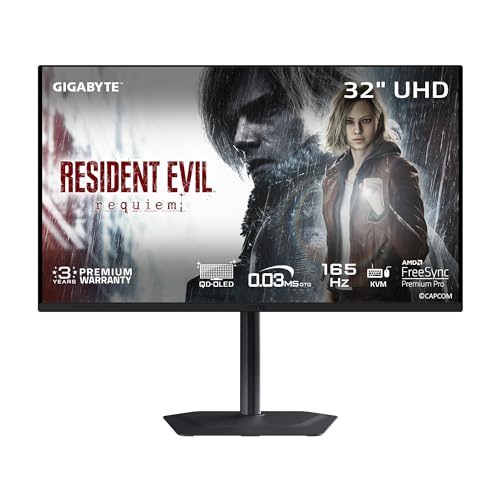
TL;DR: The Gigabyte MO32U delivers OLED‑level contrast, a blazing 165 Hz refresh rate, and 10‑bit color in a 31.5‑inch 4K panel, but its premium $649.99 price may limit budget‑conscious buyers.
The standout feature is its Samsung QD‑OLED panel, offering a contrast ratio of 1,500,000:1 and a 0.03 ms GTG response time. Combined with 165 Hz refresh, 99% DCI‑P3 coverage and 1000 nits HDR peak brightness, it promises true blacks and fluid motion for both gaming and color‑critical work.
Compared with the eight other monitors in this roundup, the MO32U provides more built‑in speaker power (2 × 5 W versus the BenQ MA320U’s 2 × 3 W) and a substantially higher refresh rate than the BenQ MA270U’s 60 Hz. Its stand depth of 240 mm is slightly deeper than the BenQ MA320U’s 220.2 mm, while the overall weight of 27.8 lb makes it heftier than many mid‑range options. Brightness in SDR mode sits at 250 cd/m², lower than the Dell S3225QS’s 300 nits, but the HDR peak of 1000 nits still outshines several competitors that list typical brightness in the 300‑350 nits range.
Users consistently praise the monitor’s “stunning color pop” and “zero motion blur,” echoing professional reviewers who highlight the blend of OLED‑level contrast and high refresh for gaming and HDR content. The same feedback mentions occasional image‑retention concerns with static UI elements and notes that the 18 W USB‑C power delivery may feel modest for laptop charging. The KVM switch, FreeSync Premium Pro, and G‑SYNC compatibility also boost productivity.
Pros
Cons
Best for: Enthusiast gamers and content creators who need ultra‑fast response, deep contrast, and accurate color in a 4K workspace.
Avoid if: You’re on a tight budget or require very high HDR brightness and robust USB‑C charging.
“Colors pop like I’ve never seen before — blacks are truly black.”
“Pixel shifting is noticeable during static scenes — can be distracting.”
TL;DR: The Dell S3225QS delivers a 31.5‑inch 4K VA panel at 120 Hz with vibrant colors, solid built‑in audio, and eye‑comfort tech, but its VA panel can smear in dark scenes and it lacks USB‑C connectivity.
The monitor delivers a standout 120 Hz refresh rate paired with a 4 ms GTG response time in Extreme mode, which makes fast motion feel smooth on a 31.5‑inch 4K screen. It also packs 10 W of total speaker power across two built‑in speakers, so you get decent audio without extra peripherals. Strong color accuracy comes from 99% sRGB and 95% DCI‑P3 coverage, while the advertised 1500:1 contrast ratio (3000:1 typical) adds depth to HDR10 content.
Compared with the other eight monitors in this roundup, the S3225QS is heavier than the Samsung ViewFinity S8 (13.45 lb) and the LG 27UP650K‑W (about 12.35 lb) but lighter than the Gigabyte MO32U (27.8 lb). Its 120 Hz panel outpaces most peers, such as the Samsung ViewFinity S7 and the InnoView portable monitor, both stuck at 60 Hz, though it sits below the Gigabyte’s 165 Hz offering. Brightness sits at 300 nits, which is lower than the Samsung S8’s typical 350 cd/m², yet matches the InnoView’s 300 nits. Dell doesn’t include any USB‑C or USB hub ports, so connectivity relies on two HDMI 2.1 inputs and a single DP 1.4.
User sentiment leans positive, with an average 4.4‑star rating from 284 reviews. Buyers frequently praise the crisp 4K detail and the buttery 120 Hz motion, noting the built‑in speakers sound surprisingly clear for a monitor. Common complaints echo the VA panel’s known drawback: slower response in dark transitions and occasional black smearing. A few owners also mention a wobbly stand and wish for more modern ports.
Pros
Cons
Best for: Most users seeking a balanced, mainstream option
Avoid if: You need advanced features or professional‑grade performance
“Great upgrade from 4K 60 Hz”
“Sharp and vibrant”
TL;DR: The Samsung ViewFinity S8 27‑inch delivers crisp 4K visuals, 99 % sRGB coverage, and a highly adjustable stand for $275.00, though its single HDMI port and 60 Hz panel limit gaming flexibility.
The standout spec is the 27‑inch 4K IPS panel that shines at a typical 350 cd/m² brightness while covering 99 % of the sRGB colour space. With a pixel density of 163 PPI, text and images appear razor‑sharp, and HDR10 support adds extra punch for media playback. The monitor’s anti‑glare coating and 178° viewing angles keep colours consistent whether you’re sitting straight on or off‑centre.
At 13.45 pounds, the ViewFinity S8 is lighter than the Dell S3225QS (which tips over 19 pounds) but a bit heavier than the ultra‑portable InnoView 18.5‑inch unit (around 5.5 pounds). It matches the weight of Samsung’s older S7 model, yet offers a more solid ergonomic stand. Speaking of ergonomics, the tool‑free stand lets you raise the screen up to 120 mm, swivel ±30°, tilt from –2° to +25°, and even pivot to portrait mode – a flexibility rarely seen at this price point.
User feedback consistently praises the monitor’s colour fidelity and the ease of assembly, noting that the 99 % sRGB coverage makes it a solid choice for photo editing and design work. However, several reviewers point out the single HDMI 2.0 input as a bottleneck for multi‑device setups, and the lack of a USB‑C port means you can’t enjoy a single‑cable docking solution. Professional reviewers also highlight that the 60 Hz refresh rate and absence of variable refresh technology make it unsuitable for fast‑paced competitive gaming.
Pros
Cons
Best for: Value-conscious buyers seeking quality at $275.00
Avoid if: You need advanced features or professional‑grade performance
“Crystal-clear image”
“Perfect for work”
TL;DR: The BenQ MA320U is a 31.5‑inch 4K IPS monitor with 97% DCI‑P3 coverage, 90 W USB‑C power delivery and a highly adjustable ergonomic stand, aimed at Mac‑centric creators.
The standout spec is the 31.5" 4K UHD panel that delivers 3840 × 2160 resolution, 550 cd/m² typical brightness and HDR10/VESA DisplayHDR 600 support with a peak of 600 cd/m². Color accuracy is strong at 97% DCI‑P3 and 99% sRGB, and the Nano Matte coating keeps glare at bay.
Compared with the other eight monitors, the MA320U is lighter than the Gigabyte MO32U (20.1 lb vs 27.8 lb) and offers a far more powerful USB‑C power delivery than the Gigabyte’s 18 W PD. It also provides a full‑size 90 W PD port that the BenQ MA270U matches, while the Dell S3225QS supplies a louder 10 W speaker system versus the MA320U’s 2 × 3 W built‑in speakers.
Users consistently praise the seamless Mac integration—Display Pilot 2 syncs brightness and volume, and the 90 W USB‑C link lets a MacBook charge while driving a 4K display. Professional reviewers highlight the ergonomic stand with a 115 mm (4.5") height range, 90° pivot, ±15° swivel and –5° to +20° tilt. The main complaints revolve around the lack of variable refresh rate for gaming, the USB‑C power delivery turning off when the monitor sleeps, and a power button that needs two presses to shut off.
Pros
Cons
Best for: Mac‑based creative professionals who need color‑accurate 4K performance and ergonomic flexibility.
Avoid if: You need VRR, higher refresh rates for gaming, or advanced features like KVM switching.
“Perfect for Mac users”
“HDR mode is good for 2 stops, which is a good match to the MacBook monitors,”
TL;DR: The Samsung ViewFinity S7 27‑inch 4K IPS monitor delivers 99% sRGB color accuracy and a fully adjustable stand for just $199.99, making it a solid budget choice for creators.
The standout spec is its 27‑inch 4K UHD IPS panel that covers 99% sRGB and supports HDR10, with a typical brightness of 350 cd/m² and a static contrast ratio of 1000:1. At a list price of $199.99, it undercuts many competitors while still offering a professional‑grade color gamut.
Compared with the other monitors in this roundup, the S7 is lighter than the LG 27UP650K‑W (11.0 lb vs 12.345886672 lb) and has a slimmer profile without the stand (41 mm depth vs 45.4 mm on the LG). It also sits at a lower price point than the Dell S3225QS and the Samsung ViewFinity S8, though it provides only a single HDMI 2.0 port, while some peers list two.
Everyday users praise the crisp 4K image and the reliable color reproduction, especially for photo and video editing. The tool‑free height, tilt and pivot adjustments get frequent mentions for making long work sessions comfortable. On the downside, reviewers note the on‑screen display pops up after every reconnection, and the 90‑degree power plug can block adjacent outlets.
Additional technical context includes a 60 Hz refresh rate, 5 ms response time, 178° horizontal and vertical viewing angles, and a VESA‑mount pattern of 100 × 100 mm. Connectivity features a DisplayPort 1.2, multiple USB‑A downstream ports, a USB‑B upstream, and a 3.5 mm headphone jack, all backed by TÜV‑certified eye‑care modes that reduce flicker and blue light.
Pros
Cons
Best for: Creative professionals on a tight budget who need reliable color accuracy and ergonomic flexibility.
Avoid if: You need high refresh rates for competitive gaming or premium HDR performance.
“Crystal-clear image”
“Perfect for work”
TL;DR: The BenQ MA270U is a 27‑inch 4K IPS monitor with 90 W USB‑C power delivery, macOS color matching with 99 % sRGB and 95 % DCI‑P3 coverage, and a fully adjustable stand, though its plastic chassis feels less premium.
This 27‑inch model delivers a crisp 3840 × 2160 resolution on an IPS panel, backed by 400 nits brightness and HDR10 support certified as DisplayHDR 400. The contrast ratio sits at 1200:1 and the response time is 5 ms (GtG), giving smooth visuals for photo work and video editing. Built‑in stereo speakers total 6 W, while the connectivity suite includes two HDMI 2.0 ports, three USB‑A ports (one 15 W, two 7.5 W) and two USB‑C ports—one with 15 W and another delivering 90 W Power Delivery.
Compared with the Gigabyte MO32U, the MA270U’s 90 W USB‑C charging far exceeds the 18 W that Gigabyte provides, meaning a single cable can both display and fully charge a MacBook Pro. Its speaker output of 6 W is modest against the 10 W speakers in Dell’s S3225QS, but the monitor’s price sits below the higher‑priced BenQ MA320U while still offering a full set of ergonomic adjustments.
Reviewers repeatedly note the monitor’s color accuracy—99 % sRGB and 95 % DCI‑P3 coverage with a 10‑bit 1.07 billion‑color panel—paired with macOS‑specific features like Display Pilot and Mac Color Match. Users love the single‑cable setup and the 115 mm height‑adjust range, but the plastic build and dated design draw criticism, and reviewers describe the speaker quality as adequate only for casual listening. The port lineup lacks Thunderbolt 4, Ethernet, and picture‑in‑picture functionality, which some power users miss.
The MA270U also offers a fully adjustable stand (pivot ±90°, swivel ±15°, tilt ‑5° to +20°) and VESA 100 × 100 mm mounting compatibility, making it flexible for both desk and wall installations. With HDR10, 400 nits brightness, and a 60 Hz refresh rate, it balances color fidelity and everyday usability for creative professionals.
Pros
Cons
Best for: MacBook Pro and Air users seeking color‑accurate 4K display and single‑cable connectivity.
Avoid if: You need high refresh rates for gaming or advanced audio and multi‑window features for professional work.
“Effortless setup… I only need two wires now — one to the wall and one to my MacBook. The display looks identical to my M4 MacBook Air.”
“Colors are clear & accurate. A software download enables Mac keyboard to control brightness.”
TL;DR: The LG 27UP650K-W delivers a 27‑inch 4K IPS panel with 95 % DCI‑P3 color coverage, factory calibration and a fully adjustable stand, making it a solid budget choice for color‑critical work.
LG factory‑calibrates the 27‑inch 3840 × 2160 IPS display, which covers 95 % of the DCI‑P3 color space and delivers out‑of‑the‑box accuracy. It also supports HDR10 and VESA DisplayHDR 400, with a minimum brightness of 320 cd/m² and a typical brightness of 400 cd/m², delivering noticeably brighter highlights than many entry‑level panels.
Compared with the eight other monitors in this roundup, the LG sits in the middle of the weight range: it’s heavier than the InnoView portable (5.46 lbs) but lighter than the Samsung ViewFinity S7 (11 lbs), the Dell S3225QS (19.33 lbs) and the Gigabyte MO32U (27.8 lbs). Its two HDMI 1.4 ports match the Samsung S7 and S8 and exceed the InnoView’s single HDMI, while the 60 Hz refresh rate aligns with most peers except the Gigabyte’s 165 Hz model. HDR support is modest compared with Gigabyte’s 1000‑nit peak, but it’s a step up from the Samsung S7/S8, which offer no HDR capability. The 95 % DCI‑P3 gamut matches the Dell’s 95 % DCI‑P3 coverage and surpasses the sRGB‑focused competitors.
User sentiment highlights the crisp 4K image and accurate colors, with many noting that the anti‑glare matte coating (3H hardness) reduces eye strain during long editing sessions. Reviewers appreciate the tilt, height and pivot adjustments, describing the stand as “ergonomic” and “productivity‑friendly.” Common complaints focus on the lack of a USB‑C port, the absence of built‑in speakers, and the external power brick that adds cable clutter, as well as the missing variable‑refresh‑rate feature for gaming.
Pros
Cons
Best for: Content creators, photographers, video editors, and professionals who need accurate color reproduction on a budget.
Avoid if: You need high refresh rates/VRR for gaming, USB‑C docking, or built‑in speakers.
TL;DR: The InnoView 18.5‑inch 4K Portable Monitor delivers crisp 3840 × 2160 visuals, 10‑bit color and HDR10 in a slim, lightweight case, though its 5.46 lb weight and external‑adapter power need limit true on‑the‑go use.
The standout spec is the 4K UHD panel at 3840 × 2160 pixels across an 18.5‑inch diagonal, paired with a 10‑bit color depth and full 100% sRGB coverage. HDR10 support and a matte anti‑glare finish add extra depth for photo‑editing or video work, while the 5 ms response time keeps motion smooth enough for most creative tasks.
Weighing 5.46 lb, the InnoView is noticeably lighter than every listed peer – the LG 27UP650K‑W, Samsung ViewFinity S8 and S7, Dell S3225QS, LG 27US550‑W and Gigabyte MO32U all tip the scales well above 11 lb. Brightness sits at 300 nits, matching the Dell and LG 27US550‑W but falling short of the Samsung S8/S7 (350 cd/m²) and BenQ models (400 nits and 550 cd/m²). All competitors share a 60 Hz refresh rate except the Gigabyte, which jumps to 165 Hz, so the InnoView matches most monitors' 60 Hz refresh but isn’t a high‑refresh option.
Reviewers praise the sharp 4K image and accurate color reproduction, noting that the built‑in speakers and dual USB‑C ports make it a solid productivity companion. Professional reviewers highlight the sturdy stand and DC dimming eye‑care features as pluses for long sessions. On the downside, users frequently mention the 5.46 lb chassis feels heavy for a truly portable screen, and the need for an external power adapter means you can’t rely on USB‑C power alone, sometimes leading to flicker when only USB‑C is used.
Pros
Cons
Best for: Creative professionals and remote workers who need a true 4K display in a relatively compact package.
Avoid if: You prioritize ultra‑light travel, need high‑refresh gaming performance, or rely on battery‑only power sources.
“Incredible clarity—perfect for editing 4K video.”
“Heavier than expected—feels more like a desktop monitor.”
TL;DR: The LG 27US550-W delivers crisp 4K IPS visuals with 90% DCI‑P3 coverage and a fully adjustable stand, but its 60 Hz panel and lack of built‑in speakers keep it from being a gaming‑first choice.
The standout spec is its 27‑inch 4K UHD panel (3840 × 2160) that supports HDR10 and a typical color gamut of 90% DCI‑P3, giving creative work a vivid, accurate look. LG also packs a 5 ms (GtG) response time and a 60 Hz refresh rate, while the anti‑glare coating helps keep reflections at bay in bright rooms. At 15.0 pounds the monitor sits on a fairly sturdy base, with a depth of 253.2 mm when the stand is attached and a slim 45.4 mm profile when it’s not.
Compared with the eight other monitors in this roundup, the LG lands in the mid‑price tier and is heavier than the ultra‑light InnoView portable option, yet lighter than the Dell S3225QS which tips the scales at over 19 pounds. Its 300 cd/m² typical brightness outshines some peers that list lower numbers, while the 90% DCI‑P3 coverage sits just below the Dell’s 95% DCI‑P3 but above the Samsung ViewFinity S7’s sRGB‑focused gamut. The fully adjustable stand (tilt, height, swivel, pivot) gives it more ergonomic flexibility than models that lack one or two of those adjustments.
Users consistently praise the monitor’s razor‑sharp 4K image and the vibrant color reproduction that makes photo and video editing feel natural. The borderless three‑side design also blends well in multi‑monitor setups. On the downside, reviewers note the 60 Hz refresh rate can feel limiting for fast‑paced games, and the absence of built‑in speakers means you’ll need external audio. Professional reviewers highlight the HDR10 support and wide color gamut as strong points for creative workflows, while also calling out the external power adapter as a minor inconvenience.
Pros
Cons
Best for: Graphic designers, photographers, video editors, and office workers who value color accuracy and ergonomic flexibility.
Avoid if: You need a high‑refresh‑rate panel for fast gaming, built‑in speakers, or extensive USB connectivity.
“Users appreciate the stunning 4K clarity and vibrant colors”
“The ergonomic stand is praised for flexibility and stability”
Breakdown
Gigabyte MO32U
Pros
Cons
Dell S3225QS
Pros
Cons
Samsung ViewFinity S8 27-inch
Pros
Based on scoring data and product specs
Personalized picks
Best Overall Pick
Gigabyte MO32U
Best ValueBest for: Audiophiles and enthusiasts seeking premium sound quality and advanced features
Dell S3225QS
Best for: Most users seeking a balanced, mainstream option
$334.99-$315.00 vs winner
Skip LG 27US550-W if…
You need advanced features or professional-grade performance
The Gigabyte MO32U leads with its 31.5‑inch QD‑OLED panel, a blistering 165 Hz refresh rate and a lightning‑fast 0.03 ms GTG response. Its VESA DisplayHDR True Black 400 certification and 1000‑nit peak brightness give HDR content serious punch, while the included HDMI 2.1 and USB‑C ports cover every connectivity need. A three‑year manufacturer warranty rounds out the value.
The Dell S3225QS comes in as runner‑up, ideal if you need a large 31.5‑inch VA screen for mixed work‑and‑play without breaking the bank. It supplies 120 Hz refresh, 300 nits brightness and 10 W of built‑in speaker power, and its ComfortView Plus panel reduces blue‑light for long sessions. At $299.99 it delivers solid performance for the price.
For tighter budgets, the Samsung ViewFinity S7 27‑inch provides 4K resolution at $199.99, making it the most affordable entry point. As a mid‑range alternative, the Dell S3225QS remains the best‑value choice with its 120 Hz VA panel and integrated audio for $299.99.
Pick the Gigabyte MO32U today and enjoy premium 4K gaming and creation without compromise.
The Gigabyte MO32U is rated with VESA DisplayHDR True Black 400 and a peak HDR brightness of 1000 nits, far exceeding the Dell S3225QS’s HDR10 support and 300‑nit brightness. That extra brightness and higher HDR tier give the MO32U a clear advantage for vivid, high‑contrast gaming visuals.
Please sign in to leave a review
No reviews yet. Be the first to review!
