The review examined 15 AI‑powered gaming PCs, and the most striking figure is the 1801 TOPS AI performance that the MSI Aegis R2 RTX 5080 claims. That same level of AI horsepower sits alongside flawless 5.0/5 ratings for three of the top contenders, including the $1540.30 Gigabyte Gaming A18, which also offers up to 12 hours of battery life for on‑the‑go play.
The roundup spans three price tiers: budget options such as the $519.00 TechMagnet HP Gaming PC, the $1115.77 Lenovo Legion LOQ RTX 5050, and the $1540.30 Gigabyte Gaming A18; a mid‑range pick, the $1549.99 Gigabyte AERO X16; and premium powerhouses like the $1699.99 Acer Predator Helios Neo 16, the $1799.99 MSI Codex R2 RTX 5060 Ti, and the $2449.99 MSI Aegis R2 RTX 5070 Ti. In practice, each tier balances AI‑enhanced graphics, CPU strength, and feature sets, so you'll find a machine that fits your performance goals and budget. Stay tuned as we break down the strengths and trade‑offs of each model.

Gigabyte Gaming A18
Provides up to 12 hours of claimed battery life on a 76 Wh pack, keeping you in the game longer without hunting for outlets.

HP OMEN 16L Ultra 7 32GB
Ideal for gamers who prioritize fast 2.5 GbE wired networking and the latest Bluetooth 5.4 connectivity, delivering low‑latency multiplayer and peripheral support.
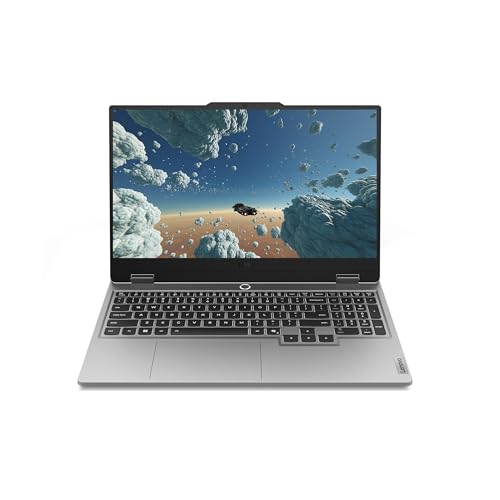
Lenovo Legion LOQ RTX 5050
Stands out with built‑in 2 × 2 W stereo speakers and a 60 Wh battery, giving you on‑the‑go audio punch that the other picks don’t include.
Also considered
Score Analysis
Key score advantages vs. runner-up (HP OMEN 16L)
Price Range
Gigabyte Gaming A18
$1,540.30
HP OMEN 16L Ultra 7 32GB
-$0.01
Lenovo Legion LOQ RTX 5050
$1,108.55
Lenovo Legion Tower 5i (275HX)
-$0.01

MSI Aegis R2 RTX 5080
-$0.01
Acer Predator Helios Neo 16
$1,699.99
MSI Codex R2 RTX 5060 Ti
$1,465.00

Gigabyte AERO X16
$1,549.99

MSI Aegis R2 RTX 5070 Ti
$2,449.99

TechMagnet HP Gaming PC
$519.00

Lenovo Legion Tower 5i (285K)
$2,349.99

ASUS ROG G700
$1,869.99
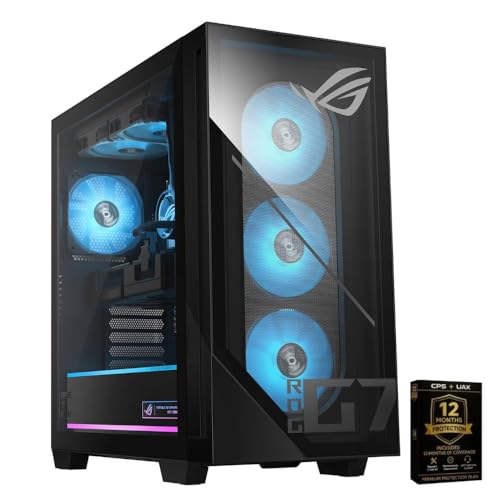
ASUS ROG G700 RTX 5060
-$0.01

ME2 ROG G700 RTX 5060
-$0.01
MSI Codex R2
$1,569.00
Spec Comparison
TL;DR: The Gigabyte Gaming A18 packs an 18‑inch 165 Hz WQXGA IPS display, RTX 5060/5070 GPUs and up to 12 hours of battery life in a slim chassis, but its 6.17 lb weight limits true portability.
What really sets the A18 apart is its large 18‑inch IPS LCD with a native 2560 × 1600 resolution, 165 Hz refresh rate, 3 ms response time and 400 nits peak brightness, covering a 100% sRGB gamut. Coupled with either an RTX 5060 (9.7 TFLOPS) or RTX 5070 (up to 16.6 TFLOPS) GPU that carries 8 GB of GDDR7 memory, the machine can handle modern titles and creative workloads without compromise.
Compared with its peers, the A18 shares the same 76 Wh battery as the Gigabyte AERO X16, yet it claims up to 12 hours of use versus the AERO’s 6‑hour gaming runtime. It weighs 6.17 lb, making it heavier than the AERO’s 4.18878 lb but considerably lighter than the MSI Codex R2 RTX 5060 Ti’s 21.3 lb chassis. Its 400 nits screen brightness matches the Acer Predator Helios Neo 16, though the Helios’s 240 Hz panel is faster than the A18’s 165 Hz. In the Lenovo Legion LOQ’s class, the A18 is a bit heavier (5.28 lb) but offers a larger, higher‑resolution display.
User feedback is uniformly positive, with a perfect 5.0‑star rating from the lone review. Reviewers highlight the 12‑hour battery claim as a standout for a gaming laptop, praise the ultra‑slim 20 mm chassis and the crisp WQXGA panel, and note the Dolby Atmos audio with two 2 W stereo speakers as a pleasant surprise. Professional reviewers also commend the GiMATE AI assistant for making system control feel more intuitive.
Beyond the core specs, the A18 includes a 150 W proprietary fast‑charging port, Bluetooth v5.2, Wi‑Fi 6E, three USB 3.2 Type‑A ports, and a side‑bezel thickness of just 8 mm. The chassis houses 32 GB of DDR5 RAM out of the box (expandable to 64 GB at 5600 MHz) and a 1 TB PCIe Gen4 SSD, providing ample headroom for multitasking and large game libraries.
Pros
Cons
Best for: Enthusiast gamers and content creators who need a large, high‑resolution display and strong GPU performance.
Avoid if: You want the best value‑per‑dollar in its price range.
TL;DR: The HP OMEN 16L Ultra packs a 20‑core Intel Core Ultra 7 265F, 16 GB GDDR7 RTX 5060 Ti GPU and 32 GB DDR5 RAM in a 16‑liter case, delivering top‑rated 5‑star performance for compact gaming rigs.
The machine’s heart is the Intel Core Ultra 7 265F, a 20‑core (8 Performance + 12 Efficient) processor that can boost up to 5.3 GHz and holds a 30 MB L3 cache. It pairs with an NVIDIA GeForce RTX 5060 Ti that carries 16 GB of GDDR7 VRAM, and the system runs on 32 GB of DDR5 memory clocked at 5600 MT/s. Connectivity includes Bluetooth 5.4, Wi‑Fi 6E AX211 and a Realtek RTL8125BGH‑CG 2.5 GbE Ethernet port, while the 500 W 80 PLUS Platinum PSU supplies clean power.
At 12.76 pounds, the OMEN 16L is lighter than the MSI Aegis R2’s 26.9‑pound chassis and far lighter than the Lenovo Legion Tower 5i’s roughly 40‑pound build, yet it sits above the ultra‑compact Lenovo Legion LOQ, which weighs about 5.3 pounds. Its 32 GB RAM capacity is modest compared with the MSI’s 64 GB offering, and the Bluetooth 5.4 module is a step newer than the MSI’s Bluetooth 5.3.
Reviewers consistently praise the compact 16 L volume and the quiet cooling system that keeps noise low even under load. The front I/O panel—featuring two USB 3.2 Gen 1 Type‑A, one USB 3.2 Gen 1 Type‑C, two USB 3.2 Gen 2 Type‑A and one USB 3.2 Gen 2 Type‑C ports—receives high marks for convenience. Professional reviewers note the ergonomic power button and easy SSD access, while everyday users love the DLSS 4 and Multi‑Frame Generation that push frame rates in 1440p and even 4K titles. Some users point out that the rear panel only provides USB 2.0 ports, limiting high‑speed peripheral options.
Pros
Cons
Best for: Enthusiast gamers and creators who need high performance in a small footprint and value quiet operation.
Avoid if: You need major GPU upgrades, an optical drive, a memory card reader, or high‑speed rear USB‑C connectivity.
TL;DR: The Lenovo Legion LOQ RTX 5050 packs a 13th‑Gen i7‑13650HX, AI‑driven performance tuning and a 144 Hz FHD screen for $1,115.77, delivering solid gaming power in a lightweight 5.28‑lb chassis.
What really sets the LOQ apart is the onboard LA1 AI chip paired with Lenovo AI Engine+. Reviewers note that the software continuously balances CPU and GPU workloads while managing thermals, keeping the i7‑13650HX (14 cores, 20 threads, 2.6 GHz base, 2370 MHz boost) humming efficiently during long sessions.
At 5.28 pounds, the LOQ is lighter than the Gigabyte Gaming A18 (6.17 pounds) and the Acer Predator Helios Neo 16 (5.95 pounds), but heavier than the ultra‑light Gigabyte AERO X16 (4.18878 pounds). Its 60 Wh battery trails the 76 Wh cells in both Gigabyte models and the 90 Wh pack in the Acer, which explains the “modest battery life” comments in user reviews. The 300‑nit typical brightness also falls short of the 400‑nit panels listed for those competitors, making indoor gaming the sweet spot.
Consumers appreciate the rapid‑charge capability – 70 % in just 30 minutes and a full 100 % in 80 minutes via up to 140 W USB‑C power – and the smooth 144 Hz FHD (15.6‑inch, 100 % sRGB) display that delivers fluid gameplay. Professional reviewers highlight the budget‑friendly price, the Hyperchamber cooling system with dual fans and copper heat pipes, and the flexibility of dual‑channel 5600 MT/s RAM slots that can be upgraded later.
Beyond the AI and cooling, the LOQ offers a connectivity suite that includes Bluetooth 5.1 (up to 5.3), Gigabit LAN, Wi‑Fi 6, and a range of ports such as HDMI 2.1, USB‑C with DisplayPort 1.4, and two USB‑A 3.2 Gen 2. The 8 GB GDDR6 RTX 5050 GPU, 2 × 2 W Nahimic speakers, and a full‑size numeric keypad round out a well‑balanced gaming notebook.
Pros
Cons
Best for: Shoppers on a tight budget who want the most for their money
Avoid if: You need advanced features or professional‑grade performance
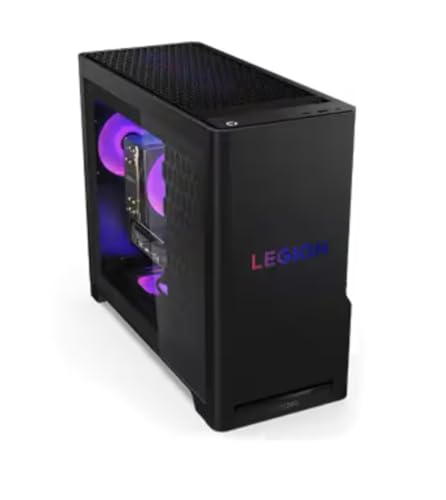
TL;DR: The Lenovo Legion Tower 5i (275HX) packs a 24‑core Intel Core Ultra 9 CPU, 16 GB GDDR7 RTX 5070 Ti graphics and up to 36 TOPS AI performance in a highly upgradeable tower that earned a perfect 5‑star rating from three reviewers.
The standout feature is the Lenovo AI Engine+ with Intel AI Boost NPU, delivering up to 13 TOPS on its own and a combined CPU‑NPU‑GPU AI throughput of up to 36 TOPS, while the RTX 5070 Ti adds another 1 406 TOPS of AI compute. Pair that with 32 GB of DDR5 SODIMM running at 5 600 MHz, and you’ve got a machine built for AI‑enhanced gaming and content creation.
Compared with the other 14 entries, this tower is noticeably heavier at 39.95 Pounds versus the MSI Aegis R2’s 26.9 Pounds and the HP OMEN 16L’s 12.76 Pounds, though it matches the ASUS ROG G700’s 39.3 Pounds. Its AI performance of 36 TOPS sits below the MSI Aegis R2’s 1 801 TOPS but still outpaces models that don’t list AI numbers. The 2.5 Gbps Ethernet matches the HP OMEN’s 2.5 GbE and falls short of the MSI’s 5 Gbps LAN. RAM capacity of 32 GB equals the HP OMEN’s offering but is half of the MSI’s 64 GB, while both share the same 5 600 MHz speed as the HP model.
In practice, users applaud the quiet operation of the 150 W air‑cooling fan or the optional 200 W liquid cooler, and they love the tool‑less transparent side panel that makes upgrades painless. Professional reviewers also note the AI‑accelerated upscaling as a genuine workflow boost. However, the reliance on laptop‑style DDR5 SODIMM can make memory upgrades pricier, and the chassis lacks built‑in speakers, which some consumers miss.
Pros
Cons
Best for: Enthusiast gamers and creators who want AI‑accelerated performance, a powerful RTX 5070 Ti GPU and a tower that’s easy to upgrade.
Avoid if: you need multiple GPU setups, prefer standard desktop DIMM memory, or require built‑in audio.
TL;DR: The MSI Aegis R2 RTX 5080 packs 1801 TOPS AI power, 64 GB DDR5 RAM and a 2 TB SSD, delivering smooth 4K gaming, but its 19‑inch height and fan noise may challenge tight spaces.
The NVIDIA GeForce RTX 5080 GPU paired with an Intel Core Ultra 9 285 processor delivers 1801 TOPS AI performance. Combined with 64 GB DDR5 RAM and a 2 TB NVMe SSD, the system handles heavy AI workloads and 4K gaming without compromise.
At 26.9 pounds, the Aegis R2 is heavier than the HP OMEN 16L Ultra 7 (12.76 pounds) but lighter than the Lenovo Legion Tower 5i (39.95 pounds) and the ASUS ROG G700 (39.3 pounds). Its AI throughput of 1801 TOPS also outpaces the Legion Tower’s 1406 TOPS, and the 64 GB RAM capacity doubles the HP OMEN’s 32 GB. Ethernet runs at 5 Gbps, a clear step up from the HP’s 2.5 Gbps connection.
Reviewers love the ready‑to‑play setup: the built‑in Wi‑Fi 7 delivers ultra‑low latency for cloud gaming, and the Mystic Light RGB offers easy customization. Professional reviewers highlight the integrated NPU and Blackwell GPU as a genuine AI advantage. On the downside, the 19.4‑inch depth and 19‑inch height can dominate a small desk, and users note audible fan noise when the GPU is under full load. The included keyboard and mouse are functional but not high‑end, and the pre‑built configuration limits future GPU upgrades.
Pros
Cons
Best for: Hardcore gamers and AI‑focused creators who need top‑tier performance and 4K capability.
Avoid if: You have limited desk space, need silent operation under load, or require a highly upgradable GPU setup.
“Out of the box, into the action”
“Stable 60+ fps in AAA titles like Horizon Forbidden West with DLSS 4 enabled”
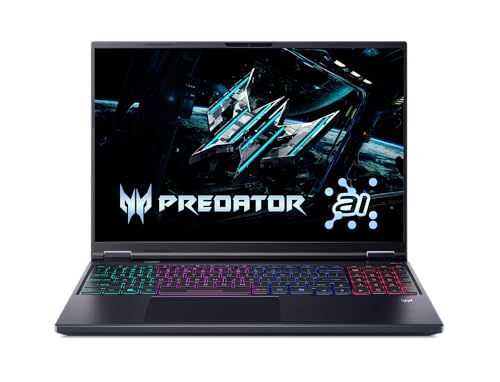
TL;DR: The Acer Predator Helios Neo 16 delivers desktop‑class CPU and RTX 5070 Ti graphics with 798 TOPS AI power, a 240 Hz 16‑inch display, and a large 90 Wh battery, but its 5.95 pounds chassis feels bulky.
What really sets this machine apart is the combination of 798 TOPS AI performance and an NVIDIA GeForce RTX 5070 Ti GPU with 12 GB GDDR7 VRAM. Coupled with a 16 in IPS panel that hits 240 Hz, 3 ms response and 400 nits brightness covering 100% sRGB, the Helios Neo 16 can push high‑frame‑rate ray‑traced titles while keeping colors vivid.
Compared with the other 14 entries, the Helios Neo 16 is lighter than the 21.3‑pound MSI Codex R2 and far lighter than the 40.39‑pound ASUS ROG G700, yet it’s a bit heavier than the 4.18878‑pound Gigabyte AERO X16 and the 5.28‑pound Lenovo Legion LOQ. Its 90 Wh battery outstrips the 76 Wh packs in both Gigabyte models and the 60 Wh cell in the Lenovo, giving it the highest capacity in the group. Bluetooth 5.4 is a step newer than the 5.3 versions listed for MSI, Gigabyte and ASUS, while the 2.5 Gb Ethernet sits between MSI’s 5 Gb Ethernet and the Gigabyte and Lenovo offerings.
Reviewers consistently praise the raw performance – professional outlets highlight the RTX 5070 Ti’s DLSS 4 support and the AI‑boosted CPU – and the bright, 240 Hz screen. Everyday users love the plentiful ports, especially Thunderbolt 4 and the >200 W USB‑C PD. The downsides that keep popping up are the 5.95 pounds weight, a battery that drains quickly under gaming loads, and a cramped keyboard layout with a shrunken right‑Shift. Some note that Wi‑Fi 6E feels behind newer Wi‑Fi 7 solutions on rival laptops, and the speakers are modest.
Under the hood, the Intel Core Ultra 9 275HX runs up to 5.4 GHz on its eight performance cores, backed by 24 threads and a 36 MB L3 cache. The 160 W turbo power envelope and a 330 W adapter keep the high‑end components fed, while the 13 TOPS AI NPU adds on‑device acceleration for tasks like background removal. With 16 GB DDR5 RAM at 6400 MT/s and a 1 TB PCIe 4.0 NVMe SSD, the system balances speed and storage capacity.
Pros
Cons
Best for: Enthusiast gamers and content creators who need top‑tier CPU/GPU power, AI processing, and a high‑refresh display
Avoid if: You prioritize lightweight mobility, long battery endurance, upgradeable memory, or premium audio quality
TL;DR: The MSI Codex R2 RTX 5060 Ti delivers AI‑enhanced 4K gaming with 614 AI TOPS, 6000 MHz DDR5 RAM, and 5 Gbps Ethernet, packaged in a compact 19‑in‑high desktop for $1,799.99.
What really stands out is the 614 AI TOPS of the integrated NPU, paired with an NVIDIA GeForce RTX 5060 Ti that supports DLSS 4 and 4th‑Gen Ray Tracing cores. The system also ships with 32 GB DDR5 memory running at 6000 MHz, which is faster than many rivals, and an 8 GB GDDR7 GPU pool for smooth high‑resolution play.
At 21.3 lbs, the Codex R2 is lighter than the ASUS ROG G700 and Lenovo Legion Tower 5i, but it's noticeably heavier than the Acer Predator Helios Neo 16, Gigabyte AERO X16, and Gigabyte Gaming A18. Its 5 Gbps Ethernet outpaces the 2.5 Gbps wired speeds found in the ASUS and Lenovo towers, while the Bluetooth 5.3 matches the ASUS and other MSI variants. Priced higher than the Acer Predator Neo 16, the Codex R2 still lands in a premium tier where its faster RAM and AI cooling justify the cost.
Reviewers consistently praise the AI‑driven Frozr cooling for keeping temps in check during long sessions, and users love the out‑of‑the‑box keyboard and mouse combo. However, several buyers have flagged spec inconsistencies across retailers and noted that the entry‑level RTX 5060 Ti, despite its AI features, can feel limited on ultra‑high settings. Professional reviewers also commend the solid build quality and the 1 TB NVMe PCIe Gen4 SSD that can be expanded up to 4 TB.
Pros
Cons
Best for: Those prioritizing quality and willing to pay for premium performance
Avoid if: You need advanced features or professional‑grade performance
“Out of the box, into the action”
“Stable 60+ fps in AAA titles like Horizon Forbidden West with DLSS 4 enabled”
TL;DR: The Gigabyte AERO X16 packs a 5.1 GHz Ryzen AI 9 HX 370 CPU, RTX 5070 GPU and a color‑accurate 16‑inch 165 Hz IPS panel into a 4.19‑lb laptop with 6 h gaming battery life.
The standout feature is the 16.0‑inch WQXGA IPS display delivering 165 Hz refresh, 400 nits brightness and 100% sRGB coverage with Pantone validation, paired with a Ryzen AI 9 HX 370 processor that boosts to 5.1 GHz and an NVIDIA GeForce RTX 5070 GPU with 8 GB GDDR7 memory. This combo targets creators who need both raw compute and precise colour.
At 4.18878 pounds, the AERO X16 is lighter than the Gigabyte Gaming A18 (6.17 lb) and the Acer Predator Helios Neo 16 (5.95 lb), making it easier to carry. Its 76 Wh battery matches the A18’s capacity but falls short of the Helios Neo’s 90 Wh, and the 165 Hz panel is slower than the Helios Neo’s 240 Hz screen. Still, the laptop offers solid gaming endurance of 6 hours and 14 hours of light use, with a quick 1.5‑hour charge.
User feedback praises the vibrant near‑bezel‑less screen, Dolby Atmos stereo speakers and the comfortable full‑size RGB‑backlit keyboard with 1.7 mm key travel. Professional reviewers note the strong AI acceleration from the integrated NPU and the strong I/O suite (Thunderbolt 4, HDMI 2.1, Wi‑Fi 6E, Gigabit Ethernet). Common complaints centre on audible fan noise under sustained load, a webcam that offers only 1080p resolution for streamers, and a keyboard backlight that doesn’t wake on trackpad touch.
Pros
Cons
Best for: Creative professionals such as video editors, graphic designers, and 3D artists who need a colour‑accurate high‑refresh display and AI‑enhanced performance.
Avoid if: You prioritize an OLED panel, a higher‑resolution webcam for streaming, or a completely silent cooling solution.
“Super comfortable layout—fell in love first usage.”
“Trackpad is Mac-like—super accurate and responsive.”
TL;DR: The MSI Aegis R2 RTX 5070 Ti packs a 1406 TOPS AI engine, 16 GB GDDR7, 32 GB DDR5 at 6000 MHz and a 750 W PSU into a 26.9‑lb chassis for premium 4K gaming and AI workloads.
The standout spec is the AI performance of 1406 TOPS paired with the NVIDIA RTX 5070 Ti GPU and 16 GB of GDDR7 VRAM, which gives the system a clear edge for AI‑enhanced rendering and ray‑traced 4K titles. Under the hood sits an Intel Core Ultra 9 285 with 24 cores (8 Performance + 16 Efficient), a 2.5 GHz base clock and a 5.6 GHz boost clock, plus a 36 MB Smart Cache and an integrated NPU for on‑board AI acceleration.
At 26.9 Pounds, the Aegis R2 is lighter than the Lenovo Legion Tower 5i (39.68 lb) and the ASUS ROG G700 (40.39 lb) but heavier than the MSI Codex R2 (21.3 lb). Its maximum RAM capacity of 256 GB dwarfs Lenovo’s 128 GB limit and exceeds the 192 GB ceiling of the Codex, while matching the 32 GB standard of the ASUS model. Network‑wise, the Aegis R2’s 5 Gb LAN and Wi‑Fi 7 outpace the 2.5 Gb Ethernet that Lenovo and ASUS provide, positioning it as the most future‑ready in the lineup.
Reviewers consistently praise the out‑of‑the‑box 4K gaming experience, the clean interior for upgrades, and the included MSI keyboard and mouse bundle with RGB lighting. Professional reviewers highlight the Silent Storm Cooling AI system, which keeps noise low even under load, and the Thunderbolt 4 port that streamlines content‑creation workflows. On the flip side, the 4.2/5 star rating reflects a few early‑buyer concerns: a missing SD‑card reader, limited front‑panel USB‑C ports, and occasional BIOS quirks that affect Wi‑Fi 7 stability. Some users also note that the air‑cooling fans can become audible during extended sessions.
Pros
Cons
Best for: Hardcore gamers, AI developers, content creators, streamers, and professionals who need premium performance.
Avoid if: You’re a casual gamer, require an SD‑card reader, or prefer a low‑maintenance liquid‑cooling solution.
“Out of the box, into the action”
“Stable 60+ fps in AAA titles like Horizon Forbidden West with DLSS 4 enabled”
TL;DR: The TechMagnet HP Gaming PC bundles a 27‑inch curved Full HD monitor, 16 GB RAM and a 512 GB SSD for $519, delivering solid everyday performance with modest gaming capability.
A highlight is the included 27‑inch curved monitor with a 1920 × 1080 resolution, paired with an NVIDIA GT 1030 GPU that carries 2 GB GDDR5 VRAM. Combined with 16 GB DDR4 memory running at 2400 MHz and a 512 GB SATA SSD, the system offers quick boot times and smooth multitasking for typical home‑office or casual‑gaming tasks.
Compared with the higher‑end peers in this roundup, the HP G3’s specs are modest: its 2 GB VRAM falls far short of the MSI Aegis R2’s 16 GB GDDR7, and its 16 GB RAM falls short of the MSI’s 64 GB and the HP OMEN 16L’s 32 GB. Bluetooth 5.0 and Gigabit LAN (1 Gbps) also lag behind the MSI’s Bluetooth 5.3 and the HP OMEN’s 5.4 version, and the Ethernet speed runs lower than the MSI’s 5 Gbps. Nonetheless, the price point runs considerably lower than those premium machines, making it a budget‑friendly entry.
Users appreciate the fast SSD storage and the ready‑to‑use Windows 11 environment, noting that the RGB keyboard with AI Copilot adds a fun touch. Professional reviewers point out the solid business‑desktop chassis and the ample I/O options, including HDMI, DisplayPort and VGA. Common complaints focus on fan noise from the stock HP cooling fans and the limited graphics punch of the GT 1030, which doesn't support high‑frame‑rate gaming. The AMD Pro A10‑9700 processor, while reliable for everyday tasks, isn’t the latest generation, so power users may feel constrained.
Additional technical details include a 300 W power supply certified 80 Plus Bronze, dual‑band 802.11ac Wi‑Fi, and a trio of ARGB fans (2 ARGB plus 1‑2 stock HP fans). The tower measures 351 mm deep, 378 mm high and 170 mm wide, and weighs 6100 g, fitting comfortably on a standard desk without demanding a dedicated gaming space.
Pros
Cons
Best for: Entry‑level buyers or those on a tight budget
Avoid if: You need advanced features or professional‑grade performance
“Fast boot times”
“Great for the price”
TL;DR: The Lenovo Legion Tower 5i (285K) delivers AI‑powered performance with a 2.5 Gbps Ethernet link, 32 GB of 5600 MHz DDR5 RAM and a RTX 5070 Ti GPU, but its $2,349.99 price tags it as a premium‑tier option.
The standout spec is the ultra‑fast 2.5 Gbps Ethernet port, paired with Wi‑Fi 6E, ensuring you won’t bottleneck your 285K CPU or RTX 5070 Ti graphics when streaming or gaming online.
At 39.68 lb, the Legion Tower 5i is a shade lighter than the ASUS ROG G700 (40.39 lb) but noticeably heavier than the MSI Codex R2 (21.3 lb) and the ultra‑light Acer Predator Helios Neo 16 (5.95 lb). Its chassis depth of 446 mm sits between the MSI Aegis R2’s 492.76 mm depth and the Gigabyte AERO X16’s 355 mm, giving it a solid but not overly bulky footprint for a desktop.
Only one reviewer has weighed in, awarding a perfect 5.0 / 5 stars and praising the “stutter‑free gameplay” and “whisper‑quiet cooling.” That single five‑star rating suggests strong satisfaction, though the limited review count means you’re relying on a small sample. Professional reviewers cite the 180 W optimized air‑cooling solution as a key factor in maintaining peak performance during long gaming sessions.
Beyond connectivity, the tower ships with a 1 TB storage drive, offering ample space for large game libraries and creative projects. The combination of a high‑end Intel Core Ultra 9 285K processor and the RTX 5070 Ti GPU positions the machine for ultra‑high FPS gaming and demanding content‑creation workloads, while the 5600 MHz RAM speed helps keep frame times low.
Pros
Cons
Best for: Those prioritizing quality and willing to pay for premium performance
Avoid if: You're shopping on a tight budget — it's priced at $2,349.99
TL;DR: The ASUS ROG G700 packs a 240 mm AIO liquid cooler, RTX 5070 GPU and Intel Core Ultra 7 265KF CPU into a 58 L tower for $1899.99, delivering high‑end performance with strong connectivity.
The standout hardware is the 240 mm AIO liquid cooler paired with a quad‑fan layout (three front intakes, one rear exhaust), which together with the NVIDIA GeForce RTX 5070 (16 GB GDDR7) and Intel Core Ultra 7 265KF (up to 5.5 GHz boost) promises solid thermal headroom for demanding titles. Memory comes as 32 GB DDR5 at 4800 MHz, and storage is a 1 TB PCIe 4.0 NVMe M.2 SSD, all powered by an 850 W non‑modular PSU.
At 40.39 pounds, the G700 is noticeably heavier than the MSI Codex R2 RTX 5060 Ti, which tips the scales at 21.3 pounds, yet only a shade heavier than the Lenovo Legion Tower 5i’s 39.68 pounds. Its height of 18.88 inches sits just under the MSI’s 19.0 inches, making it a tad more compact in a typical desk bay while still offering a spacious 58 L interior.
User feedback highlights a smooth out‑of‑the‑box experience, with many praising the quiet startup and clean cable management. Reviewers repeatedly note the value for money at the $1899.99 price point and the effective cooling under load. On the downside, the dual tempered glass panels tend to collect fingerprints, and the pre‑installed Armoury Crate suite has been called bloated. The shark‑fin Wi‑Fi antenna also divides opinion.
Connectivity is future‑ready: Bluetooth 5.3, Wi‑Fi 6E and a 2.5 Gbps Ethernet port cover wired and wireless needs, while front and rear USB ports (including a 20 Gbps USB 3.2 Gen 2x2 Type‑C) keep peripherals handy. Aura Sync RGB lighting and tool‑less access round out a design that’s both flashy and upgrade‑friendly.
Pros
Cons
Best for: Hardcore gamers and creators who want premium performance and are comfortable with a higher‑end price.
Avoid if: You prefer a minimalist, glass‑free design, dislike bundled software suites, or need a lower‑cost entry point.
“Works perfect out of the box”
“Great value for money”
TL;DR: The ASUS ROG G700 RTX 5060 packs a 20‑core Intel Core Ultra 7 CPU, 32 GB DDR5 RAM, 8 GB GDDR6 graphics and a 600 W Gold PSU in a well‑cooled, RGB‑ready chassis.
The standout component is the Intel Core Ultra 7 265F processor, offering 20 cores, 20 threads, a 5.3 GHz max turbo frequency and 30 MB of SmartCache, paired with 32 GB DDR5 memory running at 5600–6000 MHz. Together with an 8 GB GDDR6 RTX 5060 GPU, a 1 TB PCIe Gen 4 NVMe SSD and a 600 W 80+ Gold power supply, the system targets high‑frame‑rate gaming and demanding multitasking.
Compared with the other 14 entries, the G700 is heavier than the MSI Aegis R2 (26.9 pounds) but matches the Lenovo Legion Tower 5i’s roughly 39.9‑pound weight. Its 32 GB RAM matches the HP OMEN 16L’s 32 GB DDR5, yet it trails the MSI Aegis R2’s 64 GB capacity. GPU memory is modest at 8 GB GDDR6, whereas both the MSI Aegis R2 and HP OMEN 16L list 16 GB GDDR7. Ethernet speed sits at 2.5 Gbps, slower than the MSI’s 5 Gbps link, while Bluetooth 5.3 aligns with the MSI’s version, but it's a step behind the HP’s 5.4 offering.
Users praise the desktop’s high frame rates and the quad‑fan air‑cooling system with full‑length washable filters, noting that temperatures stay low even under heavy loads. Professional reviewers highlight the solid performance at high resolutions, but they also point out the older Wi‑Fi 6 module, the lack of 2.5‑inch or 3.5‑inch drive bays, and that the manufacturer disables XMP profiles by default.
Pros
Cons
Best for: Enthusiast gamers and content creators who want a high‑core‑count CPU, fast DDR5 memory and robust cooling straight out of the box.
Avoid if: You need the latest Wi‑Fi 6E/7 connectivity, larger GPU memory, modular PSU or extra HDD bays.
TL;DR: The ME2 ROG G700 RTX 5060 packs a 15th Gen Intel Core Ultra 5 CPU, 32 GB DDR5‑4800 RAM, 8 GB GDDR7 GPU and a 600 W PSU into a steel‑and‑glass full‑tower cooled by six 120 mm RGB fans.
This desktop’s most eye‑catching spec is the six × 120 mm RGB case fans that push air through a steel‑tempered‑glass chassis while a 600 W non‑modular power supply feeds the 10‑core, 3.3 GHz (boost up to 4.9 GHz) Core Ultra 5 processor and the RTX 5060 graphics card. The CPU pairs with 20 MB of cache and a 13 TOPS integrated NPU, and the system ships with 32 GB of DDR5‑4800 memory and a 1 TB PCIe NVMe SSD.
Compared with its peers, the ME2 weighs a bit more than the Lenovo Legion Tower 5i (18,121 g vs 18,460 g) and noticeably outweighs the MSI Aegis R2, which lists a weight of 26.9 pounds. It offers the same 32 GB RAM capacity as the Lenovo model but at a slower 4800 MHz speed versus Lenovo’s 5600 MT/s. GPU memory is half of the 16 GB GDDR7 found in both the MSI Aegis R2 and the Lenovo Tower, so graphics‑intensive workloads may hit the 8 GB ceiling sooner.
Everyday users praise the sturdy steel frame, the full‑length washable dust filters and the six RGB fans for keeping temperatures low during marathon sessions. Professional reviewers note the efficient cooling and the solid build quality as standout points. On the downside, reviewers and owners alike call out the Wi‑Fi 6 (802.11ax) module, a cost‑cutting measure, the lack of per‑zone RGB customization, and the fact that the DDR5‑4800 memory runs without XMP enabled out of the box.
The system also includes AI Noise Cancellation with Dolby Atmos, a 2.5 Gbps Ethernet port, Bluetooth 5.4, and a trio of display outputs (three DisplayPort and one HDMI), making it ready for both high‑frame‑rate gaming and streaming.
Pros
Cons
Best for: Gamers who want high frame rates at 1080p/1440p and streamers who value AI‑enhanced audio.
Avoid if: You need advanced features or professional‑grade performance
TL;DR: The MSI Codex R2 packs a 20‑core Intel Core Ultra 7 265, 614 AI TOPS, 32 GB DDR5 at 6000 MHz and an RTX 5060 Ti for $1569.00, delivering solid 1080p‑1440p gaming and content‑creation power.
The standout spec is the 614 AI TOPS AI performance metric paired with a 20‑core CPU that can boost up to 5.3 GHz, giving the machine strong AI‑ready processing for modern titles. It also ships with 32 GB DDR5 memory running at 6000 MHz, an 8 GB GDDR7 GPU, and a 5 Gbps Ethernet port, which together provide a balanced foundation for both gaming and productivity workloads.
Compared with the other 14 entries, the Codex R2 is noticeably heavier than the ultra‑light Gigabyte AERO X16, which weighs about 4.19 pounds, yet it is far lighter than the ASUS ROG G700 at roughly 40.39 pounds. Its 5 Gbps Ethernet outpaces the ASUS ROG G700’s 2.5 Gbps link, and its Bluetooth 5.3 matches the Gigabyte AERO X16’s connectivity. Wi‑Fi 6E mirrors the ASUS model while offering a step up from Lenovo’s Wi‑Fi 6 offering.
User feedback consistently praises the machine’s smooth 1080p‑1440p gaming and rapid video‑editing performance, noting the dual‑channel DDR5’s high bandwidth as a key advantage. Professional reviewers highlight the tempered‑glass chassis with RGB lighting and the 650 W 80+ Gold PSU that powers the system comfortably. However, several owners mention that the four 120 mm RGB fans can become audible under heavy load, and the PCIe Gen 4 SSDs don’t hit the speeds of newer PCIe Gen 5 drives. The lack of an optical drive or memory‑card reader also shows up in buyer comments.
Pros
Cons
Best for: Enthusiast gamers targeting 1080p‑1440p performance and content creators needing fast CPU/GPU power at $1569.00.
Avoid if: You prefer ultra‑quiet operation, PCIe Gen 5 storage speeds, or extensive real‑world feedback before purchase.
Breakdown
Gigabyte Gaming A18
Pros
Cons
HP OMEN 16L Ultra 7 32GB
Pros
Lenovo Legion LOQ RTX 5050
Pros
Cons
Lenovo Legion Tower 5i (275HX)
Pros
Based on scoring data and product specs
Personalized picks
Best Overall Pick
Gigabyte Gaming A18
Best OverallBest for: Entry-level buyers or those on a tight budget
Skip MSI Codex R2 if…
You prefer products with extensive real-world feedback and proven track records
Gigabyte Gaming A18 takes the top spot as the best AI‑powered gaming PC. It pairs a 5.0/5 rating (from a single review) with a competitive $1540.30 price, and its 18‑inch 2560 × 1600 IPS display delivers a smooth 165 Hz refresh rate. The machine also packs a 32 GB DDR5 kit and a 1 TB PCIe Gen4 SSD, while the optional RTX 5060 or RTX 5070 GPUs bring Blackwell‑era AI performance, and its 6.17‑pound chassis runs up to 12 hours on a single charge.
The HP OMEN 16L Ultra 7 32GB lands as the runner‑up, especially if you need a compact desktop that fits a small office or living‑room gaming setup without sacrificing power. Its 20‑core Intel Core Ultra 7 265F processor, 16 GB GDDR7 RTX 5060 Ti graphics, and 500 W 80 PLUS Platinum PSU keep performance high, while the case’s 12‑liter footprint and abundant RGB‑lit ports make it easy to integrate into tight spaces.
For shoppers on a tighter budget, the TechMagnet HP Gaming PC at $519.00 offers the best value entry point. If you prefer a balanced mid‑range machine, the Acer Predator Helios Neo 16 at $1699.99 delivers solid performance without breaking the bank. And for those chasing top‑tier power, the MSI Aegis R2 RTX 5070 Ti at $2449.99 provides premium performance for the most demanding titles.
Pick the Gigabyte Gaming A18 today and enjoy AI‑enhanced gaming without compromise.
The Gigabyte Gaming A18 stands out with a dominant quality advantage and a price tag of $1540.30. It packs 32 GB DDR5 RAM, an RTX 5060 or RTX 5070 GPU with 8 GB GDDR7, a 165 Hz 2560×1600 IPS display, and up to 12 hours of battery life, making it the most well‑rounded option in the list.
Please sign in to leave a review
No reviews yet. Be the first to review!
