
We’ve lined up 12 all‑in‑one PCs that ship with Windows 11 Pro, spanning everything from a $245.00 budget workhorse to a $1,268.57 premium powerhouse. The selection covers three price tiers – budget (HP ProOne 600 G2, HP ProOne 600 G4, Lenovo ThinkCentre M810z, HP 2025), mid‑range (OuuOee N5095, Dell OptiPlex 3280) and premium (Dell Inspiron 24, Lenovo ThinkCentre AIO 24, HP 27‑cr0082, Dell Inspiron 7730) – so you can spot the right fit for your wallet and workspace.
If you need a large, touch‑enabled canvas for creative tasks, the Dell Inspiron 7730 AIO takes the lead with its 27‑inch screen, 32 GB of memory and a solid 4.5/5 rating from 276 reviewers. For tight budgets, the HP ProOne 600 G2 shines at $245.00, has a perfect 5.0/5 score and a compact 21.5‑inch display. Meanwhile, the Dell OptiPlex 3280 AIO offers a balanced mid‑range choice, delivering 16 GB DDR4 RAM, a 512 GB SSD and a respectable 3.3/5 rating for $429.99.
Read on to see how each model performs in real‑world scenarios and which one earns the top spot for your specific needs.

Dell Inspiron 7730 AIO
Pop‑up 5 MP camera (2592 × 1944) delivers crisp video calls, helping it earn the Best Value label.

Lenovo ThinkCentre M810z 21.5-inch
Ideal for entry‑level users or tight‑budget setups, this 21.5‑inch model comes in at $285, about $983 cheaper than the Dell Inspiron 7730 AIO.

HP 2025 22-inch 8GB
Stands out with Bluetooth 5.3 connectivity, letting you pair wireless peripherals easily—a feature the Dell and Lenovo models don’t list.
Score Analysis
Key score advantages vs. runner-up (Lenovo ThinkCentre M810z)
Price Range
TL;DR: The Dell Inspiron 7730 AIO pairs a 27‑inch Full HD 10‑point touchscreen with a 10‑core 1.8 GHz Intel Core 7‑150U, 32 GB RAM and a pop‑up 5 MP camera for a premium all‑in‑one experience.
The standout feature is the 27 in (diagonal) WVA IPS InfinityEdge display that covers 99 % sRGB, supports Dolby Vision and Dell ComfortView Plus, and offers a responsive 10‑point multi‑touch surface. Coupled with a pop‑up 5 MP (2592 × 1944) webcam, you get privacy‑focused video calls without sacrificing image quality.
Compared with other models in this roundup, the Inspiron 7730 is heavier than the HP 27‑cr0082 (which weighs 6.42 kg) but still lighter than the Dell OptiPlex 3280 AIO (18.0 pounds). It also provides a far larger screen than the Dell Inspiron 24‑inch, which is limited to a smaller form factor. With 32 GB of DDR4 RAM (expandable to 64 GB) it outpaces the 16 GB found in the OptiPlex 3280, and its dedicated NVIDIA GeForce MX570A with 2 GB GDDR6 gives it graphics capability that integrated solutions alone can’t match.
Users consistently praise the bright, color‑accurate touchscreen and the convenience of the pop‑up camera, noting that the webcam’s privacy shutter feels reassuring. Professional reviewers note the “excellent color accuracy” and “solid multitasking performance” of the 10‑core, 5.4 GHz turbo‑capable processor. Everyday owners appreciate the easy RAM and storage upgrades, as well as the dual 5 W speakers with Dolby Atmos that fill a room without needing external audio.
Beyond the screen, the system includes Wi‑Fi 6E (Intel AX211) and Bluetooth 5.2 for fast wireless connectivity, a 1 TB M.2 PCIe NVMe SSD for quick storage, and HDMI‑in/out ports that let you use the unit as a secondary monitor. The built‑in 15 W TDP processor keeps power draw modest, while the 12 MB cache helps with quick data access during heavy multitasking.
Pros
Cons
Best for: Professionals, home‑office users and creative hobbyists who need a large, touch‑enabled screen, solid multitasking power and easy upgrade paths.
Avoid if: You need high‑end graphics performance, a 4K display, or are looking for a budget‑friendly all‑in‑one solution.
“Love the touchscreen and how bright the display is.”
“The pop-up camera gives me peace of mind—no more tape over the lens.”
TL;DR: The Lenovo ThinkCentre M810z packs a 21.5‑inch Full HD IPS screen, 16 GB DDR4 RAM and a 256 GB SSD into a compact 45 mm‑deep all‑in‑one for $285, but its single‑star rating and hefty 5.8 kg weight limit its appeal.
This model’s standout is the 21.5‑inch Full HD IPS display with 250 nits brightness and an anti‑glare coating, paired with an Intel Core i5‑6500 processor that runs at a 3.2 GHz base clock and a 6 MB cache. The system ships with 16 GB DDR4 memory and a 256 GB SATA SSD, delivering fast multitasking for office apps and everyday tasks.
In the context of the other eleven AIOs, the M810z is slimmer than the HP ProOne 600 G4’s 5.19 cm depth and Dell OptiPlex 3280’s 54 mm depth, yet its 5.8 kg weight makes it heavier than the HP ProOne 600 G4 (3.92 kg) and the HP 2025 8 GB model (4.99 kg). Its height of 363 mm sits between the HP ProOne 600 G4’s 321 mm and the HP ProOne 600 G2’s 531.45 mm, while the 535 mm width is comparable to the HP 2025 8 GB’s 493 mm width. Brightness matches the HP 2025’s 250 nits, but the M810z’s Dolby Audio with two 2 W speakers gives it a modest sound edge.
Customer feedback is stark: a lone review gave the machine a 1.0/5 star rating, flagging it as a low‑value purchase compared with similarly priced rivals. Users also note the modest 250 nits brightness can feel dim in bright office lighting, though they appreciate the optional 1080p webcam with a privacy switch and the inclusion of Bluetooth 4.1 and Gigabit Ethernet for business connectivity.
Beyond the core specs, the M810z offers a port selection that includes four USB 2.0 ports, four rear USB 3.1 Gen1 ports and two side USB 3.1 Gen1 ports (one always‑on), plus a DisplayPort and Ethernet RJ‑45. You can expand storage with up to a 1 TB 2.5″ HDD or a 512 GB M.2 PCIe NVMe SSD, and the machine supports up to 32 GB DDR4 RAM for future upgrades.
Pros
Cons
Best for: Entry‑level buyers or those on a tight budget
Avoid if: Reliability and user satisfaction are your top concerns
TL;DR: The HP 2025 22‑inch All‑in‑One offers a 21.45″ Full HD screen, 8 GB DDR5 RAM and Wi‑Fi 6 at $419.99, delivering a compact, budget‑friendly PC for everyday tasks.
This model packs a 13th‑gen Intel N100 processor with a 1.2 GHz base clock and a 3.4 GHz turbo boost, and it uses 8 GB DDR5 memory running at 4800 MHz. The 21.45‑inch anti‑glare panel delivers 1920 × 1080 resolution, 250 nits brightness and 99% sRGB coverage, while the integrated 720p HD webcam includes a privacy shutter.
At 11.0 Pounds, the HP 2025 is lighter than the Dell OptiPlex 3280 AIO but heavier than the OuuOee N5095, placing it comfortably in the middle of the weight range for this group. Its $419.99 price point lands it squarely in the budget tier, making it more affordable than many higher‑spec AIOs while still offering DDR5 memory and Wi‑Fi 6 connectivity.
Users appreciate the tidy all‑in‑one design, reliable Wi‑Fi 6 and clear webcam for video calls, but several reviewers note the 128 GB UFS storage fills quickly and isn’t a standard SATA/NVMe drive, limiting upgrade options. Professional reviewers also point out that the low‑power N100 chip is well‑suited for light productivity, though it may show occasional lockups under heavier workloads.
Pros
Cons
Best for: Entry-level buyers or those on a tight budget
Avoid if: You need advanced features or professional‑grade performance
“frequent freezing and unresponsiveness, calling it a “lemon.””
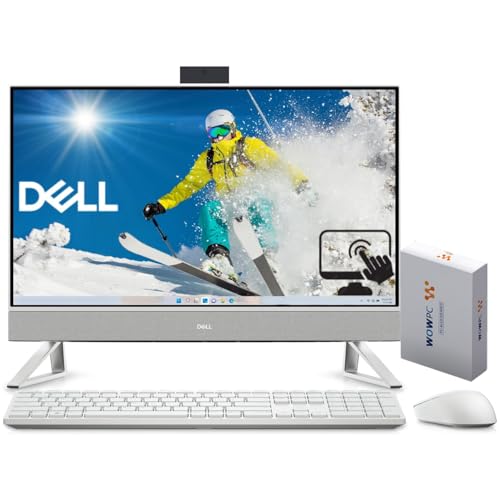
TL;DR: The Dell Inspiron 24‑inch All‑In‑One blends a 10‑core 14th‑gen i7, 16 GB DDR4 RAM and a 1440p IR webcam into a sleek 23.8″ touchscreen for $875.99, but its Full HD panel and premium price may limit appeal for power users.
What really stands out is the 2560 × 1440 IR webcam with Windows Hello support, letting you log in with facial recognition in bright or low‑light rooms. Under the hood lives an Intel Core i7‑150U processor that runs at a 1.80 GHz base clock and can boost up to 5.50 GHz, paired with 16 GB DDR4 3200 MT/s memory and a 512 GB PCIe NVMe SSD—enough for smooth multitasking and quick launches.
In the context of this 12‑product roundup, the Inspiron’s 200.7 mm depth with its stand is a touch deeper than the Lenovo ThinkCentre AIO’s 192 mm, yet its overall footprint remains comparable. At 5.64 kg (with stand) it is lighter than the Dell Inspiron 7730 AIO, which tips the scales at roughly 7 kg, and it matches the HP 2025’s compact depth of 169.93 mm while offering a larger 23.8‑inch screen. Brightness sits at 250 nits, identical to the Lenovo and HP 2025, but the HP 27‑cr0082 pushes 300 nits, giving it a slight edge in bright rooms.
Reviewers consistently applaud the crystal‑clear 1440p webcam and the responsive touch interface, noting that the included wireless keyboard and mouse set up quickly out of the box. However, the Full HD (1920 × 1080) panel on a 23.8‑inch display translates to a lower pixel density than many rivals, and some users report the wireless mouse feels unresponsive after a few weeks. Professional reviewers also label the performance as “adequate for office work,” pointing out that the CPU’s 15 W TDP keeps power draw low but doesn’t deliver the high‑end horsepower needed for heavy video editing.
The machine ships with Wi‑Fi 6E (Intel AX211) capable of 2400 Mbps speeds and Bluetooth 5.3, ensuring fast wireless connections. Its port selection is generous: a Gigabit Ethernet port, HDMI‑in and HDMI‑out, three USB 3.2 Gen 1 Type‑A ports, one USB 3.2 Gen 2 Type‑A, and a USB‑C PowerShare side port, plus an SD card reader. Dell also highlights that they use post‑consumer recycled plastic for 35 % of the chassis, aligning with eco‑friendly preferences.
Pros
Cons
Best for: Those prioritizing quality and willing to pay for premium performance
Avoid if: You're shopping on a tight budget — it's priced at $875.99
“Love the touchscreen and how bright the display is.”
“The pop-up camera gives me peace of mind—no more tape over the lens.”
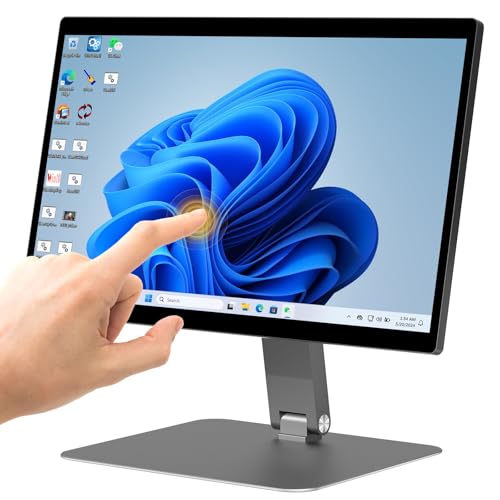
TL;DR: The OuuOee N5095 All‑in‑One packs a 15.6″ Full‑HD 10‑point touch screen, fanless aluminum chassis and Windows 11 Pro for $420.99, but its 128 GB eMMC and Celeron CPU limit heavy workloads.
The standout feature is the 360° rotatable, 180° foldable 15.6‑inch IPS touchscreen, which lets you switch between portrait, landscape or tabletop modes in seconds. The display supports 10‑point G+G capacitive touch and runs at Full HD resolution, while the aluminum alloy backplate makes the unit dust‑resistant and silent thanks to its fanless, passive cooling design.
At 7.5398093604 pounds, this model is noticeably lighter than the HP 2025’s 11.0 pounds and far lighter than the Dell OptiPlex 3280’s 18.0 pounds. Its 15.6‑inch panel is also more compact than the 21‑inch screens found on those same rivals. Storage‑wise, the 128 GB eMMC SSD falls short of the Dell’s 512 GB NVMe SSD, and the HP 2025’s storage isn’t listed, so the OuuOee offers less internal space than many mid‑range competitors. Bluetooth 5.0 lags behind the HP 2025’s 5.3 version, though Wi‑Fi 5 (802.11ac/n) still provides solid wireless connectivity.
Users appreciate the responsive touchscreen and the ability to mount the unit on a VESA 100 × 100 mm bracket, making users favor it for kiosk, POS and industrial‑automation settings. Reviewers consistently highlight the silent operation and sturdy build as big wins. However, several owners report sluggish performance when juggling multiple apps, and the 128 GB eMMC fills up quickly, especially when installing larger business software. A few have mentioned occasional touchscreen calibration drift, which can be a nuisance in high‑traffic environments.
Pros
Cons
Best for: Value-conscious buyers seeking quality at $420.99
Avoid if: You need advanced features or professional‑grade performance
“Users appreciate the smooth touchscreen responsiveness and flexible screen positioning for shared workspaces.”
“Some users report slow system performance when running multiple apps, attributed to eMMC storage and Celeron CPU.”
TL;DR: The HP 27‑cr0082 packs a 27‑inch 99% sRGB IPS screen, a 10‑core i7‑1355U with 5.0 GHz boost, 12 GB RAM and a pop‑up 1080p IR webcam for $999.99.
The standout hardware is the 13th‑gen Intel Core i7‑1355U processor, which delivers up to 5.0 GHz boost clock, 12 MB L3 cache, and 10 cores for smooth multitasking and AI‑enhanced tasks.
At $999.99 it sits above the Dell Inspiron 24‑inch and Lenovo ThinkCentre AIO 24‑inch in price, while its 27.0‑inch display outsizes the Dell OptiPlex 3280 AIO’s 21.5‑inch panel and offers a higher brightness of 300 nits compared with the 250‑nits screens on many peers. It's also heavier than the Lenovo ThinkCentre AIO 24‑inch (6.42 kg vs 5.995 kg) but still slimmer than the Dell Inspiron 7730 AIO’s deeper chassis.
Users praise the space‑saving all‑in‑one form factor, the privacy‑focused pop‑up 1080p IR webcam with AI noise removal, and the use of recycled plastics for a greener footprint. Professional reviewers note the integrated NPU that powers real‑time AI video features without taxing the CPU, though they also point out that a Full HD (1920 × 1080) resolution on a 27‑inch screen can feel less crisp than higher‑pixel panels.
Connectivity includes Bluetooth 5.3, Gigabit Ethernet at 1000 Mbps, and Wi‑Fi 6 (802.11ax). The machine offers a variety of ports: two to four USB 3.2 Gen 1 Type‑A, one USB 3.2 Gen 1 Type‑C, HDMI, and a headphone/microphone combo jack, all powered by a 90 W Smart AC adapter. The built‑in dual 2 W speakers provide basic audio for video calls, and it ships with Windows 11 Pro and a 1‑year warranty.
Pros
Cons
Best for: Those prioritizing quality and willing to pay for premium performance
Avoid if: You need advanced features or professional‑grade performance
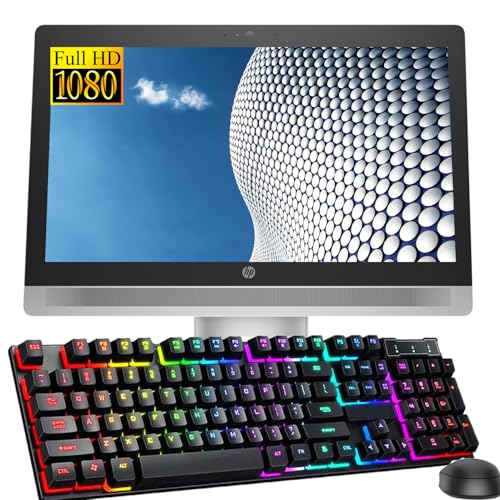
TL;DR: The HP ProOne 600 G2 packs a 21.5‑inch FHD IPS screen, an Intel i5‑6500 CPU at 3.2 GHz, 8 GB RAM and a 256 GB SSD for $245, earning a perfect 5‑star rating.
The most eye‑catching spec is the 21.5‑inch IPS panel with a 1920 × 1080 resolution, giving you crisp visuals for everyday work. Under the hood sits a 6th‑gen Intel Core i5‑6500 processor that runs at a 3.2 GHz base clock and can boost to 3.6 GHz, paired with 8 GB DDR4 RAM and a 256 GB SATA SSD for quick OS loads.
At 371.8 mm deep, the ProOne 600 G2 is considerably deeper than the HP ProOne 600 G4’s 5.19 cm depth and the Lenovo ThinkCentre M810z’s 45 mm depth, while its 6120 g weight makes it heavier than the G4’s 3.92 kg but similar to the HP 2025 22‑inch model’s 4,990 g. All three business‑class models share a 21.5‑inch screen, yet the unit doesn’t list speaker power, whereas the G4, Lenovo and HP 2025 list 2 W stereo speakers.
Users repeatedly note the sleek, space‑saving chassis and the quiet operation, calling it a professional‑looking solution for small offices. Common complaints focus on the aging i5‑6500 processor, which feels sluggish compared with newer CPUs, and the lack of HDMI or USB‑C ports that limits future‑proof connectivity. The integrated 2‑MP webcam also draws remarks for being only average for video calls.
Beyond the basics, the machine includes an extensive security suite: TPM 1.2 (upgradeable to 2.0), BIOS drive lock, SATA‑port disable, and Intel Identity Protection Technology. Graphics rely on Intel HD Graphics 530, suitable for standard office tasks but not for GPU‑intensive workloads. Storage can be expanded with an optional 500 GB 7200 RPM HDD alongside the 256 GB SSD.
Pros
Cons
Best for: Entry-level buyers or those on a tight budget
Avoid if: You need advanced features or professional‑grade performance
TL;DR: The Dell OptiPlex 3280 AIO packs a 21.5‑inch Full HD IPS screen, 16 GB DDR4 RAM and a 3.0 GHz i3 processor into a sleek, space‑saving desktop for Windows 11 Pro.
The 3.0 GHz base (3.9 GHz turbo) Intel Core i3‑10105T, paired with 16 GB DDR4 memory and a 512 GB NVMe SSD, delivers responsive multitasking for everyday office apps. The 21.5‑inch Full HD IPS panel with anti‑glare coating offers clear visuals at 1920 × 1080 resolution, while the dual‑array 1080p pop‑up IR webcam adds privacy‑focused Windows Hello login.
Compared with the other eleven AIOs in this roundup, the OptiPlex’s 21.5‑inch screen is larger than the 15.6‑inch OuuOee N5095 but essentially the same size as the HP 2025, Lenovo ThinkCentre M810z, and HP ProOne 600 series models. At roughly 9.57–10.31 lb, it's lighter than the 11.0‑lb HP 2025 but heavier than the 7.54‑lb OuuOee unit. Its 16 GB RAM tops the 8 GB configurations found in the OuuOee and HP 2025 base models, and the 512 GB SSD exceeds the storage typically offered by the entry‑level peers.
Professional reviewers note the solid business‑grade features such as TPM 2.0, BIOS password protection and the pop‑up webcam, while everyday users appreciate the clean, minimalist look and the reduction of desk clutter. Common complaints include fan noise under load, quiet 2 W speakers and the lack of a height‑adjustable stand, which can affect ergonomics during long work sessions.
Technically, the system runs on a 130 W AC adapter and includes a full set of ports: two USB 2.0, two USB 3.2 Gen 1 Type‑A, a USB‑C, an SD 3.0 reader, and a DisplayPort 1.4 for external monitors. The integrated Intel UHD Graphics 630 shares system memory, which is sufficient for office tasks but not for graphics‑intensive workloads.
Pros
Cons
Best for: Remote workers, small office environments, and educational settings that need a compact, secure, and Windows 11 Pro‑ready desktop.
Avoid if: You need advanced graphics, a height‑adjustable monitor, or a system geared toward gaming and high‑end creative work.
“Perfect for work-from-home setup—clean look and fast performance.”
“The pop-up camera is a game-changer for privacy.”
TL;DR: The Lenovo ThinkCentre AIO 24‑inch delivers a 23.8‑inch 100 Hz Full HD IPS display, a 13th‑Gen Intel i7‑13620H up to 4.9 GHz, and 16 GB DDR5 RAM for $899.99, earning 4.6‑star reviews.
The standout feature is its 100 Hz refresh rate paired with a 99% sRGB color gamut, which makes motion look smooth and colors stay accurate on the 23.8‑inch Full HD IPS panel. Security‑focused users will also notice the 5 MP infrared webcam with a privacy shutter, and the device ships with dual microphones and Harman‑tuned HD stereo speakers.
Compared with the other AIOs in this roundup, the ThinkCentre is slightly slimmer than the Dell Inspiron 24‑inch (192 mm depth vs. 200.7 mm with stand) and matches its Bluetooth 5.3 support. The HP 27‑inch model shines brighter at 300 nits, but it’s a larger 27‑inch screen. In weight, the Lenovo (5,995 g) is lighter than the HP 27‑cr0082’s 6.42 kg max, yet heavier than the HP 2025 22‑inch’s 9.0 pounds (≈4.08 kg). The Dell Inspiron 7730 AIO runs a 60 Hz panel, so the ThinkCentre’s 100 Hz is a clear visual upgrade. Even the Dell OptiPlex 3280 AIO, with its 21.5‑inch screen and 60 Hz refresh, offers fewer RAM options than the ThinkCentre’s 16 GB DDR5 (expandable to 64 GB).
User feedback frequently praises the clean Luna Grey chassis, the convenience of an included wired keyboard and mouse, and the smooth 100 Hz display for everyday tasks. Professional reviewers highlight the rare HDMI‑in port for secondary‑monitor use and the enterprise‑grade TPM 2.0 alongside the IR camera for secure logins. The most common drawback is the tilt‑only stand, which provides no height, swivel, or pivot adjustments, and the lack of VESA‑mount compatibility limits mounting flexibility.
Pros
Cons
Best for: Those prioritizing quality and willing to pay for premium performance
Avoid if: You need advanced features or professional‑grade performance
TL;DR: The HP ProOne 600 G4 packs a 21.5‑inch IPS display, an 8 GB DDR4‑2666 CPU, and enterprise security into a compact 3.92 kg all‑in‑one for $279, making it a solid budget‑friendly business desktop.
The standout feature is its 21.5‑inch IPS anti‑glare panel with 250 cd/m² brightness, 72% NTSC color gamut and 178° viewing angles, delivering a clear workspace for spreadsheets or video calls. Under the hood sits an Intel Core i5‑8500T that runs at 2.1 GHz and can boost to 3.5 GHz, paired with 8 GB DDR4‑2666 MHz memory and a 256 GB NVMe SSD, which together provide quick boot‑ups and smooth multitasking.
Compared with peers, the ProOne G4 shares the same 21.5‑inch screen size as the Lenovo ThinkCentre M810z, but it’s shorter (32.1 cm vs 363 mm tall) and a bit narrower (48.91 cm vs 535 mm wide), while the depth is slightly deeper (5.19 cm vs 45 mm). It carries half the RAM of the ThinkCentre’s 16 GB configuration and a lower‑clock 2.1 GHz processor versus the ThinkCentre’s 3.2 GHz base, so performance‑focused users may notice a gap. The Dell OptiPlex 3280 AIO lists a heftier 18.0 Pounds weight, making the HP’s 3.92 kg chassis feel noticeably lighter, though Dell offers a larger 512 GB SSD and a 130 W power adapter versus HP’s 120 W unit. Even against the older HP ProOne 600 G2, the G4 upgrades to Bluetooth 5.0 and faster 2666 MHz memory, though the G2’s 3.2 GHz CPU clock remains higher.
User feedback praises the sleek, space‑saving design and the quiet operation during video conferences, while professional reviewers highlight the strong security suite—including TPM 2.0, HP Sure Start and BIOS‑level protections—as a strong point for business environments. The built‑in 720p camera and dual‑array microphone deliver acceptable video‑call quality, though the modest 2 W stereo speakers best serve basic audio rather than media‑rich tasks. Connectivity covers Bluetooth 5.0, Wi‑Fi 5 dual‑band, Gigabit Ethernet and a mix of USB‑A, USB‑C, HDMI and DisplayPort ports, all powered by an 89% efficient external adapter.
Pros
Cons
Best for: Shoppers on a tight budget who want the most for their money
TL;DR: The HP 2025 22‑inch All‑in‑One packs a 16 GB DDR5‑4800 memory kit, a 1.0 GHz‑3.4 GHz Intel N100 CPU and a 21.5‑inch 250‑nit display into a 9.0‑pound, fan‑quiet chassis for $599.99.
What really stands out is the combination of 16 GB DDR5‑4800 RAM with an Intel N100 processor that runs at a 1.0 GHz base clock and can boost to 3.4 GHz, all while drawing just 6 W of power. The low‑power CPU translates into an ultra‑quiet, fan‑less design that many users praise for its calm office environment. The 21.5‑inch anti‑glare panel delivers 250 nits of brightness and 99% sRGB color coverage, which suffices for everyday document work and video calls.
Compared with the Dell OptiPlex 3280 AIO, the HP 2025 is considerably lighter at 9.0 pounds versus the Dell’s 18.0 pounds, and it shares the same 21.5‑inch screen size and 60 Hz refresh rate. However, the Dell ships with a larger 512 GB NVMe SSD and a 130 W power adapter, while the HP relies on a modest 128 GB internal UFS drive plus a bundled 512 GB USB flash drive for a total of 640 GB usable storage. Against the smaller‑RAM HP 2025 8 GB model, this unit offers double the memory, the same 250‑nit brightness, identical 99% sRGB coverage, and the same 2 W dual speakers, but adds DDR5‑4800 performance and a larger RAM capacity.
Professional reviewers highlight the energy‑efficient N100 CPU and the forward‑thinking inclusion of DDR5 and Wi‑Fi 6 as strong points for a sub‑$600 all‑in‑one. Everyday users love the tidy form factor, the privacy shutter on the 720p HD webcam, and the quiet operation, but several note confusion over the split storage strategy and occasional stability hiccups after Windows updates. The machine also includes Bluetooth 5.3, Gigabit Ethernet, a HDMI‑out 1.4 port, two USB‑C 5 Gbps data ports, and a full set of USB‑A connections, making it well‑equipped for typical office peripherals.
Pros
Cons
Best for: Most users seeking a balanced, mainstream option
Avoid if: You need advanced features or professional‑grade performance
“frequent freezing and unresponsiveness, calling it a “lemon.””
TL;DR: The HP 27‑inch All‑in‑One blends a vibrant 99 % sRGB IPS touchscreen, up to 4.8 GHz Intel Core Ultra processing and eco‑friendly design into a compact desktop for Windows 11 Pro users at $814.
This model’s standout feature is its 27‑inch Full HD IPS panel that covers 99 % of the sRGB gamut, offers 10‑point multi‑touch and peaks at 300 nits brightness. A 90 % screen‑to‑body ratio and a slim 18.64 cm depth keep the footprint modest, while the chassis is built from post‑consumer recycled and ocean‑bound plastics.
Compared with the Dell Inspiron 24‑inch AIO, the HP’s Bluetooth 5.3/5.4 matches the Dell’s 5.3 version, but its depth of 18.64 cm is a touch shallower than the Dell’s 200.7 mm depth with the stand attached. The HP’s 300 nits peak brightness outshines the 250 nits found on both the Dell and Lenovo ThinkCentre AIOs, and its weight range of 5.27 kg to 6.72 kg sits between the lighter Dell OptiPlex 3280 (around 8.2 kg) and the heavier Lenovo ThinkCentre (about 6.0 kg).
Professional reviewers applaud the anti‑glare IPS display for color accuracy and note the adjustable stand and comfortable keyboard/mouse combo as ergonomic wins. The AI‑optimized Intel Core Ultra 7 version, which can boost up to 4.8 GHz, earns a Zoom certification for smooth video calls. Everyday users love the smooth 10‑point touchscreen and fast SSD boot‑up, but they frequently mention the power button’s placement on the back‑top, the absence of an optical drive or SD card reader, and limited RAM upgradeability on AMD configurations. The manufacturer hasn't listed the webcam megapixel count, and it hasn't disclosed the L3 cache size.
The lineup offers a choice of AMD Ryzen 3/5/7 or Intel Core i5/Ultra 7 CPUs, with the Intel options delivering up to 4.8 GHz boost. Memory can be expanded to 64 GB on Intel models (up to 32 GB on AMD), and storage tops out at 2 TB PCIe NVMe M.2. Connectivity includes Wi‑Fi 6, Ethernet 10/100/1000 Mbps, two 5 Gbps USB‑A ports, a 5 Gbps USB‑C port, HDMI 2.0 output and a 3.5 mm combo jack, all powered by a 90 W Smart AC adapter.
Pros
Cons
Best for: Most users seeking a balanced, mainstream option
Avoid if: You need advanced features or professional‑grade performance
“The touchscreen is smooth and responsive—great for browsing and kids.”
“Love the pop-up camera—feels secure and looks clean when not in use.”
Breakdown
Dell Inspiron 7730 AIO
Pros
Lenovo ThinkCentre M810z 21.5-inch
Cons
HP 2025 22-inch 8GB
Pros
Dell Inspiron 24-inch
Pros
Cons
Based on scoring data and product specs
Personalized picks
Best Overall Pick
Dell Inspiron 7730 AIO
Best ValueBest for: Those prioritizing quality and willing to pay for premium performance
Lenovo ThinkCentre M810z 21.5-inch
Best for: Entry-level buyers or those on a tight budget
$285.00-$952.58 vs winner
Skip HP 27-inch All-in-One if…
You need advanced features or professional-grade performance
Our top pick is the Dell Inspiron 7730 AIO. It’s earned a 4.5 / 5 rating from 276 reviewers, packs a 32 GB DDR4 memory kit, and ships with a 1 TB M.2 PCIe NVMe SSD—enough to handle demanding multitasking and large media libraries. The 27‑inch WVA IPS InfinityEdge display offers 99 % sRGB coverage, Dolby Vision HDR, and 10‑point multi‑touch, making it a solid all‑rounder for both work and play.
The Lenovo ThinkCentre M810z 21.5‑inch earns runner‑up honors, especially if you need an ultra‑budget office AIO. At $285.00 it’s got a full‑HD IPS panel, 16 GB DDR4 RAM, and a 256 GB SATA SSD, delivering a tidy desktop experience for everyday productivity without breaking the bank.
Choose the Dell Inspiron 7730 AIO for the best value and feature set in a Windows 11 Pro all‑in‑one.
The Dell Inspiron 7730 costs $1,268.57, which is about $983 more than the $285 Lenovo ThinkCentre M810z. It justifies the premium with a larger 27‑inch 10‑point multi‑touch display, 32 GB of RAM, a 1 TB SSD and a dedicated 2 GB GDDR6 GPU, while the ThinkCentre offers a modest 21.5‑inch screen, 16 GB RAM and integrated graphics. If you need higher performance and a premium viewing experience, the price gap can be reasonable.
Please sign in to leave a review
No reviews yet. Be the first to review!
Also considered
Dell Inspiron 7730 AIO
$1,237.58
Lenovo ThinkCentre M810z 21.5-inch
$285.00
HP 2025 22-inch 8GB
$419.99
Dell Inspiron 24-inch
$935.00
OuuOee N5095 15.6-inch
$420.99

HP 27-cr0082
$999.99
HP ProOne 600 G2
$245.00

Dell OptiPlex 3280 AIO
$459.00

Lenovo ThinkCentre AIO 24-inch
$899.99

HP ProOne 600 G4
$289.00
HP 2025 22-inch 16GB
$599.99
HP 27-inch All-in-One
$849.99
Spec Comparison
$285.00
