Choosing an all‑in‑one PC with at least 16 GB of RAM can feel overwhelming, but we’ve narrowed it down to 13 models that span entry‑level to high‑end configurations. Prices start as low as $285.00 for the Lenovo ThinkCentre M810z, while the top‑rated Lenovo ThinkCentre AIO commands $899.99. Across the lineup you’ll find ratings from 4.0/5 up to 4.6/5, and every machine ships with a 16 GB memory kit, ensuring smooth multitasking for work or play.
We’ve grouped the picks into three price tiers that match typical budgets. The budget tier includes the $285.00 Lenovo ThinkCentre M810z, the $429.99 Dell OptiPlex 3280 AIO and the $499.98 Lenovo V100. Mid‑range options like the $499.99 HP 22aio, the $628.00 Lenovo IdeaCentre and the $637.00 Acer Aspire C27 deliver larger screens or higher refresh rates. Premium choices—Dell’s $854.88 24‑inch Touch AIO, Dell’s $875.99 Inspiron and Lenovo’s $899.99 ThinkCentre AIO—offer premium displays, stronger CPUs and the most ports. Next, we break down each model’s strengths so you can pick the perfect AIO for your workflow.

Dell 24-inch Touch AIO
Offers fast 1 Gbps Ethernet connectivity, ensuring reliable wired networking for home or office use.
HP 22aio
Ideal for budget‑conscious home office users, it delivers solid performance at $499.99—about $355 less than the Dell premium model.

Lenovo V100 24-inch
Stands out with Bluetooth 5.2, a modest downgrade that helps keep the price low for entry‑level buyers seeking a basic all‑in‑one setup.
Also considered
Score Analysis
Key score advantages vs. runner-up (HP 22aio)
Price Range
Dell 24-inch Touch AIO
$809.00
HP 22aio
$499.99
Lenovo V100 24-inch
$499.99
Lenovo IdeaCentre 24-inch
$624.99
Dell Inspiron 24-inch
$935.00

Lenovo ThinkCentre AIO 24-inch
$899.99

MSI PRO AP272P 27-inch
-$0.01

Dell OptiPlex 3280 AIO
$459.00

Lenovo ThinkCentre M810z 21.5-inch
$285.00

Acer Aspire C27-2G-UR17
$637.00
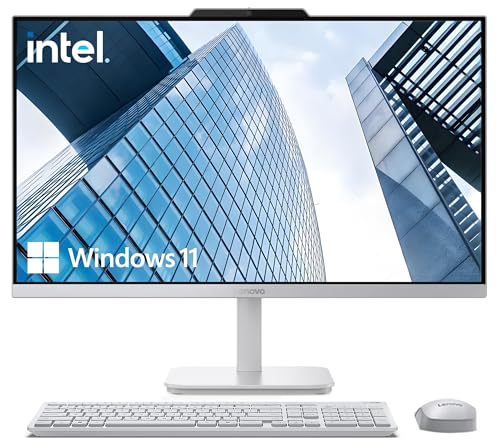
Lenovo A100 24-inch 1TB
$559.99
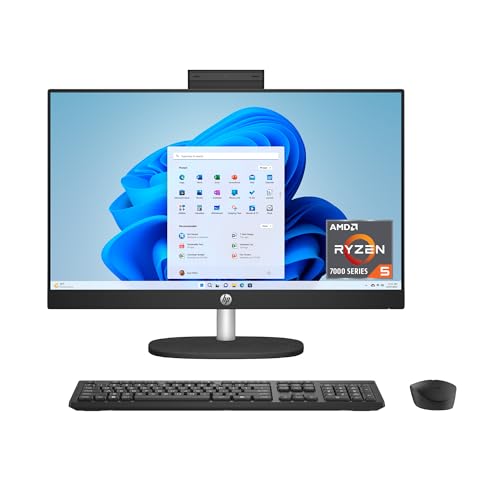
HP 23.8-inch All-in-One Jet Black
$896.93
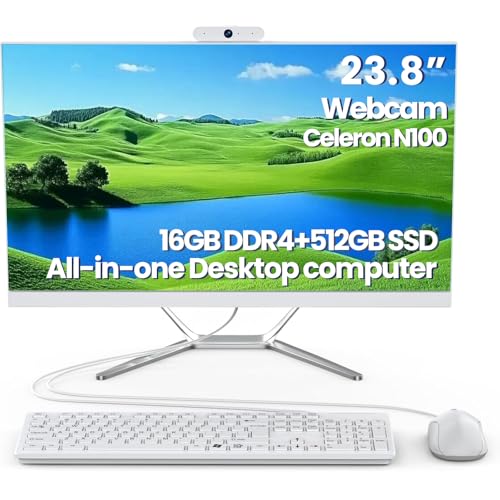
DEQIXIAN N100 All-in-One
$469.00
Spec Comparison
TL;DR: The Dell 24‑inch Touch AIO packs a 23.8‑inch HDR‑capable IPS display, 16 GB DDR5 RAM and a sleek 40.2 mm profile for $854.88, making it a solid all‑in‑one for everyday tasks.
The standout feature is the 23.8‑inch Full HD IPS touchscreen that covers 99 % of the sRGB gamut and supports HDR, delivering vivid colors and wide viewing angles up to 178°. Coupled with a 5.3 Bluetooth version and a 1 Gbps Ethernet port, the machine stays well‑connected for both wired and wireless networking.
At $854.88 it sits just below the Dell Inspiron 24‑inch, which lists at $875.99, while its 11.39 pound weight makes it lighter than the HP 23.8‑inch All‑in‑One (12.19 pounds). The depth of 40.2 mm matches the Dell Inspiron’s footprint, and its Bluetooth 5.3 aligns with the HP and Lenovo ThinkCentre models, so connectivity isn’t a compromise. The price‑to‑spec balance feels competitive within the 13‑product roundup.
Reviewers consistently praise the vivid screen and the straightforward Windows 11 Home setup, noting the narrow bezels and modern Y‑stand design as a space‑saving win. Professional reviewers call out the attractive aesthetics and the wide port selection, but they also flag the Intel Core 5 120U’s modest 1.4 GHz base clock (boosting to 4.4 GHz) as under‑powered for demanding workloads. Users echo the sentiment, highlighting weak bass from the dual Bluetooth speakers and the difficulty of upgrading RAM or storage later on.
Under the hood, the system ships with 16 GB of DDR5 RAM clocked at 5200 MHz and a 512 GB NVMe SSD, which together provide smooth multitasking for web browsing, video calls and light office apps. The Intel UHD Graphics integrated GPU pairs with a 90 W power supply, and the connectivity suite includes Wi‑Fi 6E, two front USB‑C 10 Gbps ports, HDMI in/out and a full‑size SD card reader, covering most peripheral needs without clutter.
Pros
Cons
Best for: Casual home users, students and light‑office workers who want a tidy all‑in‑one with a high‑quality touchscreen.
Avoid if: You need professional‑grade performance, dedicated graphics, extensive upgradeability, or stronger audio.
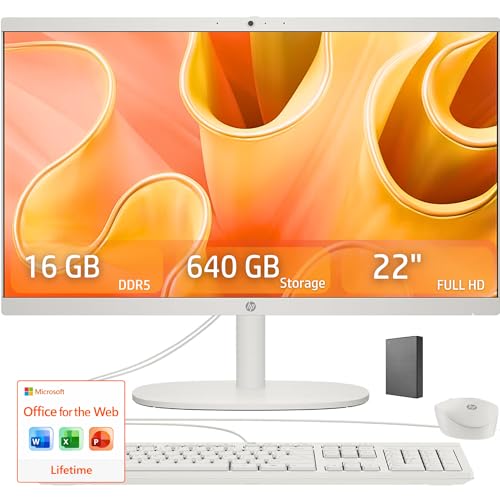
TL;DR: The HP 22aio delivers a compact 21.45‑inch Full HD screen, 16 GB DDR5 RAM and fast UFS storage at $499.99, making it a solid all‑in‑one for everyday home and office tasks.
The standout spec is the 16 GB DDR5‑4800 memory paired with an Intel N100 quad‑core processor that runs up to 3.40 GHz and a 6 MB L3 cache, delivering smooth multitasking for everyday apps. The 128 GB UFS drive boots Windows 11 quickly and can be expanded with an optional 512 GB USB flash drive, bringing total capacity to 640 GB.
At 9.19 lb, the HP 22aio it's noticeably lighter than the Dell OptiPlex 3280 AIO (18.0 pounds) and the Lenovo A100 (15.2 pounds), and even lighter than the DEQIXIAN N100 All‑in‑One (16.53 pounds). Its 21.45‑inch panel it's smaller than the 23.8‑inch screens on the Lenovo V100 and DEQIXIAN models, but it shares the same 250‑nit brightness. The dual 2 W speakers tuned by DTS match the 2 W per speaker output listed for the Lenovo V100 and A100, and the Bluetooth 5.3 module is a step ahead of the Bluetooth 5.2 found on those peers.
Users appreciate the tidy footprint, the anti‑glare 99 % sRGB display and the quick start‑up thanks to UFS storage. Reviewers note that the 720p webcam feels modest for video calls, and the internal 128 GB storage can fill up fast, requiring external drives for larger media libraries. Professional reviewers also point out that DDR5‑4800 memory and Wi‑Fi 6 give the system a future‑proof edge, even though the UFS drive is slower than a full NVMe SSD.
Additional technical perks include a 1 Gbps Gigabit Ethernet port, a USB‑C port that can reach up to 10 Gbps, and expandability to 32 GB DDR5 SO‑DIMM. The machine runs Windows 11 Home or Pro out of the box and comes with a 65 W Smart AC adapter, meeting ENERGY STAR and EPEAT Gold efficiency standards.
Pros
Cons
Best for: Value-conscious buyers seeking quality at $499.99
Avoid if: You need advanced features or professional‑grade performance
“Perfect for my home office — everything fits on a small desk.”
“The screen is bright and clear, great for Netflix and Zoom.”
TL;DR: The Lenovo V100 24‑inch All‑in‑One packs a 23.8″ IPS display, 16 GB RAM and a 512 GB PCIe SSD into a sleek chassis for $499.98, making it a solid entry‑level desktop for home and office work.
The standout spec is the combination of a 23.8‑inch Full HD IPS panel that covers 99 % of the sRGB color gamut and a fast 512 GB PCIe NVMe SSD. Paired with 16 GB DDR4 RAM, the system feels responsive for everyday multitasking, while the dual 2 W speakers and 250 nits brightness keep media clear in typical lighting.
Compared with the other twelve AIOs in this roundup, the V100 is deeper (21.23 in vs. the HP 22aio’s 7.33 in) and a touch heavier than the HP model (9.47 lb vs. 9.19 lb) but lighter than the Dell OptiPlex 3280 AIO (which weighs 18.0 lb). Its brightness and 99 % sRGB coverage match the HP 22aio, while the Lenovo A100 shares the same 2 W speaker power and Bluetooth 5.2. The DEQIXIAN N100 is significantly heavier (16.53 lb) and thicker, and the Acer Aspire C27‑2G‑UR17 is also bulkier. In short, the V100 sits in the middle of the pack: more spacious than the ultra‑thin Dell, yet not as massive as the heavier competitors.
Users appreciate the straightforward setup, the clean black design and the snappy SSD response. Professional reviewers note the i3‑N305’s 8‑core, 3.8 GHz turbo performance and the future‑proof Wi‑Fi 6 and Bluetooth 5.2 connectivity. Common complaints focus on the mono built‑in microphone, which sounds thin in video calls, and the fact that some configurations have soldered RAM, limiting future upgrades. Integrated graphics also means the V100 isn’t aimed at gaming or heavy‑duty graphics work.
Under the hood, the Intel Core i3‑N305 delivers 8 cores, 8 threads and a 6 MB cache, while the 65 W power adapter and 89 % power efficiency keep energy draw modest. Security features include firmware TPM 2.0 and a Kensington lock slot, adding a layer of protection for small‑business environments.
Pros
Cons
Best for: Entry‑level buyers or those on a tight budget
Avoid if: You need advanced features or professional‑grade performance
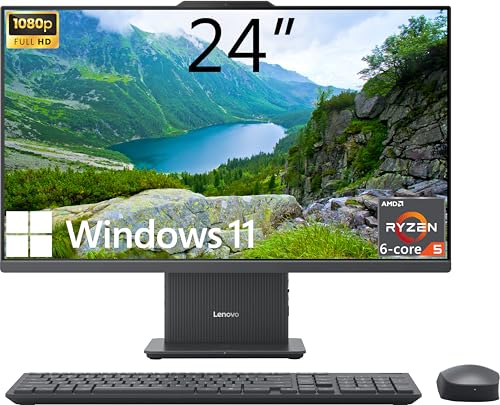
TL;DR: The Lenovo IdeaCentre 24‑inch All‑in‑One packs a Ryzen 5 7535HS, 16 GB DDR5 RAM and a borderless 24″ IPS display for $628, delivering solid everyday performance in a sleek, albeit heavy, package.
The standout feature is its 24‑inch IPS panel with 99% sRGB coverage, 250–300 nits brightness and a hardware low‑blue‑light filter, all wrapped in a three‑side borderless frame. Under the hood sits an AMD Ryzen 5 7535HS processor (6 cores, 12 threads) with a 3.3 GHz base clock, boosting up to 4.5 GHz, and 16 GB DDR5 RAM running at 4800 MHz.
At $628 it sits in the mid‑range of the roundup. Its 6001 g chassis is lighter than the Acer Aspire C27‑2G‑UR17 (15.1 lb) and the Lenovo A100 24‑inch 1TB (15.2 lb), but heavier than the HP 22aio (9.19 lb) and the HP 23.8‑inch All‑in‑One Jet Black (12.19 lb). It offers solid connectivity with Bluetooth 5.2, Wi‑Fi 6 and a 1 Gbps Ethernet port, plus a 10 Gbps USB‑C data port and a 10 Gbps USB‑A 3.2 Gen 2 port—features that outpace several peers that list fewer high‑speed ports.
Reviewers appreciate the fast boot times, smooth multitasking and the privacy‑shutter 5 MP IR webcam, especially when paired with HDMI‑in for console gaming. Professional reviewers note the sleek design and the strong CPU‑to‑RAM combo, while users flag the integrated Radeon 660M graphics as a limitation for demanding games or heavy video editing, and the 6001 g weight as a hurdle when relocating the unit.
Additional technical details include a 512 GB PCIe M.2 NVMe SSD, a 135 W 90%‑efficient power adapter, dual 2 W speakers, a firmware TPM 2.0 and a Kensington lock for security. The system supports up to 64 GB of DDR5 memory, giving plenty of headroom for future upgrades.
Pros
Cons
Best for: Most users seeking a balanced, mainstream option
Avoid if: You need advanced features or professional‑grade performance
“A perfect blend of power, usability, and sleek design for everyday tasks.”
“The touchscreen and powerful specs streamline video calls and online classes.”
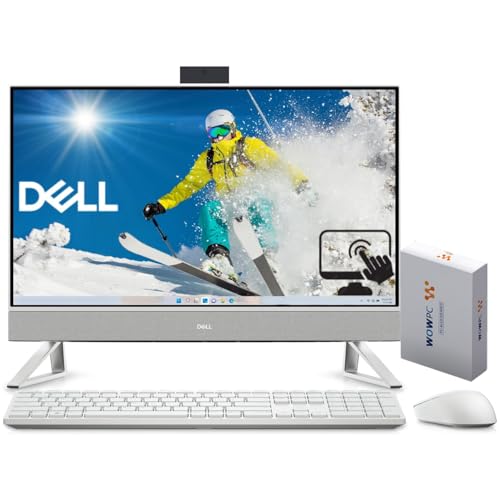
TL;DR: The Dell Inspiron 24‑inch All‑In‑One packs a 10‑core 14th‑gen i7, 16 GB DDR4, a 1440p IR webcam and a 23.8″ touch display for $875.99, but its Full HD screen and premium price may limit appeal.
What really stands out is the 1440p IR webcam with Windows Hello facial recognition, a rarity in this price class. Paired with a 10‑core, 12‑thread Intel Core i7‑150U that can boost to 5.50 GHz and a 12 MB cache, the machine feels ready for multitasking and video calls. The 16 GB DDR4‑3200 MT/s memory and 512 GB PCIe NVMe SSD round out a solid performance foundation.
Compared with its peers, the Inspiron weighs slightly more than the Dell 24‑inch Touch AIO (which weighs 5.17 kg) and the Lenovo ThinkCentre AIO (5.995 kg), but its depth without stand matches the Dell AIO at 40.2 mm. It offers a broader port mix than the HP 23.8‑inch All‑In‑One, which lists fewer connectivity options, and its Wi‑Fi 6E speed of 2400 Mbps and Bluetooth 5.3 edge out the Lenovo A100’s Bluetooth 5.2. The screen size matches the Dell AIO and HP models at 23.8 inches, yet the Inspiron’s 99 % sRGB coverage and anti‑glare coating give it a color edge over the Lenovo ThinkCentre’s unspecified gamut.
Reviewers consistently praise the crisp 1440p webcam and the wide selection of ports—including HDMI‑in, USB‑C PowerShare and an SD card reader—making it a convenient hub for home offices. The touchscreen with pen support and MyDell EQ audio presets also get positive mentions. On the flip side, users note the Full HD (1920 × 1080) panel feels low‑pixel‑density on a 23.8″ screen, and some report the supplied wireless mouse can feel unresponsive, while the keyboard’s AAA batteries don’t last long.
Beyond the core specs, the system supports up to 32 GB of DDR4 RAM, offers a 1 Gigabit Ethernet port, and runs on Windows 11 Pro out of the box. Its chassis combines a plastic resin rear cover with an aluminum/zinc stand, and 35 % of the plastic is post‑consumer recycled, appealing to eco‑conscious buyers.
Pros
Cons
Best for: Those prioritizing quality and willing to pay for premium performance
Avoid if: You're shopping on a tight budget — it's priced at $875.99
“Mouse is unresponsive”
TL;DR: The Lenovo ThinkCentre AIO 24‑inch packs a 10‑core i7, 16 GB DDR5, 100 Hz IPS panel and IR webcam in a sleek Luna Grey chassis for $899.99, ideal for secure office work.
The standout feature is its 100 Hz refresh rate paired with a 99% sRGB IPS display, delivering smooth motion and accurate colors on the 23.8‑inch Full HD screen. An IR camera with a privacy shutter adds a business‑grade security layer, while the 5 MP sensor ensures clear video calls.
Compared with the other twelve AIOs in this roundup, the ThinkCentre sits at the higher end of the price band and is heavier than the Dell 24‑inch Touch AIO (5.17 kg) and the HP 23.8‑inch model (5,536 g). Its 192 mm depth exceeds the Dell Touch’s 40.2 mm stand‑only profile and matches the Dell Inspiron’s 200.7 mm with‑stand dimension. Memory‑wise, it ships with DDR5‑based 16 GB RAM, while several peers list DDR4 or omit the type entirely, giving it a future‑proof edge.
User feedback repeatedly praises the clean, clutter‑free design, the inclusion of a wired keyboard and mouse, and the smooth 100 Hz display for everyday tasks. Professional reviewers highlight the HDMI‑in port for secondary‑monitor use and the TPM 2.0 plus IR camera as strong security credentials. The main criticisms focus on the tilt‑only stand, lack of VESA‑mount compatibility, and the absence of a touchscreen, which some competitors offer.
Under the hood, the 13th‑gen Intel Core i7‑13620H delivers a 2.4 GHz base clock, boosts to 4.9 GHz, and carries a 24 MB cache across ten cores and sixteen threads. Storage starts at a 512 GB PCIe M.2 NVMe SSD with room to expand to 4 TB, and the system supports up to 64 GB DDR5 RAM. Connectivity includes Bluetooth 5.3, Wi‑Fi 6, and Gigabit Ethernet, while the 90 W power adapter ensures reliable performance.
Pros
Cons
Best for: Those prioritizing quality and willing to pay for premium performance
Avoid if: You're shopping on a tight budget — it's priced at $899.99
“Great all-in-one for home office”
“Love the 100Hz”
TL;DR: The MSI PRO AP272P packs a 20‑core i7‑14700, 16 GB DDR5 and a 27″ 1080p 100 Hz display into an ultra‑light 1.32‑lb all‑in‑one, but its FHD panel and lack of a discrete GPU keep it from being a high‑end workstation.
What really stands out is the desktop‑class Intel Core i7‑14700 CPU – 20 cores (8 performance + 12 efficient), 28 threads, a 2.1 GHz base clock and a 5.4 GHz turbo boost, backed by 28 MB L2 and 33 MB L3 cache. Combined with 16 GB DDR5 memory running up to 3200 MHz, the machine can handle heavy multitasking and virtualization that most all‑in‑ones struggle with.
Compared with the other 12 contenders, the MSI’s 27‑inch screen dwarfs the 21.5‑inch panels of the Dell OptiPlex 3280 and Lenovo ThinkCentre M810z, and it also exceeds the 23.8‑inch displays of the Lenovo V100, HP 22aio and DEQIXIAN N100. Its up‑to‑100 Hz refresh rate beats the 60 Hz panels in those models. Memory‑wise, it offers DDR5 while the peers stick to DDR4, and the CPU cache far outpaces the 6 MB (or 4 MB) caches listed for the competition. Connectivity is future‑ready with Wi‑Fi 6E and Bluetooth 5.3, whereas some rivals only list Bluetooth 5.2. Even the chassis weighs dramatically less at 1.32 pounds, making it considerably lighter than the Dell (18 pounds), HP (9.19 pounds) and Lenovo A100 (15.2 pounds) units.
Users praise the raw CPU horsepower and the ergonomic stand that adjusts 0‑100 mm in height and tilts from –5° to +20°, plus the built‑in security suite with dTPM 2.0, optional vPro and AI‑driven Tobii Aware privacy. Critics, however, note the 1080p resolution on a 27‑inch panel feels stretched, and the integrated Iris Xe graphics can’t match a dedicated GPU for design or gaming workloads. Upgrade paths are also limited – the CPU and GPU are soldered, leaving only RAM and storage as upgrade options.
Pros
Cons
Best for: Enterprise or remote‑work stations that need desktop‑class processing, strong security and a flexible ergonomic setup.
Avoid if: You need high‑resolution or professional‑grade graphics, dedicated GPU power, or a larger display pixel count.
TL;DR: At $429.99, Dell’s OptiPlex 3280 AIO blends a 21.5‑inch Full HD IPS screen, 16 GB RAM and a 512 GB NVMe SSD into a compact, business‑grade desktop that’s ready out of the box.
The machine ships with an Intel Core i3‑10105T that runs at 3.0 GHz base and can boost to 3.9 GHz, backed by 6 MB of cache. Combined with 16 GB DDR4 memory and a 512 GB NVMe SSD, it delivers snappy multitasking for everyday office apps. Its 21.5‑inch anti‑glare IPS panel shows a crisp 1920 × 1080 image at 60 Hz, while dual 2 W speakers keep audio clear enough for calls.
Weighing roughly 9.57–10.31 lb, the OptiPlex is lighter than the 16.53‑lb DEQIXIAN N100 and the 15.2‑pound Lenovo A100, yet comparable to the 9.19‑lb HP 22aio. Its 21.5‑inch screen is smaller than the 23.8‑inch displays on the DEQIXIAN, Lenovo V100 and HP models, but matches the Lenovo ThinkCentre M810z. While most rivals sport Bluetooth 5.x, this unit uses Bluetooth 4.2, a generation behind. The 6 MB cache lines up with the Lenovo V100, A100 and ThinkCentre, and its 2 W per‑speaker output mirrors the Lenovo V100’s speaker rating.
Users love the space‑saving all‑in‑one chassis and the privacy‑focused pop‑up IR webcam that supports Windows Hello; professional reviewers highlighted it as a solid security addition. The fast NVMe storage and ample RAM earn praise for smooth multitasking, but reviewers repeatedly call the integrated Intel UHD Graphics 630 a bottleneck for gaming or heavy creative work. Some owners note fan noise under load and the lack of a height‑adjustable stand, which can affect long‑term ergonomics.
The system includes business‑grade safeguards such as TPM 2.0, BIOS password protection and a Kensington lock slot, all powered by a 130 W adapter. Connectivity covers gigabit Ethernet (1 Gbps) and an optional Wi‑Fi 6 (802.11ax) module, ensuring fast network access. A 90‑day limited warranty rounds out the package, though it’s shorter than the one‑year warranties many competitors offer.
Pros
Cons
Best for: Entry-level buyers or those on a tight budget
Avoid if: You need advanced features or professional-grade performance
“Perfect for work-from-home setup—clean look and fast performance.”
“The pop-up camera is a game-changer for privacy.”
TL;DR: The Lenovo ThinkCentre M810z packs a 21.5‑inch FHD IPS screen, 16 GB DDR4 RAM, and an Intel Core i5‑6500 into a ultra‑slim 45 mm chassis for $285, but it carries a single‑star rating from its lone reviewer.
The standout spec is the 16 GB DDR4 memory paired with a 256 GB SATA SSD, which together give the M810z enough headroom for typical office suites and light multitasking. Under the hood sits an Intel Core i5‑6500 processor that runs at a 3.2 GHz base and can boost to 3.6 GHz, with a 6 MB cache supporting it.
When you line it up against the other all‑in‑ones in this roundup, the M810z is noticeably slimmer – its 45 mm depth's far thinner than the Dell OptiPlex 3280 AIO’s 2.14 in depth and the HP 22aio’s 7.33 in depth. It also weighs 12.8 lb, making it lighter than the Dell (18 lb) but heavier than the HP (9.19 lb). The screen size matches the Dell’s 21.5‑inch panel, yet it falls short of the larger 23.8‑inch displays that the DEQIXIAN N100, Lenovo V100, and Lenovo A100 use. Storage-wise, the M810z’s 256 GB SSD is smaller than Dell’s 512 GB NVMe drive, though all models offer SSD options.
Customer sentiment is stark: the single review on the listing gave it a 1.0‑star rating, flagging dissatisfaction despite the solid hardware list. Reviewers do praise the Dolby Audio system and the dual 2 W speakers, but the low rating suggests issues that the spec sheet doesn't capture, such as possible reliability concerns or software setup frustrations. The unit also includes a 1080p webcam with a privacy switch, Gigabit Ethernet, Bluetooth 4.1, and optional Wi‑Fi adapters, covering most business connectivity needs.
Pros
Cons
Best for: Users who need a business‑grade all‑in‑one with 16 GB RAM, a compact footprint, and Windows 11 Pro preinstalled.
Avoid if: Reliability and high user satisfaction are your top concerns.
“Great all-in-one for home office”
“Love the 100Hz”
TL;DR: The Acer Aspire C27‑2G‑UR17 packs a 27‑inch 120 Hz Full HD IPS screen, a 4.5 GHz Ryzen 7 CPU, 16 GB RAM and 1 TB SSD for $637.00, making it a solid all‑in‑one for home‑office and media use.
The standout feature is the 27‑inch Full HD IPS display that runs at 120 Hz, delivering smoother motion than most standard 60 Hz panels. Under the hood sits an AMD Ryzen 7 5825U processor that can boost up to 4.5 GHz, paired with 16 GB DDR4 memory and a 1 TB PCIe NVMe SSD, giving you plenty of headroom for multitasking and storage.
Compared with the other twelve AIOs in this roundup, the Aspire C27 weighs more than the Lenovo IdeaCentre 24‑inch, which weighs 6001 g, but its mass is similar to the Lenovo A100 at 15.2 pounds. It also carries a front‑facing USB‑C port that many peers don’t list, and its Wi‑Fi 6E capability promises speeds up to 9.6 Gbps—faster than the Wi‑Fi 6 found in several rivals. While its price of $637.00 sits toward the higher end of the group, the combination of a 120 Hz screen, 1 TB SSD and a full wireless keyboard‑mouse bundle isn’t common in the lower‑priced models.
Everyday users consistently highlight the vibrant 120 Hz display and the privacy shutter on the 2 MP webcam as everyday wins. Professional reviewers point out the ergonomic stand and the VisionCare suite that reduces eye strain during long sessions. On the flip side, reviewers note that the integrated Radeon graphics can feel thin when tackling modern games or heavy video editing, and reviewers often describe the built‑in speakers as lacking volume and clarity.
Pros
Cons
Best for: Most users seeking a balanced, mainstream option
Avoid if: You're shopping on a tight budget — it's priced at $637.00
“Users love the crisp, vibrant display and smooth 120 Hz experience”
TL;DR: Lenovo A100 24‑inch All‑in‑One packs a 23.8‑inch FHD IPS screen, 16 GB DDR4 RAM and a 512 GB NVMe SSD for $559.99, delivering a tidy desktop for everyday tasks.
The A100’s standout hardware includes a 23.8‑inch IPS panel that hits 250 nits brightness and covers 99% of the sRGB gamut, while the 16 GB DDR4 SODIMM memory and 512 GB PCIe NVMe M.2 SSD give you fast, responsive multitasking. Under the hood sits an Intel N100 processor with four cores, four threads, a 6 MB cache and a turbo boost up to 3.4 GHz, all powered by a 65 W adapter. Connectivity is solid with Wi‑Fi 6, Bluetooth 5.2, Gigabit Ethernet (1 Gbps) and two USB‑A 10 Gbps ports, and the built‑in speakers deliver 2 W per driver.
At 15.2 lb, the A100 is heavier than the HP 22aio’s 9.19 lb chassis but only a shade lighter than the Acer Aspire C27’s 15.1 lb build, putting it in the mid‑range of AIO bulk. Its 2 W speakers match the Lenovo V100’s audio output, and the 250‑nit brightness is identical to both the HP 22aio and V100, though its Bluetooth 5.2 trails the HP’s newer 5.3 version. The A100 offers a comparable feature set to its peers while sitting toward the higher end of the weight spectrum.
Reviewers appreciate the compact, space‑saving design and the anti‑glare screen that’s easy on the eyes during long work sessions. The rapid NVMe SSD boot‑up and the inclusion of a wireless keyboard and mouse frequently earn praise for plug‑and‑play convenience. On the downside, users note the 720p webcam feels modest for video calls, the integrated Intel UHD Graphics limit gaming or intensive graphics work, and the RAM‑and‑SSD upgrades require opening the chassis, which some find less convenient.
From a technical standpoint, the A100’s integrated Intel UHD Graphics handle everyday tasks without issue, while the Gigabit Ethernet port ensures wired network stability for home offices. The device also includes a firmware TPM 2.0 chip for added security and a Kensington lock slot for physical protection. With a maximum RAM capacity of 64 GB DDR4, the system is future‑proof for memory upgrades, even though the stock 16 GB should satisfy most users today.
Pros
Cons
Best for: Most users seeking a balanced, mainstream option
Avoid if: You need advanced features or professional‑grade performance
TL;DR: The HP 23.8‑inch All‑in‑One packs a 16 GB DDR5, 1 TB PCIe SSD and an 89%‑ratio FHD touchscreen into a sleek jet‑black chassis for $814, ideal for productivity‑focused users.
One standout feature is its 23.8‑inch IPS touchscreen that reaches an 89% screen‑to‑body ratio, giving you a spacious canvas without a bulky frame. Under the hood sits an AMD Ryzen 5 7520U with 16 GB of DDR5 RAM clocked at 5600 MHz and a fast 1 TB PCIe Gen4 NVMe SSD, delivering snappy everyday performance.
Compared with the other twelve AIOs, the HP is a bit heavier than Dell’s 24‑inch Touch model (12.19 lb vs 11.39 lb) but lighter than Acer’s 15.1‑lb offering. Its RAM runs at 5600 MHz, noticeably faster than Dell’s 5200 MHz, while the Bluetooth 5.3 matches the Dell Touch and Lenovo ThinkCentre. At 541 mm deep, the unit is deeper than Dell’s 40.2 mm profile, giving it a sturdier footprint but a larger desk presence.
Users consistently praise the clean jet‑black design, the responsive capacitive touchscreen, and the quick boot times from the SSD. Professional reviewers note the solid build and the inclusion of HP Audio tuning and dual stereo speakers. Common complaints focus on the non‑upgradable RAM, a brightness ceiling of 250‑300 nits that can feel dim in sunny rooms, and the lack of a VESA‑mount option.
Beyond the core specs, the All‑in‑One includes an IR privacy webcam at 720p, Wi‑Fi 6, DC‑dimming flicker‑free technology, and environmental credentials such as EPEAT Gold and ENERGY STAR certification, making it a responsible choice for eco‑conscious buyers.
Pros
Cons
Best for: Those prioritizing quality and willing to pay for premium performance
Avoid if: You're on a tight budget or only need basic functionality
TL;DR: The DEQIXIAN N100 All‑in‑One packs a 23.8‑inch Full HD IPS screen, 16 GB DDR4 RAM and a 512 GB SSD into a compact 16.53‑lb chassis, but its entry‑level Celeron CPU limits heavy workloads.
The standout specification is the 16 GB of DDR4 RAM paired with a 512 GB SSD, which together enable quick boot times and smooth multitasking on the 23.8‑inch Full HD IPS display. Under the hood sits an Intel Celeron N100 processor with a 2.0 GHz base clock, a 3.4 GHz turbo boost, and a 4 MB cache, offering enough power for everyday office apps and web browsing.
Compared with the other units in this roundup, the DEQIXIAN is lighter than the Dell OptiPlex 3280 AIO (18.0 lb) but heavier than the HP 22aio (9.19 lb). Its depth of 21.3 in is considerably deeper than Dell’s 2.14 in, while the screen size matches the Lenovo V100 and Lenovo A100 at 23.8 in. Bluetooth 5.2 aligns with both Lenovo models, and the Wi‑Fi 6 capability puts it on par with the HP offering.
User feedback praises the compact all‑in‑one form factor and the reliable 3 MP webcam that streams at 2K resolution. However, reviewers note that the Celeron CPU struggles with demanding software, and the integrated Intel UHD graphics are not suited for gaming or video editing. The sealed chassis also limits future upgrades and occasionally overheats during long sessions.
Additional technical details include built‑in speakers, a DVD‑RAM optical drive, one HDMI port, one VGA port, four USB 3.0 ports and two USB 2.0 ports. The system runs Windows 11 Pro out of the box, offering enterprise‑level security features for home‑office users.
Pros
Cons
Best for: Entry-level buyers or those on a tight budget
Avoid if: You need advanced features or professional‑grade performance
“Users appreciate the clean, minimalist design and ease of setup.”
“The webcam quality is clear and reliable for Zoom and Teams calls.”
Breakdown
Dell 24-inch Touch AIO
Pros
HP 22aio
Pros
Lenovo V100 24-inch
Pros
Lenovo IdeaCentre 24-inch
Pros
Based on scoring data and product specs
Personalized picks
Best Overall Pick
Dell 24-inch Touch AIO
Best ValueBest for: Those prioritizing quality and willing to pay for premium performance
HP 22aio
Best for: Value-conscious buyers seeking quality at $499.99
$499.99-$309.01 vs winner
Skip DEQIXIAN N100 All-in-One if…
You need advanced features or professional-grade performance
We’re naming the Dell 24‑inch Touch AIO the clear winner. It ships with a 23.8‑inch Full HD IPS touchscreen that covers 99 % of the sRGB gamut and supports HDR, giving you vivid color for work or media. The machine packs 16 GB of DDR5 RAM running at 5200 MHz and a fast 512 GB NVMe SSD, while still fitting on a desk at just 11.39 lb. At $854.88 it also carries the highest user rating of 4.5 / 5 from 139 reviews.
The HP 22aio earns the runner‑up spot, especially if you need a compact all‑in‑one for everyday office tasks on a tighter budget. Its 21.45‑inch Full HD screen pairs with 16 GB DDR5‑4800 RAM and a modest 128 GB UFS drive, which is enough for documents, video calls and light multitasking. Priced at $499.99 and backed by a 4.0 / 5 rating from 183 reviewers, it offers solid performance in a smaller footprint.
For those who want alternatives at different price points, the Lenovo ThinkCentre M810z 21.5‑inch is the best budget pick at $285.00, delivering essential computing without breaking the bank. The HP 22aio, already highlighted, serves as the most balanced mid‑range option at $499.99. If you crave a premium experience, the Lenovo ThinkCentre AIO 24‑inch tops the list at $899.99, offering a larger display and higher‑end specs for power users.
Pick the Dell 24‑inch Touch AIO today for the best blend of performance, features, and value.
The Dell model costs $854.88 versus $499.99 for the HP, so it carries a premium of about $355. It adds a 23.8‑inch FHD touch screen, faster DDR5‑5200 MHz RAM, a pop‑up 5 MP + IR webcam with Windows Hello, Dolby Atmos‑enabled Bluetooth speakers, and Wi‑Fi 6E, which Dell’s brand reputation also backs.
Please sign in to leave a review
No reviews yet. Be the first to review!
