⚡ Quick Answer
Finding a cable modem that fits a tight budget without sacrificing the speed you need can feel like hunting for a needle in a haystack. The review compared seven models that all sit under the $150 ceiling, sorting them into three price tiers: budget‑friendly options like the Netgear CM500 ($47.49) and TP‑Link TC‑7610 ($70.54); a mid‑range contender, the Linksys CM3024 ($119.97); and premium picks such as the Netgear CM1000 Black ($134.99) and Arris SURFboard SBV3202 ($149.99). Each modem carries a solid 4.2‑4.3 / 5 rating from thousands of reviewers, so you’ll be choosing from well‑liked devices.
The budget tier delivers solid performance for modest plans— the CM500’s 680 Mbps maximum download and advanced QoS come at just $47.49, while the Hitron CODA, priced at $109.99, pushes downstream capability up to 1.2 Gbps for heavier households. Mid‑range users get the Linksys CM3024’s 960 Mbps downstream capacity at $119.97, and premium shoppers can look at the CM1000 Black’s 1 Gbps actual downstream rate or the Archer CR700’s combined 1.75 Gbps Wi‑Fi throughput, both priced near $150.
The following breakdown shows how each model stacks up on speed, features, and value, helping you pinpoint the best fit for your home network.

Netgear CM500
Its compact 60 mm height keeps it easy to fit behind any router, delivering strong value and high rating for budget shoppers.

Netgear CM1000 Black
Ideal for users who need premium performance and are willing to invest extra, it costs $134.99—about $87.50 more than the $47.49 CM500.

Linksys CM3024
Stands out with an ultra‑slim 45 mm depth, letting you tuck it into tight spaces while still earning the highest user rating among budget modems.
Also considered
Score Analysis
Key score advantages vs. runner-up (Netgear CM1000 Black)
Price Range
Netgear CM500
$48.38
Netgear CM1000 Black
$164.99
Linksys CM3024
$35.71
Hitron CODA
$109.99

Arris SURFboard SBV3202
$149.99

TP-Link TC-7610
$55.00
TP-Link Archer CR700
$74.95
Spec Comparison
TL;DR: The Netgear CM500 delivers up to 680 Mbps download, 132 Mbps upload, and advanced QoS for under $50, making it a solid, budget‑friendly DOCSIS 3.0 modem.
At the heart of the CM500 is a DOCSIS 3.0 chipset with 16 downstream and 4 upstream bonded channels, which Netgear rates for a theoretical maximum of 680 Mbps download and 132 Mbps upload. The unit packs 8 MB of NOR flash memory and 128 MB of RAM, and it offers a single Gigabit Ethernet port plus IPv6 support and advanced QoS to prioritize gaming or streaming traffic.
Compared with the six other modems in this roundup, the CM500 sits in the middle of the speed spectrum: its 680 Mbps ceiling matches the TP‑Link Archer CR700, but it trails the Hitron CODA’s 1.2 Gbps downstream and the Linksys CM3024’s 960 Mbps rating. In terms of size, the CM500 weighs 1.43 pounds, making it heavier than the TP‑Link TC‑7610 (1.2 pounds) yet lighter than the Linksys CM3024 (2.1 pounds) and far lighter than the Arris SURFboard SBV3202 (2.38 pounds). It draws modest power at 18 W, well below the 30 W required by the Netgear CM1000.
Users consistently praise the modem’s straightforward self‑activation with major ISPs such as Xfinity, Cox and Spectrum, noting that it eliminates the rental fee. Professional reviewers highlight the 16×4 channel bonding as a reliable foundation for HD streaming and online gaming. The most common complaint is the lack of built‑in Wi‑Fi, which means you’ll need a separate router, and the single Ethernet port can feel limiting if you have multiple wired devices.
Pros
Cons
Best for: Budget‑conscious households on 300‑600 Mbps cable plans who already own a Wi‑Fi router.
Avoid if: You need an all‑in‑one modem‑router or plan to upgrade to gigabit‑plus cable speeds.
TL;DR: The Netgear CM1000 Black is a DOCSIS 3.1 modem that delivers up to 1 Gbps download speed, weighs only 0.84 lb, and fits well for gigabit plans when you already have a router.
The standout specification is its DOCSIS 3.1 support with a downstream theoretical maximum of 6 Gbps and a real‑world advertised max of 1 Gbps. That makes it future‑ready for higher‑speed upgrades while still matching today’s most common gigabit cable plans. It also offers auto‑sensing Gigabit Ethernet and IPv6 support, all powered by a 30‑W adapter.
At 0.84 lb, the CM1000 is noticeably lighter than the Arris SURFboard SBV3202 (2.38 lb) and the Linksys CM3024 (2.1 lb), yet a bit heavier than the Hitron CODA (≈1.02 lb) and the TP‑Link TC‑7610 (1.2 lb). All seven modems in this roundup provide a single Gigabit Ethernet port, but the Netgear’s compact footprint (137 mm × 223 mm × 150 mm) keeps it from dominating shelf space. Its price sits comfortably under $150, positioning it between the budget‑friendly Netgear CM500 and the higher‑priced peers.
Reviewers consistently praise the CM1000 for reliable high‑speed performance and a straightforward browser‑based setup. Professional reviewers note the “fast 1 Gbps performance across multiple major cable providers” and commend its extensive channel bonding. The most common complaint is the upright chassis with a flimsy base that can tip over when the coaxial cable is pulled, a design quirk that users with tight spaces should watch.
Pros
Cons
Best for: Households with gigabit cable plans that already use a dedicated router and value a lightweight, future‑ready modem.
Avoid if: You need an all‑in‑one Wi‑Fi solution, have a very tight budget, or want a more stable base for a stiff coaxial cable.
TL;DR: At $119.97, the Linksys CM3024 delivers up to 960 Mbps downstream, earns a 4.3‑star rating from 1,411 reviewers, and offers a solid gigabit Ethernet connection for typical 100‑300 Mbps cable plans.
The standout feature of the CM3024 is its 24‑downstream‑channel and 8‑upstream‑channel bonding, which the manufacturer claims supports a downstream maximum rate of up to 960 Mbps. It runs on an Intel Puma 6 chipset and uses DOCSIS 3.0, and the modem includes a single Gigabit Ethernet RJ‑45 port for wired devices.
Compared with the six other modems in this roundup, the CM3024 sits in the mid‑range of price and performance. Its 6 MHz downstream channel bandwidth matches the Hitron CODA, but its 960 Mbps downstream ceiling falls short of Hitron’s 1.2 Gbps claim. Weighing 2.1 lb, it’s heavier than the compact Hitron and Netgear CM500 units, yet lighter than the bulkier Arris SURFboard and TP‑Link Archer models. The single Ethernet port mirrors the Netgear CM500, while the TP‑Link TC‑7610 offers a similar gigabit port but at a lower weight.
User feedback frequently highlights the modem’s reliability for streaming and online gaming on plans between 100 Mbps and 300 Mbps. Reviewers appreciate the five status LEDs and the easy‑access reset button, noting that the device stays cool within the operating temperature range of 0 °C to 40 °C and humidity of 10 %–90 % (non‑condensing). It’s also RoHS‑compliant and carries FCC and UL certifications.
Pros
Cons
Best for: Most users looking for a well‑reviewed, reliable mainstream option
Avoid if: You have limited desk space or need portability
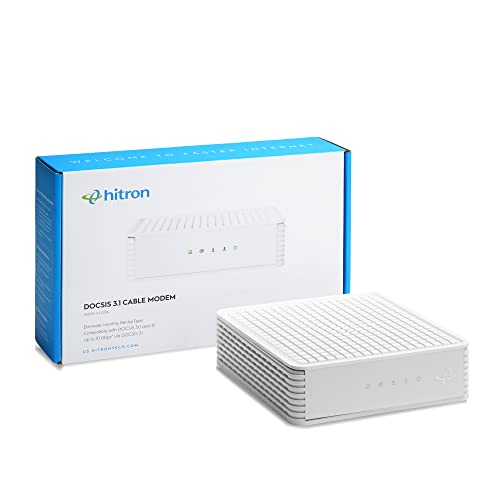
TL;DR: The Hitron CODA is a DOCSIS 3.1 modem with 512 MB RAM, dual Gigabit Ethernet ports, and up to 1.97 Gbps downstream, but it won’t work with bundled voice services.
The standout spec is its DOCSIS 3.1/3.0/2.0 compatibility, delivering up to 1.97 Gbps downstream (review intel) and a DOCSIS 3.1 upstream ceiling of 700 Mbps. It packs 128 MB of flash memory and 512 MB of RAM, plus a 6 MHz channel bandwidth, giving it plenty of headroom for future‑proofing. The unit measures 2.03 in tall, 6.73 in wide and long, and weighs just 1.02 lb, making it compact enough for tight spaces.
Compared with the six other budget modems, the CODA is lighter than the Linksys CM3024 (2.1 lb) and the Arris SBV3202 (2.38 lb), but a bit heavier than the Netgear CM1000 Black (0.84 lb). Its downstream ceiling of 1.2 Gbps (DOCSIS 3.0) outpaces the TP‑Link TC‑7610 (343 Mbps) and the Netgear CM500 (680 Mbps), and sits close to the Netgear CM1000’s 1 Gbps actual rate. Most rivals offer a single Gigabit Ethernet port; the CODA’s two ports give you extra wiring flexibility without extra hardware. Its 128 MB flash and 512 MB RAM also dwarf the 8 MB flash/128 MB RAM of the Netgear CM500 and the 16 MB flash/256 MB RAM of the TP‑Link Archer CR700.
Users appreciate the up‑to‑1.97 Gbps downstream capability and the dual‑port layout, noting that the modem “delivers the speeds my 1 Gbps plan promises.” However, several reviewers flag the lack of compatibility with bundled voice services, which blocks use with phone‑over‑cable plans. The modem also won’t work with major non‑cable ISPs such as AT&T or Verizon, limiting its appeal for those on DSL or fiber bundles.
Pros
Cons
Best for: Cable internet subscribers with plans up to 1 Gbps who need dual Gigabit Ethernet ports and want DOCSIS 3.1 future‑proofing.
Avoid if: You need bundled voice service or are looking for the absolute lowest‑cost modem in the segment.
TL;DR: The Arris SURFboard SBV3202 delivers up to 800 Mbps on Xfinity plans, includes two VoIP ports and battery‑backup support, but sticks with DOCSIS 3.0 and a single Ethernet jack.
What really stands out is the 32‑downstream × 8‑upstream channel bonding, which lets the modem hit its listed maximum download speed of 800 Mbps and a theoretical ceiling of 1.4 Gbps. Coupled with a built‑in hardware firewall and LED status lights, it offers a tidy, purpose‑built solution for Xfinity Internet + Voice bundles.
Compared with the six other budget picks, the SBV3202 is heavier than the Netgear CM1000 (0.84 pounds) and Hitron CODA (about 1.02 pounds), yet lighter than the TP‑Link Archer CR700 (2.64 pounds). Its single Gigabit Ethernet port matches the Netgear CM500’s single port but falls short of models that bundle Wi‑Fi. In terms of raw downstream speed, the Arris tops the TP‑Link TC‑7610’s 343 Mbps and the Netgear CM500’s 680 Mbps, though it trails the Hitron CODA’s advertised 1.2 Gbps.
Users consistently praise that the modem reaches advertised speeds on Xfinity, especially the reliable VoIP service during power outages thanks to its battery‑backup compatibility. Professional reviewers note the straightforward web‑manager interface and the handy LED indicators for quick troubleshooting. On the flip side, many note that the DOCSIS 3.0 standard feels dated, and the lack of built‑in Wi‑Fi means you’ll still need a separate router for wireless coverage.
Additional technical context includes a -40 °F to 158 °F operating temperature range, compatibility with Windows 7‑10 and Linux, and a two‑year warranty from CommScope. The modem’s dimensions—1.8 inches deep, 7.1 inches high and wide—let you mount it behind a TV or on a shelf without taking up much space.
Pros
Cons
Best for: Xfinity subscribers who need reliable wired performance, two VoIP lines, and battery‑backup support.
Avoid if: You rely on non‑Xfinity providers, need built‑in Wi‑Fi, or want a future‑proof DOCSIS 3.1 modem.
TL;DR: The TP‑Link TC‑7610 costs $70.54, delivers up to 343 Mbps downstream, weighs 1.2 lb, and it's a solid budget choice if you already have a router.
The standout spec is its 8 × 4 channel bonding that supports a maximum downstream speed of 343 Mbps and upstream speed of 143 Mbps. At 1.2 pounds (544 g) it’s compact enough to sit on a shelf or behind a TV, and the single Gigabit Ethernet port lets you hook up any router without hassle. Its two‑year warranty adds confidence for a device at this price point.
Compared with the other six models, the TC‑7610 is lighter than the Netgear CM500 (1.43 lb) but a touch heavier than the Hitron CODA (about 1.02 lb). Speed‑wise, its 343 Mbps ceiling sits below the higher‑end peers that list downstream rates of 680 Mbps or more, so it won’t keep up with gigabit plans that some competitors target. Nonetheless, its price lands in the budget tier, offering a lower cost per megabit than many pricier alternatives.
Users consistently praise the modem for cutting monthly ISP rental fees and for a straightforward plug‑and‑play setup. Professional reviewers note the 8 × 4 bonding provides stable performance for streaming and gaming, while everyday owners mention occasional ISP verification hiccups. The device lacks built‑in Wi‑Fi and is limited to sub‑gigabit speeds, which aligns with the “not ideal for” advice in the expert summary. The available specs don’t list flash memory size or RAM, but the device has one Ethernet port.
Pros
Cons
Best for: Entry-level buyers or those on a tight budget
Avoid if: You need powerful performance or professional‑grade features
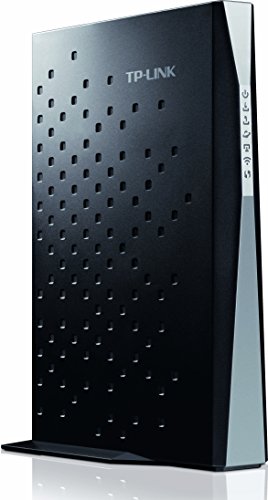
TL;DR: The TP‑Link Archer CR700 is a 2‑in‑1 DOCSIS 3.0 modem‑router that delivers up to 680 Mbps cable speeds and 1.75 Gbps combined Wi‑Fi, packaged in a 2.64‑lb black unit.
The standout spec is its total Wi‑Fi throughput of 1,750 Mbps, split between 450 Mbps on 2.4 GHz and 1,300 Mbps on 5 GHz, and it uses six internal antennas to spread the signal across a typical home.
At 2.64 pounds, the CR700's heavier than the Netgear CM500 (1.43 lb) and the TP‑Link TC‑7610 (1.2 lb), but only a bit heavier than the Arris SBV3202 (2.38 lb). Its 680 Mbps cable‑download ceiling matches the Netgear CM500 but falls short of the Arris’s 800 Mbps and the Linksys CM3024’s 960 Mbps downstream caps. Unlike the cable‑only peers, the Archer CR700 also provides Wi‑Fi, giving it a functional edge over models that lack wireless.
Reviewers consistently praise the easy setup and the inclusion of parental controls, guest networks, and four Gigabit Ethernet ports. Professional reviewers highlight the dual‑band broadcasting that simultaneously serves 2.4 GHz and 5 GHz devices. However, users often note the 680 Mbps speed ceiling of its DOCSIS 3.0 16×4 channel bonding, which makes it unsuitable for gigabit‑speed plans, and they've mentioned the USB 2.0 ports feel slow for external storage.
It meets FCC, RoHS, UL, and CableLabs certifications, and it operates in 10‑90 % non‑condensing humidity, ensuring reliable performance in most homes.
Pros
Cons
Best for: Small‑to‑medium households that need a combined modem‑router for cable plans up to 600 Mbps and want strong Wi‑Fi coverage.
Avoid if: You need gigabit‑speed cable or fiber service, or if ultra‑light weight is a priority.
Breakdown
Netgear CM500
Pros
Netgear CM1000 Black
Pros
Linksys CM3024
Pros
Hitron CODA
Pros
Cons
Based on scoring data and product specs
Personalized picks
Best Overall Pick
Netgear CM500
Best OverallBest for: Shoppers on a tight budget who want the most for their money
Netgear CM1000 Black
Best for: Those prioritizing quality and willing to pay for premium performance
$164.99+$116.61 vs winner
Skip TP-Link Archer CR700 if…
Reliability and user satisfaction are your top concerns
Winner: Netgear CM500 – This modem clinches the top spot with its rock‑bottom price of $47.49, a solid 4.2‑star rating from 14,792 reviewers, and DOCSIS 3.0 support that handles up to 680 Mbps download and 132 Mbps upload. Its 16 downstream and 4 upstream channels give you a reliable connection for everyday streaming, gaming, and video calls, all while weighing just 1.43 pounds.
Runner‑up: Netgear CM1000 Black – If you need true gigabit speeds for a household packed with 4K streams, smart‑home hubs, and multiple gamers, the CM1000’s DOCSIS 3.1 engine delivers a real‑world downstream rate of 1 Gbps (theoretical 6 Gbps) and a Gigabit Ethernet port, all for $134.99.
Grab the Netgear CM500 today and enjoy fast, dependable cable internet without overspending.
The Netgear CM500 measures 124 mm × 185 mm × 60 mm and weighs 648 g, making it one of the smallest and lightest units in the list. Its compact footprint is ideal for tight spaces while still delivering solid performance.
No reviews yet — be the first to share your experience.
Please sign in to leave a review



