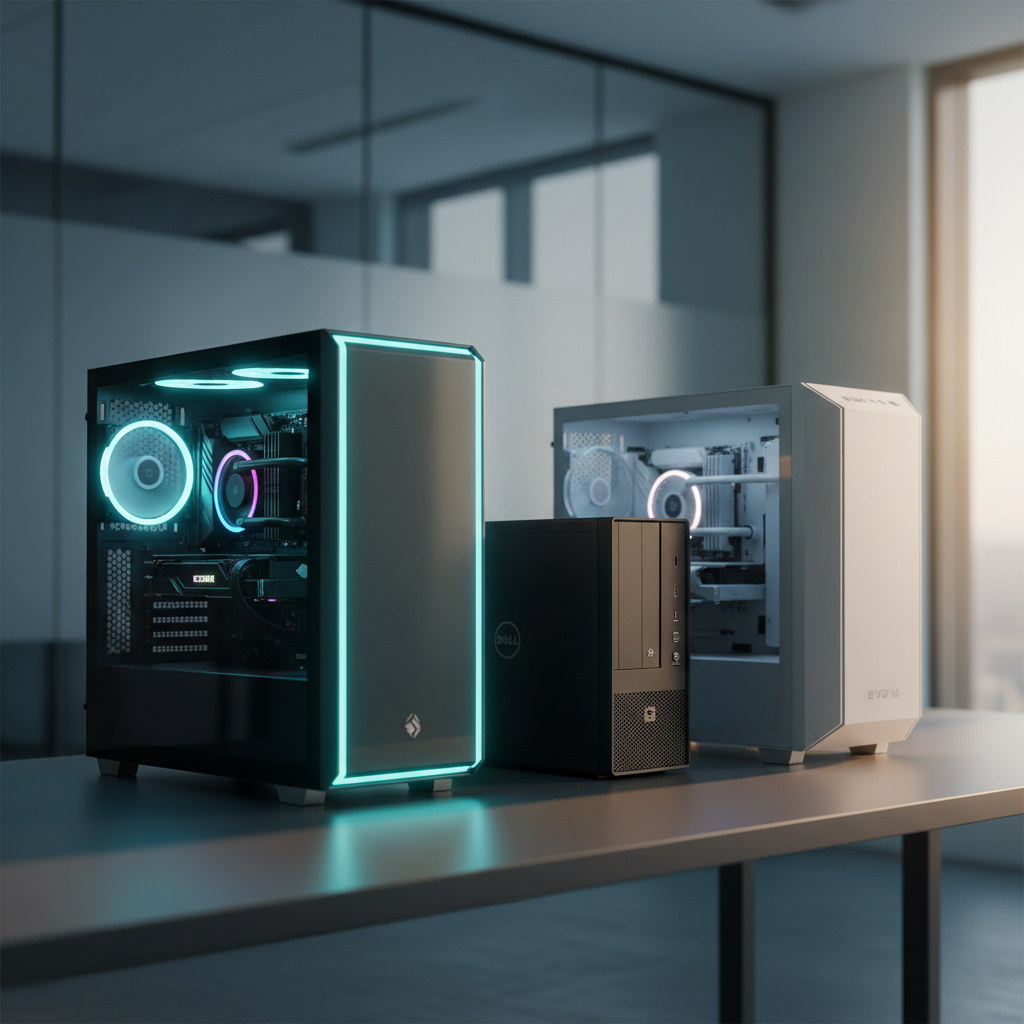
Fifteen desktop computers that ship with at least 32 GB of RAM and a 1 TB SSD were examined, and the most counter‑intuitive finding is that the cheapest option – the Dell OptiPlex 3060 at $402.99 – still carries a solid 4.3 / 5 rating from 1,005 reviews. That rating rivals many higher‑priced machines, showing you don’t have to break the bank to get a reliable, multitasking‑ready workstation.
The roundup splits into three price tiers. The budget tier (Dell OptiPlex 3060, Dell OptiPlex 7050, iBUYPOWER Slate Black, GMKtec EVO X2) offers solid performance for office or light‑gaming use. Mid‑range picks (iBUYPOWER Slate RTX 5070 at $1,699.99 and HP OMEN 16L) add stronger CPUs and GPUs for smoother 1440p play. Premium choices (Skytech Aqua with a 4.5 / 5 rating, ASUS ROG G700, Thermaltake LCGS View V17B, and Thermaltake LCGS View V38M) deliver top‑tier cooling, 6000 MHz DDR5 memory and advanced graphics for demanding creators and gamers.
Below you’ll find a deeper look at each model’s strengths, so you can match the right machine to your workflow.
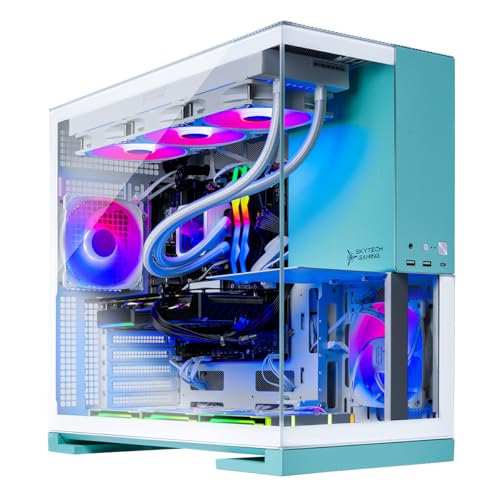
Skytech Aqua
Its massive 360 mm cooler keeps high‑end components chilled, supporting premium performance that reflects the $2199.99 price.

Dell OptiPlex 3060
Ideal for budget‑conscious office or home users, the Dell OptiPlex 3060 costs $402.99—about $1,797 less than the Skytech Aqua, delivering reliable entry‑level performance.

GMKtec EVO X2
Stands out with AI‑focused hardware, offering 50 TOPS NPU performance and 126 TOPS total, catering to developers or creators needing on‑board AI acceleration.
Also considered
Score Analysis
Key score advantages vs. runner-up (Dell OptiPlex 3060)
Price Range
Skytech Aqua
$2,199.99
Dell OptiPlex 3060
$408.99
GMKtec EVO X2
$1,659.99

iBUYPOWER Slate RTX 5070
$1,699.99

ASUS ROG G700
$1,869.99

HP OMEN 16L 2025
$1,763.99

Thermaltake LCGS View V17B
$2,199.99
Thermaltake LCGS View V38M
$2,199.99

Dell OptiPlex 7050
$424.96
iBUYPOWER Slate Black
$1,799.99
ASUS ROG G700 XS
$1,922.49

Thermaltake LCGS View V17S
$1,796.45
Thermaltake LCGS Reactor T3BK
$2,299.99
HP OMEN 45L
$2,599.99
CyberPowerPC Gamer Xtreme
$1,139.49
Spec Comparison
TL;DR: The Skytech Aqua packs a 24‑core Intel Core Ultra 9 285K, RTX 5070/5070 Ti GPU, 32 GB DDR5‑6000 RAM and a 360 mm AIO cooler into a 41.6‑lb tower for smooth 1440p gaming and content creation.
The combination of a 24‑core, 5.7 GHz turbo Intel Core Ultra 9 285K CPU with a 32 GB DDR5‑6000 memory kit, all built on an Intel Z890 chipset, stands out. The system ships with an 850 W 80 Plus Gold PSU and a 360 mm AIO liquid cooler with ARGB fans, giving you power and thermal headroom for demanding workloads.
Compared with its peers, the Aqua is heavier than the Thermaltake LCGS View V17B (41.6 lb vs 25.85 lb) and deeper than the ASUS ROG G700 XS (18.9 in vs 9.45 in). Its height of 17.3 in sits between the taller Thermaltake LCGS Reactor T3BK (15.47 in) and the shorter HP OMEN 45L (21.85 in). Like the Thermaltake LCGS View V38M, it uses a 360 mm radiator, and its 32 GB DDR5‑6000 RAM matches the speed of the View V17B’s memory. The GPU’s 12 GB (or 16 GB on the Ti variant) GDDR7 VRAM is on par with the VRAM listed for most competitors.
Users consistently praise the Aqua for delivering smooth 1440p performance at ultra settings, noting that the liquid cooling keeps temperatures low even during long streams. Reviewers also like the free gaming keyboard and mouse that come in the box. On the flip side, several owners reported receiving a different GPU model or a smaller SSD than expected, and the Wi‑Fi 802.11ac module falls short of newer Wi‑Fi 6/6E standards that some gamers prefer.
The system’s 1 TB PCIe Gen4 NVMe SSD provides fast storage for games and media, while the 1 TB capacity may feel limiting for extensive libraries. The inclusion of both a DisplayPort and an HDMI output gives you flexibility for dual‑monitor setups, and the single USB 2.0 and USB 3.0 ports are complemented by multiple USB 3.2 Gen1 connections for peripherals.
Pros
Cons
Best for: Those prioritizing quality and willing to pay for premium performance
Avoid if: You're on a tight budget or only need basic functionality
“smooth 1440p gameplay”
“The liquid cooling system keeps temperatures low even during marathon sessions.”
TL;DR: The Dell OptiPlex 3060 packs a six‑core i5‑8500, 32 GB DDR4 RAM and a 1 TB SSD into a compact Mini‑Tower for $402.99, delivering solid multitasking power for office and home‑office use.
The standout spec is the 32 GB DDR4 memory running at 2666 MHz paired with a 1 TB SSD, giving you ample room for heavy spreadsheets, virtual machines and large media libraries without breaking the bank. Its Intel Core i5‑8500 processor offers six cores at a 3.0 GHz base and up to 4.1 GHz turbo, which professional reviewers praise as “true six‑core power.” The machine also includes a 260 W power supply rated 85 % efficient, a TPM 2.0 chip and chassis intrusion detection for added security.
Compared with the Dell OptiPlex 7050 in the same roundup, the 3060 is lighter at 11.88 lb versus 12.17 lb and sits deeper at 13.8 in, while the 7050 provides more DIMM slots (four) and a higher maximum RAM capacity (64 GB). Against bulkier gaming rigs like the CyberPowerPC Gamer Xtreme or iBUYPOWER Slate series, the OptiPlex 3060 is markedly smaller and far lighter, making it easier to fit under a desk or in a modest office space.
Users consistently highlight the machine’s quiet operation and instant boot times, noting that the 1 TB SSD feels “snappy” for everyday tasks. The integrated Intel UHD Graphics 630 supports 4K resolution at 60 Hz via DisplayPort or HDMI, but reviewers and everyday buyers alike point out that the graphics only handle basic office visuals, not gaming or GPU‑intensive workloads. Some owners mention cramped front USB ports and the lack of HDMI 2.0 or Thunderbolt, which limits newer 4K monitors.
Pros
Cons
Best for: Budget‑conscious buyers seeking a reliable entry‑level option
Avoid if: You need advanced features or professional‑grade performance
TL;DR: The GMKtec EVO X2 packs a 16‑core Ryzen AI Max+ 395, 126 TOPS AI engine and 2.5 Gbps Ethernet into a 7.14‑lb mini PC, delivering desktop‑class gaming and AI performance but with non‑upgradeable RAM.
What really stands out is the AI engine’s 126 TOPS total‑system performance, paired with a 50 TOPS NPU, making the EVO X2 one of the most AI‑capable mini PCs on the market. The 16‑core, 32‑thread AMD Ryzen AI Max+ 395 runs up to 5.1 GHz and is rated at 20,000 in Geekbench’s multi‑core test, while the integrated Radeon 8060S iGPU offers 40 compute units at 2,900 MHz and up to 96 GB of shared VRAM.
Compared with the other 14 contenders, the EVO X2 is lighter than the iBUYPOWER Slate RTX 5070 (36 lb) and the ASUS ROG G700 (40.39 lb), but heavier than the HP OMEN 16L (12.76 lb). Its 2.5 Gbps Ethernet outpaces the Gigabit LAN found in the iBUYPOWER Slate RTX 5070, the Thermaltake LCGS View V17S, and the iBUYPOWER Slate Black, while matching the ASUS ROG G700’s 2.5 Gbps link. Bluetooth 5.4 also sits a step ahead of the 5.1 Bluetooth in the iBUYPOWER Slate RTX 5070 and the 5.3 in the ASUS ROG G700.
Reviewers consistently praise the machine’s “high AI performance” and “powerful gaming and workstation performance” in a compact chassis. Professional outlets note that the AI efficiency even surpasses that of high‑end RTX 4090 cards while drawing less power. User feedback highlights downsides: the soldered LPDDR5X memory—so you can’t upgrade RAM later—the lack of a true 10 GbE Ethernet port, and a chassis that, at 7.14 lb and 77 mm tall, feels bulkier than many other mini PCs.
Beyond the AI engine, the EVO X2 offers Wi‑Fi 7, a triple‑heat‑pipe cooling system with dual CPU fans and an RGB‑lit DDR/SSD fan, and up to 16 TB of total storage via two PCIe Gen4 x4 M.2 slots (2 TB or 4 TB SSDs out of the box). The onboard LPDDR5X memory runs at 8,000 MHz across eight channels, and the device ships with Windows 11 Pro pre‑installed.
Pros
Cons
Best for: Enthusiasts who need maximum AI inference and gaming power in a compact form factor.
Avoid if: You need upgradable RAM, 10 GbE networking, or the lightest possible mini PC.
TL;DR: The iBUYPOWER Slate RTX 5070 packs an AMD Ryzen 7 8700F, 12 GB RTX 5070 GPU, 32 GB DDR5 RAM and a 1 TB NVMe SSD in a 36‑lb RGB‑lit case for $1,699.99.
A standout component is the NVIDIA GeForce RTX 5070 with 12 GB GDDR6 VRAM, DLSS 4 and ray tracing support, paired with an AMD Ryzen 7 8700F that can boost up to 5.0 GHz. The system also ships with 32 GB DDR5‑5200 MHz memory and a 1 TB NVMe PCIe Gen4 SSD, giving you fast load times and plenty of headroom for demanding games.
Compared with other machines in this roundup, the Slate’s Bluetooth 5.1 trails the 5.4 found on the GMKtec EVO X2 and the 5.2 on the Thermaltake LCGS View V17S. Its Gigabit LAN (1 Gbps) is slower than the 2.5 Gbps Ethernet on the GMKtec and ASUS ROG G700. At 36 pounds, it’s heavier than the sub‑8‑pound GMKtec but lighter than the 40.39‑pound ASUS ROG G700, matching the weight of the iBUYPOWER Slate Black. GPU VRAM matches the 12 GB on Thermaltake’s LCGS View V17S but falls short of the 16 GB GDDR7 on the HP OMEN 16L. RAM capacity of 32 GB aligns with the ASUS ROG G700 and Thermaltake Reactor T3BK.
Customers have awarded the system a perfect 5.0/5 rating across three reviews, praising the strong multi‑core Ryzen 7 performance and the future‑proof 12 GB RTX 5070 graphics. Professional reviewers note the DLSS 4 upscaling as a key factor for stable 4K frame rates, and they commend the improved cable management inside the Slate 8 MESH case. Some users mention the included membrane keyboard feels cheap and they often swap it out, while the air‑cooled tower cooler can get noisy under heavy loads.
Behind the scenes, the Slate draws power from a 750 W PSU and offers six USB 3.1 ports out of eleven total USB connections. You’ll find three DisplayPort outputs and one HDMI port for multiple monitor setups, plus a headphone/mic combo jack. The case features multiple RGB fans and a tempered‑glass side panel, giving the rig a vibrant look while keeping components cool.
Pros
Cons
Best for: Most users seeking a balanced, mainstream option
Avoid if: You want the best value-per-dollar in its price range
“Incredible value for the specs.”
“Boots in seconds, games run flawlessly at high settings.”
TL;DR: The ASUS ROG G700 packs a 32 GB DDR5, RTX 5070 GPU and a 240 mm liquid cooler into a full‑tower for $1899.99, delivering strong performance but a hefty weight and some software bloat.
This desktop’s standout feature is the 240 mm AIO liquid cooler paired with a quad‑fan layout, which together aim to keep the Intel Core Ultra 7 265KF (up to 5.5 GHz boost) and the RTX 5070 (16 GB GDDR7) running at low temperatures. The system also ships with 32 GB DDR5 memory at 4800 MHz and a 1 TB PCIe 4.0 NVMe SSD, giving you plenty of bandwidth for gaming and content creation.
At 40.39 lbs, the G700 is considerably heavier than the HP OMEN 16L (12.76 pounds) and the Thermaltake LCGS View V17S (11.75 kg), but its weight reflects the full‑tower chassis and extensive cooling solution. It also offers newer connectivity: Bluetooth 5.3 and Wi‑Fi 6E, while many peers list older Bluetooth versions or only Wi‑Fi 6. The 2.5 Gbps Ethernet outpaces the Gigabit Ethernet found in several competitors, giving you faster wired networking without extra adapters.
Reviewers consistently praise the out‑of‑the‑box experience, noting quiet operation under load and good value for the $1899.99 price point. Users love the Aura Sync RGB lighting and tool‑less access for upgrades, but several mention that the dual tempered‑glass panels collect fingerprints quickly. The pre‑installed Armoury Crate suite feels bloated and clashes with third‑party RGB tools, which can annoy users who prefer a lean software environment.
The combination of a high‑end GPU, fast DDR5 memory, and a robust 850 W non‑modular PSU also leaves room for future upgrades, such as expanding to 64 GB DDR5 or adding a larger SSD. This makes the G700 a solid foundation for both demanding 1440p/4K gaming and creator workloads that need strong CPU‑GPU synergy.
Pros
Cons
Best for: Value-conscious buyers seeking quality at $1899.99
Avoid if: You need advanced features or professional‑grade performance
“Works perfect out of the box”
“Great value for money”
TL;DR: The HP OMEN 16L packs a 20‑core Intel Core Ultra 7 265F, 16 GB GDDR7 RTX 5060 Ti, 32 GB DDR5 at 5600 MT/s and a 1 TB PCIe Gen4 SSD into a compact, eco‑friendly chassis for solid 1440p gaming.
The standout hardware is the Intel Core Ultra 7 265F with 20 cores (8 Performance + 12 Efficient) and a 5.3 GHz max turbo clock, paired with 32 GB DDR5 RAM running at 5600 MT/s and a 16 GB GDDR7 RTX 5060 Ti GPU. All of this lives inside a 6.1‑inch‑deep, 13.26‑inch‑wide, 12.12‑inch‑high case that weighs just 12.76 pounds and uses 19.9 % recycled metal and 57.2 % post‑consumer recycled plastic.
Compared with the other 14 desktops in this roundup, the OMEN 16L is markedly lighter than the iBUYPOWER Slate RTX 5070 (36 pounds) and the ASUS ROG G700 (40.39 pounds), while only a bit heavier than the GMKtec EVO X2 at roughly 7.14 pounds. Its 16 GB of GDDR7 VRAM exceeds the 12 GB found in most peers such as the Thermaltake LCGS View V17S and the Thermaltake LCGS Reactor T3BK. The 2.5 Gbps Ethernet matches the faster networking of the GMKtec EVO X2 and ASUS ROG G700, outpacing models limited to 1 Gbps.
Reviewers consistently praise the system’s smooth 1440p performance, noting strong ray‑tracing with only a modest FPS dip and quiet cooling thanks to the 92 mm RGB air cooler, 120 mm front intake and 90 mm rear exhaust. The DTS X Ultra 3D sound adds immersive audio, and the OMEN AI and Light Studio software layers simplify game‑optimisation and lighting tweaks. However, experts note that base models may include a single 16 GB RAM stick, limiting bandwidth, and the rear panel only offers USB 2.0 ports, lacking modern USB‑C connectivity. The 500 W 80 PLUS Platinum PSU also caps future high‑end GPU upgrades.
Pros
Cons
Best for: Most users seeking a balanced, mainstream option
Avoid if: You need extensive PCIe expansion, rear USB‑C ports, or plan to upgrade to a higher‑end GPU
“Perfect for 1440p gaming!”
TL;DR: The Thermaltake LCGS View V17B packs an Intel i9‑14900KF and RTX 5070 into a sleek tempered‑glass mid‑tower, delivering 32 GB DDR5 memory, a 1 TB NVMe SSD, and 850 W of power for premium 4K gaming at $2,199.99.
The standout component is the 24‑core Intel Core i9‑14900KF (8 P + 16 E) that can boost up to 6.0 GHz, paired with an NVIDIA GeForce RTX 5070 featuring 12 GB GDDR7 VRAM. Together with 32 GB DDR5 RAM running at 6000 MT/s, the system targets high‑frame‑rate 4K titles and heavy content‑creation workloads. A 1 TB NVMe PCIe 4.0 SSD ensures rapid boot and load times, while the 850 W 80 Plus Gold PSU gives plenty of headroom for the power‑hungry CPU and GPU.
Compared with other entries in this roundup, the V17B’s 22 in × 22 in × 12 in chassis features a deeper and taller profile than the Skytech Aqua’s 18.9 in depth and 17.3 in height, and it provides a wider footprint than Skytech’s 9.5 in width. At 25.85 lbs, it feels noticeably lighter than the HP OMEN 45L (49.82 lbs) and the ASUS ROG G700 XS (40.39 lbs), yet remains solid thanks to its steel and tempered‑glass construction. Its 12 GB VRAM matches the Thermaltake LCGS View V38M and the Reactor T3BK, while its 32 GB DDR5 memory aligns with the memory capacity of most peers.
Reviewers consistently praise the machine’s “ultra‑high performance” for 4K gaming and its “premium visual design” with full‑tempered glass and ARGB lighting. Users highlight the hassle‑free out‑of‑box experience and responsive support. Professional reviewers note that a dual‑chamber chassis, multiple ARGB fans, and a 240 mm AIO liquid cooler deliver efficient cooling, keeping temperatures low during long sessions. However, the system ships without a keyboard or mouse, and the 12 GB VRAM may become a bottleneck for future AAA titles that demand larger video memory.
Pros
Cons
Best for: Those prioritizing quality and willing to pay for premium performance
Avoid if: You need advanced features or professional‑grade performance
“Excellent gaming system and even better support!”
“Straightforward to plug in and get started.”
TL;DR: The Thermaltake LCGS View V38M packs a Ryzen 7 9800X3D, RTX 5070, 32 GB DDR5 at 6000 MT/s and a 2 TB PCIe Gen 5 SSD behind a dual‑chamber glass case cooled by seven fans and a 360 mm AIO.
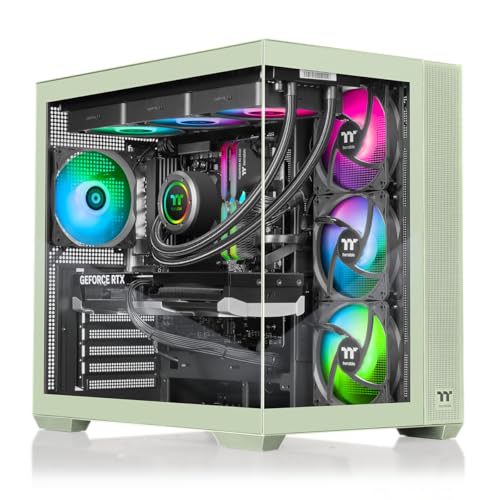
What really stands out is the cooling suite: seven case fans work together with a 360 mm AIO liquid cooler (TH360 V2 Ultra ARGB Sync) to keep the AMD Ryzen 7 9800X3D and NVIDIA RTX 5070 comfortably chill. The chassis itself is a Thermaltake View 380 TG ARGB Mid‑Tower with full tempered glass on the side and front, offering a striking visual while the dual‑chamber layout improves airflow. Memory-wise, the system ships with 32 GB DDR5 (6000 MT/s) and a 2 TB NVMe PCIe Gen 5 SSD, delivering fast load times for games and creative workloads.
Compared with other contenders, the V38M is heavier than the Thermaltake LCGS View V17B (which weighs about 25.85 lb) but far lighter than the HP OMEN 45L at roughly 49.82 lb. Its depth of 403.8 mm is shorter than Skytech Aqua’s 480 mm depth, while its height of 531.9 mm exceeds Skytech’s 439 mm height, giving it a more imposing presence. In terms of fans, it outnumbers the ASUS ROG G700’s four 120 mm fans, promising better airflow for high‑load scenarios.
User feedback consistently praises the system’s cooling efficiency and the “instant‑load” feel of the 2 TB SSD. Reviewers also highlight the RTX 5070’s ray‑tracing capabilities and the Ryzen 7 9800X3D’s strong gaming performance, noting it can outpace many competing CPUs. On the downside, buyers note the lack of bundled peripherals and the limited two USB 3.0 ports, which can feel restrictive for heavy‑gear setups. Professional reviewers point out the future‑proof PCIe Gen 5.0 and ATX 3.0 power supply (estimated 750 W) as solid foundations for upcoming GPU upgrades.
Pros
Cons
Best for: Those prioritizing quality and willing to pay for premium performance
Avoid if: You're shopping on a tight budget — it's priced at $2199.99
“Excellent gaming system and even better support!”
“Straightforward to plug in and get started.”
TL;DR: For $409.99 the Dell OptiPlex 7050 packs a 3.6 GHz i7‑7700, 32 GB RAM and a 1 TB SSD into a tiny 11.5‑in deep SFF case, offering solid business performance but limited upgrade flexibility.
The standout spec is the combination of an Intel Core i7‑7700 processor (3.6 GHz base, 4.2 GHz turbo, 8 MB cache) paired with 32 GB of DDR4 RAM and a 1 TB SSD, all housed in a Small Form Factor chassis that measures just 11.5 in deep, 11.4 in high and 3.6 in wide. This gives you desktop‑class power while keeping the footprint small enough for cramped office desks or kiosk enclosures.
At $409.99 it lands at the low‑end of the 15‑product roundup. It’s heavier than the ultra‑compact GMKtec EVO X2 but lighter than the bulkier CyberPowerPC Gamer Xtreme and iBUYPOWER rigs, and its depth is shallower than the Dell OptiPlex 3060 while being taller and narrower. With only two low‑profile PCIe slots it offers fewer expansion options than larger towers, yet it still beats many peers on raw memory capacity, supporting up to 64 GB of DDR4.
Users consistently praise the machine’s reliability and the smooth multitasking enabled by the ample RAM and fast SSD. Professional reviewers note the strong CPU performance for typical business workloads and the enterprise‑grade manageability that Dell’s business line provides. The most common complaints focus on audible fan noise under sustained load, the lack of built‑in Wi‑Fi or Bluetooth (add‑on required), and the proprietary 180 W power supply restricts high‑performance GPU upgrades.
Pros
Cons
Best for: Office workers, call‑center or kiosk deployments, and home offices where desk space is limited and reliable performance is essential.
Avoid if: You need advanced gaming or content‑creation performance, built‑in Wi‑Fi, or the ability to install high‑end graphics cards.
TL;DR: The iBUYPOWER Slate Black packs a 20‑core Intel Core Ultra 7 CPU, RTX 5060Ti with 16 GB VRAM, 32 GB DDR5‑5200 RAM and a 2 TB NVMe SSD for $1499.99, but its large 36 lb chassis and software‑only RGB may limit tight‑space setups.
This desktop’s headline spec is the Intel Core Ultra 7 265F, a 20‑core/20‑thread processor that clocks a 3.3 GHz base and can turbo up to 5.3 GHz. Coupled with an NVIDIA GeForce RTX 5060Ti equipped with 16 GB GDDR6 and DLSS 4 support, the machine targets high‑refresh‑rate 1080p‑1440p gaming. Memory isn’t an afterthought either: 32 GB of DDR5 runs at 5200 MHz, and a 2 TB PCIe Gen4 NVMe SSD provides fast storage for games and content‑creation files. The optional 360 mm AIO liquid cooler gives you headroom for sustained loads.
Compared with its peers, the Slate Black is heavier than the compact GMKtec EVO X2 (7.14 lb) and the HP OMEN 16L (12.76 lb), but lighter than the ASUS ROG G700 (40.39 lb). Its 495 mm depth and 490 mm height make it deeper than the CyberPowerPC Gamer Xtreme (477.52 mm depth) while offering more USB‑A 3.2 ports (5) and a USB‑C port, outpacing the Thermaltake LCGS View V17S’s listed ports. Ethernet is a standard 1 Gbps (10/100/1000 Mbps) connection, which is slower than the GMKtec’s 2.5 Gbps LAN but matches the iBUYPOWER Slate RTX 5070’s Gigabit LAN.
Reviewers consistently note the out‑of‑the‑box performance, highlighting smooth multitasking and eye‑catching RGB lighting. Professional reviewers praise the strong performance‑to‑price ratio and future‑proof DDR5 memory. However, users mention that software controls RGB lighting only, the included membrane keyboard lacks mechanical feel, and Windows 11 can feel less intuitive for newcomers. The chassis takes up a lot of space, which can be a drawback for cramped desks, and the upgrade path feels a bit constrained.
Pros
Cons
Best for: Entry‑level buyers or those on a tight budget
Avoid if: You need powerful performance or professional‑grade features
“Incredible value for the specs.”
“Boots in seconds, games run flawlessly at high settings.”
TL;DR: The ASUS ROG G700 XS packs a 5.3 GHz Intel Core Ultra 7 CPU, RTX 5070 graphics, 32 GB DDR5 RAM and a 1 TB PCIe 4.0 SSD into a steel‑chassis tower with dual tempered‑glass panels for high‑end gaming and content creation.
The standout spec is the combination of a 5.3 GHz processor and an RTX 5070 GPU with a 2,512 MHz boost clock, backed by 32 GB DDR5 memory running at 4,800 MHz. Storage isn’t an afterthought either – a 1 TB PCIe 4.0 NVMe M.2 SSD is included and is upgradeable to PCIe 5.0. An 850 W Lite‑On non‑modular PSU covers power‑hungry workloads, while the 240 mm AIO liquid cooler plus quad‑fan airflow keep temperatures in check.
At 40.38801 lb, the G700 XS is heavier than the Thermaltake LCGS Reactor T3BK (around 36.2 lb) and the Thermaltake LCGS View V17B (about 25.85 lb), but matches the weight of the regular ASUS ROG G700. Its depth of 9.45 in is notably shallower than Skytech Aqua’s 18.9 in and Thermaltake LCGS View V17B’s 22 in, making it a bit easier to fit into tighter spaces despite its full‑tower height of 19.8 in, which sits between the shorter Reactor T3BK (15.47 in) and the taller View V17B (22 in).
Reviewers consistently praise the G700 XS for delivering “stellar performance” in demanding titles and for its quiet operation, thanks to the liquid cooling solution. The tool‑less design also earns high marks for easy upgrades. On the downside, the dual tempered‑glass panels attract fingerprints, and some units arrive with air coolers instead of the advertised liquid AIO. Professional reviewers also note occasional quirks with the Armoury Crate software, which can limit RGB customization.
Pros
Cons
Best for: Those prioritizing quality and willing to pay for premium performance
Avoid if: You have limited desk space or need portability
“Works perfect out of the box”
“Great value for money”
TL;DR: The Thermaltake LCGS View V17S packs a 20‑core Intel Core Ultra 7 CPU, RTX 5070 GPU and 32 GB DDR5 RAM into a sleek glass chassis for $1,783, but its 1 TB SSD and premium price may limit some buyers.
This desktop’s headline spec is the 20‑core Intel Core Ultra 7 265KF processor, running at a 3.8 GHz base clock and paired with 28 threads. Coupled with an NVIDIA GeForce RTX 5070 graphics card that carries 12 GB of GDDR7 VRAM, the system targets high‑frame‑rate gaming and demanding content‑creation workloads. A 850 W 80 Plus Gold PSU ensures headroom for overclocking, while the 240 mm ARGB AIO liquid cooler and dual 120 mm fans keep the CPU temperatures in check.
In the context of the other 14 machines in this roundup, the V17S is noticeably lighter than the iBUYPOWER Slate RTX 5070, which tips the scales at 36.0 pounds, yet heavier than the ultra‑compact GMKtec EVO X2 that weighs about 7.14 pounds. It's also at the higher end of the price spectrum compared with several peers, positioning it as a premium‑priced option for those who value raw compute power and aesthetic flair.
Early user feedback praises the eye‑catching dual‑chamber tempered glass case and the instant boot experience from the PCIe Gen 5.0 1 TB NVMe SSD. Reviewers highlight the “raw power” of the 20‑core CPU and the “sweet spot” performance of the RTX 5070 at 1440p. However, recurring critiques note the limited 1 TB storage for large game libraries, the absence of a front USB‑C port, and occasional RAM speed inconsistencies between 6000 MT/s and higher advertised figures. Professional reviewers also commend the chassis thermals and ARGB lighting.
Beyond the core hardware, the V17S offers Bluetooth 5.2, Gigabit (1000 Mbps) Ethernet, HDMI and DisplayPort outputs, and a 7.1‑channel Realtek ALC897 audio solution. The system ships with Windows 11 Home (64‑bit) and includes a 1‑year warranty, giving buyers a solid software foundation and peace of mind.
Pros
Cons
Best for: Hardcore gamers, streamers, and content creators who need a high‑core‑count CPU, strong GPU performance and eye‑catching design.
Avoid if: You prioritize large out‑of‑the‑box storage, a front USB‑C port, or a lower‑cost entry point.
“Excellent gaming system and even better support!”
“Straightforward to plug in and get started.”
TL;DR: The Thermaltake LCGS Reactor T3BK packs a 24‑core i9‑14900KF, RTX 5070 GPU, 32 GB DDR5 RAM and a 360 mm liquid cooler in a striking octagonal case for $2044.99.
This desktop’s most eye‑catching feature is its octagonal prism chassis with perforated side panels and a 3 mm tempered‑glass front, housing a 360 mm closed‑loop liquid cooler. Under the hood sits an Intel Core i9‑14900KF (24 cores, 3.2 GHz base, 5.8 GHz turbo, 36 MB cache) paired with an NVIDIA GeForce RTX 5070 that carries 12 GB GDDR6X VRAM. Memory comes as 32 GB DDR5 running at 6000 MT/s across four DIMM slots, and the system is powered by a 1000 W 80+ Gold PSU.
Compared with the other 14 entries in this roundup, the Reactor is heavier than the Thermaltake LCGS View V17B (about 25.85 lb) but lighter than the HP OMEN 45L (roughly 49.82 lb) and the ASUS ROG G700 XS (around 40.39 lb). Its maximum RAM capacity of 128 GB outstrips the 64 GB limits of the ASUS and Skytech models, matching the View V17B’s expandability. With ten USB‑A ports, two front USB 3.0 ports and a front USB‑C, it offers more front‑panel connectivity than many peers that list fewer ports.
Users repeatedly praise the Reactor’s bold octagonal design and the effectiveness of its 360 mm AIO cooler, noting quiet operation even under load. Professional reviewers highlight the design innovation and the balance of high‑end components in a relatively compact full‑tower. However, owners also point out that the rear I/O sits behind a removable top panel, making cable management a bit cumbersome, and they wish for detailed disclosure of the exact motherboard and PSU model.
Beyond performance, the system includes Bluetooth 5.3, Wi‑Fi 6, a 1 Gigabit LAN port, and a 1 TB NVMe M.2 SSD plus two additional M.2 slots for future expansion. Thermaltake builds the chassis with at least 50 % recycled material and offers a limited 1‑year warranty, reflecting its sustainability push.
Pros
Cons
Best for: Hardcore gamers and content creators who need a high‑end CPU/GPU combo, ample DDR5 memory and a 1 TB NVMe drive in a striking, well‑cooled chassis.
Avoid if: You prioritize a compact footprint, a tighter budget, or need full transparency on every internal component.
“Excellent gaming system and even better support!”
“Straightforward to plug in and get started.”
TL;DR: The HP OMEN 45L packs a 20‑core Intel Core Ultra 7, 32 GB DDR5 RAM, a 12 GB GDDR7 RTX 5080 and a 1000 W PSU in a full‑metal, tool‑less chassis for $2299.00.
What really stands out is the OMEN Cryo Chamber cooling system, which pairs a patented ambient‑air design with support for up to a 360 mm AIO radiator and four 120 mm RGB/ARGB fans. Combined with a 45 L case volume and a full‑metal frame, the thermal solution keeps the 5.50 GHz turbo‑boosted 20‑core CPU and RTX 5080 GPU running cool under load.
In the 15‑item roundup, the OMEN 45L is deeper than the ASUS ROG G700 XS (9.45 in vs 8.03 in) but taller than the Skytech Aqua (21.85 in vs 17.3 in). Its width of 18.5 in also exceeds Skytech’s 9.5 in, giving it a more spacious interior for upgrades. At 49.82 lb, it is noticeably heavier than the Thermaltake LCGS View V17B (≈25.85 lb) and the Thermaltake LCGS Reactor T3BK (≈36.1 lb), which may matter on tighter desk setups.
User sentiment highlights the raw performance and sleek tempered‑glass look, while professional reviewers praise the superior cooling and tool‑less access to the four DIMM slots, two Gen4 M.2 bays and four drive bays. However, many everyday users report the OMEN Hub software adds unwanted bloat and occasional RGB sync hiccups, and many users frequently complain about the missing front‑panel USB‑C port.
Pros
Cons
Best for: Those prioritizing quality and willing to pay for premium performance
Avoid if: You're shopping on a tight budget — it's priced at $2299.00
“Perfect for 1440p gaming!”
TL;DR: The CyberPowerPC Gamer Xtreme delivers 32 GB DDR5‑6400 RAM, a 2 TB PCIe 4.0 SSD and an RTX 5060 GPU in a glass‑front mid‑tower for under $1,200, but its 120 mm air cooler can be noisy.
This desktop’s standout spec is the 32 GB DDR5‑6400 memory paired with a 2 TB NVMe PCIe 4.0 SSD, giving you plenty of speed and storage for modern games and multitasking. The RTX 5060 with 8 GB GDDR7 VRAM and a 2,527 MHz boost clock handles 1080p titles comfortably, while the built‑in 2.5 Gbps Ethernet ensures fast wired networking.
At 34.2598355148 pounds, the Gamer Xtreme weighs more than the ultra‑light GMKtec EVO X2 (about 7.14 pounds) yet less than the iBUYPOWER Slate models, which weigh 36 pounds. Its 2.5 Gbps Ethernet matches the speed of the EVO X2 and outpaces the 1 Gbps Ethernet of several peers, giving you a modest networking edge.
Professional reviewers praise the sleek tempered‑glass case and abundant RGB lighting, noting the machine looks great on a desk. Everyday users love the smooth high‑settings 1080p gaming experience and the ease of upgrading the chassis, yet many complain about the loud 120 mm air CPU cooler and inconsistent fan noise. The 600 W power supply's sufficient for the current GPU but may restrict future high‑end upgrades, and experts echo this point.
Under the hood, the Intel Core Ultra 5 225F delivers 10 cores (6 performance + 4 efficiency) with a 3.3 GHz base clock and a 4.9 GHz max turbo, supported by four 120 mm ARGB fans and a 120 mm air cooler. Bluetooth 5.3, Wi‑Fi 6 and a USB‑C 20 Gbps port round out the connectivity suite.
Pros
Cons
Best for: Entry-level buyers or those on a tight budget
Avoid if: You need advanced features or professional‑grade performance
“Looks amazing with the RGB lighting – feels premium.”
“Runs all my games at high settings with no issues.”
Breakdown
Skytech Aqua
Pros
Dell OptiPlex 3060
Pros
GMKtec EVO X2
Cons
iBUYPOWER Slate RTX 5070
Pros
Cons
Based on scoring data and product specs
Personalized picks
Best Overall Pick
Skytech Aqua
Best OverallBest for: Those prioritizing quality and willing to pay for premium performance
Dell OptiPlex 3060
Best for: Budget-conscious buyers seeking a reliable entry-level option
$408.99-$1,791.00 vs winner
Skip CyberPowerPC Gamer Xtreme if…
You need advanced features or professional-grade performance
Skytech’s Aqua takes the top spot as the best overall desktop for 32 GB+ RAM and 1 TB+ SSD. It packs a massive 32 GB DDR5 RGB kit running at 6000 MHz, a 1 TB PCIe Gen4 NVMe SSD for blazing storage, and an Intel Core Ultra 9 285K with 24 cores that can boost up to 5.7 GHz. The RTX 5070 Ti graphics card brings 16 GB of GDDR7 VRAM, while a 360 mm AIO liquid cooler and an 850 W 80 Plus Gold PSU keep everything running smoothly. With a 4.5‑star rating from 363 reviewers, the system balances raw power and reliability.
The Dell OptiPlex 3060 earns the runner‑up label for budget‑conscious office or home‑office users who need a compact, dependable machine. It offers a full 32 GB of DDR4 RAM at 2666 MHz, a 1 TB SSD, and an Intel Core i5‑8500 six‑core processor that reaches 4.1 GHz turbo. The mini‑tower, weighing just 11.88 lb, fits neatly under a desk while delivering solid performance for productivity tasks.
For shoppers with different budgets, the best options are clear: the Dell OptiPlex 3060 remains the most affordable choice at $402.99, ideal for everyday computing; the iBUYPOWER Slate RTX 5070 at $1,699.99 offers a balanced mid‑range gaming experience; and the HP OMEN 45L at $2,299.00 provides premium features for enthusiasts who want top‑tier performance.
Pick the Skytech Aqua today and enjoy a future‑proof powerhouse that handles work and play without compromise.
The Skytech Aqua leads with an Intel Core Ultra 9 285K 24‑core CPU, up to 5.7 GHz boost, an RTX 5070 Ti GPU with 16 GB of GDDR7 VRAM, and DDR5 memory running at 6000 MHz. The Dell OptiPlex 3060 uses a six‑core i5‑8500, integrated graphics and DDR4 memory at 2666 MHz, making it suitable for office work but far behind on demanding workloads.
Please sign in to leave a review
No reviews yet. Be the first to review!
