If you need a 4K desktop display that can juggle high‑frame‑rate gaming and color‑critical work, the Gigabyte MO32U tops our list. It earned a perfect 5.0/5 rating from 13 reviewers, offers a 165 Hz refresh rate, 1000‑nit HDR peak, and 99% DCI‑P3 coverage—all for $649.99. Its QD‑OLED panel delivers true blacks and factory‑calibrated ΔE ≤ 2, making it a solid choice for enthusiasts and creators alike.
The guide compares 11 models across three price tiers. Budget‑friendly options like the LG 27UP650K‑W at $226.99 and the Asus VP327Q at $229.00 give you solid 4K clarity and decent brightness (350 cd/m² on the Dell S2725QS) without breaking the bank. Mid‑range picks such as the Samsung UJ59 ($285.00) and Dell S3225QS ($299.99) add larger 32‑inch panels and higher contrast. Premium selections—including the BenQ MA320U ($649.99) and LG 32UR550K‑B ($329.99)—bring extra features like 90 W USB‑C power delivery and enhanced DCI‑P3 coverage.
Below you’ll find a closer look at each model’s strengths, so you can match the right 4K monitor to your desk setup.
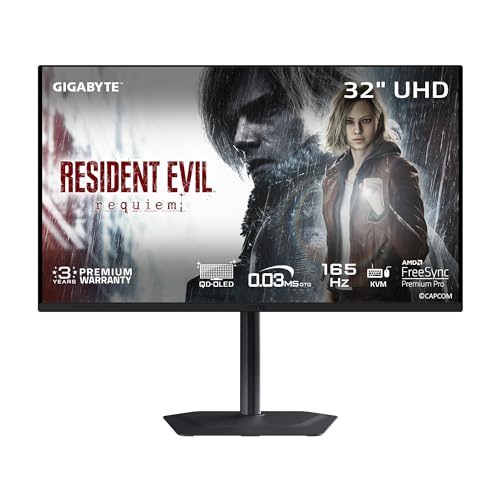
Gigabyte MO32U
It delivers premium sound with dual 5 W built‑in speakers and a USB‑C port that provides 18 W Power Delivery, making it a top‑value 4K monitor for audiophiles.

Dell S2725QS
Ideal for budget‑conscious gamers, this Dell S2725QS costs $239.99—about $410 less than the Gigabyte MO32U—while still offering integrated 5 W speakers and solid 4K performance.
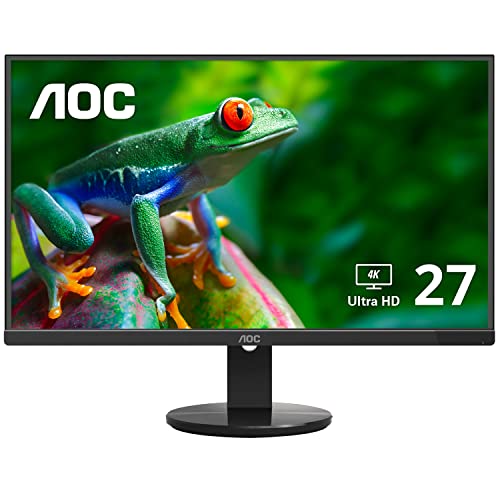
AOC U2790VQ
The AOC U2790VQ includes 1.8 m HDMI and power cables, simplifying setup for tight desks while keeping a modest price point compared to the higher‑priced Gigabyte and Dell models.
Also considered
Score Analysis
Key score advantages vs. runner-up (Dell S2725QS)
Price Range
Gigabyte MO32U
$649.99
Dell S2725QS
$278.26
AOC U2790VQ
$257.03

Dell S3225QS
$334.99

BenQ MA320U
$649.99

BenQ MA270U
$579.99

LG 27UP650K-W
$226.99

LG 32UR550K-B
$305.76

Samsung UJ59 32-inch
$285.99

Asus VP327Q
$199.00

Samsung M8
$555.63
Spec Comparison
TL;DR: The Gigabyte MO32U delivers OLED‑level contrast, a blistering 165 Hz refresh rate, and accurate 10‑bit color in a 31.5‑inch QD‑OLED panel, but its $649.99 price tags it as a premium choice.
What really sets the MO32U apart is its Samsung QD‑OLED panel, which offers a 1,500,000:1 contrast ratio and a 0.03 ms GTG response time. Coupled with a 165 Hz refresh rate, the monitor keeps up with fast‑paced shooters while still rendering deep blacks and vibrant colors. The screen also supports VESA DisplayHDR True Black 400, delivering up to 1000 nits HDR peak brightness and covering 99% of the DCI‑P3 gamut.
Compared with other entries in this roundup, the MO32U is heavier at 27.8 Pounds, noticeably more than Samsung’s M8 at 15.9 pounds and Dell’s S3225QS at 19.33 pounds. Its built‑in 2 × 5 W speakers out‑power the 2 × 3 W speakers used by BenQ’s MA320U. While the USB‑C port supplies 18 W of Power Delivery—less than the 90 W offered by some competitors—it still provides a convenient data link and DP Alt Mode.
Consumer feedback highlights the monitor’s “stunning color pop” and “zero motion blur,” confirming that the fast response and high refresh rate translate into a smooth visual experience. Professional reviewers point out the added productivity perks: a built‑in KVM switch, full ergonomic adjustments (130 mm height range, tilt –5° to +21°, swivel ±15°, and pivot to portrait), and a Kensington lock for secure mounting. Some users do mention occasional pixel‑shifting when static images sit for long periods, a typical concern with OLED technology.
Pros
Cons
Best for: Enthusiast gamers and content creators who need high refresh rates, OLED‑level contrast, and precise color accuracy.
Avoid if: You're shopping on a tight budget — it's priced at $649.99.
“Colors pop like I’ve never seen before — blacks are truly black.”
“Pixel shifting is noticeable during static scenes — can be distracting.”
TL;DR: The Dell S2725QS delivers a 27‑inch 4K IPS panel with up to 120 Hz refresh, 99% sRGB coverage, integrated 10 W speakers, and extensive ergonomic adjustments at a $239.99 price point.
The standout spec is the variable 48‑120 Hz refresh rate combined with a 3840 × 2160 resolution on a 27‑inch IPS screen. Dell pairs this with 99% sRGB color coverage, a 350 cd/m² typical brightness, and a 1500:1 static contrast ratio, giving crisp, vibrant images for both work and play. The monitor also packs 10 W of integrated speaker power (2 × 5 W) and Dell’s ComfortView Plus technology, which limits blue‑light emissions to ≤35% for all‑day eye comfort.
Compared with the other ten monitors in this roundup, the S2725QS is lighter than the Asus VP327Q but heavier than the LG 27UP650K‑W. Its 10 W speaker output outpaces the Asus’s 2 W per‑speaker setup and matches the higher‑end Dell S3225QS. The 120 Hz refresh outstrips the Samsung UJ59’s 60 Hz panel, and most peers don’t list HDR capability via HDMI 2.1 and DisplayPort 1.4, giving Dell a clear advantage for fluid, high‑resolution content.
Users consistently praise the monitor’s sharp 4K visuals and the buttery‑smooth 120 Hz experience, noting that the low‑blue‑light ComfortView Plus makes long work sessions comfortable. Professional reviewers highlight the factory‑calibrated 99% sRGB coverage and the ergonomic stand that offers tilt, swivel, height, and portrait‑mode adjustments. The main criticisms focus on the lack of a USB‑C port, limited cable‑management features, and occasional ghosting when the Extreme 4 ms response mode engages.
Additional technical context includes an edge‑lit LED backlight with flicker‑free technology, AMD FreeSync Premium for variable‑refresh synchronization, and a pixel density of 163 PPI (0.1554 mm pitch). The monitor meets ENERGY STAR 8.0 and TÜV Rheinland 4‑star eye‑comfort certifications, and it ships with a 1‑year Advanced Exchange Service warranty.
Pros
Cons
Best for: Graphic designers, content creators, office professionals, hybrid workers, and casual gamers who want a 4K monitor with high refresh, solid color accuracy, and ergonomic flexibility without a premium price tag.
Avoid if: You need USB‑C connectivity, a wider DCI‑P3 color gamut, or a built‑in USB hub for extensive peripheral use.
“sharp image quality”
“smooth 120 Hz performance”
TL;DR: The AOC U2790VQ delivers a crisp 27‑inch 4K IPS display with 108% sRGB coverage, ergonomic tilt, and HDMI 2.0 support, all for $257.03, making it a solid budget‑friendly desktop monitor.
The standout feature is its 27 in screen with a native 3840 × 2160 resolution, giving a pixel density of 163 PPI on an IPS panel. This combination yields sharp text and detailed images, while the 108% sRGB and 91% NTSC color gamuts ensure vivid, accurate colors for photo and video work.
At 11.35 lb, the monitor is lighter than the Dell S2725QS (14.26 lb) and Samsung UJ59 (16.61 lb), yet comparable to the LG 27UP650K‑W (around 12.35 lb). It also offers both HDMI 2.0 and DisplayPort 1.2 ports that support 4K @ 60 Hz, a capability some peers lack or limit to HDMI 1.4.
Professional reviewers praise its color accuracy and solid build quality, while everyday users frequently commend the frameless design and sharp 4K image. Common complaints revolve around the absence of adaptive‑sync technology, the 60 Hz refresh ceiling, and occasional reports of burn‑in with static content.
Additional technical details include a typical brightness of 350 cd/m², a dynamic contrast ratio of 20,000,000:1, flicker‑free operation, low‑blue‑light mode, and a tilt range from –3.5° to +21.5°. The 100 × 100 mm VESA mount and removable stand add flexibility for multi‑monitor setups.
Pros
Cons
Best for: Content creators, office professionals, and anyone who wants crisp 4K visuals without breaking the bank.
Avoid if: You need high refresh rates for competitive gaming or built‑in audio for a speaker‑free setup.
TL;DR: The Dell S3225QS delivers 31.5‑inch 4K resolution at 120 Hz with 10 W dual speakers, ComfortView Plus blue‑light reduction, and a VA panel, but its VA response may show slight smearing for fast dark scenes.
The standout feature is its 120 Hz refresh rate paired with a 3840 × 2160 UHD VA panel that supports HDR10 and 10‑bit color depth (1.07 billion colors). Brightness hits 300 nits, while the advertised contrast ratio is 1500:1 (typical 3000:1). Dell also adds ComfortView Plus, which cuts blue‑light emissions to ≤35%, and AMD FreeSync Premium helps keep motion smooth.
At 19.33 pounds, the S3225QS is heavier than the Samsung UJ59 (16.61 pounds) and the LG 32UR550K‑B (15.4 pounds). It also outpaces Samsung’s 60 Hz refresh rate, offering a much higher 120 Hz for gaming or scrolling. Connectivity leans toward the newer side with two HDMI 2.1 ports and a single DisplayPort 1.4, whereas the Samsung and LG models list HDMI 2.0/1.4 and older DisplayPort versions. Brightness is modest compared with the 350‑nit figures of the AOC U2790VQ and Asus VP327Q, but Dell’s 99% sRGB and 95% DCI‑P3 coverage still promises vivid color.
Reviewers consistently praise the razor‑sharp 4K image and the surprisingly clear built‑in speakers, noting the 10 W total output as a pleasant surprise. Professional reviewers highlight the fast 4 ms extreme‑mode response and FreeSync Premium as strong gaming assets. On the downside, users mention the VA panel’s slower dark‑scene response, occasional smearing, and a stand that doesn't feel solid for some users. The lack of USB‑C or a USB hub also limits peripheral options for some setups.
Pros
Cons
Best for: Most users seeking a balanced, mainstream option
Avoid if: You need advanced features or professional‑grade performance
“Great upgrade from 4K 60 Hz”
“Sharp and vibrant”
TL;DR: The BenQ MA320U delivers a 31.5‑inch 4K IPS panel with 99% sRGB, 97% DCI‑P3 coverage and 90 W USB‑C power delivery, making it a premium, Mac‑friendly desktop display.
What really sets this monitor apart is its colour‑accurate 4K IPS panel that hits 99% of the sRGB gamut and 97% of DCI‑P3, while offering a typical brightness of 550 cd/m² and a peak HDR brightness of 600 cd/m². The screen packs 140 PPI and a 1300:1 contrast ratio, all driven at a 60 Hz refresh rate and a 5 ms (GtG) response time.
At 9.1 kg (20.1 lb), the MA320U is noticeably lighter than the Gigabyte MO32U (27.8 lb) and the Samsung M8 (15.9 lb), yet still feels solid on a desk. Its connectivity wins points with two HDMI 2.0 ports, two USB‑A 3.2 Gen 1 ports, and two USB‑C ports—including a 90 W Power Delivery channel that lets you dock a MacBook with a single cable. Most peers list fewer USB‑C options, and none combine 90 W PD with the same ergonomic stand.
Reviewers consistently praise the monitor’s smooth Mac integration, noting the Brightness Intelligence Plus Gen2 feature that syncs brightness and volume with macOS. Users also love the fully adjustable stand—115 mm (4.5 in) of height travel, 90° pivot, ±15° swivel and –5° to +20° tilt—making it easy to switch between landscape and portrait modes. The downsides include the lack of variable refresh rate, which limits gaming potential, and a USB‑C power‑delivery quirk that turns off when the monitor sleeps, requiring a manual wake‑up. Some also point out that the power button needs two presses to turn off.
Pros
Cons
Best for: Creative professionals who use macOS and need accurate colours, HDR support and a single‑cable docking solution.
Avoid if: You need high‑refresh‑rate gaming features, VRR support, or a monitor with more aggressive gaming‑oriented specs.
“Perfect for Mac users”
“HDR mode is good for 2 stops, which is a good match to the MacBook monitors,”
TL;DR: The BenQ MA270U delivers a 27‑inch 4K IPS panel with 99% sRGB coverage, 90 W USB‑C power delivery and a fully adjustable stand, making it a solid Mac‑centric desktop display at $499.99.
This monitor’s most distinctive spec is the 90 W USB‑C Power Delivery combined with a single‑cable connection that also carries video, audio and data. Pair that with a 27‑inch 3840 × 2160 IPS panel, 400 nits brightness, 1200:1 contrast ratio and a 5 ms (GtG) response time, and you get crisp, color‑accurate visuals right out of the box.
Compared with the other ten contenders, the MA270U offers two HDMI 2.0 ports while the Samsung M8 provides only one HDMI port. Its 90 W USB‑C PD outpaces the Samsung M8’s 65 W delivery, and the monitor’s height adjustment of 115 mm (4.5 inches) gives it more ergonomic flexibility than many peers that lack height‑adjustable stands. Brightness at 400 nits exceeds the Dell S3225QS’s 300 nits, though the Gigabyte MO32U’s 165 Hz refresh rate is considerably higher than the MA270U’s 60 Hz.
User sentiment consistently praises the out‑of‑the‑box color accuracy—99% sRGB and 95% DCI‑P3—especially when paired with a MacBook, and the smooth macOS integration through Display Pilot software. Professional reviewers also highlight the reliable build quality and stable base, but several owners note the plastic chassis feels less premium than metal alternatives, and the built‑in 6 W stereo speakers are only adequate for casual media consumption.
Pros
Cons
Best for: MacBook Pro and Air users seeking a color‑accurate 4K display with strong USB‑C connectivity and ergonomic adjustments.
Avoid if: You need high refresh rates for gaming, a metal‑build premium aesthetic, or advanced features like Picture‑in‑Picture or KVM switching.
“Effortless setup… I only need two wires now — one to the wall and one to my MacBook. The display looks identical to my M4 MacBook Air.”
“Colors are clear & accurate. A software download enables Mac keyboard to control brightness.”
TL;DR: The LG 27UP650K-W delivers a factory‑calibrated 27‑inch 4K IPS panel with 95% DCI‑P3 coverage, ergonomic adjustments and HDR10 support at a competitive price point.
What really stands out is the 27‑inch 4K IPS display that offers a resolution of 3840 × 2160 pixels and a pixel density of 163 ppi, giving you crisp detail for photo editing or text work. LG factory‑calibrates the panel for color accuracy and covers 95% of the DCI‑P3 gamut, while HDR10 and VESA DisplayHDR 400 push typical brightness up to 400 cd/m².
Compared with the other ten monitors in this roundup, the LG is lighter than the Asus VP327Q (15.211896078 lb) and the Dell S2725QS (14.26 lb), making desk placement easier. It also lacks built‑in speakers, whereas the Asus includes 2 W stereo speakers, so you’ll need external audio if you want sound. The stand offers tilt, height and pivot adjustments, a flexibility the Samsung UJ59 does not list.
User feedback highlights the accurate colors and anti‑glare coating as eye‑friendly, especially during long editing sessions. Reviewers appreciate the ergonomic stand but note the external power brick adds cable clutter and the absence of a USB‑C port limits single‑cable docking. Professional reviewers also point out that while HDR10 is present, the HDR performance doesn’t match higher‑end OLED or premium HDR panels.
Pros
Cons
Best for: Content creators, photographers, video editors, and professionals who need accurate color reproduction on a budget
Avoid if: You need high refresh rates, VRR support, USB‑C docking or built‑in speakers, or you’re a hardcore gamer seeking premium HDR performance
TL;DR: The LG 32UR550K-B offers a 31.5‑inch 4K VA panel with 90% DCI‑P3 color coverage, dual 5 W speakers and ergonomic adjustments, priced at $329.99 and earning a 4.5‑star rating.
At the heart of the LG 32UR550K-B is its 31.5‑inch 4K UHD VA display, delivering a 3840 × 2160 resolution and a typical brightness of 250 cd/m². The panel covers 90% of the DCI‑P3 color gamut, which reviewers note translates into vivid and accurate colors for both work and media.
Weighing 15.4 pounds, the monitor is lighter than the Dell S3225QS (19.33 pounds) yet a bit heavier than the AOC U2790VQ (11.35 pounds). Its typical brightness of 250 cd/m² trails the 300‑nits brightness of the Dell S3225QS and the 350 cd/m² of the Dell S2725QS and AOC U2790VQ, so HDR looks less punchy. Audio-wise, the dual 5 W speakers equal the 10 W total output of Dell’s S3225QS and S2725QS, but outclass the Asus VP327Q’s 2 W per‑speaker setup. Ergonomically, the stand offers 110 mm of height adjustment, a –5° to +20° tilt range and a 90° clockwise pivot, matching the VESA 100 × 100 mm mount that Samsung uses on the UJ59.
Users have given the monitor a solid 4.5‑star rating across 311 reviews, praising the sharp 4K picture, the built‑in Waves MaxxAudio® speakers and the flexible stand. Professional reviewers also highlight the Black Stabilizer and Dynamic Action Sync as useful for casual gaming. On the downside, the modest 250 cd/m² brightness limits HDR impact, and the 60 Hz refresh rate without adaptive‑sync makes it less appealing for competitive gamers.
Beyond the display, LG packs features like Flicker Safe, Reader Mode, Color Weakness Mode, Super Resolution+, Smart Energy Saving and the LG Switch app, which lets you split the screen into up to six windows and launch video calls directly from the monitor.
Pros
Cons
Best for: Most users seeking a balanced, mainstream option
Avoid if: You need advanced features or professional‑grade performance
TL;DR: The Samsung UJ59 32‑inch 4K monitor delivers sharp VA‑panel visuals with 3000:1 contrast and FreeSync at a $285 price, though its older DisplayPort and modest brightness limit high‑end use.
At the core of the UJ59 is a 32‑inch VA panel with a 3840 × 2160 4K UHD resolution, a static contrast ratio of 3000:1 and a 4 ms (GTG) response time. The 60 Hz refresh rate keeps motion smooth for everyday tasks, while AMD FreeSync, Eye Saver Mode and Flicker‑Free technology help reduce eye strain during long work sessions.
Compared with the other monitors in this roundup, the UJ59 sits in the middle of the weight range: it’s lighter than the Dell S3225QS (19.33 lb) but heavier than the AOC U2790VQ (11.35 lb) and the LG 27UP650K‑W (12.35 lb). It offers two HDMI inputs, matching the Dell S3225QS, but its single DisplayPort 1.2 is an older standard than the DP 1.4 found on Dell S3225QS and Asus VP327Q. The typical brightness of 270 cd/m² trails the 350 cd/m² seen on the AOC U2790VQ and Dell S2725QS, making the UJ59 a bit dimmer in bright rooms, while users praise its 3000:1 contrast ratio as deeper than many IPS panels in the group.
User feedback frequently highlights the monitor’s razor‑sharp 4K picture and deep blacks, noting that the Eye Saver and Flicker‑Free modes make it comfortable for extended office or media‑consumption use. Professional reviewers echo this, calling the colour reproduction “excellent” and the VA contrast “superior to IPS in dark environments.” However, several owners mention the DisplayPort’s 4K @ 30 Hz limitation, the visible Samsung logo on the front bezel, and occasional FreeSync hiccups, which can be a nuisance for gamers.
Pros
Cons
Best for: Value-conscious buyers seeking quality at $285.00
Avoid if: Reliability and user satisfaction are your top concerns
TL;DR: The Asus VP327Q delivers a 31.5‑inch 4K VA panel with 350 nits brightness, 99% sRGB coverage and TÜV‑certified eye‑care at $229, though its 60 Hz refresh and limited ergonomics may deter power gamers.
What really stands out is the 31.5‑inch 4K UHD panel that renders 3840 × 2160 pixels and covers 99% sRGB, paired with HDR10 support and a brightness of 350 nits. The VA matrix provides deep blacks, while Adaptive Sync (AMD FreeSync / NVIDIA G‑Sync Compatible) helps keep motion smooth.
At 15.211896078 pounds, the VP327Q is heavier than the LG 27UP650K‑W (12.345886672 pounds) and the AOC U2790VQ (11.35 pounds) but lighter than the Dell S3225QS (19.33 pounds) and Samsung UJ59 (16.61 pounds). Its depth of 714 mm is considerably deeper than the LG 27UP650K‑W (239.3 mm) and Dell S3225QS (221.74 mm). Brightness matches the Dell S2725QS (350 cd/m²) and exceeds Samsung’s typical 270 cd/m² and Dell S3225QS’s 300 nits. Connectivity includes two HDMI 2.0 ports—newer than the HDMI 1.4 on the LG 27UP650K‑W—and a DisplayPort 1.2.
Everyday users rave about the razor‑sharp 4K visuals and vivid colors, especially the accurate 99% sRGB gamut. Reviewers also highlight the TÜV‑certified flicker‑free and low‑blue‑light technologies for long‑hour comfort. The most common complaints focus on the lack of height, swivel or pivot adjustments (tilt only), the 2 W per‑speaker output, and the 60 Hz refresh limiting competitive gaming.
Technically, the monitor uses a VA panel with a 3000:1 contrast ratio and a 4 ms GTG response time, which helps reduce motion blur on dark scenes. The stand offers a tilt range of +8° to –5°, and a 100 × 100 mm VESA mount lets you pair it with an ergonomic arm. TÜV‑Rheinland certifications confirm flicker‑free operation and low blue‑light emission.
Pros
Cons
Best for: Budget-conscious buyers seeking a reliable entry-level option
Avoid if: You need advanced features or professional‑grade performance
“Lack of height adjustment is the most frequent ergonomic complaint.”
TL;DR: The Samsung M8 blends a 32‑inch 4K VA panel, 1080p webcam and 65 W USB‑C power delivery into a single smart monitor, but its VA color shift and 60 Hz refresh keep it from being a gamer’s dream.
The standout feature is the built‑in 1080p camera with magnetic mounting, digital zoom, face tracking and a magnetic privacy cover, letting you switch from work calls to streaming without extra hardware. The display itself offers 3840×2160 resolution, 400 nits brightness, a 3000:1 contrast ratio and HDR10+ support, while Samsung’s AI upscaling promises sharper low‑resolution content.
Compared with peers, the M8’s 10 W total speaker output (5 W per driver) tops the BenQ MA270U’s 6 W stereo and matches the Dell S3225QS’s 10 W. Its 65 W USB‑C Power Delivery exceeds the 15 W the BenQ MA270U offers but falls short of the 90 W the BenQ MA320U provides. The 90° pivot and height‑adjustable stand give it more ergonomic flexibility than the fixed‑stand Samsung UJ59, while its 15.9 lb weight makes it heavier than the LG 32UR550K (15.4 lb) but lighter than the Gigabyte MO32U (27.8 lb).
Professional reviewers praise the hybrid functionality and the convenience of a single‑cable USB‑C dock, noting that AI upscaling really helps older video files. Everyday users love the solar‑powered remote and the ease of video‑calling, yet many complain about the VA panel’s narrow viewing angles and washed‑out colors when you view it off‑center. The lack of local dimming also limits HDR10+ punch, and the 60 Hz refresh rate's a common gripe among gamers seeking smoother motion.
Pros
Cons
Best for: Remote workers and hybrid professionals who need a single screen for video calls, productivity apps and casual streaming.
Avoid if: You need high‑refresh gaming performance, premium HDR fidelity or a monitor with wide‑angle color consistency.
“Perfect second screen for my bedroom—watch Netflix and work on Zoom without switching devices.”
“Love the height adjustment and pivot for coding in portrait mode.”
Breakdown
Gigabyte MO32U
Pros
Cons
Dell S2725QS
Pros
AOC U2790VQ
Pros
Cons
Dell S3225QS
Pros
Cons
Based on scoring data and product specs
Personalized picks
Best Overall Pick
Gigabyte MO32U
Best ValueBest for: Audiophiles and enthusiasts seeking premium sound quality and advanced features
Dell S2725QS
Best for: Budget-conscious buyers seeking a reliable entry-level option
$278.26-$371.73 vs winner
Skip Samsung M8 if…
You need advanced features or professional-grade performance
We’re naming the Gigabyte MO32U the clear winner in the 4K UHD desktop display round‑up. Its Samsung QD‑OLED panel delivers 10‑bit color depth across 99 % DCI‑P3, while the 165 Hz refresh rate and 0.03 ms GTG response keep motion buttery‑smooth. Add to that a 5.0‑star rating from 13 reviewers and a VESA ClearMR 9000 certification, and you get a premium experience that still lands at a list price of $799.99 (currently $649.99).
The Dell S2725QS earns runner‑up honors, especially if you need a compact 27‑inch 4K monitor for work‑to‑play switching on a tighter budget. It offers 99 % sRGB coverage, a variable 48‑120 Hz refresh rate with AMD FreeSync Premium, and 350 cd/m² brightness—all for $239.99. Its built‑in 2 × 5 W speakers and 1‑year Advanced Exchange warranty round out a solid value proposition.
For those looking beyond the top two, the LG 27UP650K‑W stands out as the best budget pick at $226.99, delivering crisp 4K visuals in a small footprint. The Dell S3225QS offers the strongest mid‑range option at $299.99, balancing size and performance without reaching premium pricing.
Pick the Gigabyte MO32U today for the most feature‑rich 4K desktop experience available.
The Gigabyte MO32U uses a Samsung QD‑OLED panel with 10‑bit color depth, 99 % DCI‑P3 coverage and factory‑calibrated ΔE ≤ 2, plus a 1000‑nit HDR peak, making it the most color‑accurate option. While the BenQ MA320U also offers 97 % DCI‑P3 and HDR600, the MO32U’s OLED technology gives it a clear edge for critical work.
Please sign in to leave a review
No reviews yet. Be the first to review!
