Finding a reliable external USB CD/DVD drive can feel overwhelming, especially when you’ve got 15 different models to sort through. Whether you’re looking to revive old photo CDs, install software from a DVD, or back up legacy media, this roundup narrows the field to the most‑reviewed options, from budget‑friendly picks to premium feature‑rich units.
We’ve grouped the drives into three price tiers. The budget segment—featuring the Roofull UL41‑Y at $27.99, the Origbelie TP520 and Roofull RF21‑MAS at $19.99, and the Rioddas BT638 at $18.99—offers solid 5 Gbps USB 3.0 speeds and 4.3‑star ratings from tens of thousands of reviewers. Mid‑range choices like the Origbelie BT668 and Roofull ECD829‑Y‑BB add extra USB ports or card readers while staying under $30. Premium options, such as the Roofull RF40 ($33.99), the Asus ZenDrive V1M ($39.99) with M‑DISC support, and the Origbelie TP888 ($39.99), bring dual USB‑A/C connectors, higher‑speed hubs, and stronger warranties.
Below you’ll see each model’s strengths, key specs, and who it serves best, so you can match the drive to your workflow without guesswork.

Roofull UL41-Y
Offers a fast 5 Gbps data transfer speed, delivering reliable performance for everyday disc reading and writing.

Roofull RF40
Ideal for users who want a proven, high‑quality drive and don’t mind paying about $6 more than the Best Overall at $33.99.

Asus ZenDrive V1M
Stands out with a 24 cm detachable cable, giving you flexible placement that the other drives lack, while still fitting comfortably at a depth of 150 mm.
Also considered
Score Analysis
Key score advantages vs. runner-up (Roofull RF40)
Price Range
Roofull UL41-Y
$27.99
Roofull RF40
$33.99
Asus ZenDrive V1M
$39.99
Origbelie TP520
$19.99

Roofull RF21-MAS
$19.99

Rioddas BT638
$18.99

Origbelie TP888
$39.99
Origbelie BT668
$27.99

Roofull UL41-Y with Case
$33.99
Roofull ECD829-Y-BB
$29.99
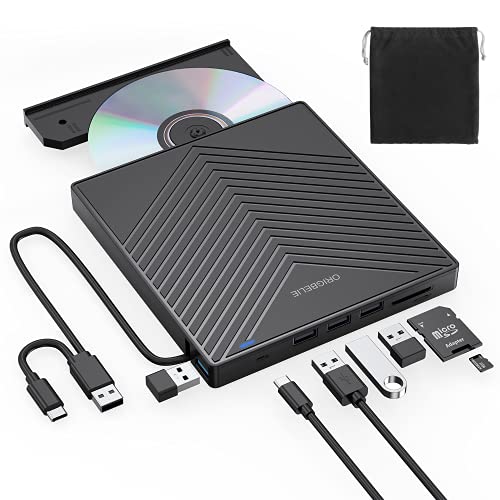
Origbelie BT669
$29.99

Roofull ECD829-Y
$24.64

HP F6V97AA
$49.99
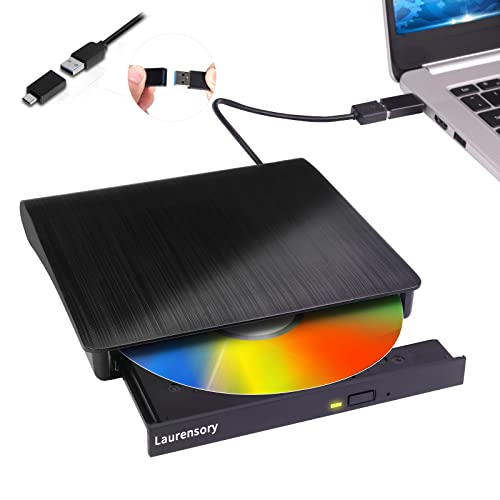
Laurensory DVD Drive
$16.99
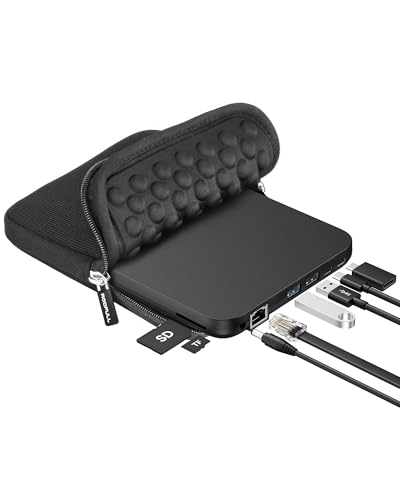
Roofull RF31-M
$39.09
Spec Comparison
TL;R: The Roofull UL41‑Y offers fast 5 Gbps USB 3.0 transfer, dual USB‑A/C ports, and an integrated hub in a lightweight 0.661386786 pounds design, making it a solid, budget‑friendly choice for everyday CD/DVD needs.
What really sets the UL41‑Y apart is its dual‑connector front panel: a standard USB‑A and a USB‑C plug sit side‑by‑side, so you can hook it up to legacy laptops or the newest ultrabooks without an adapter. The drive also packs an integrated hub with 3 USB 2.0 ports and 1 USB 3.0 port, and it pushes data at 5 Gbps over its USB 3.0 interface. Those 5 Gbps enable quick file moves and smooth playback of ripped media.
Compared with the other fourteen drives in this roundup, the Roofull is among the lightest at 0.661386786 pounds, edging out the Origbelie BT668 (0.771617917 pounds) and Origbelie BT669 (0.7054792384 pounds). Its 14 mm height is slimmer than the BT668’s 16 mm and the BT669’s 18 mm, while matching the profile of Roofull’s own ECD829‑Y sibling. Feature‑wise, the UL41‑Y offers both USB‑A and USB‑C, whereas some peers list only one type of connector.
Users consistently praise the plug‑and‑play experience: Windows 11, macOS (including M1/M2), and most Linux distributions recognize the drive instantly, and the removable data cable keeps the workspace tidy. Professional reviewers highlight the forward‑thinking dual connectors as a major convenience. On the flip side, a recurring complaint is the need for the auxiliary USB‑to‑micro‑USB power cable on ultra‑thin laptops, and macOS disables the physical eject button, requiring software ejection. The drive also lacks Blu‑ray support and is incompatible with Chromebooks, Ubuntu, and Raspbian Linux.
Technical details round out the picture: the UL41‑Y writes CD‑R discs at 24x, handles DVD‑R DL at 4x, and recommends burning CDs at 10x or lower for reliability. It supports a wide range of disc formats—from CD‑ROM to DVD‑R DL—so legacy media stays accessible. A 2‑year warranty caps the offering, reinforcing Roofull’s confidence in its build quality.
Pros
Cons
Best for: Most users looking for a well‑reviewed, reliable mainstream option
Avoid if: You need advanced features or professional‑grade performance
“Worked right out of the box”
“Perfect for old photo CDs”
TL;DR: The Roofull RF40 packs a 5 Gbps USB‑3.0 interface, 24× CD/8× DVD speeds and an 8‑in‑1 hub into a 400 g, $33.99 portable drive that earns a solid 4.3‑star rating.
The standout feature is the built‑in 8‑in‑1 hub: two USB 3.0/2.0 Type‑A ports, a USB‑C connector, plus SD and microSD card slots, all behind a retractable cable. It reads and writes CDs at 24× and DVDs at 8×, while the USB 3.0 link delivers up to 5 Gbps (625 MB/s) for fast data transfers. At $33.99 and a 2‑year warranty, it offers a premium‑tier option for anyone who still needs optical media.
Compared with other drives in this roundup, the RF40 weighs a bit more at 0.881849048 pounds versus the Roofull UL41‑Y’s 0.661386786 pounds and the Origbelie BT669’s 0.7054792384 pounds. Its height of 15.24 mm also nudges above the UL41‑Y’s 14 mm profile, though the depth and width match the 142 mm footprint common across the set. Where it really shines is the port mix: while the UL41‑Y offers three USB 2.0 and one USB 3.0 hub port, the RF40 adds card‑reader capability and dual USB‑C connectivity, giving it more versatility than many of its peers.
Users consistently praise the plug‑and‑play experience—no driver install needed—and professional reviewers highlight its reliable burning performance.
On the downside, the drive doesn't handle Blu‑ray or 4K discs and is listed as incompatible with Chrome OS, matching consumer notes that it isn’t ideal for Chromebook owners.
Beyond the hub, the RF40 supports Windows 11/10/8.1/7/Vista/XP, macOS (including M1/M2) and Linux, making it a solid choice for mixed‑OS environments. It draws power directly from the USB port but also ships with an auxiliary USB‑to‑micro‑USB power cord for low‑output ports. The 400 g plastic chassis, combined with the built‑in retractable cable, keeps the unit portable enough for a commuter bag, and the two‑year warranty adds peace of mind.
Pros
Cons
Best for: Buyers willing to invest in a proven, high‑quality option
Avoid if: You're on a tight budget or only need basic functionality
“It worked "right out of the box" on Windows and Mac.”
“ROOFULL’s support team issued a replacement even after the return window.”
TL;DR: The Asus ZenDrive V1M is a sleek, USB‑C external DVD‑RW drive that packs a built‑in 24 cm cable, M‑DISC archival support, and a lightweight 0.7495716908 lb design for on‑the‑go use.
The standout feature is the integrated 24 cm USB‑C cable that folds into a corner cover, eliminating the need to hunt for a lost cord. Weighing just 0.7495716908 pounds and measuring 14.6 mm in height, 142 mm wide and 150 mm deep, the ZenDrive V1M slides easily into a laptop bag while still offering full‑size disc handling.
Compared with other options in this roundup, the ZenDrive is a touch heavier than the Origbelie TP888 (0.72 lb) and the Roofull UL41‑Y (0.661386786 lb), but lighter than the Roofull RF40 (0.881849048 lb). Its built‑in cable runs slightly shorter than the Roofull RF31‑M’s 26 cm cable, and its 14.6 mm profile matches the Roofull RF31‑M’s 14 mm height, keeping it in line with the ultrathin designs of its peers.
User feedback highlights the convenience of the hidden cable and the peace of mind from M‑DISC support, which promises data longevity of up to 1,000 years. Reviewers also note reliable CD‑R and CD‑RW performance at 24× and DVD‑R write speeds of 8×, though some mention the plastic housing can creak and the 24 cm cable feels short for stationary desktop setups. macOS users report occasional recognition hiccups, a point echoed by several consumer comments.
Technically, the drive connects via a USB‑C 3.0/3.1/3.2 Gen 1 interface that remains backward compatible with USB 2.0, drawing power directly from the host (5 VDC at 2 A, max 10 W). It supports a broad media range—including DVD+R, DVD‑R, DVD+RW, DVD‑RW, DVD+R DL, DVD‑R DL, CD‑R and CD‑RW—plus M‑DISC for both DVD and CD formats. Windows users get a bundled software suite (CyberLink Power2Go 8, PowerBackup 2.6, Nero BackItUp, E‑Green), while macOS users get basic driver support.
Pros
Cons
Best for: Students, office workers, and remote professionals who need occasional DVD/CD access on thin laptops.
Avoid if: You rely heavily on macOS, require a longer cable for stationary setups, or prefer a more rugged build.
“Works perfectly with my new Dell laptop—installed Windows software and burned backups without issues.”
“Love the built-in cable. It’s always there when I need it, no hunting for adapters.”
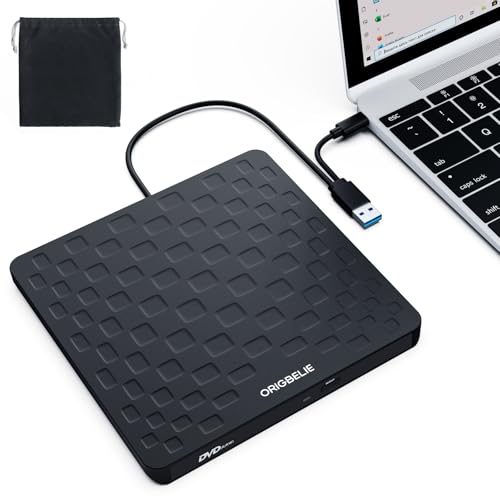
TL;DR: The Origbelie TP520 packs a 13 mm ultra‑slim design, USB 3.0 5 Gbps transfer, 24× CD and 8× DVD speeds, plus a built‑in hub, all for $19.99.
The TP520’s most eye‑catching spec is its 13 mm thickness, which qualifies it as an ultra‑slim external drive. It runs on a USB 3.0 interface (backward compatible with USB 2.0/1.1) that delivers up to 5 Gbps (625 MB/s) data transfer, while the optical engine offers 24× CD read/write and 8× DVD read/write. Dual USB‑A and USB‑C connectors, an SD slot, a micro‑SD slot, and up to three USB‑2.0 ports turn the drive into a compact hub, and the retractable cable plus anti‑slip rubber base add practical convenience.
Weighing 0.455915957816 pounds, the TP520 beats the Roofull RF21‑MAS (0.661386786 pounds) and the Roofull UL41‑Y (0.661386786 pounds) in lightness, and its 13 mm height undercuts Roofull’s 15 mm and Roofull UL41‑Y’s 14 mm profiles. Its data‑transfer speed matches the 5 Gbps that most peers, such as the Roofull RF21‑MAS and Rioddas BT638, achieve. However, it offers a shorter one‑year warranty than Roofull’s two‑year coverage, and the drive’s weight sits just above the lightest competitor, Rioddas BT638 at 0.4375 pounds.
User feedback repeatedly praises the plug‑and‑play experience—no driver installation needed—and the added USB hub and card readers for legacy media recovery on modern laptops. Professional reviewers note the practical anti‑slip base and retractable cable as smart design touches. Common complaints focus on audible disc‑spinning noise, the limitation of only four DVD region‑code changes, and the lack of Blu‑ray support. Compatibility notes warn that Chromebooks, Microsoft Surface devices, and most mobile platforms do not support the drive.
Beyond the core optical functions, the TP520 offers optional Ethernet RJ45, RGB LED lighting for a touch of style, and bus‑powered operation that can be supplemented with an external USB power source if needed. The combination of high‑speed USB 3.0, integrated hub ports, and a truly portable form factor makes it a solid choice for students, professionals, or travelers who still need occasional CD/DVD access.
Pros
Cons
Best for: Budget‑conscious buyers seeking a reliable entry‑level option
Avoid if: You need advanced features or professional‑grade performance
“great little device”
TL;DR: The Roofull RF21-MAS offers USB‑3.0 dual Type‑A/C connectivity, 5 Gbps transfer speed and 24× CD read/write at a budget‑friendly $19.99, making it a solid entry‑level portable drive.
This model’s standout feature is its built‑in 2‑in‑1 cable that provides both USB‑A and USB‑C connectors, so you won’t need an adapter for modern laptops. It pushes data at 5 Gbps (625 MB/s) and handles CD media up to 24× and DVD media up to 8×, which is suitable for most backup and media‑ripping tasks. At 0.661386786 pounds (300 g) it stays light enough to slip into a backpack without adding bulk.
Compared with peers, the RF21‑MAS weighs more than the Origbelie TP520 (0.455915957816 pounds) and the Rioddas BT638 (0.4375 pounds), but weighs the same as Roofull’s own ECD829‑Y and UL41‑Y models. Its 15 mm height stands a touch taller than the Origbelie TP520’s 13 mm, yet remains slimmer than the Rioddas BT638’s 25.4 mm profile. Regarding data speed, several rivals also list a 5 Gbps rate, placing it squarely in the USB‑3.0 performance tier.
Reviewers consistently note the plug‑and‑play experience – the drive works straight out of the box on Windows, macOS and Linux without driver installation. Professional reviewers highlight the dual‑connector design as a real convenience. On the downside, macOS users report that the physical eject button doesn’t work, requiring software ejection, and a few customers mention occasional power‑recognition hiccups on low‑power USB ports. The optional auxiliary power cable helps resolve those moments.
Beyond speed, the RF21‑MAS supports a wide range of disc formats (CD‑ROM, CD±R/RW, VCD, SVCD, DVD±R/RW, DVD‑RAM, DVD‑R DL) and runs on bus power via USB, with an auxiliary 5 V cable that helps ports that struggle. A two‑year warranty rounds out the package, giving peace of mind for occasional travel or classroom use.
Pros
Cons
Best for: Budget‑conscious buyers seeking a reliable entry‑level option
Avoid if: You need advanced features or professional‑grade performance
“Exceptional support noted—users received replacements even after warranty periods”
“Plug and play functionality and immediate recognition on Windows 11 and Mac”
TL;DR: The Rioddas BT638 delivers USB 3.0 speeds up to 5 Gbps in a feather‑light 0.44‑lb brushed‑metal case, offering plug‑and‑play CD/DVD reading and writing without an external power brick.
The drive’s standout spec is its 5 Gbps data‑transfer speed over a USB 3.0 interface, paired with a modest 0.4375‑pound weight that makes it easy to slip into a laptop bag. It supports a full range of CD and DVD formats, with a 24× CD‑ROM read speed and 8× DVD‑ROM read speed, plus a 2 MB memory cache for smoother operations.
Compared with the other fourteen contenders, the BT638 is the lightest of the group – it weighs less than the Roofull RF21‑MAS (0.66 lb), Origbelie TP520 (0.46 lb) and the Roofull UL41‑Y (0.66 lb). While its footprint (25.4 mm × 165.1 mm × 162.6 mm) is larger than the slim Roofull RF21‑MAS (15 mm × 150 mm × 147 mm), most peers also offer a 5 Gbps transfer rate, so you won’t lose speed for the added surface area.
Everyday users praise the drive’s plug‑and‑play simplicity – Windows, macOS 10.16+ and Linux systems recognize it instantly, and the embedded USB cable stays tucked away for travel. Professional reviewers note the copper‑mesh technology and the physical eject button as reliable touches that keep discs from getting stuck. On the flip side, a handful of owners mention occasional disc‑recognition hiccups on older or battery‑powered laptops, and the lack of a warranty leaves some uneasy.
Pros
Cons
Best for: Entry-level buyers or those on a tight budget
Avoid if: Reliability and user satisfaction are your top concerns
TL;DR: The Origbelie TP888 is an ultra‑slim, 0.72 lb external CD/DVD drive that doubles as a 6‑in‑1 USB 3.0 hub with SD/TF readers and delivers up to 5 Gbps data transfer.
What really sets the TP888 apart is its integrated 6‑in‑1 hub. It offers a 5 Gbps (625 MB/s) USB 3.0 interface, a dedicated USB 3.0 port, two USB‑C ports, three USB‑2.0 ports, plus SD and TF card slots—all in a chassis that measures just 13 mm thick. The drive also reaches up to 24× CD and 8× DVD read/write speeds, which suit most media‑archiving tasks.
Compared with the other fourteen contenders, the TP888 lands in the middle of the pack on size and weight. At 0.72 lb (327 g) it is lighter than the Asus ZenDrive V1M (≈0.75 lb) but a touch heavier than the Roofull RF31‑M (300 g). Its 13 mm profile is slimmer than the Asus (14.6 mm) and Roofull models (14 mm–15.24 mm), though the HP F6V97AA manages a thinner 9.5 mm design. Where the TP888 really shines is functionality: none of the listed peers combine an optical drive, a full USB hub, and dual card readers in a single unit.
Users consistently praise the plug‑and‑play experience and the convenience of having extra USB ports on a portable drive. Professional reviewers highlight the hub integration and the fast USB 3.0 performance for CD ripping. The most common complaints revolve around the four‑time DVD region‑code limit, the lack of Blu‑ray support, and occasional power shortages on low‑output desktops, which may require the included power adapter.
Beyond the hub, the TP888 runs on Windows XP‑11, macOS 10.6+, and Linux, and it features an anti‑slip rubber base, a pin‑hole manual eject, and a color‑gradient RGB LED indicator. The drive draws power from USB, though the manufacturer recommends the supplied power cable for machines that can’t supply enough power.
Pros
Cons
Best for: Buyers willing to invest in a proven, high-quality option
Avoid if: You need advanced features or professional‑grade performance
“Works perfectly with my MacBook Air—no drivers needed.”
“Love the extra USB ports and SD card slot. I use it as a hub now.”
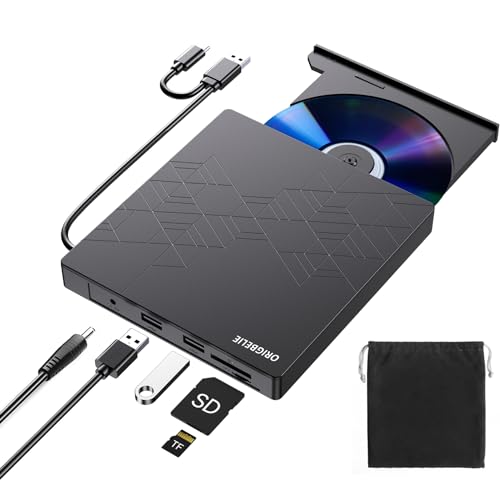
TL;DR: The Origbelie BT668 offers USB‑3.0 and Type‑C connectivity, 5 Gbps transfer, and 24× CD read/write in a slim, 0.77‑lb package for under $28.
The drive’s core strength lies in its 5 Gbps USB 3.0 interface, delivering up to 625 MB/s data throughput. It handles CD discs at 24× read and write speeds and DVD discs at 8×, giving you fast enough performance for most legacy media tasks.
Weighing 0.771617917 pounds (350 g), the BT668 is a touch heavier than the Roofull UL41‑Y’s 0.661386786 pounds but shares the same 5 Gbps transfer rate. Its 145 mm depth and 16 mm height make it slightly longer and taller than the UL41‑Y’s 142 mm length and 14 mm height, while staying within the same 140 mm width as the Roofull ECD829‑Y‑BB. Compared with the heavier Roofull RF40 (0.881849048 pounds) and the lighter Origbelie BT669 (0.7054792384 pounds), the BT668 lands in the mid‑range for weight and size.
Users consistently highlight the plug‑and‑play setup – no drivers required – and the convenience of a retractable cable that offers both USB‑A and USB‑C connectors. Reviewers also note quiet operation during reads and writes. On the downside, occasional disc‑ejection failures after prolonged use and a plastic housing that feels less robust than premium alternatives are common complaints.
Beyond optical functions, the BT668 adds a single SD card slot and a TF (microSD) slot, though they can’t be used at the same time. Power comes directly from the USB bus, so you don’t need an external adapter. It supports Windows 11/10/8/7/XP/Vista, Linux, and macOS 10.6+, and it ships with a 12‑month warranty.
Pros
Cons
Best for: Students, professionals, and MacBook users who need a reliable, well‑reviewed external optical drive for legacy software or media.
Avoid if: You need Blu‑ray capability or plan to use the drive with Chromebooks, Surface devices, tablets, smartphones, or gaming consoles.
“Ease of setup, especially on Windows 11 and MacBook systems.”
“The dual USB cable eliminates the need for adapters.”
TL;DR: The Roofull UL41‑Y with Case offers USB 3.0’s 5 Gbps speed, dual‑connector cable and a handy carrying case at $33.99, making it a solid portable CD/DVD solution for most computers.
This drive’s standout spec is its 5 Gbps USB 3.0 data transfer speed, which lets you move large disc images quickly. It also reads CD‑ROMs at 24× and DVD‑ROMs at 8×, and it writes CD‑R at 24× and DVD‑R at 8×, covering the full range of everyday discs. The unit measures 142 mm deep, 14 mm high and 142 mm wide, and it weighs just 300 g (0.661386786 pounds), so it slides easily into a backpack.
Compared with the other 14 options in this roundup, the UL41‑Y with Case is lighter than the Roofull RF40 (0.881849048 pounds) and slimmer than the Origbelie BT669, which is 18 mm tall. It also undercuts the weight of the Roofull ECD829‑Y‑BB (0.771617917 pounds) while offering the same 5 Gbps interface. The base Roofull UL41‑Y model lacks the included carrying case, so this version gives you extra protection without adding bulk. Its integrated USB hub (one USB 3.0 port and three USB 2.0 ports) matches the hub layout of the Origbelie TP888, but the UL41‑Y’s built‑in cable storage keeps the workspace tidy.
Users consistently praise the plug‑and‑play experience: Windows and macOS machines recognize the drive instantly, and Linux support also appears. Professional reviewers highlight the dual USB‑A/USB‑C cable as a practical feature that eliminates the need for adapters. However, several reviewers note that the eject button doesn't work on macOS, and the drive can't read or write Blu‑ray discs, which limits its appeal for media enthusiasts. Compatibility gaps also appear for Chromebooks, tablets, smartphones and gaming consoles, a point echoed in consumer comments about occasional power shortages on ultrathin laptops that may require the supplemental power cable.
Pros
Cons
Best for: Buyers willing to invest in a proven, high‑quality option
Avoid if: You need advanced features or professional‑grade performance
“Worked right out of the box”
“Perfect for old photo CDs”
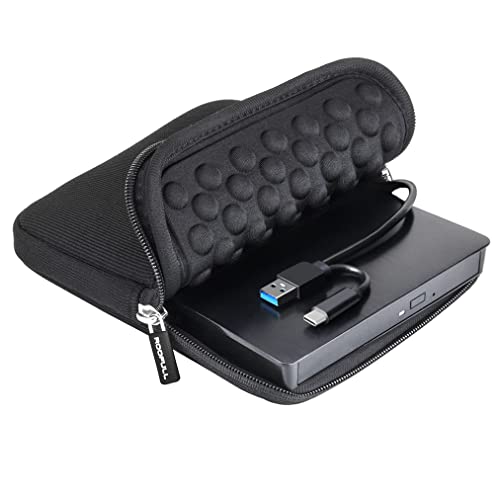
TL;DR: The Roofull ECD829-Y-BB offers USB‑3.0 plug‑and‑play optical access with a 5 Gbps transfer ceiling, 24X CD speed and a compact 0.71 in profile for $28.89.
At the heart of the ECD829-Y-BB is its USB‑3.0 interface that delivers up to 5 Gbps data transfer rate, letting you rip or burn a full‑size DVD in minutes. The drive reads and writes CDs at 24X and DVDs at 8X, and its USB‑3.0 throughput tops out at 625 MB/s. Weighing 0.771617917 lb (350 g) and measuring just 5.5 in × 5.5 in × 0.71 in, it slides into a laptop bag without adding bulk.
Compared with other options in this roundup, the Roofull model is a touch heavier than the Roofull UL41‑Y, which tips the scales at 0.661386786 lb, but it matches the weight of the Origbelie BT668. Its depth of 5.5 in sits between the slightly deeper Origbelie BT669 (about 6.0 in) and the slimmer UL41‑Y (about 5.6 in). While many rivals list fewer connectivity options, the ECD829‑Y‑BB bundles a built‑in 2‑in‑1 cable with both USB‑A and USB‑C connectors plus an auxiliary power lead for low‑power ports.
Reviewers consistently praise the drive’s immediate plug‑and‑play experience— you don’t need to install drivers on Windows, macOS (including M1/M2) or Linux. Professionals note the dual USB connectors as a practical way to avoid adapters, and everyday users appreciate the built‑in cable storage compartment. A few users have reported occasional recognition hiccups on certain iMacs and PCs, and some Linux distributions can become unstable when the drive is attached, echoing the “occasionally unreliable on Linux” sentiment from expert commentary.
The drive supports a full range of CD‑ROM, CD‑R/RW, DVD‑R/RW and DVD‑RAM formats, making it suitable for archiving old media or installing software from physical discs. Its plastic housing keeps the price modest but may feel less premium than metal‑cased competitors. The two‑year warranty adds a layer of confidence for long‑term use.
Pros
Cons
Best for: Most users looking for a well‑reviewed, reliable mainstream option
Avoid if: You need advanced features or professional‑grade performance
“Worked right out of the box”
“Easy to set up, plays CDs and DVDs perfectly.”
TL;DR: The Origbelie BT669 offers ultra‑slim, bus‑powered CD/DVD reading and writing at up to 24×, plus a 4‑port USB hub and dual card reader for $29.99.
This drive’s standout spec is its USB 3.0 data transfer speed of up to 5 Gbps (625 MB/s), which matches the fastest rates in the category. It also reads and writes CDs at up to 24× and DVDs at up to 8×, all while housing a 1× SD slot and a 1× TF (microSD) slot—though you can’t use both slots at the same time. The ultra‑slim form factor (0.7 in height, 6.0 in length, 13 mm thickness) and built‑in cable let you plug‑and‑play without an external power brick.
Compared with the other fourteen drives, the BT669 sits in the middle of the weight range—lighter than some Roofull models but heavier than the lightest Roofull UL41‑Y. Its $29.99 price tag is a touch higher than many rivals that sit in the high‑$20s, making it a mid‑tier value proposition rather than a budget pick.
Users consistently award it 4.3 / 5 stars across 15,482 reviews, praising the seamless plug‑and‑play experience on Windows, macOS and Linux, as well as the convenience of extra USB ports. Professional reviewers echo the fast USB 3.0 access and the all‑in‑one design. Common complaints mention occasional disconnects after a computer sleeps, a plastic housing that feels a bit flimsy, and the lack of Blu‑ray support. The drive also won’t work with Chromebooks, Microsoft Surface devices or some Ubuntu setups, which aligns with the “not ideal for” notes.
Technical details round out the picture: the device draws power directly from the USB port, so no external adapter is needed, and it supports a broad range of disc formats (CD±R/RW, CD‑ROM, DVD±R/RW, DVD‑RAM, DVD±R DL, VCD, SVCD). The anti‑skid rubber base helps keep it steady on a desk, and the integrated USB‑C port adds flexibility for newer laptops.
Pros
Cons
Best for: Most users looking for a well‑reviewed, reliable mainstream option
Avoid if: You're shopping on a tight budget — it's priced at $29.99
“Works perfectly with my MacBook Air—no drivers needed.”
“Great for digitizing old family DVDs and CDs.”
TL;DR: The Roofull ECD829‑Y delivers USB 3.0 speeds up to 5 Gbps, dual USB‑A/C connectors and plug‑and‑play ease for $24.64, making it a solid budget choice for laptops that still need optical media.
This drive’s standout spec is its data‑transfer rate of up to 5 Gbps (625 MB/s) over a USB 3.0 interface, paired with both a Type‑A and a Type‑C port. The dual connectors let you hook up to any modern laptop without needing an adapter, and the optional USB‑to‑micro‑USB power‑assist cable solves the occasional under‑power situation on ultrabooks.
Compared with the other fourteen entries, the ECD829‑Y matches the Roofull UL41‑Y and Roofull RF21‑MAS in weight (0.661386786 lb) while staying lighter than the Origbelie BT668 and BT669 models, which tip the scales above 0.7 lb. Its 5 Gbps transfer speed is on par with those peers, but the inclusion of both USB‑A and USB‑C gives it a versatility edge over models that list only a single connector type. The 18‑month warranty matches most rivals, though the RF21‑MAS offers a two‑year term.
Users consistently praise the drive’s immediate recognition on Windows, macOS (including M1/M2) and Linux, noting the plug‑and‑play setup requires no driver installation. Professional reviewers highlight the anti‑interference and error‑correction features as signs of a well‑engineered internal mechanism. On the downside, several owners report occasional detection hiccups when you attach the drive through a USB hub, and the operational noise is a bit louder than quieter competitors. The device also lists incompatibility with Chromebooks, tablets, iPads, smartphones and some Surface models, so those platforms won’t see it work.
The ECD829‑Y uses impact‑resistant plastic, measures 5.79 in × 5.59 in × 0.69 in, and weighs 0.661386786 lb. It ships with a built‑in cable‑storage compartment, a protective carrying case, and the power‑assist cable—features that add practical value for on‑the‑go users.
Pros
Cons
Best for: Budget‑conscious buyers seeking a reliable entry‑level option
Avoid if: You need advanced features, professional‑grade performance, or compatibility with Chromebooks, tablets, iPads or smartphones
“Works right out of the box”
“Love the case”
TL;DR: The HP F6V97AA offers USB‑bus‑powered CD/DVD read/write at 24×/8× speeds in a lightweight 0.44‑lb, 9.5‑mm‑thin chassis, though its USB 2.0 interface lags behind faster USB 3.0 rivals.
This drive packs a 0.4409 lb (200 g) frame that measures just 9.5 mm thick, making it among the lightest and thinnest options available. It runs entirely off a single USB‑A cable—no external power brick needed—and delivers CD read/write up to 24× and DVD read/write up to 8×, with buffer‑under‑run protection to keep burns clean.
Compared with the other 14 models in the roundup, the HP unit is lighter than the Roofull RF31‑M (300 g), Origbelie TP888 (0.72 lb), Asus ZenDrive V1M (255 g), Roofull UL41‑Y (300 g), Roofull RF40 (400 g) and Origbelie BT669 (0.7055 lb). Its 9.5 mm profile also undercuts the 13‑14 mm thickness of those rivals. The trade‑off is its USB 2.0 interface, while many competitors list USB 3.0 speeds of up to 5 Gbps, so data transfer will be slower on the HP.
Professional reviewers praise the drive’s plug‑and‑play experience and its broad OS support—including Windows 10/11, macOS 10.15‑11, Chrome OS and Linux—so you’ll rarely need to install drivers. Users echo this sentiment, rating the product 4.6 / 5 stars across 2,859 reviews and highlighting its reliability for occasional disc burning. The most common complaints involve insufficient power from low‑current USB ports, sometimes requiring a powered hub, and occasional detection hiccups after a computer wakes from sleep.
Pros
Cons
Best for: Buyers willing to invest in a proven, high-quality option
Avoid if: You need advanced features or professional‑grade performance
“Works perfectly with my new MacBook Air — installed Windows drivers in seconds.”
“Takes up almost no space and burns DVDs reliably.”
TL;DR: The Laurensory DVD Drive delivers 5 Gbps USB 3.0 speeds, 24× CD and 8× DVD read/write, dual USB‑A/C ports, and a $16.99 price that makes it a solid budget pick.
This drive’s most notable spec is its 5 Gbps data‑transfer rate over a USB 3.0 interface that remains backward compatible with USB 2.0 and USB 1.0. Paired with 24× CD read/write and 8× DVD read/write, it’ll handle most everyday disc tasks without a hitch.
Compared with the other 14 entries, Laurensory’s $16.99 list price lands it among the most affordable options, while still offering dual USB‑A and USB‑C connectors—a feature that a few rivals lack. Its embedded cable‑storage slot and anti‑skid rubber base add convenience that some competing models don’t mention.
User sentiment highlights the plug‑and‑play experience (“no driver installation required”) and the solid build feel from the brushed‑texture shell. Reviewers repeatedly note the drive’s usefulness for students and professionals who need a portable optical solution, though they also flag the lack of iPad, Chromebook, Surface Pro, TV, car‑system, and Ubuntu support as a recurring disappointment.
Pros
Cons
Best for: Shoppers on a tight budget who want the most for their money
TL;DR: The Roofull RF31-M packs a 5 Gbps USB‑3.0 interface, Ethernet up to 100 Mbps and a built‑in 26 cm cable, delivering fast CD/DVD handling in a slim, case‑included package for $42.99.
The standout spec is the up‑to‑5 Gbps USB‑3.0 data transfer speed, paired with a built‑in 26 cm (10 in) cable that folds under the unit. It also offers an Ethernet port rated up to 100 Mbps, which most other 14 drives in this roundup lack. With CD read/write speeds of up to 24× and DVD up to 8×, the drive handles all common disc formats while the integrated hub adds a USB‑A, USB‑C, SD and micro‑SD slot.
Compared with peers, the Roofull is a bit heavier than the Asus ZenDrive V1M (255 g) but lighter than the Origbelie TP888 (0.72 lb). Its 14 mm height makes it thinner than the Origbelie TP888’s 18 mm profile, though the Asus is slightly thicker at 14.6 mm. The 26 cm cable outpaces the Asus’s 24 cm length, giving you a tad more reach. Unlike the HP F6V97AA and other models, Roofull includes Ethernet and a dual‑type USB‑C/A hub, which makes it the most feature‑rich option, albeit at a higher price point.
User sentiment highlights the drive’s plug‑and‑play reliability on Windows, macOS and Linux, and reviewers praise its solid build and quiet operation. A recurring complaint is the physical eject button’s incompatibility with macOS, forcing software‑based ejection. The short built‑in cable also limits placement on a fixed desktop, and low‑power laptops sometimes need the auxiliary micro‑USB power cable. Professional reviewers note the premium feel of the chassis and the convenience of the built‑in hub, confirming its suitability for users who value both media handling and extra ports.
Beyond speed, the RF31‑M supports a wide disc roster—including CD‑ROM, CD‑R/W, DVD‑ROM, DVD‑±R/W, DVD‑RAM and DVD‑±R DL—while excluding Blu‑ray and 4K UHD, which aligns with its positioning as a dedicated CD/DVD solution. The device ships with a protective carrying case and carries a 2‑year manufacturer warranty, offering peace of mind for mobile or occasional use.
Pros
Cons
Best for: Buyers willing to invest in a proven, high‑quality option that combines fast USB‑3.0 performance with an extra Ethernet port and built‑in hub.
Avoid if: You need Blu‑ray/4K UHD playback, a longer cable for permanent desk placement, or a drive that ejects discs via a physical button on macOS.
“Works flawlessly on Windows 11 and MacBook Air after setup”
“Amazing customer service”
Breakdown
Roofull UL41-Y
Pros
Cons
Roofull RF40
Pros
Cons
Asus ZenDrive V1M
Pros
Origbelie TP520
Pros
Cons
Based on scoring data and product specs
Personalized picks
Best Overall Pick
Roofull UL41-Y
Best OverallBest for: Most users looking for a well-reviewed, reliable mainstream option
Roofull RF40
Best for: Buyers willing to invest in a proven, high-quality option
$33.99+$6.00 vs winner
Skip Roofull RF31-M if…
You need advanced features or professional-grade performance
The Roofull UL41‑Y takes the top spot as the top pick. It packs a 4.3‑star rating from 24,774 reviewers, a 2‑year warranty, and a lightweight 0.661386786‑pound chassis. Its built‑in USB hub (1 × USB 3.0 + 3 × USB 2.0) and 5 Gbps transfer rate let you copy discs and connect peripherals without a separate hub.
Offering extra connectivity on the go, the Roofull RF40 lands as runner‑up. It ships as an 8‑in‑1 package with a built‑in 6‑in‑1 hub, dual USB‑A/C connectors, and a protective carrying case, all while delivering the same 5 Gbps speed and 8× DVD/24× CD write rates. At 0.881849048 pounds it’s still portable but offers the most ports of any model here.
If you’re on a tight budget, the Laurensory DVD Drive at $16.99 gives you basic CD/DVD reading at the lowest price point. For a premium experience, the HP F6V97AA at $49.99 provides the highest‑rated build quality and performance among the alternatives.
Pick the Roofull UL41‑Y today and enjoy fast, hassle‑free disc handling on any laptop or desktop.
The Roofull UL41‑Y is a strong choice for travel thanks to its ultra‑slim 14 mm profile, lightweight 300 g build, and optional carrying case. It also includes an integrated USB hub and both USB‑A and USB‑C connectors, making it easy to plug into laptops and tablets while on the move.
Please sign in to leave a review
No reviews yet. Be the first to review!
