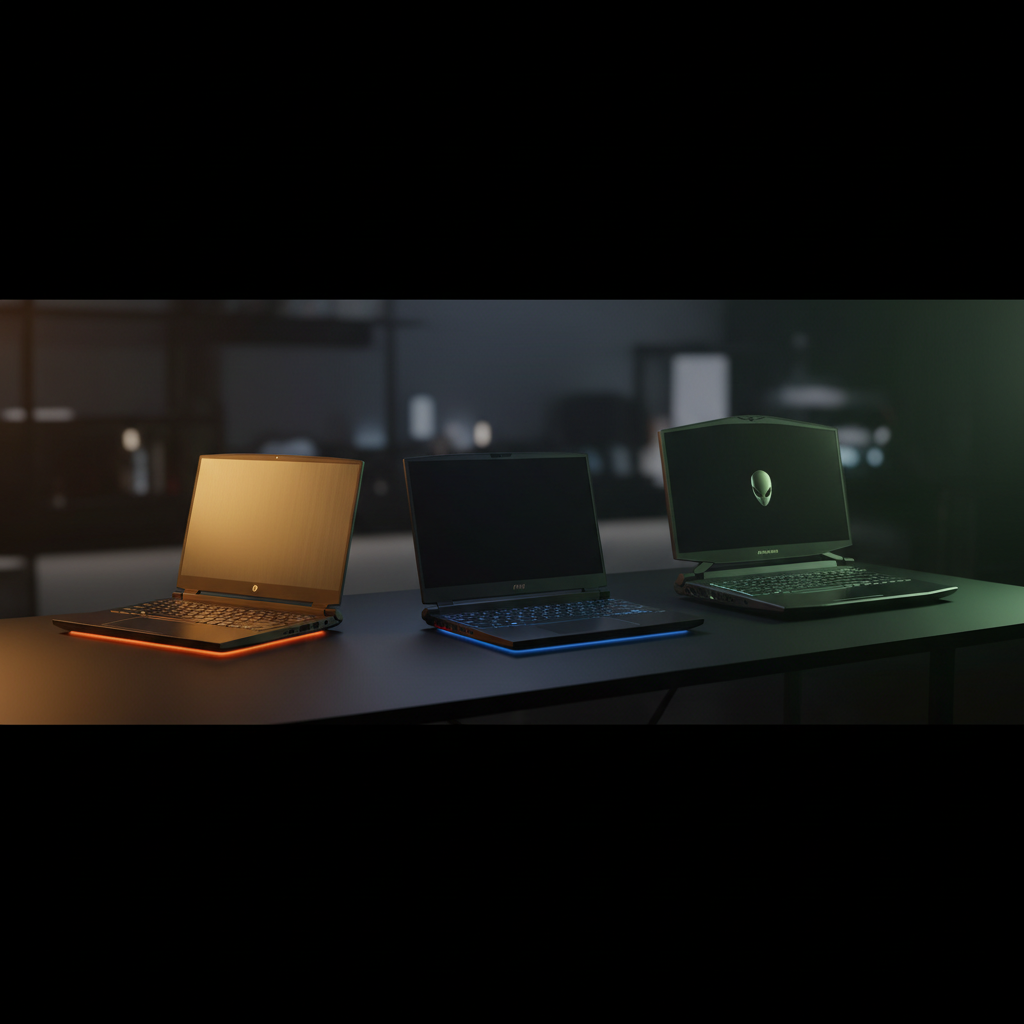
Choosing a gaming laptop with an RTX 5070 or better balances raw power, portability, and price. Our roundup compares 15 models, from a $1,442.77 budget‑friendly Gigabyte Gaming A16 up to the $5,499.00 premium Eluktronics HYDROC 16. To keep things clear, we’ve grouped them into the three price tiers the data defines: budget (Gigabyte, MSI Katana 15, HP OMEN 16 Slim, Acer Predator Neo), mid‑range (HP OMEN Ultra Slim, MSI Crosshair 18) and premium (HP OMEN Ultra Slim 64GB, MSI Vector 16, Alienware Area‑51, Eluktronics HYDROC).
If you need a thin, travel‑ready machine, the HP OMEN Ultra Slim RTX 5070 stands out with a 5.35‑lb chassis, a 4.6/5 rating from 46 reviewers, and a $1,790.00 price tag that sits comfortably in the mid‑range bucket. Gamers on a tighter budget will appreciate the MSI Katana 15’s 165 Hz QHD+ panel, a 4.4/5 rating from 139 reviews, and a $1,599.00 price—making it the best‑value pick for high‑refresh 1080p play. For a desktop‑replacement experience, the Alienware Area‑51 18 delivers an RTX 5080 GPU, a massive 9.56‑lb build, and a $3,615.30 price, earning its place as the premium flagship.
In the sections that follow, we’ll explore each tier, highlight the strengths and trade‑offs, and help you match a laptop to your gaming setup.

HP OMEN Ultra Slim RTX 5070
An 83 Wh battery provides roughly 1.75 hours of gaming, delivering strong value at the $1790 price point.

MSI Katana 15 RTX 5070
Ideal for tight‑budget gamers seeking maximum bang for their buck, it's $1599—about $191 less than the Best Overall pick.

Alienware Area-51 18
Its 96 Wh 6‑cell battery yields 145 minutes of PCMag‑tested life, catering to premium‑performance users willing to invest $3615.
Also considered
Score Analysis
Key score advantages vs. runner-up (MSI Katana 15)
Price Range
HP OMEN Ultra Slim RTX 5070
$1,790.00
MSI Katana 15 RTX 5070
$1,599.00
Alienware Area-51 18
$3,642.44

Gigabyte Gaming A16 RTX 5070
$1,442.77
HP OMEN Ultra Slim RTX 5070 64GB
$2,249.00
MSI Vector 16 HX AI
$2,726.29

MSI Crosshair 18 HX AI (Base)
$1,929.00
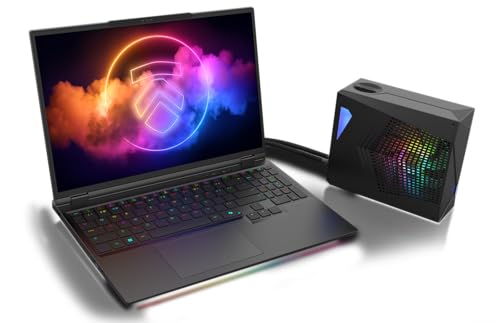
Eluktronics HYDROC 16
$5,499.00
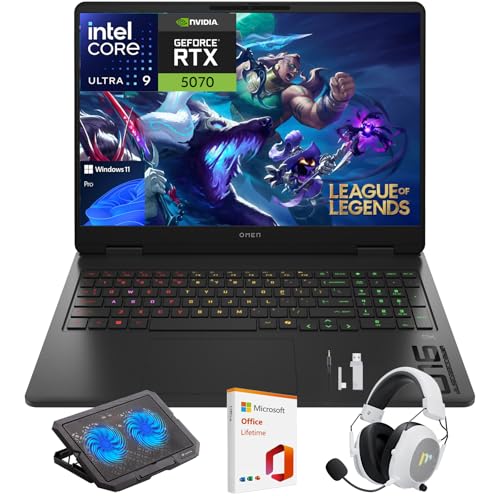
HP OMEN 16 Slim RTX 5070
$1,659.99
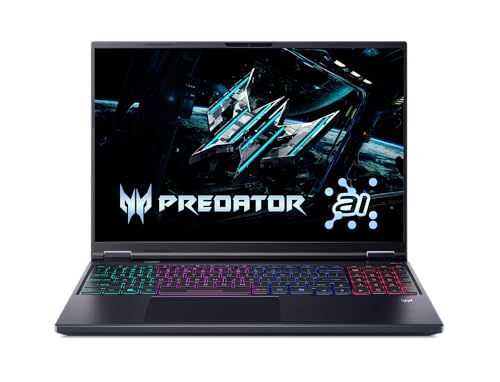
Acer Predator Helios Neo 16
$1,699.99
Dell Area-51 18
$4,049.99
MSI Crosshair 18 HX AI
$1,684.98

Dell Aurora 16X
$2,744.34
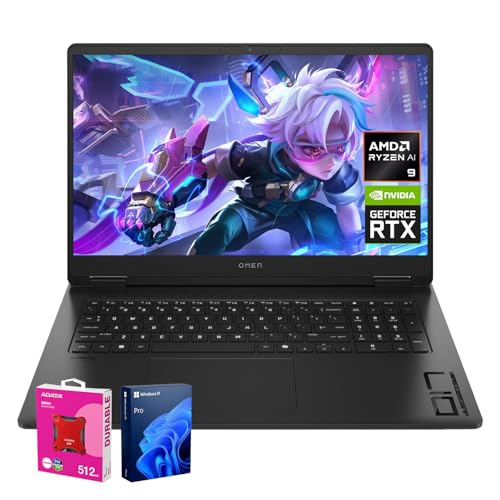
HP OMEN 17.3 RTX 5070
$2,122.99

Lenovo Legion Pro 7i
$1,891.38
Spec Comparison
TL;DR: The HP OMEN Ultra Slim RTX 5070 packs a 16‑inch 240 Hz, 500‑nit display and a Blackwell‑based RTX 5070 GPU into a 5.35‑lb aluminum chassis for $1790.00, delivering strong 1440p performance but limited gaming battery life.
The standout feature is the combination of an NVIDIA GeForce RTX 5070 Laptop GPU with 8 GB GDDR7 memory and a configurable TDP of ≈100 W (up to 110 W). Coupled with a 16‑inch IPS micro‑edge panel that reaches 240 Hz, 500 nits brightness, 100% sRGB coverage and HDR support, the laptop can sustain high frame rates at 1440p while keeping colors vivid and motion smooth. The system runs on an Intel Core Ultra 9 285H, offering 16 cores, a 2.7 GHz base clock and a 5.4 GHz boost, backed by 32 GB DDR5‑5600 RAM and a 1 TB PCIe Gen4 NVMe SSD.
Compared with the other 14 entries, the OMEN Ultra Slim is lighter than the Acer Predator Helios Neo 16 (5.95 lb) and the MSI Crosshair 18 HX AI (6.83 lb), matching the weight of the HP OMEN 16 Slim RTX 5070 (5.35 lb) and sitting just above the MSI Katana 15 (4.96 lb). Its 500‑nit panel outshines the Acer’s 400‑nit screen and ties with the Lenovo Legion Pro 7i’s 500‑nit display, while its 240 Hz refresh matches the Acer and Lenovo but exceeds the MSI Katana’s 165 Hz. The 83 Wh battery is smaller than the 90 Wh packs in Acer and MSI, which helps explain the shorter 1.75‑hour gaming runtime.
Reviewers consistently praise the laptop’s “excellent gaming performance at 1440p” and the “high‑quality 240 Hz display with accurate colors.” Professional observers note the Blackwell GPU’s ~2.5× Tensor Core boost and the effectiveness of DLSS 4 for keeping frame rates high. On the downside, users flag the fans as “loud under heavy load” and the “limited battery life during gaming,” with some noting that certain models have soldered RAM, limiting future upgrades. The aluminum chassis and MIL‑STD‑810H certification add a premium feel, and the OMEN Tempest Cooling Architecture promises a 19% cooler and 12% quieter operation than the previous generation, though real‑world noise can still be noticeable.
Pros
Cons
Best for: Value-conscious buyers seeking quality at $1790.00
Avoid if: You have limited desk space or need portability
“Runs Elden Ring at max settings with 70 FPS—no drops”
“Screen is stunning, even in sunlight”
TL;DR: The MSI Katana 15 RTX 5070 packs an i9‑14900HX and RTX 5070 GPU into a 15.6‑inch QHD+ laptop for $1,599, offering high‑frame‑rate gaming and creator performance at a lightweight 4.96 lb chassis.
The heart of the Katana is the 14th‑gen Intel Core i9‑14900HX with 24 cores (8 performance, 16 efficiency) and a turbo boost of up to 5.8 GHz, paired with an NVIDIA GeForce RTX 5070 that runs at a 2,347 MHz boost clock and draws 115 W TGP. Combined with 32 GB DDR5 RAM at 5,600 MHz and a 1 TB PCIe Gen4x4 SSD, the machine delivers desktop‑class power for QHD gaming and demanding creative workloads.
At 4.96 pounds, the Katana is lighter than the HP OMEN 16 Slim (5.35 lb) and the Acer Predator Helios Neo 16 (5.95 lb), while only a shade heavier than the Gigabyte Gaming A16 (≈4.85 lb). Its 165 Hz QHD+ IPS panel out‑refreshes the HP OMEN 16 Slim’s 144 Hz screen, though it sits below the Acer’s 240 Hz offering. Battery capacity sits at 75 Wh, just under the Gigabyte’s 76 Wh and well below the MSI Crosshair 18’s 90 Wh or the HP OMEN Ultra Slim’s 83 Wh, shortening the gaming runtime.
Reviewers consistently award the Katana 4.4 stars out of 5 across 139 reviews, praising the raw CPU/GPU performance, the vibrant 100 % DCI‑P3 color coverage, and the generous port selection (HDMI 2.1, three USB‑A 3.2, one USB‑C 3.2 with DP + PD). Common complaints focus on the screen’s modest brightness, which can feel dim in well‑lit rooms, and a battery that only lasts about 1.5–2 hours under gaming load. Users also note that the MSI Cooler Boost 5 fans become audible under heavy workloads and the palm rest can warm up.
Beyond raw specs, the laptop’s AI engine delivers 798 TOPS, enabling DLSS 4 and ray‑tracing features that help sustain high frame rates in modern titles. The dual‑fan Cooler Boost 5 system, combined with a 240 W power adapter, keeps temperatures in check during extended sessions, while the Nahimic 3D Audio and 2 W speakers provide an immersive sound experience.
Pros
Cons
Best for: Gamers and creators who need high‑frame‑rate QHD gaming on a budget
Avoid if: You prioritize long battery life, bright outdoor displays, silent operation, or a high‑resolution webcam
“Runs Elden Ring at max settings with 70 FPS—no drops”
“Screen is stunning, even in sunlight”
TL;DR: The Alienware Area‑51 18 delivers desktop‑level power with an RTX 5080 GPU, 18‑inch 300 Hz IPS screen, and a 9.56‑lb chassis for $3615.30.
What really sets this laptop apart is its 18.0‑inch IPS panel that pushes a 300 Hz refresh rate, 2560 × 1600 resolution, 500 nits brightness and 100% DCI‑P3 coverage. Coupled with an RTX 5080 Laptop GPU, 32 GB DDR5 RAM at 6400 MHz, and a 2 TB PCIe Gen5 NVMe SSD, the machine targets desktop‑grade performance in a portable form.
At 9.56 pounds, the Area‑51 18 matches the weight of the Dell Area‑51 18 and is noticeably heavier than the Dell Aurora 16X (5.66 pounds) and MSI Vector 16 HX AI (5.95 pounds), while still lighter than the HP OMEN Ultra Slim (49.82 pounds). Its 300 Hz screen outpaces the 240 Hz panels found on the MSI Vector 16 HX AI and Lenovo Legion Pro 7i. Battery capacity sits at 96 Wh, identical to the Dell Area‑51 18 and Dell Aurora 16X, but falls short of Lenovo’s 99.9 Wh offering. The Ethernet port delivers 5 GbE, a clear advantage over the 1 Gbps Ethernet on several peers.
Professional reviewers praise the mechanical per‑key RGB keyboard and the Cryo‑Chamber cooling system, noting the laptop’s ability to sustain high frame rates under heavy loads. Consumer feedback echoes the raw power but flags the short 145‑minute (≈2.4 hours) battery life in demanding scenarios, the loud fan noise when the GPU is taxed, and the premium price tag. The large chassis also makes it less convenient for frequent travel.
Pros
Cons
Best for: Those prioritizing quality and willing to pay for premium performance
Avoid if: You're on a tight budget or only need basic functionality
TL;DR: The Gigabyte Gaming A16 packs an i7‑13620H, RTX 5060, 32 GB DDR5 and a 16‑inch 165 Hz display into a 4.85‑lb chassis for $1,442, delivering solid 1080p performance and strong cooling.
The standout feature is the WINDFORCE Infinity cooling system, which keeps CPU and GPU temperatures below 70 °C even under sustained load. Coupled with an i7‑13620H and an RTX 5060, the laptop posts a 3DMark Time Spy score of 11,213 and a Cinebench R23 multi‑core result of 14,477, indicating strong 1080p gaming capability.
At 4.85017 lb, the A16 is lighter than the MSI Katana 15 (4.96 lb) and noticeably lighter than the HP OMEN 16 Slim (5.35 lb) or the Acer Predator Helios Neo 16 (5.95 lb). Its 76 Wh battery is a whisker larger than the MSI Katana’s 75 Wh pack, though it falls short of the 90 Wh cells found in some higher‑priced rivals. The 165 Hz IPS panel matches the Katana’s refresh rate, outpaces the OMEN’s 144 Hz, but sits below the Predator’s 240 Hz offering.
Reviewers consistently praise the laptop’s cooling and the comfortable 1.7 mm travel RGB keyboard, while noting the 66–68% sRGB color gamut feels washed‑out for color‑critical tasks. The dual 2 W speakers with Dolby Atmos deliver clear sound but lack volume punch, and the single‑zone RGB lighting limits personalization. The machine also doesn't include an SD card slot or Thunderbolt connectivity, which some power users miss.
On the connectivity side, the A16 includes a 1 Gbps Ethernet port, Wi‑Fi 6E, and Bluetooth v5.2. USB‑C PD 3.0 can charge the laptop to roughly 50 % in 30 minutes, and the 150 W AC adapter ensures fast recharging. The 32 GB DDR5‑5200 MHz memory and 1 TB PCIe Gen4 NVMe SSD give you plenty of headroom for multitasking and game installs.
Pros
Cons
Best for: 1080p gamers on a budget who value strong cooling and solid battery life.
Avoid if: You need a wide color gamut, HDR, high‑volume audio, or Thunderbolt connectivity for professional workflows.
“Runs Elden Ring at max settings with 70 FPS—no drops”
“Screen is stunning, even in sunlight”
TL;DR: The HP OMEN Ultra Slim RTX 5070 packs a 16‑inch 240 Hz WQXGA display, 64 GB DDR5 RAM and an Intel Core Ultra 9 285H in a hefty aluminum chassis for desktop‑class gaming.
This model’s standout spec is the massive 64 GB DDR5 memory running at 5600 MT/s, paired with a 2.7 GHz base and 5.4 GHz boost Intel Core Ultra 9 285H. The RTX 5070 GPU with 8 GB GDDR7 and DLSS 4 support promises high‑refresh 1440p play, while the 16‑inch IPS micro‑edge panel delivers 500 nits brightness, 100 % sRGB coverage and a variable refresh up to 240 Hz.
In a lineup where most slim‑gaming laptops weigh under 7 pounds, this unit’s 49.82 lb chassis makes it significantly heavier than the Lenovo Legion Pro 7i (5.65 lb) or the MSI Crosshair 18 HX (6.83 lb). Its depth of 14.07 inches is comparable to the Legion’s 364.5 mm depth, but the overall bulk limits true portability.
Professional reviewers praise the 240 Hz WQXGA screen for color accuracy and note the OMEN Tempest cooling system runs 19 % cooler and 12 % quieter than the previous generation. However, users consistently report that the fans become noisy in Turbo mode and the palm rest can get hot during long sessions. Battery life is modest, offering 1.5‑2 hours of gaming and 5‑6 hours of light use on the 83 Wh pack, which aligns with the “limited battery endurance” theme in consumer feedback.
Pros
Cons
Best for: Enthusiast gamers and creators who prioritize raw performance and a high‑refresh 1440p display over ultra‑light portability.
Avoid if: You need long battery life, ultra‑quiet operation, or a lightweight laptop for frequent travel.
“Runs Elden Ring at max settings with 70 FPS—no drops”
“Screen is stunning, even in sunlight”
TL;DR: The MSI Vector 16 HX AI packs an RTX 5080 GPU with 1334 AI TOPS, a 240 Hz QHD+ 16‑inch screen and 32 GB DDR5 RAM, delivering desktop‑class power in a 5.95‑lb chassis for $2,491.
At the heart of the Vector 16 HX AI sits an Intel Core Ultra 9 275HX with 24 cores (8 performance, 16 efficient) and an NVIDIA GeForce RTX 5080 laptop GPU. The GPU delivers 1334 AI TOPS and can draw up to 240 W in OverBoost Ultra mode, while its 16 GB GDDR7 VRAM feeds a 240 Hz QHD+ (2560 × 1600) 16‑inch panel that covers 100 % of the DCI‑P3 color space.
Weighing 5.95 lb, the Vector is a touch heavier than the Dell Aurora 16X (5.66 lb) and Lenovo Legion Pro 7i (5.65 lb) but lighter than the MSI Crosshair 18 HX AI (6.83 lb) and far lighter than the HP OMEN 17.3 (13.14 lb). Its 90 Whr battery matches the Crosshair’s capacity and sits just below the Dell’s 96 Whr and Lenovo’s 99.9 Whr packs, giving it a middle‑ground endurance profile. The 240 Hz refresh rate ties the top‑tier Lenovo model and outpaces the other laptops, which don’t list a comparable rate.
Early owners praise the vivid 240 Hz display and the smooth 8K output that Thunderbolt 5 makes possible, noting that the RTX 5080’s AI acceleration shines in real‑time upscaling and DLSS 4 workloads. Professional reviewers highlight the AI‑optimized performance as “mobile‑workstation‑grade”. On the downside, users report that the battery drains quickly once the GPU is under load, and the fans can become audible during marathon sessions.
Beyond the core hardware, the laptop ships with 32 GB DDR5‑5600 MHz memory across two SODIMM slots, a 2 TB PCIe Gen4 x4 SSD and a second M.2 slot for future expansion. Connectivity includes Wi‑Fi 7, a 2.5 Gbps Ethernet port, two Thunderbolt 5 ports, HDMI 2.1 and a Dynaudio‑tuned audio system with 2 × 2 W speakers. An IR FHD webcam with a physical privacy shutter rounds out the feature set.
Pros
Cons
Best for: Those prioritizing quality and willing to pay for premium performance
Avoid if: You have limited desk space or need portability
TL;DR: The MSI Crosshair 18 HX AI packs an 18‑inch 240 Hz QHD+ IPS panel, a 24‑core Intel Core Ultra 9 CPU and RTX 5070 GPU, but its ~6‑hour battery and lack of HDR keep it from being a true flagship.
The standout hardware is the 18‑inch IPS display with a 2560 × 1600 resolution, 240 Hz refresh rate, 500 nits peak brightness and 98% DCI‑P3 coverage, delivering buttery‑smooth visuals for fast‑paced games and color‑critical work.
Compared with the other 14 laptops in this roundup, the Crosshair is heavier at 6.83 pounds versus the Lenovo Legion Pro 7i at 5.65 pounds and the Acer Predator Helios Neo 16 at 5.95 pounds. Its 90 Wh battery gives about 6 hours of light use, which is shorter than the Legion Pro’s 7.5‑8 hour runtime but similar to the HP OMEN Ultra Slim models that list 5‑6 hours. The screen is larger—18 inches versus the 16‑inch panels on the Lenovo, HP, and Acer machines—and matches their 500 nits brightness (the Acer’s panel is only 400 nits). All the peers use 240 Hz refresh rates except the HP OMEN 16 Slim, which tops out at 144 Hz.
User sentiment praises the “buttery‑smooth 240 Hz display” and the “raw performance” from the 24‑core Intel Core Ultra 9 and RTX 5070 combo, especially for AI‑enhanced workflows. Professional reviewers note the efficient cooling system and the AI‑ready hardware, but they also flag the absence of HDR, the lack of adaptive sync, and the modest battery life as recurring complaints. The 720p webcam with a privacy shutter and the basic 2 W Dynaudio speakers (without Dolby Atmos) also draw criticism from everyday users.
Beyond the screen, the laptop offers Wi‑Fi 6E, Bluetooth 5.3, a Gigabit RJ45 Ethernet port, an HDMI 2.1 output capable of 8K@60 Hz, and a Thunderbolt 4 port. You can expand memory up to 96 GB across two DDR5‑6400 MHz slots, and storage options include up to 4 TB NVMe SSDs. The 240 W power adapter (weighing 729 g) and up to 100 W USB‑C fast charging help keep the system powered for longer sessions.
Pros
Cons
Best for: Enthusiast gamers and content creators who need high‑refresh QHD+ visuals and AI‑accelerated workflows.
Avoid if: You need ultra‑long battery life, HDR or adaptive‑sync display features, a premium metal chassis, or a higher‑end RTX 5090‑class GPU.
TL;DR: The Eluktronics HYDROC 16 packs a desktop‑class RTX 5090 GPU at 175 W, a 1000‑nit Mini‑LED 16‑inch 300 Hz panel, and a robust liquid‑cooling system, but its 2,530 g chassis and premium price keep it in the enthusiast tier.
The headline spec is the NVIDIA GeForce RTX 5090 Mobile GPU running at a maximum 175 W TGP and pairs with 24 GB of GDDR7 VRAM. Coupled with a 16.0‑inch IPS‑type display that hits 1,000 nits (Mini‑LED variant) and a 300 Hz refresh rate, the laptop delivers desktop‑level rasterization and ultra‑smooth frame pacing for high‑frame‑rate gaming.
At 2,530 g, the HYDROC 16 is lighter than the 9.56‑pound Dell Area‑51 18 and the similarly‑sized Alienware Area‑51 18, yet it sits just under the 5.66‑pound Dell Aurora 16X and the 5.95‑pound MSI Vector 16 HX AI. Its 99 Whr battery edges out the 96 Whr cells in the Dell Area‑51 18, Dell Aurora 16X, and MSI Vector, while exceeding the 83 Whr pack in the HP OMEN Ultra Slim. The 300 Hz refresh outstrips the MSI Vector's 240 Hz panel, and the 2.5 Gbps Ethernet port matches the higher‑speed networking of the Dell Area‑51 18. All of these advantages come at a premium price point that sits above most of the other 14 laptops in this roundup.
Reviewers consistently praise the raw GPU horsepower and the dual‑stage liquid‑cooling approach—an internal hydraulic chamber plus an optional external LPP G2 connector. Professional reviewers highlight the “thermal innovation” and the “high HDR and outdoor visibility” of the 1,000‑nit Mini‑LED screen. However, users note the chassis weight of 2,530 g makes frequent transport cumbersome, and the 99 Whr cell drains quickly under sustained RTX 5090 loads, limiting on‑the‑go gaming sessions. The lack of an OLED option also surfaces in criticism from color‑critical creators.
Beyond the GPU, the HYDROC 16 offers up to 96 GB of DDR5 RAM clocked at 5,600 MHz, dual PCIe Gen5/Gen4 SSD slots for a maximum of 8 TB storage, and a 420 W silicon‑carbide power adapter that can deliver up to 140 W over USB‑C or Thunderbolt 4 PD. Connectivity includes Bluetooth 5.4, Wi‑Fi 7, a 2.5 Gbps RJ‑45 port, and a full‑size SD Express 7.0 reader. The CNC‑machined aluminum chassis houses a 26.4 mm thin profile, a 356.6 mm depth, and a 244.9 mm width, giving it a sleek footprint despite the high‑performance internals.
Pros
Cons
Best for: Enthusiast gamers, 3D artists, video editors, and professionals who need desktop‑level GPU performance and are willing to invest in premium hardware.
Avoid if: You prioritize ultra‑lightweight mobility, extended battery endurance for on‑the‑go work, or an OLED screen.
TL;DR: The HP OMEN 16 Slim packs a 16‑inch 144 Hz 2K display, Intel Core Ultra 9 285H and RTX 5070 GPU, 32 GB DDR5 RAM and fast 100 W USB‑C charging in a 5.35‑lb thin chassis.
The laptop’s 16.0‑inch IPS panel offers a 1920 × 1200 resolution and a 144 Hz adaptive refresh rate, while the NVIDIA GeForce RTX 5070 with 8 GB GDDR7 delivers desktop‑class graphics. Under the hood sits an Intel Core Ultra 9 285H processor (2.2 GHz base, 5.4 GHz turbo) paired with 32 GB DDR5 memory running at 5600 MT/s and a 1 TB PCIe Gen4 NVMe SSD, giving you plenty of headroom for gaming and content creation. The chassis weighs 5.35 pounds and measures 19.81–22.61 mm thick, making it one of the more portable high‑performance laptops in its class.
Compared with peers, the OMEN 16 Slim is slightly heavier than the MSI Katana 15 RTX 5070 (4.96 pounds) but matches the weight of the HP OMEN Ultra Slim RTX 5070, which also sits at 5.35 pounds. The price sits in the same range as other premium 16‑inch RTX 5070 machines, yet it offers a full‑size keyboard with a numeric pad—something the thinner Acer Predator Helios Neo 16 omits. While the MSI Crosshair 18 HX AI ships with a 240 W adapter, the OMEN’s 150–230 W AC adapter and 100 W USB‑C PD still provide rapid charging without the bulk of a larger power brick.
Reviewers consistently award the laptop a 4.8/5 rating from five users, praising the OMEN Tempest cooling system that keeps fan noise at 52.7 dB under load and the vibrant 4‑zone RGB keyboard. Professional reviewers note the strong CPU/GPU combo and the AI‑driven performance tweaks that smooth out frame rates. On the downside, users point out the base brightness of 300 nits (max 500 nits) and a limited 62.5 % sRGB gamut, which can feel dim and less color‑accurate outdoors or for color‑critical work. Battery capacity sits at 70–83 Wh, and real‑world endurance appears modest.
Pros
Cons
Best for: Mobile gamers and power users who need high‑end CPU/GPU performance in a thin chassis, plus creators who can work with a 16‑inch 2K screen.
Avoid if: You require a brighter, color‑accurate display, Thunderbolt 4 connectivity, or extended battery endurance for long‑haul travel.
“Runs Elden Ring at max settings with 70 FPS—no drops”
“Screen is stunning, even in sunlight”
TL;DR: The Acer Predator Helios Neo 16 packs a desktop‑class Intel Core Ultra 9 and RTX 5070 Ti GPU into a 16‑inch, 240 Hz laptop for $1,699, delivering high‑end performance but with a hefty 5.95 lb chassis and modest battery life.
The standout hardware is the NVIDIA GeForce RTX 5070 Ti Laptop GPU with 12 GB GDDR7 VRAM and a 140 W TGP, complemented by 798 TOPS of AI performance. Coupled with a 16‑inch IPS panel that hits 400 nits brightness, 100 % sRGB coverage, and a blistering 240 Hz refresh, the machine promises smooth, vivid visuals for demanding titles.
At 5.95 lb, the Helios Neo is heavier than the HP OMEN 16 Slim (5.35 lb) and the MSI Katana 15 (4.96 lb), yet lighter than the MSI Crosshair 18 (6.83 lb). Its 90 Wh battery matches the Crosshair 18 but exceeds the HP OMEN Ultra Slim’s 83 Wh and the Katana’s 75 Wh, while the 330 W power adapter dwarfs the 240 W adapters of the Crosshair and the 150 W adapter of the Gigabyte A16. The 240 Hz screen also outpaces the Katana’s 165 Hz panel and the OMEN 16 Slim’s 144 Hz adaptive panel.
Reviewers praise the raw CPU/GPU combo for delivering “desktop‑level” performance at the listed price, and they highlight the bright, high‑refresh display as a major win. Users love the generous port selection—including Thunderbolt 4, HDMI 2.1, and 2.5 Gb Ethernet—and the AI‑boosted features like DLSS 4. However, the same voices note the 5.95 lb weight and short battery endurance as drawbacks, and they point out a cramped keyboard layout with a shrunken right‑Shift key. Professional reviewers note the Wi‑Fi 6E module lags behind newer Wi‑Fi 7 offerings on some rivals.
The laptop runs on an Intel Core Ultra 9 275HX with 8 performance and 16 efficiency cores (24 total), a 5.4 GHz boost clock, 36 MB L3 cache, and a 160 W turbo TDP. It ships with 16 GB DDR5 RAM at 6400 MT/s (single‑channel onboard) and a 1 TB PCIe 4.0 NVMe SSD, ensuring fast load times and ample storage for games and creative work.
Pros
Cons
Best for: Enthusiast gamers and content creators who need top‑tier CPU/GPU power, AI acceleration, and a high‑refresh, color‑accurate display.
Avoid if: You prioritize lightweight mobility, long battery endurance, upgradeable memory, or the latest Wi‑Fi 7 connectivity.
TL;DR: The Dell Area‑51 18 packs an RTX 5090 GPU, an 18‑inch 300 Hz WQXGA display and a 64 GB DDR5 kit into a 9.56‑pound chassis for desktop‑class gaming at a premium price.
What really sets this machine apart is the NVIDIA GeForce RTX 5090 Laptop GPU with 24 GB GDDR7 memory, a 4 nm fabrication process and 10,752 shading units, paired with an Intel Core Ultra 9 275HX CPU that can boost to 5.4 GHz. Together they deliver the raw horsepower needed for ray‑traced titles at the laptop’s 300 Hz, 2560 × 1600 IPS LCD. The screen also hits 500 nits of brightness, 100 % sRGB coverage and a 96.1 % DCI‑P3 gamut, making colors pop while the 3 ms response keeps motion blur to a minimum.
Compared with the other 14 laptops in this roundup, the Area‑51 18 is on the heavier side at 9.56 pounds – noticeably heftier than the Dell Aurora 16X (5.66 pounds) and the MSI Vector 16 HX AI (5.95 pounds), but similar to the Alienware Area‑51 18 which shares the same weight. Its 96 Wh battery matches the Alienware and Aurora models, yet the high‑draw components shorten runtime compared with the lighter, lower‑power machines. The 5 GbE Ethernet port outpaces the 1 GbE connections found on the Aurora and HP OMEN 17.3, giving you faster wired networking for competitive play. Brightness and refresh rate match the Eluktronics HYDROC 16, which also offers a 300 Hz panel.
Reviewers praise the desktop‑class CPU and GPU combo, the crisp 300 Hz display and the Cherry MX Ultra low‑profile mechanical keyboard with per‑key RGB lighting. However, they flag the 9.56‑pound chassis as a portability drawback and note that the battery drains quickly when the RTX 5090 is under load. They also point out the lack of a fingerprint sensor, and say the 55.9 dB maximum fan noise can be audible in quiet environments.
Pros
Cons
Best for: Those prioritizing quality and willing to pay for premium performance
Avoid if: You need advanced features or professional‑grade performance
TL;DR: The MSI Crosshair 18 HX AI packs an RTX 5070 GPU, a 18‑inch 240 Hz QHD+ display and up to 96 GB DDR5 RAM, but its 6.83‑lb chassis and ~6‑hour battery limit portability.
The standout feature is the massive 18.0‑inch IPS LCD with a 240 Hz refresh rate, 500‑nit peak brightness and a color gamut that reaches 100% sRGB, 98% DCI‑P3 and 86.1% Adobe RGB. This combination delivers smooth, vivid visuals for fast‑paced games and color‑critical work.
At 6.83 pounds, the Crosshair's heavier than the HP OMEN 16 Slim (5.35 lb), Acer Predator Helios Neo 16 (5.95 lb) and MSI Katana 15 (4.96 lb), but it also offers the largest screen in the lineup. Its 90 Wh battery matches the Acer Helios Neo and exceeds the Katana’s 75 Wh, while the 240 Hz panel outpaces the HP OMEN 16 Slim’s 144 Hz display and rivals the Helios Neo’s 240 Hz refresh.
Reviewers applaud the RTX 5070 GPU and the Core Ultra 9 275HX processor for delivering strong frame rates, and they note the bright, color‑accurate panel as a major plus. However, users point out the lack of HDR support and adaptive sync, and the 58.6 dB noise level under full load can be heard. The manufacturer‑claimed battery life of roughly 6 hours on light use also curtails long‑haul gaming sessions.
Additional technical highlights include up to 798 AI TOPS for AI‑enhanced workloads, a 3 nm CPU fabrication process, 8 GB GDDR7 GPU memory on a 115 W TGP, and dual‑fan active cooling. Future‑proof storage includes one PCIe Gen5 and one PCIe Gen4 slot, while connectivity features Thunderbolt 4, HDMI 2.1 (8K @ 60 Hz, 4K @ 120 Hz), and fast USB‑C charging up to 100 W.
Pros
Cons
Best for: Enthusiast gamers and creators who want a large, high‑refresh display and AI acceleration and can accommodate a heavier, desktop‑replacement style laptop.
Avoid if: You need long battery endurance, ultra‑light portability, or HDR/adaptive‑sync display features.
TL;DR: The Dell Aurora 16X packs a 24‑core Intel Core Ultra 9 CPU, RTX 5070 GPU, 64 GB RAM and a 16‑inch 240 Hz 100% DCI‑P3 display in a 5.66‑lb premium chassis.
The headline spec is the Intel Core Ultra 9 275HX, a 24‑core processor with a 2.7 GHz base clock and a 5.4 GHz boost. Coupled with 64 GB of DDR5 RAM (5600 MT/s) and an NVIDIA GeForce RTX 5070 with 8 GB GDDR7, the Aurora delivers desktop‑class compute power in a laptop form factor. Its 16‑inch IPS LCD offers a 2560 × 1600 resolution, 240 Hz refresh rate and full 100% DCI‑P3 color coverage, which reviewers praised for responsiveness and color accuracy.
Compared with the other 14 laptops in this roundup, the Aurora is slightly lighter than the MSI Vector 16 HX AI’s 5.95 lb chassis but just a touch heavier than the Lenovo Legion Pro 7i at 5.65 lb. Its 96 Wh battery sits between MSI’s 90 Wh and Lenovo’s 99.9 Wh, so it offers endurance comparable to those high‑performance machines. The 240 Hz panel matches the refresh rates of the MSI Vector and Lenovo Legion, while the Wi‑Fi 7 and Bluetooth 5.4 connectivity keep it ahead of many peers that list older standards.
Professional reviewers highlight the Aurora’s premium build—aluminum lid and magnesium alloy chassis—alongside its advanced thermal design, though they also flag high operating temperatures (up to 102 °C) and audible fan noise under load. Users echo praise for the smooth 240 Hz experience and the “blazing” gaming performance, but repeatedly mention the chassis weight and the lack of HDR support as drawbacks. The laptop’s extensive port selection (Thunderbolt 4, HDMI 2.1, dual USB‑A, USB‑C) satisfies power users, while the 1 TB NVMe SSD and support for up to 4 TB per slot provide ample storage headroom.
Pros
Cons
Best for: Enthusiast gamers, AI developers and content creators who need top‑tier CPU power, a high‑refresh color‑accurate screen, and extensive I/O.
Avoid if: You prioritize ultra‑light portability, silent operation, long battery life, or require HDR display support.
“Blazing-fast performance in games like Cyberpunk 2077 and Alan Wake 2 at max settings.”
“The 240Hz screen is incredibly smooth—perfect for competitive shooters.”
TL;DR: The HP OMEN 17.3‑inch RTX 5070 packs a desktop‑class Ryzen AI 9 365 CPU, 64 GB DDR5 RAM and a 2 TB PCIe Gen 4 SSD, but its 13.14‑lb chassis limits portability.
The standout spec is the combination of a NVIDIA GeForce RTX 5070 GPU with 8 GB GDDR6 VRAM and a massive 64 GB DDR5 memory kit, all fed by a 2 TB NVMe PCIe Gen 4 SSD. The 17.3‑inch IPS panel runs at 144 Hz, offers 300 nits brightness and covers 100 % sRGB, delivering smooth visuals for fast‑paced titles.
At 13.14 pounds, this OMEN is noticeably heavier than the Lenovo Legion Pro 7i (5.65 pounds) but far lighter than the HP OMEN Ultra Slim RTX 5070 64GB model, which tips the scales at 49.82 pounds. Its 300‑nit display is also dimmer than the 500‑nit panels found on the Lenovo, MSI Vector 16 HX AI and MSI Crosshair 18 HX AI laptops, and its 144 Hz refresh rate falls short of the 240 Hz screens those rivals sport.
Reviewers rave about the raw performance – the Ryzen AI 9 365 and RTX 5070 together deliver desktop‑class frame rates, and the 64 GB RAM plus 2 TB SSD eliminate bottlenecks for streaming or 3D work. At the same time, users flag the 13.14‑pound weight and the short 1.5–2‑hour gaming battery life as real‑world drawbacks, and several note that the dual‑fan cooling system can get noisy when you push the laptop hard.
Pros
Cons
Best for: Most users seeking a balanced, mainstream option
Avoid if: Reliability and user satisfaction are your top concerns
“Runs Elden Ring at max settings with 70 FPS—no drops”
“Screen is stunning, even in sunlight”
TL;DR: The Lenovo Legion Pro 7i packs a 24‑core Intel Core Ultra 9 CPU, RTX 5080 GPU and a 16‑inch 240 Hz OLED panel, delivering desktop‑level power in a 5.65‑lb chassis with a 99.9 Whr battery.
What really stands out is the combination of a 24‑core Intel Core Ultra 9 275HX processor and an RTX 5080 (optionally RTX 5090) GPU with a 175 W TGP, backed by 32 GB DDR5‑6400 MHz memory. The 16‑inch glossy OLED screen pushes 500 nits of brightness, a 240 Hz refresh rate and DisplayHDR True Black 1000, making fast‑paced titles look vivid and fluid.
At 5.65 pounds, the Legion Pro 7i is heavier than the HP OMEN Ultra Slim (5.35 pounds) but lighter than the MSI Crosshair 18 HX (6.83 pounds) and comparable to the Acer Predator Helios Neo 16 (5.95 pounds). Its 99.9 Whr battery capacity outstrips the 83 Whr in the HP OMEN Ultra Slim and the 90 Whr in both the Acer and MSI models, translating to an 8.07‑hour PCMag‑test run and 7.5 hours of light‑use endurance.
Professional reviewers repeatedly praise the laptop’s “elite performance” and “dazzling OLED display,” while users love the ability to crank AAA titles to max settings. Reviewers frequently highlight the Legion Coldfront 5.0 cooling system with a 250 W vapor chamber for keeping temperatures in check during long sessions. On the downside, the 26.7 mm chassis thickness and 5.65‑lb weight make it a bulkier travel companion, and the large power brick mirrors the laptop’s heft. The glossy Eclipse Black finish shows fingerprints easily, and the hinge opens to roughly 145°, which some reviewers note limits screen‑angle flexibility.
Beyond the headline specs, the device includes a 13 TOPS AI NPU for real‑time performance tweaks, a 2 TB NVMe SSD (2 × 1 TB) for fast storage, and a suite of connectivity options: Wi‑Fi 7, 2.5 G Ethernet, HDMI 2.1 and two Thunderbolt 4 USB‑C ports. The 500 nits OLED panel, combined with NVIDIA G‑SYNC, ensures low latency and tear‑free gaming at QHD+ resolution (2560 × 1600).
Pros
Cons
Best for: Hardcore gamers and content creators who need maximum FPS at QHD+ and appreciate a premium OLED experience.
Avoid if: Portability, lightweight travel, or a minimalist design without a glossy finish are top priorities.
Breakdown
HP OMEN Ultra Slim RTX 5070
Pros
MSI Katana 15 RTX 5070
Pros
Alienware Area-51 18
Pros
Gigabyte Gaming A16 RTX 5070
Pros
Based on scoring data and product specs
Personalized picks
Best Overall Pick
HP OMEN Ultra Slim RTX 5070
Best OverallBest for: Value-conscious buyers seeking quality at $1790.00
MSI Katana 15 RTX 5070
Best for: Shoppers on a tight budget who want the most for their money
$1,599.00-$191.00 vs winner
Skip Lenovo Legion Pro 7i if…
You need advanced features or professional-grade performance
The HP OMEN Ultra Slim RTX 5070 ranks first thanks to its 4.6‑star rating from 46 reviewers, a bright 500‑nit IPS display that can swing from 60 Hz up to 240 Hz, and a 100 W fast‑charging system that pushes the 83 Wh battery to 50 % in just 30 minutes.
The MSI Katana 15 RTX 5070 is the runner‑up, ideal if you need a lighter chassis and a high‑refresh 165 Hz panel for competitive play; it weighs just 4.96 pounds, sports a 15.6‑inch IPS screen with 165 Hz, and its RTX 5070 runs at a 115 W TGP for strong frame rates.
For tighter budgets, the Gigabyte Gaming A16 RTX 5070 offers the best value at $1442.77 while still packing the RTX 5070 and a 16‑inch display. If you can stretch to a premium build, the Eluktronics HYDROC 16 commands top‑tier components at $5499.00, positioning it as the high‑end choice.
Pick the HP OMEN Ultra Slim RTX 5070 today and lock in the most balanced gaming laptop in this class.
The HP OMEN Ultra Slim lists an 83 Wh battery with a manufacturer‑claimed gaming runtime of about 1.75 hours, while the MSI Katana 15 has a 75 Wh battery and does not list a specific gaming battery life. If pure battery endurance matters, the OMEN’s larger cell gives it the edge.
Please sign in to leave a review
No reviews yet. Be the first to review!
