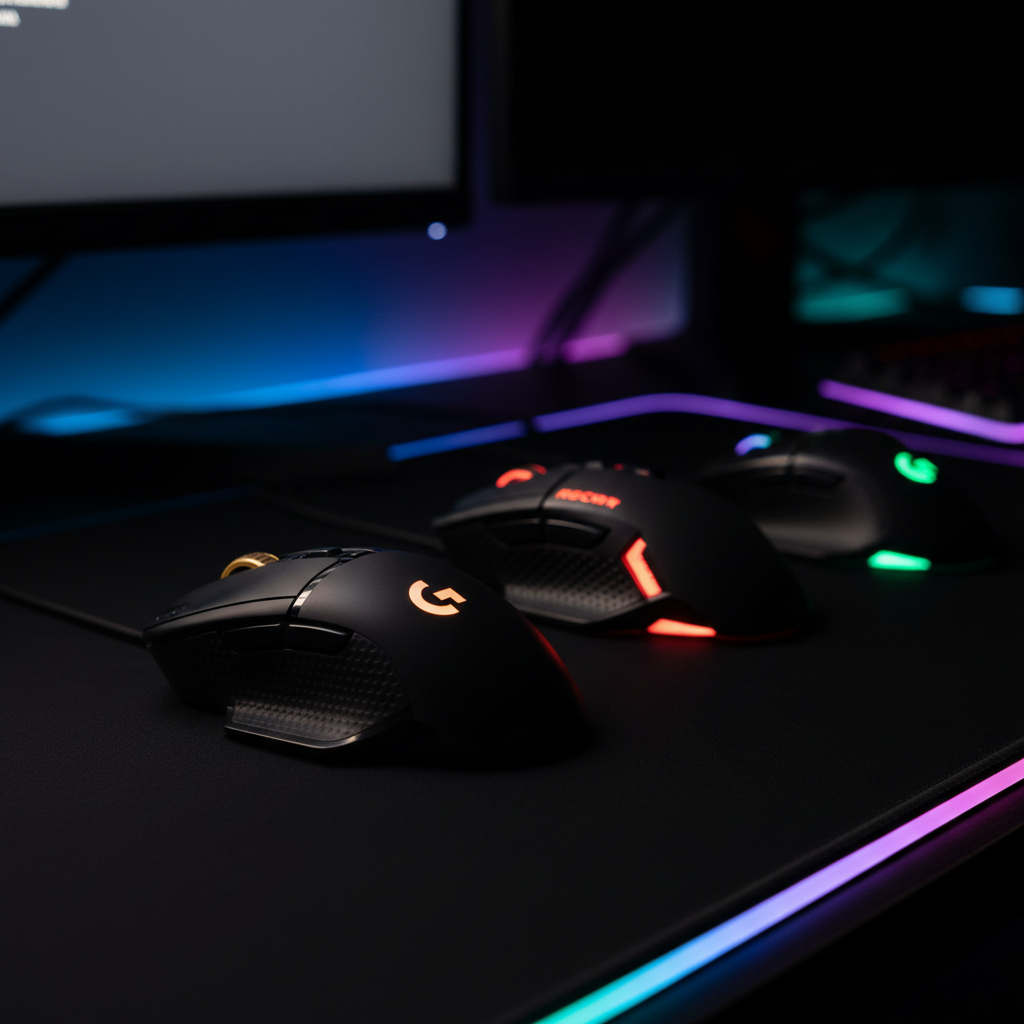
When you need a mouse with a full arsenal of macros, the market offers a surprisingly wide spread. In this roundup we compared 12 gaming mice that have ten or more programmable buttons, with button counts ranging from 11 on the Logitech G502 HERO up to 18 on the UtechSmart Venus. Prices stretch from a budget‑friendly $16.99 for the Redragon M612‑RGB to $126.99 for the ASUS Spatha X Wireless, while user ratings sit between 3.9/5 and 4.6/5, indicating strong community approval across the board.
To make sense of the options, we’ve grouped them into three price tiers. The budget tier includes the Logitech G502 HERO ($35.99, 11 buttons), Redragon M612‑RGB ($16.99, 11 buttons), Redragon M614 ($22.99, 11 buttons) and UtechSmart Venus ($32.99, 18 buttons). The mid‑range tier features the Razer Basilisk V3 ($37.99, 11 buttons) and Corsair Scimitar RGB Elite ($89.00, 17 buttons). The premium tier covers the Razer Basilisk V3 Pro ($89.00, 12 buttons), Roccat Kone XP ($89.99, 15 buttons), Corsair Scimitar Elite Wireless SE ($99.99, 16 buttons) and ASUS Spatha X Wireless ($126.99, 12 buttons), each delivering extra features like wireless freedom or advanced lighting.
Below you’ll find a closer look at each mouse’s strengths, so you can match the right button‑heavy tool to your playstyle and budget.

Logitech G502 HERO
Offers 11 programmable buttons, giving you plenty of custom controls without sacrificing comfort.

Roccat Kone XP
Ideal for audiophiles and enthusiasts who want premium sound and 15 programmable buttons, though it's about $54 more than the Logitech G502 HERO.

Redragon M612 Predator
Stands out with two side macro buttons and a $16.99 price tag, delivering 11 buttons at a fraction of the cost of the other picks.
Also considered
Score Analysis
Key score advantages vs. runner-up (Roccat Kone XP)
Price Range
Logitech G502 HERO
$35.99
Roccat Kone XP
$89.99
Redragon M612 Predator
$16.99

Corsair Scimitar Elite
$59.99

ASUS ROG Spatha X
$126.99

UtechSmart Venus
$25.16

Razer Basilisk V3
$36.95

Redragon M614
$22.99
Razer Basilisk V3 Pro
$89.00

Corsair Scimitar Elite Wireless SE
$107.99
TRELC Gaming Mouse
$28.99

Razer Naga V2 Wireless
$64.99
Spec Comparison
TL;DR: The Logitech G502 HERO offers a HERO 25,600 DPI sensor, 11 programmable buttons and a customizable weight system for $35.99, earning a 4.6‑star rating from over 57 k reviewers.
At the heart of the G502 HERO sits Logitech's HERO 25K optical sensor, capable of 25,600 DPI and tracking with zero smoothing or acceleration. The mouse also packs 11 programmable buttons, including a dedicated DPI‑shift button and a dual‑mode scroll wheel that can be set to ratcheted or free‑spin. A built‑in adjustable weight system lets you add five 3.6 g weights (total 18 g) to fine‑tune the feel.
Weighing 0.27 pounds, the G502 lands between the lighter Razer Basilisk V3 (0.2225 pounds) and Razer Naga V2 (0.209375 pounds) and the heavier UtechSmart Venus (0.4875 pounds) or Redragon M614 (0.48942622164 pounds). Its 11 programmable buttons match the TRELC Gaming Mouse and Redragon models, but fall short of the UtechSmart Venus’s 18 total buttons, giving it a solid middle ground for macro‑heavy titles.
Reviewers praise the sub‑micron accuracy of the HERO sensor and the flexibility of the weight system, especially for MMO and MOBA games. Many complain about the reliance on Logitech G HUB software; they find the interface bloated and the initial setup tedious. The 7 ft braided cable feels sturdy but can be stiff and tangle easily, and the mouse’s larger footprint may be cramped for users with small hands.
Beyond the sensor, the G502 runs at a 1000 Hz polling rate and supports >40 G acceleration with a tracking speed above 400 IPS, ensuring rapid response in fast‑paced shooters. LIGHTSYNC RGB lighting adds a single zone around the scroll wheel and logo, and five onboard memory profiles let you store settings without the PC.
Pros
Cons
Best for: Most users looking for a well‑reviewed, reliable mainstream option
Avoid if: You have limited desk space or need portability
“Just an ordinary mouse, not worth the money. Useless software, plastic USB cable (not braided).”
TL;DR: The Roccat Kone XP packs a 19,000 DPI Owl‑Eye sensor, 15 programmable buttons (up to 29 via Easy‑Shift+), and 22 RGB LEDs into a solid‑wired mouse for right‑handed gamers who crave customization.
The standout spec is its 19,000 DPI optical sensor paired with 50 G acceleration and a 1000 Hz polling rate, delivering fast, precise tracking for fast‑paced shooters and MOBA clicks. Its 15 programmable buttons, expanded to 29 functions through Easy‑Shift+, let you map complex macros without clutter.
Compared with the other eleven contenders, the Kone XP is lighter than the Corsair Scimitar RGB Elite (0.229 lb vs 0.269 lb) and the Razer Basilisk V3 Pro (0.229 lb vs 0.24 lb), but a touch heavier than the Razer Naga V2 (0.209 lb). It offers fewer total programmable buttons than the Scimitar RGB Elite’s 17, yet more than the Razer Basilisk V3’s 12‑button layout. Cable length matches the Scimitar’s 180 cm, and its 22 individual LEDs outshine the simpler lighting schemes of many peers.
User sentiment repeatedly praises the ergonomic thumb rest and the crisp feel of the Titan Optical switches, which the manufacturer rates at 100 million clicks. Professional reviewers highlight the “excellent ergonomics for palm and claw grips” and the “high‑performance 19K DPI sensor.” Common complaints focus on the stiff braided cable, the bulkier shell compared to ultralight mice, and limited RGB customization within the ROCCAT Swarm software.
Additional technical context includes a 4D Krystal Wheel that registers left, right, and down clicks, a two‑year warranty, and NVIDIA Reflex support for reduced input lag. The mouse runs on Windows 7‑11 via a USB 2.0 wired connection, ensuring broad compatibility without the need for batteries or wireless dongles.
Pros
Cons
Best for: Right‑handed gamers with medium to large hands who need a high‑DPI sensor and extensive button mapping for FPS, MMO, or MOBA titles.
Avoid if: You’re left‑handed, have small hands, prefer ultralight or wireless mice, or need extensive RGB control beyond what Swarm provides.
TL;DR: The Redragon M612‑RGB delivers an 8000 DPI optical sensor, 11 fully programmable buttons and 5‑zone RGB lighting for just $16.99, making it a solid budget pick for gamers who need customization.
The standout spec features a 8000 DPI Pixart optical sensor, paired with a 1000 Hz polling rate and 1 ms response time, giving you high‑precision tracking without breaking the bank. You can program all 11 buttons, and the two side macro buttons add extra flexibility for MMO or MOBA builds.
At 0.27778245012 pounds (125.9 g), the M612 sits between the heavier Redragon M614 (0.48942622164 lb) and the lighter Logitech G502 HERO (0.27 lb). It matches the M614 and TRELC Gaming Mouse on button count, both offering 11 programmable keys, but falls short of the UtechSmart Venus’s 18‑button layout. Its maximum DPI equals the M614’s 8000 DPI, yet it’s lower than the Logitech G502’s 25,600 DPI.
Users consistently praise the mouse’s comfortable matte‑finished body, rubberized side grips and the depth of its software‑driven macro system. Professional reviewers highlight the value of the 10 million‑click durability and the 5 dynamic backlight modes. The most common complaints focus on the software’s unintuitive interface, occasional chassis cracks after months of use, and the lack of a wireless option.
Beyond the sensor, the M612 offers a 1.8 m braided fiber USB 3.0 cable, 5‑zone RGB lighting, and a dedicated rapid‑fire button. The included software lets you adjust DPI independently on the X/Y axes, remap every button, and switch profiles on the fly, all backed by a 1‑year limited warranty.
Pros
Cons
Best for: Budget-conscious buyers seeking a reliable entry-level option
Avoid if: You are left‑handed, need an ultra‑light mouse, or require a fully wireless solution
“Users love the comfort and grip, especially during extended sessions.”
“The software is difficult to navigate and unreliable on first setup.”
TL;DR: The Corsair Scimitar RGB Elite packs 17 programmable buttons, a 12‑button adjustable side keypad and an 18,000 DPI PixArt sensor into a solid‑built, wired mouse priced at $89.
What really sets this mouse apart is the patented Key Slider system that lets you reposition all 12 side buttons, giving you a total of 17 fully programmable controls. The native PixArt PMW3391 sensor reaches a maximum of 18,000 DPI and can be tuned in 1 DPI increments, while the Omron D2FC‑F‑K switches rate for 50 million clicks.
Compared with the other eleven entries, the Scimitar RGB Elite is heavier than the Razer Basilisk V3 Pro (0.24 lb) and the Roccat Kone XP (0.229 lb) but lighter than the ASUS Spatha X Wireless, which tips the scales at about 1.9 lb. It offers more programmable buttons than the Roccat Kone XP’s 15 and the wireless Scimitar Elite SE’s 16, yet it remains in the same price tier as the Razer Basilisk V3 Pro.
Professional reviewers highlight the mouse’s sturdy build—braided cable, PTFE feet and four independent RGB zones—as well as the precision of the 18,000 DPI sensor. Everyday users love the macro‑friendly layout for MMO and MOBA titles, but many note that the 122 g (0.268964 lb) chassis feels bulky for smaller hands and that the wired connection limits mobility. A few also mention occasional iCUE software hiccups and accidental side‑button presses during intense sessions.
Pros
Cons
Best for: MMO and MOBA players who need a high button count and precise sensor performance, especially those with medium to large hands.
Avoid if: You have small hands, prefer a wireless mouse, or need a lightweight device for fast‑paced FPS play.
“Best mouse I’ve ever used for WoW”
“Too big for my hands”
TL;DR: The ASUS Spatha X Wireless offers a magnesium‑alloy chassis, 12 programmable buttons, swappable Omron switches, and up to 19000 DPI, but its 168 g weight and premium $126.99 price place it in the high‑end MMO‑focused tier.
The standout spec is the X model’s optical sensor capable of 19000 DPI, the highest DPI listed among the 12‑button mice in this roundup. It pairs with a 1000 Hz polling rate in both wired and wireless modes and a 1 ms wireless response time, while the 1000 mAh battery can last up to 67 hours on a full charge.
At 168 g (mouse only) the Spatha X is heavier than the Roccat Kone XP’s 104 g and the Corsair Scimitar Elite Wireless SE’s 0.2513 pounds, and it carries fewer programmable buttons than the Scimitar Elite’s 16 or the Kone XP’s 15. Its 67‑hour battery life is solid but shorter than the Scimitar Elite’s 150‑hour claim when RGB is off.
Professional reviewers highlight the premium magnesium‑alloy body and the ability to swap Omron switches; many users praise its durability. However, community feedback frequently mentions the mouse feels heavy for fast‑paced FPS titles, and some note that the original laser sensor (used in earlier Spatha versions) jittered on glossy surfaces—though the X model’s optical sensor resolves that issue. The onboard memory stores profiles, and three RGB zones add a touch of flair without draining the battery.
Pros
Cons
Best for: Buyers willing to invest in a proven, high‑quality option
Avoid if: You need advanced features or professional‑grade performance
TL;DR: The UtechSmart Venus offers 18 programmable buttons, up to 16,400 DPI, and adjustable weights for under $33, making it a feature‑rich budget MMO mouse with solid user ratings.
With 18 programmable buttons, five onboard profiles and a dedicated set of 12 side buttons, the Venus gives you far more control options than many mids‑range mice. Its high‑precision Avago laser sensor reaches a DPI range of 200 – 16,400, while a 1,000 Hz polling rate and 12,000 FPS frame rate keep cursor movement smooth. You can also fine‑tune the feel with eight 2.4 g weights that add up to 19.2 g of extra mass, and the mouse sports five preset RGB backlight modes with over 16 million colors.
Compared with the Logitech G502 HERO, which lists 11 programmable buttons, the Venus provides a much larger button count. It’s also heavier than the G502’s 0.27 lb and the TRELC Gaming Mouse’s 0.36 lb, while the Redragon M614 sits at a similar weight of about 0.49 lb but still only offers 11 buttons. The Venus’s 6 ft braided cable is a foot shorter than the G502’s 7 ft cable, giving a tidy setup without sacrificing reach.
Reviewers consistently praise the mouse’s value‑for‑money button layout and the ability to swap out the Teflon feet for smoother gliding. Professional reviewers note it as a budget‑friendly alternative to high‑end MMO mice, delivering flagship‑level specs without the premium price tag. However, a common complaint is a left‑click double‑click failure that can develop over time, and some users mention the scroll‑wheel LED getting stuck on yellow and not syncing with the rest of the RGB.
Beyond the button bounty, the Venus’s sensor delivers up to 30 G of acceleration and a maximum speed of 100 – 150 in/s, ensuring rapid response in fast‑paced games. The wired USB connection uses a gold‑plated connector and a braided fiber cable for durability, while the onboard memory means your profiles travel with you even on macOS or Linux machines, despite the software being Windows‑only.
Pros
Cons
Best for: Budget-conscious buyers seeking a reliable entry-level option
Avoid if: You want the best value-per-dollar in its price range
“Best mouse for the money”
“Perfect for WoW, Guild Wars 2, and other MMOs”
TL;DR: The Razer Basilisk V3 costs $37.99, carries a 4.6‑star rating from over 9,600 reviewers, and users praise it for comfort and customization despite some scroll‑wheel quirks.
Razer’s Basilisk V3 sits in the mid‑price tier at $37.99 and earned a 4.6‑out‑of‑5 rating, placing it seventh among the twelve mice in this roundup. The brand’s reputation for gaming peripherals helps it stand out, and the large number of reviews shows it’s a popular choice among gamers.
Buyers consistently highlight the mouse’s ergonomic shape, textured finish and the abundance of programmable buttons that let them map commands for FPS, MOBA or MMO titles. The dual‑mode scroll wheel and vibrant RGB lighting also earn frequent compliments. On the downside, several users mention that the scroll wheel can feel floaty and roll back, and a handful report premature button failures or a software suite they find overly complex.
In the context of this lineup, the Basilisk V3 offers a solid blend of price, brand credibility and user approval. While it doesn’t have the highest rating, its score is competitive and its price is comparable to other well‑reviewed options, making it a reliable mainstream pick for right‑handed gamers who value customization.
Pros
Cons
Best for: Most users looking for a well‑reviewed, reliable mainstream option
TL;DR: The Redragon M614 packs 11 programmable buttons, an 8000 DPI sensor and 7 RGB lighting modes into a wired, right‑handed mouse for $22.99, earning a solid 4.5‑star rating.
The standout spec is its 11 programmable buttons—including a dedicated sniper button—paired with a maximum DPI of 8000, giving you plenty of on‑the‑fly customization and precise cursor control for FPS or MOBA titles.
Within this 12‑mouse roundup, the M614 is heavier than the Redragon M612‑RGB (0.27778245012 lb) and the TRELC Gaming Mouse (0.36 lb), but sits just above the UtechSmart Venus (0.4875 lb). Its button count matches the M612‑RGB, TRELC and Logitech G502 HERO, yet falls short of the Venus’s 18 total buttons. DPI‑wise, it trails the Logitech G502 HERO’s 25,600 DPI but outpaces many budget options that cap below 8000.
Reviewers consistently praise the adjustable DPI range (250–8000) and the extra sniper button for quick targeting, while professional reviewers note the rapid‑fire button as a tactical advantage. The Windows‑only driver draws criticism from macOS users, and a handful of owners mention occasional build quirks and inconsistent DPI listings across retailers.
The mouse connects via a wired USB cable, offers 7 dynamic RGB lighting modes with 16.8 million color options, and comes with a 1‑year warranty, rounding out a feature‑rich package for its price point.
Pros
Cons
Best for: Budget‑conscious buyers seeking a reliable entry‑level option
Avoid if: You've limited desk space or need portability, or you require macOS support
“Red Dragon products are very affordable and are great quality. If you're a budget gamer, look no further!”
“I wish there were more of this product, but sadly, it is no longer in production.”
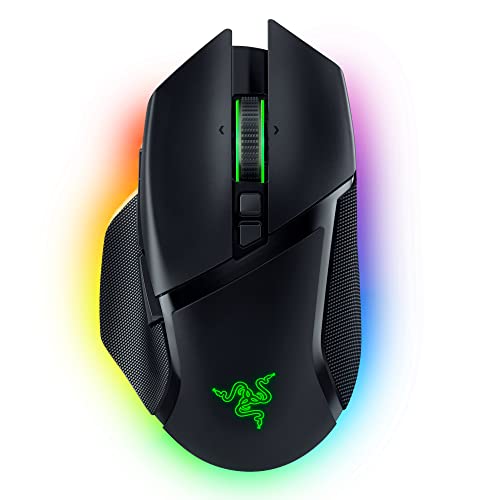
TL;DR: The Razer Basilisk V3 Pro 30K DPI costs $89, holds a 4.3‑star rating, and is praised for its long battery life, comfortable tilt wheel, and ergonomic feel, though its weight and macOS limits draw criticism.
Razer’s Basilisk V3 Pro sits at the mid‑range price point of $89 and earns a solid 4.3‑star rating from over a thousand reviewers, placing it among the higher‑rated options in this twelve‑item roundup. As a product from a well‑known gaming brand, it benefits from Razer’s reputation for premium build quality and extensive software support on Windows.
Reviewers highlight the mouse’s long battery endurance, noting weeks of use before needing a recharge. They also praise the HyperScroll tilt wheel for its smooth tactile feel and usefulness in both gaming and productivity tasks. Many say the shape fits well in the hand, making comfort a recurring theme during long sessions. On the downside, several gamers mention the weight feels hefty for fast‑paced shooters, and macOS users are disappointed by limited customization options. Some complain that the wireless charging puck isn’t included.
Within the lineup, the Basilisk V3 Pro blends price and positive sentiment, ranking near the top for satisfaction despite a few ergonomic trade‑offs.
Pros
Cons
Best for: Buyers willing to invest in a proven, high‑quality option
TL;DR: The Corsair Scimitar Elite Wireless SE packs 16 programmable buttons, a 12‑key adjustable side panel and up to 500 hours of Bluetooth battery life into a 0.251 lb, 33,000 DPI mouse for MMO‑heavy setups.
The adjustable Key Slider™ side panel, with 12 programmable buttons you can slide to match your grip, provides a total of 16 programmable inputs. The mouse also houses a 33,000 DPI Marksman S 33K optical sensor with 1 DPI steps, 750 IPS max speed and 50 G acceleration, giving you fine‑grained control for any in‑game scenario.
Compared with the other eleven contenders, the Scimitar Elite Wireless SE offers more buttons than the Roccat Kone XP’s 15 but falls just short of the Corsair Scimitar RGB Elite’s 17. At 0.251 lb, it weighs slightly more than the Razer Basilisk V3 Pro’s 0.24 lb, yet far less than the ASUS Spatha X Wireless’s 1.9 lb. Its Bluetooth‑mode battery life of 500 hours dwarfs the Spatha X’s listed 67‑hour max, while the 2.4 GHz mode still reaches 150 hours.
Professional reviewers note the mouse’s “unmatched macro flexibility” and “high sensor performance,” but they also point out the bulkier chassis that can feel unwieldy for smaller hands and an iCUE software experience that some find unstable. Streamers who already use Elgato’s ecosystem appreciate the native Stream Deck integration, though that benefit limits itself to those users.
Pros
Cons
Best for: MMO, MOBA and RPG players who need a high button count and streamers invested in the Elgato ecosystem.
Avoid if: You play fast‑paced FPS titles, are left‑handed, or have a small hand size that finds a bulky mouse uncomfortable.
“Best mouse I’ve ever used for WoW”
“Too big for my hands”
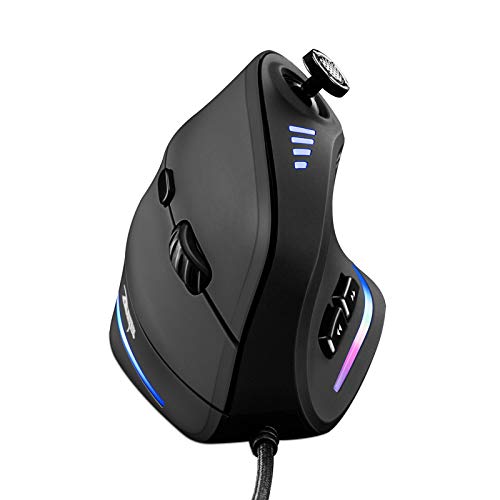
TL;DR: The TRELC Gaming Mouse offers a vertical ergonomic shape, 11 programmable buttons with a 5‑direction thumb rocker, and a 1500‑10000 DPI sensor at $28.99, making it a solid budget option for wrist‑friendly gamers.
The standout feature is the 5‑D rocker combined with 11 programmable buttons, letting you map complex commands without leaving your grip. Its optical PMW3325 sensor reaches a maximum of 10000 DPI and 20 G acceleration, while the polling rate tops out at 1000 Hz for responsive tracking.
At 0.36 pounds, the mouse is lighter than the UtechSmart Venus (0.4875 pounds) and Redragon M614 (0.489 pounds) but a bit heavier than the Logitech G502 HERO (0.27 pounds). Button‑wise, TRECL’s 11 programmable keys match the Redragon M614 and Logitech G502, though the UtechSmart Venus offers more total buttons (18). The 1800 mm (1.8 m) cable length mirrors the UtechSmart’s 1.8 m cable and is shorter than Logitech’s 2.1 m lead.
Users consistently praise the vertical ergonomic design for easing wrist strain, and the thumb rocker is highlighted as a key advantage in FPS, MOBA, and MMO titles. However, many note a 2–3 day adjustment period to get comfortable with the handshake grip, and the stiff 1.8 m cable can feel cumbersome during long sessions. The customization software works, but some find installation a bit fiddly.
Additional technical details include five RGB lighting effects, onboard memory for saved profiles, and a button lifespan of 10 million clicks with a scroll wheel rated for 1.2 million rotations. The mouse runs on a 5 V, 100 mA power draw and supports Windows 2000 through 11, while macOS forward/back buttons may not work.
Pros
Cons
Best for: Entry-level buyers or those on a tight budget
Avoid if: You need powerful performance or professional‑grade features
“well‑being enhancer”
“significantly reduces discomfort during long gaming hours”
TL;DR: The Razer Naga V2 costs $64.99, holds a 4.1‑star rating from 1,860 reviewers, and is praised for its button layout and battery life but criticized for software quirks and occasional connectivity drops.
Razer’s Naga V2 sits at an affordable price point for a mouse aimed at gamers who need a lot of programmable inputs. Among the twelve contenders in this roundup it lands in the lower‑mid tier, earning a solid 4.1 out of 5 based on a sizable pool of reviews.
Users consistently highlight the generous number of programmable buttons and the long battery endurance that lets them game wirelessly for days. The ergonomic right‑handed shape and Razer’s brand reputation also earn positive mentions. On the downside, many reviewers report double‑click issues on the thumb cluster, random disconnections in the wireless mode, and frustration with the mandatory Razer Synapse software, which some find unstable or overly complex.
In context, the Naga V2 offers a compelling mix of price and community approval, but the reported reliability and software concerns mean it may not be the safest bet for those who need rock‑solid performance without tweaking.
Pros
Cons
Best for: Most users seeking a balanced, mainstream option
“Some users report button double-pressing or unresponsiveness, particularly on the thumb grid (e.g., buttons 11 and 12).”
“Users consistently commend the battery life, with many confirming over 200 hours of real-world use.”
Breakdown
Logitech G502 HERO
Pros
Roccat Kone XP
Pros
Redragon M612 Predator
Pros
Corsair Scimitar Elite
Pros
Based on scoring data and product specs
Personalized picks
Best Overall Pick
Logitech G502 HERO
Best OverallBest for: Most users looking for a well-reviewed, reliable mainstream option
Roccat Kone XP
Best for: Audiophiles and enthusiasts seeking premium sound quality and advanced features
$89.99+$54.00 vs winner
Skip Razer Naga V2 Wireless if…
You have limited desk space or need portability
The Logitech G502 HERO takes the top spot with its 11 programmable buttons, a HERO 25K sensor that reaches up to 25,600 DPI, and a solid 4.6/5 rating from 57,434 reviewers—all for $35.99, well below its $69.99 list price. Its adjustable 5‑piece weight system and dual‑mode scroll wheel give you fine‑tuned control without sacrificing speed.
The Roccat Kone XP lands as the runner‑up, perfect if you need the most button flexibility for MMO or RTS titles. It offers 15 programmable buttons (up to 29 functions via Easy‑Shift+™), a 4D Krystal Wheel with left, right and down clicks, and a 19,000 DPI Owl‑Eye sensor—all wired through a 180 cm PhantomFlex braided cable.
For tighter budgets, the Redragon M612‑RGB delivers a full suite of programmable keys at just $16.99, making it the go‑to value pick. If you prefer a premium, wireless experience, the ASUS Spatha X Wireless stands out at $126.99, combining high‑end build quality with extensive button mapping for competitive play.
Pick the Logitech G502 HERO today; it balances performance, customization, and price.
The Logitech G502 HERO offers 11 programmable buttons at $35.99, making it the most cost‑effective high‑button option; the Roccat Kone XP has 15 buttons but costs $89.99, a $54 premium.
Please sign in to leave a review
No reviews yet. Be the first to review!
