Even though it lives in the mid‑range price tier, the GAOMON WH851 costs just $52.99 and still claims the top spot as the best graphics tablet, holding a 4.4‑star rating from 786 reviewers and 16,384 pressure‑sensitivity levels.
Our roundup pits 9 tablets against each other, all offering at least 16,384 pressure levels. The budget lane includes the $29.99 XP‑Pen Deco 640 (4.2‑star rating, 9,719 reviews) and the similarly priced Ugee M708 and ienRon IES1060. Mid‑range contenders include the GAOMON WH851, the XP‑Pen Deco 01 V2 ($59.99, 4.4‑star rating) and the XP‑Pen Artist 13.3 Pro V2 ($224.99). The premium tier showcases the Huion Kamvas 13 ($229.00, 4.5‑star rating), the Veikk VK1600 ($239.99) and the flagship XP‑Pen Magic Drawing Pad 12.2‑inch, priced at $399.99 with the highest rating of 4.6 stars from 625 reviews.
Next, the guide walks through each model’s strengths and quirks so you can match the tablet to your workflow—whether you need a pocket‑sized sketch pad or a full‑laminated display for studio work.

GAOMON WH851 8x5-inch
Includes 20 replacement nibs, giving you plenty of spare tips right out of the box.

XP-Pen Magic Drawing Pad 12.2-inch
Ideal for creators who want a larger 12.2‑inch surface and premium build; at $399.99 it’s roughly $347 pricier than the GAOMON WH851, reflecting its high‑end positioning.

XP-Pen Deco 01 V2
Stands out with eight customizable shortcut keys and an ultra‑thin 8 mm profile, letting you keep a minimalist workspace while still accessing tools fast.
Also considered
Score Analysis
Key score advantages vs. runner-up (XP-Pen Magic Drawing)
Price Range
GAOMON WH851 8x5-inch
$52.99
XP-Pen Magic Drawing Pad 12.2-inch
$499.99
XP-Pen Deco 01 V2
$43.99

Huion Kamvas 13
$229.00

XP-Pen Deco 640
$29.99

Ugee M708
$39.99

ienRon IES1060
$35.99

XP-Pen Artist 13.3 Pro V2
$224.00
Veikk VK1600
$239.99
Spec Comparison
TL;DR: The Gaomon WH851 offers 16,384 pressure levels, ±60° tilt and up to 18 hours of Bluetooth use at a $52.99 price, making it a compact, value‑packed tablet for beginners and hobbyists.
The standout spec is its 16,384 pressure‑sensitivity levels paired with ±60° tilt support, letting you capture fine line work and bold strokes alike. The AP519 stylus reads at 5,080 LPI and lands with ≤0.3 mm accuracy, while the tablet’s 8 customizable express keys and a programmable dial give quick access to shortcuts.
At 0.87523518014 pounds (397 g), the WH851 is significantly lighter than the XP‑Pen Deco 01 V2’s 2.2046 pounds and the Ugee M708’s 2.381 pounds, yet a touch heavier than the ultra‑light XP‑Pen Deco 640 at 0.3748 pounds. Its wired report rate of ≥380 PPS outpaces the Deco 01 V2’s 266 RPS, and it matches the 16,384‑level pressure sensitivity found in both the Deco 01 V2 and the Veikk VK1600. Express‑key count is on par with the Deco 01 V2, while the additional side buttons and dial give it a feature edge over models that list fewer controls.
In practice, users love the wireless freedom of Bluetooth 5.0 and the tablet’s up to 18 hours of continuous use, noting the quick 2.5‑hour charge and 15‑minute auto shut‑off as convenient. Reviewers also praise the generous accessory bundle—glove, extra nibs, sleeve, and cables—that makes the out‑of‑the‑box experience feel complete. The most common critique is the modest 8 × 5 in active area, which can feel restrictive on larger monitors, and the lack of touch or multi‑touch input that some creatives expect.
Beyond the drawing surface, the WH851 measures 288.8 mm × 171.2 mm × 7.5 mm, fitting easily on tight desks. Its 1,300 mAh battery delivers the advertised 18‑hour runtime, and the battery‑free stylus doesn’t need charging. The matte, low‑glare surface provides moderate friction, helping the pen glide naturally without a glossy finish.
Pros
Cons
Best for: Beginner digital artists, hobbyists, students, remote workers, and left‑handed creators who need a balanced feature set at an affordable price.
Avoid if: You require a large drawing surface, touch gestures, or a premium‑grade build.
“I actually don’t have any negative things to say about this tablet.”
“the budget tablet that actually delivers”
TL;DR: The XP‑Pen Magic Drawing Pad packs a 12.2‑inch laminated IPS screen, 16,384 pressure levels with ±60° tilt, and up to 13 hours of battery life, but it sits at a premium $399.99 price point.
The standout spec delivers fine‑grained control for detailed illustration with its 16,384 pressure levels and ±60° tilt support on the battery‑free X3 Pro Pencil. The 12.2‑inch matte IPS display offers a 2160 × 1440 resolution, 360 nits brightness, and a 1200:1 contrast ratio, so colors stay vivid even in bright environments.
Weighing 1.3007273458 Pounds, the Magic Pad is lighter than the Veikk VK1600 (4.4 Pounds) but heavier than the GAOMON WH851 (0.875 Pounds) and the XP‑Pen Deco 640 (0.374 Pounds). Its 360 nits screen outshines the Veikk’s 208 nits and the Huion Kamvas 13’s 220 nits, giving it a clear edge in brightness. Pressure‑sensitivity matches the Veikk VK1600 and XP‑Pen Deco 01 V2, both of which also list 16,384 levels, while most other peers don’t specify pressure data.
Reviewers repeatedly praise the natural feel of the battery‑free stylus and the tablet’s portability, noting that the 8–13 hour battery life (8000 mAh capacity) lets artists sketch outdoors without hunting for power. Professional reviewers highlight the vibrant color reproduction and the solid build quality. Common complaints focus on the auto‑brightness feature being overly sensitive, the lack of video output via USB‑C, and occasional lag with the MediaTek processor when running heavy apps.
Beyond drawing, the Magic Pad runs Android 14, includes an 8 MP front camera with face unlock and auto‑brightness, a 13 MP rear camera, Bluetooth 5.1, and Wi‑Fi 5. It ships with 256 GB internal storage and supports up to 1 TB via microSD, plus four built‑in speakers and two microphones for multimedia use.
Pros
Cons
Best for: Buyers willing to invest in a proven, high‑quality option
Avoid if: You're shopping on a tight budget — it's priced at $399.99
TL;DR: The XP‑Pen Deco 01 V2 offers a 10‑inch active area, 16,384 pressure levels and ±60° tilt at $59.99, making it a solid mid‑range tablet for beginners and hobbyists.
The standout spec is its 16,384 pressure‑sensitivity levels, paired with ±60° tilt support, which lets you vary brush angle without lifting the pen. The battery‑free EMR stylus also provides a hover distance of 10 mm, so you can position the tip before drawing. With a thin 8 mm profile and a 1000 g (2.20462262 lb) weight, the tablet stays stable on a desk while remaining portable enough for occasional travel.
Compared with the other eight tablets in this roundup, the Deco 01 V2 sits in the middle of the weight spectrum: it’s heavier than the ultra‑light GAOMON WH851 and XP‑Pen Deco 640, but lighter than the Ugee M708, Huion Kamvas 13 and the Veikk VK1600. It matches the GAOMON and Ugee on eight customizable express keys, yet offers fewer shortcut keys than the ienRon IES1060, which lists twelve. In terms of price, it’s positioned above the entry‑level Deco 640 and below the higher‑priced artist displays like the XP‑Pen Artist 13.3 Pro V2 and Huion Kamvas 13.
Users consistently rate the tablet 4.4 / 5 stars, praising its paper‑like feel, high sensitivity and the convenience of a pen that never needs charging. Professional reviewers highlight the tilt range and the smooth line response at 266 RPS. Drivers often cause trouble on macOS, and users report occasional conflicts with existing tablet drivers. Nevertheless, once set up, the tablet’s cross‑platform support—including Windows, macOS, Linux, Android 10+ and Chrome OS—covers most creative workflows.
Technical details add confidence: a resolution of 5080 LPI ensures fine line detail, while the included accessories—replacement nibs, a pen stand, protective film, drawing glove and multiple USB adapters—help you start right out of the box. The 12‑month warranty provides basic protection, and the tablet’s overall dimensions of 13.8 × 8.8 × 0.32 in keep it compact on a typical workstation.
Pros
Cons
Best for: Home and office users seeking a balance of features and value
Avoid if: You have limited desk space or need portability
“feels like real paper”
“affordable and amazing”
TL;DR: The Huion Kamvas 13 packs a 13.3‑inch laminated display, 16,384‑level pressure sensitivity and dual dials into a 1.96‑pound tablet that feels like paper, making it a solid entry‑level choice for portable creators.
The standout hardware is the 13.3‑inch IPS LCD with full lamination and a 2nd‑gen anti‑glare etched glass surface, delivering 220 nit typical brightness, 99% sRGB and Rec.709 coverage, and a 1000:1 contrast ratio. Pen performance draws on 16,384 pressure levels, ±0.2 mm auto‑alignment accuracy, and ±60° tilt support, all powered by a battery‑free electromagnetic pen.
At 1.96 pounds, the Kamvas 13 is lighter than the Veikk VK1600 (4.4 pounds) and comparable to the XP‑Pen Deco 01 V2 (2.20462262 pounds). Its working area of 165.2 mm × 293.8 mm matches the active drawing area of the XP‑Pen Artist 13.3 Pro V2 (165.8 mm × 294.7 mm) and exceeds the 158.75 mm × 254 mm area of the ienRon IES1060, giving you more real‑world canvas than many compact peers.
Reviewers consistently praise the tablet’s “paper‑like” feel, thanks to the anti‑glare glass and full lamination, and note the responsiveness of the PW600L pen. Professional reviewers highlight the dual dials and five silent programmable keys as workflow boosters. The main complaints revolve around the lack of touch gestures, the need to purchase the full‑feature USB‑C video cable separately, and the stand is sold apart from the box.
Pros
Cons
Best for: Buyers willing to invest in a proven, high‑quality option
Avoid if: You need advanced features or professional‑grade performance
“unbeatable for beginners”
“very close to paper”
TL;DR: The XP‑Pen Deco 640 delivers 16,384‑level pressure sensitivity and tilt support at a $29.99 price, but its compact 90 × 160 mm active area may feel cramped for detailed work.
What sets the Deco 640 apart is its 16,384 pressure‑sensitivity levels and 60° tilt recognition, both come via a battery‑free P01 stylus that feels natural in the hand. The pen also reports at 220 RPS and reads height of 10 mm, giving you fine control for shading and line work.
In practice, the tablet is lighter than every other model in this nine‑product roundup, weighing just 0.3747858454 pounds, and its $29.99 price tag makes it the most budget‑friendly option. However, the active drawing area of 90 mm × 160 mm is smaller than the typical tablet here, which often offers substantially larger work surfaces.
Users consistently praise the plug‑and‑play setup, the responsive stylus, and the value for beginners, while recurring complaints mention the cramped drawing space and occasional driver or pen disconnections on macOS. Professional reviewers note the rare inclusion of tilt support at this price point, but they also point out the plastic build feels less premium than higher‑end alternatives.
Beyond the core specs, the Deco 640 ships with eight shortcut keys, a USB‑C connection (including an adapter for USB‑A), ten extra nibs, a nib extractor, and a quick‑start guide, giving newcomers everything they need to start drawing right away.
Pros
Cons
Best for: Beginners or students on a tight budget who want high pressure sensitivity and tilt support without breaking the bank.
Avoid if: You need a large drawing surface, a premium build, or rock‑solid reliability for professional work.
“feels like real paper”
“affordable and amazing”
TL;DR: The UGEE M708 offers a 10 × 6‑inch drawing surface, 8192 pressure levels, tilt support and eight express keys for just $39.99, making it a solid entry‑level tablet for hobbyists and students.
The tablet’s most eye‑catching spec is its 10 × 6‑inch active drawing area (254 × 152.4 mm), giving you room to work with arm‑based strokes. It registers up to 8192 pressure levels and supports a 60° tilt range, while the passive, battery‑free stylus lets you draw without worrying about charging. The tablet is only 8 mm thick and weighs 2.3809924296 pounds, so it sits comfortably on a desk without feeling top‑heavy.
Compared with the other eight entries, the M708’s drawing surface is larger than the XP‑Pen Deco 640’s 90 mm × 160 mm area, yet it provides fewer pressure levels than the XP‑Pen Deco 01 V2’s 16,384 levels. It also offers fewer shortcut keys than the ienRon IES1060’s 12 customizable keys, though it still supplies eight express keys for quick tool access. At 2.3809924296 pounds it’s heavier than the ienRon’s 1.1‑pound unit but lighter than the XP‑Pen Artist 13.3 Pro V2, which tips the scales at 2.5 pounds.
User sentiment highlights the tablet’s comfortable, paper‑like texture and the convenience of a stylus that never needs a battery. Reviewers praise the smooth line transitions and reliable pressure response, especially for beginners. However, several users note that the express keys can stick when pressed off‑center, and the Micro‑USB connector feels dated next to newer USB‑C ports on competing models.
Technically, the M708 reads at 5080 LPI and has an accuracy of ±0.01 inches, while its report rate of 266 RPS ensures responsive cursor movement. It ships with a passive stylus, a pen stand with eight replacement nibs, an artist glove, a Micro‑USB to USB‑A cable, and a quick‑start guide, and it works across Windows, macOS, Chrome OS, Linux and Android devices.
Pros
Cons
Best for: Budget‑conscious buyers seeking a reliable entry‑level option
Avoid if: You have limited desk space or need portability
TL;DR: The ienRon IES1060 offers a 158.75 mm × 254 mm active area, 8192‑level pressure sensitivity, 12 shortcut keys, and a battery‑free pen for $37.68, making it a solid entry‑level tablet.
What really stands out are the 8192 pressure‑sensitivity levels, which combine with ±60° tilt support to let you vary line weight and brush dynamics with fine control. The active drawing surface measures 158.75 mm high by 254 mm wide, giving you plenty of room for sketching, and the tablet packs 12 customizable shortcut keys plus 10 soft‑touch multimedia keys to streamline workflow. The included battery‑free passive stylus eliminates any need for charging, and the aluminum alloy adjustable stand adds ergonomic comfort.
Compared with the other eight tablets in this roundup, the IES1060 is lighter than the Ugee M708 and the XP‑Pen Deco 01 V2, yet a bit heavier than the ultra‑light XP‑Pen Deco 640 and the GAOMON WH851. Its active area outstrips the Deco 640’s 90 mm × 160 mm space, putting it on par with larger‑format tablets while still fitting comfortably on a desk. With 12 shortcut keys it offers more programmable controls than the 8‑key layouts on the Ugee M708, GAOMON WH851, and XP‑Pen Deco 01 V2. The 8192 pressure levels sit below the 16384 levels that the XP‑Pen Deco 01 V2 and Veikk VK1600 provide, but they still exceed many budget‑oriented models that list fewer levels. Its 5080 LPI resolution matches the Veikk VK1600, giving crisp line rendering.
Users consistently praise the smooth feel of the pen and the usefulness of the stand, noting that the tablet feels ready to use right out of the box thanks to the USB cable, cleaning cloth, soft brush, gloves, and 30 replacement nibs. However, reviewers also point out that the lack of an on‑screen display means you must rely on hand‑eye coordination, and the driver installation on macOS can be fiddly. The tablet doesn't support iOS or Chrome OS, which limits its appeal for those who work on tablets or Chromebooks, and some users mention a short USB cable and a plasticky build that feels less sturdy than higher‑priced rivals.
At 1.1 pounds (499 g) the tablet is easy to move, and the total dimensions of 355 mm × 238.5 mm × 2.54 mm keep it compact for a home studio. The package weighs 1361 g and includes an adjustable stand, cleaning accessories, and a pen holder, all backed by a one‑year warranty.
Pros
Cons
Best for: Entry-level buyers or those on a tight budget
Avoid if: You want the best value‑per‑dollar in its price range
“great starter tablet”
“smooth pen performance”
TL;DR: The XP‑Pen Artist 13.3 Pro V2 offers a 13.3‑inch IPS display with 16384 pressure levels, 250 cd/m² brightness and a battery‑free stylus, but it carries a mid‑range price tag of $224.99.
This tablet’s standout feature is its full‑laminated anti‑glare IPS panel. At 13.3 inches it delivers a 1920 × 1080 resolution, 99% sRGB coverage and a brightness of 250 cd/m², giving artists a vivid, low‑parallax workspace. The X3 Pro stylus adds 16384 pressure levels, ±60° tilt and a latency of 90 ms, while the pen’s center accuracy sits at ±0.4 mm.
Compared with the Huion Kamvas 13, the Artist 13.3 Pro V2 is heavier (2.5 lb vs 1.96 lb) and brighter (250 cd/m² vs 220 nit), though both share a similar active area size. Its pressure sensitivity matches the Veikk VK1600’s 16384 levels, and it offers the same eight customizable shortcut keys as the XP‑Pen Deco 01 V2. The red multifunctional dial is a unique workflow boost that the Huion and many peers lack.
Everyday users repeatedly praise the tablet’s smooth, lag‑free drawing feel and the convenience of the red dial for brush size and zoom adjustments. Professional reviewers highlight the accurate color reproduction and the stylus’s natural feel. Common complaints focus on driver instability on macOS and Linux, the lack of an on‑screen display menu, and the screen’s 250 cd/m² brightness, which can feel insufficient in very bright rooms. The tablet also requires a constant power connection, so it isn’t a standalone solution for on‑the‑go sketching.
Pros
Cons
Best for: Most users looking for a well‑reviewed, reliable mainstream option
Avoid if: You're shopping on a tight budget — it's priced at $224.99
“The red dial is a game‑changer for brush control.”
“Driver crashes on macOS Ventura and Sonoma, requiring reinstallation.”
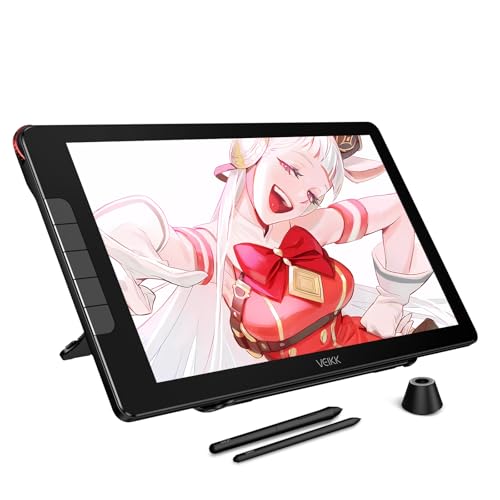
TL;DR: The Veikk VK1600 packs a 15.6‑inch full‑laminated IPS display, 16384 pressure levels and 125% sRGB color coverage into a single USB‑C pen display for $239.99.
The standout spec is the 15.6‑inch IPS LCD with full lamination, anti‑glare and anti‑fingerprint coating, delivering 208 nits of brightness, 125% sRGB coverage and 5080 LPI detail. It supports 16384 pressure levels, 60° of tilt, and comes with two battery‑free EMR pens plus a built‑in pen holder. Five programmable shortcut keys and a single aerospace‑grade aluminum dial round out the control set.
At 4.4 lb, the VK1600 is noticeably heavier than the Huion Kamvas 13 (1.96 lb) and the XP‑Pen Deco 01 V2 (≈2.2 lb). Its 15.6‑inch screen also dwarfs the 13‑inch panels of the Huion and the 13.3‑inch display of the XP‑Pen Artist 13.3 Pro V2, giving you more drawing real‑estate. Brightness sits at 208 nits, a touch lower than the Huion’s 220 nit panel, while pressure sensitivity matches the XP‑Pen Deco 01 V2’s 16384 levels. The VK1600’s five shortcut keys equal the Huion’s count but fall short of the eight keys that the XP‑Pen Deco 01 V2 offers.
Everyday users consistently praise the natural drawing feel, accurate colors and hassle‑free USB‑C setup. Professional reviewers highlight the full‑laminated matte screen for reduced glare and precise color rendering. The most common drawbacks are early macOS driver gaps—later updates have fixed the missing driver but calibration tools remain absent—plus the limited number of shortcut keys and reports of a less‑durable 3‑in‑1 cable.
Pros
Cons
Best for: Budding digital artists, students and freelance illustrators who want a large, color‑accurate pen display without breaking the bank.
Avoid if: You need a standalone tablet, higher‑resolution 2.5K displays, more shortcut keys, or a fully polished driver suite out of the box.
“better visual quality and drawing performance”
“solid drawing tablet”
Breakdown
GAOMON WH851 8x5-inch
Pros
XP-Pen Magic Drawing Pad 12.2-inch
Pros
Cons
XP-Pen Deco 01 V2
Pros
Huion Kamvas 13
Pros
Based on scoring data and product specs
Personalized picks
Best Overall Pick
GAOMON WH851 8x5-inch
Best OverallBest for: Home and office users seeking a balance of features and value
XP-Pen Magic Drawing Pad 12.2-inch
Best for: Buyers willing to invest in a proven, high-quality option
$499.99+$447.00 vs winner
Skip Veikk VK1600 if…
You need advanced features or professional-grade performance
The GAOMON WH851 8×5‑inch tablet takes the top spot thanks to its solid blend of price and performance. At just $52.99 it offers 16,384 pressure‑sensitivity levels, an 8 × 5 in active area, and eight customizable express keys, and it has a 4.4‑star rating from 786 reviewers.
The runner‑up, the XP‑Pen Magic Drawing Pad 12.2‑inch, shines when you need a standalone screen for on‑the‑go illustration or client demos. Its 12.2‑inch laminated IPS display, built‑in 4‑speaker audio, 8 MP front camera, and 8–13 hour battery life let you work unplugged while still enjoying high‑resolution visuals and 16,384 pressure levels.
For tighter budgets, the XP‑Pen Deco 640 at $29.99 delivers essential drawing functionality without breaking the bank. If you prefer an all‑in‑one premium experience, the same Magic Drawing Pad that placed second remains the best high‑end choice at $399.99, combining a built‑in screen with robust connectivity and battery life.
Pick the GAOMON WH851 for the best value and start creating right away.
The GAOMON WH851 costs just $52.99 and still offers 16,384 pressure levels, up to 18 hours of battery life, and a compact 8 × 5 in active area. Its 8 customizable express keys and a built‑in mechanical dial give it more functionality than many higher‑priced rivals.
Please sign in to leave a review
No reviews yet. Be the first to review!
