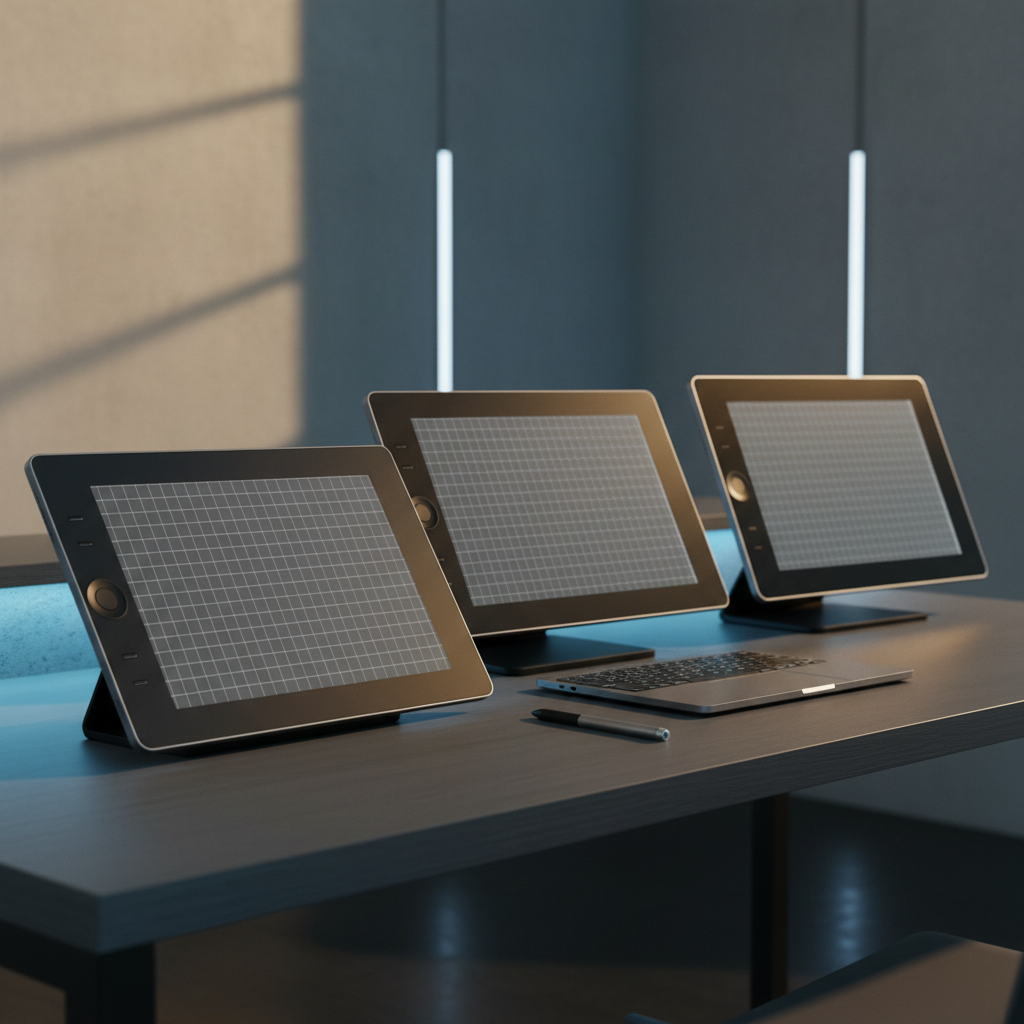
Choosing a graphics tablet with an integrated screen can feel overwhelming, especially when 15 different models line up across a price span from $149.99 for the XP‑Pen Artist 12 (11.6‑inch) to $645.00 for the Wacom Cintiq 16 (15.6‑inch). Our roundup splits them into three clear buckets – budget options like the XP‑Pen Artist 12 and Gaomon PD1320, mid‑range contenders such as the Huion Kamvas Pro 16, and premium choices including the XP‑Pen Artist 22 (21.5‑inch) and the Wacom Cintiq 16.
One standout figure is the 4.6/5 rating that both the Wacom Cintiq 16 and the XP‑Pen Magic Drawing Pad 12.2‑inch share, signaling strong user approval. If you’re hunting for the most economical entry point, the XP‑Pen Artist 12’s 220 cd/m² brightness and 24‑bit color depth deliver a clear visual experience without breaking the bank. Meanwhile, the premium tier offers larger work areas and wider color gamuts, like the Artist 22’s 122 % sRGB coverage.
Below you’ll find a side‑by‑side look at each tablet’s key specs, so you can match the device that fits your creative workflow and budget.

XP-Pen Artist 12 11.6-inch
Its 220 cd/m² brightness provides clear visuals while it stays entry‑level priced.

Wacom Cintiq 16
Best for professional artists who need a proven, high‑quality display, even though it’s $495 more than the XP‑Pen Artist 12.

XP-Pen Artist 13.3 Pro
Includes eight replacement pen nibs, letting you draw longer between swaps—something the other two don’t bundle.
Also considered
Score Analysis
Key score advantages vs. runner-up (Wacom Cintiq 16)
Price Range
XP-Pen Artist 12 11.6-inch
$159.99
Wacom Cintiq 16
$649.95
XP-Pen Artist 13.3 Pro
$209.99
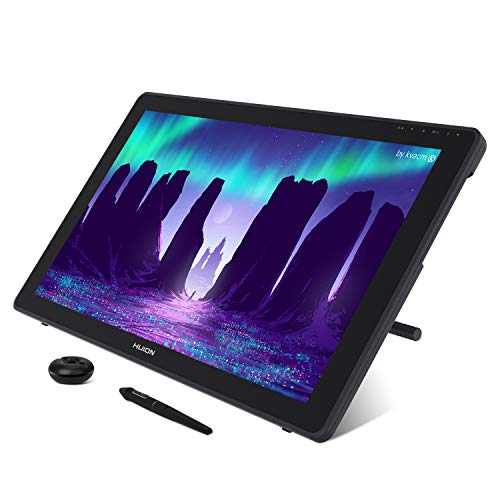
Huion Kamvas 22
$448.00

XP-Pen Magic Drawing Pad 12.2-inch
$429.99

Huion Kamvas Pro 16
$299.99

Huion Kamvas 13
$229.00

Gaomon PD1320
$199.99

Huion Kamvas Slate 11
$262.99

XP-Pen Artist 22 21.5-inch
$349.99

GAOMON PD1161 11.6-inch
$149.99

Veikk VK1200
$142.49

XP-Pen Artist 13.3 Pro V2
$209.99

Veikk VK2200PRO
$298.99
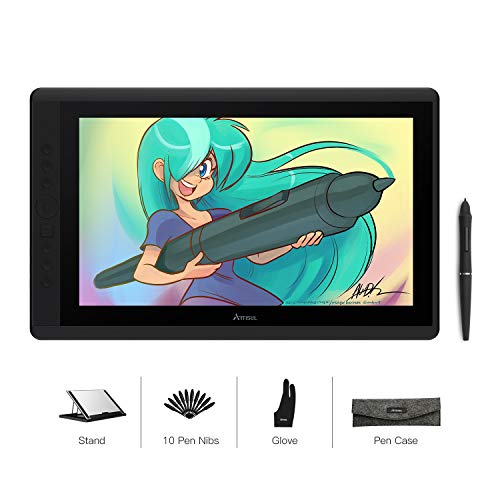
Artisul D16
$179.00
Spec Comparison
TL;DR: The XP‑Pen Artist 12 delivers a full‑HD 11.6‑inch IPS screen with 8192‑level pressure sensitivity and a battery‑free stylus for $149.99, making it a solid entry‑level pen display.
The tablet packs a 11.6‑inch full‑HD IPS panel (1920 × 1080) that shines at 220 cd/m² and covers 72% NTSC, which the manufacturer lists as 100% sRGB. With 24‑bit color depth (16.7 million colors) and a pixel pitch of 0.1335 mm, the display offers crisp, vibrant visuals. The included PH2 stylus provides 8192 pressure‑sensitivity levels and ±45° tilt, giving you fine control without worrying about battery charging.
At $149.99 the Artist 12 sits in the same price bracket as the GAOMON PD1161 and the Veikk VK1200. Its weight of about 2 lb (1.99959271634Pounds, 907 g) is comparable to the GAOMON’s 1.9 lb and a touch heavier than the VK1200’s roughly 1.78 lb, so it’s still portable but not the lightest option. The tablet’s dimensions (364 mm × 218 mm × 11.4 mm) keep it compact for a desk‑top setup while offering a full‑screen drawing area.
Reviewers praise the tablet’s easy setup—thanks to the 3‑in‑1 HDMI/USB cable—and the natural feel of the battery‑free stylus. The anti‑reflective IPS panel makes drawing comfortable even in bright rooms. However, many users note occasional cable disconnections and the lack of an integrated stand on the standard model, which means you’ll need a separate accessory for a stable drawing angle. The center delivers solid accuracy (±0.01 inch) but it drops to ±2 mm toward the edges, a point to consider for detail‑heavy work.
The device reports pen data at 266 RPS and responds in 14 ms, while its 178° viewing angle and ±45° tilt support give a fluid drawing experience. With a contrast ratio of 700:1 and a power draw of just 0.35 W (standard model), it stays energy‑efficient without sacrificing visual quality.
Pros
Cons
Best for: Budget‑conscious buyers seeking a reliable entry‑level option
Avoid if: You need professional‑grade edge precision, a built‑in stand, or touch input
“It will disconnect at any time at the very slightest movement... a total waste of $200.”
“No delay in drawing time”
TL;DR: The Wacom Cintiq 16 delivers a 396 mm diagonal IPS display with 8192‑level pressure sensitivity and ±60° tilt, but its $645 price and fixed stand make it a premium choice for serious hobbyists.
The standout spec is the Wacom Pro Pen 2, offering 8192 pressure levels and tilt recognition up to ±60°, letting you vary line weight as naturally as on paper. The tablet scores 4.6/5 stars from 3,127 reviews, indicating strong user approval.
At 4.18878Pounds, the Cintiq 16 is heavier than the XP‑Pen Magic Drawing Pad 12.2‑inch (about 1.3 pounds) but considerably lighter than the Veikk VK2200PRO (over 11 pounds). Unlike the Huion Kamvas 22, which lists adjustable stand angles from 20° to 80°, the built‑in stand holds the Cintiq 16 at a 19° tilt, so you’ll miss the flexibility of a fully adjustable stand.
Professional reviewers praise the tablet’s “high contrast and color accuracy” thanks to a 1000:1 contrast ratio and 16.7 million‑color depth. Users repeatedly note the natural drawing feel, yet many voice frustration over the lack of touch input and missing express keys. The device connects via HDMI and USB‑A and includes a 3‑in‑1 cable for plug‑and‑play setup.
Pros
Cons
Best for: Buyers willing to invest in a proven, high‑quality option
Avoid if: You're shopping on a tight budget — it's priced at $645.00
TL;DR: The XP‑Pen Artist 13.3 Pro offers a 13.3‑inch full‑laminated IPS screen with ≥91% Adobe RGB coverage, 8192‑level pressure, and a battery‑free stylus for under $190.
The standout spec is its full‑lamination paired with a 13.3‑inch IPS panel that reaches ≥91% of the Adobe RGB color space, ≈88% NTSC and ≥123% sRGB. At 166 PPI the display delivers crisp detail, while the tablet’s body measures just 2.54 mm in height and 250.0 mm in depth, giving it a sleek profile.
Compared with the other 14 entries, the Artist 13.3 Pro is heavier than most budget‑friendly peers – it weighs 4.40924524Pounds (2000 g), whereas the Artisul D16, Gaomon PD1320, Huion Kamvas 13 and the newer XP‑Pen 13.3 Pro V2 all sit below 3 pounds. Its Adobe RGB coverage also outstrips the Artisul D16’s 76% figure, giving artists a wider gamut for color‑critical work. Pixel density matches the Gaomon PD1320’s 166 PPI, and the 13.3‑inch screen size aligns with that same model, placing the XP‑Pen solidly in the mid‑size category.
Reviewers consistently praise the tablet’s vibrant display and the natural feel of the battery‑free X3 stylus, which offers 8192 pressure levels, 60° of tilt, and a 220 RPS report rate. Professional reviewers note that the full‑lamination virtually eliminates parallax, making line work feel precise. The downside most users mention is the need for a dual‑cable setup (power and data) and occasional signal hiccups, which can interrupt a smooth workflow.
Pros
Cons
Best for: Budget-conscious buyers seeking a reliable entry‑level option
Avoid if: You need advanced features or professional‑grade performance
“It will disconnect at any time at the very slightest movement... a total waste of $200.”
“No delay in drawing time”
TL;DR: The Huion Kamvas 22 offers a 21.5‑inch Full HD IPS display with 120% sRGB coverage, 8192‑level pressure and ±60° tilt, all for $369.00, though its non‑laminated screen can introduce noticeable parallax.
The standout spec is the 21.5‑inch Full HD IPS panel that delivers 120% sRGB color gamut and 220 cd/m² brightness, paired with a battery‑free PW517 pen offering 8192 pressure levels and ±60° tilt. Its anti‑glare coating and 89° viewing angle help keep colors consistent from most angles, while the 14 ms response time keeps strokes fluid.
At 8.6 pounds, the Kamvas 22 is heavier than the Huion Kamvas Pro 16 (2.98 pounds) and the Slate 11 (≈1.12 pounds) but lighter than the Veikk VK2200PRO (≈11.02 pounds). Its 21.5‑inch screen matches the size of the XP‑Pen Artist 22 and the VK2200PRO, and it’s larger than the 15.6‑inch Pro 16 and the 13‑inch Kamvas 13. Brightness (220 cd/m²) and color gamut (120% sRGB) line up with the Pro 16, while the active area (268.11 mm × 476.64 mm) is essentially the same as the Artist 22’s 267.786 mm × 476.064 mm.
Reviewers consistently praise the natural feel of the PW517 pen, noting its high accuracy (±0.3 mm center) and smooth pressure curve. However, the lack of full lamination creates a parallax gap that many users find distracting during fine detail work, especially in bright rooms where the 220 cd/m² brightness can feel modest. Many find the bundled 3‑in‑1 cable a bit cumbersome to manage.
Beyond the screen, the tablet comes with a fully adjustable stand (20°‑80°), HDMI input, one USB‑A port and two full‑featured USB‑C ports, making it easy to connect to most PCs and laptops. The anti‑glare surface helps reduce reflections, and a 1 Year warranty backs the build.
Pros
Cons
Best for: Buyers willing to invest in a proven, high‑quality option
Avoid if: You're on a tight budget or only need basic functionality
“Feels like drawing on paper”
“Pen is incredibly accurate”
TL;DR: The XP‑Pen Magic Drawing Pad packs a 12.2‑inch 360‑nit IPS screen, 16,384‑level battery‑free stylus and up to 13 hours of battery for $399.99, earning a 4.6‑star rating from 625 users.
The standout feature is its high‑resolution 12.2‑inch WQXGA display (2160 × 1440) with 360 nits brightness, 1200:1 contrast and a color gamut of 109 % sRGB, 82 % Adobe RGB. Coupled with a battery‑free X3 Pro Pencil that offers 16,384 pressure levels and ±60° tilt, the tablet feels like a dedicated drawing studio in a portable shell that weighs just 599 g (1.3007 lb) and is only 6.9 mm thick.
Compared with the other 14 tablets in this roundup, the Magic Drawing Pad weighs far less than the 8.6‑pound Huion Kamvas 22 and the 11‑pound Veikk VK2200PRO, yet a touch more than the 1.12‑pound Huion Kamvas Slate 11. Its 360‑nit screen outshines the 220‑nit panels in the Huion Kamvas Pro 16 and Kamvas 13. While its sRGB coverage (109 %) trails the 120 % sRGB of the Kamvas Pro 16, it still exceeds the minimum for most creators. Unlike the XP‑Pen Artist 22, this model lacks a video‑output port, so you can’t use it as a secondary monitor.
Reviewers consistently praise the natural feel of the EMR‑based stylus and the tablet’s bright, anti‑glare matte screen for outdoor sketching. The built‑in 4‑speaker array and 2‑microphone setup receive positive mentions for media playback and video calls. Common complaints focus on the auto‑brightness sometimes reacting too aggressively to changing light, and the MediaTek octa‑core processor (up to 2.4 GHz) feeling modest when running heavy Android art apps. Professional reviewers also note the early firmware quirks with cursor offset, which have been addressed in later updates.
Under the hood, the Magic Drawing Pad runs Android 14, offers 8 GB RAM, 256 GB internal storage and expandable microSD support up to 1 TB. Connectivity includes Bluetooth 5.1, Wi‑Fi 5 (dual‑band) and a single USB‑C 2.0 port for power and data. The 8,000 mAh battery delivers 8–13 hours of continuous use, and the front 8 MP camera enables face unlock and the auto‑brightness feature. The package comes with an artist glove, multiple nibs, a flexible case with a low‑angle stand, and a 3‑month Clip Studio Paint subscription.
Pros
Cons
Best for: Buyers willing to invest in a proven, high‑quality option
Avoid if: You need advanced features or professional‑grade performance
TL;DR: The Huion Kamvas Pro 16 offers a 15.6‑inch full‑HD laminated IPS display with 120% sRGB coverage, a battery‑free 8192‑level stylus, and a solid $299.99 price, making it a strong mid‑range graphics tablet.
The tablet’s 15.6‑inch IPS panel delivers 1920 × 1080 resolution, 220 cd/m² brightness, and a 1000:1 contrast ratio, all behind a full‑laminated anti‑glare glass that reduces parallax. With a 25 ms response time and 89° viewing angles, the screen stays clear even at wide angles.
At $299.99, it’s in the same price tier as the Veikk VK2200PRO, yet it weighs just 2.98 pounds versus the VK2200PRO’s 11.0231131 pounds, making it far more portable. Its 15.6‑inch size is more compact than the 21.5‑inch models from Veikk and XP‑Pen, while the 120% sRGB gamut matches the color coverage that both the Veikk VK2200PRO and the Huion Slate 11 list.
Reviewers consistently highlight the natural drawing feel and the generous accessory bundle (artist glove, cleaning cloth, 10 extra nibs, pen stand). Professional reviewers note the laminated screen’s accuracy, but they also point out that the power button’s placement among the six express keys can cause accidental shutdowns, and the panel may get warm during long sessions. The base configuration lacks a built‑in stand, though the foldable ST200/ST300 stand offers 20° and 45° (or 60°) angles.
Pros
Cons
Best for: Digital illustrators, concept artists, students, hobbyists, and freelancers who want a portable, full‑HD pen display without breaking the bank.
Avoid if: You need a built‑in stand, ultra‑quiet operation under heavy load, or the absolute highest‑end stylus refinement.
“Feels like drawing on paper”
“Pen is incredibly accurate”
TL;DR: The Huion Kamvas 13 delivers a 13.3‑inch fully laminated display, 16,384‑level pressure sensitivity and dual dials for a portable, well‑reviewed drawing experience at $229.
The standout feature is its 13.3‑inch IPS LCD with full‑lamination and a 2nd‑gen anti‑glare etched glass surface that reduces parallax and mimics paper. The panel reaches 220 cd/m² typical brightness and covers 90% of Adobe RGB, 99% of both Rec.709 and sRGB, plus a 120% sRGB volume, giving vivid colors for most creative work.
Compared with the other 14 tablets in this roundup, the Kamvas 13 sits in the middle of the weight spectrum: it is lighter than the XP‑Pen Artist 13.3 Pro (≈4.4 lb) and the Artisul D16 (≈3.4 lb), but a touch heavier than the Huion Slate 11 (≈1.1 lb). Its active area (293.8 mm × 165.2 mm) matches the XP‑Pen Artist 13.3 Pro V2’s 294.7 mm × 165.8 mm drawing space, while being a bit more compact than the Gaomon PD1320’s overall footprint. Brightness of 220 cd/m² is lower than the Artisul D16’s 300 cd/m² but comparable to the Gaomon PD1320, which lists the same 220 cd/m².
Users consistently praise the tablet’s “paper‑like” feel thanks to the anti‑glare glass and the responsiveness of the PW600L pen. Reviewers note that the dual customizable dials and five silent programmable keys streamline brush size, opacity and zoom adjustments without reaching for the mouse. However, several owners mention the absence of a built‑in stand and the need to buy a full‑feature USB‑C video cable separately, which adds modest extra cost.
The tablet draws power directly from the host via USB, so you don't need an external adapter.
Pros
Cons
Best for: Most users looking for a well‑reviewed, reliable mainstream option
Avoid if: You need advanced features or professional‑grade performance
“Feels like drawing on paper”
“Pen is incredibly accurate”
TL;DR: The Gaomon PD1320 offers a 13.3‑inch full‑laminated IPS screen, 8192‑level battery‑free pen and lightweight design for under $203, making it a solid mid‑range choice for mobile creators.
The standout feature is its full‑laminated anti‑glare glass on a 13.3‑inch IPS panel with a 1920 × 1080 resolution, delivering a 166 PPI pixel density and a 25 ms response time. The AP50 pen works without a battery, offers 8192 pressure levels, 10 mm sensing height and up to 60° of tilt, while the tablet runs on a single USB‑C cable for video, data and power.
At 1.94 pounds, the PD1320 is considerably lighter than the XP‑Pen Artist 13.3 Pro (weighing 4.40924524 pounds) and lighter than the XP‑Pen Artist 13.3 Pro V2 (2.5 pounds), while matching the Huion Kamvas 13’s 1.96 pounds. Its 220 cd/m² brightness equals the Kamvas 13 but falls short of the Artisul D16’s 300 cd/m², so it may feel dimmer in very bright rooms. Pixel density mirrors the XP‑Pen’s 166 PPI, placing it on par with other 13‑inch models in the lineup.
Reviewers consistently praise the natural drawing feel of the battery‑free pen and the convenience of the built‑in 3.5 mm headphone jack—an uncommon perk. Users also like the tablet’s portability, noting the 1.94‑pound weight as easy to carry to class or a coffee shop. Common criticisms focus on the lack of express shortcut keys, the relatively thick bezels that give the unit a dated look, and you must purchase the full‑featured USB‑C cable separately. Some Android users report occasional driver lag on macOS, and the matte screen protector can introduce a slight grain.
Pros
Cons
Best for: Students, note‑takers and beginner‑to‑intermediate digital artists who value portability, a responsive pen and a solid‑laminated screen at a reasonable price.
Avoid if: You need advanced shortcuts, higher brightness for bright environments, or a professional‑grade display with ultra‑thin bezels.
TL;DR: The Huion Kamvas Slate 11 packs a 10.95‑inch 99% sRGB screen, 90 Hz refresh and 11‑hour battery into a feather‑light 509.6 g tablet, but its pen jitter and modest brightness keep it from being a pro‑level workhorse.
The Slate 11’s standout spec is its 10.95‑inch full‑laminated display with a 90 Hz refresh rate, 350 nits brightness and 99% sRGB coverage, delivering a smooth, color‑accurate canvas at 207 PPI. Under the hood you get an Android 14 system powered by a MediaTek Helio G99, 8 GB RAM, 128 GB internal storage and an 8000 mAh battery that promises up to 11 hours of use on a single charge.
Compared with other tablets in this roundup, the Slate 11 is notably lighter than the Huion Kamvas 13 (889.04 g) and far lighter than the Veikk VK2200PRO (5000 g) or the Kamvas Pro 16 (2.98 lb). Its 350 nits brightness outshines the 220 cd/m² panels of the Kamvas 13, Kamvas Pro 16 and Gaomon PD1320, while its pen accuracy of ±0.3 mm at the centre beats the ±0.5 mm the Pro 16 claims. However, the Pro 16 offers a larger 15.6‑inch screen, 120% sRGB gamut and 8192 pressure levels, which some creators may prefer.
Reviewers consistently praise the tablet’s ultra‑portable aluminum body (509.6 g, 7.5 mm thick) and the paper‑like feel of its nano‑etched matte screen. The built‑in 4 stereo speakers and 8 MP front/13 MP rear cameras add media versatility. Professional feedback notes the pen’s high activation force and occasional wobble on diagonal strokes, and users report inconsistent palm rejection in third‑party apps. The modest 350 nits brightness may feel dim in bright environments.
Pros
Cons
Best for: Art students, hobbyists, note‑takers and casual creators who need a well‑reviewed, portable all‑in‑one drawing tablet.
Avoid if: You are a professional digital artist requiring ultra‑high pen precision, brighter outdoor visibility, or a larger drawing surface.
“Feels like drawing on paper”
“Pen is incredibly accurate”
TL;DR: The XP‑Pen Artist 22 offers a 21.5‑inch IPS display with a large active area, high‑gamut colors and a battery‑free 8192‑level stylus, though its Full HD resolution can make text appear less sharp.
The standout feature is its 21.5‑inch screen with a 476.064 mm × 267.786 mm active drawing area and color coverage of ≥122% sRGB and ≥90% Adobe RGB, delivering vivid results straight out of the box. The included PA6 stylus is battery‑free, supports 8192 pressure levels and ±60° tilt, and the tablet adds five customizable shortcut keys for workflow efficiency.
Compared with the other 14 entries, the Artist 22 sits at a higher price point but remains lighter than the Huion Kamvas 22, which weighs 8.6 pounds, while it is heavier than the Huion Kamvas Pro 16 at 2.98 pounds. Its adjustable stand ranges from 16° to 90°, offering a broader tilt range than the Kamvas 22’s 20°–80° limits. On the connectivity side, the tablet provides a single HDMI, a USB‑C data port, a DC power jack and a 3.5 mm headphone jack, which is fewer than the multiple USB‑C and USB‑A ports listed for the Kamvas 22.
Users consistently praise the natural drawing feel, easy setup and the vibrant color output, while many note that the Full HD resolution on a 21.5‑inch panel results in a modest 102 PPI pixel density, making text look blurry during UI work. Professional reviewers highlight the fast 8 ms response time and the anti‑glare etched glass surface, though they also point out the lack of a built‑in USB hub and note that the non‑laminated panel causes a slight parallax. The tablet draws about 250 cd/m² of brightness, refreshes at 60 Hz, and consumes ≤20 W when active.
Pros
Cons
Best for: Buyers willing to invest in a proven, high‑quality option
Avoid if: You're on a tight budget or only need basic functionality
“It will disconnect at any time at the very slightest movement... a total waste of $200.”
“No delay in drawing time”
TL;DR: The GAOMON PD1161 offers an 11.6‑inch Full HD IPS screen, 8192‑level battery‑free stylus and tilt support for $149.99, making it a lightweight, budget‑friendly entry point for screen‑based drawing.
At the heart of the PD1161 is an 11.6‑inch IPS LCD with a 1920 × 1080 resolution and a 72% NTSC color gamut (≈100% sRGB). The anti‑glare panel delivers a 178° viewing angle, while the AP50 stylus provides 8192 pressure levels and ±60° tilt, all without a battery. The tablet lists accuracy as ±0.5 mm at the center and ±3 mm at the corners, and the pen reports 5080 LPI with a 10 mm sensing height.
When you line it up against the other 14 tablets in this roundup, the PD1161 is a touch lighter than the XP‑Pen Artist 12, which tips the scales at about 2 pounds, but a shade heavier than the Veikk VK1200’s roughly 1.78 pounds. Its 72% NTSC gamut mirrors both the XP‑Pen Artist 12 and the VK1200, and the 11.6‑inch screen size is identical across those models. Center accuracy of ±0.5 mm sits close to the XP‑Pen Artist 12’s ±0.01 inch, indicating a comparable level of precision.
Reviewers consistently praise the natural feel of the battery‑free pen and the eight programmable express keys plus five menu shortcuts that streamline workflow. The tablet’s portability and 1.9‑pound weight make it a popular choice for students and artists on the go. Professional reviewers note the solid color accuracy for the price, though they point out the lack of a built‑in stand and the need for a separate HDMI adapter on laptops without a native port. Many see the one‑year warranty as modest for a device in this category.
Pros
Cons
Best for: Budget‑conscious buyers seeking a reliable entry‑level option
Avoid if: You need advanced features or professional‑grade performance
“great steal for beginners”
“easy to use”
TL;DR: The Veikk VK1200 is an 11.6‑inch full‑laminated IPS pen display with 8192 pressure levels, 120% sRGB coverage, and a lightweight 1.78353969958 pounds design, offering solid value for beginners at $149.99.
What really stands out is the 8192‑level pressure sensitivity paired with ±60° tilt support, letting you create nuanced strokes without a battery‑powered pen. The 11.6‑inch screen is a full‑laminated IPS panel with anti‑glare glass, delivering a paper‑like feel and a wide 178° viewing angle.
Compared with the other 14 tablets in this roundup, the VK1200's lighter than the XP‑Pen Artist 12 (1.99959271634 pounds) and the GAOMON PD1161 (1.9 pounds), and far lighter than the 13.3‑inch models that tip the scales above 2.5 pounds. Its 120% sRGB gamut also exceeds the 100% sRGB coverage of the XP‑Pen Artist 12, while matching the 72% NTSC coverage of several peers. Screen size is identical to the XP‑Pen Artist 12 and GAOMON PD1161, but smaller than the 13.3‑inch options.
Reviewers love the tablet’s paper‑like, anti‑glare surface and the convenience of two battery‑free pens that don't need charging. Users also appreciate the six shortcut keys and the included accessories such as a pen holder, artist glove, cleaning cloth, and 28 replacement nibs. On the downside, the 11.6‑inch display can feel cramped for complex projects, and the required driver install sometimes conflicts with existing software, especially on macOS. A few users have noted occasional USB/HDMI connection hiccups.
Pros
Cons
Best for: Budget‑conscious buyers seeking a reliable entry‑level option
Avoid if: You need advanced features or professional‑grade performance
TL;DR: The XP‑Pen Artist 13.3 Pro V2 offers a 13.3‑inch full‑laminated IPS screen, 16,384 pressure levels with ±60° tilt, and a lightweight 2.5‑lb body for solid drawing performance at a mid‑range price.
The tablet’s standout spec is its 13.3‑inch IPS display with 99% sRGB and 89% Adobe RGB coverage, paired with a brightness of 250 cd/m² and a contrast ratio of 1000:1, delivering vivid colors and low glare for detailed artwork.
Weighing 2.5 pounds, it’s heavier than the Huion Kamvas 13 (1.96 pounds) but far lighter than the Veikk VK2200PRO (11.0231131 pounds). Its active drawing area measures 165.8 mm × 294.7 mm, marginally larger than the Kamvas 13’s 165.2 mm × 293.8 mm, while its 250 cd/m² brightness exceeds the Kamvas 13’s listed 220 nit and matches the Gaomon PD1320’s 220 cd/m². A report rate of ≥200 RPS and latency of 90 ms keep it on par with other mid‑range pen displays, and its single red dial plus eight customizable shortcut keys provide more workflow controls than the Kamvas 13’s two dials and five keys.
Everyday users rave about the tablet’s smooth, lag‑free drawing feel and the convenience of the red dial for brush size and zoom adjustments. Professional reviewers highlight the X3 Pro stylus’s high responsiveness and the anti‑glare laminated screen that minimizes parallax. Common complaints focus on the need for a constant power connection, occasional driver crashes on macOS and Linux, and a brightness level that can feel low in very bright rooms. The stand’s tilt range caps at 65°, which some find less flexible than rivals that offer a wider angle.
Additional technical notes include a pen accuracy of ±0.4 mm at the center and ±0.8 mm at the edge, a pen retraction distance of ≥0.6 mm, and a pressure sensitivity of 16,384 levels. The tablet ships with a power adapter, USB‑C cables, a glove, cleaning cloth, eight pen nibs, and the foldable stand, providing a complete out‑of‑the‑box experience.
Pros
Cons
Best for: Most users looking for a well‑reviewed, reliable mainstream option
Avoid if: You need advanced features or professional‑grade performance
“It will disconnect at any time at the very slightest movement... a total waste of $200.”
“No delay in drawing time”
TL;DR: The Veikk VK2200PRO offers a 21.5‑inch full‑laminated anti‑glare screen with 8192‑level pressure, two battery‑free pens and solid connectivity at $298.99, though its macOS driver can be finicky.
The standout feature is its 21.5‑inch full‑laminated IPS panel with anti‑glare glass, delivering a 1920 × 1080 resolution and 16.7 million colors. The tablet supports 8192 pressure levels, ±60° tilt, and a hover detection height of 10 mm, all driven by two battery‑free P05 styluses that come in the box.
Compared with the other 14 entries, the VK2200PRO is considerably heavier than the 1.12‑pound Huion Kamvas Slate 11 and the 2.98‑pound Kamvas Pro 16, but its 21.5‑inch screen matches the size of the XP‑Pen Artist 22, giving it one of the largest drawing areas in the roundup. Its 120 % sRGB coverage aligns with the Kamvas Pro 16’s color gamut, and the 8192 pressure levels are on par with several peers, placing it solidly in the mid‑range performance tier.
Users repeatedly praise the large, responsive display and the inclusion of a second pen, noting that the full lamination “eliminates parallax” for precise work. Professional reviewers also highlight the eight silent shortcut keys and the two customizable dials as workflow boosters. On the downside, macOS driver sometimes glitches, causing occasional pen dropouts, and the on/off and settings buttons sit on the bottom edge, making them hard to reach during long sessions.
Additional technical details include a 10 mm hover detection height, 8 programmable silent keys, 2 side buttons, and a 12‑month hardware warranty. Connectivity options cover HDMI, USB‑A (data) and USB‑C (data + power), and the package includes an adjustable stand, cleaning cloth, drawing glove, HDMI cable, USB‑C cable, power adapter, pen stand and 28 replacement nibs.
Pros
Cons
Best for: Most users looking for a well‑reviewed, reliable mainstream option
Avoid if: You have limited desk space or need portability
“a really good tablet at a really great price”
“big draw for budget‑conscious creators”
TL;DR: The Artisul D16 offers a 15.6‑inch full‑HD matte screen, 8192‑level pressure sensitivity and a battery‑free stylus for $179, making it a solid budget entry for digital creators.
The standout spec is the 15.6‑inch IPS LCD with a full‑laminated matte surface and 300 cd/m² brightness, delivering a paper‑like feel and reduced parallax. Its pen provides 8192 pressure levels and a 5080 LPI resolution, which professional reviewers praise for delivering fine detail.
Compared with the other tablets in this roundup, the D16’s screen is larger than the 13.3‑inch XP‑Pen Artist 13.3 Pro and Gaomon PD1320, and far bigger than the 11.6‑inch models such as the XP‑Pen Artist 12, GAOMON PD1161 and Veikk VK1200. Brightness at 300 cd/m² also exceeds the 220 cd/m² of the Gaomon PD1320 and XP‑Pen Artist 12. At 3.42 pounds, it is heavier than the 1.94‑pound Gaomon PD1320 but lighter than the 4.40924524‑pound XP‑Pen Artist 13.3 Pro.
User feedback highlights the natural drawing feel and the convenience of a battery‑free stylus, while the 7 programmable shortcut keys and a scroll dial with up to five functions speed up workflow. However, several owners note that the pen nib holder can obscure the cursor near the screen edges and that you need to install the Windows driver before connecting the tablet, a step that can trip up newcomers. The adjustable stand offers six angle positions, though some users say the joints loosen after extended use.
Pros
Cons
Best for: Entry‑level buyers or those on a tight budget
Avoid if: You need powerful performance or professional‑grade features
“no lag”
“smooth line variation.”
Breakdown
XP-Pen Artist 12 11.6-inch
Pros
Wacom Cintiq 16
Pros
Cons
XP-Pen Artist 13.3 Pro
Pros
Huion Kamvas 22
Pros
Based on scoring data and product specs
Personalized picks
Best Overall Pick
XP-Pen Artist 12 11.6-inch
Best Budget PickBest for: Budget-conscious buyers seeking a reliable entry-level option
Wacom Cintiq 16
Best for: Buyers willing to invest in a proven, high-quality option
$649.95+$489.96 vs winner
Skip Artisul D16 if…
You need powerful performance or professional-grade features
The XP‑Pen Artist 12 11.6‑inch takes the top spot thanks to its ultra‑affordable $149.99 price tag, a solid 4.3‑star rating from over 12,000 reviewers, and a full HD 1920 × 1080 IPS panel that delivers 24‑bit color (16.7 million colors) with 72 % NTSC coverage. Its battery‑free PH2 stylus offers 8192 pressure levels and ±45° tilt, giving you precise control without extra accessories.
The runner‑up, the Wacom Cintiq 16, offers a 1000:1 contrast ratio and a built‑in stand for studio work. With 8192‑level pressure sensitivity and ±60° tilt recognition, it provides a more vivid drawing surface at $645.00, making it a strong choice for creators who prioritize display quality over budget.
For those looking beyond the winner, the Huion Kamvas 13 at $229.00 offers a larger 13‑inch screen at a modest price jump, fitting the mid‑range niche. The premium tier remains the Wacom Cintiq 16, whose professional‑grade pen performance and superior contrast justify its higher cost for serious artists.
Pick the XP‑Pen Artist 12 today and start drawing without breaking the bank.
The Cintiq 16 costs $645 versus $149.99 for the Artist 12, a price gap of about $495. It adds a larger 15.6‑inch display, higher contrast (1000:1 vs 700:1), and a wider tilt range, which can justify the cost for professionals who need more screen real‑estate and richer color performance.
Please sign in to leave a review
No reviews yet. Be the first to review!
