If you need a canvas that spans more than ten inches, the market offers a solid set of 13 tablets with active areas of 10 inches or larger. The Huion HS610, priced at $47.99, leads with a 4.5‑star rating from over 14,000 reviewers, while the XP‑Pen Deco 01 V3 sits at $45.99 and also carries a 4.5‑star score from 8,059 reviews. These figures illustrate the strong demand for spacious, responsive drawing surfaces.
Our roundup spreads across three price tiers: budget‑friendly picks like the Veikk A30 ($33.99) and Ugee M708 ($39.99) give you a full‑size area without breaking the bank; mid‑range options such as the Huion Inspiroy H1060P ($41.99) and GAOMON M10K ($43.99) add extra shortcut keys and thicker builds; premium choices—including the XP‑Pen Deco 01 V2 at $59.99 and the Huion HS610—bundle higher pressure levels and tilt support for pros. Whether you're sketching on a dorm desk or setting up a home studio, the upcoming sections break down which tablet matches your workflow.

Huion HS610
It comes with 8 spare pen nibs, so you’ll replace tips without extra cost, extending the tablet’s lifespan.

XP-Pen Deco 01 V3
Artists who need a longer 159 mm active height and want to save $2 versus the Huion HS610 will find it ideal.

Huion Inspiroy H1060P
Its 10 mm thin profile and 770 g weight give it a sleek, portable feel that the bulkier HS610 and Deco 01 V3 lack.
Also considered
Score Analysis
Key score advantages vs. runner-up (XP-Pen Deco 01)
Price Range
Huion HS610
$47.99
XP-Pen Deco 01 V3
$45.99
Huion Inspiroy H1060P
$43.99

Veikk A30
$33.99

GAOMON M10K 10x6-inch
$42.99

XP-Pen Deco 01 V2
$43.99

Ugee M708
$39.99

Veikk A15
$49.99
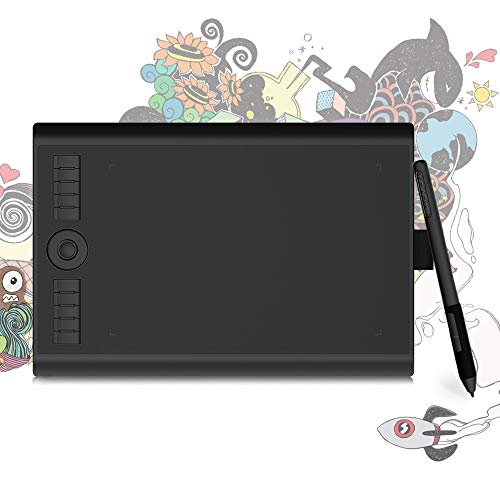
GAOMON M10K PRO 10x6.25-inch
$40.36

Veikk A30 V2
$39.89

Gaomon M10K-Pro
$39.99

Ugee M808 Standard
$33.95

Ugee M708 V2
$49.99
Spec Comparison
TL;DR: The Huion HS610 offers a 10 × 6.25‑inch active area, 8192‑level battery‑free stylus and 28 shortcuts for $47.99, earning a 4.5‑star rating from over 14 k users.
The tablet’s standout spec is its 254 mm × 158.8 mm (10 × 6.25 in) active drawing area, paired with a PW100 pen that provides 8192 pressure levels, ±60° tilt and ±0.3 mm accuracy. At 1.322773572 pounds (600 g) and only 8 mm thick, it stays portable while still feeling solid. Its 28 express keys (12 physical, 16 soft‑touch) and a 266 PPS report rate give you fast, customizable control.
Compared with peers, the HS610’s active area matches the width of the XP‑Pen Deco 01 V3 (254 mm) but offers a taller drawing space (158.8 mm vs. the Deco’s 159 mm height) and far more shortcuts than the Deco’s 8 round keys. It is slightly heavier than the XP‑Pen’s 1.2566348934 pounds but lighter than the GAOMON M10K PRO’s 1.58953290902 pounds. The Ugee M708 V2 lists a comparable 8 mm thickness and 8 mm height, yet the HS610 gives you twice the number of express keys.
Reviewers love the large canvas and the battery‑free pen that never needs charging, calling the drawing feel “natural” and the customization “intuitive.” Professional reviewers highlight the 12 physical and 16 soft keys as a strong workflow boost. The main complaints focus on the wired‑only connection and the fact that the tablet disables the touch‑ring and shortcut keys when it runs on Android, where the active area shrinks to 158.8 mm × 99.2 mm. Some users also note that the plastic surface can scratch with heavy use.
Beyond the drawing surface, the HS610 ships with a Micro USB OTG adapter, a USB‑C OTG adapter, a Micro USB‑to‑USB‑A cable, a pen holder with built‑in nib storage, and eight spare pen nibs. The pen resolution of 5080 LPI and the 10 mm sensing height add precision for detailed work, while the ±60° tilt support expands expressive possibilities.
Pros
Cons
Best for: Beginner to intermediate digital artists, art students, educators, and mobile creators who want a large drawing surface at an affordable price.
Avoid if: You need iOS compatibility, wireless/Bluetooth connectivity, or full Android pressure‑sensitivity support.
TL;DR: The XP‑Pen Deco 01 V3 delivers a generous 10‑inch active area, 16,384 pressure levels and 60° tilt support for $45.99, making it a solid mid‑range tablet for artists who value size and precision.
The standout spec is its 16,384‑level pressure sensitivity, paired with an accuracy of ±0.01 inch and a 266 RPS maximum report rate, which together deliver a responsive drawing experience. Its active area measures 254 mm × 159 mm (about 10 × 6.25 inches), providing ample room for detailed work without feeling cramped.
Compared with the other twelve tablets in this roundup, the Deco 01 V3 is lighter than the GAOMON M10K (which weighs over 1.5 lb) and thinner than most peers, at just 7.6 mm thick versus the GAOMON M10K’s 10.5 mm and the Veikk A15’s 9 mm. It also offers a higher pressure‑sensitivity count than the GAOMON M10K’s 8,192 levels, while matching the Veikk A15’s 5,080 LPI resolution. The tablet provides eight customizable round shortcut keys, the same number as the Ugee M708 V2 but fewer than the Veikk A15’s twelve.
Users consistently praise the natural feel of the battery‑free stylus and the convenience of the bundled accessories—ten replacement nibs, a stand, a drawing glove and a protective film. Professional reviewers highlight the tablet’s tilt support of ±60° and the sharp 5,080 LPI resolution as rivaling higher‑priced models. The most common complaints revolve around driver conflicts on Windows when multiple tablet drivers run simultaneously, and the lack of Bluetooth or iOS compatibility limits flexibility for those who work on iPads or need a wireless setup.
Pros
Cons
Best for: Buyers willing to invest in a proven, high‑quality option
Avoid if: You're on a tight budget or only need basic functionality
“Users consistently praise the smooth, paper-like drawing feel and minimal nib wear”
TL;DR: The Huion Inspiroy H1060P offers a 10 × 6.25‑inch active area, 8192 pressure levels and 28 programmable keys for $41.99, making it a solid mid‑range tablet with a battery‑free pen.
The tablet’s most eye‑catching spec is its 254 mm × 158.8 mm (10 in × 6.25 in) active drawing area paired with 8192 pressure‑sensitivity levels and ±60° tilt support. Accuracy is listed at ±0.3 mm, and the pen reports up to 233 PPS. You also get 12 hard‑press express keys plus 16 soft keys, for a total of 28 shortcuts you can map to your favorite commands.
Compared with peers, the H1060P supplies far more shortcuts than the GAOMON M10K PRO (10 keys) or the Ugee M708 (8 keys). Its report rate of up to 233 PPS is a touch slower than the GAOMON M10K PRO’s 266 PPS, but still on par with most non‑screen tablets. Weighing 1.6975594174 pounds, it sits just above the GAOMON M10K PRO’s 1.58953290902 pounds and the Veikk A30 V2’s 1.20372395052 pounds, yet it’s considerably lighter than the Ugee M708’s 2.3809924296 pounds. The H1060P uses a Micro‑USB connection, which is older than the USB‑C port found on the Veikk A30 V2.
Reviewers praise the tablet’s “professional‑grade” pressure curve and the convenience of 28 programmable keys, noting that the battery‑free PW100 pen feels light and never needs charging. However, many users describe the smooth surface as “slippery” and wish for a textured finish. Reviewers frequently call the driver software “complex” and less intuitive than alternatives, and many users commonly complain about the lack of wireless or USB‑C connectivity.
Beyond the drawing surface, the package includes a PW100 battery‑free stylus, a pen holder with nib extractor, a Micro‑USB cable, a USB‑A‑to‑USB‑C adapter and a quick‑start guide. The pen offers 2 side buttons, 11 total nibs (1 pre‑installed + 10 extras) and 5080 LPI resolution. Huion backs the tablet with a 1‑year warranty.
Pros
Cons
Best for: Digital artists and illustrators who want a spacious drawing area, high pressure sensitivity and plenty of shortcut keys without breaking the bank.
Avoid if: You need a textured drawing surface, wireless/Bluetooth connectivity, or a tablet with a more streamlined driver experience.
“I never worry about charging the pen – it’s battery‑free.”
“The surface feels too smooth and slippery for my style.”
TL;DR: The Veikk A30 offers a 10‑inch active area, 8192‑level pressure sensitivity and tilt support for just $33.99, making it a solid entry‑level tablet for hobbyists and students.
The standout spec is the 8192 pressure‑sensitivity levels combined with up to 60° of tilt support, letting you vary line weight and angle without needing a separate dial. The battery‑free VEIKK P01 pen reads from approximately 10 mm above the surface, so you’ll never have to worry about charging.
At 1.27427187436 pounds (577.9 g), the A30 is lighter than most of its peers – the Ugee M708 and Huion H1060P tip the scales at over 2 pounds, while the Ugee M808 sits at 1.69 pounds. Only the newer Veikk A30 V2 is a shade lighter. The tablet provides four customizable touch‑sensitive buttons, which is fewer than the eight express keys on the Ugee M708 or the ten on the GAOMON M10K PRO 10x6.25‑inch, but it matches the Ugee M808’s 8192‑level pressure baseline (the M808 can reach 16384 levels). Tilt capability mirrors the GAOMON M10K PRO’s ±60° support, and the active drawing area of 10 × 6 inches aligns with the 254 mm width found on the Ugee M808 and Gaomon M10K‑Pro models.
Reviewers consistently praise the natural feel of the pen and the tablet’s broad OS compatibility, especially the Android support that many budget tablets lack. Reviewers highlight the battery‑free stylus and reversible USB‑C connector as conveniences. On the flip side, users note that the cylindrical pen can feel slippery and may roll off the surface, prompting many to add a grip sleeve. The four shortcut buttons lack tactile feedback, and some find the proprietary USB‑C cable less convenient than a standard one.
Physically, the A30 measures 330.2 mm in length, 213.36 mm in width and just 2.54 mm in height, giving it a slim profile that slides easily into a bag. Its plastic‑plus‑ABS construction keeps the weight down, and the manufacturer backs it with a 12‑month warranty.
Pros
Cons
Best for: Budget‑conscious buyers seeking a reliable entry‑level option
Avoid if: You need advanced features or professional‑grade performance
“"fantastic" drawing performance”
“"good value for money"”
TL;DR: The Gaomon M10K 10×6‑inch tablet offers a 255 mm × 159 mm active area, 8192 pressure levels and 10 express keys for $43.99, making it a solid, budget‑friendly choice for most digital creators.
The standout spec offers a large 255 mm × 159 mm (10 × 6 in) active drawing area paired with 8192 pressure‑sensitivity levels, letting you capture fine detail without sacrificing workspace. The included battery‑free AP32 stylus eliminates charging hassles, and the tablet adds a programmable touch ring plus 10 customizable express keys for quick tool swaps.
Compared with the other 12 entries, the M10K is heavier than the XP‑Pen Deco 01 V3 (which weighs 1.2566348934 pounds) but lighter than the Huion Inspiroy H1060P (1.6975594174 pounds). Its 10.5 mm thickness exceeds the XP‑Pen’s 7.6 mm, while the Huion HS610 sits at 8 mm. In terms of controls, the M10K matches the GAOMON M10K PRO’s 10 express keys and touch ring, yet offers fewer shortcuts than Huion’s 28 total keys on the H1060P.
Reviewers consistently praise the tablet’s premium feel, the smooth, responsive pen, and the productivity boost from the express keys and touch ring. Professional reviewers note the “fantastic drawing performance” on both macOS and Windows. The most common complaints revolve around Android driver quirks—mapping issues and limited support—as well as a hidden driver menu on Windows and a loosely fitting pen holder slot.
The device ships with a pen case, eight spare nibs, an artist glove, USB‑C & Micro‑USB adapters and a protective cloth case, covering most starter‑kit needs. Compatibility spans Windows 7+, macOS 10.12+, and Android 6.0+, and it works with major art software such as Photoshop, Illustrator, Krita and Clip Studio Paint.
Pros
Cons
Best for: Most users looking for a well‑reviewed, reliable mainstream option
Avoid if: You need advanced features or professional‑grade performance
TL;DR: The XP‑Pen Deco 01 V2 offers a 10‑inch active area, 16,384‑level pressure sensitivity, and ±60° tilt in a thin, lightweight tablet for $59.99, earning solid 4.4‑star reviews.
The standout spec is the battery‑free EMR pen with 16,384 pressure levels and tilt support up to ±60°, letting you vary line weight and angle without charging. XP‑Pen lists its accuracy at ±0.01" and the tablet reports at 266 RPS, while the resolution reaches 5080 LPI.
Compared with the other twelve entries, the Deco 01 V2 is heavier than the Ugee M708 V2 (1.10 lb) and Veikk A15 (1.21 lb) but lighter than the GAOMON M10K (1.53 lb) and Huion Inspiroy H1060P (1.70 lb). It shares eight customizable shortcut keys with the Ugee and the XP‑Pen Deco 01 V3, though Veikk offers twelve. Its pressure sensitivity outmatches the Ugee’s 8192 levels and matches the higher‑end V3’s 16,384 levels.
Reviewers consistently praise the tablet’s paper‑like feel and the fine‑grained pressure response, noting that the stylus feels natural once the driver is installed. Professional reviewers highlight the tilt range as a valuable addition for brush work. The most common complaint is driver installation difficulty, especially on macOS, and occasional conflicts with other tablet drivers.
The device also delivers a 266 RPS report rate, 5080 LPI resolution, and a thin 8 mm profile that fits comfortably on a desk. XP‑Pen backs it with a 12‑month warranty, giving you a year of manufacturer support.
Pros
Cons
Best for: Buyers willing to invest in a proven, high-quality option
Avoid if: You're shopping on a tight budget — it's priced at $59.99
“Users consistently praise the smooth, paper-like drawing feel and minimal nib wear”
TL;DR: The UGEE M708 offers a generous 10‑by‑6‑inch drawing surface, 8192 pressure levels and 8 express keys for just $39.99, making it a solid budget tablet with solid Linux and Android support.
The tablet’s standout feature is its 10 × 6 inch active drawing area (254 × 152.4 mm) paired with 8192 pressure‑sensitivity levels and 60° of tilt support. An accuracy of ±0.01 inches (0.254 mm) and a report rate of 266 RPS give you responsive line work, while the 8 mm thickness keeps the panel slim enough for a comfortable wrist angle.
Compared with the other 12 entries, the M708 is heavier than the Gaomon M10K‑Pro (1.53 lb) and the Veikk A30 V2 (1.20 lb), but its 8 mm profile is slimmer than the 10.5 mm thickness of the Gaomon M10K‑Pro. It offers twice as many express keys as the Veikk A30 V2, which only provides four, and matches the GAOMON M10K PRO 10x6.25‑inch’s 8192 pressure levels and 266 RPS report rate. Unlike the XP‑Pen Deco 01 V3, which also has 8 express keys, the M708’s micro‑USB connection is older than the Deco’s USB‑C‑compatible design.
Users consistently praise the tablet’s large active area for allowing arm‑based drawing without feeling cramped, and they love the battery‑free passive stylus that doesn’t need charging. Professional reviewers note the smooth line transitions and the usefulness of tilt support for shading. On the downside, several owners mention that the express keys can stick when pressed off‑center, and the micro‑USB port feels dated compared with newer USB‑C options. Reviewers describe the build as plasticky with a slight flex under pressure, which aligns with the “budget‑friendly” positioning.
Pros
Cons
Best for: Budget-conscious buyers seeking a reliable entry‑level option
Avoid if: You need advanced features or professional‑grade performance
TL;DR: The Veikk A15 offers a 10×6‑inch active area, 8192 pressure levels and 12 shortcut keys, making it a solid starter tablet despite a slightly higher price and occasional Photoshop quirks.
The standout spec is the 12 programmable express keys, twice the number found on the Ugee M708 V2 and XP‑Pen Deco 01 V3, letting you keep tools and shortcuts at your fingertips. Coupled with a pen that reports at 290 PPS and offers ±0.01 inch (0.254 mm) accuracy, the tablet feels responsive for line work and shading.
In the context of the 13‑product roundup, the A15 weighs a bit more than the Ugee M708 V2 (which weighs about 1.10 lb) and carries more shortcut keys than the GAOMON M10K (which provides 10). Its tilt range of ±60° matches the GAOMON M10K PRO, but you must update the A15’s firmware to unlock it.
Users consistently praise the paper‑like matte surface and the battery‑free stylus that never needs charging, noting a smooth drawing experience in Photoshop, Krita and Clip Studio Paint. Professional reviewers highlight the high 5080 LPI resolution and the comfort of the included glove and 20 replacement nibs. The most common complaints involve occasional Photoshop pressure sensitivity doesn’t always work on older drivers, the absence of a pen stand, and the need to update firmware for tilt support.
Pros
Cons
Best for: Beginner digital artists, art students, educators and hobbyists who want a reliable tablet with a generous active area and strong pressure sensitivity.
Avoid if: You need flawless Photoshop integration out‑of‑the‑box, rely on iOS or Samsung Android devices, or require a lower‑cost, ultra‑basic tablet.
“Great value for money”
“Easy setup and driver installation”
TL;DR: The GAOMON M10K PRO delivers a 10 × 6.25 in active area, 8192 pressure levels, ±60° tilt and a battery‑free pen for $40.36, backed by a solid 4.4‑star rating from over 2,400 reviewers.
The tablet’s most eye‑catching spec is its 8192‑level pressure sensitivity combined with ±60° tilt recognition, giving you a near‑professional feel on a 10 × 6.25 in (255 × 159 mm) drawing surface. At 1.58953290902 lb (720.5 g) it’s lightweight enough to move around a studio, yet sturdy enough for daily use.
Compared with the other 12 entries, the M10K PRO is lighter than the Ugee M708 (2.38 lb) but a bit heavier than the Veikk A30 V2 (1.20 lb). It offers more shortcut keys than the Veikk (4 keys) and matches the Gaomon M10K‑Pro’s 10 custom keys while adding a radial dial that many peers lack. Its one‑year limited warranty aligns with most competitors, though the Ugee M708 provides a longer two‑year term.
Everyday users rave about the smooth drawing feel and the convenience of a battery‑free AP32 pen, while professional reviewers highlight the radial dial as a genuine productivity boost. Android OTG support expands the tablet’s reach to mobile creators, though some owners report intermittent driver hiccups after macOS updates and say the active area feels tight for full‑arm strokes.
Pros
Cons
Best for: Most users looking for a well‑reviewed, reliable mainstream option
Avoid if: You need advanced features or professional‑grade performance
TL;DR: For $39.89, the Veikk A30 V2 offers a 10 × 6‑inch active area, 8,192 pressure levels and a battery‑free stylus, making it a solid budget choice despite a slippery pen and touch keys lacking tactile feedback.
The tablet’s most eye‑catching spec is its 10 × 6‑inch (254 × 152.4 mm) active drawing area, which lets you work with fewer hand movements. It pairs that space with 8,192 pressure‑sensitivity levels, ±0.01 inch (±0.254 mm) accuracy, a 10 mm hover height, and a 250 PPS report rate, all driven by a battery‑free P01 stylus.
Compared with the other 12 entries, the A30 V2 offers a more compact profile than the Ugee M708’s 359 mm length but only marginally wider than its 210 mm width. At 1.2037 pounds it’s considerably lighter than the Ugee’s 2.38 pounds and lighter than the Huion Inspiroy H1060P’s 1.70 pounds, yet it matches the weight of the earlier Veikk A30 (around 1.27 pounds). Its four customizable touch keys number fewer than the eight on the Ugee M708, the ten on the Gaomon M10K‑Pro, and the 28 on the Huion H1060P, making the A30 V2 a more streamlined option.
Professional reviewers praise the tablet’s unique gesture touchpad for quick zoom and brush‑size changes, noting it as a workflow boost. Everyday users love the smooth, high‑pressure stylus but frequently mention the straight, slippery pen design can cause hand fatigue during long sessions. Some users also report occasional USB connectivity hiccups and driver quirks on newer macOS versions.
Beyond the drawing surface, the A30 V2 includes a 150 cm USB‑C cable, two OTG adapters, an artist glove, eight replacement nibs, and a pen holder. It supports Windows 7‑11, macOS 10.8+, Linux and Android 6.0+ (excluding certain Samsung devices), and comes with a one‑year warranty.
Pros
Cons
Best for: Intermediate digital artists, illustrators, comic creators, design students and hobbyists who need a large active area without breaking the bank.
Avoid if: You require an ergonomic pen grip, need tactile feedback on shortcut keys, or plan to use the tablet with Chrome OS.
“"fantastic" drawing performance”
“"good value for money"”
TL;DR: The Gaomon M10K‑Pro offers a 10‑inch active area, 8192 pressure levels, ±60° tilt and 28 shortcut keys for just $39.99, making it a solid entry‑level tablet for beginners.
The standout spec is the generous 254 mm × 158.8 mm (10 × 6.25 in) active drawing area, paired with 8192 pressure‑sensitivity levels and ±60° tilt recognition. Those numbers give you fine control for shading and line work without needing a battery‑powered stylus, thanks to the passive AP32 pen.
Compared with the other 12 tablets in this roundup, the M10K‑Pro is lighter than the Ugee M708 (1.53 Pounds vs 2.38 Pounds) and offers far more shortcuts (28 total keys versus Ugee’s 8). It’s a bit heavier than the Veikk A30 V2 (1.53 Pounds vs 1.20 Pounds) but still under the 2‑pound mark, and its 10.5 mm thickness is thicker than the Veikk’s slimmer profile. The tablet also matches the weight of the GAOMON M10K 10x6‑inch sibling (both around 1.53 Pounds) while providing a similar express‑key count.
User sentiment highlights the natural feel of the battery‑free pen and the convenience of the 28 programmable keys, especially for beginners juggling shortcuts. Professional reviewers praise the tablet’s pressure and tilt performance on Windows and macOS, noting solid build quality for the price. Common complaints revolve around inconsistent Android mapping, the older mini‑USB connection, and soft touch keys that lack the click of hard buttons.
Connectivity relies on a mini‑USB interface, but the package includes both micro‑USB and USB‑C OTG adapters, a carrying case, artist glove, driver card and a full nib kit (8 replacement nibs). The tablet ships with a 1‑year warranty and a lightweight chassis at 1.5322127209 Pounds (696 g), making it easy to carry to class or a coffee shop.
Pros
Cons
Best for: Budget-conscious buyers seeking a reliable entry‑level option
Avoid if: You need advanced features or professional‑grade performance
TL;DR: The Ugee M808 offers a 254 mm × 158.8 mm active area, up to 16,384 pressure levels and ±60° tilt support for just $33.95, making it a solid entry‑level tablet for beginners.
The standout spec is the pressure‑sensitivity range: the PH23 pen delivers a default 8,192 levels and can be upgraded to 16,384 levels, rivaling many higher‑priced models. Combined with a 5,080 LPI pen resolution and a 10 mm reading height, the tablet responds quickly even during fast strokes.
At 1.69 pounds, the M808 weighs a bit more than the Veikk A30 (≈1.27 lb) and the Veikk A30 V2 (≈1.20 lb), but it’s noticeably lighter than the Ugee M708 (≈2.38 lb). Its weight sits close to the Huion H1060P (≈1.70 lb) and is just above the GAOMON M10K PRO 10x6.25‑inch (≈1.59 lb). This makes it portable enough for a backpack yet stable on a desk.
Users repeatedly praise the large 254 mm × 158.8 mm drawing surface and the battery‑free stylus, noting that plug‑and‑play via the included USB‑C cable is hassle‑free. Professional reviewers highlight the tablet’s “exceptionally high pressure sensitivity” and “responsive performance with no noticeable lag.” Common complaints mention the lack of a built‑in display, a narrow pen grip that can cause hand fatigue, and occasional macOS driver quirks.
Additional technical details include a depth of 9.3 mm, a height of 330.1 mm and a width of 210.1 mm, giving the tablet a slim profile. The device supports Windows 7+, macOS 10.10+, Chrome OS 88+, Android 6.0+, Linux and Harmony OS, and offers eight shortcut keys plus a report rate of ≥220 RPS for smooth cursor tracking.
Pros
Cons
Best for: Budget‑conscious buyers seeking a reliable entry‑level option
Avoid if: You need advanced features or professional‑grade performance
“perfect for beginners”
“great for kids and students”
TL;DR: The UGEE M708 V2 offers a 10 × 6‑inch active area, 8192 pressure levels, 60° tilt and eight shortcut keys for $49.99, making it a solid entry‑level tablet with a battery‑free pen.
The tablet’s most eye‑catching spec is its 10 × 6 in (254 × 152.4 mm) drawing surface paired with 8192 pressure‑sensitivity levels and tilt support up to 60°. Its passive UGEE P01/P05 stylus doesn't need charging, and eight customizable express buttons sit conveniently on the tablet’s edge.
At 1.10231131 lb the M708 V2 is slightly lighter than the Veikk A15 (1.20592857314 lb) and thinner than Veikk’s 9 mm profile. Its active area matches the Huion HS610, XP‑Pen Deco 01 V3 and GAOMON M10K, all of which also sit around 10 × 6 in. The report rate of 266 RPS runs a bit lower than Veikk’s 290 PPS, and it provides fewer shortcut keys than Veikk’s 12‑key layout, though it matches the eight round keys on the XP‑Pen model.
Reviewers repeatedly praise the large canvas and the battery‑free pen, noting that the included pen stand, gloves and spare nibs add genuine value. Professional reviewers call it a “Budget King” for its high pressure levels and tilt response. However, users often mention that the micro‑USB connector feels dated, the plastic chassis feels cheap, and the express keys can become sticky or unresponsive, leading to occasional lag in demanding applications.
Pros
Cons
Best for: Beginner and intermediate digital artists, students and hobbyists who want a large drawing surface and solid pen performance without a steep price.
Avoid if: You need a premium‑grade build, ultra‑low latency, iOS compatibility, or cannot tolerate occasional sticky shortcut keys.
Breakdown
Huion HS610
Pros
XP-Pen Deco 01 V3
Pros
Huion Inspiroy H1060P
Pros
Veikk A30
Pros
Based on scoring data and product specs
Personalized picks
Best Overall Pick
Huion HS610
Best ValueBest for: Buyers willing to invest in a proven, high-quality option
XP-Pen Deco 01 V3
Best for: Buyers willing to invest in a proven, high-quality option
$45.99-$2.00 vs winner
Skip Ugee M708 V2 if…
Reliability and user satisfaction are your top concerns
We crown the Huion HS610 the winner of the large‑area tablet roundup. It offers a 254 mm × 158.8 mm active surface on PC, 8192 pressure‑sensitivity levels and a total of 28 express keys (12 physical plus 16 soft‑touch). At $47.99 it lands a solid 4.5 / 5 rating from 14,105 reviewers, giving you a spacious drawing field without breaking the bank.
The XP‑Pen Deco 01 V3 earns the runner‑up spot, especially if you need ultra‑high pressure resolution for detailed illustration. Its 16384 pressure levels and a 254 mm × 159 mm active area give you extra control, while the package includes 10 replacement nibs, a stylus stand, a drawing glove and a protective film—all useful for a professional‑grade workflow.
For shoppers focused on price tiers, the Ugee M808 Standard at $33.95 is the best budget option, delivering the lowest entry price at $33.95. The Huion Inspiroy H1060P at $41.99 hits the sweet spot as a mid‑range pick, balancing cost with a solid feature set. If you’re willing to spend more for a premium feel, the XP‑Pen Deco 01 V2 at $59.99 provides the top‑end experience in this category.
Grab the Huion HS610 today and start drawing on a truly large canvas.
The Huion HS610 provides a total of 28 express keys (12 physical plus 16 soft‑touch) and a touch‑sensitive ring, while the Deco 01 V3 offers 8 customizable round shortcut keys. Both support ±60° tilt, but the HS610 has 8192 pressure levels compared to the Deco’s 16384 levels, giving the XP‑Pen finer pressure resolution. So the HS610 leads in shortcut customization, whereas the Deco 01 V3 excels in pressure sensitivity.
Please sign in to leave a review
No reviews yet. Be the first to review!
