
Massive portable storage needs meet a market full of options. The review covered fifteen high‑capacity USB flash drives, spanning a price range from $66.99 for a basic 512 GB model up to $377.81 for a top‑tier 2 TB drive. The lineup divides into three price tiers: budget picks like the Samsung FIT Plus, mid‑range options such as the Samsung Type‑C, and premium choices including the Transcend ESD310 and SanDisk Ultra Luxe 1TB.
For mobile professionals who demand the fastest transfers and a cable‑free dual‑interface, the Transcend ESD310 512 GB leads the pack. It carries a 4.6‑star rating from 1,503 reviewers, reads up to 1,050 MB/s, and weighs just 11 g, making it ideal for photographers, gamers, and travelers. If you’re after solid performance without a premium price tag, the Samsung FIT Plus 512 GB is the budget champion at $69.99, earning a 4.7‑star rating from 38,723 users and measuring a slim 2.54 mm thick. For power users who need true terabyte capacity and dual connectors, the SanDisk Ultra Luxe 1TB stands out in the premium tier with a 4.6‑star rating, a $164.99 price, and a lightweight 9.07 g design.
Below you’ll find a deeper look at each tier, so you can match the right drive to your specific workflow.

Transcend ESD310 512GB
A 7.8 mm depth provides a solid, premium form factor that backs its high rating, strong value and confidence in the Transcend brand.

Samsung FIT Plus 512GB
Ideal for budget‑focused users, this drive costs $69.99—about $64 less than the Best Overall model—while still delivering reliable 512 GB storage.

Samsung Type-C 512GB
Stands out with 15,000 gauss magnet resistance and a 70 °C max operating temperature, offering durability for users needing rugged performance where the slimmer FIT Plus and bulkier Transcend fall short.
Also considered
Score Analysis
Key score advantages vs. runner-up (Samsung FIT Plus)
Price Range
Transcend ESD310 512GB
$133.74
Samsung FIT Plus 512GB
$69.99
Samsung Type-C 512GB
$104.99

Kingston DataTraveler Max 512GB
$74.58
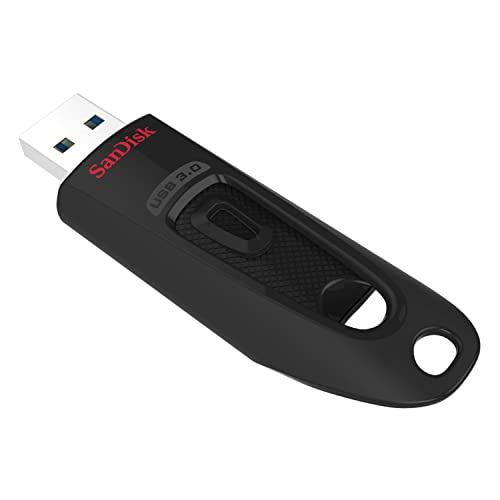
SanDisk Ultra 512GB
$74.99

SanDisk Ultra Luxe 1TB
$164.99

Corsair Flash Voyager GTX 512GB
$124.99
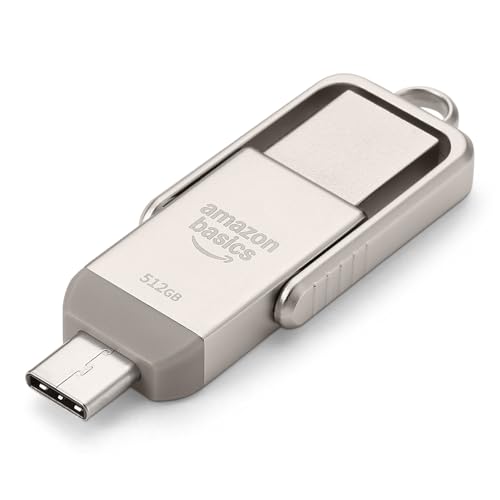
Amazon Basics Dual-Port 512GB
$74.09

SanDisk Extreme PRO Dual Drive 2TB
$368.50

SanDisk Ultra Dual Drive Luxe 1TB
$157.55
Corsair Flash Voyager GTX 1TB
$289.99

Patriot Supersonic Rage Prime 1TB
$127.99

Teamgroup C175 1TB
$94.99

Corsair Flash Survivor Stealth 512GB
$99.99
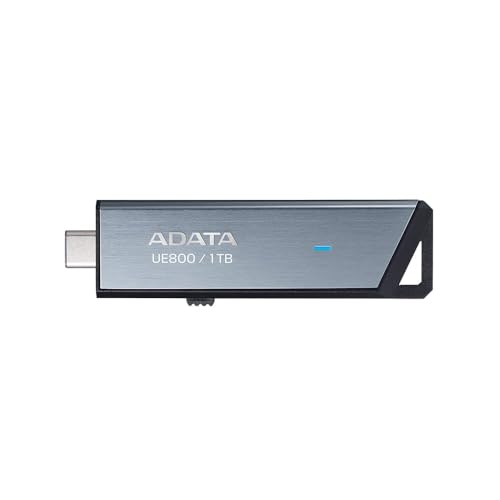
ADATA UE800 2TB
$114.99
Spec Comparison
TL;DR: The Transcend ESD310 packs 512 GB of fast SSD storage into an ultra‑light 0.01‑pound, dual‑USB‑C/‑A drive that reads up to 1,050 MB/s, making it ideal for on‑the‑go creators.
The standout spec is its dual USB 3.2 Gen 2 interface, offering both USB‑A and USB‑C connectors without any cable. With a maximum read speed of 1,050 MB/s and a write speed of 950 MB/s, the drive can move large video files quickly. Its 512 GB capacity and aluminum body with plastic end caps keep the unit rugged yet pocket‑sized at 71.3 mm × 20 mm × 7.8 mm.
Compared with the other 14 entries, the ESD310 is among the lightest at 0.01 pounds—lighter than the Corsair Flash Voyager GTX (0.114 pounds) and comparable to Samsung’s 0.0075‑pound model, while still heavier than the Patriot Supersonic Rage Prime (0.02 pounds). Its dual‑connector design also outpaces several rivals that offer only a single port, giving it a convenience edge in a crowded field.
Users rave about the tiny footprint and the speed boost for photo and video workflows, especially on handheld consoles like the Steam Deck. Professional reviewers highlight the aluminum build for durability and the plug‑and‑play experience across Windows, macOS, Linux, ChromeOS, iOS/iPadOS and Android. Reviewers note the main trade‑off: real‑world write speeds often settle around 900 MB/s, and you can easily misplace the removable plastic caps. There’s also no activity LED, so you can’t see transfer status at a glance.
Pros
Cons
Best for: Mobile professionals such as photographers and videographers, as well as gamers who need fast, portable storage for handheld consoles.
Avoid if: You require hardware‑level encryption, an activity LED for transfer monitoring, or rely exclusively on Lightning‑only iPhones.
“So small and fast—fits on my keychain and transfers 4K video in seconds.”
“Works perfectly with my Steam Deck and MacBook—no drivers needed.”
TL;DR: The Samsung FIT Plus 512 GB flash drive packs 512 GB of storage, up to 400 MB/s speeds, and rugged 5‑way protection into a tiny metal key‑ring design for $69.99.
The drive measures just 2.54 mm in height, 23.62 mm in length and 18.80 mm in width, and weighs only 3.10 g, so it slides into a pocket without a bulge. Its metal casing houses an integrated key ring and a 5‑way protection suite: 15000 gauss magnet resistance, 1500 G shock tolerance, waterproofing to 1 meter for 72 hours, X‑ray resistance up to 100 mGy, and operating temperatures from 0 °C to 60 °C.
At $69.99, the FIT Plus sits in a competitive price spot, and its 4.7/5‑star rating from 38,723 reviewers signals strong approval. The advertised up to 400 MB/s read and write speeds match the USB 3.2 Gen 1 interface, offering solid performance for a budget‑tier flash drive. While some peers push higher sequential speeds, they tend to be heavier and cost more, making Samsung’s offering a lightweight, value‑focused choice.
Users repeatedly praise the rapid large‑file transfers and the drive’s durability, noting that the metal body and key ring keep it safe on the go. Professional reviewers highlight the consistently achievable 400 MB/s read speed on modern hosts, though they point out that write speeds may dip below 100 MB/s on older machines. Reviewers most commonly point to the lack of a USB‑C connector and the absence of built‑in hardware encryption.
It uses a USB 3.2 Gen 1 (USB 3.1) Type‑A connector and works with PCs, Macs, gaming consoles, smart TVs and car infotainment systems. Samsung’s Magician software lets you optimize performance and securely erase data, but the drive doesn't include native encryption features.
Pros
Cons
Best for: Content creators, travelers, and field workers who need fast, durable, high‑capacity storage on a budget.
Avoid if: You rely solely on USB‑C ports or require hardware encryption for sensitive files.
“Transfers large video files in seconds—way faster than my old SanDisk.”
“Left it in my laptop for weeks—no issues, no breakage.”
TL;DR: Samsung’s Type‑C 512 GB flash drive offers 400 MB/s reads, a rugged metal case, and a feather‑light 0.0075 lb profile, but its 110 MB/s write speed may feel slow for heavy backups.
The standout spec is the 400 MB/s sequential read speed, which puts large 4K video files onto the drive in a flash. Coupled with a 512 GB capacity, it’s a solid match for creators who need quick off‑loads. The drive weighs just 0.007495716908 pounds and measures only 2.54 mm thick, making it practically invisible on a laptop edge.
Compared with other entries in this 15‑item roundup, the Samsung is noticeably lighter than the Corsair Flash Survivor Stealth 512 GB (0.0440924524 pounds) and far slimmer than its 24 mm height. Its 400 MB/s read speed outpaces the Survivor’s 150 MB/s and the Teamgroup C175’s 100 MB/s, while matching the Amazon Basics Dual‑Port’s advertised 400 MB/s. The drive sits at a higher price tier than the budget‑friendly Amazon model, but it brings a metal chassis and a reversible Type‑C connector that the dual‑port competitor lacks.
Reviewers consistently praise the metal body for feeling premium and surviving the occasional drop, and they love the reversible USB‑C plug for modern laptops and phones. Professional reviewers highlight how the 400 MB/s reads make 4K video transfers feel effortless. On the downside, users note the write speed caps at 110 MB/s, which can bottleneck large RAW photo batches. The capless design, while sleek, sometimes gathers dust or lint, and anyone with older USB‑A ports will need an adapter.
Beyond speed, the drive features a 15000 gauss magnet‑resistance rating, 1500 G shock tolerance, and a waterproof rating of 1 meter for up to 72 hours. It tolerates operating temperatures from 0 °C to 60 °C and can survive non‑operating extremes between –10 °C and 70 °C. Samsung also backs the unit with a five‑year warranty, underscoring confidence in its durability.
Pros
Cons
Best for: Most users looking for a well‑reviewed, reliable mainstream option
Avoid if: You have limited desk space or need portability
“lets you transfer big files between computers, back up data, or even boot a PC”
“Users frequently commend the drive’s speed, noting quick transfers of large video and photo libraries.”
TL;DR: Kingston’s DataTraveler Max packs 512 GB of storage and USB 3.2 Gen 2 speeds up to 1,000 MB/s read and 900 MB/s write in a sleek, retractable‑cap design.
What really stands out is the advertised read speed of up to 1,000 MB/s and write speed of up to 900 MB/s, which the USB 3.2 Gen 2 (10 Gbps) interface delivers. At 512 GB, it offers a sizable capacity in a pocket‑sized form factor with a retractable sliding connector and an LED indicator for transfer activity.
Compared with the other 14 drives in this roundup, Kingston is lighter than the SanDisk Ultra (0.03086471668 lb vs 0.0440924524375 lb) and far thinner than SanDisk’s 7.9 mm height. It’s heavier than the ultra‑light Samsung FIT Plus (0.03086471668 lb vs 0.006834330122 lb) but still shorter than the Samsung’s 23.62 mm length. Its read speed dwarfs the SanDisk Ultra’s 130 MB/s, the Amazon Basics dual‑port’s 400 MB/s, and the Corsair Survivor’s 150 MB/s, placing it among the fastest in the group. While the Teamgroup C175 1 TB model is lighter (9 g vs Kingston’s 14 g) and the Samsung Type‑C is lighter still (0.007495716908 lb), none of those rivals match Kingston’s advertised 1,000 MB/s burst reads.
Users rave about the “lightning‑fast” transfers and the satisfying click of the sliding cap, noting the LED makes it easy to see when data is moving. Professional reviewers praise the SSD‑like burst performance, but they also flag a noticeable drop in sustained large‑file writes, slipping to roughly 80 MB/s once the cache runs out. A few owners mention the slider can feel a bit stiff and the plastic housing feels lightweight, though most consider the trade‑off worth the speed.
Beyond speed, the drive supports Windows 11/10/8.1, macOS 10.14+, Linux 2.6+, and Chrome OS, and it comes with a five‑year limited warranty. It lacks hardware encryption or ruggedization, so it’s best kept in a controlled environment.
Pros
Cons
Best for: Creative professionals, students, and office workers who need fast, portable transfers of large media files.
Avoid if: Your workflow involves heavy, continuous write operations like video‑editing timelines or full system backups.
“lightning fast transfers, with one noting they "didn’t get a progress bar because the file copied too quickly."”
“the slider mechanism being stiff”
TL;DR: The SanDisk Ultra 512 GB flash drive offers 130 MB/s read speed, 5‑year warranty and SecureAccess encryption for $66.99, earning a 4.6‑star rating from over 51 k reviewers.
What really stands out is the advertised maximum read speed of 130 MB/s paired with a hefty 512 GB capacity, all housed in a slide‑to‑reveal, capless body that weighs just 20 g. The drive also ships with SanDisk SecureAccess encryption and a year of RescuePRO Deluxe, giving you built‑in data protection without extra software.
Compared with its peers, the Ultra’s read speed is slower than the Kingston DataTraveler Max’s 1000 MB/s but faster than the Teamgroup C175’s 100 MB/s and sits just below the Corsair Survivor’s 150 MB/s. Its $66.99 price tag is essentially on par with Kingston’s $67.10 and a bit cheaper than the Samsung FIT Plus at $69.99, while the Amazon Basics Dual‑Port commands $78.84 for a lower 400 MB/s read ceiling. In short, it lands in the middle of the performance‑price spectrum, offering solid speed without the premium cost of SSD‑based drives.
Users consistently praise the drive’s large capacity and the convenience of the built‑in encryption, noting that it makes moving photos, videos and project files painless. The 4.6‑star average from 51,537 reviews reflects broad satisfaction, especially for the price. However, reviewers also flag the modest write speed of 12–25 MB/s and occasional incompatibility of the exFAT format with certain TVs or game consoles. Reviewers frequently note the lack of an activity LED, which leaves transfer progress invisible.
Pros
Cons
Best for: Students, professionals, photographers and videographers who need a high‑capacity, secure drive without breaking the bank.
Avoid if: You require very high write performance or a USB‑C‑only solution for newer laptops.
“Users consistently rate the drive highly (4.6–4.8 stars across retailers) for ease of use, speed, and storage capacity.”
“Many appreciate the secure encryption feature, with verified purchasers noting it's easy to set up and works without needing an internet connection.”
TL;DR: The SanDisk Ultra Luxe 1TB offers a sleek all‑metal swivel, dual USB‑C/A connectors and up to 400 MB/s read speed in a feather‑light 0.02‑lb package.
This drive’s standout spec is its 1 TB capacity packed into a 1.0 mm‑high, 10.2 mm‑long and 15.2 mm‑wide metal body, making it one of the thinnest high‑capacity flash drives on the market. It also ships with a retractable swivel connector that lets you flip between USB‑C and USB‑A without a dongle, and the manufacturer lists read speeds of up to 400 MB/s.
Compared with the SanDisk Ultra Dual Drive Luxe 1TB, the Ultra Luxe is lighter at 0.02 lb versus 0.03 lb and dramatically slimmer (1.0 mm vs. 8.6 mm), though both share the same 400 MB/s read ceiling. The Patriot Supersonic Rage Prime 1TB advertises a faster 600 MB/s read rate, and the ADATA UE800 2TB pushes up to 1000 MB/s, so the Ultra Luxe sits in a middle ground on raw speed while keeping a premium metal feel.
Reviewers consistently praise the massive 1 TB storage and the convenience of dual connectors, noting that professional users love the ability to move large 4K video files without hunting for adapters. Reviewers call the metal swivel housing “premium and durable,” and the 4.6‑star rating from 1,855 reviewers reflects strong satisfaction. Users report the drive gets warm during extended transfers, and security‑focused users see the lack of built‑in hardware encryption as a deal‑breaker.
Pros
Cons
Best for: Buyers willing to invest in a proven, high‑quality option
Avoid if: You need advanced features or professional‑grade performance
“Users consistently rate the drive highly (4.6–4.8 stars across retailers) for ease of use, speed, and storage capacity.”
“Many appreciate the secure encryption feature, with verified purchasers noting it's easy to set up and works without needing an internet connection.”
TL;DR: The Corsair Flash Voyager GTX 512 GB offers SSD‑class 440 MB/s read/write speeds in a rugged zinc‑alloy case with dual USB‑A/C connectors, backed by a 5‑year warranty.
The drive packs a solid 512 GB of 3D NAND storage and delivers up to 440 MB/s for both reading and writing, thanks to its USB 3.1 Gen 1 (USB 3.0) interface. Its dual‑sided USB‑Type‑A and USB‑Type‑C connectors let you plug into almost any modern computer without needing an adapter.
Compared with the other 14 entries, the Voyager GTX is noticeably heavier at 0.114 pounds (52 g) than the Samsung Type‑C 512 GB (0.007495716908 pounds), the SanDisk Ultra Dual Drive Luxe (0.03 pounds), and the Patriot Supersonic Rage Prime 1 TB (0.02 pounds). Speed‑wise, its 440 MB/s read/write rate sits below the Transcend ESD310’s advertised 1,050 MB/s read and the ADATA UE800’s up‑to‑1000 MB/s, but it outpaces the Corsair Flash Survivor Stealth’s 150 MB/s and matches the Samsung’s 400 MB/s read speed.
Reviewers praise the SSD‑like performance and the premium zinc‑alloy housing, noting that the integrated LED serves as a handy transfer indicator. Everyday users echo that sentiment, highlighting rapid moves of large photo and video libraries and the drive’s durability under rough handling. The most common gripe is a steep drop to roughly 30–40 MB/s when the drive is used on legacy USB 2.0 ports, and a few users mention the metal body getting warm during extended transfers.
Running on Corsair’s SSD Toolbox, the drive offers formatting, partitioning, and health monitoring without additional drivers. It works with Windows 7‑10, macOS, and Linux out of the box, making it a versatile choice for mixed‑OS environments.
Pros
Cons
Best for: Content creators and power users who need a well‑reviewed, high‑capacity USB drive with fast SSD‑like transfers.
Avoid if: Your primary computers only have USB 2.0 ports or you require an ultra‑slim, lightweight flash drive.
TL;DR: The Amazon Basics Dual‑Port 512 GB flash drive packs a metal rotating case, USB‑A & USB‑C connectors and up to 400 MB/s read speed for $78.84, though write performance isn’t disclosed.
The standout feature is its dual‑port design – a USB‑A (Type‑A) and a USB‑C (Type‑C) connector on the same stick – so you can plug straight into both legacy PCs and modern smartphones without an adapter. It offers a nominal 512 GB capacity with more than 460 GB usable space and reads at up to 400 MB/s via a USB 3.2 Gen 1 interface, all housed in a rotating metal exterior with a protective cover.
Compared with the other 14 drives in this roundup, the Amazon Basics model sits in a mid‑range price tier. Its read speed matches the Samsung Type‑C 512 GB (400 MB/s) but falls short of the Kingston DataTraveler Max’s 1000 MB/s and its write speed isn’t listed, unlike Kingston’s advertised 900 MB/s. It’s faster than the SanDisk Ultra’s 130 MB/s and the Corsair Survivor Stealth’s 150 MB/s, yet slower than the high‑end Kingston. Most competitors provide a single connector, so the dual‑port convenience is a unique advantage. At 18 g it’s heavier than the ultra‑light Samsung FIT Plus (3.10 g) and the Teamgroup C175 (9 g), but weight isn’t a primary buying factor here.
Reviewers consistently praise the fast read performance and the solid metal build, noting that the rotating cover protects the connectors during travel. Professional reviewers highlight the dual‑port layout as a major convenience for photographers and videographers who need to move 4K footage between devices. However, users frequently mention the lack of any listed write speed, leading to uncertainty when transferring large video files. The drive also doesn’t support Lightning ports, so iPhone or iPad users will need an extra adapter.
Pros
Cons
Best for: Budget-conscious buyers seeking a reliable entry-level option
Avoid if: You want the best value‑per‑dollar in its price range
“25GB in 25 minutes”
“really good”
TL;DR: The SanDisk Extreme PRO Dual Drive 2TB delivers up to 1,000 MB/s read, 900 MB/s write and a dual USB‑C/USB‑A design in a sturdy metal case, but it comes at a premium $377.81 price.
This drive’s standout spec is its advertised sequential performance – up to 1,000 MB/s read and up to 900 MB/s write – paired with a massive 2 TB capacity. The USB 3.2 Gen 2 interface and dual USB‑C/USB‑A connectors let you move large media files between modern laptops and older machines without an adapter.
Compared with the other 14 entries, it's pricier than the Corsair Flash Voyager GTX 1TB (listed at $260.99) and the SanDisk Ultra Luxe 1TB (listed at $164.99). Those rivals cap at 440 MB/s read/write, while the Extreme PRO pushes well beyond that. It also weighs more than the ultra‑slim SanDisk Ultra Luxe 1TB (0.02 pounds vs 0.05 pounds), but the metal chassis adds durability that many plastic‑cased drives lack.
User sentiment repeatedly praises the lightning‑quick transfers for large video projects and the convenience of having both USB‑C and USB‑A in one stick. Professional reviewers note the drive hits near‑advertised speeds and appreciate the built‑in 128‑bit AES encryption plus the RescuePRO Deluxe recovery suite. Common complaints focus on the exposed connector that can snag and on occasional heat buildup during prolonged transfers, especially given its bulkier form factor.
Beyond speed, the drive offers 8,361 IOPS random 4K reads and 3,481 IOPS random 4K writes, which helps when handling many small files. The included SanDisk app provides automatic backup, and the lifetime limited warranty underscores the brand’s confidence in durability.
Pros
Cons
Best for: Buyers willing to invest in a proven, high‑quality option
Avoid if: You're shopping on a tight budget — it's priced at $377.81
“Transfers 4K video files in seconds compared to minutes on older drives”
“Love the dual connectors—no more carrying adapters”
TL;DR: The SanDisk Ultra Dual Drive Luxe packs a full 1 TB into a sleek all‑metal, dual‑connector flash drive that reads up to 400 MB/s, but it runs hot and lacks encryption.
This drive’s standout feature is its 1 TB capacity combined with a USB‑C / USB‑A swivel connector, letting you move large files between modern laptops and older PCs without an adapter. It sports an all‑metal housing for durability and reads up to 400 MB/s, which reviewers say feels “fast” for a flash drive. The dimensions are 8.6 mm × 44.5 mm × 12.2 mm, and it weighs 0.03 pounds, making it a compact addition to any keyring.
Compared with the other 14 contenders, the Luxe is a bit heavier than the SanDisk Ultra Luxe 1TB (which is 0.02 pounds) and considerably larger than that model’s 1.0 mm height and 10.2 mm length. Its 400 MB/s read speed matches Samsung’s 512 GB Type‑C drive but falls short of the Transcend ESD310’s 1,050 MB/s, ADATA UE800’s 1,000 MB/s, and Patriot Supersonic Rage Prime’s advertised 600 MB/s sequential reads. Even Corsair’s Flash Voyager GTX edges ahead at 440 MB/s. Nonetheless, the dual‑connector design gives it a convenience edge that many single‑connector rivals lack.
Consumer sentiment highlights the drive’s speed, compactness, and sturdy metal build as major pluses. Professional reviewers praise the “tiny wonder” of having a full terabyte in such a small form factor and note the convenience of the swivel mechanism. The most common complaints revolve around the drive heating up during prolonged large transfers and a noticeable gap between the advertised read speed and slower write performance. Users also point out the lack of any hardware or software encryption, and they describe the bundled Memory Zone app’s social‑media backup feature as unreliable.
The drive runs on a USB 3.2 Gen 1 (USB 3.1 Gen 1 / USB 3.0) interface and supports Windows, macOS, Android, and Linux (OTG). It includes a keyring hole for easy portability and comes with a 5‑year limited manufacturer warranty. The spec lists write speeds as “Variable, lower than read speed,” which aligns with user‑reported slower writes.
Pros
Cons
Best for: Mobile professionals, content creators, travelers, and Android users who need a high‑capacity, dual‑connector flash drive that fits in a pocket.
Avoid if: You require encryption, SSD‑level write performance, or a drive that stays cool under heavy workloads.
“Users consistently rate the drive highly (4.6–4.8 stars across retailers) for ease of use, speed, and storage capacity.”
“Many appreciate the secure encryption feature, with verified purchasers noting it's easy to set up and works without needing an internet connection.”
TL;DR: The Corsair Flash Voyager GTX 1TB delivers SSD‑like 440 MB/s read/write speeds in a rugged metal case, but its premium $260.99 price and USB‑A‑only interface may limit its appeal.
At the core of this drive is a full 1 TB of 3D NAND storage paired with 33,000 IOPS random performance and symmetrical 440 MB/s read and write speeds. Those figures place it among the fastest USB‑3.0 flash drives on the market, and the metal zinc‑alloy enclosure with aluminum accents adds a premium feel that many reviewers note as “solid” and “durable.”
Compared with other 1 TB options in this roundup, the Corsair is noticeably larger and heavier – it weighs 0.114 pounds, which is heavier than the 0.02‑pound SanDisk Ultra Luxe 1TB and larger than its 1 mm height. Speed‑wise, it outpaces the SanDisk Ultra Luxe’s 400 MB/s read rating, yet it falls short of the SanDisk Extreme PRO Dual Drive 2TB’s advertised 1,000 MB/s reads. Its price tag also sits above many peers, making it a premium‑tier choice rather than a budget pick.
Consumer feedback repeatedly praises the drive’s plug‑and‑play convenience, the fast transfer rates, and the sturdy metal housing. However, users also flag the removable cap as a nuisance that they may misplace, and the lack of any hardware encryption or password protection draws common criticism from security‑conscious buyers. Professional reviewers echo the speed praise but point out the USB‑A‑only connection as a limitation for newer laptops that favor USB‑C.
Beyond raw speed, the Voyager GTX supports Windows 7‑11, macOS, and Linux, and works over both USB 3.0 and USB 2.0 standards. It operates safely between 0 °C and 70 °C and comes with a five‑year warranty plus Corsair’s SSD Toolbox software for basic drive management.
Pros
Cons
Best for: Buyers willing to invest in a proven, high‑quality option
Avoid if: You need advanced features or professional‑grade performance, such as hardware encryption, water/dust resistance, or USB‑C connectivity
TL;DR: The Patriot Supersonic Rage Prime 1TB delivers SSD‑like 600 MB/s reads, a rugged rubberized body and a 5‑year warranty, but its $127.99 price is higher than many USB‑A flash drives.
This drive packs a full 1 TB of storage (about 931 GB usable) and hits the advertised 600 MB/s sequential read speed with a real‑world figure of 613 MB/s, while sequential writes reach 547 MB/s (sustained average 667 MB/s). It connects via USB 3.2 Gen 2 (10 Gbps) and remains backward compatible with USB 3.0 and USB 2.0, giving you the fastest USB‑A performance in this list.
Compared with the other fourteen contenders, the Patriot offers more capacity than most of the 512 GB models such as the Corsair Flash Voyager GTX and Transcend ESD310, matching the ADATA UE800 and SanDisk Ultra Dual Drive Luxe on size. At 0.02 pounds (8.2 g) it is lighter than the Corsair, Transcend, ADATA, Corsair Survivor and SanDisk drives, though the Samsung Type‑C flash is even lighter. Its 600 MB/s read outpaces the Corsair Flash Voyager GTX’s 440 MB/s and the Samsung Type‑C’s 400 MB/s, yet it sits below the Transcend’s 1,050 MB/s and ADATA’s 1,000 MB/s peak rates.
Users consistently applaud the blazing transfer speeds and the capless, retractable USB‑A connector that slides neatly into the rubberized housing. Reviewers also note the built‑in thermal sensor that helps keep the drive’s temperature in check, even though some report a slight warmth under prolonged heavy use. Critics frequently point out that the opaque case makes the red LED hard to see, and the lack of a USB‑C option limits compatibility with newer laptops.
Pros
Cons
Best for: Content creators, video editors and photographers who need fast, high‑capacity USB‑A storage with a rugged design.
Avoid if: You're shopping on a tight budget — it's priced at $127.99
“accurate read speeds, lack of a cap, and 5-year warranty”
“a little warm”
TL;DR: The Teamgroup C175 1TB USB‑C flash drive packs a terabyte of space into a 9.5 mm‑high unibody, offers 100 MB/s read speeds and a lifetime warranty, but its write speed tops out around 41 MB/s.
What really stands out is the 1 TB (1,000,000,000,000 bytes) capacity housed in a compact 9.5 mm × 54.9 mm × 20.5 mm chassis. The matte‑and‑gloss dual‑texture finish feels premium, and the USB 3.2 Gen 1 interface delivers a maximum sequential read speed of 100 MB/s. Users also appreciate the plug‑and‑play convenience and the snap‑on cap, even though some note the cap can feel a bit flimsy.
Compared with the 14 other drives in this roundup, the C175 offers the largest storage bucket – most competitors sit at 512 GB. Its read speed is lower than the Amazon Basics Dual‑Port 512GB, which lists up to 400 MB/s, but the Teamgroup still provides respectable performance for everyday file transfers. In terms of weight, the drive (0.01984160358 lb) is lighter than the Corsair Flash Survivor Stealth (0.0440924524 lb) yet heavier than the ultra‑light Samsung FIT Plus (0.006834330122 lb). Because the design lacks rugged water‑resistant ratings that some peers tout, it serves as a sleek, everyday‑use option rather than an adventure‑grade device.
Reviewers consistently praise the massive 1 TB capacity and the clean, ergonomic shape, calling it ideal for students and travelers who need to carry large media libraries or project files. The typical sequential write speed of 41 MB/s shows up in user comments as “good enough for documents and photos but sluggish for large video batches.” Professional reviewers highlight the lifetime warranty as a confidence booster, while also noting the absence of an official write‑speed figure, which can be a deal‑breaker for power users.
Pros
Cons
Best for: Students, professionals and travelers who need a portable, high‑capacity drive for documents, media and backup tasks.
Avoid if: You require fast bidirectional transfers, professional‑grade durability, or iOS compatibility.
TL;DR: The Corsair Flash Survivor Stealth 512 GB offers rugged aluminum construction, 200 m waterproof protection, 40 G shock resistance, and up to 150 MB/s read speed for $99.99.
What really sets this drive apart is its military‑grade durability. The CNC‑machined aircraft‑grade anodized aluminum housing houses a screw‑on cap that seals an EPDM gasket, delivering waterproof protection down to 200 meters (65616.8 ft) and shock resistance of 40 G. With a capacity of 512 GB and a read speed of up to 150 MB/s over a USB 3.0 (Standard‑A) interface, it’s built for harsh environments where data loss isn’t an option.
Compared with the other 14 USB sticks in this roundup, the Survivor Stealth is heavier than the ultra‑light Samsung Type‑C 512 GB (0.0075 lb) and the Teamgroup C175 1TB (0.0198 lb), but still lighter than the Corsair Flash Voyager GTX 512 GB (0.114 lb). Its 150 MB/s read speed trails the Samsung, Amazon Basics Dual‑Port, and Patriot models, which list 400–600 MB/s, yet it outpaces the Teamgroup’s 100 MB/s figure. Pricing-wise, it sits above some budget‑focused options like the Teamgroup stick, though it matches the premium positioning of the Voyager GTX.
Users consistently praise the drive’s ruggedness, noting that the aluminum shell and deep‑water rating make it a favorite for outdoor photographers and field technicians. However, reviewers also point out the screw‑on cap can be fiddly in cold or wet conditions, and the lack of a disclosed write speed raises concerns about slower transfers when saving large files. The 24 mm × 24 mm × 77 mm form factor is bulkier than many pocket‑sized competitors, which some find less convenient for everyday carry.
From a technical standpoint, the drive works plug‑and‑play with Windows, macOS, and Linux, operating safely between 0 °C and 70 °C. It carries a 5‑year warranty, reflecting Corsair’s confidence in its build quality. While it doesn’t support Windows To Go, its sturdy design and read performance of up to 150 MB/s make it a solid choice for professionals who need a reliable, rugged storage solution.
Pros
Cons
Best for: Outdoor professionals, photographers, and anyone needing a rugged, high‑capacity USB drive.
Avoid if: You have limited desk space, need ultra‑compact portability, or require Windows To Go support.
TL;DR: The ADATA UE800 2TB delivers up to 1000 MB/s speeds in a sleek, capless USB‑C form factor, but its premium price and lack of rugged features may limit its appeal.
The standout spec of the UE800 is its advertised 2 TB storage paired with USB‑C 3.2 Gen 2 performance that tops out at 10 Gbps, offering read and write speeds of up to 1000 MB/s. Its brushed‑aluminum body houses a capless, retractable slider that eliminates the hassle of lost caps, and a built‑in lanyard hole adds a touch of convenience for on‑the‑go use.
When you line it up against the other 14 drives in this roundup, the UE800 sits toward the higher end of the price spectrum and carries a modest weight of 13 g. It’s lighter than many bulkier metal‑capped models but heavier than the ultra‑light plastic sticks that weigh just a few grams. The lack of an IP rating also puts it behind rugged options that offer water and dust resistance.
Reviewers consistently praise the flash drive’s high‑speed transfers and the durability of its metal chassis, noting that the capless slider feels solid in daily use. Professional reviewers highlight the near‑theoretical USB‑3.2 Gen 2 bandwidth as a strong point, while users flag the absence of hardware encryption and occasional slider stiffness after extensive cycles. The drive remains backward compatible with USB 2.0, and ADATA backs it with a 5‑year limited warranty.
Pros
Cons
Best for: Content creators and mobile professionals who need rapid 4K/8K video off‑loading and appreciate a sleek, capless USB‑C design.
Avoid if: You require rugged, water‑proof storage or built‑in encryption for sensitive data.
Breakdown
Transcend ESD310 512GB
Pros
Samsung FIT Plus 512GB
Pros
Samsung Type-C 512GB
Pros
Kingston DataTraveler Max 512GB
Pros
Based on scoring data and product specs
Personalized picks
Best Overall Pick
Transcend ESD310 512GB
Best OverallBest for: Audiophiles and enthusiasts seeking premium sound quality and advanced features
Samsung FIT Plus 512GB
Best for: Budget-conscious buyers seeking a reliable entry-level option
$69.99-$63.75 vs winner
Skip ADATA UE800 2TB if…
You have limited desk space or need portability
Transcend’s ESD310 512 GB takes the top spot thanks to its high‑speed dual‑interface and solid build. It offers a maximum read speed of 1,050 MB/s and a write speed of 950 MB/s, while the USB 3.2 Gen 2 (10 Gbps) connection delivers fast transfers on both Type‑A and Type‑C ports. A 5‑year limited warranty and an aluminum body with plastic end caps round out a package that feels both premium and reliable, and it holds a 4.6‑star rating from 1,503 reviewers.
The Samsung FIT Plus 512 GB lands as the runner‑up, ideal if you need a pocket‑sized, rugged drive you can clip to a keyring. Its metal casing measures just 2.54 mm in height, 23.62 mm in length and weighs only 3.10 g, and it survives drops of up to 1500 G, water immersion to 1 meter for 72 hours, and temperatures from –10 °C to 70 °C. With read and write speeds up to 400 MB/s, it’s a sturdy companion for on‑the‑go media playback and quick file swaps.
For shoppers on a tighter budget, the SanDisk Ultra 512 GB at $66.99 delivers the lowest entry price. If you prefer a mid‑range option with modern connectivity, the Samsung Type‑C 512 GB at $104.99 offers USB‑C convenience and solid performance. And for those chasing premium capacity, the SanDisk Extreme PRO Dual Drive 2TB at $377.81 provides the highest storage and a premium build for demanding workflows.
Pick the Transcend ESD310 512 GB today for the best high‑capacity flash drive experience.
The Samsung FIT Plus 512 GB is rated waterproof to a depth of 1 meter for up to 72 hours and also offers 1500 G shock resistance, making it the most rugged choice for wet or rugged environments. Other drives in the list, such as the Transcend ESD310 or Kingston DataTraveler Max, do not list any water‑proof specifications.
Please sign in to leave a review
No reviews yet. Be the first to review!
