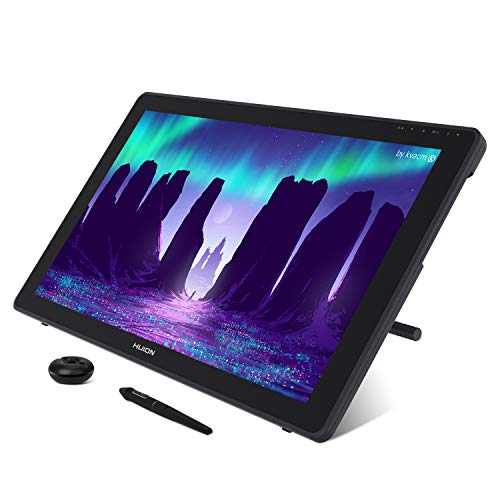
Picking the right Huion tablet can feel overwhelming, especially when you’ve got 15 models on the table. We’ve broken them into three clear price tiers so you can match your budget to the features you need. On the budget side you’ll find the Inspiroy H640P at $27.99 and the HS610 for $47.99, both packing 8192 pressure levels and a handful of programmable keys. Mid‑range options like the Inspiroy H950P sit at $49.89, offering an 8.7 × 5.4‑inch active area, ±60° tilt and a 4.4‑star rating from 13,918 reviews. If you’re ready to step up, premium picks such as the Kamvas 13 at $229.00 deliver a full‑laminated display, 16,384 pressure levels and dual dials for fine‑tuned control.
Across the lineup, you’ll notice a common thread: every tablet ships with Huion’s battery‑free PW‑series stylus, so you never have to worry about charging. Active drawing areas range from a compact 100 × 160 mm on the H640P up to a spacious 293.8 × 165.2 mm on the Kamvas 13, letting you choose the canvas size that fits your workflow. Shortcut keys vary from six on the Inspiroy 2 Small Pink to a full set of 28 on the H1060P, giving you plenty of ways to streamline repetitive actions.
Next, we explore each tier, highlighting the strengths and quirks of every model so you can decide which Huion tablet earns a spot on your desk.

Huion Inspiroy H950P
Its generous 138 mm × 221 mm active drawing area gives you plenty of space for detailed work, a key factor behind its top rating.

Huion HS610
Ideal for budget-conscious creators who need a reliable entry‑level tablet, it comes in at $47.99—about $2 less than the Best Overall model.

Huion Inspiroy H640P
The compact 100 mm × 160 mm active area fits snugly on small desks, offering an ultra‑affordable entry point at $27.99.
Also considered
Score Analysis
Key score advantages vs. runner-up (Huion HS610)
Price Range

Huion Inspiroy H950P
$49.89

Huion HS610
$47.99

Huion Inspiroy H640P
$27.99

Huion Inspiroy 2 Medium
$63.99

Huion Inspiroy H1060P
$43.99
Huion Inspiroy Q11K
$49.99

Huion Inspiroy 2 Large
$84.99

Huion Kamvas 13
$229.00

Huion Inspiroy 2 Small Pink
$40.99

Huion Kamvas 22
$448.00

Huion Kamvas Pro 16
$299.99

Huion 420
$16.99

Huion Kamvas Slate 11
$262.99

Huion Note X10
$95.99
Huion WH1409
$69.99
Spec Comparison
TL;DR: The Huion Inspiroy H950P packs an 8192‑level, battery‑free stylus, ±60° tilt and an 8.7 × 5.4‑inch active area into a 0.31‑inch‑thin, 1.76‑lb tablet for under $50.
The standout spec is its 8192 pressure‑sensitivity levels combined with ±60° tilt support, letting you vary line weight and shading without switching tools. The included PW100 stylus is battery‑free and weighs virtually nothing, while the tablet’s active drawing area measures 138 mm × 221 mm (8.7 × 5.4 in). Manufacturer lists accuracy at ±0.3 mm and the report rate hits 233 PPS, which should feel snappy for most drawing software.
Compared with its peers, the H950P is thinner than the HS610’s 8 mm body and the Q11K’s 11 mm chassis, yet its 0.31‑in thickness still feels solid. At 1.76 lb it sits heavier than the ultra‑light HS610 (about 1.32 lb) and the Inspiroy 2 Small Pink (around 0.61 lb), but lighter than the Q11K (1.94 lb) and the WH1409 (2.43 lb). Its active area matches the Inspiroy 2 Medium’s 138 × 221 mm canvas, but is smaller than the HS610’s PC mode (158.8 × 254 mm) while offering more space than the HS610’s Android mode (99.2 × 158.8 mm). Like the Q11K and H1060P, it shares the same 5080 LPI pen resolution and 8192‑level pressure curve.
User sentiment praises the battery‑free PW100 for eliminating charging hassles and notes the tilt function as a “standout” feature—though several reviewers mention it often requires a firmware update to activate. Reviewers repeatedly call the tablet’s lightweight, portable design “great for travel” and “ideal for cramped desks.” On the downside, the lack of iOS support and occasional pen‑cursor issues on Samsung devices are common complaints, and some buyers report missing accessories out of the box.
Pros
Cons
Best for: Beginner and intermediate digital artists who want high pressure sensitivity, tilt control and a portable, well‑reviewed tablet without breaking the bank.
Avoid if: You rely on iOS devices, need a built‑in display, or require flawless Samsung compatibility out of the box.
“Battery-free pen is a game-changer”
“Smooth and responsive”
TL;DR: The Huion HS610 offers a 10 × 6.25‑inch active area, battery‑free PW100 pen with 8192 pressure levels and tilt, plus 28 shortcut keys for under $50.
The tablet’s standout spec is its 254 mm × 158.8 mm (10 × 6.25 in) active drawing area for PC, paired with a 5080 LPI pen resolution and a report rate of 266 PPS. The PW100 stylus is battery‑free, supports ±60° tilt, and delivers ±0.3 mm accuracy, giving beginners and intermediate artists a precise drawing experience without worrying about charging.
Compared with other Huion models in this roundup, the HS610 matches the Inspiroy H1060P and H950P with a total of 28 express keys (12 physical + 16 soft‑touch). It is heavier than the ultra‑light H640P (272 g) but lighter than the H950P (798 g), placing it solidly in the mid‑weight range. Its 8 mm thickness is on par with the H640P and H1060P, while the active area is larger than the compact Inspiroy 2 Small Pink (160 mm × 100 mm) and comparable to the larger Inspiroy 2 Medium (221 mm × 138 mm).
User feedback consistently highlights the tablet’s natural feel and the convenience of the touch‑sensitive ring for zooming and brush control. Reviewers also appreciate the included micro‑USB OTG adapter and the eight spare pen nibs. The main criticisms focus on the wired‑only connection, the fact that the touch ring and shortcut keys don’t work on Android, and the lack of iOS support, which can be a deal‑breaker for creators who rely on Apple devices.
Pros
Cons
Best for: Budget-conscious buyers seeking a reliable entry‑level option
Avoid if: You want the best value‑per‑dollar in its price range
TL;DR: The Huion Inspiroy H640P packs an 8192‑level battery‑free pen, 5080 LPI resolution and six programmable keys into a 0.6 lb, 160 mm × 100 mm active area for a budget‑friendly, portable drawing experience.
The tablet’s standout spec features the PW100 stylus, which offers 8192 pressure‑sensitivity levels, ±0.3 mm accuracy and a 10 mm sensing height, all without a battery. Coupled with a 233 PPS report rate, the pen feels responsive enough for sketching and note‑taking. Its active drawing area measures 160 mm by 100 mm, giving you roughly 6.3 × 3.9 in of canvas space while the whole unit weighs just 0.6 pounds.
Compared with other entries in the roundup, the H640P sits in the middle of the weight spectrum: it’s heavier than the ultra‑light Huion 420 at 0.2755778275 pounds, but noticeably lighter than the Huion H1060P (1.6975594174 pounds), the HS610 (1.322773572 pounds) and the larger H950P (1.76 pounds). The H640P offers six programmable express keys, fewer than the 12 physical keys on the H1060P, yet they still provide quick shortcuts for beginners. The active area is larger than the tiny footprint of the Huion 420, though it remains smaller than the expansive canvas of the H950P.
Users consistently praise the battery‑free pen for its natural feel and the tablet’s Android compatibility, calling it a solid “mouse replacement” for quick annotations. However, the compact active area often leads to frequent zooming, and the lack of tilt support limits brush dynamics for more advanced workflows. A few reviewers note occasional macOS driver hiccups and a fragile micro‑USB cable, but most find the non‑slip rubber base and reversible design (left‑handed support) feel practical.
Pros
Cons
Best for: Budget-conscious buyers seeking a reliable entry‑level option
Avoid if: You need a large drawing surface, tilt functionality, or iOS compatibility
“Battery-free pen is a game-changer”
“Smooth and responsive”
TL;DR: The Huion Inspiroy 2 Medium offers an 8.7 × 5.4 in active area, 8192 pressure levels with tilt, a scroll‑wheel shortcut, and a lightweight 0.9259415004‑lb design for a solid $67.99 price.
The tablet’s most distinctive spec is its 221 × 138 mm (8.7 × 5.4 in) PC‑mode active area paired with a PW110 stylus that delivers 8192 pressure levels, 5080 LPI resolution and ±60° tilt. A 9.5 mm‑diameter pen with an extended silicone grip reduces hand fatigue, while the built‑in scroll wheel lets you adjust brush size or zoom without reaching for keyboard shortcuts.
At 0.9259415004 pounds, the Inspiroy 2 Medium is noticeably lighter than the WH1409 (2.425084882 lb), the Q11K (1.94 lb), and all other peers listed, making it easy to carry between workstations. Its 305 mm × 180 mm footprint is also more compact than the WH1409’s 456 mm length and the large‑size Inspiroy 2 Large, yet it matches the H950P’s 221 × 138 mm drawing area. Unlike most competitors—WH1409, Q11K, HS610, and H1060P—the medium model includes a scroll wheel, and its 3 group keys (up to 24 functions) give extra workflow flexibility.
Reviewers repeatedly praise the tablet’s realistic, high‑friction surface, noting it feels about 20 % rougher than earlier Huion models and mimics paper nicely. Professionals highlight the scroll wheel and group keys as workflow boosters, while everyday users love the lightweight build and the pen’s ergonomic grip. The most common complaints focus on the wired‑only USB‑C connection and a scroll wheel that can feel stiff straight out of the box.
Pros
Cons
Best for: Most users looking for a well‑reviewed, reliable mainstream option
Avoid if: You're shopping on a tight budget — it's priced at $67.99
“Battery-free pen is a game-changer”
“Smooth and responsive”
TL;DR: The Huion Inspiroy H1060P offers a spacious 10 × 6.25‑inch drawing area, 8192 pressure levels, and 28 programmable keys at $41.99, making it a solid budget tablet despite a slippery surface and older Micro‑USB connection.
The standout feature is its 10 × 6.25‑inch (254 mm × 158.8 mm) active area, giving you plenty of room for detailed illustrations while the PW100 battery‑free pen delivers 8192 pressure‑sensitivity levels and ±60° tilt support. Manufacturers list accuracy at ±0.3 mm, and the pen reports up to 233 PPS, so strokes feel responsive. The tablet also packs 28 express keys—12 hard‑press and 16 soft‑touch—so you can map shortcuts for Photoshop, Illustrator, Krita, and more.
Compared with other Huion models in this roundup, the H1060P is heavier than the Inspiroy 2 Small Pink (0.606 lb) and the H640P (0.6 lb), but lighter than the Q11K (1.94 lb). Its 10 mm thickness is thicker than the HS610’s 8 mm and the H950P’s 7.87 mm, yet thinner than the Q11K’s 11 mm. While the HS610 shares the same 254 mm × 158.8 mm active area, the H1060P’s larger footprint surpasses the smaller 100 mm × 160 mm area of the Inspiroy 2 Small Pink and H640P, giving you more canvas space at a similar price point.
Reviewers consistently praise the tablet’s natural drawing feel and the lack of lag, especially noting that pressure works well in Inkscape—a rare compliment. However, many users point out that the smooth surface feels “slightly long‑in‑the‑tooth” and can be slippery during long sessions. The driver’s described as “complex and less intuitive,” and the reliance on a Micro‑USB connection feels outdated compared with newer USB‑C or wireless options.
Technical highlights include a pen resolution of 5080 LPI and a sensing height of 10 mm, ensuring fine detail capture. The PW100 pen comes with 11 nibs (1 pre‑installed + 10 extras) and two side buttons for quick access. Compatibility spans Windows 7+, macOS 10.11+, Android 6.0+ (OTG required), and Linux, though you’ll need a USB‑A to USB‑C adapter for Mac.
Pros
Cons
Best for: Budget-conscious buyers seeking a reliable entry-level option
Avoid if: You want the best value‑per‑dollar in its price range
“Battery-free pen is a game-changer”
“Smooth and responsive”
TL;DR: The Huion Inspiroy Q11K gives you an 11‑inch drawing surface, 8192 pressure levels and wireless freedom for $54.99, though the original pen needs frequent charging and lacks tilt.
The standout spec is the 11 × 7‑inch active area, which translates to a generous 279.4 × 174.6 mm workspace for detailed illustrations. Coupled with a pen resolution of 5080 LPI and 8192 pressure‑sensitivity levels, the tablet delivers fine line control that professionals appreciate.
At 1.94 pounds, the Q11K is slightly heavier than the Huion Inspiroy H950P (1.76 lb) and noticeably heftier than the HS610 (≈1.32 lb). Its overall dimensions of 390 mm × 223 mm × 11 mm place it in the mid‑range size bracket, offering a larger active area than the H950P’s 138 mm × 221 mm drawing field while still fitting comfortably on a typical desk.
Users consistently praise the tablet’s wireless 2.4 GHz receiver and the eight programmable shortcut keys, which streamline workflow without reaching for the keyboard. Professional reviewers highlight the solid build quality and note that the 233 PPS report rate produces smooth, jitter‑free lines. However, the original PF150 pen requires recharging via a micro‑USB port, a point that many everyday users flag as a workflow interruption, and the base model doesn't support tilt, limiting its usefulness for shading techniques.
Pros
Cons
Best for: Most users looking for a well‑reviewed, reliable mainstream option
Avoid if: You have limited desk space or need portability
“Battery-free pen is a game-changer”
“Smooth and responsive”
TL;DR: The Huion Inspiroy 2 Large offers a spacious 266.7 × 166.7 mm active area, 8192 pressure levels, tilt support and a unique programmable scroll wheel for $84.99.
What really stands out is the tablet’s large active drawing area of 266.7 mm width by 166.7 mm height, paired with a 24‑key shortcut layout split into three sets of eight. The PW110 pen delivers 8192 pressure levels, 5080 LPI resolution and ±60° tilt, while the 3 gf activation force feels feather‑light. A single programmable scroll wheel adds instant zoom and pan control, a feature rarely seen at this price.
Compared with the other 14 tablets in our roundup, the Inspiroy 2 Large sits in the middle of the weight spectrum: it’s heavier than the ultra‑light Huion Note X10 (433 g) but lighter than the bulkier WH1409 (2.43 lb) and the Huion Q11K (1.94 lb). Its 24 shortcut keys outnumber the 12 keys on the WH1409 and the eight‑key setups on the Inspiroy 2 Medium and Q11K, giving you more on‑tablet control without reaching the heft of the larger models.
User feedback repeatedly praises the pen’s responsiveness and the scroll wheel’s convenience for zooming while editing. Reviewers also note the tablet’s smooth surface can feel a bit slippery, especially for left‑handed users, and the lack of a built‑in display means you’ll need to develop hand‑eye coordination. Professional reviewers highlight the low 3 gf activation force and the PenTech 3.0 engine as rivaling higher‑priced Wacom Intuos units.
From a technical standpoint, the tablet draws power via USB‑C, so you never need to swap batteries. It ships with the PW110 stylus, ten spare nibs, a pen holder, a USB‑C cable, an OTG adapter for Android use, and an optional artist glove. Compatibility spans Windows 7+, macOS 10.12+, Linux (Ubuntu 20.04+) and Android 6.0+, making it a versatile choice for multi‑platform creators.
Pros
Cons
Best for: Most users looking for a well‑reviewed, reliable mainstream option
Avoid if: You're shopping on a tight budget — it's priced at $84.99
“Battery-free pen is a game-changer”
“Smooth and responsive”
TL;DR: The Huion Kamvas 13 delivers a 13.3‑inch fully‑laminated anti‑glare glass display with 16,384 pressure levels, dual dials and five programmable keys, all in a 1.96‑pound portable package for $229.00.
It fully laminates a 2.0 anti‑sparkle etched glass panel, pairs it with 220 nit typical brightness and an 89° viewing angle both horizontally and vertically. This combination gives a paper‑like drawing surface with minimal parallax, while the 13.3‑inch IPS LCD offers 1920 × 1080 resolution and 5080 LPI pen resolution.
At 1.96 pounds, the Kamvas 13 sits between the lighter Huion Kamvas Slate 11 (about 1.12 pounds) and the heavier Kamvas Pro 16 (about 2.98 pounds). Its 16,384 pressure‑sensitivity levels outpace the Pro 16’s 8,192 levels and the Note X10’s 8,192 levels, giving finer control for line work. Brightness matches the Pro 16’s 220 nit spec, but the Kamvas 13’s Adobe RGB coverage (90 %) trails the Pro 16’s 92 % while still covering 99 % of sRGB and Rec.709.
Reviewers repeatedly note the tablet’s “paper‑like” feel and the ease of setting it up via a single USB‑C connection—provided you purchase the full‑feature cable separately. Users love the dual dials and five silent programmable keys for quick brush or opacity changes, and they appreciate the lightweight chassis for on‑the‑go sketching. The most common complaints focus on the missing USB‑C video cable, the lack of an included stand, and the absence of touch or multi‑touch gestures.
Additional technical highlights include ±60° tilt support, an auto‑alignment accuracy of ±0.2 mm at a 30° angle, and a report rate exceeding 260 PPS, which together ensure responsive pen tracking. The tablet draws power directly from the host via USB, eliminating the need for an external adapter.
Pros
Cons
Best for: Buyers willing to invest in a proven, high‑quality option
Avoid if: You're shopping on a tight budget — it's priced at $229.00
“unbeatable for beginners”
“very close to paper”
TL;DR: The Huion Inspiroy 2 Small Pink is a lightweight, pink‑hued tablet with a battery‑free stylus, 8192 pressure levels and a compact 160 × 100 mm active area, ideal for beginners on a budget.
The Inspiroy 2 Small Pink packs a battery‑free PW110 stylus that delivers 8192 pressure‑sensitivity levels and 5080 LPI pen resolution, while a textured surface adds a 20 % friction increase for a more controlled feel.
Weighing just 0.6062712205 lb, it's noticeably lighter than the Huion H1060P (1.6975594174 lb) and essentially matches the 0.6 lb weight of the H640P. Its 8 mm thickness sits between the H640P’s 8 mm and the H950P’s 7.87 mm (0.31 in). With six programmable keys and a scroll wheel, it offers fewer shortcuts than the H1060P’s 28 total express keys but more than the single‑button 420.
Reviewers praise the tablet’s portable size, smooth lag‑free stylus response and the handy scroll wheel, noting that the lightweight build (0.6062712205 lb) makes it easy to slip into a bag. Common complaints focus on the cramped 160 mm × 100 mm drawing area, the absence of tilt support, and the wired‑only USB‑C connection, which can feel limiting for mobile creators.
Technical details include a ±0.3 mm pen accuracy, a report rate of >260 PPS, and a sensing height of >10 mm, ensuring responsive input. The tablet supports left‑handed use with 180° rotation and works with Android 6.0+ devices, making it a versatile entry‑level option.
Pros
Cons
Best for: Budget-conscious buyers seeking a reliable entry-level option
Avoid if: You want the best value-per-dollar in its price range
“Battery-free pen is a game-changer”
“Smooth and responsive”
TL;DR: The Huion Kamvas 22 offers a 21.5‑inch Full HD IPS display with 8192 pressure levels and 120% sRGB coverage at $369, delivering a spacious, color‑accurate drawing experience for serious hobbyists.
The standout spec is the 21.5 inches screen that delivers Full HD resolution on an IPS panel with 220 cd/m² brightness and 120% sRGB color gamut. Paired with a battery‑free PW517 pen that reports 5080 LPI, 8192 pressure levels and ±60° tilt, the tablet feels precise enough for detailed illustration work. The anti‑glare coating and 89° viewing angle keep colors consistent even when you shift your position.
At 8.6pounds, the Kamvas 22 is considerably heavier than the Kamvas Pro 16 (2.98pounds) and far heavier than the Slate 11 and Kamvas 13, which weigh just over a pound each. Its 21.5‑inch display also dwarfs the Pro 16’s 15.6‑inch panel, giving you a much larger drawing canvas than most other models in this 15‑product roundup. While brightness matches the Pro 16’s 220 cd/m², the lack of full‑lamination makes the Kamvas 22’s surface less crisp than higher‑end alternatives.
Reviewers repeatedly praise the natural feel of the PW517 stylus and the tablet’s color accuracy, noting that the 120% sRGB coverage feels notable for the price. Common complaints focus on the noticeable parallax caused by the non‑laminated screen and the modest brightness that can struggle in bright rooms. Users also mention the 3‑in‑1 cable as a bit cumbersome to manage during long sessions.
Beyond the screen, the stand adjusts from a minimum 20° to a maximum 80°, letting you find a comfortable angle for both drawing and viewing. Connectivity includes HDMI, one USB‑A port and two full‑featured USB‑C ports, ensuring you can hook up most modern laptops without extra adapters. The tablet runs on Huion’s official drivers and supports Windows, macOS, Linux and Android (USB‑C, DP 1.2 required).
Pros
Cons
Best for: Buyers willing to invest in a proven, high-quality option
Avoid if: You need advanced features or professional‑grade performance
“unbeatable for beginners”
“very close to paper”
TL;DR: The Huion Kamvas Pro 16 offers a 15.6‑inch laminated anti‑glare IPS display with 120% sRGB coverage, 8192‑level pressure sensitivity and a solid 4.4‑star rating for $299.99.
The standout feature is its full‑laminated anti‑glare glass on a 15.6‑inch IPS panel that delivers 220 cd/m² brightness, a 1000:1 contrast ratio and a fast 25 ms response time. With 120% sRGB (and 92% AdobeRGB) color gamut, the screen reproduces vivid hues that many artists find useful for color‑critical work.
At 2.98 pounds, the Pro 16 is heavier than the Slate 11 and the Kamvas 13 but noticeably lighter than the larger Kamvas 22, placing it in a comfortable middle ground for portable studios. Its pen resolution of 5080 LPI and 8192 pressure‑sensitivity levels match the Inspiroy 2 Large, while most other peers don’t list these figures, giving the Pro 16 a clear advantage in precision.
Users consistently praise the natural feel of the battery‑free PW507 stylus and the generous bundle that includes an artist glove, cleaning cloth, ten extra nibs and a pen stand. Professional reviewers highlight the laminated screen’s ability to reduce parallax, making line work feel more accurate. Common complaints focus on the side‑mounted power button that may trigger unintentionally and occasional warmth during extended sessions.
Technical extras include a 10 mm sensing height, ±60° tilt support, six programmable express keys, two side‑button shortcuts and a single touch‑sensitive bar for quick tool access. The tablet connects via a USB‑C 3‑in‑1 cable that carries video, data and power, drawing ≤9 W in use and dropping to ≤0.2 W on standby.
Pros
Cons
Best for: Digital illustrators, concept artists, students, hobbyists and freelancers who want a portable, full‑HD pen display with professional‑grade color fidelity and pressure sensitivity.
Avoid if: You need an integrated stand, ultra‑quiet operation under heavy load, or the absolute highest stylus refinement.
“unbeatable for beginners”
“very close to paper”
TL;DR: The Huion 420 delivers a compact 4 × 2.23 in drawing surface, 2048‑level pressure sensitivity and plug‑and‑play Mini USB at an entry‑level price of $16.99.
The tablet’s standout spec is its ultra‑light weight of 0.2755778275 pounds combined with a 1.5 m Mini USB cable, making it easy to slip into a backpack or laptop bag. Its pen reports at 200 RPS with ±0.3 mm accuracy and a 12 mm sensing height, giving a responsive feel for sketching or note‑taking.
Compared with the other fourteen Huion models in this roundup, the 420 is markedly lighter than the Inspiroy H640P (0.6 pounds) and far lighter than the Inspiroy H1060P (1.6975594174 pounds). Its active area of 4 × 2.23 in is also smaller than the H640P’s 100 mm × 160 mm drawing space, and its 4000 LPI pen resolution sits below the 5080 LPI found in the H640P and H1060P. Likewise, the 2048 pressure levels are fewer than the 8192 levels offered by many higher‑priced Huion tablets such as the H640P, H950P and Q11K.
Reviewers consistently praise the tablet’s portability and the natural feel of the P68 stylus, noting its usefulness for OSU! gaming, PDF signing and quick sketches. Professional reviewers highlight the solid build quality relative to the low price and the accurate 4000 LPI tracking. Common complaints focus on the battery‑powered pen (it requires a AAA cell, which isn’t supplied) and the lack of programmable express keys, which can slow workflow for more demanding tasks.
Pros
Cons
Best for: Beginner artists, students and remote workers who need a lightweight, affordable tablet for basic drawing and note‑taking.
Avoid if: You're a professional illustrator or designer who requires a large active area, higher pressure sensitivity and extensive shortcut keys.
TL;DR: The Huion Kamvas Slate 11 packs a 10.95‑inch 90 Hz matte display, 8 GB RAM and 11‑hour battery into a 509.6 g aluminum body, but its pen wobble and modest 350‑nit brightness keep it from being a pro‑grade workhorse.
The standout hardware is the 10.95‑inch full‑laminated screen with a 90 Hz refresh rate and 350 nits of brightness, delivering smoother strokes than many 60 Hz rivals. A MediaTek Helio G99 processor powers its 8 GB of RAM and 128 GB of internal storage, giving it Android 14 multitasking capability while staying under 1 pound (509.6 g).
Compared with the other 14 tablets in this roundup, the Slate 11 is lighter than the Kamvas 13 (which tips the scales at 1.96 pounds) and dramatically lighter than the Kamvas 22 (8.6 pounds). It also carries a larger battery (8000 mAh) and longer runtime (up to 11 hours) than the Note X10’s 1300 mAh cell, though it sits at a higher price point than that entry‑level model.
Professional reviewers note the paper‑like nano‑etched matte surface and the 90 Hz panel as major wins for sketching on the go, while everyday users rave about the built‑in speakers and the convenience of a standalone Android tablet. The same reviews flag a noticeable pen wobble and a relatively high activation force, which can make precise diagonal lines feel jittery. The 350‑nit brightness also struggles in bright outdoor lighting, and both experts and casual users echo this point.
Pros
Cons
Best for: Buyers willing to invest in a proven, high-quality option
Avoid if: You're shopping on a tight budget — it's priced at $262.99
“unbeatable for beginners”
“very close to paper”
TL;DR: The Huion Note X10 is a portable A5‑size smart notebook that captures pen strokes via Bluetooth, offers 8192 pressure levels, 18 hours of battery life, and 50 replaceable pages for about $95.99.
The standout feature of the Note X10 is its hybrid design: you write on real A5 paper while the built‑in EMR pen records each stroke. The working area measures 186.9 mm × 140.9 mm, and the pen delivers 5080 LPI resolution with 8192 pressure levels and ±60° tilt support. Manufacturers list accuracy at ±0.3 mm, and the device stores up to 50 pages offline, making it a true notebook‑tablet combo.
At 0.95460159446 pounds (433 g), the Note X10 is lighter than the Huion Inspiroy 2 Large (1.2 pounds) but a touch heavier than the Inspiroy 2 Medium (0.9259415004 pounds). Its active area is smaller than the Inspiroy 2 Large’s 166.7 mm × 266.7 mm canvas, yet larger than the H950P’s 138 mm × 221 mm space. Resolution and pressure sensitivity match the top peers, all offering 5080 LPI and 8192 levels, so you won’t lose detail compared to other Huion tablets.
Users love the authentic paper feel and the 18‑hour battery life, which recharges in ≤4 hours via USB‑C. Reviewers praise the vector‑based export and stroke replay for illustration work. However, the default pen barrel feels thin and top‑heavy, leading to hand fatigue, and the included ballpoint refill often appears blotchy with slow ink flow. Professional reviewers also note the mandatory account creation and location tracking as privacy concerns.
Pros
Cons
Best for: Digital artists, illustrators, and designers who want the tactile feel of real paper combined with high‑precision pen performance.
Avoid if: You need handwriting‑to‑text conversion, prefer a pure paper notebook, or are sensitive to pen ergonomics and privacy requirements.
“Users appreciate the real paper feel and portability”
TL;DR: The Huion WH1409 offers a 17‑inch (350 × 219 mm) active area, 8192 pressure levels and wireless freedom, making it a solid mid‑range choice for serious digital artists who have the desk space.
The standout feature is its large 17‑inch diagonal active drawing area, measuring 350 mm wide by 219 mm high. With 8192 pressure‑sensitivity levels, a 5080 LPI resolution and a 233 PPS report rate, the tablet delivers fine line control and smooth cursor movement.
Compared with the other fourteen tablets in this roundup, the WH1409 is heavier than the Inspiroy 2 Medium (0.93 lb) and the Inspiroy 2 Large (1.2 lb), but still lighter than the larger‑format models that tip the scales above 2 lb. Its 12 programmable express keys outnumber the 8 keys found on the Inspiroy Q11K and the single side button on the HS610. The active area also eclipses the 221 × 138 mm space of the Inspiroy 2 Medium and the 166.7 × 266.7 mm of the Inspiroy 2 Large, giving it a clear size advantage.
Users consistently praise the tablet’s spacious canvas and the freedom of its 2.4 GHz wireless connection, which reaches up to 10–12 m. Professional reviewers note excellent macOS compatibility and a fluid pen feel. However, several Windows Photoshop users report occasional line jitter that sometimes requires third‑party smoothing plugins. The pen doesn’t have an eraser function, and both tablet and pen need regular charging despite the respectable 40–45 hour battery life for the tablet and 800 hour life for the pen.
Pros
Cons
Best for: Digital illustrators, concept artists, and freelancers who need a large drawing surface and wireless flexibility.
Avoid if: You have limited desk space, need a highly portable tablet, or rely heavily on Windows Photoshop without third‑party smoothing tools.
“The size is amazing — finally no more cramped drawing.”
“Battery lasts forever; I use it wirelessly all day.”
Breakdown

Huion Inspiroy H950P
Pros

Huion HS610
Pros
Cons

Huion Inspiroy H640P
Pros

Huion Inspiroy 2 Medium
Pros
Cons
Based on scoring data and product specs
Personalized picks

Best Overall Pick
Huion Inspiroy H950P
Best OverallBest for: Most users looking for a well-reviewed, reliable mainstream option

Huion HS610
Best for: Budget-conscious buyers seeking a reliable entry-level option
$47.99-$1.90 vs winner
Skip Huion WH1409 if…
You have limited desk space or need portability
The Huion Inspiroy H950P wins the Best Overall title. At $49.89 it offers a solid 4.4/5 rating with 13,918 reviews, an active drawing area of 138 mm × 221 mm, and eight programmable press keys—all while weighing just 1.76 lbs, making it easy to move between workspaces.
The Huion HS610 lands as the runner‑up, perfect if you need a bigger canvas and more shortcuts for a busy workflow. Its PC active area measures 158.8 mm × 254 mm, it provides a total of 28 express keys, and a touch‑sensitive non‑rotating ring adds extra control without taking up desk space.
For tight budgets, the Huion 420 delivers basic pen input for just $16.99, making it the most affordable entry point. If you want a premium, screen‑based experience, the Huion Kamvas 22 stands out with its large display and professional‑grade features at $369.00.
Choose the H950P for the best overall value and start creating right away.
The Inspiroy H950P, priced at $49.89, balances a solid active area (221 × 138 mm) with 8 programmable express keys and 8192 pressure levels, making it a well‑rounded entry‑level choice. Its battery‑free PW100 stylus and tilt support (±60°) add features that many beginners appreciate without a steep price tag.
Please sign in to leave a review
No reviews yet. Be the first to review!