
We’ve lined up 13 lightweight ultrabooks to help you balance portability with performance. Prices span from a budget‑friendly $176.25 for the HP Chromebook 14—rated 4.3/5 and weighing just 3.24 pounds—to the premium Razer Blade 14 2025 at $2,299.99, also a 4.0/5 performer. If battery endurance matters most, the Samsung Galaxy Book5 Pro promises up to 25 hours of video playback and carries a $1,299.99 price tag, while the HP Chromebook 14 claims up to 14 hours on a single charge.
Our selection covers every price tier: the budget group includes the HP Chromebook 14, Lenovo Flagship Chromebook (2.86 pounds, 4.3/5), HP 14‑dq0040nr and the ASUS 15.5‑inch Laptop; the mid‑range tier features the Acer Chromebook 2023 Flagship and Lenovo V14 G4; the premium tier showcases the ASUS Vivobook 16, MSI Thin 15, Samsung Galaxy Book5 Pro, and Razer Blade 14 2025. Whether you need a feather‑light student companion or a high‑end work‑play machine, the upcoming sections break down each model’s strengths, trade‑offs, and ideal use cases. Stay tuned for the detailed look at each ultrabook.

HP Chromebook 14
Its claimed battery life of up to 14 hours gives you all‑day productivity without hunting for an outlet.
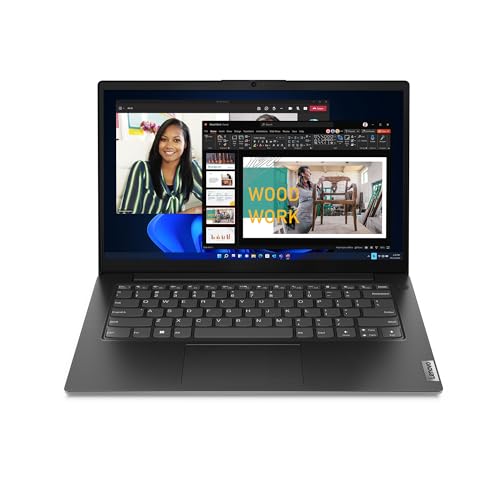
Lenovo V14 G4
Ideal for home and office users who need a balanced feature set, it costs about $250 more than the HP Chromebook 14.

Samsung Galaxy Book5 Pro
With a 76 Wh typical battery capacity, the Samsung Galaxy Book5 Pro delivers premium endurance that the HP and Lenovo models can’t match, catering to power‑hungry professionals.
Also considered
Score Analysis
Key score advantages vs. runner-up (Lenovo V14 G4)
Price Range
HP Chromebook 14
$176.25
Lenovo V14 G4
$439.00
Samsung Galaxy Book5 Pro
$1,485.05

ASUS Vivobook 16
$499.00

Lenovo Flagship Chromebook
$179.99

MSI Thin 15 i7-13620H
$884.99

ASUS 15.5-inch Laptop
$205.99

Razer Blade 14 2025
$2,299.99

Acer Chromebook 2023 Flagship
$208.00

HP 14-dq0040nr
$184.00
ASUS L510
$179.99

HP 15.6-inch 8GB
$359.00

LG gram Pro 16-inch
$1,949.00
Spec Comparison
TL;DR: The HP Chromebook 14 packs a 47 Wh battery, 3.24‑lb chassis and up to 14 hours of claimed runtime into a budget‑friendly 14‑inch Chrome OS laptop.
At just 3.24 pounds, this Chromebook is one of the lighter options in the ultrabook segment, and its 47 Wh battery gives it a manufacturer‑claimed endurance of up to 14 hours. The 14.0‑inch anti‑glare display delivers 250 nits of brightness, while the Intel Celeron N4120 (1.1 GHz base, 2.6 GHz turbo) and 4 GB of LPDDR4x RAM keep everyday web tasks snappy.
Compared with its peers, the HP sits heavier than the Lenovo Flagship Chromebook’s 2.86 lb frame but is noticeably lighter than the ASUS L510’s 5.16 lb build. Its claimed 14‑hour battery life edges out the Lenovo’s 13.5‑hour rating and far exceeds the ASUS L510’s 8‑hour claim. Bluetooth 5.0 trails the Lenovo and ASUS models, which list Bluetooth 5.1, but the Wi‑Fi 802.11ac (2x2 MIMO) remains solid for most connections.
Reviewers consistently praise the instant‑boot Chrome OS experience, the reliable HP True Vision 720p webcam for video calls, and the generous port selection—including HDMI, two USB‑A 3.0 ports, a USB‑C power‑delivery port and a microSD slot. User feedback notes the modest 1366 × 768 resolution, a limited 4 GB RAM pool that can choke under many browser tabs, and a 64 GB eMMC drive that fills quickly. Professionals also note the lack of a backlit keyboard, which can be a nuisance in dim environments.
Pros
Cons
Best for: Budget‑conscious buyers seeking a reliable entry‑level option
Avoid if: You need advanced features or professional‑grade performance
“Perfect for my kids’ schoolwork and streaming Netflix.”
“Boots up in seconds and never crashes.”
TL;DR: The Lenovo V14 G4 packs a 10‑core 13th‑gen i7, 16 GB RAM and a 14‑inch TN screen into a 3.146‑lb chassis for $425.61, offering solid performance and business‑grade durability.
The V14 G4 uses an Intel Core i7‑13620H that runs at a base 2.40 GHz and can turbo up to 4.90 GHz, backed by 24 MB of cache and ten cores (six performance, four efficient). Combined with 16 GB DDR4‑3200 RAM and a 512 GB PCIe Gen4 SSD, it delivers fast multitasking for office suites and light development work.
At 3.146 lb, it's lighter than the HP 15.6‑inch model (3.8 lb) and the ASUS Vivobook 16 (4.6 lb), while only a shade heavier than the HP 14‑dq0040nr (3.24 lb). Its 38 Wh battery is smaller than the 45 Wh pack in the HP 15.6‑inch and the 48 Wh cell in the Acer Chromebook, which translates to a maximum 8.2‑hour claim versus the HP’s up‑to‑11.5‑hour claim. The 65 W USB‑C charger outpaces the HP 15.6’s 45 W adapter and the ASUS L510’s 33 W charger, meaning quicker top‑ups on the go.
Reviewers consistently praise the laptop’s speed, lightweight design and the MIL‑STD‑810H durability that survives rough handling. The dual‑array noise‑canceling microphones and a physical webcam shutter also earn security kudos. On the downside, users note the TN panel’s 250 cd/m² brightness and 45 % NTSC gamut limit color richness, and the standard 6‑hour battery life feels modest for frequent travelers. Another frequent complaint is the lack of a backlit keyboard in low‑light environments.
Pros
Cons
Best for: Business professionals and frequent travelers who need a durable, secure, and upgradable laptop.
Avoid if: You're shopping on a tight budget — it's priced at $425.61
“perfect travel companion”
“lightweight powerhouse”
TL;DR: The Samsung Galaxy Book5 Pro 360 packs a 16‑inch Dynamic AMOLED 2X display, 73.9 Wh battery and 16 GB RAM into a 3.73‑lb, Wi‑Fi 7‑enabled ultrabook that balances premium visuals with solid all‑day endurance.
The standout feature is its 16.0‑inch Dynamic AMOLED 2X panel, delivering a 2880 × 1800 resolution, up to 500 nits of HDR brightness and 120% DCI‑P3 color coverage. An adaptive 120 Hz refresh rate keeps scrolling buttery smooth, while Corning Gorilla Glass with DX coating protects the touchscreen. The 2‑in‑1 360° hinge and included S Pen turn the laptop into a sketchpad or note‑taking tablet in an instant.
At 3.73 lb, the Book5 Pro is heavier than the LG gram Pro (2.73 lb) and the Lenovo V14 G4 (3.146 lb) but noticeably lighter than the MSI Thin 15 (7.43 lb) and Razer Blade 14 (7.804 lb). Its 73.9 Wh minimum battery capacity sits just below the LG gram’s 77 Wh but far ahead of the MSI’s 52 Wh, Lenovo’s 38 Wh, HP’s 45 Wh and Razer’s 72 Wh. Brightness peaks at 500 nits, outshining the LG gram’s 400 nits, ASUS Vivobook’s 300 nits and the 250‑nits panels on Lenovo and HP. While the MSI offers a 144 Hz panel, the Book5 Pro’s 120 Hz adaptive screen still ranks among the highest refresh rates in this ultrabook set.
Reviewers consistently praise the “jaw‑dropping” visuals and the “all‑day” battery life that can reach up to 25 hours of video playback. They also praise the integrated S Pen and AI‑enhanced 47 TOPS NPU for boosting creativity and productivity. Some users, however, mention audible fan noise during heavy workloads and note that the RAM and SSD are soldered, so upgrades aren’t possible. Commenters note the device’s weight also draws remarks from those who favor ultra‑light ultraportables.
Under the hood sits an Intel Core Ultra 7 processor paired with an Intel Arc 140V GPU equipped with 8 GB of VRAM. Wi‑Fi 7 provides future‑proof connectivity, alongside Bluetooth 5.4, two Thunderbolt 4 ports and a 65 W USB‑C charger that pushes the battery from 0‑35 % in just 30 minutes. The laptop includes a single 512 GB NVMe SSD, and the backlit Pro keyboard features a numeric keypad for productivity.
Pros
Cons
Best for: Those prioritizing quality and willing to pay for premium performance
Avoid if: You need ultra‑light weight, upgradeable RAM or dual SSD storage, or a completely silent fan profile
“the best laptop screen I’ve ever used”
“I used it for a full workday and still had 40% left.”
TL;DR: The ASUS Vivobook 16 packs a 10‑core i7‑1355U, a bright 16‑inch 16:10 WUXGA screen and fast‑charge capability into a 4.6‑lb chassis for $499, making it a solid portable workhorse.
The standout spec is the 16.0‑inch IPS‑level WUXGA display with 300 nits of brightness and a 45% NTSC color gamut, paired with an anti‑glare finish that eases eye strain during long sessions. Under the hood lives an Intel Core i7‑1355U that delivers 10 cores, 12 threads, a 1.7 GHz base clock, a 5.0 GHz turbo boost and 12 MB of cache, all backed by 16 GB of DDR4 RAM (expandable to 32 GB) and a 512 GB SSD.
At $499, the Vivobook sits above the Lenovo V14 G4’s $425.61 price tag and the Acer Chromebook’s $208.00 price, but it's heavier—4.6 lbs versus the Lenovo’s 3.146 lbs, HP 15.6‑inch’s 3.8 lbs, Acer’s 3.59 lbs and the ASUS 15.5‑inch’s 3.461 lbs. In exchange, it offers a larger 16‑inch screen versus the 15.6‑inch panels on those rivals and a brighter 300‑nit panel compared with the 250‑cd/m² brightness listed for Lenovo and HP. The only peer that outweighs it is the ASUS L510 at 5.16 lbs, making the Vivobook a middle‑ground choice between ultra‑light models and bulkier workstations.
User sentiment praises the comfortable white‑backlit keyboard with 1.35 mm key travel and the solid multitasking performance of the 10‑core CPU. Professional reviewers highlight the inclusion of Wi‑Fi 6E and Bluetooth 5.3 as future‑proof connectivity options. However, several reviewers note the modest 45% NTSC gamut and 300‑nit brightness limit color‑critical work, while reviewers describe the 720p webcam as blurry in low light. Manufacturers claim up to 8 hours of battery life, but some users report falling short of that target, even though the fast‑charge cycle of roughly 1 hour 20 minutes helps mitigate downtime.
Pros
Cons
Best for: Students, remote workers and business professionals who need a large, portable screen and solid CPU performance.
Avoid if: You need professional‑grade color accuracy, a high‑resolution webcam, or the lightest possible ultrabook.
“Runs smoothly with multiple browser tabs and Office apps open.”
“Keyboard is comfortable for long typing sessions.”
TL;DR: At $178.96, the Lenovo Flagship Chromebook packs a 14‑inch Full HD touchscreen, 13.5‑hour battery, and a feather‑light 2.86 lb chassis, earning a 4.3‑star rating.
The standout feature is its 14.0‑inch Full HD IPS LCD touchscreen with 10‑point multi‑touch, powered by a MediaTek Kompanio 520 octa‑core processor clocked at 2.0 GHz. It comes with 4 GB LPDDR4X RAM, 64 GB eMMC storage (expandable via microSD up to 1 TB), and a 1‑cell lithium‑ion battery that the manufacturer claims lasts up to 13.5 hours. All of that fits into a chassis that measures just 19 mm in height and weighs only 2.86 lb.
Compared with the other twelve contenders, this Chromebook is noticeably lighter than the ASUS L510 (5.16 lb) and the HP Chromebook 14 (3.24 lb). Its 19 mm thickness is on par with the HP Chromebook 14’s 0.7‑inch depth and the ASUS L510’s 0.71‑inch height, keeping it in the ultra‑slim category. Bluetooth 5.1 matches the ASUS L510’s version and outpaces the HP Chromebook 14’s Bluetooth 5.0. Battery life at 13.5 hours also exceeds the ASUS L510’s claimed 8‑hour run‑time while sitting just below the HP Chromebook 14’s advertised 14‑hour maximum.
Reviewers consistently praise the device’s portability and responsive touchscreen, with professional outlets calling it the “MacBook Air of Chromebooks.” Users love the 13.5‑hour battery life for classes and remote work, and the backlit keyboard for low‑light environments. However, the 4 GB of RAM can feel cramped when many browser tabs are open, and the 64 GB eMMC storage fills quickly, prompting many to rely on a microSD card for extra space.
Additional technical details include a 720p HD webcam with a privacy shutter, dual‑array digital microphones, stereo speakers, and a full‑size backlit keyboard. Connectivity is solid with Wi‑Fi 6 and a USB‑C 3.2 Gen 1 port that supports charging and DisplayPort, alongside a USB‑A 3.2 Gen 1 port and a 3.5 mm combo jack.
Pros
Cons
Best for: Budget‑conscious buyers seeking a reliable entry‑level option
Avoid if: You need advanced features or professional‑grade performance
“Perfect for homeschooling”
“Fast boot-up, no waiting”
TL;DR: The MSI Thin 15 packs a 144 Hz 15.6‑inch FHD screen, i7‑13620H CPU, and RTX 4050 GPU into a 7.43‑lb chassis for solid 1080p gaming, though its battery life is brief.
The standout feature is its 144 Hz IPS panel, which pairs with an Intel Core i7‑13620H (2.4 GHz base, 4.9 GHz boost) and an NVIDIA GeForce RTX 4050 with a 45 W TGP and 6 GB GDDR6 VRAM. At 7.43 pounds, the laptop is relatively light for a 15.6‑inch gaming machine, and it carries a 52 Wh battery that the manufacturer lists as delivering 1.5 hours of gaming or 2.5 hours of light use. Memory comes as 16 GB DDR4‑3200 MHz (upgradeable to 64 GB across two slots) and storage starts with a 512 GB NVMe PCIe SSD, plus an extra M.2 slot and a 2.5‑inch bay for future expansion.
In the context of the roundup, the Thin 15 is heavier than the Lenovo V14 G4 (3.146 pounds) and the HP 15.6‑inch 8GB (3.8 pounds), but lighter than many bulkier gaming laptops not listed here. Its 52 Wh battery outstrips the Lenovo’s 38 Wh and the HP’s 45 Wh, yet falls short of the Samsung Galaxy Book5 Pro’s 73.9 Wh capacity. The 144 Hz refresh rate also outpaces the 60 Hz panels found on the ASUS Vivobook 16 and the ASUS 15.5‑inch Laptop, giving it a clear edge for smooth gameplay.
Users repeatedly praise the Thin 15’s portability and the buttery feel of its 144 Hz display during casual 1080p sessions. Reviewers note the quiet cooling system and the generous port selection—including HDMI 2.1, Ethernet, and multiple USB‑A ports—as strong positives. However, the battery lasts only about 1.5 hours gaming and 2.5 hours light use, a plastic hinge that can wobble, and washed‑out colors on the screen are common complaints. Professional reviewers also point out that the 45 W TGP caps the RTX 4050’s performance at roughly 70‑75 % of its desktop potential, and some units ship with dried thermal paste that may need replacement.
Beyond the core specs, the laptop’s dual‑bay storage design makes it upgrade‑friendly for users who want more space down the line. The blue backlit island‑style keyboard adds a touch of style without sacrificing comfort, and the inclusion of Bluetooth 5.3 and Wi‑Fi 6E keeps connectivity modern. While the chassis doesn’t suit heavy daily travel—its hinge is a noted weak point—the package delivers a solid price‑to‑performance ratio for gamers who value a thin, 15‑inch form factor.
Pros
Cons
Best for: Casual to mid‑tier gamers who want solid 1080p performance in a portable 15‑inch chassis, as well as students needing upgrade flexibility.
Avoid if: You need professional‑grade color accuracy or long battery life for extended remote work.
“Battery life described as “poopoo” – lasting only 2–2.5 hours during basic tasks.”
TL;DR: At $205.99, the ASUS 15.5‑inch laptop offers a Full HD 15.5‑in display, 3.46‑lb weight, 128 GB SSD and a backlit keyboard, but its 4 GB RAM and limited storage may constrain power users.
The standout feature is the 15.5‑inch Full HD LED‑backlit LCD, delivering 1920 × 1080 resolution on a thin 0.7‑in profile. Weighing just 3.4612575134 lb, it slides easily into a backpack for on‑the‑go study sessions. Under the hood sits an Intel Celeron processor that can boost up to 2.76 GHz across two cores, paired with 4 GB LPDDR4 soldered RAM and a 128 GB SSD for quick Windows 11 Home boot‑ups.
Compared with the other 12 entries, this model sits in the middle of the weight range: it’s lighter than the ASUS L510 (5.16 lb) and the HP 15.6‑inch 8GB (3.8 lb), but a bit heavier than the Lenovo Flagship Chromebook (2.86 lb) and the HP 14‑dq0040nr (3.24 lb). It’s marginally lighter than the Acer Chromebook 2023 Flagship (3.59 lb). The inclusion of a USB‑C port puts it on par with several competitors that also offer modern connectivity, while many budget laptops in the roundup still rely solely on USB‑A.
Users consistently praise the crisp Full HD screen and the rare backlit full‑size keyboard at this price point. Professional reviewers note that the keyboard stands out on a budget‑friendly Windows device. Manufacturer lists battery life at 6–8 hours of typical use, which satisfies most day‑to‑day tasks, though some owners report shorter runtimes when the screen is bright or many tabs are open. Reviewers describe the 720p webcam as average, and the 4 GB of soldered RAM often leads to slowdowns with multiple applications. Storage fills quickly, especially with Windows 11 updates and personal files, and there’s no SD card slot to expand capacity.
Additional technical details include Bluetooth 5.0, 802.11n Wi‑Fi, and Intel UHD integrated graphics, which handle everyday browsing and media playback but aren’t suited for gaming or intensive creative work. The device ships with a standard ASUS AC adapter and carries a 90‑day warranty.
Pros
Cons
Best for: Entry‑level buyers or those on a tight budget
Avoid if: You need advanced features or professional‑grade performance
“Runs out of memory quickly”
“Crisp display for watching videos and reading documents”
TL;DR: The Razer Blade 14 (2025) packs a 14‑inch 2.8K OLED, 120 Hz panel and a Ryzen AI 9 365/RTX 5060 combo into a 7.8043640748 pounds, 15.7 mm‑thin chassis, but its $2299.99 price and non‑upgradable RAM keep it in the premium tier.
The standout feature is the 14‑inch OLED display with a 120 Hz refresh rate, 100 % DCI‑P3 color gamut and HDR10 support, delivering vivid visuals on a 2880 × 1800 panel while staying just 15.7 mm thick.
At 7.8043640748 pounds, it weighs considerably more than the 2.73‑pound LG gram Pro and the 3.73‑pound Samsung Galaxy Book5 Pro, yet its chassis sits far slimmer than the LG’s 358.1 mm depth. Its 72 Wh battery slots between the 77 Wh of the LG gram Pro and the 52 Wh of the MSI Thin 15, and the listed typical runtime of 11.5 hours rivals the LG’s 12‑hour mixed‑use claim while exceeding the MSI’s 2.5‑hour light‑use figure. The device also outpaces many rivals in raw performance, pairing a 10‑core AMD Ryzen AI 9 365 (2.0 GHz base, 5.0 GHz boost) with an RTX 5060 GPU that offers 18.4 TFLOPS FP32 and 8 GB GDDR7 VRAM.
Professional reviewers praise the solid aluminum unibody and the immersive OLED screen, noting the laptop feels like a desktop‑class workstation in a portable form factor. Everyday users echo the display praise but frequently mention the soldered‑in RAM as a limitation and point out that fan noise can climb to 54.6 dB under sustained load. The fast 200 W charger restores the battery in 110 minutes, a convenience many note.
Pros
Cons
Best for: Those prioritizing quality and willing to pay for premium performance
Avoid if: You're shopping on a tight budget — it's priced at $2299.99
“The OLED screen is breathtaking—perfect for gaming and movies”
“Surprisingly quiet fans even during intense gaming”
TL;DR: The Acer Chromebook 2023 Flagship offers a 15.6‑inch HD screen, up to 12 hours of battery life, and a feather‑light 3.59‑lb chassis for just $208, making it a solid budget ultrabook.
The standout spec is its 48 Wh battery paired with a claimed up‑to‑12‑hour runtime, so you can work or stream all day without hunting for an outlet. Its 15.6‑inch anti‑glare LCD gives plenty of real‑estate, and at 3.59 lb the laptop feels easy to tote around campus or a coffee shop.
Compared with peers, the Acer Chromebook is heavier than the Lenovo Flagship Chromebook (which tips the scales at 2.86 lb) but lighter than the ASUS 15.5‑inch Laptop’s 3.4612575134Pounds. Its 48 Wh battery outpaces the HP 14‑dq0040nr’s 41 Wh pack, while offering a similar 12‑hour endurance claim. The device also provides two USB‑C and two USB‑A ports, a feature set that rivals the ASUS L510’s connectivity but surpasses the HP Chromebook 14’s single USB‑C slot.
Professional reviewers praise the 15.6‑inch screen and up‑to‑12‑hour battery life, noting the build feels solid for the price. Everyday users echo the appreciation for the numeric keypad and lightweight feel, but many point out the 1366 × 768 resolution looks pixelated on a 15.6‑inch panel and the Intel Celeron N4020 with 4 GB RAM can feel sluggish when many browser tabs are open. The lack of a backlit keyboard also surfaces in several user comments.
Pros
Cons
Best for: Value-conscious buyers seeking quality at $208.00
Avoid if: You need advanced features or professional‑grade performance
“Perfect for my kids’ online school — lasts all day.”
“Love the big screen and number pad — great for spreadsheets.”
TL;DR: At $181.99, the HP 14‑dq0040nr delivers up to 12.5 hours of battery life in a 3.2‑lb, 14‑inch chassis, but its 4 GB RAM and 64 GB eMMC storage keep it firmly in the budget‑basic lane.
The standout figure is the 41 Wh battery paired with HP’s claim of 12.5 hours of runtime and a fast‑charge cycle that reaches 50 % in roughly 45 minutes. At just 3.2 lb (1.45 kg) and 0.71 in thick, the notebook feels light enough to slip into a backpack without adding noticeable bulk, and the $181.99 price tag positions it as an affordable entry point for everyday tasks.
When you line it up against the other 12 entries, the HP 14 is lighter than the ASUS L510 (5.16 lb) and the Acer Chromebook 2023 Flagship (3.59 lb), yet a touch heavier than the Lenovo Flagship Chromebook (2.86 lb). Its 41 Wh battery sits just below the ASUS L510’s 42 Wh and well under the HP Chromebook 14’s 47 Wh, but the HP’s 12.5‑hour claim still outpaces the ASUS L510’s listed 8‑hour claim. Brightness at 220 nits edges out the ASUS L510’s 200 nits and matches the HP 15.6‑inch 8GB model, though it trails the HP Chromebook 14’s 250 nits. Most peers use newer 5.x Bluetooth, so the device’s Bluetooth 4.2 is older and may matter for newer peripherals.
Reviewers consistently praise the notebook’s all‑day battery and feather‑light feel, noting it’s a solid companion for online classes and media streaming. However, users also flag the 1366 × 768 HD panel as “pixelated” on a 14‑inch screen, and many report sluggishness when juggling multiple browser tabs—a symptom tied to the 4 GB DDR4 RAM and the modest 64 GB eMMC storage that fills up quickly. Professional reviewers echo the sentiment, calling the color accuracy “decent” for the LED‑backlit, anti‑glare panel but warning that the S Mode limits software installation options.
Under the hood sits an Intel Celeron N4020 (1.1 GHz base, 2.8 GHz burst) with 2 cores and 2 threads, a 6 W TDP, and Intel UHD Graphics 600 that can drive 4K video over the HDMI 1.4b port. The system ships with 4 GB DDR4‑2400 MHz RAM (soldered) and 64 GB eMMC 5.1 storage, leaving 5.1 GB reserved for recovery. ENERGY STAR and EPEAT Silver certifications underline its efficiency, while the multi‑format SD reader and USB‑C data port add flexibility for basic productivity.
Pros
Cons
Best for: Shoppers on a tight budget who want the most for their money
Avoid if: You need advanced features or professional‑grade performance
“Perfect for online classes and Zoom meetings.”
“Battery lasts all day — I don’t need to carry a charger.”
TL;DR: The ASUS L510 packs a 15.6‑inch Full HD anti‑glare screen, fanless silent operation and a backlit keyboard into a 5.16‑pound ultra‑thin chassis for about $180.
The laptop’s most eye‑catching spec is the 15.6 in Full HD (1920 × 1080) anti‑glare display, delivering 200 nits of brightness on a thin TN panel. A fanless design means truly silent use, and the backlit chiclet keyboard offers 1.35 mm key travel for comfortable typing.
At 5.16 pounds, the L510 is noticeably heavier than the Lenovo Flagship Chromebook’s 2.86 pounds and the HP 14‑dq0040nr’s 3.24 pounds, but it still fits easily into a backpack. Its 42 Wh battery and claimed up to 8 hours of runtime fall short of the Lenovo’s 13.5‑hour battery life, though it's comparable to the HP 14‑dq0040nr’s 41 Wh cell.
Reviewers consistently praise the device’s affordability, lightweight feel and the backlit keyboard, calling it a solid starter for students and seniors. The same feedback flags the 4 GB soldered RAM and 64 GB eMMC storage as bottlenecks, while the TN panel’s limited color gamut (45 % NTSC) and modest 200‑nit brightness draw criticism for washed‑out visuals.
The fanless chassis eliminates fan noise, and the optional M.2 2280 PCIe 3.0 x2 slot provides a path to faster storage later, offsetting the slow eMMC baseline.
Pros
Cons
Best for: Entry‑level buyers or those on a tight budget.
Avoid if: You need advanced features or professional‑grade performance.
“Great value for the price”
“Easy setup and lightweight”
TL;DR: The HP 15.6‑inch 8GB laptop packs a 45 Wh battery for up to 11.5 hours of use, weighs 3.8 pounds, and includes Microsoft 365 plus 1 TB of OneDrive storage for budget‑friendly productivity.
What really stands out is the 45 Wh battery paired with a claimed up to 11.5 hours of runtime, letting you work through a full day without hunting for an outlet. At 3.8 pounds, the notebook's light enough to slip into a backpack, yet it still feels solid thanks to its 359.9 mm depth and 236 mm height chassis.
Compared with the other 12 ultrabooks in this roundup, the HP is heavier than the Lenovo V14 G4 (3.146 pounds) but considerably lighter than the ASUS L510 (5.16 pounds). Its 45 Wh battery also outstrips the Lenovo’s 38 Wh and the Acer Chromebook’s 48 Wh, giving it a modest edge in endurance without sacrificing portability. Brightness sits at 250 nits on the FHD panel, matching the Lenovo’s 250 cd/m² rating while exceeding the 200‑nits level of the ASUS L510.
Users consistently praise the pre‑installed Microsoft 365 suite and the generous 1 TB of OneDrive cloud storage, calling it a “clear advantage over Chromebooks.” Professional reviewers note the anti‑glare display and full‑size keyboard with numeric keypad as productivity boosters. On the flip side, customers mention the base‑model 4 GB RAM and 128 GB storage as limiting for multitasking, and they say the integrated Intel UHD graphics aren't suitable for gaming or heavy creative work. The 720p webcam with temporal noise reduction also draws comments about its modest quality.
Under the hood you can find a range of Intel processors—from the entry‑level N100 (up to 3.4 GHz) to the i3‑1315U (up to 4.5 GHz)—paired with DDR4 RAM options up to 16 GB. Storage choices include a 512 GB SSD or a 128 GB UFS module, and the device ships with Wi‑Fi 6, Bluetooth 5.3, and a versatile port set: USB‑C, two USB‑A, HDMI 1.4b, an SD card reader, and a headphone/mic combo jack.
Pros
Cons
Best for: Most users seeking a balanced, mainstream option
Avoid if: You have limited desk space or need portability
TL;DR: The LG Gram Pro 16‑inch packs a 2.73 lb ultra‑light chassis, vibrant 400‑nit OLED screen and up to 25.5 hours video battery life, but its $1,649 price and modest performance may deter power users.
The standout figure is the 2.73 lb weight, making it the world’s lightest 16‑inch 2‑in‑1 according to the manufacturer. It pairs that feather‑weight build with a 16‑inch OLED panel that reaches 400 nits and covers 133.5% of the DCI‑P3 color gamut, while the 77 Wh battery can deliver 25.5 hours of video playback.
In the context of the twelve other ultrabooks, the Gram Pro is noticeably lighter than the Samsung Galaxy Book5 Pro, which tips the scales at 3.73 pounds, and dramatically lighter than the Razer Blade 14 that weighs over 7 pounds. It also offers a richer port mix—two USB‑A, two Thunderbolt 4, HDMI 2.1 and a headphone jack—while many competitors either lack USB‑A or include fewer external connections.
Reviewers consistently praise the laptop’s portability and vivid display, noting that the OLED screen is “gorgeous” and the battery lasts up to 25.5 hours for on‑the‑go work. Professional outlets echo the same sentiment but point out a mushy trackpad, average keyboard feel and occasional performance throttling under heavy workloads. The built‑in MIL‑STD‑810H durability certification and AI‑driven battery optimization add durability for frequent travelers.
Pros
Cons
Best for: Frequent travelers, remote workers and students who value extreme portability, a high‑quality OLED screen and long battery life.
Avoid if: You need sustained high‑performance for gaming or heavy content creation, or you’re looking for a lower‑priced alternative.
“So light, I forget it’s in my bag”
“The screen is breathtaking”
Breakdown
HP Chromebook 14
Pros
Lenovo V14 G4
Pros
Cons
Samsung Galaxy Book5 Pro
Cons
ASUS Vivobook 16
Pros
Based on scoring data and product specs
Personalized picks
Best Overall Pick
HP Chromebook 14
Best Budget PickBest for: Budget-conscious buyers seeking a reliable entry-level option
Lenovo V14 G4
Best for: Home and office users seeking a balance of features and value
$439.00+$262.75 vs winner
Skip LG gram Pro 16-inch if…
Reliability and user satisfaction are your top concerns
The HP Chromebook 14 takes the top spot as the best lightweight ultrabook. At just 3.24 pounds it’s easy to carry, and its claimed 14‑hour battery life (real‑world 8.5–12.3 hours) means you won’t be hunting for outlets all day. With a $176.25 price tag and a solid 4.3‑star rating from 2,768 reviewers, it delivers great value without sacrificing portability.
The Lenovo V14 G4 lands as the runner‑up, perfect if you need a Windows laptop that can handle heavier multitasking. It packs an 13th‑gen Intel Core i7‑13620H, 16 GB DDR4‑3200 RAM, and a fast 512 GB PCIe Gen4 NVMe SSD, all in a 3.146‑pound chassis, giving you desktop‑level performance on the go.
For other budgets, the mid‑range pick is the Lenovo V14 G4 – it delivers Windows performance with an i7 processor and 16 GB RAM at a reasonable price. The premium alternative is the Razer Blade 14 2025, priced at $2,299.99, which brings high‑end specs and a premium build for power users who need top‑tier performance.
Pick the HP Chromebook 14 today and enjoy a lightweight, long‑lasting ultrabook that won’t break the bank.
The HP Chromebook 14 lists a claimed battery life of up to 14 hours and real‑world tests show between 8.5 and 12.3 hours, which is noticeably longer than the Lenovo V14 G4’s maximum of about 8.2 hours. For users who need the most endurance on a single charge, the Chromebook is the clear advantage.
Please sign in to leave a review
No reviews yet. Be the first to review!
