
We’ve sifted through 15 mini PCs to find the right balance of size, performance, and price for business and home‑office setups. Whether you need a discreet VESA‑mountable unit for a cramped desk, a quiet workhorse for video calls, or a premium box that can drive multiple 4K displays, this roundup covers the full spectrum.
Our budget tier—featuring the Kamrui Pinova P1 at $209.99 with a 4.4/5 rating, the Pinova P2, GMKtec G10 and G3 Plus—delivers solid multi‑monitor support and Wi‑Fi 5 GHz speeds up to 1300 Mbps without breaking the bank. In the mid‑range slot, the Beelink Mini S13 Pro stands out at $303.00, earning a 4.5/5 rating and offering dual‑4K HDMI plus 2.5 GbE Ethernet. For premium power users, the Kamrui E1 commands $319.99, has a 4.4/5 rating, and pairs its 12 W Intel N97 CPU with dual‑4K output and Bluetooth 5.2, while the Acemagic K1, Bosgame E5 and Geekom AX8 Max round out the high‑end choices.
Below you’ll see how each model stacks up in real‑world office scenarios, so you can pick the mini PC that fits your workflow perfectly.

Kamrui E1
Bluetooth Version 5.2 delivers fast, reliable wireless connections, boosting its value.
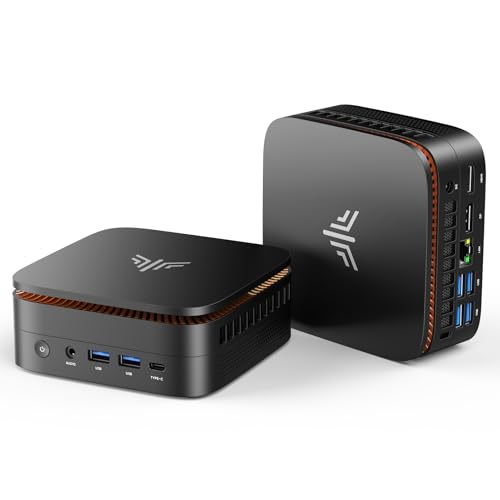
Kamrui Pinova P1
Ideal for budget‑conscious home‑office users, the Pinova P1 comes in at $209.99—about $110 less than the Kamrui E1.

GMKtec G10
Its whisper‑quiet operation at approximately 35 dB and ultra‑slim 43.18 mm height set the G10 apart from the Kamrui models.
Also considered
Score Analysis
Key score advantages vs. runner-up (Kamrui Pinova P1)
Price Range
Kamrui E1
$319.99
Kamrui Pinova P1
$359.99
GMKtec G10
$329.99

Kamrui Pinova P2
$329.99

Kamrui E1 N95
$329.00

Beelink Mini S13 Pro
$287.84

Acemagic K1 1TB Ryzen
$339.00

Bosgame E5
$319.99

GMKtec G3 Plus
$309.99

Geekom AX8 Max
$749.00

GMKtec M3 Ultra
$399.98

GMKtec G3S Beats
$219.99

Peladn WI-4
$179.99

Acemagic K1 256GB Ryzen
$299.00

Bosgame E4 512GB
$289.00
Spec Comparison
TL;DR: The Kamrui E1 packs a 12th‑Gen Intel N97 CPU, dual 4K video out and VESA mounting into a 2.05‑in‑high, 0.86‑lb chassis for $319.99, delivering quiet, low‑power office performance.
Its dual‑display capability stands out: an HDMI 2.0 port and a DisplayPort 1.4 both support 4K @ 60 Hz, letting you run two high‑resolution monitors from a single mini PC. Under the hood sits a 4‑core Intel N97 processor with a 2.0 GHz base clock, 12 W TDP and 16 GB DDR4 RAM running at 3200 MHz, all fed by a 256 GB M.2 SATA SSD that can be expanded to 2 TB.
Compared with the other 14 entries, the E1 is lighter than the Acemagic K1 (1.39 lb) and the Kamrui E1 N95 (1.37 lb) but a touch heavier than the GMKtec G3 Plus at 0.79 lb. Its Bluetooth 5.2 matches the Beelink Mini S13 Pro and the Pinova P2, and outpaces the Acemagic K1’s Bluetooth 4.2. The chassis measures 5.04 in × 5.04 in × 2.05 in, so it’s larger than the Beelink Mini S13 Pro’s 4.52 in × 4.00 in × 1.54 in footprint, yet still compact enough for a desk or VESA mount. Noise at 38 dBA runs slightly higher than the GMKtec G10’s reported ~35 dB, but reviewers note the fan drops to semi‑passive mode under light load.
User feedback repeatedly mentions fast boot times and smooth 4K video streaming, thanks to the Intel UHD Graphics Gen 11 with 24 execution units and hardware decoding for HEVC, VP9 and AV1. Professional reviewers highlight the 12 W TDP and ~8 W idle draw as evidence of efficient power use, and they commonly complain about the lack of a USB‑C or Thunderbolt port and the SATA‑based SSD (capped around 550 MB/s). Single‑channel RAM also limits bandwidth for more demanding multitasking.
Pros
Cons
Best for: Buyers looking for a compact, dual‑4K mini PC that delivers reliable office and media‑streaming performance in a small footprint.
Avoid if: You need advanced connectivity (USB‑C/Thunderbolt) or professional‑grade graphics and memory bandwidth for heavy rendering workloads.
“Turned my old TV into a full desktop — boots fast and runs 4K Netflix smoothly.”
“Love the VESA mount — keeps my desk clean.”
TL;DR: The Kamrui Pinova P1 delivers 16 GB RAM, 1 TB SSD, triple‑4K video and a low‑power Ryzen 4300U for $209.99, making it a compact, quiet mini PC that's ideal for office and media tasks.
The Pinova P1 packs a 2.7 GHz AMD Ryzen 4300U with a 1.4 GHz Vega 6 graphics engine, 16 GB DDR4‑3200 MHz RAM and a 1 TB NVMe SSD, while staying under a 15 W TDP. Its three video outputs—HDMI 2.0, DisplayPort 1.4 and a 10 Gbps USB‑C—support triple 4K@60 Hz displays, and the unit weighs 0.8598028218pounds.
Compared with the other 14 mini PCs in this roundup, the Pinova P1 is priced competitively and offers more USB‑A ports (six 5 Gbps ports) than the GMKtec G3S Beats, which lists only a handful of USB ports. It is heavier than the Peladn WI‑4’s 270 g chassis but lighter than the GMKtec G10’s 1039 g design. Its 1300 Mbps Wi‑Fi 5 speed far exceeds the GMKtec G3S Beats’ 433 Mbps, and its 52.07 mm height is taller than the 35 mm height of the Peladn WI‑4.
Professional reviewers highlight the smooth everyday performance, the quiet 2300 RPM cooling fan and the ability to run 24/7 thanks to the low‑power 15 W TDP. The device also includes VESA‑mount compatibility, Wake‑on‑LAN and RTC Wake, making it easy to tuck behind a monitor or TV for a space‑saving office or home‑theater setup.
Pros
Cons
Best for: Budget-conscious buyers seeking a reliable entry-level option
Avoid if: You need advanced features or professional‑grade performance
“Perfect for my home office — runs Zoom, Excel, and Chrome smoothly.”
“Mounted it behind my TV — looks clean and plays 4K Netflix without issues.”
TL;DR: The GMKtec G10 packs a Ryzen 5 3500U, 16 GB RAM, 1 TB NVMe SSD and up to 1200 MHz GPU clock into a 43 mm‑high, VESA‑mountable mini PC that handles triple‑4K displays while staying quiet.
The standout spec is the integrated Radeon Vega 8 GPU that can boost up to 1200 MHz, paired with a 2.5 GbE Ethernet port that reaches up to 2500 Mbps. Combined with 16 GB DDR4 RAM running at 2400 MT/s and a 1 TB NVMe SSD (expandable to 16 TB), the G10 can drive three 4K monitors via HDMI 2.1, DisplayPort 1.4 and a full‑function USB‑C.
Weighing 2.29942139266 pounds, the G10 exceeds the weight of the GMKtec G3 Plus (≈0.79 lb) and the Beelink Mini S13 Pro, yet remains lighter than the Kamrui Pinova P2 (≈1.87 lb). Its 43.18 mm height is a touch taller than the G3 Plus (42 mm) and the Beelink (39.1 mm), while its width (96.52 mm) is narrower than both. GPU‑clockwise, the G10 outpaces the G3 Plus and Beelink (both 1000 MHz) yet sits below the Pinova P2 and Acemagic K1 (both 1400 MHz). Ethernet speed matches the G3 Plus and Beelink’s 2.5 GbE but exceeds the Acemagic K1’s 1000 Mbps. The G10’s max RAM capacity of 64 GB doubles the G3 Plus’s 32 GB limit and matches the Pinova P2.
Professional reviewers note the Vega 8 iGPU consistently beats comparable Intel N‑series graphics, making the G10 a solid choice for office work, multi‑monitor productivity, and light creative tasks. Users praise the quiet silent‑turbo fan, which runs at approximately 35 dB, and the convenience of the included VESA‑mount bracket (75 × 75 mm). However, the older Zen+ (12 nm) CPU architecture is less power‑efficient than newer Zen 4/5 chips, Wi‑Fi 5 tops out at 866.7 Mbps, and one of the USB‑C ports is power‑delivery only, which some find limiting.
Pros
Cons
Best for: Most users seeking a balanced, mainstream option
Avoid if: You're shopping on a tight budget — it's priced at $299.99
“Runs Office, Teams, and 4K YouTube smoothly — perfect for home office.”
“Triple monitor setup works flawlessly — great for trading dashboards.”
TL;DR: The Kamrui Pinova P2 delivers triple‑4K output, Wi‑Fi 6, and a 16 GB RAM setup in a 1.87‑lb silver shell for $289.99, making it a solid mid‑range mini PC for office work.
It can run three independent 4K@60 Hz displays simultaneously, thanks to one HDMI 2.0, one DisplayPort 1.4, and a USB‑C port with DP Alt Mode. The chassis measures 128.27 mm × 128.27 mm × 43.94 mm and weighs 1.87 pounds (850 g), so it fits neatly on a desk or behind a monitor. Connectivity is generous: Bluetooth 5.2, Wi‑Fi 6, Gigabit Ethernet, and a total of seven USB ports—including two USB‑C Gen2 ports.
Compared with other mini PCs in this roundup, the Pinova P2 is lighter than the GMKtec G3 Plus, which tips the scales at about 0.79 lb, but heavier than the GMKtec G10’s 2.30 lb frame. Its height of 43.94 mm is essentially the same as the G10’s 43.18 mm, giving it a comparable footprint while offering more USB ports than the G10’s unspecified count. The Acemagic K1 models sit around 1.43 lb, making the Pinova P2 a bit heftier but still well within the portable range.
Users repeatedly praise the silent fan and the plug‑and‑play feel of Windows 11 Pro out of the box. The included 100 × 100 mm VESA mount often earns a “wow” from users who mount the unit behind a monitor. Professional reviewers note the smooth multi‑monitor experience but flag the single‑channel 16 GB DDR4 as a bottleneck for demanding tasks. A handful of owners have reported that units arrive without an operating system, which adds an extra setup step.
Under the hood sits an AMD Ryzen 3 4300U (Zen 2) with a 2.7 GHz base clock, 4 cores, 4 threads, and a 3.7 GHz boost. The chip draws a modest 28 W TDP, keeping power consumption low. Integrated Radeon graphics run at 1400 MHz across five compute units, sufficient for everyday productivity but not for gaming or heavy creative workloads. The system ships with 16 GB DDR4 (up to 3200 MHz) and a 512 GB SATA SSD, and you can expand both RAM (up to 64 GB) and storage (up to 4 TB total) via two additional M.2 slots.
Pros
Cons
Best for: Most users looking for a well‑reviewed, reliable mainstream option
Avoid if: You need advanced features or professional‑grade performance
“Perfect for my home office — runs Zoom, Excel, and Chrome smoothly.”
“Mounted it behind my TV — looks clean and plays 4K Netflix without issues.”
TL;DR: The Kamrui E1 N95 packs a 12 W Intel N150 CPU, dual‑4K video output and 16 GB of RAM into a 30 mm‑high, VESA‑mountable chassis for $309.97.
What really sets the E1 apart is its ultra‑low power draw – the Intel N150 runs at a base frequency of 800 MHz with a 12 W TDP, and the unit idles at just 8 W. Even under full load the fan tops out at 2300 RPM, keeping the chassis cool while staying quiet enough for a shared office.
Compared with the other 14 mini‑PCs in this roundup, the E1’s 30 mm height makes it noticeably thinner than the Beelink Mini S13 Pro (which stands at 39.1 mm) and lighter than the GMKtec G10 (over 2 lb), though it does weigh more than the feather‑light GMKtec G3 Plus. It also lacks a USB‑C port that several rivals include, so you’ll rely on its two USB 3.2 Gen 2 Type‑A ports for fast peripherals.
User reviews repeatedly praise the silent idle operation and the ability to mount the unit behind a monitor using its 75 × 100 mm VESA bracket. Professional reviewers highlight the modest performance edge over the older N100 chip, while also noting that the integrated Intel UHD Graphics handle video playback and office apps well but fall short for AAA gaming. The single DDR4‑SO‑DIMM slot supports up to 16 GB at 2666 MHz, and the M.2 2280 slot can hold a 1 TB SSD with room to expand to 2 TB.
Pros
Cons
Best for: Most users seeking a balanced, mainstream option
Avoid if: You're shopping on a tight budget — it's priced at $309.97
“Turned my old TV into a full desktop — boots fast and runs 4K Netflix smoothly.”
“Love the VESA mount — keeps my desk clean.”
TL;DR: The Beelink Mini S13 Pro delivers 16 GB DDR4 memory, dual‑4K HDMI, 2.5 Gbps Ethernet and Wi‑Fi 6 in a 275 g, fan‑cooled chassis, earning a 4.5‑star rating from 752 reviewers.
The Intel N150 processor pairs with 16 GB DDR4 (3200 MHz) RAM, a 0.81 GHz base clock and a 3.4 GHz boost clock, all housed in a 1.54 in × 4.52 in × 4.00 in footprint that weighs just 275 g. High‑speed connectivity includes a 2.5 Gbps RJ45 Ethernet port, Wi‑Fi 6 dual‑band, Bluetooth 5.2, and four USB 3.2 Gen 2 (10 Gbps) Type‑A ports.
Compared with other mini PCs in the roundup, the S13 Pro weighs significantly less than the GMKtec G10 (over 2 lb) and the Kamrui Pinova P2 (1.87 lb), while still offering the same 2.5 Gbps Ethernet speed that the G10 and G3 Plus provide. It matches the G3 Plus on GPU clock (1000 MHz) but falls short of the G10’s 1200 MHz GPU boost. Unlike the Acemagic K1, which tops out at 1000 Mbps Ethernet, the S13 Pro’s network link is twice as fast.
Users consistently praise the near‑silent operation of the fan‑cooled heat‑pipe system and the ability to mount the unit behind a monitor with the included VESA bracket. Reviewers love the dual HDMI 2.0/2.1 outputs that handle two 4K@60 Hz displays, and the 4.5‑star rating from 752 reviews reflects solid everyday performance. Common complaints focus on the lack of a USB‑C port, a plastic‑feel chassis, and occasional Windows activation hiccups.
Additional technical notes include a 6 MB Smart Cache, a TDP of 25 W for low power draw, and dual M.2 slots that together support up to 4 TB of storage (a primary 500 GB PCIe 3.0 NVMe SSD plus an optional second drive). The integrated Intel UHD Graphics (24 EU) runs at a 1000 MHz clock, which's adequate for office tasks but not for modern gaming or heavy GPU workloads.
Pros
Cons
Best for: Most users looking for a well‑reviewed, reliable mainstream option
Avoid if: You need advanced features or professional‑grade performance
“Fast boot, quiet, and small — perfect for my desk.”
“Plays 4K YouTube and Netflix without any stutter.”
TL;DR: The Acemagic K1 Mini PC packs a Ryzen 3 4300U, 1 TB NVMe storage and triple‑4K video output into a 50.8 mm‑high, 1.39‑lb chassis for $319, but its Wi‑Fi 5, Bluetooth 4.2 and cooling can limit sustained workloads.
The standout spec is the 1 TB M.2 NVMe SSD, giving you fast local storage without needing an external drive. Under the hood sits a 2.7 GHz quad‑core Zen 2 CPU (up to 3.7 GHz boost) with a 15 W standard TDP, paired with integrated Radeon graphics clocked at 1400 MHz across five cores. The unit also supports up to 64 GB DDR4 RAM at 3200 MHz, though it ships with 16 GB in dual‑channel slots.
At 1.39 lb, the K1 is heavier than the Kamrui E1’s 0.86 lb but noticeably lighter than the GMKtec G10’s 2.29942139266 lb (1039 g). Its 1000 Mbps Ethernet link trails the 2500 Mbps ports that the GMKtec G10, GMKtec G3 Plus, and the optional 2.5 Gbps mode on the Beelink Mini S13 Pro provide, so you’ll get solid but not top‑tier wired networking.
Users love the smooth 4K video playback and the rare ability to drive three 4K displays simultaneously via HDMI, DisplayPort and USB‑C. Professional reviewers note the value‑focused price and the “rare triple‑4K output capability at this price point.” However, several owners report the fan becoming audible under load and the CPU throttling after prolonged heavy tasks—issues caused by the active cooling design. The older Wi‑Fi 5 (802.11ac) and Bluetooth 4.2 also show their age compared with newer competitors.
Pros
Cons
Best for: Those prioritizing quality and willing to pay for premium performance
Avoid if: You need advanced features or professional‑grade performance
“I installed Linux Mint and it really purrs. I'm delighted.”
“Cooling fan seems to be running fine so unsure why it is doing this,”
TL;DR: The Bosgame E5 packs a Ryzen 3 5300U, 16 GB DDR4‑3200 RAM and a 1 TB NVMe SSD into a 1.1 kg chassis, offering dual Gigabit Ethernet and triple‑4K display support for solid office and home‑lab use.
The standout feature is the pair of 2 × Gigabit LAN ports (1000 Mbps each), a rarity in mini PCs at this price point. Coupled with a 1500 MHz Radeon Vega 6 GPU and a base clock of 2.6 GHz, the E5 handles typical productivity workloads smoothly.
Compared with the other 14 entries, the E5 is lighter than the ultra‑thin GMKtec M3 Ultra (1470 g) but deeper at 165 mm versus its 44 mm profile. It also outweighs ultra‑compact models like the Kamrui E1 (≈0.86 lb) and Acemagic K1 (630 g), yet it still stays under 1.2 kg. RAM capacity matches the GMKtec M3 Ultra’s 64 GB ceiling, and its 3200 MHz DDR4 speed aligns with the Acemagic K1’s maximum RAM frequency.
Users consistently praise the dual LAN for network‑lab projects and the quiet operation of the plastic chassis. Professional reviewers note the easy‑to‑upgrade RAM and SSD, while also pointing out that Wi‑Fi 5 (802.11ac) and the lack of a Thunderbolt port limit future‑proofing. The PCIe 3.0 x4 storage slot caps upgrade bandwidth compared with newer PCIe 4.0 offerings.
The E5 runs Windows 11 Pro on an AMD Ryzen 3 5300U (Zen 3) with four cores and eight threads, 4 MB cache, and a 7 nm process. Integrated graphics reach 1500 MHz, and the system can drive three 4K displays via HDMI 2.0, DisplayPort and USB‑C. Storage starts with a 1 TB NVMe SSD and can expand to a total of 4 TB across two M.2 slots. Connectivity includes Bluetooth 5.0, Wi‑Fi 5, and a mix of USB‑C, USB‑3.2 and USB‑2.0 ports.
Pros
Cons
Best for: Home‑lab enthusiasts and office users who need dual Ethernet and multiple 4K displays.
Avoid if: You're on a tight budget or require Wi‑Fi 6/Thunderbolt connectivity.
TL;DR: The GMKtec G3 Plus packs a 2.5 GbE Ethernet port, dual 4K HDMI, 16 GB DDR4 RAM and a 512 GB NVMe SSD into a 42 mm‑tall, sub‑pound chassis for $299.99.
The standout spec, the 2.5 GbE (2500 Mbps) Ethernet connection, outpaces many mini PCs that still sit at 1 GbE.
Compared with its peers, the G3 Plus weighs markedly less than the GMKtec G10’s 2.299 pounds and even less than the Kamrui E1’s 0.86 lb. Its 42 mm height stands a touch taller than the Beelink Mini S13 Pro’s 39.1 mm, but it remains slimmer than the Kamrui Pinova P2’s 43.94 mm. Ethernet speed matches the G10 and Beelink Mini S13 Pro, while beating the Acemagic K1’s 1000 Mbps link. The device also offers more RAM capacity than the Kamrui E1 (32 GB max vs 16 GB) and a faster DDR4 speed of 3200 MHz, whereas the G10 tops out at 2400 MT/s.
User feedback highlights the near‑silent active cooling system with upgraded fan, thermal paste and twin copper heat pipes, making video calls and 4K streaming feel effortless. Professional reviewers praise the “snappy multitasking” and the rich I/O selection, yet they note occasional SSD temperature spikes (up to 91 °C) and sporadic Bluetooth/Wi‑Fi interference that can cause peripheral drops. Some owners have needed to manually update drivers to resolve those hiccups.
The G3 Plus runs on an Intel Twin Lake N150 processor (4 cores/4 threads, 800 MHz base, up to 3.6 GHz burst) with a 6 MB cache, delivering enough power for everyday productivity while staying under 10 W idle. Its 16 GB DDR4 module runs at 3200 MHz, and the 512 GB PCIe 3.0 M.2 2280 NVMe SSD provides quick boots. Four USB 3.2 Gen 1 ports, a 3.5 mm combo audio jack, and a VESA‑compatible mount round out the connectivity, all backed by Windows 11 Pro.
Pros
Cons
Best for: Home office workers who need a quiet, low‑power PC with dual‑monitor 4K capability and fast wired networking.
Avoid if: You require heavy gaming, professional‑grade video editing, or flawless Bluetooth/Wi‑Fi reliability.
“Set up in 10 minutes — Windows activated automatically.”
“Plays 4K YouTube and Netflix without buffering — fans are almost silent.”
TL;DR: The Geekom AX8 Max packs an 8‑core Ryzen 7 8745HS, Radeon 780M graphics and dual 2.5 GbE ports into a premium‑priced, all‑metal mini PC that excels in performance‑heavy office tasks.
At $749.00 the AX8 Max lands in the premium tier of this roundup, has a solid 4.4/5‑star rating from 574 reviewers and comes with a three‑year warranty. Its AMD Ryzen 7 8745HS APU runs at a base clock of 3.8 GHz and a configurable 54 W TDP, delivering eight cores and sixteen threads for demanding spreadsheets, video editing, or multi‑monitor trading setups.
Compared with the other 14 mini PCs, the AX8 Max is notably pricier, positioning it as a “premium alternative” rather than a budget pick. While many rivals only offer standard gigabit Ethernet, this model includes dual 2.5 GbE ports, giving you noticeably faster wired networking without needing an external adapter.
Professional reviewers praise its CPU power and note that the Radeon 780M graphics perform on a level similar to a GTX 1650, making light gaming and GPU‑accelerated workloads feasible. Users consistently comment on the quiet, all‑metal chassis and the ease of adding more RAM or storage, though they also flag the missing M.2 SATA slot and SD card reader that the product page advertises, as well as a BIOS that lacks overclocking options.
Pros
Cons
Best for: Buyers willing to invest in a proven, high‑quality option
Avoid if: You're shopping on a tight budget — it's priced at $749.00
TL;DR: The GMKtec M3 Ultra packs a 12th‑Gen i5‑12450H, dual 4K HDMI, 2.5 G Ethernet and up to 64 GB RAM in a 44 mm‑deep chassis, but its fan can be noisy and it sits at a premium price.
At the heart of the M3 Ultra is an Intel Core i5‑12450H with 8 cores (6 Performance + 2 Efficient) and 12 threads, reaching a max turbo frequency of 4.4 GHz while drawing a 45 W TDP. The device also offers 48 EU integrated graphics running at a max dynamic frequency of 1.20 GHz, and it ships with Windows 11 Pro plus Linux compatibility. Connectivity is strong: Wi‑Fi 6 delivers up to 3.5 Gbps and the Intel i225v port provides 2.5G Ethernet.
Compared with its peers, the M3 Ultra is much shallower than the Bosgame E5’s 165 mm depth, yet its 115 mm height is a touch taller than the Bosgame’s 107 mm. It weighs 1470 g, making it heavier than the lightweight Kamrui E1, which is under 0.86 lb. Its dual HDMI 2.0 ports and a USB‑C port (with unreliable DisplayPort 1.4) let you run three 4K displays at 60 Hz, a capability that many of the other mini PCs in the roundup lack.
Users consistently praise the fast boot‑up and smooth multitasking that the i5‑H series delivers, especially when paired with the 16 GB (8 GB × 2) DDR4‑SO‑DIMM that comes standard. The dual M.2 slot design—one 512 GB PCIe 3.0 SSD plus a second slot for up to a 2 TB drive—receives many positive mentions for future‑proofing. However, professional reviewers flag the fan as a frequent source of loud noise, sometimes reaching 39 dB even during light tasks, and they note the high power draw relative to more efficient U‑series chips.
Pros
Cons
Best for: Those prioritizing quality and willing to pay for premium performance
Avoid if: You need advanced features or professional‑grade performance
“Fast boot times and smooth multitasking with 16 GB RAM.”
“Perfect for home office and media center—4K on TV looks great.”
TL;DR: The GMKtec G3S Beats packs a 12th‑gen Intel N95 CPU, dual 4K HDMI outputs and up to 9 TB of expandable storage into a 44 mm‑tall, 260 g chassis for $219.99.
The standout feature is its ability to drive two independent 4K displays via two HDMI 2.0 ports, each supporting up to 4096 × 2160 @ 60 Hz. Combined with a 256 GB NVMe SSD and two M.2 slots that together can hold up to 9 TB, the G3S Beats gives you a desktop‑class workstation in a box that’s only 44 mm tall and 106 mm wide.
Compared with the other mini PCs in this roundup, the G3S Beats is lighter than the Bosgame E4 (1.19 lb) and the Kamrui Pinova P2 (1.87 lb), but a touch heavier than the Peladn WI‑4 (270 g). Its maximum RAM capacity of 16 GB falls short of the Kamrui Pinova P1’s 64 GB and the Acemagic K1’s 64 GB, and its GPU tops out at 1.2 GHz—well below the Pinova P2’s 1.4 GHz and the GMKtec G10’s 1.2 GHz with a similar noise level. Ethernet speed is a solid Gigabit LAN (10/100/1000 Mbps), matching the Bosgame E4’s dual Gigabit ports but slower than the G10’s advertised up to 2500 Mbps. Wi‑Fi peaks at 433 Mbps on a Wi‑Fi 5 (802.11ac) radio, which is slower than the Pinova P1’s 1.3 Gbps on 5 GHz but typical for this price tier.
Reviewers consistently praise the quick Windows 11 boot, the quiet 35 dB fan under load, and the convenient VESA‑mount bracket that makes the unit disappear behind a monitor. The plastic chassis keeps the price low but feels less premium than metal‑cased rivals, and users note the single DDR4 slot limits upgrades beyond 16 GB—an issue for heavy multitaskers. Professional reviewers also point out the absence of Wi‑Fi 6 and any USB‑C or DisplayPort, which could affect future‑proofing.
Pros
Cons
Best for: Entry-level buyers or those on a tight budget
Avoid if: You need advanced features or professional‑grade performance
“Set up in 10 minutes — Windows activated automatically.”
“Plays 4K YouTube and Netflix without buffering — fans are almost silent.”
TL;DR: The Peladn WI‑4 packs an Intel Celeron N5095, dual 4K HDMI, 8 GB RAM and a 256 GB SSD into a 270 g, 0.5 L chassis for $169.99, making it a solid budget mini‑PC for office tasks.
The standout hardware is the dual HDMI 2.0 ports that support two 4K displays at 60 Hz, backed by an integrated GPU that can run up to 750 MHz. Inside, the Celeron N5095 delivers a 2.0 GHz base clock with a 15 W TDP, paired with 8 GB DDR4 RAM running at 2666 MHz and a 256 GB NVMe/SATA SSD. The unit measures just 112 mm deep, 35 mm high and 124 mm wide, and weighs only 270 g, fitting easily on a desk or behind a monitor.
Compared with the other 14 mini PCs in this roundup, the WI‑4 is lighter than the Bosgame E4 (540 g) and far more compact than the Acemagic K1 (99 mm tall). Its RAM speed of 2666 MHz trails the Kamrui Pinova P1’s 3200 MHz, and its Bluetooth 4.2 is older than the GMKtec G3S Beats’ Bluetooth 5.0. However, its Gigabit LAN (1000 Mbps) matches the Ethernet speed of most peers, and its price under $170 positions it as one of the most affordable options.
Users consistently praise the smooth handling of web browsing, office suites and 4K video playback, noting that the dual‑4K HDMI makes multi‑monitor productivity a breeze.
Professional reviewers highlight the dual HDMI 2.0 as a standout feature for dual‑4K setups, and they're also pointing out occasional overheating during long video‑encoding sessions and driver quirks with Linux due to the Realtek network/Wi‑Fi stack. The inclusion of Windows 11 Pro adds business‑grade security and management tools out of the box.
Pros
Cons
Best for: Shoppers on a tight budget who want the most for their money
Avoid if: You need advanced features or professional‑grade performance
“Perfect for office use and media streaming.”
“Tiny size, easy to mount behind monitor.”
TL;DR: The Acemagic K1 packs a Ryzen 3 4300U, 16 GB DDR4 RAM and a 256 GB NVMe SSD into a 99 mm square, 650‑g chassis, delivering smooth 4K video and solid multitasking for $279.
At just 99.06 mm deep, 99.06 mm high and 29.97 mm wide, the K1 is one of the smallest units in the lineup, and its 650.5 g weight makes it easy to slide onto a desk or mount with a 75×75 mm VESA bracket. It runs on a 2.7 GHz base‑clock Zen 2 CPU (up to 3.7 GHz boost) and a 28 W TDP, paired with 16 GB DDR4 RAM and a 256 GB M.2 2280 NVMe SSD, giving you desktop‑like responsiveness in a tiny footprint.
Compared with peers, the K1 is lighter than the Kamrui Pinova P2 (850 g) and the GMKtec G10 (1039 g) but heavier than the feather‑weight GMKtec G3 Plus (358 g). Its 99 mm square footprint is more compact than the Pinova’s 128 mm depth and width, and sits between the slimmer G3 Plus and the taller G10, which measures 43.18 mm high. Port‑wise the K1 outshines many rivals, offering four USB 3.2 Gen1‑A, two USB 3.2 Gen2‑A and a USB 3.2 Gen2‑C, plus HDMI 2.0, DisplayPort 1.4b, Gigabit Ethernet and a 3.5 mm audio jack, so you won’t need extra adapters.
Reviewers applaud the K1’s triple‑display 4K support and its ability to handle everyday multitasking without stutter, noting the 28 W TDP delivers “desktop‑like” performance. Users echo that sentiment, repeatedly mentioning smooth 4K streaming and the silent, compact design. The most common drawbacks in reviews are the device’s warmth under sustained load, Wi‑Fi 5 (802.11ac) limiting wireless speed, and Bluetooth 4.2 lagging behind newer versions.
Pros
Cons
Best for: Entry-level buyers or those on a tight budget
Avoid if: You need advanced features or professional‑grade performance
“I installed Linux Mint and it really purrs. I'm delighted.”
“Cooling fan seems to be running fine so unsure why it is doing this,”
TL;DR: The Bosgame E4 packs a Ryzen 5 3550H, dual 4K outputs and dual Gigabit LAN into a 45.72 mm‑tall, 1.19 Pounds mini PC, offering solid office performance at a budget price.
The standout hardware is the dual Gigabit Ethernet ports, each rated at 1000 Mbps, giving you reliable wired connectivity and the option to aggregate links. It also supports three 4K displays simultaneously via HDMI 2.0, DisplayPort and USB‑C, all capped at 3840×2160 @ 60 Hz. Those video capabilities are rare in a device priced under $250.
At 45.72 mm high, 129.54 mm long and 127 mm wide, the E4 is taller and longer than the GMKtec G3 Plus (42 mm height, 114 mm length) but still fits comfortably on a desk. Weighing 1.19 Pounds, it’s heavier than the G3 Plus’s 0.789 Pounds yet lighter than the Acemagic K1’s 1.433 Pounds, placing it in the middle of the pack for portable mini PCs.
Professional reviewers praise the triple‑display flexibility and the dual LAN ports for network redundancy, while users love the easy access to the 16 GB DDR4 SODIMM and two M.2 slots that can expand storage up to 4 TB. The integrated AMD Radeon Vega 8 runs at 1200 MHz, which is adequate for office apps and light media, but the mobile‑grade Ryzen 5 3550H (2.1 GHz base, 3.7 GHz boost, 35 W TDP) shows lower sustained performance than desktop CPUs. Users commonly complain about Wi‑Fi 5 (802.11ac) and occasional fan noise under load.
Pros
Cons
Best for: Entry-level buyers or those on a tight budget
Avoid if: You need powerful performance or professional‑grade features
“Perfect for office work and dual monitors.”
“Easy to set up and upgrade.”
Breakdown
Kamrui E1
Pros
Kamrui Pinova P1
Pros
GMKtec G10
Pros
Cons
Kamrui Pinova P2
Pros
Based on scoring data and product specs
Personalized picks
Best Overall Pick
Kamrui E1
Best ValueBest for: Buyers willing to invest in a proven, high-quality option
Kamrui Pinova P1
Best for: Budget-conscious buyers seeking a reliable entry-level option
$359.99+$40.00 vs winner
Skip Bosgame E4 512GB if…
You need powerful performance or professional-grade features
Kamrui E1 takes the top spot as the best mini‑PC for both business and home office. At $319.99 it offers a solid 4.4‑star rating from 1,644 reviewers, 16 GB of DDR4 RAM and a 256 GB SATA SSD. The Intel N97 processor powers it, reaching 3.6 GHz turbo while drawing just 12 W of TDP.
The runner‑up, Kamrui Pinova P1, shines when you need extra storage and stronger graphics for light creative work. It’s priced at $209.99, ships with a 1 TB NVMe SSD and an AMD Radeon Vega 6 GPU that runs up to 1.4 GHz, and can drive triple 4K displays – ideal for multitasking across several monitors.
For tighter budgets, the Peladn WI‑4 at $169.99 delivers basic performance for everyday tasks. The GMKtec G10, priced at $299.99, offers a balanced mid‑range option with more robust specs for demanding office apps. If you want top‑tier power, the Geekom AX8 Max at $749.00 provides premium performance for intensive workloads.
Pick the Kamrui E1 today and enjoy a well‑rounded, cost‑effective mini‑PC that covers all your office needs.
The Kamrui E1 costs $319.99 and is praised for its higher overall quality, while the Kamrui Pinova P1 is $209.99—about $110 cheaper. If you prioritize premium build and performance, the E1 is worth the extra cost; if budget is tighter and you still need solid performance, the Pinova P1 offers great value.
Please sign in to leave a review
No reviews yet. Be the first to review!
