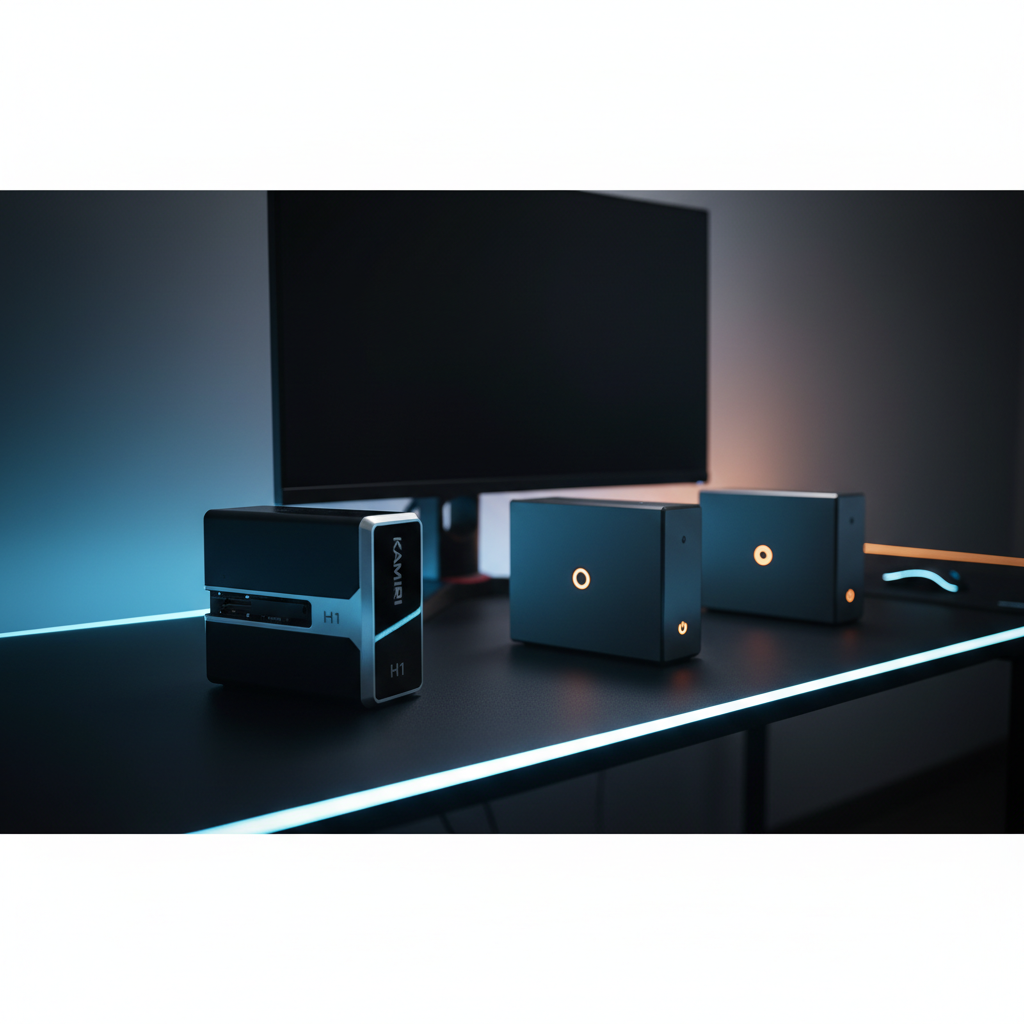
Picking a mini PC that can actually game is a juggling act between power, size and price. In this roundup we compared 15 models, from entry‑level boxes that start at $279.99 up to premium rigs topping out at $1179.00. The Kamrui H1 lands at the top with an 8‑core Ryzen 7 6800H, 12 GPU compute units and a 4.1‑star rating from 86 reviewers, all packed into a 5‑inch square chassis for just $479.99. It’s a solid all‑rounder for 1080p titles and multi‑monitor setups.
The selection spans three price tiers. Budget‑friendly choices include the GMKtec M5 PLUS ($279.99) and Bosgame H77 ($299.99), both carrying strong 4.6‑star ratings and support for triple 4K displays. Mid‑range options like the Kamrui H1 and Kamrui E1 Ryzen 7 sit around $479.99 and $499.99 and add higher memory speeds. Premium models such as the Bosgame P6 ($592.99) and Minisforum X1 Pro ($1179.00) push compute units to 16 and memory capacity to 128 GB. Let’s break down how each one performs in real‑world gaming scenarios.

Kamrui H1
Supports three simultaneous 4K displays, giving you expansive gaming visuals without sacrificing performance.

Bosgame H77
Ideal for entry‑level gamers on a tight budget, it’s $180 cheaper than the Best Overall at $299.99.

Bosgame P6
Stands out with Bluetooth 5.3 and dual RJ45 1 Gbps Ethernet ports, catering to premium setups that need advanced connectivity.
Also considered
Score Analysis
Key score advantages vs. runner-up (Bosgame H77)
Price Range
Kamrui H1
$489.99
Bosgame H77
$360.99
Bosgame P6
$519.99

Kamrui E1 Ryzen 7
$499.99

Minisforum X1 Pro
$1,179.00

Geekom AX8 Max
$749.00

Kamrui AM21
$559.99

Kamrui E3B
$459.99

Minisforum DeskMini UM870 Slim
$303.00
GMKtec M5 PLUS
$279.99

Origimagic N2 Pro
$446.49

Bosgame P3 Plus
$0.00

Bosgame M4
$619.99

Geekom IT15
$1,499.00

Minisforum DeskMini UM870
$303.90
Spec Comparison
TL;DR: The Kamrui H1 packs a desktop‑class Ryzen 7 6800H and Radeon 680M into a 5‑inch square chassis, delivering triple‑4K support and fast LPDDR5 memory for $479.99.
The standout spec is the AMD Ryzen 7 6800H processor (8 cores, 16 threads) paired with an integrated Radeon 680M GPU that offers 12 compute units running at 2.2 GHz. Combined with 32 GB of LPDDR5 memory clocked at 6400 MHz, the H1 can drive up to three 4K displays at 60 Hz via HDMI 2.0, DisplayPort 2.0, or USB‑C Alt Mode.
At 1.0582188576 pounds (480 g), the H1 is lighter than the Bosgame M4 (2.76018752024 pounds) and the Kamrui E1 (2.63 pounds), and it shares the same 12‑CU GPU count as those models. Its GPU frequency of 2.2 GHz beats the Kamrui E3B’s 2.0 GHz but sits below the Bosgame P6’s 2.4 GHz and the UM870’s 2.7 GHz. Memory speed of 6400 MHz outpaces the Bosgame M4’s 5600 MT/s while matching the Bosgame P6.
Reviewers consistently note the H1’s “surprising power” and smooth multitasking across multiple 4K screens, especially for remote work and light gaming. Professional reviewers highlight the Ryzen 7 6800H as a top‑tier mobile APU and the Radeon 680M as the best integrated GPU in its class. Common complaints revolve around audible fan noise under sustained workloads and the lack of Thunder‑bolt or USB‑C power delivery, which can be a drawback for users needing those features.
Pros
Cons
Best for: Value‑conscious buyers seeking a powerful, compact PC at $479.99.
Avoid if: You need a dedicated GPU for demanding games or require Thunderbolt/USB‑C power delivery.
“Surprisingly powerful for such a small device”
“Boots instantly, handles multiple browser tabs and video editing smoothly”
TL;DR: The Bosgame H77 packs an AMD Ryzen 7 7735HS CPU, Radeon 680M iGPU and 32 GB DDR5 RAM into a 126 × 112 × 41 mm chassis, delivering triple‑4K support for $299.99.
At the heart of the H77 sits an 8‑core/16‑thread Ryzen 7 7735HS built on a 6 nm process, with a 3.2 GHz base clock that can boost up to 4.75 GHz. Its Radeon 680M iGPU runs at 2200 MHz across 12 compute units and 768 shaders, which reviewers note handles 1080p esports titles at medium‑high settings. Memory isn’t a bottleneck either: the machine ships with 32 GB DDR5 SDRAM clocked at 4800 MHz, and you can expand to 64 GB via two SODIMM slots.
Compared with other mini PCs in this roundup, the H77 is lighter than the Minisforum DeskMini UM870 (3.04 lb) but a touch heavier than the UM870 Slim’s 1.23 kg chassis. Its Ethernet port matches the UM870 Slim’s 2.5 Gbps link, while its Bluetooth 5.2 trails the 5.3 found on both UM870 models. GPU frequency sits at 2.2 GHz, which is lower than the UM870’s 2.7 GHz but on par with the Kamrui E1 Ryzen 7’s 2.2 GHz.
Users rate the H77 at 4.6 / 5 stars across 26 reviews, praising the smooth Windows 11 Pro experience and the ability to drive three 4K monitors simultaneously. Professional reviewers call it a performance leader in the mini‑PC segment, noting the “over 50 % better 1080p gaming performance than previous‑gen mini PCs.” Common complaints focus on audible fan noise during prolonged loads and the fact that the base SSD is only 512 GB, so you’ll need an upgrade for larger libraries.
Pros
Cons
Best for: Budget‑conscious gamers, professionals and content creators needing strong multi‑core CPU performance.
Avoid if: You need AAA‑level graphics performance, Thunderbolt peripherals, or larger native storage out‑of‑the‑box.
“smooth performance in daily tasks and light gaming.”
“clean Windows 11 Pro installation with no bloatware.”
TL;DR: The Bosgame P6 packs a Ryzen 9 6900HX, 32 GB of 6400 MHz LPDDR5X RAM and dual PCIe 4.0 slots into a sub‑5‑inch chassis, delivering desktop‑class CPU power but limited graphics.
The heart of the P6 is an AMD Ryzen 9 6900HX with eight cores and sixteen threads, a 3.3 GHz base clock and a 4.9 GHz boost clock, all running on a 45 W TDP. Coupled with 32 GB of soldered LPDDR5X memory clocked at 6400 MHz, it offers the kind of processing muscle you’d expect from a full‑size workstation. Graphics are handled by an integrated Radeon 680M with 12 compute units at 2.4 GHz, and the system supports three simultaneous 4K displays via HDMI, DisplayPort and USB‑C.
In the context of the other 14 mini PCs, the P6 is slightly more expensive than the Bosgame M4, yet it weighs considerably less than the M4’s 2.76 lb and also lighter than the Kamrui H1’s roughly 1.06 lb. It adds a second 1 Gbps Ethernet port, whereas models like the Kamrui E3B list only a single gigabit port. Bluetooth 5.3 puts it a step ahead of the Kamrui E1’s 5.2, and its Wi‑Fi 6E tri‑band radio matches the latest standards. Unlike the Kamrui AM21, the P6 does not include USB4 or Thunderbolt, and its graphics remain integrated rather than a dedicated GPU.
Reviewers consistently highlight the P6’s snappy multitasking and quiet operation, crediting the advanced vapor‑chamber cooling with phase‑change material. Users love the compact footprint—122.94 mm long, 129.03 mm wide and 43.94 mm thick—and the VESA‑mount bracket that makes it easy to hide behind a monitor. The main criticisms focus on the soldered‑on 32 GB RAM, which can’t be upgraded, and the integrated Radeon 680M, which struggles with the latest AAA titles. The absence of Thunderbolt/USB4 and 2.5 Gbps Ethernet also shows up in the feedback.
From a technical standpoint, the P6 ships with Windows 11 Pro pre‑installed and is Ubuntu‑compatible for developers who prefer Linux. Storage is generous: a 1 TB NVMe PCIe 4.0 SSD out of the box and two additional M.2 2280 slots that together can hold up to 8 TB. Auto Power‑On after power restoration and Wake‑on‑LAN round out the feature set, making it a solid choice for a permanent desk or a small office.
Pros
Cons
Best for: Those prioritizing quality and willing to pay for premium performance
Avoid if: You're on a tight budget or only need basic functionality
TL;DR: The Kamrui E1 packs an 8‑core Ryzen 7 6800H, 32 GB DDR5 RAM, and triple‑4K video output into a compact 129 mm square chassis for $499.99.
The heart of the E1 is an AMD Ryzen 7 6800H APU with eight cores and sixteen threads, a 3.2 GHz base clock and a boost up to 4.7 GHz. Its integrated Radeon 680M GPU offers 12 compute units running at 2200 MHz, and the system ships with 32 GB of DDR5 memory clocked at 4800 MHz. Triple‑4K @60 Hz support comes via HDMI 2.0, DisplayPort 1.4 and USB‑C, making it a rare mini‑PC that can drive three 4K screens simultaneously.
Compared with the other mini PCs in this roundup, the E1 is heavier than the Kamrui H1 (which weighs about 1.06 lb) and carries a slower RAM speed than the H1’s 6400 MHz modules. Its 2.5 Gbps Ethernet outpaces the Gigabit (1 Gbps) Ethernet on the Kamrui E3B, while its Wi‑Fi 6 speed of 2400 Mbps matches the E3B’s wireless performance. The chassis is a touch deeper than the Bosgame M4’s 127 mm depth, and a bit longer than the Bosgame P6’s 122.94 mm length, but it still fits comfortably on a desk or behind a monitor.
Reviewers note the E1’s quiet operation and its ability to handle 4K video playback without stutter. Professionals highlight the strong CPU‑GPU combo for non‑gaming workloads and the value of three native 4K outputs. A downside is the lack of a dedicated graphics card, which limits AAA gaming performance, and some mention uncertainty around RAM upgradability in the DDR5 configuration. A few also report occasional Wi‑Fi hiccups, though the wired 2.5 Gbps Ethernet remains solid.
Pros
Cons
Best for: Most users seeking a balanced, mainstream option
Avoid if: You're shopping on a tight budget — it's priced at $499.99
“smooth 4K video playback”
“excellent multitasking with multiple browser tabs and office apps”
TL;DR: The Minisforum X1 Pro packs a 12‑core Ryzen AI 9 HX 370 CPU, up to 5.1 GHz boost and 80 TOPS AI power into a 5.4‑lb chassis, delivering desktop‑class performance for a premium price.
The standout spec is the AMD Ryzen AI 9 HX 370 processor, offering 12 cores / 24 threads, a 5.1 GHz boost clock and a total AI throughput of 80 TOPS (16 TOPS CPU + 14 TOPS GPU + 50 TOPS NPU). Its integrated Radeon 890M provides 16 compute units with a GPU clock of up to 2900 MHz, far above the 2.4 GHz of the Bosgame P6 and the 2.2 GHz of the Kamrui E1.
Compared with the other 14 mini PCs in this roundup, the X1 Pro is heavier than the Geekom IT15 (3.73 lb) and the Kamrui AM21 (≈2.76 lb), but it also brings more compute power—16 GPU CUs versus the 12 CUs of several rivals. It outpaces many peers on networking, offering dual 2.5 GbE ports and Wi‑Fi 7, while the Bosgame P6 still uses 1 GbE and older Wi‑Fi standards. Storage expandability is another win: three 2280 NVMe slots can hold up to 12 TB, whereas most competitors list only a single slot.
User feedback consistently praises the X1 Pro’s quiet cooling system; dual fans and phase‑change material keep noise at 45 dB under full load. Reviewers also highlight the internal 140 W PSU, which eliminates a bulky external brick. Both consumers and professionals note the downside: the integrated graphics rely on DDR5‑5600 memory, which caps GPU performance below what the CPU class might suggest.
From a technical standpoint, the machine supports up to 128 GB of DDR5 SO‑DIMM memory at 5600 MT/s across two slots, and its configurable TDP ranges from 15 W to 54 W (PL1) with a 65 W burst limit (PL2). The AI‑focused architecture (Zen 5 + Zen 5c) and 80 TOPS total AI capability make it a solid choice for AI‑heavy workloads, while the 4‑monitor, 8K@60 Hz display support adds future‑proof visual capacity.
Pros
Cons
Best for: Those prioritizing quality and willing to pay for premium performance
Avoid if: You're shopping on a tight budget — it's priced at $1179.00
TL;DR: The Geekom AX8 Max packs an AMD Ryzen 7 8745HS APU with Radeon 780M graphics, quad‑display output and USB4 into a compact metal case for $749.00, earning a 4.4‑star rating from 574 reviewers.
What really sets this mini PC apart is the combination of an AMD Ryzen 7 8745HS processor and integrated Radeon 780M graphics, plus true quad‑display support and dual 2.5 GbE Ethernet ports. The chassis uses an all‑metal design, and a USB4 Type‑C port adds future‑proof connectivity.
At $749.00, the AX8 Max lands in the middle of the price spread for this roundup: it’s cheaper than the Kamrui AM21 but pricier than the Bosgame P6, Bosgame M4, Kamrui E1, Kamrui H1 and Kamrui E3B. While the Bosgame models list fewer connectivity options, the AX8 Max’s USB4 and dual 2.5 GbE give it an edge for users who need high‑speed networking and versatile ports.
Customers consistently note the fast, responsive performance and the quiet, solid‑build feel of the metal case. Professional reviewers highlight the CPU strength that can rival higher‑priced desktop chips and the iGPU that holds its own against entry‑level discrete cards. The main complaints revolve around advertised features that are missing – the product page mentions an M.2 SATA slot and an SD‑card reader that aren’t present, and the Bluetooth version is listed as 5.2 even though the hardware is 5.4. The BIOS also lacks overclocking options, which some power users find limiting.
The AX8 Max ships with a three‑year warranty and carries CE, FCC, CB, CCC, SRRC and RoHS certifications, underscoring its compliance and build quality.
Pros
Cons
Best for: Buyers willing to invest in a proven, high‑quality option
Avoid if: You're on a tight budget or only need basic functionality
TL;DR: The Kamrui AM21 packs a Zen 4 Ryzen 7 8745HS, 32 GB DDR5 at 5600 MHz, and a 2600 MHz Radeon 780M into a 128 mm‑deep chassis, delivering desktop‑grade multitasking and 1080p‑to‑4K gaming in a truly compact form.
What really stands out is the combination of a 2600 MHz integrated GPU and 5600 MHz DDR5 memory. The Radeon 780M’s 12 compute units run at a higher clock than many rivals, while the fast DDR5 kit helps keep frame rates smooth even at 4K 120 Hz refresh rates. The CPU’s 3.8 GHz base and 4.9 GHz turbo frequencies, together with 8 cores and 16 threads, give the AM21 the horsepower to handle productivity workloads and light gaming without breaking a sweat.
Compared with the other 14 mini PCs in this roundup, the AM21 sits near the top of the performance curve. Its GPU clock of 2600 MHz outpaces the Bosgame P6’s 2.4 GHz and the Kamrui H1’s 2.2 GHz, and its RAM speed of 5600 MHz matches the Bosgame M4’s 5600 MT/s while being a step above the 2000 MHz found in the Kamrui E3B. Physically, the 128 mm depth mirrors the compact footprint of the Bosgame M4 (127 mm) and the Kamrui E3B (128 mm), keeping it as easy to slip behind a monitor as any of its peers.
Users consistently praise the tiny chassis, silent operation (≤41 dB under full 45 W load), and the ability to drive up to four 4K displays—or a single 8K screen—right out of the box. Professional reviewers note the dual Ethernet ports (1 Gbps and 2.5 Gbps) and the 40 Gbps USB4 connection, which surprises reviewers for a mini PC in this price tier. On the flip side, several owners have reported BIOS quirks after swapping RAM or SSDs, and the lack of Thunderbolt support can be a stumbling block for those who rely on that ecosystem.
Pros
Cons
Best for: Professionals and creators who need a powerful, multi‑monitor workstation in a tiny footprint, as well as casual gamers who play at 1080p‑4K resolution.
Avoid if: You require top‑tier AAA gaming performance, a discrete GPU, Thunderbolt connectivity, or are working with a very tight budget.
“Perfect small form factor PC”
“Silent operation”
TL;DR: The Kamrui E3B packs an AMD Ryzen 7 7730U, Radeon 680M iGPU at 2.0 GHz, 16 GB DDR4‑3200 RAM and triple 4K output for under $440, making it a solid mini‑PC for light gaming and media.
What really stands out is the 8‑core/16‑thread Ryzen 7 7730U paired with an integrated Radeon 680M GPU that runs at 2.0 GHz and offers 12 Compute Units. The machine ships with 16 GB DDR4‑3200 MHz memory (expandable to 64 GB) and a 512 GB NVMe SSD, while its HDMI 2.0, DisplayPort 1.4b and USB‑C (DP Alt Mode) ports all support 4K @ 60 Hz.
Compared with the other 14 mini PCs in this roundup, the E3B’s 2.0 GHz GPU frequency sits a touch lower than the 2.2 GHz in the Kamrui H1 and Bosgame H77, but its 2400 Mbps Wi‑Fi 6 matches the Kamrui E1. At 2.63 lb, it’s heavier than the ultra‑light Kamrui H1 yet lighter than the Bosgame M4 and the Minisforum DeskMini UM870 models.
Professional reviewers praise the Ryzen 7 7730U for its energy efficiency and the Radeon 680M as one of the best integrated graphics for casual titles. Users consistently note the quiet fan, fast boot from the NVMe drive, and smooth 4K video playback, while a recurring complaint is that some units arrive with a SATA SSD, which can feel slower than the NVMe option. The lack of Thunder‑bolt on the USB‑C port also limits future‑proofing for high‑speed peripherals.
Pros
Cons
Best for: Home‑office professionals, light content creators, media‑center enthusiasts, students and remote workers who need a compact, quiet PC with strong CPU performance and multi‑monitor support.
Avoid if: You want the best value‑per‑dollar in its price range or need a dedicated GPU for high‑end 3D rendering or modern AAA gaming.
“Runs Lightroom and Photoshop smoothly—great for photo editing on a budget.”
“Very quiet, no fan noise during daily use.”
TL;DR: The Minisforum DeskMini UM870 Slim packs an AMD Ryzen 7 8745H and Radeon 780M into a 130 mm‑deep, 2.70948119998 Pounds chassis, delivering desktop‑class CPU power and solid 1080p gaming in a budget‑friendly, ultra‑compact package.
This bare‑bone mini PC is built around an 8‑core, 16‑thread Zen 4 CPU that runs at 3.8 GHz base and boosts up to 4.9 GHz, with a configurable TDP of up to 65 W. The integrated Radeon 780M iGPU offers 12 compute units clocked at 2,600 MHz and up to 4 GB of shared VRAM, a rare GPU frequency for a budget mini PC. DDR5‑5600 MT/s memory support (up to 96 GB across two slots) and dual M.2 PCIe 4.0 x4 NVMe slots (max 4 TB total) give the system plenty of headroom for multitasking and content creation.
Compared with other contenders, the UM870 Slim’s 2,600 MHz GPU clock outpaces the Bosgame H77’s 2,200 MHz and the Kamrui E3B’s 2,000 MHz, while its 5,600 MT/s memory speed exceeds Bosgame H77’s 4,800 MHz rating. At 2.70948119998 Pounds it's heavier than the ultra‑light Kamrui H1 (1.0582188576 Pounds) but lighter than the regular Minisforum DeskMini UM870 (3.04017459298 Pounds). Its 130 mm depth is a touch deeper than the UM870’s 120 mm, and the single USB4 port delivers up to 40 Gbps with DP Alt Mode— a capability few budget mini PCs provide.
Professional reviewers note that the active dual‑fan cooling system with heat pipes and phase‑change material keeps sustained 60 W performance without throttling, and the noise stays around ~35 dB under standard load. Users praise the smooth 1080p gaming performance (often cited at 75‑123 FPS) and the ability to run triple‑monitor setups, especially for 4K video editing. However, the plastic chassis feels less premium than metal alternatives, the glued rubber feet make the unit difficult to open for upgrades, and the MediaTek MT7922 Wi‑Fi 6E chip can be problematic on some Linux distributions.
Pros
Cons
Best for: Power users who need desktop‑class CPU performance in a compact, budget‑friendly mini PC.
Avoid if: You need a premium metal chassis, an out‑of‑the‑box OS/RAM/SSD configuration, or reliable native Linux Wi‑Fi support.
“Runs Adobe Premiere smoothly — no lag during 4K timeline scrubbing.”
“Connected three monitors: two 4K and one 8K — all work flawlessly.”
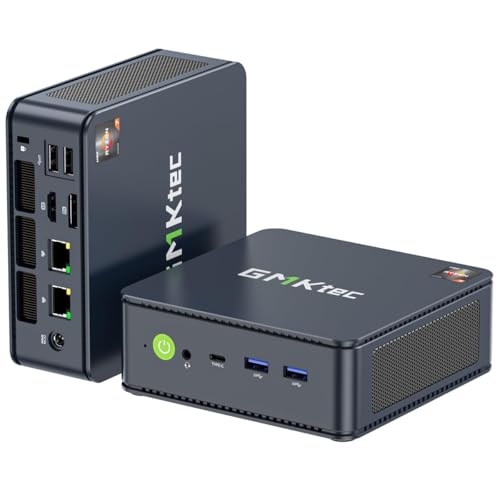
TL;DR: At $279.99 the GMKtec M5 PLUS earns a 4.3‑star rating from 435 reviewers, and reviewers praise its multitasking ability but note Wi‑Fi heat and fan noise.
The GMKtec M5 PLUS costs $279.99 and lands at rank #10 among the fifteen mini PCs in this gaming roundup. Its 4.3‑star rating from 435 reviews puts it solidly in the middle of the pack, offering a respectable value compared with higher‑priced rivals.
Users repeatedly highlight the device’s strong ability to handle many tasks at once and appreciate the inclusion of dual wired networking ports for fast connections. However, several reviewers mention that the built‑in Wi‑Fi module often runs unusually hot, and the auxiliary fan tends to run continuously, adding noticeable noise. A handful of owners also report occasional SSD detection quirks and brief display flicker, which often require firmware or BIOS tweaks.
Focusing on price and rating, the M5 PLUS offers an affordable option for shoppers who want decent performance without breaking the bank. It doesn’t lead the pack in raw power, but its user‑reported strengths make it a viable choice for budget‑conscious buyers who value networking features and multitasking capability.
Pros
Cons
Best for: Shoppers on a tight budget who want the most for their money
“solid performance for productivity, media streaming, and light virtualization”
“Fast boot times (<15 seconds with PCIe SSD)”
TL;DR: The Origimagic N2 Pro packs an AMD Ryzen 7 6800H with 8 cores, 32 GB DDR5, and a Radeon 680M iGPU into a 800 g, 126 mm‑wide mini PC that supports four 8K displays.
The heart of the N2 Pro is the Ryzen 7 6800H APU, delivering 8 cores and 16 threads at a 3.2 GHz base clock and a 4.7 GHz boost. Its 45 W TDP keeps power draw reasonable for a desktop‑class chip, while the integrated Radeon 680M runs up to 2.2 GHz with 12 compute units. This combination provides a solid foundation for 1080p gaming and content‑creation workloads without a discrete GPU.
Compared with other mini PCs in the roundup, the N2 Pro’s GPU frequency of 2.2 GHz sits below the 2.7 GHz found in the Bosgame P3 Plus and the Minisforum DeskMini UM870, yet matches the Bosgame H77. Its RAM speed of 4800 MHz aligns with both Bosgame models, and its dual 2.5 GbE ports equal the Bosgame P3 Plus and UM870, outpacing the Kamrui E3B’s 1 Gbps Ethernet. At 800 g, it's lighter than the Bosgame P3 Plus (0.86 kg) and considerably lighter than the UM870 (3.04 lb).
Professional reviewers praise the N2 Pro’s “well‑balanced machine with excellent connectivity” and note its quiet active‑air cooling with a copper heat pipe. Everyday users report smooth Photoshop and Premiere Pro performance and appreciate the VESA‑mountable, space‑saving chassis. Common complaints focus on the limited two USB‑A 2.0 ports and occasional fan noise under sustained load, while the lack of a dedicated GPU keeps it from high‑end 3D or CAD tasks.
Beyond the CPU and iGPU, the N2 Pro offers two USB4 ports that handle 8K video at 60 Hz and 40 Gbps data, enabling eGPU expansion and up to four simultaneous displays. Wi‑Fi 6E and Bluetooth 5.2 round out the connectivity suite, and the 32 GB DDR5 SODIMM (4800 MHz) can be expanded to 64 GB. Storage starts with a 512 GB NVMe SSD, and the dual M.2 slots support up to 4 TB total.
Pros
Cons
Best for: Content creators and home‑office professionals who need strong CPU power, fast DDR5 memory, and multi‑monitor support in a compact, quiet chassis.
TL;DR: The Bosgame P3 Plus packs an AMD Ryzen 7 7840HS, up to 2.7 GHz GPU frequency and triple‑4K display support into a 40.64 mm‑deep plastic chassis with dual 2.5 Gbps Ethernet and a 1 TB PCIe 4.0 SSD.
The standout spec is the integrated Radeon 780M GPU that can boost to up to 2.7 GHz, a frequency that outpaces the Bosgame H77’s 2200 MHz iGPU and rivals the 2.7 GHz GPU found in the Minisforum DeskMini UM870. Coupled with 32 GB DDR5 RAM running at 4800 MT/s, the P3 Plus can juggle heavy multitasking and 1080p gaming without a discrete graphics card.
Compared with the other 14 mini‑PCs in this roundup, the P3 Plus offers a uniquely dense I/O mix: dual 2.5 Gbps Ethernet ports, a USB4 port delivering 40 Gbps, three USB‑C 3.2 Gen 2 ports, and a single HDMI 2.0 plus a DisplayPort that together enable triple‑4K monitor setups. The UM870 and UM870 Slim both list dual 2.5 Gbps Ethernet, but the P3 Plus adds the high‑speed USB4 lane that the UM870 Slim lacks. Its chassis depth of 40.64 mm is markedly shallower than the UM870’s 120 mm depth, making it easier to slip into tight desk spaces. While the Kamrui E3B provides Wi‑Fi 6E, its Ethernet is limited to 1 Gbps, so the P3 Plus’s 2.5 Gbps LAN is a clear advantage for low‑latency gaming.
Professional reviewers note that the Zen 4‑based Ryzen 7 7840HS (3.8 GHz base, 5.1 GHz boost) paired with the RDNA 3 iGPU delivers performance close to a GTX 1060, and users praise the triple‑monitor productivity and solid 1080p game frame rates. However, the plastic chassis feels less premium than metal‑cased rivals, and the single‑fan cooling solution can lead to thermal throttling during prolonged high‑load sessions. The HDMI 2.0 output also caps 4K refresh rates, so ultra‑high‑refresh 4K gaming isn’t feasible.
Pros
Cons
Best for: Enthusiasts who need a compact, high‑performance PC for solid 1080p gaming and multi‑monitor productivity, and who value fast wired networking and ample SSD storage.
“Runs CS:GO and Valorant at over 100 FPS at 1080p—perfect for esports.”
“Triple monitor setup works flawlessly for trading and productivity.”
TL;DR: The Bosgame M4 packs an AMD Ryzen 7 7840HS, 32 GB DDR5, and a 1 TB PCIe 4.0 SSD into a 127 mm × 42 mm × 127 mm chassis, delivering desktop‑class power for up to four 4K displays at a mid‑range price.
What really stands out is the combination of an 8‑core/16‑thread Ryzen 7 7840HS (3.8 GHz base, 5.1 GHz boost) with a Radeon 780M GPU that runs between 2600 MHz and 2800 MHz across 12 compute units. Paired with 32 GB DDR5 memory at 5600 MT/s and a 1 TB PCIe 4.0 NVMe SSD, the M4 offers a level of performance you’d normally expect from a full‑size desktop.
Compared with the other mini PCs in this roundup, the M4’s chassis is a touch longer than the Bosgame P6 but slimmer, and it’s shorter and narrower than the Kamrui E1 Ryzen 7 while weighing a bit more than that model’s 2.63 lb. It’s also more compact than the Kamrui E3B, which measures 128 mm deep and 128 mm wide, and it matches the weight of the Kamrui AM21 (about 2.76 lb). In contrast, the Kamrui H1 is considerably lighter at just over 1 lb, highlighting the M4’s sturdier build.
Users consistently praise the smooth 4K playback and the ability to run up to four monitors simultaneously through HDMI 2.0, DisplayPort 1.4, USB‑C and USB4 (which even supports 8K at 60 Hz). Professional reviewers note the Oculink port as a welcome option for future eGPU upgrades, and the Wi‑Fi 6E module delivers strong wireless speeds. On the downside, the high‑pitched fan can become noisy under heavy workloads, and the BIOS offers limited overclocking controls, which some power users find restrictive. The 12‑month warranty and plastic‑dominant housing also represent trade‑offs.
Pros
Cons
Best for: Power users, creative professionals, and multitaskers who need strong CPU/GPU performance in a compact chassis.
Avoid if: You need advanced features or professional‑grade performance, such as dedicated AI acceleration, silent operation, or a longer warranty.
“The Oculink port is a key differentiator, enabling external GPU use for gaming or rendering.”
TL;DR: At $1499 the Geekom IT15 earns a 4.3‑star rating from 66 reviewers, praised for its strong performance and premium build but noted for missing front USB‑C and occasional fan noise.
Geekom offers the IT15 at a premium price point of $1499 and gives it a 4.3‑star rating based on 66 reviews, placing it toward the lower end of the fifteen‑product mini‑PC gaming roundup. Its price reflects the brand’s reputation for delivering high‑end compute in a compact form.
Users consistently highlight the device’s impressive processing power and graphics capability, describing it as delivering desktop‑class performance in a tiny chassis. Reviewers also commend the rugged, crush‑proof build, the extensive rear I/O that includes modern connectivity options, and the quiet, efficient cooling system. The tool‑less interior makes RAM and SSD upgrades straightforward, while the clean Windows 11 Pro installation avoids unwanted bloatware. AI‑enhanced gaming via XeSS and support for multiple high‑resolution displays earn particular praise, and the inclusion of a VESA mount adds flexible placement.
Given its high price and solid rating, the IT15’s specs suggest it’s aimed at users who value performance and build quality above cost. However, the lack of a front USB‑C port and occasional fan noise under heavy use are recurring concerns, and some shipments omit a 2.5‑inch SATA connector, limiting storage options for certain buyers.
Pros
Cons
Best for: Those prioritizing quality and willing to pay for premium performance
TL;DR: The Minisforum DeskMini UM870 packs an AMD Ryzen 7 8745H and Radeon 780M into a 54 mm‑high, 3.04‑lb chassis, delivering solid 1080p gaming and triple‑display support for a modest $303 price.
The standout spec is the 2.7 GHz GPU frequency of the integrated Radeon 780M, paired with up to 4 GB of shared VRAM. Coupled with a 5600 MT/s DDR5 memory channel, the Mini PC can handle demanding multitasking and smooth 1080p titles while staying under a 35 dB noise ceiling during load.
Compared with peers, the UM870 shares the 12 compute‑unit GPU count found in the Bosgame H77, Kamrui E3B, Kamrui H1 and Kamrui E1, but it pushes a higher memory speed than Bosgame H77’s 4800 MHz. Its 2.5 Gbps Ethernet matches the Bosgame H77, while the Kamrui E3B tops out at 1 Gbps. The device’s dual front USB 3.2 Gen 2 ports and rear USB4 (40 Gbps) give it broader connectivity than the Kamrui H1, which lists fewer USB‑C video outputs.
Users consistently praise the ultra‑quiet dual‑fan cooling and the compact 127 mm‑wide, 54 mm‑high footprint that fits easily on a desk or behind a monitor. Professional reviewers note the “ultra‑quiet operation and high energy efficiency,” with an average 72 W draw at 1080p gaming and a peak of 87 W. However, the plastic chassis feels less premium, and the glued rubber feet make upgrades a bit tricky. Linux users also report Wi‑Fi and Bluetooth quirks that may need work‑arounds.
Under the hood, the Zen 4‑based Ryzen 7 8745H runs at a 3.8 GHz base and can boost to 4.9 GHz across its 8 cores and 16 threads, while staying within a 65 W TDP that can be tuned via BIOS. The system ships with a 1 TB PCIe 4.0 SSD and supports up to 4 TB total storage, giving ample room for games and media.
Pros
Cons
Best for: Entry-level buyers or those on a tight budget
Avoid if: Reliability and user satisfaction are your top concerns
“Runs Adobe Premiere smoothly — no lag during 4K timeline scrubbing.”
“Connected three monitors: two 4K and one 8K — all work flawlessly.”
Breakdown
Kamrui H1
Pros
Bosgame H77
Pros
Bosgame P6
Pros
Kamrui E1 Ryzen 7
Pros
Cons
Based on scoring data and product specs
Personalized picks
Best Overall Pick
Kamrui H1
Best OverallBest for: Value-conscious buyers seeking quality at $479.99
Bosgame H77
Best for: Entry-level buyers or those on a tight budget
$360.99-$129.00 vs winner
Skip Minisforum DeskMini UM870 if…
Reliability and user satisfaction are your top concerns
The Kamrui H1 takes the top spot thanks to its AMD Ryzen 7 6800H processor (8 cores, 16 threads, up to 4.7 GHz boost), a 12‑CU Radeon 680M GPU running at 2.2 GHz, and 32 GB of LPDDR5 memory clocked at 6400 MHz. It ships with a 1 TB NVMe SSD, supports three simultaneous 4K displays, and offers Wi‑Fi 6, Bluetooth 5.2 and a 2.5 Gbps Ethernet port—all for $479.99.
Bosgame H77 lands as the runner‑up and shines if you need a compact mini PC for esports titles at 1080p medium‑high settings. Its AMD Ryzen 7 7735HS (8 cores/16 threads) and 12‑CU Radeon 680M GPU (2.2 GHz) deliver the promised performance, while the USB4 port can drive an 8K/60 Hz or 4K/120 Hz display. At $299.99 and a 4.6/5 rating from 26 reviewers, it offers strong value in a tiny 126 × 112 × 41 mm chassis.
For tighter budgets, the GMKtec M5 PLUS at $279.99 provides the most affordable entry into mini‑PC gaming. If you’re willing to splurge for top‑tier power, the Geekom IT15 at $1499.00 delivers premium performance for demanding 4K sessions.
Pick the Kamrui H1 for the best gaming experience and start building your compact rig today.
The Kamrui H1 costs about $479.99, which is roughly $180 more than the Bosgame H77’s $299.99 price tag. It adds an aluminum alloy chassis, fan‑assisted cooling and the ability to run three 4K displays simultaneously, while the H77 offers USB4 with 8K/4K @ 120 Hz support at a lower cost. If you value the premium build and extra display capacity, the higher price can be justified.
Please sign in to leave a review
No reviews yet. Be the first to review!
