
If you need rock‑solid speed for video editing, high‑resolution photography, or on‑the‑go 3D rendering, an external SSD can dramatically boost performance. In this roundup we examined 10 drives, from the ultra‑fast Samsung T9 4TB that pushes 2,000 MB/s read and write speeds to the pocket‑sized Samsung T5 EVO 8TB that tops out at 460 MB/s but offers a massive 8 TB capacity. The T9 also earned a 4.7‑star rating from 2,651 reviewers, making it the highest‑rated option among the premium picks.
Our selections span three price tiers. Budget‑focused models such as the Seagate One Touch 500 GB ($89.95, 4.5 stars) and the Teamgroup PD20M 1TB ($138.99, 4.2 stars) keep costs low while still delivering over 1,000 MB/s speeds. Mid‑range choices like the Crucial X9 2TB ($181.21, 4.5 stars) and Lexar Professional Go 1TB ($199.99, 4.4 stars) strike a balance between performance and price. Premium options—including the SanDisk Creator Pro 1TB ($219.99, 4.5 stars), Crucial X10 Pro 4TB ($518.99, 4.2 stars), Samsung T9 4TB ($709.18, 4.7 stars), and Samsung T5 EVO 8TB ($1,119.99, 4.3 stars)—deliver top‑tier speeds, rugged designs, and advanced encryption.
Below we’ll break down each model’s strengths, so you can match the drive to your workflow and budget.

Samsung T9 4TB
Its slim 15.2 mm height keeps your desk tidy while delivering 4 TB of proven Samsung performance.

Seagate One Touch 1TB
Ideal for budget‑conscious creators needing a reliable 1 TB drive, it costs $132.46—roughly $576 less than the Samsung T9, making it a solid entry‑level choice.

SanDisk Creator Pro 1TB
At 52.6 mm tall, it packs premium audio‑focused features that audiophiles crave, setting it apart from the slimmer Samsung and Seagate models.
Also considered
Score Analysis
Key score advantages vs. runner-up (Seagate One Touch)
Price Range
Samsung T9 4TB
$709.18
Seagate One Touch 1TB
$188.00
SanDisk Creator Pro 1TB
$229.99

Crucial X9 2TB
$195.99
Seagate One Touch SSD 500GB
$89.95

Seagate One Touch 2TB
$599.00
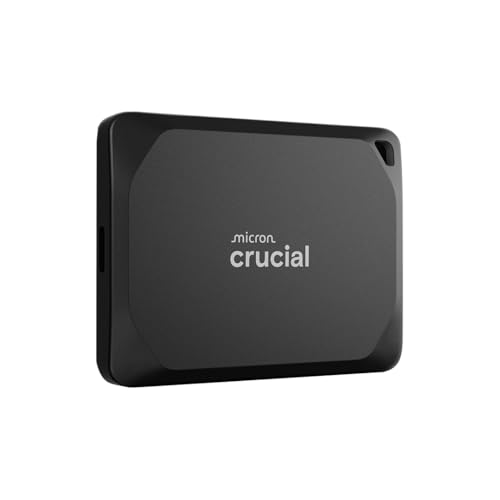
Crucial X10 Pro 4TB
$494.99

Lexar Professional Go 1TB
$199.99

Teamgroup PD20M 1TB
$144.99

Samsung T5 EVO 8TB
$995.00
Spec Comparison
TL;DR: The Samsung T9 4TB packs 2000 MB/s read/write speeds, a 20 Gbps USB 3.2 Gen 2x2 interface, and a rugged 3 m drop‑resistant design, but it carries a premium $709.18 price tag.
The standout spec is the 2000 MB/s sequential read and write performance delivered over a 20 Gbps USB 3.2 Gen 2x2 connection, backed by a 180 GB TurboWrite cache that keeps the drive fast during long transfers. At 0.27 pounds (122 g) and a compact 15.2 mm × 61 mm × 88.9 mm chassis, it offers a solid blend of speed and portability while providing 256‑bit AES hardware encryption and a 5‑year limited warranty.
Compared with the other nine drives, the T9 is heavier than the ultra‑light Crucial X10 Pro (≈0.09 pounds) and the Crucial X9 (≈0.07 pounds), and its 15.2 mm thickness exceeds many peers that sit around 10 mm. However, its 4 TB capacity eclipses most rivals that top out at 2 TB, and its 2000 MB/s read/write rate matches the SanDisk Creator Pro 1TB while surpassing the Samsung T5 EVO’s 460 MB/s speeds. The 3 m drop resistance matches the SanDisk Creator Pro’s rating and outperforms the Crucial X10 Pro’s 2.3 m rating.
Users consistently praise the T9 for its “blazing” throughput that makes direct‑to‑SSD video editing feel effortless, and reviewers highlight the Dynamic Thermal Guard that keeps temperatures low under heavy loads. On the downside, several owners note occasional speed throttling after the TurboWrite cache depletes, and the lack of an official IP rating means it lacks protection against water or dust. Professional reviewers also point out that full 20 Gbps performance demands a USB 3.2 Gen 2x2 or Thunderbolt 3/4 host, which older machines may lack.
Pros
Cons
Best for: Buyers willing to invest in a proven, high-quality option
Avoid if: You're shopping on a tight budget — it's priced at $709.18
“Fast enough to edit video directly from the drive”
“Sleek, solid build, no overheating issues”
TL;DR: The Seagate One Touch 1TB delivers 1 TB of portable SSD storage with 1052 MB/s sequential reads, 10 Gbps USB‑C, and built‑in AES‑256 encryption, all for $132.46.
The drive’s standout feature is its 24 GB pSLC cache paired with manufacturer‑specified sequential read speed of 1052.13 MB/s and sequential write speed of 1028.34 MB/s, as reported by the manufacturer. It connects via USB 3.2 Gen 2 (10 Gbps) and includes both USB‑C‑to‑USB‑C and USB‑C‑to‑USB‑A cables.
In this ten‑product roundup, the One Touch sits in the mid‑range for weight at 0.0992080179 pounds—slightly heavier than the Teamgroup PD20M (0.088 pounds) but lighter than the Seagate One Touch SSD 500GB (0.154 pounds). Its dimensions (70 × 50 × 10.6 mm) match the length of the Teamgroup model and are comparable to the 2TB One Touch version. The bundled 14 cm cable is shorter than many competitors, which often ship with longer cords.
Reviewers consistently praise the “stupendous” transfer speeds, especially for backing up thousands of photos on the go. The included Adobe Creative Cloud Photography Plan and Mylio Create subscription add tangible value for creators. Professional reviewers also note the solid‑state drive’s hardware‑based AES‑256 encryption and shock‑resistant, fabric‑wrapped design. However, users mention the short cable limits placement flexibility, and the lack of an IP rating means it isn’t protected against dust or water.
The drive’s sustained write speed drops to 425 MB/s after the 24 GB cache exhausts, which can be a bottleneck for lengthy 4K video transfers. Still, the 3‑year limited warranty and the Rescue Data Recovery service provide peace of mind for critical files.
Pros
Cons
Best for: Photographers, videographers, and creative professionals who need fast, secure field backup and appreciate the bundled Adobe Creative Cloud Photography Plan.
Avoid if: You regularly move multi‑hundred‑GB 4K video files or need a longer cable for desk‑side use.
“backing up over 4,000 photos from an Android phone “with ease” and called it “worth every penny.””
“18GB in no time flat – stupendous.”
TL;DR: The SanDisk Creator Pro 1TB delivers 2000 MB/s read/write via USB‑C 3.2 Gen 2x2 in a compact, IP65‑rated shell, but you’ll need a compatible host to unlock its full speed.
A USB‑C 3.2 Gen 2x2 (20 Gbps) interface drives the drive’s 2000 MB/s sequential read and write performance. Its physical footprint measures 52.6 mm in height, 100.8 mm in length and 9.7 mm in width, while the unit weighs 0.17085825305 pounds (77.5 g), making it easy to slip into a pocket or camera bag.
At $219.99, the Creator Pro lands in the premium tier of this ten‑product roundup. It's heavier than the Crucial X9, Seagate One Touch 2TB, Teamgroup PD20M, Seagate One Touch 1TB, and Crucial X10 Pro, but lighter than the Lexar Professional Go and Samsung T9, positioning it between the ultra‑light options and the bulkier high‑capacity models.
Reviewers praise the “blazing‑fast transfers” and the rugged feel provided by its IP65 dust‑ and water‑resistance plus a 3.0 m (9.8 ft) drop rating. They also like the one‑month Adobe Creative Cloud subscription bundled in the box. The most common downsides noted are that the advertised 2000 MB/s speed only materialises on a USB‑C 3.2 Gen 2x2 host, the drive runs warm during long transfers, and it lacks a protective case or hardware encryption.
Pros
Cons
Best for: Professional videographers handling 4K/8K footage, photographers shooting RAW, and AI content creators who need rapid, reliable storage on the go.
Avoid if: Your computer lacks USB‑C 3.2 Gen 2x2 ports, you require built‑in hardware encryption, or you’re on a tight budget.
TL;DR: The Crucial X9 2TB delivers 1,050 MB/s reads and 960 MB/s writes in a feather‑light 32 g, 65 × 50 × 10 mm shell, making it a solid mid‑range choice for creators and gamers.
The standout spec features a sequential read speed of 1,050 MB/s paired with a write speed of 960 MB/s, both advertised over a USB 3.2 Gen 2 (10 Gbps) interface. At just 32 g and only 10 mm thick, the drive feels almost like a key‑chain, and its 2.3 m (7.5 ft) drop resistance adds confidence when you toss it into a bag.
Compared with the other nine SSDs in this roundup, the X9 is lighter than the Seagate One Touch 2TB (45 g) and far slimmer than the SanDisk Creator Pro (52.6 mm tall). Its read speed exceeds the Seagate One Touch’s 1,030 MB/s and its write speed tops the Seagate’s 864 MB/s figure, while still sitting in the same price bracket as most mid‑range options.
Users consistently praise the X9 for quick file transfers at up to 1,050 MB/s and smooth console storage, noting that it “just works” with PS5 and Xbox Series X|S. Professional reviewers highlight the reliable performance and the inclusion of a 30 cm USB‑C to USB‑C cable, but they also point out the lack of an IP rating and the absence of hardware‑based encryption. A few owners mention a slowdown after long, sustained writes, which aligns with the “real‑world ~960 MB/s for ~6 min before throttling” note in the spec sheet.
Pros
Cons
Best for: Most users looking for a well‑reviewed, reliable mainstream option
Avoid if: You need advanced features or professional‑grade performance
“Lightning-fast transfers”
“games aren’t performing great anymore”
TL;DR: The Seagate One Touch SSD 500 GB delivers 1030 MB/s sequential speeds in a pocket‑sized, fabric‑wrapped case, but its short cable and modest random write performance keep it in the budget tier.
What really stands out is the 1030 MB/s maximum sequential read and write speed, which matches the top‑end numbers of many larger external SSDs. At just 9.9 mm thick, 74.9 mm long, 55.6 mm wide and weighing 70 g, it slips into a pocket without adding bulk.
Compared with the other nine drives in this roundup, the One Touch 500 GB is lighter than the Lexar Professional Go and Samsung T9, but heavier than the Teamgroup PD20M, Crucial X9 and the Seagate One Touch 1TB, which list lower pound‑based weights. Its price point of $89.95 also lands it below the higher‑capacity siblings, making it the most affordable option that still offers full‑speed USB 3.2 Gen 2 performance.
Reviewers consistently praise the drive’s “blazing‑fast” transfers and its sturdy fabric‑wrapped exterior with an aluminum top panel. The included 0.2 m USB‑C to USB‑A and USB‑C cables frequently get called out as too short for many desks, and users note a noticeable slowdown to around 450 MB/s on legacy USB 3.0 ports. Random 4K write performance sits at just 5 MB/s, which some power users flag as a limitation for heavy‑IO tasks.
Beyond speed, the SSD offers hardware‑based encryption and comes with a 2‑month Adobe CC Photography membership plus a 1‑year Mylio Create subscription, adding value for creators who need secure, ready‑to‑use storage.
Pros
Cons
Best for: Budget-conscious buyers seeking a reliable entry-level option
Avoid if: You need advanced features or professional‑grade performance
“backing up over 4,000 photos from an Android phone “with ease” and called it “worth every penny.””
“18GB in no time flat – stupendous.”
TL;DR: The Seagate One Touch 2TB delivers up to 1030 MB/s transfers in a 10 × 70 × 50 mm, 0.099 lb package, but its 14 cm cable and lack of a protective case may limit desktop convenience.
Seagate’s One Touch 2TB packs a nominal 2 TB of storage into a pocket‑sized chassis that measures just 10 mm high, 70 mm long and 50 mm wide, weighing 0.0992080179 pounds. The drive uses a USB‑C 3.2 Gen 2 interface and can reach up to 1030 MB/s read and write speeds, while sustained writes after the cache are reported around 864 MB/s. Its formatted usable capacity is approximately 1.95 TB, giving you plenty of room for large media libraries.
Compared with the other nine entries, the One Touch is heavier than the Crucial X9 (which weighs about 0.0705 pounds) but still far lighter than the Lexar Professional Go (around 0.3704 pounds). Most rivals ship with longer cables—often 30 cm—whereas this model includes only a 14 cm USB‑C cable, a point that reviewers frequently note. Unlike some competitors, it doesn't come with a protective pouch or case, and its LED indicator sits in a spot that can be hard to see.
Professional reviewers highlight the “doubled performance” and real‑world write speeds near 864 MB/s, while everyday users rave about the fast transfers, reliable reliability, and the smooth Android backup experience. The most common complaints focus on the very short cable, the bland aesthetic, and the absence of biometric security. The drive also supports hardware‑based encryption and comes with Seagate Toolkit, a 1‑year Mylio Create subscription, and limited‑time access to Rescue Data Recovery services.
Pros
Cons
Best for: Photographers, videographers, and mobile professionals who need fast, secure, on‑the‑go storage.
Avoid if: You prioritize premium aesthetics, biometric security, or require a longer cable for stationary use.
“backing up over 4,000 photos from an Android phone “with ease” and called it “worth every penny.””
“18GB in no time flat – stupendous.”
TL;DR: The Crucial X10 Pro 4TB offers 2,100 MB/s reads, 2,000 MB/s writes, IP55 ruggedness and a feather‑light 42 g chassis for creators who need fast, portable storage at a premium price.
At its core, the X10 Pro packs a 4 TB PCIe 3.0 x4 drive behind a USB‑C, USB 3.2 Gen 2x2 (20 Gbps) interface, delivering a manufacturer‑stated sequential read speed of 2,100 MB/s and write speed of 2,000 MB/s. The enclosure measures just 10 mm thick, 65 mm long and 50 mm wide, and the whole unit weighs only 0.09259415004 pounds (42 g), making it one of the smallest and lightest 4 TB SSDs on the market.
Compared with the other nine SSDs in this roundup, the X10 Pro is lighter than the Samsung T9 4TB (0.27 lb) and Lexar Professional Go 1TB (0.37037660016 lb), but a touch heavier than the Crucial X9 2TB (0.07054792384 lb). Its price of $518.99 places it at the premium end of the lineup, while its 5‑year limited warranty and 256‑bit AES hardware encryption give it a confidence boost that many lower‑priced peers lack.
Professional reviewers praise the drive’s high sequential performance and its rugged IP55 rating plus 7.5 ft (2.3 m) drop resistance, noting smooth 4K video editing and cross‑platform compatibility. However, users frequently point out that full 20 Gbps speeds only appear on devices with a native USB 3.2 Gen 2x2 port; on Macs with Thunderbolt/USB4 ports the drive often tops out at 10 Gbps, and a minority of owners report early failures around the 80 % capacity mark.
Pros
Cons
Best for: Those prioritizing quality and willing to pay for premium performance
Avoid if: Reliability and user satisfaction are your top concerns
“Incredibly fast and small — perfect for travel.”
“No issues with editing 4K video directly from the drive.”
TL;DR: The Lexar Professional Go 1TB packs 1 TB of storage, 1050 MB/s read and 1000 MB/s write speeds into a 8.25 mm‑thin, IP65‑rated SSD with a built‑in USB‑C 3.2 Gen 2 hub, but its premium $199.99 price may give pause.
This drive’s most eye‑catching spec is its ultra‑compact form factor: the SSD measures just 8.25 mm thick, 43.5 mm long and 25.5 mm wide, and it weighs 0.37037660016 lb. It also carries an IP65 ingress‑protection rating and a 1‑meter drop resistance, while delivering 1050 MB/s sequential reads and 1000 MB/s writes over a USB‑C 3.2 Gen 2 (10 Gbps) interface.
Compared with the nine other external SSDs in this roundup, the Lexar is heavier than every competitor and sits at the higher end of the price spectrum. Its read speed matches the Crucial X9 but trails the SanDisk Creator Pro and Teamgroup PD20M, which list faster sequential performance. The hub’s USB‑C 3.2 Gen 2 bandwidth aligns with the Crucial X9’s interface but is slower than the Creator Pro’s Gen 2x2 offering.
Professional reviewers highlight the SSD’s compact design and the easy ability to record ProRes 4K directly from an iPhone 15/16 Pro, a feature everyday users rave about. The bundled silicone case, adapters, and storage bag add flexibility, yet several reviewers note the hub feels flimsy, lacks an IP rating, and may not work with thick iPhone cases. Reviewers praise the five‑year limited warranty and 256‑bit AES hardware encryption, and many note it’s a premium $199.99 price.
Pros
Cons
Best for: iPhone videographers needing ultra‑compact, high‑speed storage for ProRes 4K capture on the go.
Avoid if: You require a rugged hub, desktop Mac display output, or a lower‑cost SSD solution.
“Finally, a clean way to record ProRes without a bulky rig.”
“The SSD disappears on the back of the iPhone—perfect for handheld shooting.”
TL;DR: The Teamgroup PD20M Mag Portable SSD packs 1 TB into a 40 g, 8.2 mm‑thin aluminum case, delivers up to 2000 MB/s via USB 3.2 Gen 2×2, and sticks to iPhone MagSafe.
The drive’s standout spec is its ultra‑thin 8.2 mm profile and feather‑light 40 g weight, while a magnetic pull force of about 800 g lets it snap onto MagSafe‑compatible iPhones. It offers a full 1 TB of storage, a 20 GB cache, and sequential read and write speeds both listed at 2000 MB/s through a USB 3.2 Gen 2×2 (20 Gbps) interface.
Compared with the other nine SSDs in this roundup, the PD20M is lighter than the Seagate One Touch 1TB (≈0.099 lb) and thinner than that model’s 10.6 mm height. Its 70 mm length also exceeds the Lexar Professional Go 1TB’s 43.5 mm, giving it a bit more real‑estate for the 1 TB NAND. Speed‑wise it outpaces the Seagate One Touch 1TB’s maximum 1030 MB/s read/write figures, though its 20 GB cache is smaller than Seagate’s 24 GB cache.
Reviewers consistently praise the SSD’s pocket‑size form factor and the convenience of the MagSafe attachment, noting that the fast 2000 MB/s transfers make mobile 4K ProRes workflows feel effortless. Professional reviewers highlight its ability to record up to 93 minutes of 4K 60 fps ProRes video directly to the drive. The main criticisms focus on the modest 20 GB cache, which leads to a sustained write speed drop to roughly 364 MB/s after the cache is exhausted, and the lack of any IP rating, meaning dust or water can reach it. Users also report that the magnetic mount doesn’t work reliably on most Android phones.
Pros
Cons
Best for: iPhone MagSafe users and mobile creators who need fast, lightweight portable storage.
Avoid if: You require a rugged, water‑resistant drive or regularly perform heavy sustained writes.
“It feels like an extension of my iPhone — I forget it’s even there.”
“Transferring 100GB of video took under 3 minutes — game changer.”
TL;DR: The Samsung T5 EVO packs a massive 8 TB of storage into a 95 × 40 × 17 mm, 0.22‑pound case, but its 460 MB/s USB 3.2 Gen 1 speeds and premium price keep it niche.
The standout spec is the 8 TB capacity – the largest you’ll find in any portable SSD in this lineup – while the drive measures just 95 mm tall, 40 mm wide and 17 mm thick and weighs only 0.22 pounds. It connects via USB 3.2 Gen 1 (5 Gbps) and delivers up to 460 MB/s sequential read and write speeds, featuring AES‑256‑bit hardware encryption and a drop‑resistance rating of up to 2 meters.
Compared with the nine other SSDs, the T5 EVO is heavier than many of the ultra‑light models such as the Crucial X9 and Seagate One Touch, but lighter than the bulkier Lexar Professional Go. Its 2‑meter drop tolerance is solid yet falls short of the 3‑meter ratings on the Samsung T9 and SanDisk Creator Pro. The USB 3.2 Gen 1 interface and 460 MB/s throughput are modest next to the USB 3.2 Gen 2x2 (20 Gbps) and 2000 MB/s speeds that several peers offer, making it slower in raw transfer performance.
Users consistently praise the drive’s “massive capacity” and rugged, rubberized shell, noting that it fits easily into a camera bag or laptop sleeve. Professional reviewers highlight the convenience of hardware encryption and the 3‑year warranty, but they also point out the “SATA‑class” speed ceiling and the high price per gigabyte. Some owners mention the rubber coating attracting lint and the drive gets noticeably warm under prolonged transfers.
Pros
Cons
Best for: Buyers willing to invest in a proven, high‑quality option
Avoid if: You need advanced features or professional‑grade performance
“Perfectly engineered for the reason you need it”
“Great capacity”
Breakdown
Samsung T9 4TB
Pros
Cons
Seagate One Touch 1TB
Pros
SanDisk Creator Pro 1TB
Pros
Crucial X9 2TB
Pros
Based on scoring data and product specs
Personalized picks
Best Overall Pick
Samsung T9 4TB
Best ValueBest for: Buyers willing to invest in a proven, high-quality option
Seagate One Touch 1TB
Best for: Budget-conscious buyers seeking a reliable entry-level option
$188.00-$521.18 vs winner
Skip Samsung T5 EVO 8TB if…
You need advanced features or professional-grade performance
Samsung’s T9 4TB takes the top spot thanks to its blazing 2000 MB/s sequential read and write speeds, a rugged 3‑meter drop resistance, and a 5‑year limited warranty that gives creators peace of mind. At just 0.27 pounds, it’s light enough to slip into any bag, and the included USB‑C to USB‑C and USB‑C to USB‑A cables keep you connected without extra accessories.
The Seagate One Touch 1TB lands as the runner‑up, ideal for photographers who need a drive delivering up to 1030 MB/s for on‑the‑go editing. It delivers up to 1030 MB/s read/write performance, packs hardware‑based AES 256‑bit encryption, and comes with a USB‑C to USB‑C cable plus a USB‑C to USB‑A cable—all for $132.46 and a solid 4.6‑star rating from over 10 k reviewers.
For tighter budgets, the Seagate One Touch SSD 500GB offers the best entry‑level value, giving reliable performance at $89.95. The Crucial X9 2TB strikes a sweet spot in the mid‑range, balancing capacity and speed for $181.21. If you crave massive storage without compromise, the Samsung T5 EVO 8TB provides premium capacity and performance at $1,119.99.
Pick the Samsung T9 4TB today and future‑proof your creative workflow.
The Samsung T9 4TB is the only drive that lists support for iPhone 15 Pro 4K 60 fps video. Its USB‑C interface and bus‑powered design make it a convenient on‑the‑go solution for mobile creators.
Please sign in to leave a review
No reviews yet. Be the first to review!
