Choosing a Samsung monitor can feel overwhelming, so we narrowed the field to 14 desktop displays that span the brand’s current lineup. Our picks cover every price tier – the budget corner includes the $111.99 S39C and the $116.99 CF396, both have a rating of 4.6 / 5, while the mid‑range group features the 27‑inch LC27F390 and the ultrawide 34‑inch LS34C502GAN with a 100 Hz refresh rate. At the top end, the premium tier showcases the 32‑inch UJ59 at $285.00, the 28‑inch U28E590D for $525.29, and the smart M8 and M80C models priced above $530.
Each monitor brings its own strengths. The CF396’s 23.5‑inch VA panel offers 250 cd/m² brightness and a 1800R curve for immersive gaming on a tight budget. The LS34C502GAN delivers a 34‑inch ultrawide canvas with a typical 300 cd/m² brightness and 100 Hz smoothness, ideal for multitaskers. Meanwhile, the M8 adds built‑in speakers and a 1080p webcam, positioning it as a hybrid work‑and‑play solution.
Below you’ll find a side‑by‑side look at specs, user sentiment, and which scenarios each model shines in, so you can pick the Samsung display that fits your desk and your dollars.
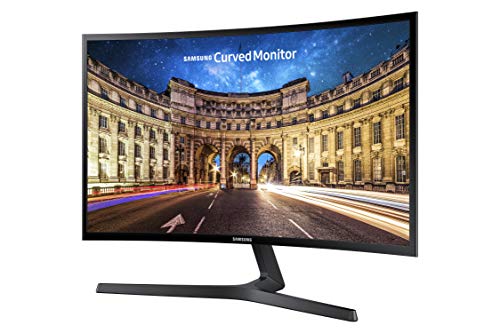
Samsung CF396
Its bezel thickness under 0.5 inches (12.7 mm) delivers a sleek, immersive look without raising the price.

Samsung C27F390
Great for gamers craving a curved display, and it runs about $43 pricier than the CF396.

Samsung LC27F390
Adds a headphone jack and HDMI port, offering direct audio and video connections the other two lack.
Score Analysis
Key score advantages vs. runner-up (Samsung C27F390)
Price Range
TL;DR: The Samsung CF396 delivers a 23.5‑inch 1800R curved VA panel with Full HD resolution, eye‑care modes and AMD FreeSync at a budget‑friendly $116.99.
The monitor’s most eye‑catching spec is its 1800R curvature combined with a VA panel that offers 3000:1 static contrast and 16.7 million colors, making the 23.5‑inch screen feel more immersive than a flat panel of the same size. Its 4 ms gray‑to‑gray response time and 60 Hz refresh rate are solid for casual gaming, while the 250 cd/m² brightness keeps images clear in typical indoor lighting.
Compared with the other Samsung models in this roundup, the CF396 is lighter than the LS27D366GANXZA’s 8.4 pounds and considerably lighter than the SE450’s 14.0 pounds. Its stand depth of 8.6 inches sits just shy of the S39C’s 250 mm (≈9.8 in) depth, giving it a slightly slimmer footprint than that larger‑screen sibling. While the C27F390 and LC27F390 weigh 9.7 pounds and 13.0 pounds respectively, the CF396’s 6.83 pounds (with stand) makes it easier to reposition on a desk.
Users repeatedly praise the curve for reducing eye strain during long work sessions, and many highlight the Eye Saver Mode and Eco‑Saving Plus as helpful for late‑night use. Professional reviewers note AMD FreeSync as a rare value‑add at this price point. The most common complaints focus on the modest 250 cd/m² brightness, which can feel dim in sunny rooms, and the lack of height, swivel or pivot adjustments—only a limited tilt range of –2° to +22° is provided.
Pros
Cons
Best for: Budget-conscious buyers seeking a reliable entry-level option
Avoid if: You have limited desk space or need portability
TL;DR: The Samsung C27F390 is a 27‑inch curved VA monitor with 1800R curvature, 3000:1 static contrast, AMD FreeSync, and eye‑comfort features, all for $159.99.
This model’s most eye‑catching spec is its aggressive 1800R screen curvature paired with a VA panel that delivers a static contrast ratio of 3000:1 and a 4 ms gray‑to‑gray response time. Those numbers give deep blacks and smooth motion at the native 1920 × 1080 resolution.
At 9.7 pounds, the C27F390 is lighter than the SE450’s 14.0‑pound build but a bit heavier than the LS27D366GANXZA’s 8.4 pounds. Its stand depth of 247.7 mm sits between the LS27D366’s 233.68 mm and the SE450’s 8.8‑inch listed depth, while the width of 622.9 mm matches the LS27D366’s 622.30 mm footprint. The monitor also supports a standard 75 × 75 mm VESA mount, a feature many budget peers share.
Reviewers consistently praise the Flicker‑Free and Eye Saver Mode for reducing eye strain during long work sessions, and the 68% Adobe RGB, 72% NTSC, and 93% sRGB coverage satisfies most office‑type color needs. However, the glossy surface can cause noticeable reflections in bright rooms, and the lack of height adjustment, swivel, or pivot limits ergonomic flexibility. The built‑in 3.5 mm headphone jack is useful, but the absence of speakers means you’ll need external audio for media playback.
Additional technical context includes a brightness of 250 cd/m², pixel density of 81 ppi (32 ppcm), and a 60 Hz refresh rate. AMD FreeSync helps smooth out frame‑rate variations, making the monitor a decent entry‑level choice for casual gaming, while the 1,000,000:1 dynamic contrast ratio adds extra punch to HDR‑like content.
Pros
Cons
Best for: Office work, productivity, and budget‑friendly home setups that benefit from eye‑comfort features.
Avoid if: You need extensive ergonomic adjustments, built‑in audio, or a glare‑free display for very bright rooms.
“Perfect for long work hours”
“Great picture quality for the price”
TL;DR: The Samsung LC27F390 is a 27‑inch curved Full HD VA monitor with a 1800R curvature, 3000:1 static contrast and AMD FreeSync, delivering immersive viewing and eye‑comfort features at a mid‑range price.
This model’s standout spec is its 1800R curvature radius, which pairs with a VA panel that offers a static contrast ratio of 3000:1 and a 4 ms gray‑to‑gray response time. The 27‑inch screen delivers Full HD resolution (1920 × 1080) at a typical brightness of 250 cd/m², while the 60 Hz refresh rate keeps motion smooth for everyday use.
At 13.0 pounds, the LC27F390 weighs more than the Samsung C27F390 (9.7 pounds) but less than the SE450 (14.0 pounds). Its 0.5‑inch thickness compares to the CF396’s sub‑0.5‑inch bezel, making it a relatively slim option among the 14‑product lineup. Brightness matches the C27F390’s 250 cd/m² and falls short of the LS34C502GAN’s 300 cd/m² typical brightness, placing it solidly in the mid‑range tier.
Reviewers consistently praise the immersive feel of the 1800R curve and the eye‑comfort suite—Eye Saver Mode, Flicker‑Free technology, and a headphone jack—during long work sessions. However, users note that the glossy surface can produce glare in bright rooms and that the tilt‑only stand (‑2° to 22°) offers limited ergonomic adjustment. Competitive gamers also point out the 60 Hz refresh rate as a bottleneck compared to higher‑refresh alternatives.
Beyond the core display, the monitor includes AMD FreeSync, a Game Mode, and Samsung’s MagicBright and MagicUpscale features, which together smooth gameplay and enhance image quality without extra hardware. Color coverage reaches 93 % of the sRGB gamut, 72 % NTSC and 68 % Adobe RGB, sufficient for casual media consumption but not for color‑critical work.
Pros
Cons
Best for: Buyers in the mid price range seeking the best quality at that price point
Avoid if: You want the best value‑per‑dollar in its price range
“feels like a mini home theater.”
TL;DR: The Samsung LS27D366GANXZA offers a 27‑inch 1800R curved VA panel with 100 Hz refresh, AMD FreeSync and TÜV‑certified eye‑comfort at a budget‑friendly price.
This monitor’s standout feature is its 1800R curvature, which wraps the 27‑inch screen around your field of view and pairs with a VA panel that delivers 3000:1 static contrast. The 100 Hz maximum refresh rate and 4 ms gray‑to‑gray response time, plus AMD FreeSync, give smoother motion than a typical 60 Hz panel.
Compared with other Samsung models in the roundup, the LS27D366GANXZA is heavier than the CF396 (8.4 pounds vs 6.83 pounds) and deeper than the CF396’s 8.6‑inch stand depth. Its typical brightness of 250 cd/m² matches the CF396 and the C27F390, while its 95 % sRGB coverage is comparable to the LC27F390’s 93 % sRGB. The monitor provides only a single HDMI 1.4 port and one D‑Sub, so it offers fewer connectivity options than the S39C, which includes two HDMI ports and a DisplayPort.
User feedback highlights the immersive feel of the curvature and the comfort of the TÜV‑certified blue‑light reduction, making long work sessions easier on the eyes. However, reviewers consistently note the lack of height, swivel or pivot adjustments and the absence of built‑in speakers, meaning you’ll need external audio and a separate stand if you want more ergonomic flexibility. Professional reviewers also point out that the Full HD resolution and 4 ms response are fine for casual gaming but fall short for competitive esports or high‑end design work.
Pros
Cons
Best for: Budget-conscious buyers seeking a reliable entry-level option
Avoid if: You have limited desk space or need portability
TL;DR: The Samsung LS34C502GAN delivers a 34‑inch 21:9 ultrawide VA panel with 100 Hz refresh, AMD FreeSync and eye‑care features at a competitive $229.99 price.
The standout spec is its 100 Hz refresh rate paired with a 5 ms (GtG) response time, which gives noticeably smoother motion than many 60‑75 Hz Samsung monitors in this lineup. Coupled with AMD FreeSync’s 48–100 Hz variable refresh range, it handles casual gaming and fast scrolling without tearing.
At 10.8 pounds, it’s lighter than most of its Samsung siblings—such as the 13‑pound LC27F390 or the 16.6‑pound UJ59—but a touch heavier than the compact C27F390’s 9.7 pounds. Its typical brightness of 300 cd/m² outshines most peers (e.g., the LC27F390’s 250 cd/m²) while falling short of the ViewFinity S8’s 350 cd/m², positioning it solidly in the mid‑range brightness bracket.
Reviewers consistently praise the ultrawide 21:9 aspect ratio for side‑by‑side productivity, noting that the 34‑inch screen and ~109 PPI density make text and UI elements comfortably readable. Professional reviewers highlight the eye‑care suite—ambient light sensor, eye‑saver mode and flicker‑free panel—as it’s a real benefit during long work sessions. However, users also flag the VA panel’s tendency toward ghosting in dark‑to‑bright transitions, the lack of built‑in speakers, and a stand that only tilts (‑2° to +22°) without height adjustment.
Pros
Cons
Best for: Most users looking for a well‑reviewed, reliable mainstream option
Avoid if: You have limited desk space or need portability
“I bought this monitor specifically because of its ability to display 2 different inputs side by side and it does that amazingly!”
“It has vivid color, nice sound system.”
TL;DR: The Samsung S39C delivers a 27‑inch 1000R curved VA panel with 75 Hz refresh, solid color coverage and built‑in speakers at a budget‑friendly price, though it lacks a VESA mount and height adjustment.
The standout spec is the 1000R curvature paired with a 27‑inch VA screen that offers 119.3 % sRGB and 88.4 % Adobe RGB coverage, plus a static contrast ratio of 3000:1. Its 75 Hz refresh rate and 4 ms gray‑to‑gray response time give smoother motion than a typical 60 Hz panel, while the 5 W (2.5 W × 2) built‑in speakers add basic audio without extra peripherals.
Compared with other Samsung monitors in this roundup, the S39C’s 250 mm (9.84 in) depth with stand is marginally deeper than the CF396’s 218.4 mm (8.6 in) and almost matches the C27F390’s 247.7 mm. At 5.1 kg (≈11.2 lb), it's heavier than the CF396 (6.83 lb) and LS27D366 (≈8.4 lb) but lighter than the SE450 (14.0 lb) and LC27F390 (13.0 lb). Its typical brightness of 250 cd/m² aligns with the brightness listed for most peers, and the minimum 200 cd/m² matches the lower end of the range seen on the LS27D366 and LC27F390.
Professional reviewers praise the eye‑comfort suite—Flicker‑Free and Eye Saver mode—alongside the 1000R curve for reducing fatigue during long work sessions. Everyday users echo this, noting the monitor feels gentle on the eyes and the sleek three‑side borderless design looks premium on a desk. The most common criticisms focus on the lack of a VESA‑mount interface, the limited ergonomics (tilt only, no height or swivel), and the modest output of the built‑in speakers.
Pros
Cons
Best for: Entry-level buyers or those on a tight budget
Avoid if: You want the best value‑per‑dollar in its price range
“Great for long work hours”
“Looks premium on my desk”
TL;DR: The Samsung UJ59 32‑inch delivers crisp 4K VA panel visuals with strong contrast, eye‑comfort features, and FreeSync, all for $285, though its 60 Hz refresh and DP bandwidth limit high‑end gaming.
The standout spec is its 3840 × 2160 4K resolution on a 32‑inch VA panel, paired with a static contrast ratio of 3000:1 and a 4 ms gray‑to‑gray response time. Those numbers give deep blacks and smooth motion for everyday work and media consumption.
At 16.61 pounds, the UJ59 is lighter than the ViewFinity S8 (19.62 pounds) but heavier than the LS34C502GAN, which lists at 4.9 kg. Its typical brightness of 270 cd/m² sits between the SH850’s 300 cd/m² and the ViewFinity S8’s 350 cd/m², while its contrast ratio far exceeds the SH850’s 1000:1. The 60 Hz refresh rate matches the baseline of many peers but trails the LS34C502GAN’s 100 Hz capability.
Reviewers praise the sharp 4K picture and the deep blacks that the VA panel provides, noting that Eye Saver Mode and Flicker‑Free technology reduce eye strain during long work sessions. However, users frequently mention the DisplayPort 1.2 limitation that caps 4K at 30 Hz, a visible Samsung logo on the front bezel, and occasional FreeSync hiccups that can affect smooth gaming.
Beyond the core display, the monitor includes AMD FreeSync, Picture‑by‑Picture and Picture‑in‑Picture modes (PIP up to 25 % of the screen), and a headphone jack for private listening. These features round out a solid value for anyone needing a large, color‑accurate screen without breaking the bank.
Pros
Cons
Best for: Those prioritizing quality and willing to pay for premium performance
Avoid if: Reliability and user satisfaction are your top concerns
TL;DR: The Samsung U28E590D delivers a crisp 28‑inch 4K image with a 1 ms response time and AMD FreeSync, but its TN panel limits viewing angles and its price sits at $525.29.
This monitor’s standout spec is its 3840 × 2160 pixel UHD panel on a 28‑inch diagonal, giving a pixel density of 157 PPI. The screen reaches a typical brightness of 370 cd/m² and a static contrast ratio of 1000:1, while the 1 ms GTG response time helps keep motion blur low for casual gaming.
Compared with the other Samsung models in the roundup, the U28E590D is lighter than the M8 (which weighs 15.9 pounds) but heavier than the LS34C502GAN (about 10.8 pounds). It also offers fewer built‑in speakers than the M8 and lacks the higher‑refresh HDMI support found on the ViewFinity S8, which runs 60 Hz at 4K. Its two HDMI 1.4 ports cap at 30 Hz, so you’ll rely on the DisplayPort 1.2 input for full‑speed 4K work.
Reviewers consistently praise the monitor’s razor‑sharp text and the ease of multitasking on the large 4K canvas. Professional reviewers note the 1.07 billion‑color (8‑bit + dithering) panel delivers vivid shades, while everyday users appreciate the Flicker‑Free and Eye‑Saver modes for long work sessions. The most common complaints revolve around the TN panel’s limited horizontal (170°) and vertical (160°) viewing angles, occasional dead pixels, and a stand that feels a bit flimsy with only –2° to +15° tilt.
Additional technical details include AMD FreeSync support, a 75 mm × 75 mm VESA mount, and a headphone jack for private listening. The monitor draws a typical 32 W of power and comes with a three‑year warranty, giving you some peace of mind for a premium‑tier display.
Pros
Cons
Best for: Those prioritizing quality and willing to pay for premium performance
Avoid if: You're shopping on a tight budget — it's priced at $525.29
“Crisp, sharp image”
“Great for multitasking”
TL;DR: The Samsung M8 is a 32‑inch 4K hybrid monitor/TV with a built‑in 1080p camera, AI upscaling and a solar‑powered remote, but its VA panel’s colour wash‑out and 60 Hz refresh keep it from being a gamer’s first choice.
A standout feature is its all‑in‑one design: a 32‑inch VA panel delivering 3840×2160 resolution, 400 nits brightness and a static contrast ratio of 3000:1, plus AI upscaling that sharpens lower‑resolution content. It also houses a 1080p webcam with digital zoom, face tracking and a magnetic privacy cover, and two 5 W speakers that together output 10 W.
At 15.9 pounds, the M8 is heavier than the Samsung U28E590D (11.6 pounds) but lighter than the Samsung ViewFinity S8 (19.62 pounds). Its depth with stand measures 239.5 mm, which is deeper than the Samsung M80C’s 180.1 mm stand depth, while it shares the same 65 W USB‑C Power Delivery as the M80C. The stand offers height adjustment, tilt and a 90° pivot, giving more ergonomic flexibility than many flat‑panel peers.
Reviewers appreciate the convenience of a single device that doubles as a TV and a productivity monitor. Professional reviewers highlight the AI upscaling as a strong point, and users love the solar‑powered remote and the height‑adjustable stand. However, the VA panel’s narrow viewing angles lead to colour wash‑out off‑centre, the lack of local dimming curtails true HDR10+ performance, and the 60 Hz refresh rate feels limiting for fast‑paced gaming.
Pros
Cons
Best for: Remote workers and hybrid professionals who want a single screen for video calls, media streaming and office tasks.
Avoid if: You're shopping on a tight budget — it's priced at $531.50
“Perfect second screen for my bedroom—watch Netflix and work on Zoom without switching devices.”
“Love the height adjustment and pivot for coding in portrait mode.”
TL;DR: The Samsung M80C is a 27‑inch 4K smart monitor with a VA panel, 400 nits typical brightness, height‑adjustable stand and 65 W USB‑C power delivery, but its 60 Hz refresh and lack of adaptive sync keep it out of the gaming lane.
The M80C packs a 27‑inch 3840 × 2160 pixel VA display that delivers up to 400 cd/m² typical brightness and a static contrast ratio of 3000:1. Its 10 W RMS speakers and integrated 1080p webcam give you a complete video‑call setup, while the USB‑C port supplies up to 65 W of power so you’ll run a laptop with a single cable.
Weighing 14.8 lb, the monitor weighs less than the larger‑screen ViewFinity S8 and the UJ59, yet it's a bit lighter than the Samsung M8, which tips in at 15.9 lb. Like the M8, it offers a single HDMI 2.0 input and 65 W USB‑C power delivery, and its built‑in 2‑port USB‑2.0 hub matches the modest peripheral support of its peers.
Users consistently highlight the all‑in‑one convenience of Tizen’s streaming apps, Multi View and Wireless DeX, and they call the ergonomic stand—height, tilt and swivel adjustments—a standout feature for remote work. Professional reviewers note the lack of adaptive sync and the 60 Hz panel as a drawback for serious gamers, and several owners mention that the 400‑nit HDR peak feels underwhelming compared with higher‑brightness displays.
Pros
Cons
Best for: Remote workers, multitaskers, media‑streaming enthusiasts, and smart‑home owners who value an integrated smart‑TV experience.
Avoid if: You need high refresh rates, adaptive sync, or top‑tier HDR performance for gaming.
“Perfect second screen for my bedroom—watch Netflix and work on Zoom without switching devices.”
“Love the height adjustment and pivot for coding in portrait mode.”
TL;DR: The Samsung ViewFinity S8 offers a 37‑inch 4K VA panel with 350 cd/m² typical brightness, a 90 W USB‑C dock and built‑in KVM, priced at $299.99, delivering a spacious, productivity‑focused experience.
The standout spec is the 37‑inch 4K UHD VA screen that delivers a static contrast ratio of 3000:1 and a typical brightness of 350 cd/m², while the 5 ms gray‑to‑gray response time keeps motion clear enough for most work tasks. Its USB‑C 3.2 Gen 1 port supplies up to 90 W power, video, data and Ethernet over a single cable, and the built‑in KVM switch lets you toggle between two computers without reaching for the keyboard.
Compared with the other thirteen monitors in this roundup, the ViewFinity S8 is larger than the 32‑inch UJ59 and the 23.8‑inch SH850, and it weighs 19.62 pounds—heavier than the 10.8‑pound LS34C502GAN but in the same ballpark as the 18.3‑pound SH850. Its typical brightness of 350 cd/m² outshines the UJ59’s 270 cd/m² and the SE450’s 250 cd/m², though its 60 Hz refresh rate matches many peers and falls short of the LS34C502GAN’s 100 Hz and the SH850’s 75 Hz. Like several rivals, it lacks built‑in speakers.
Users consistently praise the monitor’s large 37‑inch workspace and the convenience of a single‑cable USB‑C connection, especially for remote or hybrid work where desk clutter matters. Professional reviewers note the integrated KVM switch as a productivity boost, while the TÜV‑certified eye‑care suite (flicker‑free, Eye Saver Mode) helps during long sessions. Common complaints focus on the VA panel’s color wash‑out at extreme angles, the 60 Hz limit for fast‑action gaming, and the absence of built‑in speakers.
Pros
Cons
Best for: Remote and hybrid workers who need a single‑cable docking solution and plenty of screen real‑estate.
Avoid if: You need advanced gaming features, high refresh rates, or built‑in speakers for meetings.
TL;DR: The Samsung SE200 is a 21.5‑inch Full HD TN monitor with 250 cd/m² brightness, 5 ms gray‑to‑gray response, and eco‑friendly build, earning 4.4‑star ratings for solid office performance.
The SE200 packs a 21.5‑inch 1920 × 1080 panel that delivers a typical brightness of 250 cd/m² and a static contrast ratio of 1000:1. Its 5 ms gray‑to‑gray response time and 60 Hz refresh rate keep motion smooth for everyday tasks, while the 0.24825 mm pixel pitch yields a crisp image. The monitor is VESA‑compatible (100 × 100 mm) and offers tilt from –1° to +20°, plus an ultra‑low standby draw of less than 0.1 W.
Compared with other Samsung options in this roundup, the SE200 is a bit heavier than the CF396 (7.3 lb vs 6.83 lb) but lighter than the SE450 (14.0 lb). Its depth of 7.87 cm is shallower than the CF396’s 8.6‑inch stand depth, making it easier to fit on cramped desks. Like the CF396, it provides a 250 cd/m² brightness, yet it doesn't have HDMI or DisplayPort inputs that models such as the S39C include, limiting connection choices.
Reviewers consistently praise the eye‑care suite – Eye Saver Mode and Flicker‑Free technology – for reducing fatigue during long work sessions. Professional reviewers also highlight the monitor’s ENERGY STAR, TCO, and EPEAT certifications, noting the 30 % recycled‑plastic construction as a solid sustainability win. However, users frequently mention the absence of HDMI and the TN panel’s narrower viewing angles and less vivid colors as drawbacks for media‑heavy use.
Pros
Cons
Best for: Small‑business desks or home offices that need an energy‑efficient 1080p monitor with eye‑care features and reliable build quality.
Avoid if: You need advanced ports, high‑color accuracy, or built‑in audio for gaming or professional media editing.
“Great picture quality for the price”
“Perfect for dual‑monitor setups and office work”
TL;DR: The Samsung SE450 is a 24‑inch Full HD TN monitor at $150.10, with a fully adjustable stand, low 23 W power draw, and VGA/DVI/DisplayPort inputs, though its color accuracy and missing HDMI limit it to budget office use.
The standout feature is the ergonomic stand, which slides from 14.0 inches to 19.2 inches in height and offers tilt, swivel and pivot adjustments. At 14.0 pounds, it's solid enough to stay put while you fine‑tune your viewing angle.
Compared with other Samsung models in this roundup, the SE450 is heavier than the CF396 (6.83 pounds) and the LS27D366GANXZA (8.4 pounds), but lighter than the LC27F390 (13.0 pounds). Its typical brightness of 250 cd/m² matches the C27F390 and CF396, yet it lacks the HDMI port that several peers provide.
Professional reviewers note the low power footprint—23 W typical consumption, standby under 0.3 W, and off‑mode under 0.005 W—plus eco‑friendly construction with 30% recycled plastic. The TN panel delivers a 5 ms gray‑to‑gray response and a 1000:1 static contrast ratio, making it adequate for office tasks but falling short for color‑critical work. Users appreciate the easy setup and eye‑comfort features, though some report washed‑out colors off‑center and occasional stand wobble.
Pros
Cons
Best for: Entry-level buyers or those on a tight budget
Avoid if: You need advanced features or professional‑grade performance
“great design to fit any workstation”
“an affordable model with all the basic features you need for everyday work”
TL;DR: The Samsung SH850 is a 23.8‑inch WQHD monitor with 108.79 PPI sharpness, 5 ms response, USB‑C connectivity and full ergonomic adjustments, priced at $279.99 for a solid productivity‑focused experience.
The SH850 sports a 2560 × 1440 pixel panel on a 23.8‑inch diagonal, giving a pixel density of 108.79 PPI that keeps text and images crisp. Its PLS panel covers 98% of the sRGB color space, and the display can reach a typical brightness of 300 cd/m² (minimum 240 cd/m²). With a maximum refresh of 75 Hz and a 5 ms gray‑to‑gray response time, it balances smooth motion with low input lag for everyday tasks.
Compared with the other 13 monitors in this roundup, the SH850 is heavier than most of the 27‑inch and 34‑inch models—its 18.3 pounds outweigh the LS34C502GAN’s 10.8 pounds and the LC27F390’s 13.0 pounds—but it is lighter than the 32‑inch ViewFinity S8, which tips the scales at 19.62 pounds. Its typical brightness of 300 cd/m² sits above the UJ59’s 270 cd/m² yet below the ViewFinity’s 350 cd/m². The static contrast ratio of 1000:1 is lower than the UJ59’s minimum 2000:1, while the 75 Hz refresh rate lands between the UJ59’s 60 Hz and the LS34C502GAN’s 100 Hz.
Professional reviewers praise the monitor’s color accuracy and the convenience of a single USB‑C cable that carries video, data and power. Everyday users love the bezel‑less three‑side design and the ergonomic stand that offers 135 mm of height adjustment, plus tilt, swivel and pivot. However, many note that the USB‑C port can be finicky at first—drivers often need manual installation—and that many find the on‑screen menu confusing, which can make setup slower than expected.
Beyond the core display, the SH850 includes AMD FreeSync for smoother scrolling, Eye Saver and Flicker‑Free technologies for reduced strain, and multitasking helpers like Picture‑by‑Picture, Picture‑in‑Picture and daisy‑chain support for up to four monitors. The stand’s VESA‑compatible 100 × 100 mm pattern lets you mount the screen on a wall or arm if desk space is at a premium.
Pros
Cons
Best for: Most users seeking a balanced, mainstream option
Avoid if: You need advanced features or professional‑grade performance
“Amazing picture quality — text is crisp, colors are vibrant.”
“Ergonomic stand is fantastic — height, swivel, and pivot make it perfect for long workdays.”
Breakdown
Samsung CF396
Pros
Samsung C27F390
Pros
Samsung LC27F390
Pros
Cons
Based on scoring data and product specs
Personalized picks
Best Overall Pick
Samsung CF396
Best Budget PickBest for: Budget-conscious buyers seeking a reliable entry-level option
Samsung C27F390
Best for: Budget-conscious buyers seeking a reliable entry-level option
$159.99+$43.00 vs winner
Skip Samsung SH850 if…
You need advanced features or professional-grade performance
Winner: Samsung CF396 wins thanks to its price of $116.99, a strong 4.6‑star rating from 11,272 reviewers, and a full‑HD 23.5‑inch VA panel that delivers 250 cd/m² brightness, a 3000:1 contrast ratio and a 1800R curvature for an engaging viewing experience.
The runner‑up, Samsung C27F390, offers a larger 27‑inch curved screen for immersive gaming or media consumption. It keeps the same 4 ms response time and 1800R curvature, adds a higher dynamic contrast of 1,000,000:1, and is priced at $159.99.
For shoppers looking beyond the winner, the lineup still offers options:
Pick the Samsung CF396 today for the best value in a Samsung desktop display.
The CF396 costs $116.99, which is about $43 less than the C27F390’s $159.99 price tag, making it a strong value option. Both share a 1800R curvature and 60 Hz refresh, but the C27F390 offers a larger 27‑inch screen and higher sRGB coverage (93 %). If budget is the priority, the CF396 gives solid performance for less money.
Please sign in to leave a review
No reviews yet. Be the first to review!
Also considered
Samsung CF396
$116.99
Samsung C27F390
$159.99
Samsung LC27F390
$199.99

Samsung LS27D366GANXZA
$161.49

Samsung LS34C502GAN
$275.38

Samsung S39C
$111.99

Samsung UJ59 32-inch
$285.99
Samsung U28E590D
$525.29

Samsung M8
$555.63

Samsung M80C
$540.64

Samsung ViewFinity S8
$349.99

Samsung SE200
-$0.01
Samsung SE450
$150.10
Samsung SH850
$279.99
Spec Comparison
$159.99
