
Our top pick is the Synology DS220j. At $486.00 it earns a solid 4.4/5 rating from over 3,300 reviewers, packs two drive bays, a 1 × Gigabit Ethernet (1000 Mbps) port and two USB 3.0 (5 Gbps) connections, and weighs just 1.94 pounds. The combination of Synology’s DSM software and a 1.4 GHz quad‑core Realtek CPU makes it a reliable private‑cloud hub for home users and small offices without the expense of high‑end hardware.
The roundup covers 11 Synology devices spread across three price tiers. Budget options include the $114.01 BDS70‑1T portable SSD and the $194.99 DS223j 2‑bay NAS, which target cost‑conscious users. Mid‑range choices feature the DS220j and the $329.00 DS118, offering a balance of performance and price. Premium selections such as the $639.84 DS925+, the $662.15 DS223, and the $519.99 DS425+ deliver higher capacity, faster networking and more advanced features for prosumers and small businesses.
Below you’ll find a detailed look at each model, so you can match the right Synology cloud storage device to your workflow and budget.
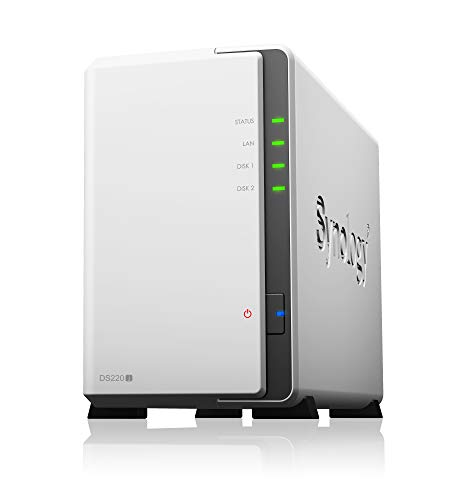
Synology DS220j
Offers a Gigabit Ethernet port (1000 Mbps) plus two USB 3.0 ports (5 Gbps), delivering solid connectivity for most home setups.

Synology DS223j 2-bay
Ideal for budget‑conscious home users, the DS223j 2‑bay comes in at $194.99—about $291 cheaper than the mid‑range DS220j, while still offers reliable entry‑level storage.

Synology DS925+
Stands out with a quiet 20.5 dB(A) noise level and dual 92 mm fans, for users who need premium, low‑noise performance beyond the mid‑range and entry models.
Also considered
Score Analysis
Key score advantages vs. runner-up (Synology DS223j 2-bay)
Price Range
Synology DS220j
$486.00
Synology DS223j 2-bay
$194.99
Synology DS925+
$639.84

Synology DS223
$662.15

Synology BDS70-1T
$120.40
Synology DS124 1-bay
$144.99

Synology DS425+
$519.99
Synology DS223j
$675.64

Synology BeeStation 4TB
$309.99
Synology DS118
$329.00
Synology DS225+
$1,083.91
Spec Comparison
TL;DR: The Synology DS220j offers two drive bays, 512 MB of DDR4 memory and a single Gigabit Ethernet port for $486, delivering solid home‑cloud performance with low power draw.
The DS220j’s most distinctive hardware spec is its 512 MB DDR4 (non‑ECC) memory paired with a Realtek RTD1296 quad‑core 1.4 GHz CPU, giving enough juice for everyday file sharing, media streaming and basic backup tasks. Its compact desktop form measures 225.5 mm deep, 165 mm high and 100 mm wide, and it weighs just 1.94 pounds, making it easy to fit on a home office shelf.
Compared with the other Synology models in this roundup, the DS220j is lighter than the DS425+ and DS925+, both of which tip the scales at over 4 pounds, while it’s a bit heavier than the ultra‑compact DS118 (700 g). Its 100 mm width is noticeably slimmer than the 199 mm width of the DS425+ and DS925+, yet wider than the 71 mm width of the DS118. In depth, it matches the DS223j at 225.5 mm and sits just a shade deeper than the 223 mm depth of the DS425+ and DS925+. These dimensions place it firmly in the middle of the size spectrum for the lineup.
Reviewers consistently praise the DS220j’s DiskStation Manager (DSM) software for its intuitive browser‑based setup and extensive app ecosystem, noting that even newcomers can get a private cloud running quickly. Users also highlight the low power consumption—12.46 W when active and only 5.06 W in HDD‑hibernation mode—which keeps electricity costs down. However, the single Gigabit Ethernet port and the modest 512 MB RAM draw criticism from power users who need higher throughput or heavier multitasking. Because the unit ships without drives, you’ll need to buy compatible 3.5″ or 2.5″ SATA HDD/SSD separately and use a screwdriver to install them.
Pros
Cons
Best for: Most users looking for a well‑reviewed, reliable mainstream option
Avoid if: You have limited desk space or need portability
TL;DR: The Synology DS223j is a compact 2‑bay NAS that packs a 1.7 GHz quad‑core CPU, 1 GB DDR4 RAM and a single 1 GbE port into a 1.92‑lb, $194.99 unit.
Weighing 1.9180216794 pounds and measuring 165 mm deep, 226 mm tall and 100 mm wide, the DS223j houses a Realtek RTD1619B quad‑core processor running at 1.7 GHz, 1 GB DDR4 non‑ECC memory, and a 1 Gbps Ethernet port. It draws 16.31 W during active use and drops to just 4 W when the drives are in hibernation, while idle noise registers at 18.2 dB(A).
At 1.92 lb it’s lighter than the DS124’s 2.74916440714 lb chassis but considerably heftier than the BDS70‑1T’s feather‑light 0.09479877266 lb design. Its 165 mm depth is shallower than the DS124 and DS118’s 224 mm frames, yet deeper than the BeeStation’s 115 mm case. Height‑wise it stands taller than the DS124, DS118 and DS220j’s roughly 166 mm profiles, but shorter than the BeeStation’s 252 mm tower. The 1 GB RAM matches the DS118’s memory but doubles the DS220j’s 512 MB, while the 1.7 GHz CPU ties the DS124 and outpaces the DS220j’s 1.4 GHz chip. Network connectivity is limited to a single 1 GbE port, matching the DS220j and lagging behind the BDS70‑1T’s 10 Gbps interface. Power draw of 16.31 W exceeds the DS118’s typical 9.4 W, though its 4 W hibernation use is on par with the DS118’s 4.22 W standby. Noise at idle (18.2 dB(A)) is quieter than the DS425+’s 21.6 dB(A) rating.
Reviewers praise the DS223j’s user‑friendly DiskStation Manager (DSM) interface and the ease of setting up RAID 1 for data redundancy. The hardware encryption engine adds a layer of security, and the device’s modest power draw reduces electricity costs. However, users note the lack of tool‑less, hot‑swappable drive bays, and the fixed 1 GB RAM can become a bottleneck for power users. The single Gigabit Ethernet port and modest CPU prevent the unit from handling intensive media transcoding or heavy multi‑user environments.
Technical highlights include support for RAID 0, 1, Basic, Hybrid RAID and JBOD, a maximum single volume size of 108 TB, and a rich protocol list (SMB, NFS, AFP, FTP, WebDAV, iSCSI, CIFS, HTTP/HTTPS, SNMP, LDAP, CalDAV, Kerberos). The unit ships with two USB 3.2 Gen 1 ports, a 60 W power supply, and a 2‑year warranty.
Pros
Cons
Best for: Budget‑conscious buyers seeking a reliable entry‑level option
Avoid if: You need advanced features or professional‑grade performance
“airplane noise”
“Easy setup and migration”
TL;DR: The Synology DS925+ packs a quad‑core 2.2 GHz AMD Ryzen CPU, 4‑bay storage and dual 2.5 GbE ports, delivering up to 565 MB/s write speeds in a quiet, expandable chassis.
Synology builds the DS925+ around a 4‑core, 2.2 GHz AMD Ryzen V1500B processor and ships it with 4 GB DDR4 ECC memory that can be expanded to 32 GB. Its four drive bays support hot‑swap SATA disks and two M.2 NVMe slots for SSD caching, while sequential read and write performance reach 522 MB/s and 565 MB/s respectively.
At 4.9824471212 pounds, it is lighter than the DS223 (6.68 lb) and DS223j (5.84 lb) but heavier than the DS220j (1.94 lb) and the DS118, which lists its weight in grams. Noise measures 20.5 dB(A) with two 92 mm fans, placing it between the quieter DS223j (18.2 dB(A)) and the slightly louder DS425+ (21.6 dB(A)). The unit offers two 2.5 GbE LAN ports, outpacing the DS220j’s single Gigabit Ethernet connection, and it doubles the drive‑bay count of the DS220j’s two‑bay design.
Reviewers praise the fast file transfers, the quiet operation and the intuitive DSM 7.2 interface for small‑business workflows. Professional reviewers note the reliable performance under load and the benefit of SSD caching via the M.2 slots. The main criticisms focus on the lack of native 10 GbE, which limits ultra‑fast networking, and the requirement to use Synology‑certified drives, a policy some users find restrictive. Power draw is 37.91 W during access and drops to 12.33 W in hibernation, while fan speed modes let you choose between full‑speed, cool or quiet operation.
Pros
Cons
Best for: Those who need a high‑performance, four‑bay NAS with fast networking and room to grow memory and cache.
Avoid if: You require native 10 GbE, want unrestricted drive compatibility, or are on a tight budget.
TL;DR: The Synology DS223 packs a quad‑core 1.7 GHz Realtek CPU, 2 GB DDR4 RAM and two drive bays into a quiet 14.6 dB(A) chassis that consumes just 17.343 W when active.
The standout hardware is the 1.7 GHz quad‑core Realtek RTD1619B paired with 2 GB DDR4 non‑ECC memory, giving the DS223 more headroom than the DS223j’s 1 GB RAM while staying within a compact 232.7 mm depth and 108 mm width. Its 14.6 dB(A) noise level is noticeably quieter than the DS925+ (20.5 dB(A)) and the DS425+ (21.6 dB(A)), so it's a good fit for a home office or bedroom setup.
Compared with its peers, the DS223 is a bit heavier at 6.6800065386 pounds, while the DS223j tips the scales at 5.842249943 pounds and the DS220j comes in at just 1.94 pounds. It also sits a little deeper than the DS925+ and DS425+ (both 223 mm) but shares the same 165 mm height as the DS223j and DS220j. Its power draw of 17.343 W during access and 4.08 W in hibernation is lower than many larger units, and the single 1 GbE LAN port keeps networking simple.
User feedback praises the intuitive DSM interface, the quiet operation and the low power draw, while professional reviewers note the reliable Btrfs file system and the added 2 GB RAM over the DS223j. The consensus is that the Realtek processor handles everyday backup and media streaming well, but it falls short for 4K transcoding or heavy Docker workloads. The fixed 2 GB RAM and the 18 TB per‑bay drive limit (36 TB raw max) are common points of criticism for power users.
Pros
Cons
Best for: Buyers willing to invest in a proven, high‑quality option
Avoid if: You're on a tight budget or only need basic functionality
“Perfect for home backups — set it and forget it”
“DSM is the best NAS OS out there — so many apps and easy to use”
TL;DR: The Synology BDS70-1T packs a 1 TB NVMe SSD, 800 MB/s sustained writes and plug‑and‑play backup into a 65 mm‑square, 43 g device for $114.01.
The standout spec is the built‑in 1 TB NVMe SSD that delivers a sustained write speed of 800 MB/s and a peak transfer rate of 1050 MB/s over a USB‑C 10 Gbps (USB 3.2 Gen 2) interface. At just 65 mm tall, long, and wide, and weighing only 0.09479877266 lb (43 g), it’s one of the most compact and lightweight storage solutions in this roundup.
Compared with the other ten Synology devices, the BeeDrive is dramatically lighter than the DS124 (2.74916440714 lb) and the DS223j (1.9180216794 lb), and it also undercuts the DS118’s 700 g and the DS220j’s 1.94 lb. Its footprint measures far smaller than the DS124’s 166 mm × 71 mm panel or the BeeStation’s 252 mm × 258 mm dimensions. While most peers rely on Ethernet ports, the BDS70‑1T uses a USB‑C connection, making it a true portable alternative to the rack‑mounted or 2‑bay NAS models that dominate the list.
Users consistently praise the “plug‑and‑play” experience: the device automatically backs up photos from up to five devices and supports wireless BeeDrop transfers without extra software. Professional reviewers note the 800 MB/s sustained write speed as “NAS‑grade endurance” and commend the intuitive backup UI. The main criticisms note that mobile backup and sync only run while the host computer stays on, there’s no built‑in hardware encryption (it relies on BitLocker or macOS Disk Utility), and the capacity limits you to a single 1 TB option.
Additional technical context includes support for Windows 10 (1809+) and newer, macOS 12+, iOS 15+ and Android 10+. The device ships with a USB‑C to C cable, a USB‑C to A adapter and a quick‑start guide, and it carries a three‑year warranty. Certifications such as RoHS, FCC and CE underline its compliance with major safety standards.
Pros
Cons
Best for: Entry‑level buyers or those on a tight budget
Avoid if: You need powerful performance or professional‑grade features
“Finally, a backup drive that just works.”
“I no longer lose photos from my phone—BeeDrive backs them up automatically.”
TL;DR: The Synology DS124 packs a 4‑core 1.7 GHz Realtek CPU, 1 GB DDR4 memory and a single 3.5″/2.5″ bay into a 224 mm × 166 mm × 71 mm, 2.75‑lb chassis for $139.99, delivering quiet, low‑power home storage.
The standout hardware is the 4‑core 1.7 GHz Realtek RTD1619B processor, a step up from the older 1.4 GHz chips some peers use, and it pairs with a hardware encryption engine for secure data handling. With a maximum single‑volume capacity of 108 TB, the DS124 can host a very large drive while keeping power draw modest at 10.69 W during access and just 3.44 W in HDD hibernation. Its 19.0 dB(A) noise level makes it suitable for office desks or bedroom shelves.
Compared with other models in this roundup, the DS124 is heavier than the ultra‑compact BDS70‑1T (0.09 lb) and the DS118 (700 g), but lighter than the DS425+ (4.81 lb). Its dimensions match the DS118’s depth (224 mm), height (166 mm) and width (71 mm), while the DS223j sits taller at 226 mm and wider at 100 mm. Like the DS220j, it offers a single 1 GbE LAN port and two USB 3.2 Gen 1 ports, but it provides a faster 1.7 GHz CPU versus the DS220j’s 1.4 GHz processor. In terms of noise, the DS124 is quieter than the DS425+ (21.6 dB(A)). It offers storage flexibility similar to the BeeStation 4TB, which also supports 1 GbE, though the BeeStation lists larger physical dimensions.
Users consistently praise the DS124 for its plug‑and‑play DSM setup, silent operation, and dependable backup features such as Hyper Backup and Btrfs snapshots that add self‑healing protection. Professional reviewers note the noticeable performance gain from the newer Realtek CPU and the energy‑efficient design. However, the community also flags the limited 1 GB RAM as a bottleneck for multitasking, the single‑bay layout as a lack of RAID redundancy, and the absence of hot‑swap capability and video‑transcoding support as constraints for power users.
Pros
Cons
Best for: Entry‑level buyers or those on a tight budget
Avoid if: You need advanced features or professional‑grade performance
“This NAS is easy to set up, like all Synology products, and the system does what you expect. I’m using it as an SMB drive with automatic backup to Synology C3, and that works like a charm. You could run other services, but I’d rather have a separate device with more RAM and a better CPU for that.”
TL;DR: The Synology DS425+ offers four drive bays, 2.5 GbE networking, dual M.2 slots, and quiet 21.6 dB operation, making it a solid mid‑range NAS for home offices and small teams.
The standout feature is its 2.5 GbE LAN port, paired with a second 1 GbE port, delivering faster local transfers than many entry‑level Synology models. It also houses two M.2 2280 slots for SSD caching or additional storage, and a 4‑bay hot‑swappable SATA enclosure that can hold up to 80 TB of raw capacity.
Compared with other units in this roundup, the DS425+ is heavier than the DS220j (1.94 pounds) but lighter than the DS223 (6.68 pounds). Its dimensions (223 mm × 166 mm × 199 mm) match the DS925+, while the DS118 is noticeably smaller and single‑bay. The DS425+ is pricier than the entry‑level models but offers more drive bays and higher‑speed networking than the DS223j, which only lists a 1 GbE port.
User feedback frequently praises the 21.6 dB(A) idle noise level, calling the unit “library‑quiet.” Professional reviewers highlight the long‑awaited 2.5 GbE upgrade as a major plus. At the same time, reviewers note the Intel Celeron J4125 (2.0 GHz base, 2.7 GHz turbo) as a bottleneck for heavy transcoding or multiple virtual machines, and the lack of a 10 GbE option limits future‑proofing for bandwidth‑hungry workflows. The device consumes 28.25 W during access and drops to 6.10 W in HDD hibernation, with a modest 2 GB DDR4 system memory and a maximum upgrade ceiling of 6 GB.
Pros
Cons
Best for: Most users seeking a balanced, mainstream option
Avoid if: Reliability and user satisfaction are your top concerns
“library-quiet”
“2.5GbE support is a game‑changer for local backups and media streaming”
TL;DR: The Synology DS223j is a compact 2‑bay NAS that runs quietly at 18.2 dB(A), draws just 16.31 W under load, and offers 1 GB RAM for basic home or small‑office file storage.
The standout spec is its near‑silent operation: the unit measures only 18.2 dB(A) thanks to a single 92 mm fan, and it stays cool with a maximum BTU output of 55.62 BTU/hr. Power draw's modest at 16.31 W during access and drops to just 4 W in HDD hibernation, keeping monthly electricity costs low. With a 1 GB DDR4 non‑ECC system memory and a 1.7 GHz quad‑core Realtek RTD1619B processor, the DS223j delivers the full DSM experience in a lightweight package that weighs 5.842249943 pounds.
Compared with its peers, the DS223j is quieter than the DS925+ (20.5 dB(A)) and the DS425+ (21.6 dB(A) idle). It shares the same 225.5 mm × 165 mm × 100 mm footprint as the DS220j, but it weighs more than the 1.94‑pound DS220j and less than the 6.6800065386‑pound DS223. Its hibernation draw of 4 W sits slightly below the DS118’s 4.22 W standby consumption. While the DS223j lacks the dual‑fan design of the DS925+, its single fan keeps noise down without sacrificing cooling.
Users consistently praise the DS223j for its silent operation and low energy use, noting that the device blends into a home office without being a distraction. Professional reviewers echo this, calling it “the quietest NAS in its class.” The same reviewers point out that the 1 GB RAM limits multitasking and that the Realtek CPU isn’t built for heavy transcoding or Docker workloads. The unit also requires the system to be powered down to swap drives, as it doesn’t support hot‑swap bays.
Pros
Cons
Best for: Home users, remote workers, and small offices that need a quiet, low‑power, easy‑to‑manage storage solution.
Avoid if: You need advanced features or professional‑grade performance such as Docker, virtual machines, or intensive media transcoding.
“airplane noise”
“Easy setup and migration”
TL;DR: The Synology BeeStation 4TB offers 4 TB of built‑in storage, AI‑driven photo tagging via an on‑device NPU, and plug‑and‑play setup, but lacks media‑streaming and RAID expansion.
The BeeStation BST150-4T packs a 4 TB 3.5″ hard drive that spins at 5400 RPM, driven by a Realtek RTD1619B quad‑core processor clocked at 1.7 GHz and 1 GB of soldered DDR4 RAM. A built‑in Neural Processing Unit accelerates on‑device photo organization, letting the BeePhotos app auto‑tag images without sending them to the cloud. Over its 1 GbE Ethernet port the unit delivers about 76 MB/s read and 85 MB/s write.
The BeeStation’s 115 mm depth makes it noticeably slimmer than the DS118, DS124 and DS220j, which sit around 224 mm deep, while it weighs 820 g—slightly more than the 700 g DS118, but less than the 870 g DS223j and far less than the multi‑bay DS425+, which exceeds 4 pounds. Both the BeeStation and the DS118 ship with 1 GB of DDR4 memory, outpacing the DS220j’s 512 MB, and its active power draw of 7.85 W draws less than the DS118’s typical 9.4 W, though its standby draw of 1.65 W is lower than the DS118’s 4.22 W standby figure.
Everyday users rave about the QR‑code setup that makes initial configuration a matter of seconds, and professional reviewers highlight the on‑device AI tagging as a smooth, privacy‑first alternative to cloud services. The most common gripe is the absence of media‑server features such as DLNA or Plex, and a few owners note the audible whir of the 5400 RPM drive during heavy file transfers.
The unit offers both a USB‑A and a USB‑C 3.2 Gen 1 port (5 Gbps) for local backups, operates between 0 °C and 35 °C, and tolerates humidity from 8 % to 80 % RH, matching the environmental range of many home routers. Its three‑year warranty rounds out the package for users who want a set‑and‑forget personal cloud.
Pros
Cons
Best for: Entry‑level buyers or those on a tight budget
Avoid if: You need advanced features or professional‑grade performance
“Set up in under 5 minutes—just scan, plug in, and go.”
“Wish it could stream movies—I expected Plex support.”
TL;DR: The Synology DS118 packs a 1.4 GHz quad‑core CPU, 1 GB DDR4 RAM and a single 60 mm fan into a 71 mm‑wide, 700 g desktop NAS that can transcode 4K video at 30 FPS and hold up to 16 TB.
Synology equips the DS118 with a Realtek RTD1296 quad‑core processor running at 1.4 GHz and a 1 GB DDR4 memory module. Together they enable 4K media transcoding at 30 FPS, a capability usually reserved for higher‑end models. The unit draws a modest 9.4 W typical, and its active 60 mm fan keeps it cool without noticeable noise. It fits into a compact chassis measuring 71 mm (W) × 224 mm (D) × 166 mm (H) and weighing just 700 g.
Size‑wise, it mirrors the DS124, which also lists 71 mm × 224 mm × 166 mm dimensions, but the DS118 is lighter than the DS124’s roughly 2.75 pound weight. Compared with the two‑bay DS223j and DS220j, the DS118 offers fewer drive bays—just one—but it shares the same single Gigabit Ethernet port found on the DS220j. It also provides more RAM than the DS220j’s 512 MB, giving it a modest edge in multitasking despite the non‑expandable 1 GB limit.
Users consistently praise the straightforward setup and the silent operation of the fan‑cooled design. Reviewers note the “powerful quad‑core CPU for a 1‑bay NAS” and point out the hardware encryption engine works with minimal impact on performance. The downside that surfaces in both consumer and expert feedback is the 1 GB RAM ceiling, which can cause slowdowns when many DSM packages run simultaneously. The lack of an HDMI output means you can’t hook the NAS directly to a TV, and the single drive bay eliminates RAID redundancy or easy capacity upgrades.
Beyond its core specs, the DS118 runs Synology’s full DiskStation Manager OS, offering over 100 packages, DLNA support, and a hardware encryption engine. It can serve up to 15 surveillance cameras, with two free licenses included, and provides two USB 3.2 Gen 1 Type‑A ports for external storage. The built‑in 36 W AC adapter powers the unit, while idle HDD standby consumption drops to 4.22 W, reinforcing its energy‑efficient profile.
Pros
Cons
Best for: Value-conscious buyers seeking quality at $329.00
Avoid if: You need advanced features or professional‑grade performance
TL;DR: The Synology DS225+ is a compact 2‑bay NAS with 2.5 GbE networking, expandable up to 6 GB RAM, and quiet 19.6 dB operation, priced at $999.07 for premium home‑office use.
The standout hardware feature is the single 2.5 GbE LAN port paired with a 1 GbE port, giving you up to 2.5 Gbps of wired bandwidth. It ships with 2 GB DDR4 non‑ECC memory but lets you add a 6 GB SODIMM module, and its sequential read and write speeds reach 282 MB/s and 217 MB/s respectively. The unit weighs 1.3 kg, measures 232.2 mm × 165 mm × 108 mm, and runs at a measured 19.6 dB(A) noise level.
Compared with the other ten models in this roundup, the DS225+ sits in the middle of the weight range – lighter than the DS223j (≈5.84 lb) and DS223 (≈6.68 lb) but it's heavier than the ultra‑compact DS118 (≈0.7 kg). Its noise level is quieter than the DS925+ (20.5 dB) and DS425+ (21.6 dB) yet a touch louder than the DS223j’s 18.2 dB. Memory‑wise, it outclasses the DS223j’s 1 GB and the DS220j’s 512 MB, while still offering the expandability that many entry‑level peers lack. All models share a 2‑bay layout except the higher‑capacity units, so the DS225+ aligns with the DS223, DS223j, DS220j, and DS118 on drive count.
Professional reviewers highlight the fast 2.5 GbE link as a “significant performance leap” over 1 GbE‑only boxes, and everyday users praise the low‑noise operation and the straightforward DSM setup. The package includes two Surveillance Station licenses, which users find valuable for home security. In practice, the lack of M.2 NVMe slots and the ceiling of 6 GB RAM are common complaints, especially for those looking to run heavy virtualization or SSD caching. The unit also doesn't offer a native 10 GbE upgrade path.
Under the hood, the Intel Celeron J4125 quad‑core CPU runs at 2.0 GHz base and boosts to 2.7 GHz, backed by a hardware encryption engine. Power draw is 16.98 W during active access and drops to 6.08 W in HDD hibernation, translating to 57.90 BTU/hr and 20.73 BTU/hr respectively. Two USB 3.2 Gen 1 ports and link‑aggregation support round out the connectivity options.
Pros
Cons
Best for: Those prioritizing quality and willing to pay for premium performance
Avoid if: You need advanced features or professional‑grade performance
Breakdown
Synology DS220j
Pros
Synology DS223j 2-bay
Pros
Synology DS223
Pros
Based on scoring data and product specs
Personalized picks
Best Overall Pick
Synology DS220j
Best Mid-Range PickBest for: Most users looking for a well-reviewed, reliable mainstream option
Synology DS223j 2-bay
Best for: Budget-conscious buyers seeking a reliable entry-level option
$194.99-$291.01 vs winner
Skip Synology DS225+ if…
You need advanced features or professional-grade performance
The Synology DS220j is the clear winner of our roundup. It earns a solid 4.4 / 5 rating from 3,344 reviewers, offers two drive bays for flexible storage, and supports a maximum raw capacity of 32 TB, providing ample expansion space. At just 0.88 kg and a price of $486.00, it balances capacity, size, and cost nicely.
If you need a bit more processing muscle and a slightly larger memory pool, the Synology DS223j 2‑bay steps in as the runner‑up. Its Realtek RTD1619B CPU runs at 1.7 GHz and it ships with 1 GB DDR4 memory, delivering smoother multitasking for home office or media streaming. It also holds a 4.5 / 5 rating from 1,420 reviews and it's priced at $194.99, making it a strong choice for users who want extra headroom without breaking the bank.
For tighter budgets, the Synology BDS70‑1T stands out as the most affordable option at $114.01, perfect for a simple, low‑cost entry into network storage. At the high‑end, the Synology DS225+ tops the premium tier at $999.07, offering the most advanced features for power users who demand top‑tier performance.
Pick the DS220j today and enjoy reliable, scalable NAS storage right out of the box.
The DS220j comes with 512 MB DDR4 memory, a Realtek RTD1296 quad‑core CPU at 1.4 GHz and draws about 12.5 W in active use, while the DS223j 2‑bay offers 1 GB DDR4, a faster Realtek RTD1619B quad‑core CPU at 1.7 GHz and consumes roughly 16.3 W with a fan that runs at 18.2 dB(A). Both have two drive bays and the same 1 GbE LAN port, but the DS223j is priced at $194.99 versus $486 for the DS220j, making the DS223j a more budget‑friendly choice that also provides a modest performance bump.
Please sign in to leave a review
No reviews yet. Be the first to review!
