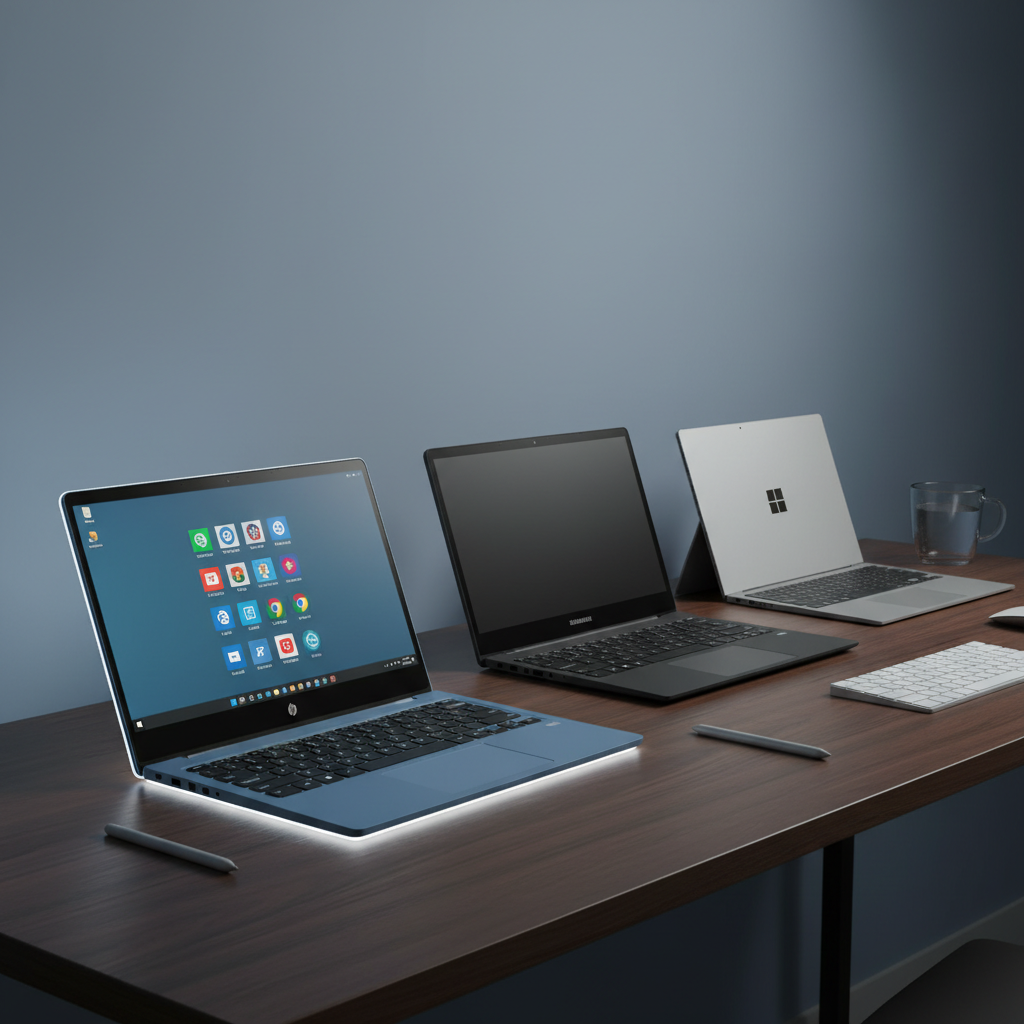
Choosing a 2‑in‑1 tablet can feel like a maze, but we’ve narrowed it down to 14 models that span the whole price spectrum. The most eye‑catching spec in the lot is the 16‑hour video‑playback battery life found on the Microsoft Surface Pro 12‑inch, which sits at $849.97, while the entry‑level Lenovo 300e Chromebook starts at $74.95. All devices carry a 4‑plus star rating, with the HP OmniBook 5 earning a 4.9/5 from its 18 reviewers.
To make the hunt easier, we grouped the picks into three tiers. The budget bucket—Lenovo 300e, Lenovo 500e, Dell Latitude 3190 and HP Chromebook 14‑inch—covers prices from $74.95 up to $218.49 and ratings around 4.0–4.4. Mid‑range options, the Elepad YOGA116 and Lenovo Chromebook Duet, land in the $236–$243 range and bring 4.2–4.3 stars. Premium contenders—Samsung Chromebook Plus V2, HP OmniBook 5, Microsoft Surface Pro 2025 and the Surface Pro 12‑inch—command $649.99 to $849.97 and push ratings up to 4.9/5, plus brighter displays and longer battery lives.
Below we break down each model’s standout features, durability and real‑world usability so you can match a convertible to your workflow, for students, remote professionals or creatives on the go.

HP Chromebook 14-inch Blue
Its battery lasts up to 13.5 hours, giving you all‑day use on a single charge.

Microsoft Surface Pro 12-inch
Ideal for professionals who need premium performance, and it costs about $631 more than the HP Chromebook.
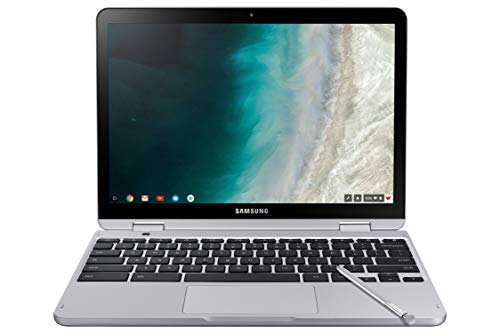
Samsung Chromebook Plus V2 12-inch
Offers a 39 Wh battery—slightly larger than the Surface—while staying in a mid‑range price bracket, appealing to users who want longer unplugged time without premium cost.
Also considered
Score Analysis
Key score advantages vs. runner-up (Microsoft Surface Pro)
Price Range
HP Chromebook 14-inch Blue
$216.00
Microsoft Surface Pro 12-inch
$849.97
Samsung Chromebook Plus V2 12-inch
$243.49

Lenovo 300e Chromebook
$64.94

Microsoft Surface Pro 2025
$649.99

Lenovo Chromebook Duet
$259.99
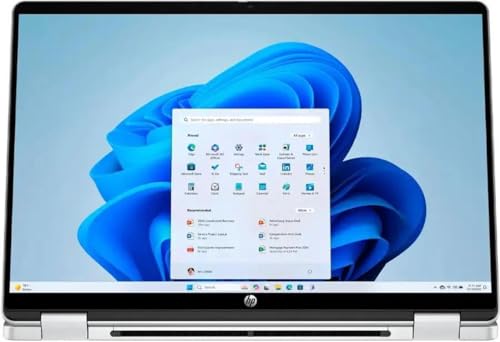
HP OmniBook 5 14-inch
$654.99

Dell Latitude 3190
$154.99

Elepad YOGA116
$229.99
Lenovo 500e Chromebook 11.6-inch
$79.99

RCA 12.2-inch Tablet
$185.00

RCA Voyager Pro
$129.00

TPSPAD W116
$249.99

Qazipo 12-inch
$379.99
Spec Comparison
TL;DR: The HP Chromebook 14‑inch in Serenity Blue offers a 14" Full HD IPS touchscreen, 13.5‑hour battery and a quad‑core Intel N100, making it a solid, budget‑friendly 2‑in‑1 for students.
The standout feature is its 14‑inch Full HD (1920 × 1080) IPS touchscreen that flips 360° for tablet or laptop mode, and it supports an active stylus for note‑taking. The display reaches 250 nits of brightness, which is adequate for indoor use.
At 4.52 lbs, it's heavier than the Lenovo Chromebook Duet (1.122 lb) and the Samsung Chromebook Plus V2 (2.98 lb), and even the Dell Latitude 3190 (4.39 lb) tips the scales lighter. Its battery life of up to 13.5 hours outlasts most peers, beating the Lenovo’s 12‑hour claim and the Samsung’s 10‑hour estimate, while only the Elepad YOGA116 lists an extreme 240‑hour claim.
Reviewers praise the Full HD IPS panel for finally delivering crisp visuals, and professionals note the Intel N100’s 3.40 GHz quad‑core CPU as a clear step up from older entry‑level chips. Users love the Wi‑Fi 6 (802.11ax) connection and the convenience of the 360° hinge, but they often note that 4 GB of LPDDR5 RAM can feel cramped when many Chrome tabs are open, and the 64 GB eMMC storage fills quickly, especially with media files.
Pros
Cons
Best for: Students (K‑12 and college) needing a reliable Chrome OS notebook for Google Classroom, note‑taking, and light web work.
Avoid if: You want the best value‑per‑dollar in its price range or need high‑performance multitasking and ample internal storage.
“Perfect for schoolwork and Zoom meetings.”
“Love the touch screen and flip design—great for watching videos.”
TL;DR: The Surface Pro 12‑inch packs a Snapdragon X Plus CPU, 45 TOPS NPU and 16 GB RAM into a 2.5683853523 lb tablet that delivers up to 16 hours of video playback on a 38 Wh battery.
The standout hardware includes an AI‑focused 45 TOPS Neural Processing Unit and a Snapdragon X Plus eight‑core processor that can reach 3.4 GHz. Combined with 16 GB LPDDR5x RAM, the device promises responsive multitasking and on‑device AI workloads while staying in a compact 12.0‑inch PixelSense LCD form factor.
Compared with the other 13 entries, this Surface Pro is lighter than the HP OmniBook 5 (3.6 lb) and the Qazipo 12‑inch (3.63 lb), but a touch heavier than the Microsoft Surface Pro 2025 (2.20462262 lb). Its 16‑hour video playback matches the HP OmniBook’s 16.75‑hour claim only slightly short, and its 400‑nit peak brightness outshines the HP’s 300‑nit panel. The 90 Hz refresh rate exceeds the Samsung Chromebook Plus V2’s 60 Hz, though it still falls short of a 120 Hz experience.
Everyday users praise the feather‑light feel (2.5683853523 lb) and the all‑day battery endurance, noting that the integrated Surface Slim Pen storage and magnetic charging make note‑taking effortless. Reviewers flag the UFS storage as slower than faster alternatives, the LCD’s 400‑nit ceiling as modest for bright environments, and the lack of an included 45 W charger as an inconvenience.
Under the hood, the tablet offers Wi‑Fi 7, Bluetooth 5.4, Thunderbolt 4 (two ports) and a DisplayPort 1.4a capable of dual 4K output. The 2 W stereo speakers deliver Dolby Atmos audio, and the rear 10 MP Ultra HD camera rounds out a well‑equipped 2‑in‑1 platform.
Pros
Cons
Best for: Those prioritizing quality and willing to pay for premium performance
Avoid if: You're shopping on a tight budget — it's priced at $849.97
“Incredibly light and easy to carry”
“Battery lasts all day”
TL;DR: The Samsung Chromebook Plus V2 offers a 12.2‑inch 1920×1200 display, built‑in active stylus, and fanless design at $243.49, but its shallow keyboard and modest battery life may limit power users.
The standout feature is the integrated active stylus that stores inside the chassis and supports pressure sensitivity, paired with a 12.2‑inch glossy WUXGA LED screen delivering a sharp 1920 × 1200 resolution. At 2.98 pounds, the device feels solid yet it's portable enough for classroom or coffee‑shop use.
Compared with the Lenovo Chromebook Duet, which weighs just 1.122 pounds and measures 7.6 mm thick, the Samsung is heavier and noticeably thicker at 17.0 mm. Its 39 Wh battery capacity exceeds the Duet’s estimated 29 Wh, while the Bluetooth version is older (4.0 versus the Duet’s 5.3). Against the bulkier HP Chromebook 14‑inch (5.0 pounds) and Dell Latitude 3190 (4.39 pounds), the Samsung sits in a middle ground—lighter than those larger laptops but still more substantial than ultra‑light tablets.
Users praise the vivid 1920 × 1200 display and the convenience of the built‑in stylus for note‑taking and whiteboard capture. However, reviewers consistently note that the advertised 10‑hour battery life drops to about 5.25 hours during 4K video playback and around 7.25 hours for light web browsing. Professional reviewers also highlight the shallow‑travel keyboard and note that the touchpad feels cramped for extended work sessions.
Under the hood, the Chromebook runs a fanless Kaby Lake Intel Celeron 3965Y dual‑core processor at 1.5 GHz, paired with 4 GB LPDDR3 RAM and 64 GB eMMC storage. ENERGY STAR certification and a 39 Wh battery aim to balance efficiency with everyday productivity, while the 60 Hz refresh rate keeps scrolling smooth for web‑centric tasks.
Pros
Cons
Best for: Most users looking for a well‑reviewed, reliable mainstream option
Avoid if: You need advanced features or professional‑grade performance
“Still trying to figure it out—it’s a little hard to figure out, it’s not like a regular computer, a little bit of pain in the butt.”
TL;DR: The Lenovo 300e Chromebook offers a rugged 11.6‑inch 2‑in‑1 design with 10‑hour battery life and drop resistance up to 29.5 inches, all for $74.95.
The standout feature is its durability – a 360° hinge and rubberized bumpers protect the device when it’s dropped from up to 29.5 inches, matching the ruggedness expected in a classroom. A 42 Wh lithium‑polymer battery delivers up to 10 hours of use, so a full school day can be covered without hunting for an outlet. At 3.0 pounds, it’s light enough to carry between classes, and the 11.6‑inch IPS LCD (1366 × 768) offers 250 nits of brightness for clear viewing.
When you line it up against the other 13 contenders, the 300e is the most budget‑friendly option, undercutting the Lenovo 500e Chromebook’s price point. It also weighs less than the Dell Latitude 3190, which tips the scales at 4.39 pounds, and it feels sturdier than the RCA Voyager Pro, which features a 7‑inch screen. While the HP Chromebook 14‑inch brings a larger display, the 300e’s compact form and lower weight make it easier for younger hands to handle.
Reviewers consistently highlight the device’s ability to survive daily drops and stay powered through a full day of lessons. The spill‑resistant, mechanically anchored keyboard earns extra marks for surviving accidental spills. On the flip side, professional reviewers note that the MediaTek MT8173C quad‑core processor, capped at 2.1 GHz, can feel sluggish when many Chrome tabs are open, and the 32 GB eMMC storage fills quickly for students who store lots of files. Users also mention that the lack of a backlit keyboard limits use in dim classrooms.
Technically, the 300e runs Chrome OS with automatic updates, supports up to 512 GB SD cards for extra space, and includes dual microphones, built‑in stereo speakers, and a 720p HD webcam for video calls. Connectivity covers Wi‑Fi 5 (802.11ac) and Bluetooth 4.2, and the device offers a 45W USB‑C power adapter for charging.
Pros
Cons
Best for: K‑12 students and schools that need a low‑cost, drop‑proof convertible for everyday classroom use.
Avoid if: You need advanced performance, extensive local storage, or a backlit keyboard for low‑light work.
“My kids drop it daily—still works perfectly after a year.”
“Battery lasts all day, even with YouTube and Google Docs.”
TL;DR: The Surface Pro 2025 offers a 12‑inch PixelSense LCD, a 45 TOPS AI NPU, up to 16 hours of video playback, and a feather‑light 2.20462262 lb chassis for $649.99.
The standout spec is the on‑device AI engine: a 45 TOPS neural processing unit paired with a Snapdragon X Plus processor that can boost to 3.4 GHz. This combination enables smooth Copilot+ experiences while keeping power draw low enough for 16 hours of video playback.
Compared with the other 13 tablets in this roundup, the Surface Pro 2025 is lighter than the HP OmniBook 5 (3.6 pounds) and the Qazipo (3.63 pounds), yet still heavier than the ultra‑light RCA 12.2‑inch Tablet (0.000625 pounds). Its 400‑nit brightness outshines the HP OmniBook’s 300 nits, matching the brightness of the older Microsoft Surface Pro 12‑inch model. The device’s thickness of 36.3 mm exceeds the Samsung Chromebook Plus V2’s 17.0 mm, but its overall footprint (293.4 mm × 209.3 mm) is shorter than the HP OmniBook’s 313 mm depth.
Users consistently praise the long battery life and the lightweight chassis, noting that the 16‑hour video playback easily covers a full workday and the 2.20462262 lb weight makes it comfortable for note‑taking on the go. Professional reviewers also highlight the AI‑first design as a genuine productivity boost. On the downside, reviewers point out that the 256 GB UFS storage runs slower than the SSDs in higher‑end Surface models, and the lack of an OLED panel limits peak brightness for outdoor use. The tablet provides only two USB‑C/USB4 ports, which some users find restrictive, and you must purchase the keyboard and Surface Slim Pen separately.
The technical package rounds out with Wi‑Fi 7, Bluetooth 5.4, a 12‑inch PixelSense LCD at 220 PPI, and a dynamic refresh rate that can reach 90 Hz. Windows Hello facial recognition, a TPM 2.0 chip, and BitLocker support bolster security. The device ships with Windows 11 Home/Pro and includes a 30‑day Microsoft 365 trial, making it ready for both work and play right out of the box.
Pros
Cons
Best for: Those prioritizing quality and willing to pay for premium performance
Avoid if: You're shopping on a tight budget — it's priced at $649.99
“Incredibly light and easy to carry”
“Battery lasts all day”
TL;DR: The Lenovo Chromebook Duet packs a 10.95‑inch 1920×1200 IPS screen, 29 Wh battery for up to 12 hours of use, and a feather‑light 1.122‑lb chassis, making it a solid mid‑range 2‑in‑1 for students and on‑the‑go productivity.
The standout spec is the 10.95‑inch WUXGA IPS touchscreen, which Corning Gorilla Glass 3 protects, delivering 400 nits of brightness. Coupled with a 29 Wh battery that offers up to 12 hours of runtime and a boot time under 10 seconds, the Duet feels instantly ready for work or class.
At 1.122 lb (tablet only) the Duet is considerably lighter than the HP Chromebook 14‑inch Blue at 5.0 pounds and also lighter than Samsung Chromebook Plus V2 12‑inch (2.98 pounds) and Elepad YOGA116 (3.45905289078 pounds). Its 12‑hour battery life sits between Samsung’s advertised 10‑hour claim and HP’s up to 13.5‑hour claim, giving it a competitive edge in endurance. Bluetooth 5.3 is newer than Samsung’s 4.0 and Elepad’s 4.2, while matching the TPSPAD’s 5.0, which helps with faster peripheral connections.
Users consistently praise the Duet’s portability, bright display, and the quick startup that lets them jump straight into ChromeOS. Professional reviewers note the “surprisingly well‑built” full‑metal chassis and commend the 12‑hour battery as a “mobile energy‑saving champion.” The most common complaints focus on the modest 4 GB RAM and 64 GB eMMC storage, which can feel cramped with many tabs or large Android apps, and the 802.11n Wi‑Fi that lags behind newer Wi‑Fi 6 devices.
Under the hood, the Duet runs a MediaTek Kompanio 838 octa‑core processor at 2.6 GHz, paired with 4 GB LPDDR4X RAM clocked at 4266 MHz. You can expand storage via microSD up to 256 GB, and two USB‑C ports support charging, data, and 4K @ 30 Hz video output. The detachable folio keyboard attaches through a 3‑point pogo‑pin connector, and it supports a USI‑compatible stylus (sold separately). MIL‑STD‑810H durability and TÜV Low Blue Light certification add robustness and eye‑comfort for long study sessions.
Pros
Cons
Best for: Most users seeking a balanced, mainstream option
Avoid if: You need advanced features or professional‑grade performance
“Perfect for schoolwork and Zoom meetings”
“Light enough to hold for hours”
TL;DR: The HP OmniBook 5 14‑inch delivers a 16.75‑hour video‑playback battery, 16 GB DDR5 RAM, and a versatile 360° hinge, but its $619 price tags it as a premium‑tier convertible.
The standout spec is the 64 Wh battery paired with up to 16.75 hours of video‑playback time, and the device can replenish that power with 65 W USB‑C fast charging. Under the hood sits an Intel Core i7‑150U with a 1.8 GHz base clock, turbo‑boosting to 5.4 GHz across 10 cores, and 16 GB of DDR5 RAM backed by a 512 GB PCIe NVMe SSD.
Compared with the other 13 contenders, the OmniBook is heavier than the Microsoft Surface Pro 2025 (about 2.2 lb) but only marginally lighter than the Qazipo 12‑inch (3.63 lb). Its 300‑nit display is a notch dimmer than the Surface Pro’s 400‑nit panel, yet it matches the Surface Pro’s Bluetooth 5.4 connectivity. The price point sits above many budget tablets in the roundup, positioning it as a premium offering.
Users consistently praise the all‑day battery life, 300‑nit IPS touchscreen, and the 360° hinge that lets the device flip into tablet mode. Reviewers note the AI‑enhanced Intel Core Ultra processor feels snappy for everyday tasks, while the comfortable backlit keyboard earns frequent compliments. Common complaints revolve around the HP Rechargeable Pen needing a separate charging cable, the absence of an SD card slot, a louder‑than‑desired trackpad click, and a limited 62.5% sRGB color gamut that falls short for color‑critical work.
Beyond the battery and performance, the OmniBook sports a 14‑inch IPS multitouch display with a 1920 × 1200 resolution and 60 Hz refresh rate. Integrated Intel graphics handle casual media and light creative work, and the connectivity suite includes two Thunderbolt 4 (USB‑C) ports, an HDMI 2.1 port, and a headphone/microphone combo jack.
Pros
Cons
Best for: Those prioritizing quality and willing to pay for premium performance
Avoid if: You're shopping on a tight budget — it's priced at $619.00
“Battery lasts all day, even with video calls.”
“Screen is bright and perfect for watching videos.”
TL;DR: The Dell Latitude 3190 offers a rugged 11.6‑inch convertible with up to 11 hours of advertised battery life, 4 GB of RAM and a 42 Wh battery at a $159.99 price point.
What really sets this device apart is its 42 Wh (3‑cell) battery that the manufacturer claims can last up to 11 hours on a charge, while real‑world users report 6–8 hours of steady use. Coupled with a fanless Intel Pentium Silver N5030 that runs at a 1.1 GHz base clock and can boost to 3.1 GHz, the tablet boots quickly from its 128 GB SSD and stays quiet in classrooms or coffee shops.
In the context of the other 13 tablets, the Latitude 3190 is heavier than the 1.1‑pound RCA Voyager Pro but lighter than the 5.0‑pound HP Chromebook 14. Its advertised 11‑hour battery sits between the RCA’s up to 6 hours and the HP’s up to 13.5 hours, and matches the Lenovo 500e Chromebook’s 11‑hour claim while exceeding the Samsung Chromebook Plus V2’s 10‑hour advert. The device also offers a 360° hinge and optional Dell Active Pen, features that many of the competing models don’t have.
Professional reviewers highlight the tablet’s durable rubberized base, spill‑resistant keyboard and dual noise‑cancelling microphone array as strong points for education and field work. Everyday users echo this sentiment, noting the long battery life and quick startup as daily wins, while they’re repeatedly calling out the low‑resolution 1366 × 768 display and the soldered 4 GB of RAM as limiting factors for multitasking or media‑rich tasks.
Pros
Cons
Best for: Entry-level buyers or those on a tight budget
Avoid if: You need advanced features or professional‑grade performance
“Arrived in like‑new condition with fast boot and smooth Windows 11 performance.”
“Perfect for my kids’ schoolwork—durable and long battery life.”
TL;DR: The Elepad YOGA116 is an 11.6‑inch Windows 11 2‑in‑1 tablet with a Full HD IPS screen, 4 GB RAM, 256 GB eMMC storage, and a 360° hinge, but its modest specs and low rating may limit power‑hungry tasks.
The standout feature is its 11.6‑inch 1920 × 1080 pixel IPS touchscreen, which delivers crisp visuals for media and note‑taking. Under the hood sits a 2.5 GHz dual‑core Intel Celeron N4020 processor, 4 GB of DDR4 RAM and 256 GB of eMMC storage, while the included stylus adds a pen‑friendly edge for sketches and annotations.
At 3.45905289078 pounds, the YOGA116 is heavier than the 1.122‑pound Lenovo Chromebook Duet but lighter than the 5.0‑pound HP Chromebook 14‑inch and comparable to the TPSPAD W116, which shares the same weight. Its claimed 240‑hour battery life dwarfs the up‑to‑12‑hour figure of the Duet, the up‑to‑13.5‑hour claim of the HP model, and the advertised 10‑hour run‑time of the Samsung Chromebook Plus V2, though real‑world use often falls short of the manufacturer’s claim.
Users consistently praise the sharp Full HD display and the convenience of the 360° hinge that lets you switch between laptop, tablet, tent and stand modes. Reviewers also note the solid port selection—HDMI, USB‑C charging, microSD slot and USB 3.0—making it easy to connect peripherals. On the downside, the 4 GB RAM and eMMC storage feel sluggish when multitasking, and the Celeron N4020 processor struggles with demanding apps; both everyday users and professional reviewers echo that sentiment.
Pros
Cons
Best for: Students, children, seniors and travelers who need a lightweight, portable Windows device for web browsing, media consumption and light productivity.
Avoid if: You require heavy multitasking, video editing, gaming or a high‑performance machine for professional design or engineering tasks.
“Crisp, bright display for the price”
“Sluggish performance when multiple apps are open”
TL;DR: The Lenovo 500e Chromebook 11.6‑inch packs MIL‑STD‑810G durability, a built‑in passive stylus and up to 11 hours of battery life for $89.99, but its low‑resolution screen and modest speakers keep it firmly in the budget‑friendly, education‑focused lane.
The standout feature is its ruggedness: it’s MIL‑STD‑810G certified, can survive drops from 29.5 inches, and resists spills up to 330 ml. A passive, battery‑free stylus is included, and the device runs on a 42 Wh battery that Lenovo states can last up to 11 hours on a single charge. Corning Gorilla Glass protects the 11.6‑inch IPS LCD, and the keyboard flips 360° for true tablet use.
At $89.99 the 500e lands in the budget tier, making it cheaper than many of the other 13 contenders. It weighs 1352 g, which is heavier than the 1.1‑lb RCA Voyager Pro and the 1.122‑lb Lenovo Chromebook Duet, but considerably lighter than the Dell Latitude 3190 at 4.39 lb. Its 42 Wh battery matches the capacity of the Lenovo 300e and Dell Latitude 3190, while offering a full hour more of claimed runtime than the 300e’s 10‑hour estimate.
Educators and students praise the device’s rugged build and the convenience of the bundled stylus; professional reviewers echo the durability praise and note the generous port mix of two USB‑C, two USB‑A, HDMI, a microSD slot, headphone/mic combo and a Kensington lock. However, the 1366 × 768 HD screen is often described as dim and low‑resolution, speakers sound muffled, and both front and rear cameras produce grainy images. The all‑plastic chassis adds bulk, which some users find unwieldy in tablet mode.
Pros
Cons
Best for: Entry‑level buyers or those on a tight budget
Avoid if: You need advanced features or professional‑grade performance
TL;DR: The RCA 12.2‑inch Windows 10 tablet offers a full‑PC OS, detachable keyboard and HDMI output at $260, but its 2 GB RAM and Celeron CPU make multitasking feel sluggish.
The device features a 12.2‑inch IPS LCD with a 1920 × 1200 resolution and 185.51 DPI pixel density, delivering crisp visuals for browsing and light media. It runs Windows 10 Home (64‑bit) on an Intel Celeron N4000 processor clocked to 2.6 GHz, paired with 2 GB DDR4 RAM and 64 GB eMMC storage, expandable by up to 128 GB via microSD.
The RCA sells for $260, undercutting the $249.99 TPSPAD W116 and the $243.49 Samsung Chromebook Plus V2. It’s dramatically lighter than the TPSPAD, which weighs over 3 pounds, while its 6‑hour active battery life is shorter than the Samsung Chromebook Plus V2’s advertised 10‑hour runtime. The detachable full‑size travel keyboard with an integrated trackpad gives it a laptop‑like feel that many of the Chrome‑OS competitors lack.
Reviewers like the full Windows environment, the HDMI port for external monitors, and the included one‑month Office 365 trial. However, users consistently note that the 2 GB of RAM and low‑power Celeron chip cause noticeable lag when several apps run. Users describe both front and rear 2 MP cameras as outdated for video calls, and the 802.11N Wi‑Fi often struggles to keep a strong signal. Under load, battery life falls short of the 6‑hour claim, and users report the built‑in speakers as tinny.
Pros
Cons
Best for: Students or casual users who need an inexpensive Windows tablet for note‑taking, document editing and occasional media consumption.
Avoid if: You need advanced performance, high‑resolution cameras, robust Wi‑Fi, or smooth multitasking for demanding tasks.
“It’s torture to use... like a competition team is working to make it fail.”
TL;DR: The RCA Voyager Pro is a 7‑inch Android tablet with a detachable keyboard, weighing just 1.1 lb, and offers up to 6 hours of advertised battery life for basic browsing and media.
The standout spec is its 7.0 in capacitive multi‑touch display, which runs at a resolution of 1024 × 600 pixels. Coupled with a detachable keyboard case that ships inside the box, the device can switch from a handheld tablet to a makeshift laptop in seconds. At 1.1 lb, it’s light enough to carry in a small bag, and the 0.45 in thickness keeps it portable for on‑the‑go use.
Compared with the other 13 tablets in this roundup, the Voyager Pro is markedly lighter than the Dell Latitude 3190 (4.39 lb) and the Lenovo 300e Chromebook (3.0 lb), and it matches the weight of the Lenovo Chromebook Duet (1.122 lb). Its 7.3 in depth makes it thicker than the Duet’s 7.6 mm profile, but still slimmer than the Dell’s 11.0 in depth. Screen size is also smaller than the 11.6‑in Lenovo 500e Chromebook and the 14‑in HP Chromebook, placing it firmly in the compact‑tablet segment.
Reviewers note that the tablet handles everyday tasks like web browsing, video calls, and light media consumption without fuss. Professionals praise the detachable keyboard for turning a budget tablet into a usable typing device, while seniors and kids appreciate the low price and portability. However, people frequently describe the 1024 × 600 display as dim and pixelated in bright rooms, and the typical 4–5‑hour battery life often falls short of expectations.
Under the hood, the Voyager Pro runs Android 6.0 Marshmallow on a quad‑core ARM Cortex‑A series processor clocked between 1.2 GHz and 1.3 GHz, paired with 1 GB DDR3 RAM. Storage starts at 16 GB of flash memory and can be expanded up to 128 GB via a microSD card. Connectivity includes Bluetooth 4.0 and dual‑band Wi‑Fi (802.11 b/g/n, 802.11ac), and the front‑facing 1 MP camera handles basic video calls.
Pros
Cons
Best for: Entry‑level buyers or those on a tight budget
Avoid if: You need advanced features or professional‑grade performance
“Great for the price”
“Compact and useful”
TL;DR: The TPSPAD W116 packs an 11.6‑inch Full‑HD IPS touchscreen, 8 GB RAM and a magnetic detachable keyboard into a 3.46‑lb, 8.9 mm‑thin Windows 11 tablet, but its Celeron CPU and modest battery keep it in the budget‑friendly niche.
The standout spec is the 11.6‑inch 1920 × 1080 IPS display with 10‑point multi‑touch, delivering crisp visuals for browsing and media. At 3.45905289078 pounds and only 8.9 mm thick, the tablet feels light enough for on‑the‑go note‑taking yet sturdy enough to handle a detachable keyboard.
Compared with the other 13 devices in this roundup, the TPSPAD is heavier than the Lenovo Chromebook Duet (1.122 pounds) and thinner than the Samsung Chromebook Plus V2 (17.0 mm thick). Its 38 Wh battery sits just below Samsung’s 39 Wh but ahead of Lenovo’s 29 Wh, while the Bluetooth 5.0 module outpaces Samsung’s 4.0 yet trails Lenovo’s 5.3. The 8 GB of DDR4 RAM exceeds the HP Chromebook’s 4 GB and rivals the Dell Latitude’s unspecified amount, giving it a clear memory advantage.
Professional reviewers praise the Full‑HD IPS panel and the convenience of the magnetic type‑cover, noting that Windows 11 provides a familiar desktop experience. Everyday users appreciate the HDMI output and microSD expansion, but many flag the Intel Celeron N4020 as a bottleneck when juggling multiple browser tabs, and the 5–7 hour battery estimate feels short for all‑day use. Some owners also mention occasional keyboard connection wobble.
Under the hood, the device runs an Intel Celeron N4020 with a 1.1 GHz base frequency that can boost to 2.8 GHz, paired with a 4 MB Smart Cache and integrated Intel UHD Graphics 600. The tablet uses a 256 GB eMMC drive, ample for documents but slower than SSD alternatives. Connectivity includes a full‑size HDMI port, a USB 3.0 slot, a USB‑C port with OTG support, and a 3.5 mm audio jack, covering most peripheral needs.
Pros
Cons
Best for: Students and casual users who want a portable Windows tablet with a solid display and detachable keyboard for note‑taking, web browsing and media consumption.
Avoid if: You need intensive multitasking, video editing, gaming performance, or extended battery endurance beyond a typical workday.
“Great for watching movies and browsing.”
“Keyboard attaches well and feels like a real laptop.”
TL;DR: The Qazipo 12‑inch 2‑in‑1 tablet packs a 2K IPS touchscreen, 12 GB DDR5 RAM and a 512 GB SSD into a 0.4‑inch‑thin Windows 11 device, but its $379.99 price sits at the high end of the segment.
What really sets this hybrid apart is the 12‑inch 2000 × 1200 pixel IPS LCD with a 90% screen‑to‑body ratio, delivering crisp visuals in a 16:9 format. Coupled with 12 GB of DDR5 memory and a fast 512 GB SSD, the Qazipo feels responsive for everyday Office tasks, streaming and light creative work. The tablet also includes a magnetic leather‑case keyboard, turning the slate into a full‑size Windows 11 laptop without extra accessories.
Weighing 3.63 pounds, the Qazipo sits above the ultra‑light Lenovo Chromebook Duet and Samsung Chromebook Plus V2, yet remains lighter than the HP Chromebook 14‑inch Blue. Its 0.4‑inch thickness makes it slimmer than the HP model’s 1.0‑inch profile, while the dual USB‑C ports give it more versatile connectivity than many peers that only offer a single Type‑C or rely on older USB‑A ports.
Amazon reviewers repeatedly praise the bright 2K screen, the smooth Windows experience and the comfortable magnetic keyboard, calling the device “solidly built” and “very portable.” Professional reviewers echo the sentiment, noting the inclusion of DDR5 RAM at this price point as a differentiator. However, several users flag the Bluetooth 4.2 and Wi‑Fi 5 radios as dated, and the entry‑level Intel N95 processor as a limitation for power‑hungry applications.
Pros
Cons
Best for: Those prioritizing quality and willing to pay for premium performance
Avoid if: You need advanced features or professional‑grade performance
“Runs very smoothly for everyday usage like web browsing, chat, and video calls.”
“Screen is bright and clear.”
Breakdown
HP Chromebook 14-inch Blue
Pros
Cons
Microsoft Surface Pro 12-inch
Pros
Cons
Samsung Chromebook Plus V2 12-inch
Pros
Lenovo 300e Chromebook
Pros
Based on scoring data and product specs
Personalized picks
Best Overall Pick
HP Chromebook 14-inch Blue
Best Budget PickBest for: Users with specific technical requirements or compatibility needs
Microsoft Surface Pro 12-inch
Best for: Those prioritizing quality and willing to pay for premium performance
$849.97+$633.97 vs winner
Skip Qazipo 12-inch if…
You need advanced features or professional-grade performance
The HP Chromebook 14‑inch Blue takes the top spot as the best 2‑in‑1 tablet in our roundup. At a list price of $218.49 it offers good value, and its 4.4‑star rating from 223 reviews shows strong user approval. You'll also get up to 13.5 hours of battery life, meaning it can power through a full workday without hunting for an outlet.
Our runner‑up is the Microsoft Surface Pro 12‑inch, which shines for high‑performance Windows tablet needs in creative work or demanding multitasking. It offers 16 hours of video‑playback battery life, a bright 400‑nit 12‑inch PixelSense display, and 16 GB of LPDDR5x RAM to keep demanding apps running smoothly.
For those on a tighter budget, the Lenovo 300e Chromebook is a solid choice, but since the HP Chromebook already covers the budget tier we highlight the mid‑range and premium options: the Samsung Chromebook Plus V2 12‑inch at $243.49 provides a balanced price and everyday versatility, while the Microsoft Surface Pro 12‑inch at $849.97 delivers premium performance and a high‑resolution display for power users.
Pick the HP Chromebook 14‑inch Blue today and you'll enjoy a capable, affordable convertible that handles work and play with ease.
The HP Chromebook 14‑inch Blue is listed with up to 13.5 hours of battery life, which is longer than the Microsoft Surface Pro 12‑inch’s 12 hours of web usage (though the Surface Pro can reach 16 hours in video playback). For typical mixed‑use, the HP Chromebook will keep you powered longer without a charger.
Please sign in to leave a review
No reviews yet. Be the first to review!
