⚡ Quick Answer
It’s a bit of a curve‑ball that the $27.99 AOC 4K Webcam, the most budget‑friendly option in our lineup, carries a 4.6/5 rating from 139 reviewers – matching the highest scores we saw. Despite its modest price, it still delivers true 4K video at 30 fps and a 90° ultrawide field of view, proving that low cost doesn’t always mean low performance.
Twelve webcams span three price tiers. The budget tier (AOC, Nework, Depstech, EMEET C960) keeps prices under $60 and offers solid 4K basics. Mid‑range picks like the EMEET S600 ($59.49) and OBSBOT Tiny 2 Lite ($119.00) add features such as adjustable fields of view and HDR. Premium models – Logitech Brio ($121.82), OBSBOT Meet ($129.00), Razer Kiyo V2 ($149.99) and OBSBOT Tiny 2 ($269.00) – bring higher frame rates, AI auto‑framing, and larger sensors for professional‑grade streams.
The following sections break down each tier, spotlight standout specs, and help you decide which webcam fits your setup and budget.

OBSBOT Meet
Its 60 fps frame rate delivers smooth 4K video while staying at $129, making it the most value‑packed choice.
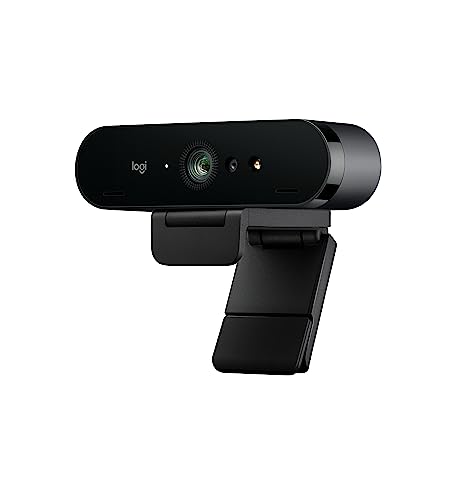
Logitech Brio 4K
Ideal for mainstream users who want a well‑reviewed webcam; at $121.82 it’s $7.18 cheaper than the OBSBOT Meet.
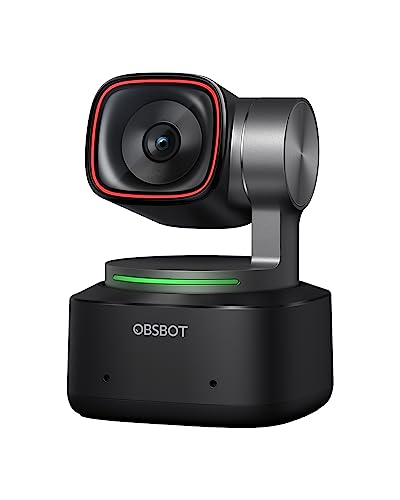
OBSBOT Tiny 2
Stands out with an ultra‑thin 4.7 mm depth, delivering premium performance in a compact form the other models lack.
Also considered
Score Analysis
Key score advantages vs. runner-up (Logitech Brio 4K)
Price Range
OBSBOT Meet
$98.99
Logitech Brio 4K
$120.49
OBSBOT Tiny 2
$299.00

EMEET S600 4K
$53.18

Depstech 4K
$37.99

AOC 4K Webcam
$25.63

Nework 4K Webcam
$33.76
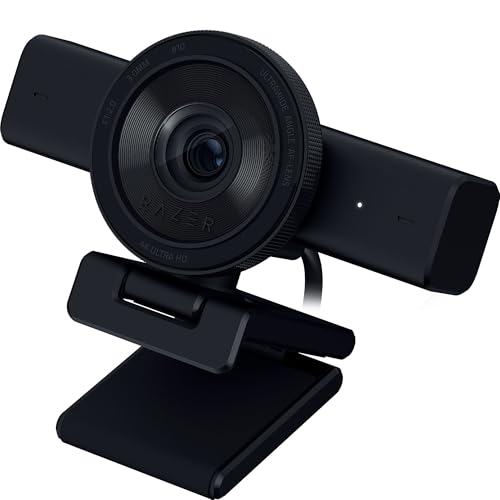
Razer Kiyo V2
$129.99

EMEET C960 4K
$49.99

OBSBOT Tiny 2 Lite
$119.00
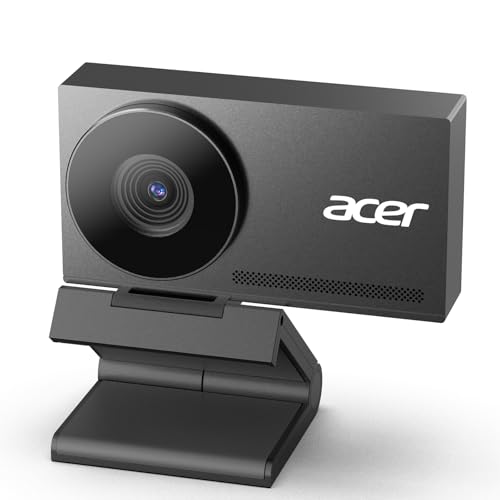
Acer 4K Webcam
$49.98
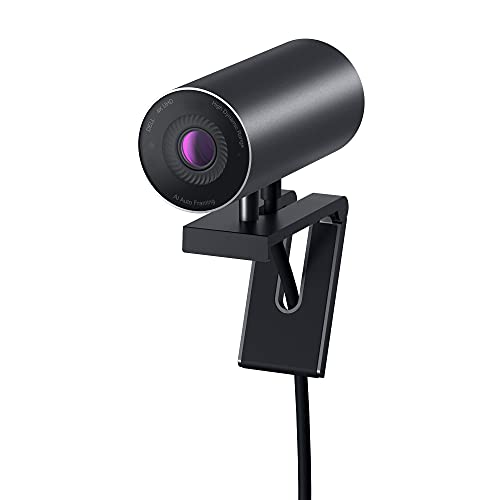
Dell Ultrasharp HDR 4K Webcam
$152.87
Spec Comparison
TL;DR: The OBSBOT Meet delivers 4K video at 60 fps in a thumb‑drive‑sized body that weighs only 40.5 g, making it a portable, AI‑enhanced webcam for anyone who needs crisp video on the go.
What really sets the Meet apart is its 3840×2160 resolution paired with a full 60 fps frame rate, so you get smooth, ultra‑HD video without the choppiness that can plague lower‑end cams. The sensor is a 1/2‑inch CMOS, and the camera supports HDR, AI auto‑framing, autofocus, beauty mode, and gesture control—all from a device that measures just 10.3 mm high, 10.9 mm long and 5.0 mm wide.
When you line it up against the other eleven contenders, the Meet is the lightest on the list. At 40.5 g (about 0.09 lb) it’s far lighter than the Logitech Brio’s 0.74 lb and the Razer Kiyo V2’s 1.10 lb, and even lighter than the budget‑friendly EMEET S600 (0.22 lb) and EMEET C960 (0.30 lb). Its 60 fps 4K output also outpaces the Brio, which tops out at 30 fps for 4K, giving the Meet a clear edge for motion‑heavy calls or streams.
Reviewers consistently praise the tiny form factor and the AI‑driven tracking that keeps you centered whether you’re in portrait or landscape mode. Professional sites note the “surprisingly good performance” and “gorgeous 4K image” despite the webcam’s minuscule size. Users love the dual microphones that capture clear voice, but they also point out the 60‑inch detachable USB‑C cable as a limitation on larger desks, and the USB 2.0 connection caps the bandwidth, preventing higher‑frame‑rate 4K capture.
Pros
Cons
Best for: Mobile professionals, remote workers, streamers, and content creators who need a portable 4K webcam with AI tracking.
Avoid if: You require built‑in lighting, an ultra‑wide field of view, or 4K video at 60 fps, and the short cable length is a deal‑breaker for your setup.
“thumbdrives weigh more”
“affordable & adorable”
TL;DR: The Logitech Brio 4K delivers true 4K Ultra HD video (4096×2160 @ 30 fps) with HDR, adjustable FOV and dual noise‑canceling mics, but its bulkier build and premium $121.82 price make it a professional‑grade choice.
The standout spec is its 4K Ultra HD sensor—4096×2160 pixels at 30 fps—paired with RightLight 3 HDR, which keeps colors accurate even in dim rooms. It also sports a 13 MP glass lens, 5× digital zoom and an adjustable field of view (90°/78°/65°), letting you frame yourself precisely. Dual omni‑directional microphones reach up to 1.5 m, capturing clear voice without a separate headset.
Compared with the other eleven webcams, the Brio sits at the higher end of the price spectrum, making it pricier than the OBSBOT Tiny 2 Lite and the EMEET S600 4K. At 0.74 lb (65 g), it is considerably heavier than the OBSBOT Meet, which weighs about 0.09 lb, and wider than the OBSBOT Tiny 2 Lite’s 48.3 mm width. Its USB‑A 3.0 interface ensures fast data transfer, whereas some peers list only USB‑C or older standards. While the Razer Kiyo V2 offers a similar HDR feature, the Brio’s adjustable FOV gives it an edge over models that provide a single fixed angle.
Users consistently praise the crystal‑clear 4K picture and the low‑light performance that RightLight 3 provides, calling it “the best video I’ve seen on a webcam.” Professional reviewers highlight the advanced autofocus and Windows Hello support for secure log‑ins. The most common complaints focus on the bulkier chassis, which can look conspicuous on a slim laptop, and the fact that 4K is capped at 30 fps—something gamers and creators who want smoother high‑resolution motion may find limiting. The webcam also relies on a strong USB 3.0 connection; streaming 4K over USB 2.0 can lead to stutter, several reviewers note.
Technical extras include a built‑in privacy shutter, 5× digital zoom for detailed presentations, and a 1.5‑2.2 m cable that gives flexibility in desk setups. The device supports Windows Hello facial recognition, adding a layer of convenience for frequent log‑ins. The Brio blends high‑resolution video, strong audio capture and professional‑grade features into a single package.
Pros
Cons
Best for: Professionals who need reliable, high‑definition video conferencing and Windows Hello integration.
Avoid if: You're shopping on a tight budget — it's priced at $121.82.
“best webcam video I've seen”
“works in dim rooms”
TL;DR: The OBSBOT Tiny 2 delivers true 4K 3840×2160 video at 60 fps with AI‑driven PTZ tracking, but its premium $269 price and 0.32 lb weight make it a specialist’s choice.
What really sets the Tiny 2 apart is its 3840×2160 4K sensor combined with a 1/1.5‑inch CMOS chip and 60 fps frame rate, giving crisp, fluid video even in challenging lighting. HDR Light Correction and a 0.3‑second auto‑focus time further boost clarity, while AI‑powered tracking modes (upper body, close‑up, hand, zone) let the camera follow you without touching a button.
In the context of this 12‑product roundup, the Tiny 2 is lighter than the Dell Ultrasharp HDR 4K Webcam (1.31 lb) and the Razer Kiyo V2 (1.10 lb), yet noticeably heavier than the OBSBOT Meet (0.09 lb) and the EMEET S600 (0.22 lb). Its price of $269.00 places it in the premium tier, so it’s pricier than many of the other options while offering a richer feature set.
Professional reviewers praise the large sensor and AI tracking as a “performance leap” over typical webcams, noting the smooth 2‑axis PTZ movement during streams and presentations. Consumer sentiment highlights the ease of gesture and voice commands, though a few users point out the lack of built‑in illumination as a drawback for low‑light rooms.
Beyond the core specs, the Tiny 2 supports Beauty, Desktop, Group, Portrait, and Whiteboard modes, plus HDR Light Correction and SDK/OSC integration for advanced workflows. Global hotkeys and Stream Deck compatibility make it a versatile tool for creators who need hands‑free control.
Pros
Cons
Best for: Content creators, streamers, remote workers, educators, and esports pros who need high‑quality 4K video with AI tracking and hands‑free control.
Avoid if: You’re shopping on a tight budget — the webcam is priced at $269.00.
TL;DR: The EMEET S600 delivers true 4K video at 30 fps with an 88° adjustable field of view, dual noise‑canceling mics, and a handy privacy cover, all for $59.49.
The standout spec is its 3840×2160 resolution at 30 fps, using a 1/2" Sony 8 MP sensor. An adjustable field of view ranges from 40° to 73° and can reach a maximum of 88°, while a 4× digital zoom lets you frame yourself precisely. Fast PDAF autofocus and auto light correction keep the picture sharp even when you move.
In the 12‑product lineup, the S600 sits at a higher price point than the Acer 4K Webcam and the Depstech 4K, yet it’s lighter than the bulkier AOC 4K Webcam. Its cable length of 5 ft gives you more reach than the shorter‑corded Acer model, and the built‑in rotary privacy cover adds a layer of convenience that many peers lack.
Reviewers consistently praise the webcam’s crisp 4K output and the expansive 88° angle, noting that it makes professional‑looking streams feel effortless. Everyday users love the plug‑and‑play USB connection and the privacy cover that keeps the lens safe. Experts note the downside is that the default exposure can be too bright, requiring a manual tweak in the software. Also, the 60 fps mode drops to 1080p, so you lose the 4K detail when you chase higher frame rates.
Beyond video, the S600 packs two noise‑canceling microphones with intelligent reduction, delivering clear audio for calls and recordings. Power consumption stays modest at 2.5 W, and the 5‑foot cable lets you position the camera comfortably on a desk or tripod. A 2‑year warranty rounds out the package, giving peace of mind for long‑term use.
Pros
Cons
Best for: Content creators and professionals who want reliable 4K video with a wide angle and solid audio.
Avoid if: You need true 4K at 60 fps or exceptional low‑light performance.
TL;DR: The Depstech 4K webcam delivers true 3840×2160 video at 30 fps, dual noise‑canceling mics and a handy remote, all for $37.99, making it a solid budget‑friendly choice.
The standout spec is its 4K resolution of 3840×2160 at 30 fps; an 8 MP 1/2.55" Sony CMOS sensor captures it. It also offers 3X digital zoom and auto‑focus that you can control remotely, plus dual noise‑canceling microphones for clearer voice pickup.
Compared with the other eleven contenders, the Depstech sits in the middle of the size range: its 52 mm height is a bit shorter than the Nework 4K’s 2.44 in height, while its 54 mm width is narrower than the AOC 4K’s 63.5 mm width. It matches the EMEET S600’s 52 mm height but is slimmer than the EMEET C960’s 23 mm width. In terms of features, the remote‑controlled zoom and exposure adjustments give it an edge over models that rely solely on on‑camera buttons, such as the Acer 4K. Pricing-wise it is a few dollars above the ultra‑budget Nework 4K but still cheaper than the OBSBOT Tiny 2 Lite.
Users have left 902 reviews with an average of 4.3 / 5 stars, noting the clear video and the convenience of the remote. A recurring compliment is the dual‑mic setup, which many say reduces background chatter during calls. Some reviewers point out the rating is a touch lower than competing 4.5‑star options, suggesting occasional hiccups with focus or software compatibility.
Additional technical notes include auto light adjustment that adapts to ambient lighting, plug‑and‑play USB‑A/C connectivity, and broad OS support for Windows XP through 11 and macOS. It works with popular platforms like Zoom, Skype, Teams, YouTube, Facebook and Facetime, so you won’t need extra drivers for most everyday uses.
Pros
Cons
Best for: Budget-conscious buyers seeking a reliable entry-level option
Avoid if: You have limited desk space or need portability
TL;DR: The AOC 4K Webcam delivers true 4K video at 30 fps with a 90° ultrawide view, auto‑focus and a sliding privacy cover, all for a budget‑friendly $27.99.
The standout spec is its 90° field of view combined with a 12 MP CMOS sensor that records 4K Ultra HD video at 30 fps. Auto‑focus and automatic light correction keep the picture clear, while the built‑in noise‑cancelling microphone captures voice without a separate dongle. A sliding lens cover adds a physical privacy safeguard, and the USB‑C connector (adapter included) makes plug‑and‑play setup a breeze.
At $27.99, this webcam lands at the low‑end of the twelve‑product roundup. It’s heavier than the Nework 4K Webcam (0.29 lb) and the Acer 4K model (0.11 lb), and also heavier than the EMEET S600 (0.22 lb) and EMEET C960 (0.30 lb), but its 90° view outpaces the Nework’s 79° and the EMEET C960’s 73° field of view. The wider angle makes it a good match for group calls or small conference rooms where you want everyone in frame.
Reviewers praise the sharp 4K picture and the convenience of the privacy cover, noting that the webcam feels “plug‑and‑play” right out of the box. However, several users mention that focus can be limited for subjects farther than a few feet away, and the ultrawide lens introduces noticeable edge distortion. The noise‑cancelling built‑in microphone often receives criticism for being insufficient for high‑quality streaming or podcasting.
Pros
Cons
Best for: Entry‑level buyers or those on a tight budget who need an ultrawide view for group video calls.
Avoid if: You need advanced audio quality, precise focus control, or professional‑grade streaming performance.
TL;DR: For $35.58, the Nework EasyCam 502 delivers true 4K Ultra HD (3840×2160) video, dual PDAF + CDAF autofocus and dual noise‑cancelling mics in a lightweight 130 g package.
The standout spec offers native 4K Ultra HD resolution (3840×2160) with 4K @ 30 fps and 1080p @ 60 fps video modes, paired with dual phase‑detection and contrast‑detect autofocus that keeps you sharp even when you move. A 79° field of view captures a comfortable framing for most desk setups.
Compared with the other eleven webcams in this roundup, the EasyCam 502 is lighter than the AOC 4K Webcam (which weighs 159 g) but heavier than the ultra‑light Acer 4K Webcam (50 g). Its price point sits below premium options like the OBSBOT Tiny 2 Lite, making it a budget‑friendly option while still offering 4K video that many higher‑priced rivals only promise. The 79° field of view is narrower than the AOC’s 90°, but broader than the 73° offered by the EMEET C960.
Reviewers repeatedly praise the crystal‑clear 4K output at 3840×2160 and the rapid dual autofocus, noting that video calls feel “studio‑like” without fiddling with focus. Users also appreciate the plug‑and‑play USB connection that works on Windows, macOS and Linux, and the built‑in privacy cover that adds a tangible security layer when the camera isn’t in use. The included tripod makes mounting on laptops or monitors hassle‑free.
The webcam houses two dual noise‑cancelling microphones with a 3 m pickup range, delivering clear voice capture that many users say “cuts out background chatter.” Combined with the privacy cover and the easy‑setup design, the EasyCam 502 is ready for professional video calls, online teaching or casual streaming.
Pros
Cons
Best for: Entry-level buyers or those on a tight budget
Avoid if: You need advanced features or professional‑grade performance
TL;DR: The Razer Kiyo V2 streams 4K (2160p) at 30 fps with a 93° ultrawide view, AI auto‑framing and HDR, but its premium $149.99 price and 4K 30 fps limit may deter budget‑focused users.
Its standout spec is a 93° diagonal field of view paired with a Sony STARVIS 1/2.8‑inch CMOS sensor, delivering 4K (2160p) video at 30 fps and 1080p at 60 fps. HDR support and a built‑in stereo omnidirectional microphone with noise reduction round out the hardware, while AI auto‑framing and real‑time face retouching add software polish.
Compared with the other eleven webcams, the Kiyo V2 is heavier than the ultra‑light OBSBOT Meet (≈0.09 lb) yet lighter than Dell’s Ultrasharp HDR 4K (1.31 lb). Its 78.5‑inch detachable USB‑C cable is longer than Dell’s 2 m cable, giving you more flexibility on a cluttered desk. While some rivals list digital zoom or multiple aperture options, the Kiyo V2 focuses on a single f/2.0 aperture and a wide‑angle lens, positioning it as a premium‑feature‑rich option rather than a compact travel cam.
Professional reviewers praise the sensor’s low‑light detail and the AI‑driven framing that keeps you centered during movement. Everyday users love the crisp 4K image and the handy twist‑to‑open privacy shutter, but many note that colors appear muted until you tweak the software’s exposure and white‑balance settings. Creators often complain about the lack of 4K 60 fps, and the camera’s larger footprint can squeeze tight desk space.
Pros
Cons
Best for: Those prioritizing quality and willing to pay for premium performance
Avoid if: You're shopping on a tight budget — it's priced at $149.99
TL;DR: The EMEET C960 4K streams true 3840×2160 video at 30 fps with PDAF autofocus, dual noise‑canceling mics and a 73° field of view for $47.99, making it a solid mid‑range choice.
The standout spec is the Sony sensor that captures genuine 4K Ultra HD (3840×2160) at 30 fps, paired with Phase‑Detection Autofocus (PDAF) for sharp focus even when you move. A 73° field of view lets you stay in frame without the distortion of ultra‑wide lenses, and the built‑in auto light correction adapts to changing lighting conditions.
Within this 12‑product roundup the C960 sits in the middle of the price band and is a bit heavier than the feather‑light Acer 4K webcam, yet lighter than the bulkier AOC model. It also offers a physical flippable privacy cover—a feature that several peers lack—and a 360° rotatable head, giving it more flexibility than many competing units that only swivel on one axis.
Reviewers consistently note the crisp, detailed 4K output and reliable PDAF, describing the build as solid and premium‑feeling for the price. The dual noise‑canceling microphones receive praise for clear voice pickup, while the auto light correction highlights its effectiveness across varied lighting. Common complaints focus on occasional graininess in low‑light or bright white‑background scenes and the relatively short fixed USB‑A cable, which can limit placement options on cluttered desks.
Technically, the webcam connects via USB 2.0/3.0 USB‑A and works with Windows 7/10/11, macOS 10.14+, Android TV 7.0+ and Linux. Plug‑and‑play setup means no driver installs, and the 2‑year warranty adds peace of mind. Adjustable angles (360° horizontal, 15° vertical) and a 1/4" tripod thread let you fine‑tune positioning for meetings or streaming sessions.
Pros
Cons
Best for: Most users looking for a well‑reviewed, reliable mainstream option
Avoid if: You have limited desk space or need portability
“Image can appear slightly grainy in certain lighting conditions, particularly noticeable on white backgrounds”
TL;DR: The OBSBOT Tiny 2 Lite delivers true 4K video at 60 fps with AI‑driven tracking and voice‑controlled PTZ, but its $119 price places it above many budget 4K webcams.
What really sets the Tiny 2 Lite apart is its 3840×2160 4K sensor paired with a smooth 60 fps output, plus HDR support. The camera also packs AI tracking for upper‑body and hand movements, dynamic 2.0 gesture control, voice‑activated commands, and a dedicated whiteboard mode, all using a 1/2" CMOS sensor.
Compared with other 4K options in this roundup, the Tiny 2 Lite offers a higher frame rate than the Logitech Brio 4K, which tops out at 30 fps for 4K and reaches 90 fps only at lower resolutions. The OBSBOT Meet also hits 60 fps at 4K, but it measures considerably smaller. Razer’s Kiyo V2 and Dell’s Ultrasharp HDR 4K stick to 1080p or 30 fps 4K limits, while the EMEET S600 and C960 models cost well below the Tiny 2 Lite and run at lower frame rates. In short, the Tiny 2 Lite sits in the mid‑range tier: more features than many entry‑level 4K cams, but pricier than the most budget‑friendly choices.
Reviewers consistently highlight the reliability of the AI tracking and the convenience of voice commands, especially for remote‑work presentations and online teaching. Users also note the sturdy build and the clear 4K image quality. A common complaint is the $119 price tag, which some feel is steep compared with cheaper 4K alternatives that lack the same tracking and control features.
Pros
Cons
Best for: Most users looking for a well‑reviewed, reliable mainstream option
Avoid if: You have limited desk space or need portability
TL;DR: The Acer 4K Webcam delivers crisp 3840×2160 video with a Sony 1/2‑inch sensor, dual noise‑reduction mics, and a lightweight metal body, but it struggles in dim lighting and has a long 2 m cable.
The standout spec is its native 4K resolution of 3840×2160, driven by a Sony 1/2‑inch sensor and a fast f/2.8 aperture. Phase‑detection autofocus (PDAF) keeps you sharp while the two digital noise‑reduction microphones provide clear voice capture. At just 0.11 lb (50 g) and with a compact 45 mm depth, the webcam feels solid yet barely adds weight to your setup.
Compared with the other eleven models, the Acer unit is noticeably lighter than the EMEET C960 (0.3 lb) and the Nework webcam (0.29 lb), and also lighter than the AOC (0.35 lb) and EMEET S600 (0.22 lb). Its 45 mm depth sits between the shallow 39 mm of the C960 and the deeper 71 mm of the S600, making it a good fit for tight monitor mounts. The 2 m cable is longer than the 5‑ft (1.52 m) cable on the S600, which some users find cumbersome, but it offers more placement flexibility than shorter‑cabled rivals.
Reviewers consistently praise the webcam’s sharp image quality in well‑lit rooms and the clarity of its dual microphones. Professional reviewers note the “brutal” detail and quick PDAF response, while everyday users love the magnetic privacy cover that protects the lens when not in use. The main complaints focus on poor low‑light performance, with footage turning dark and noisy without extra lighting, and the fact that many PCs cannot sustain full 4K output, limiting the advertised resolution. The aluminum alloy body includes a fast‑cooling design, an LED indicator, HDR support, and a simple plug‑and‑play USB 2.0 connection powered at 5 V.
Pros
Cons
Best for: Content creators, remote workers, and gamers who have good lighting and want an affordable 4K webcam with solid build quality.
Avoid if: You need strong low‑light performance, advanced features like gesture control, or a shorter cable for tight spaces.
TL;DR: Dell’s UltraSharp HDR 4K webcam delivers 8.3 MP 4K video with HDR and AI auto‑framing, but its premium $152.87 price, heavier build, and lack of built‑in mic make it a niche choice for pros who need top‑tier image quality.
The standout spec is its 8.3 MP Sony STARVIS back‑illuminated sensor paired with 4K UHD resolution (3840×2160) at 24/30 fps, plus Advanced Digital Overlap HDR for true‑to‑life colour in varied lighting. An f/2.7 aperture and three selectable fields of view—65°, 78°, 90°—let you fine‑tune framing for meetings or content creation.
At 1.31 pounds, the webcam is heavier than the Razer Kiyo V2 (1.10 lb) and the Logitech Brio 4K (0.74 lb), and far heavier than the OBSBOT Meet (0.09 lb). Its 2 m cable matches the length of the Razer’s 78.5‑inch cable and exceeds the EMEET S600’s 5‑ft lead, giving you plenty of reach. Priced at $152.87, it sits above most rivals such as the Logitech Brio 4K and the OBSBOT Tiny 2 Lite, which are listed for under $130.
Professional reviewers praise the premium anodized‑aluminum body and the magnetic mount that fits monitors up to 2.12 in thick, while the AI Auto‑Framing and privacy cover add convenience. Users note the absence of an integrated microphone, meaning you’ll need a separate audio solution, and the limited tilt range (‑20° to +10°) can feel restrictive compared with fully articulating webcams. Some users have reported compatibility issues with Alienware displays.
Additional technical touches include Windows Hello support for secure log‑ins, a multi‑element lens that maintains sharpness across all FOV settings, and a 5 Gb/s USB 3.2 Gen 1 connection for reliable data transfer. The webcam ships with a tripod adapter and magnetic privacy cap, rounding out a feature‑rich package aimed at remote‑work professionals and content creators.
Pros
Cons
Best for: Professionals who need premium 4K image quality and are willing to invest in a high‑end webcam.
Avoid if: You need a built‑in microphone, a fully rotatable mount, or you plan to use the webcam with an Alienware display.
Breakdown
OBSBOT Meet
Pros
Logitech Brio 4K
Pros
Cons
OBSBOT Tiny 2
Pros
Cons
EMEET S600 4K
Pros
Based on scoring data and product specs
Personalized picks
Best Overall Pick
OBSBOT Meet
Best ValueBest for: Audiophiles and enthusiasts seeking premium sound quality and advanced features
Logitech Brio 4K
Best for: Most users looking for a well-reviewed, reliable mainstream option
$120.49+$21.50 vs winner
Skip Dell Ultrasharp HDR 4K Webcam if…
Reliability and user satisfaction are your top concerns
We’re naming the OBSBOT Meet the clear winner of our 4K webcam roundup. It delivers true 4K Ultra HD at 3840 × 2160 resolution with a smooth 60 fps frame rate, and its 1/2‑inch CMOS sensor keeps the picture crisp. At a list price of $129.00 it undercuts many rivals, while a solid 4.5‑star rating from 1,890 reviews shows buyers are happy. The compact design—just 0.08928721611 pounds (40.5 g)—makes it easy to mount anywhere, and AI framing, autofocus, HDR and gesture control add extra polish.
The Logitech Brio 4K takes the runner‑up spot, ideal if you need a professional‑grade webcam for secure login and privacy. It supports Windows Hello, includes a built‑in privacy shutter, and offers 4K at 4096 × 2160 @ 30 fps plus 1080p at 60 fps for versatile streaming. With advanced autofocus, 5× digital zoom and three FOV presets, it covers boardroom calls and content creation alike, all for $121.82 and backed by a 4.5‑star rating from 17,596 reviewers.
Looking at budget tiers, the AOC 4K Webcam offers entry‑level 4K at $27.99, making it the best budget pick. For a solid mid‑range option, the Logitech Brio 4K (already highlighted) balances price and features nicely. If you’re willing to splurge, the OBSBOT Tiny 2 stands out as the premium choice at $269.00, offering advanced AI tracking and premium build quality.
Pick the OBSBOT Meet today for the best blend of 4K clarity, smart features, and value.
Yes, the OBSBOT Meet’s slightly higher price brings AI framing, beauty mode, gesture control, HDR and a lightweight design, which together give strong overall value compared with the Brio.
No reviews yet — be the first to share your experience.
Please sign in to leave a review



