We’ve lined up 11 webcams that promise low‑light auto‑light correction, so you can stay visible even when the room’s dim. Prices stretch from the ultra‑budget Logitech C270 at $15.59, which still offers 720p video at 30 fps and RightLight 2 auto light correction, up to the premium OBSBOT Tiny 2 at $299.00 with AI tracking and 4K resolution. All models carry a solid 4.4‑plus rating out of five, with the Logitech C270 earning 4.4/5 from over 21 000 reviewers.
Our selection spans three price tiers. The budget bucket (Logitech C270, Emeet C950, Logitech Brio 101, Logitech Brio 300) gives you basic 1080p or 720p performance and built‑in microphones for everyday calls. Mid‑range options (Emeet NOVA 4K, Emeet C960) step up to true 4K video and dual AI‑noise‑cancelling mics. Premium picks (Logitech Brio 301, Anker PowerConf C200, Razer Kiyo Pro, OBSBOT Tiny 2) add larger apertures, higher frame rates, and advanced light‑boost technologies.
Below you’ll see which webcam takes the crown for each use case, from budget‑friendly remote work to high‑end streaming in low light.

Logitech C270
Its 1.2 MP (1280 × 960) sensor provides clear video while keeping the price under $16, making it a solid value for low‑light calls.

Emeet C960
Ideal for home‑office users who want a wider 73° field of view, though it costs about $34.40 more than the Logitech C270.

Anker PowerConf C200
Featuring an f/2.8 aperture, it captures more light, and a 3 m voice pickup range suits larger rooms—features the other two lack.
Also considered
Score Analysis
Key score advantages vs. runner-up (Emeet C960)
Price Range
Logitech C270
$19.99
Emeet C960
$47.99
Anker PowerConf C200
$51.99

Emeet NOVA 4K
$49.99

Logitech Brio 101
$24.99

Logitech Brio 301
$45.99

Logitech Brio 300
$49.99

Razer Kiyo Pro
$199.00
OBSBOT Tiny 2
$269.00

Emeet C950
$17.98

eMeet C980 PRO
$79.99
Spec Comparison
TL;DR: The Logitech C270 delivers 720p video with RightLight 2 auto‑light correction, a built‑in noise‑reducing mic and a lightweight 0.16 lb design for just $15.59.
Logitech’s RightLight 2 automatic light correction stands out, brightening low‑light rooms without manual tweaks. Paired with a CMOS sensor that outputs 1280 × 960 (1.2 MP) stills and 1280 × 720 video at 30 fps, the webcam keeps everyday calls clear and smooth. Its universal clip adjusts up/down, and the 5 ft USB‑A cable gives you plenty of reach on a desk.
Compared with the other ten entries, the C270 weighs noticeably less at 0.16 lb versus the Emeet C950’s 0.55 lb and the Logitech Brio 300’s 0.25 lb. Its 55°–60° diagonal field of view narrows the view compared with the 70° offered by the Emeet C950 and Brio 300, yet sits close to the 58.9° of the Logitech Brio 101. Sensor resolution is lower than the 2 MP units found in those peers, which explains why reviewers note softer images next to higher‑resolution models.
Users consistently praise the plug‑and‑play USB connection and the omnidirectional mic that captures clear audio up to 1.5 m away, even in noisy rooms. Professional reviewers highlight the simplicity of setup and the reliable RightLight 2 performance in dim lighting. The most common complaints revolve around the fixed 4.0 mm focus that only works beyond 40 cm, and the lack of pan, tilt or zoom controls, which can feel limiting for creators who want more framing flexibility.
Pros
Cons
Best for: Budget-conscious buyers seeking a reliable entry‑level option
Avoid if: You need 1080p or higher resolution, autofocus, wide‑angle view, or a swivel/tilt mechanism
“simple budget webcam that "gets the job done"”
“crisp and smooth video”
TL;DR: The Emeet C960 delivers true 4K video with a fast PDAF autofocus, dual AI‑noise‑cancelling mics and automatic light correction for $49.99, making it a solid mid‑range choice for remote work and streaming.
The standout spec is the 8.3 MP Sony 4K UHD CMOS sensor that records at 3840 × 2160 @ 30 fps, paired with a 73° diagonal field of view and phase‑detection autofocus that tracks subjects in real time. Automatic exposure and brightness adjustment keep the picture clear even when lighting shifts, and the built‑in physical privacy cover adds a tangible security layer.
Weighing 0.3 pounds, the C960 is heavier than the Logitech Brio 301 but lighter than the Anker PowerConf C200, and its weight's almost identical to the Emeet NOVA 4K. Its 1.5‑meter cable is comparable to most peers, and the included monitor clip, 1/4″ tripod thread and 360° swivel make mounting as flexible as the higher‑priced models.
Users consistently praise the plug‑and‑play setup, the crisp 4K picture and the speedy autofocus. Professional reviewers note that the video quality rivals premium webcams, while everyday buyers appreciate the privacy shutter and the ease of mounting. Common criticisms note the microphones are adequate but not studio‑grade, the need to enable 4K manually in software, and the USB‑2.0 interface that may bottleneck bandwidth unless a USB‑3.0 port is used.
Pros
Cons
Best for: Home and office users seeking a balance of features and value
Avoid if: You need AI background blur or studio‑grade audio
“Excellent video camera, super easy to operate.”
TL;DR: The Anker PowerConf C200 delivers 2K video with a fast f/2.8 lens, solid low‑light performance and AI‑enhanced dual mics, all in a compact unit that weighs 0.44 lb.
What really sets the C200 apart is its 5 MP BSI sensor paired with an f/2.8 aperture, enabling a maximum resolution of 2K (2560×1440) at 30 fps. The camera can focus from 15 cm out to 3 m, and its three digital field‑of‑view presets (65°, 78°, 95°) let you broaden the picture without moving the unit. Dual stereo microphones with AI‑powered noise cancellation capture sound up to 3 m away, and a built‑in mechanical shutter protects privacy when you’re not on a call.
Compared with the other ten webcams in this roundup, the C200 sits in the mid‑price premium tier. It is heavier than the Logitech Brio 301 (0.164 lb) and Brio 300 (0.249 lb) but lighter than the eMeet C980 PRO (0.536 lb). Its widest 95° view outstrips the Logitech Brio 101’s 58.9° diagonal field of view and approaches the eMeet C980 PRO’s 98° maximum. The microphone range of up to 3 m is a notch below the Logitech Brio 301’s 4 m pickup, yet it still beats many entry‑level models that list no range at all.
Reviewers consistently praise the webcam’s “crystal‑clear 2K video” and the “strong low‑light capability” that the f/2.8 lens provides. The built‑in shutter earns frequent mentions for peace of mind. On the downside, some users note compression artifacts and occasional frame‑rate hiccups, especially when the autofocus stalls. Professional reviewers also point out that the AI noise‑cancellation can sound “choppy” in quieter environments, and the lack of manual exposure control sometimes leads to overexposure in very bright rooms.
The C200 connects via a USB‑C cable (USB‑A to USB‑C included) and draws 1 A at 5 V, so no external power brick is needed. It works with Windows 7+ and macOS 10.11+, and supports popular meeting software such as Zoom, Teams, and OBS. Anker backs the unit with an 18‑month warranty and lifetime technical support, adding confidence for long‑term use.
Pros
Cons
Best for: Buyers willing to invest in a proven, high‑quality option
Avoid if: You're on a tight budget or only need basic functionality
“Failed in less than two years”
“severe compression artifacts, unpredictable frame drops, and slow autofocus. FOV adjustment is just digital zoom, reducing quality.”
TL;DR: The Emeet NOVA 4K delivers 4K UHD video at 30 fps with phase‑detection autofocus, dual noise‑canceling mics and a 73° field of view for $46.49, and comes with a two‑year warranty.
The standout spec is its 3840×2160 @ 30 fps video output, paired with an 8.3 MP CMOS sensor and f/2.2 aperture. Phase‑detection autofocus works from 200 mm to 3000 mm, so you stay in focus whether you’re close‑up or at the far end of a typical desk. The 73° field of view captures a comfortable head‑and‑shoulder framing without excessive background.
Compared with the other ten webcams in this roundup, the NOVA 4K sits in the middle of the weight range at 0.29 pounds—lighter than the Anker PowerConf C200 but a touch heavier than the ultra‑light Logitech Brio 301. Its 1500 mm cable matches the length of the Logitech Brio 300 and Brio 301, offering similar desk reach while lacking the flexibility of a detachable cord. The 73° view is wider than the Logitech Brio 101’s 58.9° diagonal view and on par with the Emeet C960’s 73° diagonal field, giving you a broader scene than many mid‑range rivals.
Reviewers consistently praise the camera’s low‑light auto‑light correction and backlight compensation, noting a noticeable upgrade over built‑in laptop lenses. Professional testers highlight the crisp 4K image when lighting is adequate, while everyday users love the physical sliding privacy cover and the clear audio from the two omnidirectional noise‑canceling microphones (100 Hz – 10 kHz). A common complaint is occasional autofocus hunting when the subject moves quickly, and some users miss a dedicated hardware mute button.
Pros
Cons
Best for: Most users looking for a well‑reviewed, reliable mainstream option
Avoid if: You need a detachable cable, a hardware mute button, or ultra‑high‑frame‑rate streaming capabilities
“Much better than my laptop’s built‑in camera — colors are vibrant and skin tones natural.”
“Audio is clear even with AC running nearby — noise cancellation works well.”
TL;DR: The Logitech Brio 101 delivers 1080p video with RightLight 2 low‑light boost, a built‑in mic, and a slide‑to‑cover shutter for $37, making it a solid budget webcam.
What really sets the Brio 101 apart is its RightLight 2 technology, which can boost brightness by up to 50 % in dim rooms, paired with a 1080p video stream at 30 fps. The camera uses a custom 4‑element glass lens with an f/2.0 aperture and a 4 mm focal length, delivering 0.9 MP effective resolution across a 58.9° diagonal field of view.
Compared with the other ten webcams, the Brio 101’s 58.9° field of view is narrower than the Logitech Brio 300’s 70° and the Emeet NOVA 4K’s 73°, but its 75 g weight is about the same as the Brio 300 and noticeably lighter than the Emeet C960’s 136 g. Its 1500 mm cable length matches the Brio 300 and Emeet NOVA 4K, giving it similar reach while staying compact.
Customers consistently praise the clear 1080p picture and the hassle‑free plug‑and‑play setup, noting that the integrated slide‑to‑cover shutter adds a welcome layer of privacy. Professional reviewers echo this, calling it a best‑in‑class budget webcam, though they point out the fixed focus can struggle with close‑up documents.
The webcam’s mono omni‑directional microphone captures sound up to 1.22 m away, which is sufficient for typical desk setups. With a fixed focus lens, you won’t get autofocus adjustments, and the relatively narrow field of view means you’ll need to stay within the frame for group calls. Still, the combination of Full HD video, RightLight 2 low‑light enhancement, and a physical privacy shutter makes it a well‑rounded choice for everyday video conferencing.
Pros
Cons
Best for: Budget-conscious buyers seeking a reliable entry-level option
Avoid if: You need advanced features or professional‑grade performance
“Crisp, clear video even in dim lighting.”
“Privacy shutter gives me peace of mind.”
TL;DR: At $49.99, the Logitech Brio 301 delivers 1080p video with RightLight 2.5 auto‑light correction, a 70° field of view, and a built‑in privacy shutter, earning 4.5‑star ratings from over a thousand users.
The standout feature is Logitech’s RightLight 2.5 auto light correction, which automatically brightens low‑light rooms so you stay clearly visible. The webcam records Full HD 1920 × 1080 video at 30 fps, uses a 2 MP CMOS sensor with a fixed 1.0 mm focal length and f/2.8 aperture, and captures a diagonal 70° field of view. Its single omnidirectional mic reaches up to 4 meters, and the unit weighs just 0.164375 pounds (74.6 g) with a compact 45 mm depth.
When comparing the ten contenders, the Brio 301 is lighter than the Emeet C960 and the Anker PowerConf C200, and matches the weight of the Logitech Brio 300. Its 1500 mm USB‑C cable is the same length as the Emeet NOVA 4K’s cable but a bit shorter than the eMeet C980 PRO’s 1.8 m lead. The 70° field of view is a few degrees narrower than the 73° that the Emeet C960 and the NOVA 4K offer, while its 2 MP sensor provides less detail than the 5 MP and 8.3 MP sensors used by the Anker and Emeet models.
Users consistently praise the sharp 1080p picture and say the spin‑to‑close privacy shutter provides peace‑of‑mind. Professional reviewers note that RightLight 2.5 “effectively compensates for poor lighting,” making the webcam reliable for home‑office calls. Reviewers frequently describe the mono noise‑reducing microphone as clear, though some users miss the depth that dual‑mic setups deliver. Fixed focus limits close‑up framing, and the lack of a tripod mount means positioning relies on the built‑in clip.
Beyond video, the Brio 301 plugs into any USB‑C port with no driver hassle and runs on Windows or macOS via the Logi Tune app (Chrome OS support isn’t listed). It requires 2 GB of RAM for 1080p streaming and 1 GB for 720p, and its housing contains at least 48% post‑consumer recycled plastic. Logitech backs the webcam with a 1‑year limited hardware warranty (2 years in EMEA).
Pros
Cons
Best for: Most users looking for a well‑reviewed, reliable mainstream option
Avoid if: You have limited desk space or need portability
“Crisp, clear video even in dim lighting.”
“Privacy shutter gives me peace of mind.”
TL;DR: The Logitech Brio 300 delivers Full HD video with RightLight 2 low‑light help, a 70° field of view, and a built‑in privacy shutter for $44.70, making it a solid entry‑level webcam.
The standout spec is its 70° field of view paired with a 2 MP CMOS sensor, delivering 1920 × 1080 video at up to 30 fps. RightLight 2 auto‑light correction tries to brighten dim scenes, while the fixed‑focus glass lens keeps the hardware simple.
Compared with peers, the Brio 300 is lighter than the Emeet NOVA 4K (0.29 pounds) but heavier than the Logitech Brio 301 (0.164375 pounds). Its 70° view matches the Emeet C950’s field of view, yet it’s a few degrees narrower than the 73° that both the Emeet NOVA 4K and Emeet C960 provide. Cable length sits at 1524 mm, on par with most rivals, and its USB‑C interface keeps the connection straightforward.
Users appreciate the plug‑and‑play USB‑C setup and the flip‑up privacy shutter that physically covers the lens. Professional reviewers note that RightLight 2 can boost brightness in low‑light rooms, though they also point out that the fixed‑focus lens can produce grainy footage when lighting is poor. The lack of a swivel or tripod mount is a frequent complaint, especially for those who need flexible positioning.
Pros
Cons
Best for: Budget‑conscious buyers seeking a reliable entry‑level option
Avoid if: You have limited desk space or need portability
“Crisp, clear video even in dim lighting.”
“Privacy shutter gives me peace of mind.”
TL;DR: The Razer Kiyo Pro delivers HDR‑enabled 1080p @ 60 fps video with a -38 dB STARVIS sensor and built‑in stereo mic, but its $199 price and Razer Synapse software may deter budget‑focused buyers.
The standout feature is the ultra‑sensitive 1/2.8" Sony STARVIS CMOS sensor paired with 2.9 µm pixel size and -38 dB sensor sensitivity. This combination lets the webcam capture clean, natural‑looking video in dim rooms, and HDR support at 30 fps adds extra color depth. It also streams uncompressed 1080p at 60 fps, a rarity at this tier.
At $199 the Kiyo Pro sits at the premium end of the lineup, making it pricier than models such as the eMeet C980 PRO or Anker PowerConf C200. It weighs 0.43 pounds, which is heavier than the ultra‑light Logitech Brio 301 (0.164 pounds) but comparable to the Anker PowerConf C200 (0.44 pounds). Its 1.5 m USB‑C cable and 5 Gbps data rate match the connectivity of many peers, while the adjustable monitor clip and 1/4"‑20 tripod thread give it more mounting flexibility than some fixed‑mount alternatives.
Reviewers consistently praise the webcam’s low‑light performance, noting that skin tones stay natural and motion remains smooth at 60 fps. Professional reviewers highlight the “high‑quality low‑light video” and the HDR mode’s ability to boost vibrancy. However, the same sources flag the Razer Synapse software as “bloated, laggy, and unstable,” and users report occasional drops from 60 fps under heavy multitasking. Many users also complain about the lack of Windows Hello compatibility.
The camera’s lens uses Corning Gorilla Glass 3, offering scratch resistance. A built‑in stereo microphone handles audio with -38 dB sensitivity, a step up from many entry‑level webcams. The device ships with a removable privacy cover, a 2‑year manufacturer warranty, and supports major streaming platforms like OBS, XSplit, Twitch, YouTube, Zoom, Teams, Skype, and Discord.
Pros
Cons
Best for: Buyers willing to invest in a proven, high‑quality option
Avoid if: You're shopping on a tight budget — it's priced at $199.00
“super high quality”
“awesome for streaming”
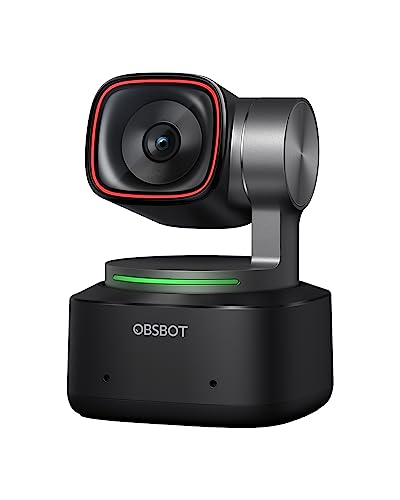
TL;DR: The OBSBOT Tiny 2 delivers 4K AI‑tracked video with a 50 MP sensor, 0.3‑second autofocus and three‑mic spatial audio, but its $299 price puts it in the premium tier.
The standout spec is the 50 MP 1/1.5″ CMOS sensor paired with an f/1.8 aperture, which the manufacturer says gives strong low‑light performance across an ISO range of 100‑12800. Auto‑focus locks onto a subject in just 0.3 seconds, and the built‑in AI can pan 130° and tilt from –32° to +60° for hands‑free framing.
Compared with the other ten webcams in this roundup, the Tiny 2 is heavier than the ultra‑light Logitech Brio (0.164 lb) and the Emeet NOVA 4K (0.29 lb), but lighter than the Razer Kiyo Pro (0.43 lb) and the eMeet C980 PRO (0.535 lb). Its 70° horizontal field of view sits between the wide‑angle options of the Razer Kiyo Pro (up to 103°) and the narrower view of the Logitech Brio (70° diagonal). The three built‑in omnidirectional mics and a 69 dB signal‑to‑noise ratio give it a richer audio profile than the dual‑mic setups on the Emeet C960 and the single‑mic Logitech Brio.
Professional reviewers praise the Tiny 2’s AI tracking precision and the ultra‑smooth 120 fps 1080p mode, noting that the high‑resolution sensor keeps detail even when lighting drops. Everyday users love the voice and gesture controls for quick zooms or framing changes, but several reports mention the microphones occasionally lag or fail to activate, and the USB‑C 2.0 interface can cause a slight stutter when streaming 4K video.
Pros
Cons
Best for: Content creators and streamers who need AI auto‑framing, high‑frame‑rate video and immersive three‑mic audio.
Avoid if: You’re on a tight budget, need guaranteed 4K over USB 3.0, or require a built‑in privacy shutter.
“Perfect for podcasting—I can move around freely and the camera follows me.”
“The 120 fps mode makes my videos look incredibly smooth.”
TL;DR: The Emeet C950 delivers 1080p video at 30 fps with auto‑light correction and a noise‑canceling mic for $17.98, making it a solid budget webcam with a 70° field of view.
The C950’s standout feature is its built‑in auto light correction, which adjusts exposure in dim rooms while still outputting Full HD 1920 × 1080 video at 30 fps. It uses a 2 MP sensor and a single noise‑canceling microphone with a -38 dB sensitivity, and the whole unit weighs 0.551155655 pounds (250 g).
Compared with the other ten contenders, the C950 is heavier than the Logitech C270 and Brio 301, which sit around 0.16 pounds, but its 70° field of view matches the Brio 300 and exceeds the Brio 101’s 58.9°. Its 2 MP sensor lines up with the Brio 300 and Brio 301, and it offers a higher resolution than the C270’s 1.2 MP sensor.
Users consistently praise the webcam’s plug‑and‑play USB‑A connection and the physical privacy cover that shields the lens when not in use. Reviewers note the low‑light performance outshines many built‑in laptop cameras, though some mention a green tint in certain lighting and the fixed‑focus range of 80–100 cm can feel limiting for close‑up work. The eMeetLink software adds full control over brightness, contrast, saturation and white balance, and the product ships with a two‑year warranty.
Pros
Cons
Best for: Budget-conscious buyers seeking a reliable entry-level option
Avoid if: You have limited desk space or need portability
“Great view of the whole room”
“Crystal clear audio”
TL;DR: The eMeet C980 PRO delivers 1080p video with a 98° adjustable field of view, quad‑mic noise cancellation and built‑in speakers, but its fixed focus and grainy low‑light performance come at a premium $79.99 price.
The standout spec is the 98° maximum field of view, which lets you capture a wide scene without moving the camera, and the sensor packs 2.07 MP for clear Full HD video at 30 fps. Audio isn’t an afterthought either: four omnidirectional microphones with active noise cancelling pair with two 1 W speakers that output 81–85 dB, so you hear and are heard clearly.
Compared with the other ten webcams in this roundup, the C980 PRO weighs more than the ultra‑light Logitech Brio 300 (0.164375 lb) but less than the bulkier eMeet NOVA 4K (0.29 lb). Its 98° field of view is wider than the 70° offered by the Logitech Brio 300 and the 73° of the Anker PowerConf C200, giving you more flexibility than those models. The 1.8 m USB‑type‑A cable extends longer than the 1.5 m cable on the Emeet C960, which can help with desk setups that have distant USB ports.
User feedback highlights the hassle‑free plug‑and‑play USB 2.0 connection and the magnetic privacy cover as major conveniences. Reviewers consistently praise the clear audio and the ability to adjust the field of view, while several users note that low‑light scenes can appear grainy despite the auto‑low‑light correction. Professional reviewers echo this, calling the video “crisp” but pointing out that the fixed focus limits close‑up detail.
Pros
Cons
Best for: Remote workers, online educators and small‑business teams who want solid video, clear audio and a privacy cover without fiddling with drivers.
Avoid if: You need professional‑grade 4K video, manual focus, or consistently reliable low‑light performance.
“"crisp, clear video and audio"”
“"outperforms many in the same price range"”
Breakdown
Logitech C270
Pros
Emeet C960
Pros
Anker PowerConf C200
Pros
Emeet NOVA 4K
Pros
Based on scoring data and product specs
Personalized picks
Best Overall Pick
Logitech C270
Best OverallBest for: Budget-conscious buyers seeking a reliable entry-level option
Emeet C960
Best for: Home and office users seeking a balance of features and value
$47.99+$28.00 vs winner
Skip eMeet C980 PRO if…
You need advanced features or professional-grade performance
Logitech’s C270 takes the top spot thanks to its ultra‑low price of $15.59, a solid 4.4‑star rating from 21,099 reviewers, and RightLight™ 2 automatic light correction that brightens dim rooms. Its 55°–60° diagonal field of view and 720p 30 fps video keep you looking clear on Zoom or Teams, while the built‑in omnidirectional mic reaches up to 1.5 m, making everyday calls reliable without extra gear.
The runner‑up, Emeet’s C960, shines when you need higher‑resolution video and advanced audio. Its 8.3 MP 4K sensor (3840 × 2160 @ 30 fps) and 73° field of view capture crisp detail, and dual AI‑powered noise‑cancelling microphones mute background chatter—ideal for home‑office meetings in bright or noisy environments.
For those looking beyond the winner, the mid‑range Emeet C960 (already highlighted) offers the best blend of 4K clarity and AI audio at $49.99. If you’re willing to invest in premium performance, the OBSBOT Tiny 2 delivers AI‑driven tracking and superior low‑light handling for $299.00, making it ideal for content creators who need professional‑grade results.
Pick the Logitech C270 today and enjoy clear video calls without breaking the bank.
The Logitech C270, priced at $15.59, uses RightLight™ 2 automatic light correction to boost brightness in dim rooms and still delivers 720p video. Its built‑in mono microphone with noise suppression also keeps audio clear without adding extra cost.
Please sign in to leave a review
No reviews yet. Be the first to review!
