Choosing a webOS smart display can feel overwhelming, especially when LG offers six different models that blend a traditional monitor with built‑in streaming apps. In this roundup we’ve lined up all six, so you can see how the options split across three price tiers: budget (the 27‑inch $179.99 and 32‑inch $229.99 models), mid‑range (the 34‑inch $329.99), and premium (the 34‑inch $346.00 and the 32‑inch $786.99 touchscreen). Each device runs LG’s webOS23, giving you direct access to Netflix, Prime Video, Disney+, and more without a separate PC.
The premium 34‑inch LG 34SR60QC‑W leads the pack with a 21:9 curved VA panel, 100 Hz refresh rate, 2 × 7 W built‑in speakers, and a solid 4.4/5 rating from 235 reviewers—all for $346.00. Its sibling, the 34‑inch 34SR63QA‑W, adds a USB‑C port that delivers 65 W Power Delivery and also carries a 4.4/5 rating from 238 reviews at $329.99. On the budget side, the 27‑inch LG 27SR50F‑W offers a 27‑inch IPS panel, dual 5 W speakers, and a 3.9/5 rating for $179.99, while the 32‑inch LG 32SR50F‑G provides dual HDMI, 14.6 pounds weight, and a 4.3/5 rating at $229.99. The premium 32‑inch LG 32U889SA‑W stands out with a 4K IPS touchscreen, 65 W USB‑C PD, and a 4.0/5 rating for $786.99. The 27‑inch 4K model lacks price info, so we’ll focus on its feature set later.
Read on to see how each display’s specs, connectivity, and smart features stack up for work, play, and everything in between.

LG 34SR60QC-W
Its 2 × 7 W built‑in speakers deliver premium audio, making it the clear top choice.

LG 34SR63QA-W
Ideal for home or office users, it balances features and value while costing $16 less than the top pick at $329.99.

LG 32SR50F-G
It offers dual HDMI inputs and a stereo speaker pair, delivering entry‑level pricing at $229.99 for budget‑focused buyers.
Score Analysis
Key score advantages vs. runner-up (LG 34SR63QA-W)
Price Range
LG 34SR60QC-W
$348.04
LG 34SR63QA-W
$377.81
LG 32SR50F-G
$171.93

LG 27SR50F-W
$195.95
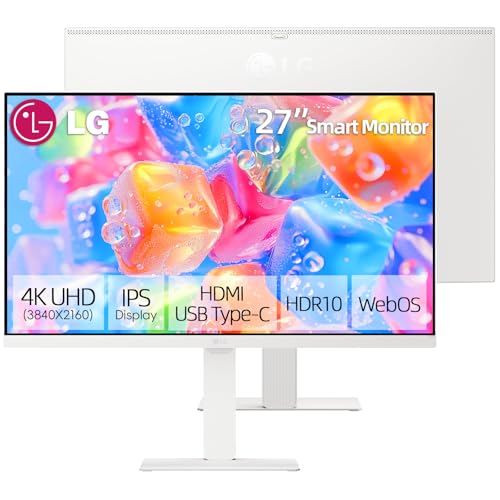
LG 27-inch 4K Smart Monitor
$379.00

LG 32U889SA-W
$796.99
Spec Comparison
TL;DR: The LG 34SR60QC-W delivers a 34‑inch 21:9 curved UltraWide screen with 100 Hz refresh, webOS 23 streaming, and built‑in 2 × 7 W speakers, making it a solid all‑in‑one workspace and entertainment hub.
This monitor’s standout feature is its 34‑inch 1800R curved VA panel that runs at 100 Hz and a 5 ms GTG response time, while offering 99 % sRGB coverage and a typical contrast ratio of 3000:1. Those numbers translate to smoother motion and richer colors for both work and media.
Compared with the other five models in the roundup, the 34SR60QC-W matches the weight of the LG 34SR63QA‑W (both 13.45 lb) and is lighter than the heavyweight 32U889SA‑W, yet it’s a bit heavier than the 27SR50F‑W (12.3 lb). Its built‑in speakers put out 2 × 7 W, out‑shining the 5 W dual speakers of the 27SR50F‑W and the 1.2 W units in the 27‑inch 4K Smart Monitor, though the 34SR63QA‑W lists a total of 14 W. The 100 Hz refresh and 5 ms response outpace the 60 Hz/14 ms combo on the 27SR50F‑W, and its typical brightness of 300 cd/m² exceeds the 250 cd/m² of that same model.
Reviewers love the immersive 21:9 screen for multitasking and binge‑watching, and they appreciate the convenience of webOS 23 with over 300 streaming apps and AirPlay 2/HomeKit support. Professional reviewers note the VA panel’s slower response and limited viewing angles, and users frequently mention the lack of height adjustment and the bulk of the external power adapter as trade‑offs.
Pros
Cons
Best for: Remote workers, hybrid professionals, and Apple ecosystem users who want a wide workspace and built‑in streaming without a separate PC.
Avoid if: You’re a competitive gamer, a color‑critical designer, or need height adjustment and USB‑C docking features.
TL;DR: The LG 34SR63QA-W offers a 34‑inch 21:9 curved VA display with webOS 23, 100 Hz refresh and 65 W USB‑C charging at $329.99, making it a versatile all‑in‑one monitor‑TV for remote work and streaming.
This monitor’s standout feature is its 34‑inch ultrawide VA panel that delivers a native 3440 × 1440 resolution, 100 Hz refresh rate and a 5 ms (GTG) response time. With 99% sRGB coverage, a 3000:1 contrast ratio and 300 cd/m² brightness, it provides vivid colors and deep blacks, while HDR10 adds extra punch for movies and games.
Compared with its LG siblings, the 34SR63QA-W matches the 34SR60QC‑W’s 7 W per‑channel speakers and 100 Hz refresh, but it’s lighter than the 32SR50F‑G (13.45 lb vs 14.6 lb) and offers a brighter 300 cd/m² panel versus the 27SR50F‑W’s typical 250 cd/m². Its 65 W USB‑C power delivery aligns with the 27‑inch 4K Smart Monitor, yet the latter’s weight isn’t listed, while the 32U889SA‑W is substantially heavier at 46.74 lb.
Reviewers highlight the convenience of webOS 23, which comes pre‑installed with Netflix, Disney+, Apple TV+, HBO Max, Prime Video and productivity suites like Microsoft 365, letting you work or stream without a PC. Users love the expansive screen real‑estate for multitasking, but many note the built‑in 7 W speakers feel thin on bass and the tilt‑only stand (‑5° to +15°) limits ergonomic adjustment. Professional reviewers also point out that the webOS interface isn’t as snappy as LG’s TV version and that LG omitted a KVM switch despite the dual HDMI inputs.
Pros
Cons
Best for: Home and office users seeking a balance of features and value
Avoid if: You have limited desk space or need portability
TL;DR: The LG 32SR50F‑G is a 32‑inch Full HD webOS 23 smart monitor that packs built‑in streaming apps, AirPlay 2, and decent IPS performance for $229.99.
This model’s standout feature is its webOS 23 platform with native Netflix, Prime Video, Apple TV, Disney+, HBO Max and LG Channels, letting you stream without a PC. It also supports AirPlay 2, HomeKit, Bluetooth 5.0 and Wi‑Fi 802.11 a/b/g/n/ac, so Apple devices and wireless accessories connect effortlessly.
Compared with the other five monitors in the roundup, the 32‑inch screen is larger than the 27‑inch LG 27SR50F‑W and the 27‑inch 4K model, while its typical brightness of 250 cd/m² matches the 27‑inch but falls short of the 34‑inch LG 34SR60QC‑W’s 300 cd/m². Its contrast ratio of 1200:1 beats the 27‑inch’s 1000:1 yet is lower than the 34‑inch’s 3000:1. The 5 ms (GtG) response time is faster than the 27‑inch’s 14 ms and on par with the 34‑inch models, but the 60 Hz refresh rate lags behind the 100 Hz panel of the 34‑inch LG 34SR60QC‑W. At 14.6 lbs, it’s heavier than the 34‑inch LG 34SR63QA‑W (13.45 lbs) and the 34‑inch LG 34SR60QC‑W (13.45 lbs) but similar to the larger 32‑inch LG 32U889SA‑W, which is substantially heavier.
Reviewers praise the monitor’s all‑in‑one convenience, loving the picture quality, straightforward setup, and ability to run cloud apps directly from the screen. Professional reviewers note the intuitive webOS experience, especially for Apple users, yet they call out the limited ergonomic options—only tilt adjustment from –5° to +15°—and the bulk of the external power adapter. The 60 Hz panel suffices for video and office work, yet gamers commonly complain about its limited frame rate.
Pros
Cons
Best for: Remote and hybrid workers who want a single screen for cloud apps and streaming, especially those invested in the Apple ecosystem.
Avoid if: You want the best value‑per‑dollar in its price range or need high‑refresh‑rate gaming performance.
“Perfect for WFH”
“Great picture quality”
TL;DR: The LG 27SR50F-W is a 27‑inch Full HD webOS Smart Monitor priced at $179.99, offering dual HDMI, built‑in 5 W speakers, AirPlay 2 and a 14 ms response time for casual work and media.
Running webOS 23, the 27SR50F‑W gives you direct access to streaming apps, cloud PC tools and AirPlay 2 without a separate box. Its 27‑inch IPS panel delivers a typical brightness of 250 cd/m², a 72% NTSC color gamut and a 1000:1 contrast ratio, while the built‑in dual 5 W stereo speakers handle everyday video calls and movies. The monitor refreshes at 60 Hz and switches scenes in 14 ms (GtG), which handles office tasks and light entertainment.
At 12.3 lbs, the LG 27SR50F‑W is lighter than the 32‑inch LG 32SR50F‑G (14.6 lbs) and the 34‑inch LG 34SR63QA‑W (13.45 lbs). Its 211 mm depth with stand is comparable to the 32SR50F‑G’s 210.8 mm depth, while the 34‑inch models sit a bit deeper at around 224 mm. Speaker power is modest at 5 W per channel, lower than the 7 W per channel in the 34‑inch siblings, but it still provides casual listening.
Users consistently praise the all‑in‑one convenience: the monitor’s smart TV interface, smooth AirPlay 2 performance, and the ability to connect two HDMI sources at once. However, several reviewers note that the Full HD 1920 × 1080 resolution on a 27‑inch screen can look pixelated, especially when reading text or editing photos. Professional reviewers also point out the limited ergonomics—tilt‑only adjustment with no height, swivel or pivot options—and the 14 ms response time, which may feel sluggish for fast‑paced games.
Beyond the smart features, the IPS panel offers 178° viewing angles and an anti‑glare surface, making it suitable for shared spaces. The unit supports VESA mounting (100 × 100 mm) and consumes about 25 W during typical use, keeping power draw modest for a full‑size monitor.
Pros
Cons
Best for: Entry-level buyers or those on a tight budget
Avoid if: You need advanced features or professional‑grade performance
TL;DR: The LG 27‑inch 4K Smart Monitor delivers crisp IPS visuals with 95% DCI‑P3 color, webOS streaming, and a 65 W USB‑C dock, but its tiny speakers and lack of a webcam keep it focused on work‑oriented use.
This model pairs a 27‑inch 3840 × 2160 IPS panel with 95% DCI‑P3 and 99% sRGB coverage, 300 nits brightness, and a 1300:1 contrast ratio, giving you vivid detail for design work and media consumption. The built‑in webOS 23 platform adds native streaming apps, AirPlay 2, and AI Dynamic Tone Mapping, while the 65 W USB‑C port handles video, data, and power over a single cable.
Compared with the other five LG monitors in the roundup, it is lighter than the 32‑inch models (the 32SR50F‑G weighs 14.6 lb and the 32U889SA‑W weighs about 46.7 lb) but a touch heavier than the 27SR50F‑W’s 12.3 lb. Its 2 × 1.2 W speakers are modest against the 5 W stereo speakers in the 27SR50F‑W and the 7 W per‑channel output in the 34‑inch models. Brightness at 300 nits exceeds the 200 cd/m² minimum of the 27SR50F‑W and matches the typical 300 cd/m² of the 34SR60QC‑W. The 5 ms response time is faster than the 14 ms of the 27SR50F‑W, though its 60 Hz refresh rate lags behind the 100 Hz of the 34SR60QC‑W.
Professional reviewers praise its “best‑in‑class color performance” and the convenience of running Microsoft 365 apps directly from the monitor via cloud PC. Everyday users love the color accuracy and single‑cable docking, but many note the absence of an integrated webcam or microphone and describe the plastic chassis as less premium than metal‑framed rivals. Some mention occasional webOS lag, which can feel unnecessary if you already own a streaming device.
Ergonomically, the stand offers 130 mm of height adjustment, a 90° pivot for portrait mode, ±30° swivel, and –5° to +20° tilt, plus a 100 × 100 mm VESA mount option. Power draw stays modest at 25.6 W typical and under 0.5 W in sleep mode, and it's efficient for long‑hour work sessions.
Pros
Cons
Best for: Remote workers and creators who want a 4K IPS display with built‑in smart TV apps and a single‑cable USB‑C dock for a tidy workstation.
“Perfect for home office and streaming”
“USB-C charging is a lifesaver”
TL;DR: The LG 32U889SA-W offers a 31.5‑inch 4K IPS touchscreen with 95% DCI‑P3 color, a rolling stand and 65 W USB‑C PD, but its $787 price and 60 Hz panel may deter budget‑focused gamers.
This model’s most distinctive spec is the 31.5‑inch 4K UHD IPS touchscreen, which packs a native 3840 × 2160 resolution, 350 nits brightness and a 95 % DCI‑P3 color gamut. The panel supports HDR10 and a 10‑bit (1.07 billion colors) depth, while the 5 ms response time and 60 Hz refresh rate keep everyday motion fluid.
Compared with the other five monitors in the roundup, the 32U889SA-W is considerably heavier at 46.74 pounds versus the roughly 13‑14 pound range of the LG 34SR60QC‑W, LG 34SR63QA‑W, LG 32SR50F‑G and LG 27SR50F‑W. Its brightness of 350 nits outshines the 240 cd/m² minimum listed for the 34SR60QC‑W and the 200‑250 cd/m² range of the 27SR50F‑W. However, its 60 Hz refresh rate falls short of the 100 Hz found in the 34SR60QC‑W, and its 1000:1 contrast ratio falls below the typical 3000:1 of that model. Speaker power (2 × 5 W) remains modest compared with the 2 × 7 W or 14 W total output of the 34‑inch peers, though it matches the 5 W stereo speakers of the 27‑inch models.
Reviewers consistently praise the rolling stand with its ±90° pivot, swivel and a 13‑inch height‑adjustment range, noting how easily the monitor can be moved around a home office or classroom. The built‑in webOS platform and AirPlay 2/Screen Share support receive positive mentions for quick media streaming, while the 65 W USB‑C port serves as a strong docking solution for laptops. On the downside, users flag the glossy screen for reflecting ambient light, the lack of an integrated webcam or microphone for video calls, and the 60 Hz panel limits fast‑paced gaming. Professional reviewers echo these points, calling the color accuracy “professional‑grade” but noting that webOS feels less productive than a traditional desktop OS.
Pros
Cons
Best for: Those prioritizing quality and willing to pay for premium performance
Avoid if: You're on a tight budget or only need basic functionality
“The seamless transition between PC mode and smart TV mode”
“The responsiveness of the touchscreen for navigating apps and settings”
Breakdown
LG 34SR60QC-W
Pros
LG 34SR63QA-W
Pros
LG 32SR50F-G
Pros
Cons
LG 27SR50F-W
Pros
Cons
Based on scoring data and product specs
Personalized picks
Best Overall Pick
LG 34SR60QC-W
Best OverallBest for: Audiophiles and enthusiasts seeking premium sound quality and advanced features
LG 34SR63QA-W
Best for: Home and office users seeking a balance of features and value
$377.81+$29.77 vs winner
Skip LG 32U889SA-W if…
You're on a tight budget or only need basic functionality
LG 34SR60QC‑W takes the top spot as the best webOS smart display. It pairs a spacious 34‑inch 21:9 ultrawide panel with a crisp 3440 × 1440 resolution and a smooth 100 Hz refresh rate, while delivering 99 % sRGB coverage and HDR10 support for vibrant colors. The built‑in 2 × 7 W speakers and dual HDMI 2.0 ports round out a well‑equipped package, and a 4.4‑star rating from 235 reviewers backs its appeal.
The runner‑up, LG 34SR63QA‑W, shines when you need a single‑cable workstation. Its USB‑C port supplies 65 W Power Delivery and supports DisplayPort Alt Mode, letting you power a laptop and drive the 34‑inch screen without extra adapters. It matches the winner’s 21:9 aspect, 300 cd/m² brightness, and HDR10 capability, making it a solid choice for productivity‑focused setups.
For tighter budgets, the LG 27SR50F‑W delivers a compact 27‑inch smart monitor at $179.99, offering webOS apps and decent built‑in speakers. If you prefer a mid‑range option, the runner‑up LG 34SR63QA‑W (already highlighted) balances size and connectivity for $329.99. For premium seekers, the LG 32U889SA‑W stands out with 4K resolution and high‑end features at $786.99.
Pick the LG 34SR60QC‑W today and enjoy a premium, all‑in‑one smart display experience.
The 32U889SA‑W offers a large 31.5‑inch 4K IPS touchscreen, 10‑bit color and built‑in video‑conferencing support, making it ideal for professional calls despite its higher price. If budget is a concern, the 34SR60QC‑W provides a spacious 34‑inch 3440 × 1440 screen and full webOS features for a more affordable setup.
Please sign in to leave a review
No reviews yet. Be the first to review!
Also considered
$377.81
