Getting color right can make or break a design project, a photo edit, or a video grade. To help you cut through the noise, this guide compares 11 desktop displays that promise professional‑grade accuracy. The lineup stretches from the $79.55 Sansui ES-22X3AH up to the $1,289.99 Asus ProArt PA32QCV, with every model holding a solid 4.4‑4.6/5 rating from thousands of reviewers.
The roundup divides the monitors into three price tiers. Budget‑friendly choices include the Sansui ES-22X3AH (100 % sRGB, 120 Hz refresh) and the Koorui E2411K, both priced under $100 and carrying 4.4‑4.5/5 scores. Mid‑range contenders like the Sceptre C248W‑FW100T ($109.97) and Acer KB272 (27‑inch IPS, 4.6/5) give you 100 % sRGB coverage without breaking the bank. Premium options such as the Dell S2725QS ($239.99) push brightness to 350 cd/m² and deliver 99 % sRGB, while the AOC 27G4H and BenQ PD2730S add advanced IPS panels and higher refresh rates for creators who need extra headroom.
Below is a breakdown of each model’s strengths, connectivity, and ergonomics, helping you match the monitor that fits your workflow, desk space, and budget.

AOC 27G4H
Offers a dedicated 1 x DisplayPort 1.4 connection for high‑bandwidth video and includes a 3.5 mm headphone jack for convenient audio monitoring.

Sceptre C248W-FW100T
Ideal for budget‑conscious creators needing a compact display; at $109.97 it’s about $30 cheaper than the AOC 27G4H, while still delivering solid reviews.

Acer KB272 27-inch
Features built‑in 2 W speakers and a supplied HDMI cable, providing an all‑in‑one setup that the other picks lack.
Score Analysis
Key score advantages vs. runner-up (Sceptre C248W-FW100T)
Price Range
AOC 27G4H
$139.99
Sceptre C248W-FW100T
$78.97
Acer KB272 27-inch
$99.99

Dell S2725QS
$278.26
KOORUI E2411K
$89.99

BenQ PD2730S 27-inch
$1,099.99
Asus ProArt PA32QCV
$1,289.99

ASUS VA249QG
$99.00

Sansui ES-22X3AH
$81.99

KOORUI MB24V29F
$89.98

BenQ PD2706QN
$279.99
Spec Comparison
TL;DR: The AOC 27G4H delivers a 200 Hz refresh rate, <2 ΔE color accuracy and 92% DCI‑P3 coverage on a 27‑inch Full HD panel, all backed by a three‑year warranty.
The standout spec is the 200 Hz refresh rate paired with a 0.3 ms MPRT response time, which keeps motion buttery smooth even in fast‑paced games. Its Fast IPS panel shows a color accuracy of <2 ΔE and covers 120‑121% of the sRGB spectrum plus 92% of DCI‑P3, while the typical brightness is 300 cd/m² and HDR10 support adds a hint of dynamic range.
Compared with the other ten monitors in this roundup, the AOC weighs notably more at 18.0007436923 pounds, out‑weighing the Sceptre C248W‑FW100T and the ASUS VA249QG. Its 227.6 mm depth also exceeds the 193 mm depth of the Sceptre and the 188.2 mm depth of the ASUS model. The 200 Hz refresh rate eclipses the 100 Hz of the Sceptre, the 120 Hz of the ASUS and Sansui, and even the 144 Hz of the KOORUI E2411K, putting it at the top end of motion performance among its peers. Unlike several rivals that lack a DisplayPort, the AOC includes a 1 × DisplayPort 1.4, giving you more connectivity options.
Reviewers consistently praise the ultra‑smooth gameplay and the ergonomic stand, which offers 130 mm of height adjustment, -90° to +90° pivot, -30° to +30° swivel and a tilt range of -5° to +23°. Users also like the three‑year Zero‑Bright‑Dot warranty, which's rare at this price point. Common criticisms focus on the glossy screen that can reflect light in bright rooms, the Full HD resolution on a 27‑inch panel that reduces text sharpness, and the single HDMI 2.0 port plus the absence of built‑in speakers.
Pros
Cons
Best for: Competitive gamers and budget‑conscious users who want high refresh rates, accurate colors and solid ergonomics.
Avoid if: You need professional‑grade resolution or a matte display for bright rooms, or you rely on built‑in speakers.
“perfect price and quality. can't beat this deal.”
TL;DR: The Sceptre C248W‑FW100T delivers a 24‑inch 1500R curved VA panel with 100 Hz refresh, 1 ms blur‑reduction response and full 100% sRGB coverage at a budget‑friendly $109.97.
The monitor’s standout feature is its 1500R curvature combined with a 100 Hz refresh rate and a 1 ms blur‑reduction response time, which together create smooth motion and an immersive viewing experience on a 24‑inch Full HD (1920 × 1080) screen. Its VA panel covers 100% of the sRGB color gamut, so colors appear vivid and accurate for everyday content.
Compared with the other ten entries in this roundup, the C248W‑FW100T sits in the middle of the refresh‑rate spectrum—faster than the 120 Hz ASUS VA249QG and slower than the 144 Hz KOORUI E2411K. At 3963 g, it is lighter than the Acer KB272’s 11.0‑pound chassis but heavier than the ASUS VA249QG’s 6.7‑pound build. Its price point matches the budget tier of the Acer and ASUS models while offering a curved screen that those flat‑panel peers lack.
Reviewers consistently praise the “buttery‑smooth” 100 Hz gameplay and the subtle curve that adds depth to both games and productivity tasks. Eye‑comfort features such as flicker‑free backlighting and blue‑light reduction help during long work sessions. Common complaints focus on the stand’s limited tilt‑only adjustment, weak built‑in stereo speakers, and occasional difficulty locking 100 Hz over HDMI without tweaking settings.
Beyond the core display specs, the monitor includes AMD FreeSync, two HDMI 1.4/2.0 ports, a DisplayPort 1.2, a VGA input and a 3.5 mm audio‑out jack. Built‑in stereo speakers provide basic audio without needing external boxes, though they lack bass depth. The matte surface reduces glare, and the 1‑year limited warranty rounds out the package.
Pros
Cons
Best for: Most users looking for a well-reviewed, reliable mainstream option
Avoid if: You need advanced features or professional-grade performance
“Great beginner gaming monitor for gamers on a budget... easy setup, even comes with a decent screwdriver.”
“The curve is subtle, but the 100Hz is buttery smooth. Just wish the stand was more adjustable.”
TL;DR: The Acer KB272 27‑inch IPS monitor delivers 99% sRGB color coverage, a 120 Hz refresh rate and a 1 ms VRB response, all backed by a solid 4.6‑star rating from over 1,400 reviewers.
The standout spec is its 99% sRGB color gamut, which helps keep colors vivid on a 27‑inch Full HD panel. Paired with an IPS panel, the monitor also offers 178° horizontal and vertical viewing angles, 81.59 PPI pixel density and a 250 cd/m² brightness level. The built‑in VisionCare suite adds flicker‑less backlighting and low‑blue‑light mode, while a 1 ms VRB response time and up‑to‑120 Hz refresh rate keep motion smooth for casual gaming.
Compared with other entries in this roundup, the Acer is larger than the 23.8‑inch ASUS VA249QG and the 22‑inch Sansui ES‑22X3AH, but it also weighs more than the 6.7‑pound ASUS and the 3.0‑kilogram KOORUI E2411K. Its brightness of 250 cd/m² matches the KOORUI MB24V29F, yet it is dimmer than the ASUS’s 300 cd/m². While the Acer includes a VGA port and an HDMI 1.4 input, it lacks the DisplayPort found on the AOC 27G4H, making its connectivity a bit more limited.
Reviewers consistently praise the monitor’s eye‑comfort features, noting that VisionCare reduces strain during long work‑from‑home sessions. Users also like the clear 1080p image and the smooth motion provided by FreeSync, even though the monitor’s refresh ceiling’s modest for high‑end gaming. Common complaints focus on the lack of height or swivel adjustment, a loose‑feeling HDMI port and a stand that can wobble on uneven surfaces. Professional reviewers note that Acer does not factory‑calibrate the panel, which matters for color‑critical work.
Pros
Cons
Best for: Office and business users needing a large, clear display for spreadsheets, video calls and light gaming, especially when color accuracy matters.
Avoid if: You require professional‑grade factory calibration, extensive ergonomic adjustments, or a higher refresh‑rate panel for competitive gaming.
TL;DR: The Dell S2725QS delivers 27‑inch 4K clarity, 99% sRGB coverage and a variable 48‑120 Hz refresh rate, and it's wrapped in an ultra‑thin, ergonomically adjustable design for color‑critical work.
This monitor’s standout spec is its 27‑inch 4K UHD panel with a variable refresh rate that tops out at 120 Hz, paired with 99% sRGB coverage and a 10‑bit (1.07 billion colors) depth. The edge‑lit LED IPS panel shines at 350 cd/m² typical brightness and a static 1500:1 contrast ratio, while integrated speakers deliver 10 W total (2 × 5 W) audio.
Compared with the other ten displays, the S2725QS is noticeably heavier than the BenQ PD2706QN (9.1 lb) and the ASUS VA249QG (6.7 lb), but its 60.00 mm monitor‑only depth makes it the thinnest in the lineup, far slimmer than the AOC 27G4H (227.6 mm) or the Acer KB272 (68.58 mm without stand). Its 120 Hz ceiling exceeds the BenQ’s 100 Hz and matches the ASUS, though it falls short of the KOORUI’s 144 Hz. Brightness at 350 cd/m² outpaces the ASUS’s typical 300 cd/m² and sits between the BenQ’s 300 cd/m² standard and 400 cd/m² HDR peak.
Professional reviewers applaud the monitor’s color fidelity and eye‑comfort suite—Dell ComfortView Plus cuts blue‑light emissions to ≤35% and TÜV Rheinland awards it a 4‑star rating. Users consistently note the fluid 120 Hz experience and the fully adjustable stand (130 mm height travel, ±90° pivot, –30° to +30° swivel, –5° to +21° tilt). The most common complaints revolve around the lack of a USB‑C port, limited cable‑management features, and occasional ghosting when the 4 ms “Extreme” response mode is selected.
Pros
Cons
Best for: Buyers willing to invest in a proven, high-quality option
Avoid if: You need DCI‑P3 coverage, USB‑C docking, or extensive cable‑management features
“sharp image quality”
“smooth 120 Hz performance”
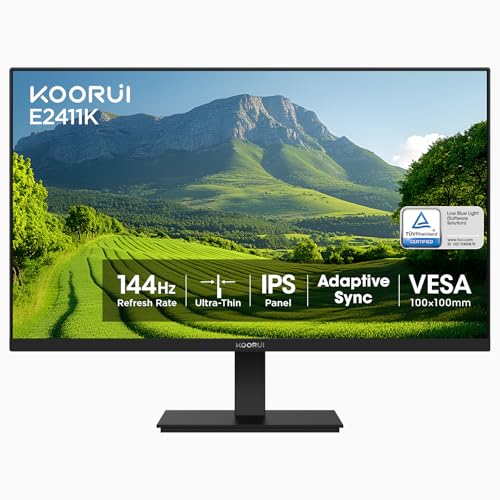
TL;DR: The KOORUI E2411K delivers a 144 Hz IPS panel with 99% sRGB coverage and eye‑care features at a budget‑friendly $89.99, making it a solid choice for smooth, colorful everyday use.
Its standout spec is a 144 Hz refresh rate on a 24‑inch IPS screen, paired with a 5 ms (GTG) response time. That combination gives motion‑clear gameplay and scrolling that most 60 Hz office monitors can’t match, while the 99% sRGB color gamut keeps colors vivid for casual creative work.
Compared with the other ten displays in this roundup, the E2411K is lighter than the KOORUI MB24V29F (8.10 lbs) and the Acer KB272 (about 11 lb), but a bit heavier than the Sansui ES‑22X3AH (6.65 lbs) and the ASUS VA249QG (6.7 lbs). Its stand depth of 424 mm is noticeably deeper than the typical 180‑210 mm depth found on those peers, which may affect desk space. Connectivity is modest with a single HDMI 2.0 port and one VGA port, fewer than the Sansui’s two HDMI inputs, while the AOC 27G4H offers both HDMI and DisplayPort.
Users consistently praise the monitor’s smooth 144 Hz performance, especially when FreeSync is enabled, and appreciate the Flicker‑Free backlight with a Blue Light Filter for long‑hour comfort. However, several reviewers note that the tilt adjustment –‑5° to +15° –‑ can feel limited, and the lack of built‑in speakers means you’ll need external audio. Professional reviewers also highlight the high dynamic contrast ratio of 20,000,000:1, which adds depth to dark scenes, though the static contrast sits at 3000:1.
Additional technical details include a 250 cd/m² adjustable brightness, 178° H/178° V viewing angles, and VESA‑mount compatibility of 100 × 100 mm, giving you flexibility to mount the screen on a wall or arm. The monitor comes with a power adapter, HDMI cable, user manual, and base stand, and is backed by a three‑year warranty (display covered for one year, accessories for three).
Pros
Cons
Best for: Budget‑conscious gamers and remote workers who want a high refresh rate and accurate colors without breaking the bank.
Avoid if: You need professional‑grade color accuracy, extensive connectivity options, or built‑in speakers for multimedia use.
“Out of the box, there was noticeable ghosting... until I turned OD on!”
“No USB attachments — couldn’t plug my mouse in, which was inconvenient.”
TL;DR: The BenQ PD2730S delivers 5K (5120 × 2880) color‑critical performance with factory‑calibrated ΔE ≤ 2, but its modest 2 × 3 W speakers and 60 Hz refresh keep it squarely in the professional‑design niche.
This 27‑inch monitor packs a 5K IPS Nano Matte panel that hits 5120 × 2880 resolution and 218 PPI, while offering factory‑calibrated color accuracy of ΔE ≤ 2 and 98% DCI‑P3 coverage (100% sRGB, 100% Rec.709). Brightness tops out at 400 nits and the monitor delivers a 2000:1 contrast ratio, giving you a crisp, true‑to‑life image for photo or video work.
Weighing 17.5 pounds, the PD2730S is lighter than the Asus ProArt PA32QCV and the AOC 27G4H, yet noticeably heavier than the BenQ PD2706QN. It also out‑features many peers with Thunderbolt 4 delivering 90 W upstream power and a built‑in KVM switch, something the Dell S2725QS and other budget options don’t list.
Reviewers consistently praise the Nano Matte coating for eliminating glare without adding grain, and professionals love the macOS‑focused tools like M‑book Mode and ICCsync. The downsides that keep showing up include low‑power 2 × 3 W speakers, no webcam, and a 60 Hz panel that limits fast‑action gaming.
Beyond color, the monitor supports VESA DisplayHDR 400 and HDR10, and the ergonomic stand offers up to 150 mm of height adjustment, a 90° pivot, ±60° swivel and -5° to +20° tilt, all managed by an integrated cable hook. TÜV Rheinland certification gives you confidence for long‑hour work sessions.
Pros
Cons
Best for: Creative professionals who work on Mac—graphic designers, photo editors, video editors and VFX artists needing precise color and high‑resolution detail.
Avoid if: You prioritize high refresh rates for gaming, require strong built‑in speakers or a webcam, or need a lower‑priced solution.
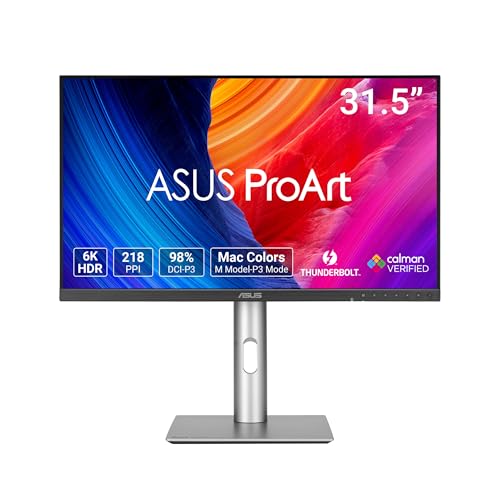
TL;DR: The Asus ProArt PA32QCV delivers a factory‑calibrated 6K IPS panel with 600 nits peak HDR, 100% sRGB and 98% DCI‑P3 coverage, but its 60 Hz refresh and premium price keep it niche.
The standout spec is its 6016 × 3384 (6K) resolution, which translates to 218 PPI on a 31.5‑inch IPS panel. Factory calibration guarantees ΔE < 2, while the display reaches 600 cd/m² peak HDR brightness and 400 cd/m² typical output, backed by a 3000:1 maximum contrast ratio.
At 20.5 pounds, the PA32QCV is heavier than the BenQ PD2730S (17.5 lb), BenQ PD2706QN (9.1 lb), Dell S2725QS (14.26 lb), AOC 27G4H (≈18 lb) and Acer KB272 (≈11 lb). It also outpaces those models in connectivity, offering two Thunderbolt 4 ports, a DisplayPort 1.4 with DSC, HDMI 2.1, and a built‑in USB‑C KVM switch, whereas the peers list fewer or only basic USB‑A ports.
Professional reviewers praise the monitor’s razor‑sharp 6K image, high brightness, and wide color gamut, noting the 178° viewing angles as “excellent.” Users echo the color accuracy praise but warn that the 60 Hz refresh rate feels limiting for gaming or fast‑motion video editing, and the edge‑lit backlight can produce slight uniformity variations.
Additional technical notes include HDR10 support with multiple HDR modes (including PQ Optimized), Adaptive‑Sync compatible with AMD FreeSync, and a 5 ms (GTG) response time. The stand offers 0–130 mm of height adjustment and a 100 × 100 mm VESA mount, making ergonomic setup flexible.
Pros
Cons
Best for: Buyers willing to invest in a proven, high‑quality option
Avoid if: Reliability and user satisfaction are your top concerns
TL;DR: The ASUS VA249QG delivers a 23.8‑inch IPS panel with 99 % sRGB coverage, 120 Hz refresh, and eye‑care features at $99, making it a solid budget choice for color‑critical work.
This monitor’s standout spec is its 120 Hz refresh rate paired with a 1 ms MPRT response time, which is rare in the sub‑$100 IPS segment. Combined with 99 % sRGB color gamut and 300 cd/m² typical brightness, it offers vivid, accurate colors for photo editing or design work.
Compared with the other ten entries, the VA249QG is lighter than the Acer KB272 (which tips the scales at over 11 pounds) and roughly on par with the KOORUI E2411K that lists its weight in kilograms. It lacks a USB hub that some peers provide, and its tilt range of +23° to –5° is narrower than models that offer swivel or pivot adjustments.
Users consistently praise the anti‑glare surface and the Flicker‑Free, TÜV‑Rheinland‑certified Low Blue Light tech for reducing eye strain during long sessions. Users frequently describe the built‑in stereo speakers as thin‑sounding, and a few owners note that the stand can wobble when nudged. Professional reviewers highlight the accurate color reproduction and the frameless design that simplifies multi‑monitor setups.
Pros
Cons
Best for: Budget‑conscious buyers seeking a reliable entry‑level option
Avoid if: You need advanced ergonomics, high‑end audio, or professional‑grade performance
TL;DR: The Sansui ES-22X3AH delivers a 22‑inch Full HD VA panel with 120 Hz refresh, 100 % sRGB coverage and Adaptive Sync at a budget‑friendly $79.55, though it lacks built‑in speakers and advanced connectivity.
The monitor’s standout spec is its 120 Hz refresh rate, which pairs with a Full HD 1920 × 1080 resolution on a 22‑inch screen. It also offers 100 % sRGB color gamut and a brightness of 250 cd/m², giving you vibrant, accurate colors for everyday work and casual gaming. Weighing 6.65 lb, it feels solid without being overly heavy.
Compared with the other ten monitors in this roundup, the ES‑22X3AH sits between the 144 Hz KOORUI E2411K and the 100 Hz Sceptre C248W‑FW100T in refresh speed. Its full 100 % sRGB coverage matches the Sceptre model and exceeds the 99 % sRGB panels in KOORUI E2411K, KOORUI MB24V29F and ASUS VA249QG. Its brightness matches KOORUI MB24V29F’s 250 cd/m² but falls short of ASUS VA249QG’s 300 cd/m². At 6.65 lb, it weighs more than the KOORUI E2411K’s 3.0 kg yet less than the KOORUI MB24V29F’s 8.10 lb.
Reviewers frequently praise the smooth motion from the 120 Hz panel and the plug‑and‑play feel of the dual HDMI 1.4 inputs. Professional reviewers note Adaptive Sync (FreeSync) as a rare advantage at this price point. Common complaints revolve around corner clouding in dark scenes, the absence of built‑in speakers, and the limited tilt range of –5° to +22°.
Additional technical notes: the VA panel uses a matte anti‑glare surface, offers a contrast ratio of 4000:1, and includes an HDR mode that isn’t HDR10 certified. A 75 × 75 mm VESA‑mount pattern lets you attach the monitor to an arm for ergonomic setups.
Pros
Cons
Best for: Budget-conscious buyers seeking a reliable entry-level option
Avoid if: You need advanced features or professional‑grade performance
“Smooth visuals and sharp colors”
“Great value for the performance”
TL;DR: The KOORUI MB24V29F offers a 24‑inch IPS panel with 144 Hz refresh, 99% sRGB coverage, and AMD FreeSync at a budget‑friendly $89.99, though its ergonomics are limited to tilt‑only adjustment.
At the core of this monitor is a 24‑inch IPS display that pushes 144 Hz refresh and reaches 99% sRGB color gamut, delivering smooth motion and accurate colors backed by that coverage. The panel shines at 250 cd/m² brightness and a static contrast ratio of 1000:1, while the ultra‑thin three‑sided bezel keeps the footprint compact at 7.29 in depth, 16.72 in height, and 21.34 in width. Weighing 8.10 lbs, it’s a solidly built unit that includes an HDMI 2.0 port, VGA, and a 3.5 mm audio jack.
Compared with its peers, the MB24V29F undercuts the $89.99 price point of many rivals and matches the 144 Hz refresh of the KOORUI E2411K, while offering the same 250 cd/m² brightness as that model. It weighs more than the KOORUI E2411K (3.0 kg) yet less than the Acer KB272, which tips the scales at 11.0010668738 lb. The ASUS VA249QG sits at 6.7 lb, so the KOORUI is a bit heftier, though still within a manageable range for most desks.
Users consistently highlight the monitor’s affordability and the vibrant colors that come from its near‑full sRGB coverage. Setup stays straightforward because the package includes HDMI and VGA cables, and many appreciate the tilt range of –5° to +15°. On the downside, reviewers frequently mention a tilt mechanism that can feel loose or stop working, and a few have received units with cracked screens out of the box. The lack of height, swivel, or pivot adjustments also draws criticism from those who need more ergonomic flexibility.
Technically, the IPS panel provides 178° horizontal and vertical viewing angles, ensuring consistent color from side‑to‑side. AMD FreeSync support and NVIDIA G‑Sync compatibility via FreeSync keep tearing at bay during fast‑paced content. The monitor is VESA‑compatible (100 × 100 mm), so you can mount it to a wall or arm if you prefer a cleaner workspace.
Pros
Cons
Best for: Budget-conscious buyers seeking a reliable entry‑level option
Avoid if: You need advanced ergonomic features or professional‑grade color performance
“Great Value for Money!”
“Love it!”
TL;DR: The BenQ PD2706QN delivers a factory‑calibrated 27‑inch QHD IPS panel with 100 Hz refresh, 95% DCI‑P3 coverage and a 90 W USB‑C hub, making it a solid choice for color‑critical work at a premium price.
The standout spec is its color accuracy: the panel calibrates to ΔE ≤ 2 and covers 100% sRGB, 100% Rec.709 and 95% DCI‑P3, all on a 27‑inch 2560 × 1440 IPS screen. HDR10 support pushes peak brightness to 400 cd/m², while a 100 Hz refresh rate keeps cursor movement smooth during design work. The anti‑glare Nano Matte coating further reduces reflections without adding grain.
Compared with the other ten monitors in this roundup, the PD2706QN sits in a higher price tier than the Dell S2725QS and the AOC 27G4H, but it offers a richer color gamut than the Acer KB272’s basic 2 W speakers and HDMI 1.4 only setup. It’s lighter than the Dell (14.26 lb) yet heavier than the ASUS VA249QG (6.7 lb), and its depth with stand (221 mm) reaches deeper than the ultra‑slim 60 mm profile of the Dell S2725QS. The built‑in KVM switch and a USB‑C 90 W Power Delivery port give it more connectivity than the Sceptre C248W‑FW100T, which lists only basic HDMI and DisplayPort inputs.
Professional reviewers highlight the Pantone and Calman validation as evidence of its suitability for graphic design and photo editing, and users consistently praise the Mac‑centric M‑Book Mode and ICCsync technology for seamless workflow integration. However, a recurring theme in consumer feedback is unreliable wake‑up from sleep when using DisplayPort, and the lack of adaptive‑sync or picture‑in‑picture features makes it less appealing for gaming or multitasking setups.
Pros
Cons
Best for: Graphic designers, photo editors, and other color‑critical creatives who value factory‑calibrated accuracy and Mac‑friendly connectivity.
Avoid if: You need adaptive‑sync, picture‑in‑picture, or a monitor that wakes reliably from sleep via DisplayPort, or if gaming performance is a priority.
“4.9/5 from 32 reviews on Bitkart”
“Pantone certification was a key decision factor for design work.”
Breakdown
AOC 27G4H
Pros
Cons
Sceptre C248W-FW100T
Pros
Acer KB272 27-inch
Pros
Dell S2725QS
Pros
Cons
Based on scoring data and product specs
Personalized picks
Best Overall Pick
AOC 27G4H
Best Mid-Range PickBest for: Most users looking for a well-reviewed, reliable mainstream option
Sceptre C248W-FW100T
Best for: Most users looking for a well-reviewed, reliable mainstream option
$78.97-$61.02 vs winner
Skip BenQ PD2706QN if…
You need advanced features or professional-grade performance
The AOC 27G4H takes the top spot thanks to its professional‑grade color performance and solid feature set. It delivers a ΔE < 2 color accuracy, 92% DCI‑P3 coverage and a 120–121% sRGB range, which means you’ll see true‑to‑life colors on a 27‑inch Fast IPS panel. Add a 200 Hz refresh rate, 1 ms GtG response and a 3‑year manufacturer warranty, and you’ve got a monitor that feels both fast and reliable, all at $139.99 and a 4.6‑star rating from over 9,000 reviewers.
The runner‑up, the Sceptre C248W‑FW100T, shines if you want a curved screen with built‑in audio for casual media or gaming. Its 1500R curvature and 24‑inch VA panel cover 100% sRGB, while the integrated stereo speakers let you enjoy movies without extra gear. With a 100 Hz refresh rate, 1 ms blur‑reduction response and a 4.6‑star rating from more than 23,000 reviewers, it’s a solid choice at $109.97 for users who value immersion and convenience.
Looking beyond the top two, the best budget option is the Sansui ES‑22X3AH, the lowest‑priced model at $79.55, making it the go‑to if you need a basic display without spending much. For those willing to invest in premium performance, the Asus ProArt PA32QCV stands out as the high‑end alternative, priced at $1289.99 and positioned for demanding color‑critical work.
Grab the AOC 27G4H today and get professional‑level color accuracy without the premium price tag.
The AOC 27G4H offers 300 cd/m² brightness, HDR10 support, and a wide 120–121 % sRGB coverage with 92 % DCI‑P3, making it well‑suited for bright rooms. The Dell S2725QS is brighter at 350 cd/m² and covers 99 % sRGB, but its 4K resolution may be overkill for some workflows. Choose the AOC for a balance of color gamut and price, or the Dell if you need higher brightness and resolution.
Please sign in to leave a review
No reviews yet. Be the first to review!
Also considered
$78.97
