
Our top pick for Bluetooth‑enabled graphics tablets is the Gaomon WH851 8×5‑inch. Priced at $52.99 and has a 4.4‑star rating from 786 reviewers, it combines a lightweight 0.87523518014‑pound chassis with up to 18 hours of battery life on a single 1,300 mAh charge. The tablet offers eight customizable express keys, a single mechanical dial with three programmable functions, and a slim 7.5 mm profile, making it a solid choice for beginners and mobile creators who need reliable performance without the hassle of a wired connection.
Nine models span three price tiers. The budget tier features the Gaomon WH851, the XP‑Pen Deco MW and the Wacom Intuos Small Bluetooth, all cost under $100 and suitable for entry‑level work. Mid‑range options include the XP‑Pen Deco LW, the Wacom Intuos Small Bluetooth Pistachio ($90.59, 4.5‑star rating from 35,340 reviews) and the Huion Note X10, offering larger active areas and higher pressure levels. Premium selections such as the Xencelabs Pen Tablet Bundle, the Wacom Intuos Pro Medium Bluetooth and the Wacom Intuos Medium Bluetooth provide professional‑grade features and higher price points.
Below you’ll find a closer look at each tablet’s strengths, so you can match the right device to your workflow.

GAOMON WH851 8x5-inch
Offers 20 replacement nibs and auto shut‑off after 15 minutes, delivering solid value for entry‑level creators.

Wacom Intuos Small Bluetooth Pistachio
Ideal for artists who want a well‑reviewed mainstream tablet; at $90.59 it's about $38 above the GAOMON, reflecting its brand reputation.
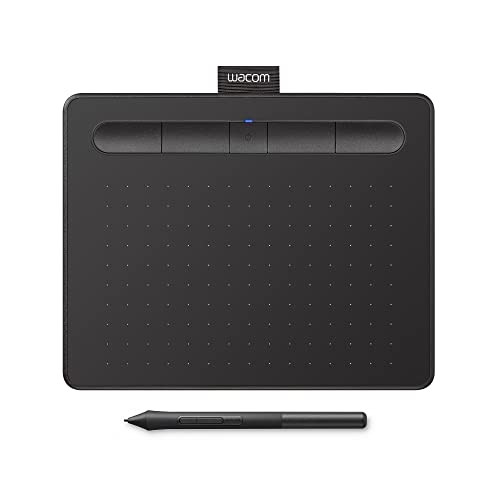
Wacom Intuos Small Bluetooth
At $79.95 it undercuts the pistachio model while keeping the same 15‑hour battery life, offering a slightly cheaper Wacom option.
Also considered
Score Analysis
Key score advantages vs. runner-up (Wacom Intuos Small)
Price Range
GAOMON WH851 8x5-inch
$52.99
Wacom Intuos Small Bluetooth Pistachio
$90.59
Wacom Intuos Small Bluetooth
$79.95

Wacom Intuos Medium Bluetooth
$129.95

Xencelabs Pen Tablet Bundle
$329.99
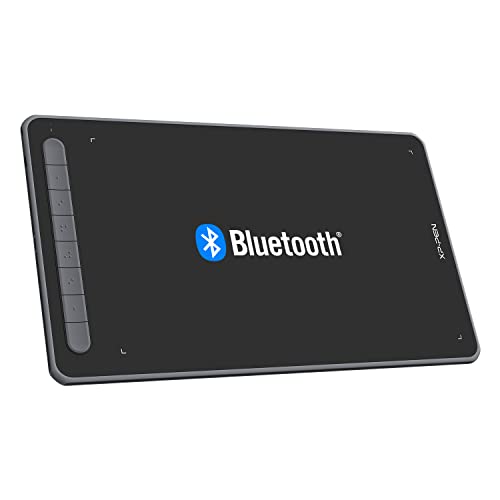
XP-Pen Deco LW
$79.99

XP-Pen Deco MW
$59.99

Wacom Intuos Pro Medium Bluetooth
$329.95

Huion Note X10
$95.99
Spec Comparison
TL;DR: The GAOMON WH851 offers 16,384 pressure levels, 18‑hour Bluetooth battery life and eight express keys at a budget‑friendly $52.99, making it a solid entry‑level tablet.
The standout spec is the pen’s 16,384 pressure‑sensitivity levels combined with ±60° tilt support, giving you fine‑grained control that rivals higher‑priced models. Its battery‑free AP519 stylus also features a sub‑0.3 mm accuracy and a 10 mm sensing height, so strokes feel natural on the matte surface.
Compared with the other eight tablets, the WH851’s eight express keys match the XP‑Pen Deco MW and exceed the four keys on the Wacom Intuos Small Bluetooth. Its 18‑hour wireless battery life outlasts the XP‑Pen Deco MW’s 10‑hour runtime and is a bit longer than the Wacom Intuos Small Bluetooth’s 15‑hour claim. At roughly 0.88 lb, it’s lighter than the XP‑Pen Deco LW (over 1.7 lb) but a shade heavier than the Wacom Intuos Small Bluetooth (about 0.55 lb).
Users repeatedly praise the tablet’s 18‑hour battery life and the paper‑like feel of the stylus, noting that the bundled glove and 20 replacement nibs add real value. Professional reviewers highlight the textured matte surface and the mechanical dial’s three programmable functions as useful for shortcut workflows. However, several owners mention the 8 × 5 in active area feels cramped on larger monitors, and the lack of touch or multi‑touch input limits certain creative gestures.
Pros
Cons
Best for: Budget-conscious buyers seeking a reliable entry-level option
Avoid if: You have limited desk space or need portability
“I actually don’t have any negative things to say about this tablet.”
“the budget tablet that actually delivers”
TL;DR: The Wacom Intuos Small Bluetooth Pistachio offers a 4,096‑level pressure‑sensitive, battery‑free pen, 15 hours of wireless use and solid software support for $90.59, making it a reliable starter tablet for creators on a budget.
What really stands out is the pen’s 4,096 pressure‑sensitivity levels combined with ±0.01 in (0.25 mm) accuracy, letting you control line weight with fine detail. The tablet runs on a built‑in lithium‑ion battery that lasts up to 15 hours and recharges in about 3.5 hours, so you'll sketch for a full workday without plugging in.
Compared with the other eight tablets in this roundup, the Intuos Small is notably lightweight at 0.55 lb, lighter than the Huion Note X10 (≈0.95 lb) and far lighter than the XP‑Pen Deco LW (≈1.76 lb). Its battery life sits between the Huion’s 18 hours and the XP‑Pen Deco LW’s 10 hours, offering a middle ground. The Bluetooth 4.2 connection is older than the 5.0 modules found in several competitors, and some users note it as a minor limitation.
Reviewers consistently praise the natural feel of the EMR‑based, battery‑free pen and the ease of pairing via Bluetooth. The free software bundle—including Clip Studio Paint Pro and Corel Painter Essentials—gets many beginners up and running quickly. Common complaints focus on the small 7.0 × 4.4 in active drawing area, which can feel cramped for detailed work, and the outdated Micro‑USB charging port that lacks the convenience of USB‑C.
From a technical standpoint, the tablet’s dimensions are 10.4 × 7.8 × 0.4 in with a sleek 8.8 mm thickness, making it easy to slip into a backpack. Four customizable ExpressKeys and two pen buttons give quick access to shortcuts, while the 0.55 lb weight keeps the device portable without sacrificing stability.
Pros
Cons
Best for: Beginners, teachers, students and remote creators who want a well‑reviewed, portable tablet with solid pressure sensitivity.
Avoid if: You need tilt support, a larger active area, multi‑touch gestures, or a modern USB‑C connection.
“even 6-year-olds can use it easily”
“the comfort and precision of the pen”
TL;DR: The Wacom Intuos Small Bluetooth offers a 6.0 × 3.7‑inch active area, 15‑hour battery life and a battery‑free pen at a budget‑friendly $79.95, making it a solid starter tablet for portable creativity.
The tablet’s most distinctive spec is its compact active drawing surface of 6.0 inches wide by 3.7 inches high, paired with 4096 pressure‑sensitivity levels and a pen accuracy of ±0.01 inches. Its built‑in lithium‑ion battery delivers up to 15 hours of wireless use, and the whole unit weighs just 0.55125 pounds, so you’ll slip it into a backpack without feeling the load.
Compared with the other eight tablets in this roundup, the Intuos Small is lighter than the XP‑Pen Deco LW (1.76 pounds) and matches the weight of the Wacom Intuos Small Bluetooth Pistachio (0.55 pounds). The active area measures smaller than the Deco LW’s 6 × 10‑inch canvas and also smaller than the medium‑sized Wacom Intuos Medium Bluetooth, but it still offers a usable space for beginners. It provides four ExpressKeys, fewer than the eight found on the Deco LW and GAOMON WH851, and its Bluetooth 4.2 connection trails the 5.0 versions on the Deco LW, Huion Note X10 and the Intuos Medium.
Reviewers highlight the tablet’s portability and the battery‑free EMR pen, which feels like drawing on paper and never needs charging. On the downside, several users note the outdated micro‑USB charging port and the absence of tilt recognition, which limits expressive control for more advanced work. The small active area feels cramped when tackling detailed illustrations.
Pros
Cons
Best for: Beginner digital artists, students and Chromebook users who need a reliable, portable tablet without breaking the bank.
Avoid if: You require a larger drawing surface, tilt support, or the latest USB‑C connectivity.
“even 6-year-olds can use it easily”
“the comfort and precision of the pen”
TL;DR: The Wacom Intuos Medium Bluetooth offers a 215.90 mm × 134.62 mm active area, 4096‑level pressure sensitivity and up to 15 hours of wireless use for $109.95, making it a solid mid‑range choice for hobbyists and students.
This tablet’s most distinctive spec is its active drawing area of 215.90 mm by 134.62 mm, paired with a battery‑free Wacom Pen 4K that delivers 4096 pressure levels and ±0.25 mm pen accuracy. The built‑in lithium‑ion battery provides up to 15 hours of Bluetooth operation, and a full charge takes approximately 3.5 hours. Weighing just 0.90625 pounds (411 g), it feels light enough to move around a small studio or classroom.
Compared with the other eight entries, the Intuos Medium is slightly lighter than the Huion Note X10 (0.9546 pounds) but noticeably heavier than the Wacom Intuos Small Bluetooth models (around 0.55 pounds). Its 15‑hour battery life sits between the Huion’s 18 hours and the XP‑Pen Deco LW’s 10 hours, giving you more freedom than the latter without the longer charge time of the former. The tablet supplies four ExpressKeys, fewer than the eight found on the XP‑Pen Deco LW and GAOMON WH851, yet matches the four offered on the Wacom Intuos Small Bluetooth. In terms of connectivity, it relies on a micro‑USB port while many competitors have moved to USB‑C or newer Bluetooth versions.
Users consistently praise the natural feel of the battery‑free pen and the convenience of wireless drawing, especially when paired with the included Clip Studio Paint Pro and other software trials. Professional reviewers highlight the plug‑and‑play setup and the helpful ExpressKeys for speeding up workflow. The most common criticisms focus on the older micro‑USB connector, the lack of tilt support, and the relatively small active area, which can feel restrictive for detailed illustration work. Some owners also mention nib wear after extended use.
Technical details round out the package: the tablet reports 133 points per second, offers a resolution of 2540 lpi, and includes two programmable side buttons on the pen. The dimensions are 264.16 mm × 198.12 mm × 10.16 mm, and Wacom backs the unit with a one‑year warranty.
Pros
Cons
Best for: Buyers willing to invest in a proven, high-quality option
Avoid if: You need advanced features or professional‑grade performance
“even 6-year-olds can use it easily”
“the comfort and precision of the pen”
TL;DR: The Xencelabs Pen Tablet Bundle delivers a 16:9, 8,192‑level pressure surface, battery‑free dual pens and 16‑hour wireless life, but its premium price and lack of a built‑in stand keep it in the professional tier.
What really sets this tablet apart is the 8,192‑level pressure sensitivity combined with a 3 g activation force and ±60° tilt support, all on a 262.4 × 147.4 mm active drawing area. The bundled Quick Keys remote adds an OLED display, four color‑customizable LEDs and eight shortcut buttons, while the tablet itself weighs 710.5 g and features a 6.5° sloped palm rest.
Compared with the other eight entries, the Xencelabs active area matches the 264 mm × 147 mm surface of the Wacom Intuos Pro Medium, and it’s noticeably larger than the 215.90 mm × 134.62 mm area of the Wacom Intuos Medium. Its 16‑hour wireless battery life tops the 15‑hour figures that Wacom lists for both the Intuos Medium and the Intuos Small Bluetooth, and it also outlasts the 10‑hour wireless time of the XP‑Pen Deco LW, though Huion Note X10 claims 18 hours. At 710.5 g, the tablet is heavier than the 411 g Wacom Intuos Pro Medium and the 0.55 lb Wacom Intuos Small Bluetooth, reflecting its premium build with metal backplate and non‑slip silicone pads.
Users consistently praise the tablet’s accuracy and the premium feel of its surface, noting that the battery‑free pens eliminate charging interruptions. Professionals highlight the flexibility of up to five configuration sets (44 shortcuts per app) and the illuminated corner LEDs for quick mode changes. However, newcomers find the OLED Quick Keys remote a bit overwhelming, and the absence of an integrated stand or a replaceable surface texture limits portrait‑mode work and long‑term texture tweaks.
Pros
Cons
Best for: Those prioritizing quality and willing to pay for premium performance
Avoid if: You're shopping on a tight budget — it's priced at $329.99
“The most accurate pen tablet I’ve used”
“Texture of the surface is perfect — smooth with just enough friction”
TL;DR: The XP‑Pen Deco LW offers a 10 × 6 in active area, 8192‑level pressure, 60° tilt and 10‑hour Bluetooth‑free drawing, making it a solid mid‑range wireless tablet for students and freelancers.
The Deco LW’s standout spec is its generous 10 in × 6 in active drawing area paired with 8192 pressure levels and a 60° tilt range, all using a battery‑free X3 Elite stylus that weighs just 11.5 g and activates with 3 g of force. Its Bluetooth 5.0 connection lets you work up to 10 hours continuously, while eight customizable express keys keep shortcuts at your fingertips. The tablet’s surface feels matte and paper‑like, and the 0.35 in thickness keeps it slim.
Compared with the other eight tablets, the Deco LW provides a larger canvas than the Wacom Intuos Small Bluetooth (which offers a 6 in × 3.7 in area). Its 10‑hour wireless runtime matches the XP‑Pen Deco MW but falls short of the 18‑hour battery life reported for the Huion Note X10 and the GAOMON WH851. At 1.763698096 lb, it's heavier than the Intuos Small’s 0.55125 lb but only a bit heavier than the GAOMON WH851’s 0.87523518014 lb. The eight express keys outnumber the four found on the Intuos Small, and the Bluetooth 5.0 standard is newer than the Intuos Small’s Bluetooth 4.2.
Reviewers consistently praise the tablet’s paper‑like matte texture and the freedom of wireless use. Professional outlets note that its build quality and Bluetooth performance feel “almost as good as a Wacom Intuos.” However, users on macOS report that pressure sensitivity disappears in Adobe Illustrator and that the driver must be launched manually, which can be frustrating. Android users have mentioned occasional screen‑mapping hiccups, and some find the stylus a bit light for their taste.
Technical details round out the package: a resolution of 5080 LPI and a 200 RPS report rate deliver smooth cursor movement, while the 1000 mAh battery (3.7 V) powers the tablet. The stylus features a 0.6 mm tip‑retraction distance, two side buttons, and ten replacement nibs. Four rubber feet keep the tablet stable on a desk.
Pros
Cons
Best for: Most users seeking a balanced, mainstream option
Avoid if: You want the best value‑per‑dollar in its price range
“Feels like drawing on paper”
“Perfect for beginners and pros”
TL;DR: The XP‑Pen Deco MW offers an 8 × 5‑inch active area, Bluetooth 5.0, and a battery‑free stylus with 8192 pressure levels for $59.99, making it a solid entry‑level tablet for portable creators.
The Deco MW’s standout spec is its X3 Elite stylus, which delivers 8192 pressure levels and a feather‑light 3 g activation force, while the tablet itself stays thin at 8.8 mm and houses an 8‑key shortcut cluster, six of which have tactile bumps for quick access.
Compared with peers, the Deco MW is thicker than the GAOMON WH851’s 7.5 mm profile but matches the Wacom Intuos Small Bluetooth’s roughly 8.9 mm thickness. It also provides the same eight express keys as the GAOMON model, whereas the Wacom Intuos Small offers only four. Battery capacity sits at 1000 mAh with up to 10 hours of wireless use, matching the XP‑Pen Deco LW and falling short of the GAOMON’s 1,300 mAh and 18‑hour claim.
User feedback praises the pen’s ultra‑low activation force and the tablet’s seamless Bluetooth latency, while noting the absence of a rear eraser on the stylus and occasional driver freezes on macOS. Reviewers also point out the limited iOS support—only ibis Paint X works—so iPad users may need a different solution.
Technical details round out the picture: the tablet draws on a 203.2 mm × 127 mm (8 × 5 in) active area, runs on a 3.7 V battery, and supports 60° of tilt with a resolution of 5080 LPI. The pen retracts by 0.6 mm, and the package includes a USB‑A dongle, USB‑C cable, and ten replacement nibs, ensuring you'll start right out of the box.
Pros
Cons
Best for: Entry-level buyers or those on a tight budget
Avoid if: You'll need professional‑grade features such as a larger active area, full iOS support, or a built‑in eraser on the pen
“Feels like drawing on paper”
“Perfect for beginners and pros”
TL;DR: The Wacom Intuos Pro Medium Bluetooth delivers a 8192‑level pressure pen, 10 ExpressKeys, two dials, and a ultra‑thin 4 mm magnesium body for $379.95, but its premium price may deter budget‑focused creators.
The tablet’s standout spec is its 8192 pressure‑sensitivity levels paired with ±60° tilt support and a crisp 5080 LPI resolution, giving strokes a natural, paper‑like feel. Its active drawing area measures 264 mm × 147 mm (10.4 in × 5.8 in) within a compact 291 mm × 206 mm footprint, and the whole unit weighs just 0.90609989682 pounds (411 g). At its thinnest point the panel is only 4 mm thick, thanks to a magnesium‑alloy chassis that feels solid yet lightweight.
Compared with the other eight tablets in this roundup, the Intuos Pro Medium is pricier than the Xencelabs Pen Tablet Bundle (listed at $329.99) and the Wacom Intuos Medium Bluetooth (listed at $109.95). It also offers more on‑board controls: 10 ExpressKeys versus the 4 that the standard Wacom Intuos Medium provides, and two mechanical dials while most peers list none or only a single dial (GAOMON WH851 includes one). While the Huion Note X10 and XP‑Pen Deco models provide comparable Bluetooth versions, they lack the Pro Pen 3’s 8192‑level pressure and the dual‑dial workflow boost.
Reviewers repeatedly highlight the tablet’s ergonomic layout and the Pro Pen 3’s “lag‑free” tracking, noting reduced hand fatigue during long sessions. Professional reviewers praise the mechanical dials as a genuine productivity boost for video editing and 3D sculpting. Users also commend the reliable Bluetooth 5.0+ connection that lets you toggle between two paired devices. On the downside, the $379.95 price tag is a clear jump from entry‑level options, and newcomers may find the ExpressKey and dial customization a bit steep to master. As an off‑screen device, it also lacks an integrated display, which some beginners expect.
Additional technical context includes a USB‑C port that handles both data and power, a USB‑A to USB‑C adapter, and a switch that lets you move between USB and up to two Bluetooth‑paired computers. The tablet ships with a nib‑removal tool and a pen stand stocked with five standard, three felt, and two rubber nibs, ensuring you can fine‑tune the tip for different media.
Pros
Cons
Best for: Those prioritizing quality and willing to pay for premium performance
Avoid if: You're shopping on a tight budget — it's priced at $379.95
“even 6-year-olds can use it easily”
“the comfort and precision of the pen”
TL;DR: The Huion Note X10 is a hybrid smart notebook and graphics tablet with 8192‑level pressure, 18‑hour Bluetooth battery life, and 50 replaceable A5 pages, but its thin pen can feel tiring.
The standout feature of the Huion Note X10 is its 2‑in‑1 design: you write on real A5 paper while the built‑in sensors capture every stroke digitally. It stores up to 50 pages offline, offers 8192 pressure‑sensitivity levels, 5080 LPI pen resolution, and ±60° tilt support, all powered by a 1300 mAh battery that delivers 18 hours of active Bluetooth use and recharges in ≤4 hours via USB‑C.
Compared with the other eight tablets in this roundup, the Note X10 is heavier than the Wacom Intuos Small Bluetooth (0.95 lb vs 0.55 lb) but lighter than the XP‑Pen Deco MW (1.76 lb). Its 18‑hour battery life exceeds the 15‑hour runtime of the Wacom Intuos Small and matches the 18‑hour claim of the GAOMON WH851, while its 8192‑level pressure matches the high‑end Wacom Intuos Pro Medium and Xencelabs bundle.
Everyday users praise the authentic paper feel and the stable Bluetooth link that lets notes sync without a computer. Professional reviewers highlight the hybrid design and vector‑based editing as strong points, yet they note the mandatory account creation and lack of handwriting‑to‑text conversion as privacy and productivity drawbacks. The included pen’s thin barrel and top‑heavy balance frequently appear in user complaints, along with blotchy ink from the default ballpoint refill.
The tablet measures 241 mm × 178 mm × 13 mm and provides a working area of 186.9 mm × 140.9 mm, roughly the size of an A5 sheet. The specs list pen accuracy at ±0.3 mm, and the Bluetooth range reaches 5‑10 m, ensuring reliable connectivity across a typical desk or couch setup.
Pros
Cons
Best for: Digital artists, illustrators, and designers who want the tactile feel of paper combined with tablet functionality.
Avoid if: You need reliable handwriting‑to‑text conversion, prioritize pen comfort, or are sensitive to privacy/account requirements.
“Users appreciate the real paper feel and portability”
Breakdown
GAOMON WH851 8x5-inch
Pros
Wacom Intuos Small Bluetooth Pistachio
Pros
Wacom Intuos Small Bluetooth
Pros
Wacom Intuos Medium Bluetooth
Pros
Based on scoring data and product specs
Personalized picks
Best Overall Pick
GAOMON WH851 8x5-inch
Best OverallBest for: Budget-conscious buyers seeking a reliable entry-level option
Wacom Intuos Small Bluetooth Pistachio
Best for: Most users looking for a well-reviewed, reliable mainstream option
$90.59+$37.60 vs winner
Skip Huion Note X10 if…
Reliability and user satisfaction are your top concerns
The GAOMON WH851 8×5‑inch takes the top spot thanks to its generous 8 × 5 in active area, 16,384 pressure levels and Bluetooth 5.0 connectivity—all for $52.99. Its 18‑hour battery life and eight customizable express keys make it a versatile, low‑price workhorse, and the 4.4‑star rating from 786 reviewers supports the specs.
The runner‑up is the Wacom Intuos Small Bluetooth Pistachio, a solid choice if you prefer the Wacom ecosystem and a splash of color. It offers a 7 × 4.4 in active area, 4,096 pressure levels and 15‑hour battery life for $90.59, plus four express keys and a 4.5‑star rating from over 35,000 users.
A mid‑range pick, the Wacom Intuos Small Bluetooth Pistachio at $90.59 provides a familiar Wacom feel with reliable performance.
If you need a premium solution, the Wacom Intuos Pro Medium Bluetooth at $379.95 delivers a larger drawing surface and professional‑grade features.
Pick the GAOMON WH851 now and enjoy a full‑featured tablet without breaking the bank.
The GAOMON WH851 shines for on‑the‑go work with up to 18 hours of battery life, a lightweight 397 g body, and Bluetooth 5.0 for a stable wireless link. Its 8 × 5 in active area and 16,384 pressure levels also give plenty of creative freedom without needing a charger for days.
Please sign in to leave a review
No reviews yet. Be the first to review!
