
If you need a screen that feels like paper while you draw, annotate, or teach, interactive pen displays have become a mainstream tool. This roundup lines up 10 options, from entry‑level tablets you can fit on a dorm desk to studio‑grade panels that fill an entire wall. Each model ships with a battery‑free stylus and a touch‑enabled screen, so you can go straight from sketch to screen without a separate graphics card.
At the low end, the Wacom One HD costs $298.82 and carries a 4.5/5 rating from 3,181 reviews, offering a 13.3‑inch Full HD panel and a lightweight 4.5‑pound chassis. Mid‑range contenders like the Cintiq 24 sit at $1,299.95 with a 4.4/5 score and a 23.8‑inch 2.5K display. Premium picks include the Cintiq Pro 27 at $3,499.95 (4.5/5 from 642 reviews) and the ActivPanel V10, which trades a $2,219 price tag for 1034 cd/m² brightness and an 8‑mic array.
Students, freelance illustrators and classroom tech leads will find the sections ahead break down each model’s strengths, letting you match the right screen to your workflow.

Wacom Cintiq Pro 27
Offers versatile mounting with four ¼‑inch standard mount options, giving you flexible setup choices.

Wacom One HD
Ideal for students or hobbyists, this entry‑level model costs about $3,200 less than the Wacom Cintiq Pro 27.
Promethean ActivPanel V10
Stands out with an 8‑mic array and 1034 cd/m² brightness, delivering studio‑grade audio and vivid visuals that the other picks don’t provide.
Also considered
Score Analysis
Key score advantages vs. runner-up (Wacom One HD)
Price Range
Wacom Cintiq Pro 27
$3,499.95
Wacom One HD
$389.95
Promethean ActivPanel V10
$2,219.00

Wacom Cintiq 24
$1,299.95
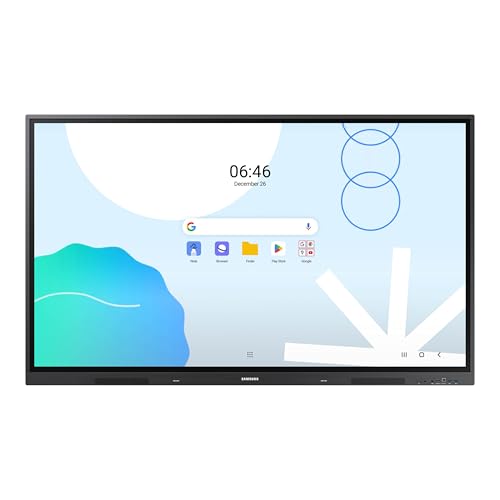
Samsung LH65WADWLGCXZA
$1,598.94

Wacom Cintiq 16
$649.95

Samsung LH86WADWLGCXZA
$1,784.55
Samsung LH75WAD
$1,679.00
Wacom Cintiq DTK2200
$1,699.95

Wacom DTU-1141B
$840.00
Spec Comparison
TL;DR: The Wacom Cintiq Pro 27 delivers a 26.9‑inch 4K pen display with 99% Adobe RGB, 120 Hz refresh and 8,192 pressure levels, but its premium price and 15.9 lb weight demand a spacious, professional workspace.
The standout spec is the 26.9‑inch IPS‑type LCD that packs a 3840 × 2160 resolution, 99% Adobe RGB and 98% DCI‑P3 coverage, plus a 10‑bit (1.07 billion colors) depth and 30‑bit color processing. A 120 Hz refresh rate and 10 ms response time give a fluid drawing experience, while the 1000:1 contrast ratio and 0.15525 mm pixel pitch keep details crisp. The included Pro Pen 3 offers 8,192 pressure levels, ±60° tilt, 5080 lpi resolution and a 240 pps report rate.
Compared with the other nine displays, the Cintiq Pro 27 is heavier than the compact Wacom Cintiq 16 (4.18878 Pounds) and the mid‑size Wacom Cintiq 24 (12.566 Pounds), yet considerably lighter than the Promethean ActivPanel V10’s 55‑inch model at 64.37 lb. It provides eight ExpressKeys, fewer than the Wacom Cintiq DTK2200’s 16 programmable keys, but still more than the Cintiq 16’s limited controls. Connectivity is richer than many peers, offering two USB‑C ports alongside HDMI, Mini DisplayPort and a USB‑A port.
Reviewers praise the screen’s studio‑grade color accuracy and the near‑zero latency that makes the pen feel like a natural brush. Everyday users echo the smooth 120 Hz performance but note the anti‑glare coating can make the display appear dimmer than glossy alternatives. Several owners report accidental activation of the rear‑mounted ExpressKeys, and the lack of an integrated kickstand means you’ll need a separate stand or arm.
Pros
Cons
Best for: Buyers willing to invest in a proven, high‑quality option
Avoid if: You're on a tight budget or only need basic functionality
“is like working on paper”
“colors are “print accurate like I’ve never seen.””
TL;DR: The Wacom One HD delivers a 13.3‑inch Full HD matte screen, battery‑free pen with 4,092 pressure levels, and a simple single‑cable setup for under $300, making it a solid entry‑level draw‑display.
The standout spec is its 13.3‑inch Full HD (1920 × 1080) AHVA IPS panel, which provides 200 cd/m² brightness and a 1000:1 contrast ratio. The EMR pen offers 4,092 pressure levels and tilt support, while the device weighs 4.5 pounds and measures 15.7 in × 10.2 in × 3.1 in. A 10 W power adapter and a 4‑way USB‑C/HDMI/USB‑A cable keep the setup tidy.
Compared with peers, the One HD is heavier than the Wacom DTU‑1141B (2.9 lb) but lighter than the large‑format Wacom Cintiq 24, which tips the scales at over 12 lb. Its 200 cd/m² brightness sits below the 400‑nit rating listed for the Samsung LH75WAD, and its 1000:1 contrast ratio is modest next to that model’s typical 1200:1. Unlike the Samsung LH65WAD and LH86WAD, the One HD doesn't include built‑in speakers, and it lacks the multi‑touch capability found on some larger interactive panels.
Professional reviewers praise the low latency and natural feel of the pen, noting the “accurate pen response” and “strong fundamentals” for beginners. Users echo this sentiment, rating the device 4.5 stars out of 5 across 3,181 reviews, and frequently mention the convenience of the battery‑free stylus and the bundled software trials. Common complaints focus on the fixed 19° tilt angle, the absence of an eraser button, and occasional driver hiccups that require reinstallations.
Pros
Cons
Best for: Budget‑conscious beginners, students, and casual artists who want a reliable entry‑level pen display.
Avoid if: You need professional‑grade color accuracy, multi‑touch gestures, extensive shortcut keys, or a longer warranty period.
“great, no-frills drawing tablet for budding artists”
“great starter tablet for digital art”
TL;DR: The Promethean ActivPanel V10 delivers 4K QLED visuals at 1034 cd/m² brightness, 50‑point infrared touch, and strong 2.1‑channel audio, but its heavyweight design and external PC requirement suit larger, tech‑savvy spaces.
The panel’s standout spec features 1034 cd/m² brightness combined with a dynamic contrast ratio that can reach up to 950,000:1, making images pop even in well‑lit classrooms. Its 3840 × 2160 4K resolution and 10‑bit color depth (1.07 billion colors) ensure crisp, vivid detail, while the 8 ms response time keeps motion smooth. With 50 simultaneous infrared Vellum touch points, multiple users can interact at once without lag.
When you line it up against the other nine contenders, the ActivPanel is considerably brighter than the 230 cd/m² of the Wacom Cintiq DTK2200 and the 350 cd/m² of the Wacom Cintiq 24. It also outshines the Samsung LH65WADWLGCXZA’s modest dual‑15 W speakers, offering a 2 × 25 W + 20 W subwoofer configuration. However, at 64.37 lb for the 55‑inch model (and up to 149.7 lb for the 86‑inch), it's much heavier than the Wacom devices, which all weigh under 20 lb, and bulkier than the compact Samsung panels.
Users consistently praise the panel’s plug‑and‑play feel and the built‑in audio that supports hybrid teaching, noting that the ActivPen 2 and remote make lesson delivery intuitive. Professional reviewers highlight its award‑winning design and smooth integration with Promethean ActivSuite. The most common complaint cites the need for an external PC or OPS module, which adds cost and complexity, and the substantial weight often forces professional installation.
The connectivity suite offers extensive options: two HDMI 2.1 ports, a DisplayPort 1.4, multiple USB‑C PD ports (100 W and 65 W), four USB‑A 3.2 Gen 1 ports, and dual Gigabit Ethernet. An ambient light sensor automatically adjusts brightness, and the built‑in 8‑mic array captures clear audio for remote participants. ENERGY STAR certification keeps power draw modest at a max of 117 W, with standby under 0.5 W.
Pros
Cons
Best for: Large classrooms, university lecture halls, corporate meeting rooms and collaborative workspaces that need a premium interactive display.
Avoid if: You have limited mounting space, a tight budget, or need an all‑in‑one solution without external compute.
TL;DR: The Wacom Cintiq 24 offers a 23.8‑inch 2.5K IPS display with 350 cd/m² brightness, 100% sRGB, 99% DCI‑P3 coverage and a battery‑free Pro Pen 3, delivering pro‑level color fidelity in a fanless, VESA‑mountable tablet.
The standout spec is the 23.8‑inch IPS panel that delivers 2560 × 1440 resolution, 350 cd/m² brightness, 8‑bit color depth and a contrast ratio of 1000:1. Its anti‑glare etched glass provides near‑zero parallax, giving a paper‑like drawing surface. The display covers 100% of the sRGB gamut and 99% of DCI‑P3, which professional reviewers praise its excellent color accuracy.
Compared with the other nine entries, the Cintiq 24 is lighter than the DTK2200’s 18.7 Pounds but heavier than the Cintiq 16’s 4.18878 Pounds and the Wacom One HD’s 4.5pounds. Its 350 cd/m² brightness outshines the DTK2200’s 230 cd/m² and the One HD’s 200 cd/m², while matching the DTK2200’s 1000:1 contrast ratio. The 12 ms response time is faster than the DTU-1141B’s 25 ms but slower than the ActivPanel V10’s 8 ms. Pressure sensitivity of 8192 levels and tilt up to 60° match the Cintiq 16, giving it comparable pen performance in a larger workspace.
User sentiment repeatedly highlights the natural feel of the Pro Pen 3 and the vivid, consistent colors across the screen. Common complaints focus on the tablet’s 12.566348934 pounds weight, which can make repositioning a chore, and the thin bezel that sometimes catches the pen tip. Reviewers also note the absence of built‑in ExpressKeys, meaning you’ll need an external remote for shortcuts. The fanless design keeps the unit silent, a plus for voice‑over work, and the USB‑C port with DisplayPort Alt Mode/Thunderbolt 3/4 ensures modern connectivity.
Pros
Cons
Best for: Professional digital illustrators, animators, concept artists and anyone needing accurate color on a large pen display.
Avoid if: You have limited desk space, rely on older computers without DisplayPort Alt Mode/Thunderbolt, or need built‑in shortcut keys.
“is like working on paper”
“colors are “print accurate like I’ve never seen.””
TL;DR: The Samsung 65‑inch LH65WADWLGCXZA packs a 4K Direct LED screen, dual‑sided passive pen, 40‑point multi‑touch and extensive connectivity, but its weight and lack of built‑in Windows limit some installations.
The standout feature is the dual‑sided passive pen that lets you switch colors instantly, paired with 40 simultaneous touch points and a drawing latency of ≤45 ms, making collaborative sketching feel natural.
Compared with the Samsung LH86WADWLGCXZA, which lists only a single HDMI output, the LH65WADWLGCXZA offers three HDMI inputs (two native HDMI plus a VGA‑to‑HDMI converter), giving you far more source flexibility. Unlike the Samsung LH75WAD, which provides a single Gigabit Ethernet port, this model includes two RJ45 ports, allowing dual wired connections. At 42800 g, the display is considerably heavier than the Wacom One HD, which weighs 4.5 pounds, so mounting requires a sturdy support.
Educators appreciate the EDLA‑certified Android 13 platform for seamless Google Classroom integration, and reviewers from BH Photo Video praise the 3‑in‑1 USB‑C that handles screen mirroring, touch control, and up to 65 W charging. However, users note the lack of a built‑in Windows OS and the absence of NFC, meaning you’ll need an extra OPS module for Windows apps and pairing devices takes longer.
The 65‑inch panel delivers 3840 × 2160 resolution, 400 cd/m² brightness and a 1200:1 contrast ratio, while a 0.372 mm pixel pitch and 178° viewing angles keep images sharp from any seat. An 8 ms response time and 60 Hz refresh rate round out the visual performance.
Pros
Cons
Best for: Large classrooms or conference rooms that rely heavily on Google services and need extensive multi‑user interaction on a big 65‑inch 4K touchscreen.
“The Google Classroom integration is flawless—students join instantly.”
“Love the dual pens—no more stopping to change colors during lessons.”
TL;DR: The Wacom Cintiq 16 delivers a 15.6‑inch Full HD IPS display with 8192‑level pressure sensitivity and tilt support, packaged with a Pro Pen 2 for $645, earning 4.6‑star ratings from over 3,000 users.
The standout spec is the 8192 pressure‑sensitive levels combined with ±60° tilt recognition, letting you vary line weight just like on paper. The 396 mm (15.6‑inch) IPS screen offers a 1000:1 contrast ratio and 16.7 million‑color depth, while the active drawing area measures 345 mm × 193 mm.
Compared with the other nine entries, the Cintiq 16 is heavier than the Wacom DTU‑1141B’s 2.9 lb frame but lighter than the professional‑grade Cintiq 24, which tops out at over 12 lb. Its 15.6‑inch panel out‑sizes the Wacom One HD’s 13.3‑inch display, though the One HD is rated at 200 cd/m² brightness, a figure the Cintiq 16 does not list. The built‑in stand fixes the tablet at a 19° tilt, whereas the larger Cintiq models offer adjustable ergonomics.
Reviewers consistently praise the natural feel of the Pro Pen 2, noting the “virtually lag‑free” tracking and reliable pressure curve. The lack of touch input and the fixed stand angle are frequent complaints, as are the missing on‑board express keys that some users expect on higher‑end tablets. Professional reviewers highlight the solid construction and plug‑and‑play setup via the included 3‑in‑1 cable.
Technical details round out the package: connectivity wires through HDMI and USB‑A, the tablet runs on macOS 10.12+ or Windows 7+, and the warranty covers one year. The device ships with a Pro Pen 2, three replacement nibs, a detachable holder, and a silicone grip, ensuring you’re ready to draw straight out of the box.
Pros
Cons
Best for: Budget-conscious buyers seeking a reliable entry-level option
Avoid if: You have limited desk space or need portability
“is like working on paper”
“colors are “print accurate like I’ve never seen.””
TL;DR: The 86‑inch Samsung WAD Interactive Display delivers 4K IPS visuals, 40‑point infrared touch and dual passive pens, but its massive size, weight and lack of built‑in camera make it a specialist‑room solution.
At 86 inches diagonal, the display offers a 3840 × 2160 (4K UHD) IPS panel with 400 nits brightness, a typical contrast ratio of 1200:1 and an 8 ms response time. Its infrared touch layer registers up to 40 simultaneous points with a drawing latency of ≤45 ms, while the included dual passive pens switch instantly without re‑calibration.
Compared with the other nine contenders, this screen dwarfs the Wacom Cintiq 24’s 23.8‑inch panel and even the larger Promethean ActivPanel V10, which tops out at 86 inches but weighs considerably less. It also out‑lights the Wacom One HD’s 151.9 nits, matching the Samsung LH75WAD’s 400 nits brightness while offering more HDMI inputs (3 versus the single HDMI listed for most Wacom models). However, at a set weight of 124.3 lb it's far heavier than the 4.5‑lb Wacom One HD and the 12.6‑lb Promethean V10, making relocation a serious consideration.
Users consistently praise the ultra‑responsive multi‑touch surface and the ability to mirror up to nine devices simultaneously, calling the experience “fluid” for collaborative lessons. Professional reviewers note the EDLA certification that guarantees smooth access to Google Workspace, and the optional OPS slot can turn the display into a Windows‑based workstation. The downsides that surface in feedback are the absence of an integrated camera or microphone—so external gear is needed for video calls—and a power draw of 486 W when active, which is higher than many classroom displays.
Under the hood, the unit runs Android 13 on a quad‑core ARM Cortex‑A55 processor with 8 GB RAM and 64 GB storage, and its front USB‑C port supplies up to 65 W Power Delivery for charging laptops while mirroring. Built‑in surge, humidity and voltage‑spike protection let it run 12 hours a day in demanding environments, and remote device management tools simplify large‑scale deployments.
Pros
Cons
Best for: Large classrooms, lecture halls or corporate meeting rooms that need a high‑resolution Android interactive display with extensive multi‑touch and screen‑sharing capabilities.
Avoid if: You need an all‑in‑one video‑conferencing solution or a portable display that can be moved frequently.
TL;DR: The Samsung LH75WAD is a 75‑inch 4K Android 13 interactive display with 40‑point touch, dual‑pen support, 30 W speakers and a bright 400 cd/m² panel, built for collaborative spaces.
At 75 inches diagonal, the LH75WAD delivers a 3840 × 2160 ADS panel with a typical brightness of 400 cd/m² and a contrast ratio of 1200:1. The screen refreshes at 60 Hz, responds in 8 ms, and offers a wide 178° viewing angle both horizontally and vertically. Touch performance is fast, with a response time of ≤10 ms and drawing latency of ≤45 ms, while the infrared system supports up to 40 simultaneous touch points and a passive dual‑pen.
Compared with its Samsung siblings, the LH75WAD provides a full suite of USB connectivity – five ports total, including a 65 W USB‑C for charging – whereas the LH65WAD only lists a single USB 2.0 port. Its USB layout mirrors the LH86WAD, which also features four USB 3.0 ports and a USB‑C. In the broader field, the display’s 400 cd/m² brightness outshines the Wacom One HD’s 151.9 nits, and its 1200:1 contrast ratio exceeds the Wacom One’s 868:1 measured contrast.
Users praise the EDLA certification that unlocks Google Play, YouTube and Classroom, making the Android 13 environment feel familiar in schools and meeting rooms. The built‑in 30 W (2 × 15 W) speakers and Wi‑Fi 6 connectivity keep collaborative sessions smooth. However, reviewers note the unit’s heft – 45 360 g without the stand – which can make wall‑mounting a challenge, and the lack of an included stand adds to installation effort. The 400 cd/m² panel, while bright for most classrooms, may struggle in very well‑lit auditoriums.
Pros
Cons
Best for: Large classrooms, universities, corporate meeting rooms, and collaborative spaces that need a 75‑inch Android interactive display with robust multi‑touch and pen capabilities.
Avoid if: You need advanced features or professional‑grade performance
TL;DR: The Wacom Cintiq DTK2200 offers a 21.5‑inch Full HD H‑IPS screen, 2048 pressure levels and a 180° adjustable stand for $1699.95, but its DVI‑only input and grainy anti‑glare surface may limit some users.
The standout spec features a 21.5‑inch diagonal display with a Full HD 1920 × 1080 resolution and 230 cd/m² brightness, delivering a 1000:1 contrast ratio on an H‑IPS panel. Its pen delivers 2048 pressure‑sensitivity levels and ±60° tilt, while the ergonomic stand rotates a full 180° for comfortable drawing angles.
Compared with the other nine entries, the DTK2200 is heavier than the Cintiq 16 (4.2 lb) and the Cintiq 24 (about 12.6 lb), and its brightness of 230 cd/m² falls below the Cintiq 24’s 350 cd/m² and far under the ActivPanel V10’s 1034 cd/m². Its pressure sensitivity of 2048 levels is also lower than the 8192 levels found in both the Cintiq 24 and Cintiq 16, placing it in a middle tier of responsiveness while still offering professional‑grade tilt support.
Professional reviewers praise the natural pen‑on‑screen feel and the “sweet spot” size that balances studio space with desk footprint. Everyday users love the 16 programmable ExpressKeys and two rear‑mounted touch strips for workflow shortcuts, yet many note the anti‑glare surface feels grainy and the DVI‑I connector requires adapters for modern HDMI or DisplayPort setups. The lack of multi‑touch means you’ll miss pinch‑zoom gestures common on newer touch‑enabled displays.
Pros
Cons
Best for: Professional digital artists, illustrators, graphic designers and animators who value a large, color‑accurate pen display and are willing to invest in premium performance.
Avoid if: You need a lightweight, portable solution, require multi‑touch gestures, or have limited desk space.
“is like working on paper”
“colors are “print accurate like I’ve never seen.””
TL;DR: The Wacom DTU‑1141B is a compact 10.1‑inch Full HD pen display with a battery‑free 1024‑level stylus, single‑cable USB‑2.0 setup, and built‑in security, priced around $641.74 for budget‑focused signature work.
At the heart of the DTU‑1141B is a 10.1‑inch Full HD (1920 × 1080) AHVA IPS panel that delivers crisp visuals and 170° viewing angles, while a 25 ms response time keeps the on‑screen cursor in sync with your strokes. The included EMR pen is cordless, battery‑free and offers 1024 pressure levels plus ±0.5 mm coordinate accuracy, giving a paper‑like feel for signing and annotating documents.
Compared with the Wacom Cintiq 16, the DTU‑1141B weighs considerably less at 2.9 lbs versus the Cintiq’s 4.18878 pounds, and it provides four programmable ExpressKeys instead of the Cintiq’s sixteen. Its screen is also smaller than the 13.3‑inch display that the Wacom One HD uses, which may matter if you need a larger drawing canvas.
Everyday users praise the natural writing experience and the convenience of a single USB‑2.0 cable that supplies power, video, and data. Professional reviewers note the responsive pen and the crisp Full HD display, but they also point out the lack of tilt sensitivity and a modest brightness that can feel dim in bright rooms. The device includes RSA/AES hardware encryption for secure e‑signature capture and comes with a fixed 15° inclination, and a 1‑year warranty backs it.
Pros
Cons
Best for: Entry-level buyers or those on a tight budget
Avoid if: You need advanced features or professional‑grade performance
Breakdown
Wacom One HD
Pros
Promethean ActivPanel V10
Pros
Wacom Cintiq 24
Cons
Based on scoring data and product specs
Personalized picks
Best Overall Pick
Wacom Cintiq Pro 27
Best ValueBest for: Buyers willing to invest in a proven, high-quality option
Wacom One HD
Best for: Budget-conscious buyers seeking a reliable entry-level option
$389.95-$3,110.00 vs winner
Skip Wacom DTU-1141B if…
You need advanced features or professional-grade performance
The Wacom Cintiq Pro 27 earns the win thanks to its professional‑grade specs: a 26.9‑inch 4K UHD panel (3840 × 2160) delivers crisp detail, the Pro Pen 3 offers 8,192 levels of pressure sensitivity, and eight customizable ExpressKeys let you shortcut tools without reaching for the keyboard.
The runner‑up, the Wacom One HD, shines when you need an affordable, portable sketching surface – its 13.3‑inch HD screen (1920 × 1080) and battery‑free EMR pen with 4,092 pressure levels make it a solid choice for students, hobbyists, or anyone setting up a small home studio on a budget.
Pick the Wacom Cintiq Pro 27 if you want the most capable interactive display for serious creation, and you’ll be ready to work with industry‑standard color and performance right out of the box.
The Cintiq Pro 27’s Pro Pen 3 offers 8192 levels of pressure sensitivity, while the One HD’s included pen provides 4092 levels. Both pens support tilt, but the Pro’s higher resolution and 10‑bit color depth give more nuanced control for professional illustration.
Please sign in to leave a review
No reviews yet. Be the first to review!
