It might surprise you that LG’s $99.99 24‑inch UltraGear, the 24G411A‑B, carries the same 4.5‑star rating as the $250.06 32‑inch curved 32GS60QC‑B, even though it’s the most budget‑friendly option in the lineup. Despite its modest 250 cd/m² brightness and 120 Hz native refresh (144 Hz over‑clocked), reviewers praise its IPS color accuracy and smooth motion.
Six LG gaming monitors are split into three price tiers. The budget tier includes the 24G411A‑B and the 27GS50F‑B, the latter priced at $166.99 and boasting a 4.6‑star rating. The mid‑range tier offers the 27G640A‑B with a 300 Hz refresh and the 32GS60QC‑B with a 180 Hz panel and 1000R curvature. Premium choices are the 27GP750‑B, a 27‑inch IPS model with 240 Hz and dual adaptive‑sync, and the 27GR95QE‑B, an OLED screen that pushes 240 Hz, 0.03 ms response, and 1000‑nit HDR for $549.99.
Each model’s strengths, ergonomics, and ideal gaming scenarios are outlined below to help you pick the right monitor for your setup.

LG 32GS60QC-B
A slim 226.5 mm depth with the stand keeps your desk tidy, and its 4.5‑star rating signals solid value for most users.
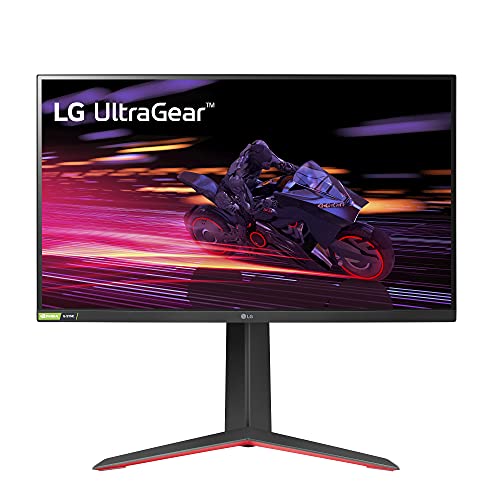
LG 27GP750-B
Ideal for gamers wanting a proven, high‑quality display; at $269.93 it’s about $20 pricier than the 32GS60QC‑B but offers the same 4.5‑star confidence.

LG 27GS50F-B
Stands out with HDCP 1.4 support on its single DisplayPort, delivering entry‑level compatibility at $166.99—significantly cheaper than the other two and earns the highest 4.6‑star rating.
Also considered
Score Analysis
Key score advantages vs. runner-up (LG 27GP750-B)
Price Range
LG 32GS60QC-B
$248.31
LG 27GP750-B
$286.92
LG 27GS50F-B
$129.99
LG 27G640A-B
$296.99
LG 27GR95QE-B
$486.49

LG 24G411A-B
$99.99
Spec Comparison
TL;DR: The LG 32GS60QC‑B offers a 31.5‑inch 1000R curved VA panel with 180 Hz refresh, 1 ms response and HDR10 at a $250 price, earning a solid 4.5‑star rating from over 13 k reviewers.
The monitor’s 1000R curvature wraps the 31.5‑inch screen tightly around your field of view, while the VA panel delivers a typical contrast ratio of 3000:1 and a typical brightness of 300 cd/m². A 1 ms (GtG) response time and a 180 Hz maximum refresh rate aim to keep fast action fluid, and HDR10 support adds a modest boost to bright scenes.
At 13.0 pounds, the LG 32GS60QC‑B is slightly lighter than the 27GP750‑B (13.2 lb) but noticeably heavier than the 24G411A‑B (7.3 lb). Its stand provides tilt from –5° to +15° only, whereas the 27G640A‑B offers height adjustment up to 130 mm. The stand depth of 226.5 mm sits between the deeper 27GP750‑B (291.2 mm) and the shallower 27GS50F‑B (201.61 mm), giving a moderate footprint on a desk.
Professional reviewers praise the deep blacks from the 3000:1 contrast and the immersive curve, but they also flag visible ghosting and overshoot when the “Faster” overdrive mode activates. Everyday users echo these points, noting that VRR flicker can be distracting and that the lack of height adjustment limits ergonomic comfort. The monitor packs a solid gaming suite—Black Stabilizer, Crosshair Overlay, FPS Counter and Dynamic Action Sync—while AMD FreeSync Premium helps smooth gameplay up to 180 FPS. Power draw stays modest at 22–24 W in active use.
Pros
Cons
Best for: Most users looking for a well‑reviewed, reliable mainstream option
Avoid if: You have limited desk space or need portability
TL;DR: The LG 27GP750-B delivers a blistering 240 Hz refresh rate and 1 ms response on a 27‑inch IPS panel with 99% sRGB coverage, but its 1080p resolution can look pixelated up close.
This monitor’s standout spec is the 240 Hz maximum refresh rate paired with a 1 ms gray‑to‑gray response time, which keeps motion buttery smooth for fast‑paced shooters. The IPS panel also reaches a typical brightness of 400 cd/m² and covers 99% of the sRGB colour space, giving vivid visuals that rival many higher‑priced rivals.
Compared with the other five LG models in this roundup, the 27GP750‑B's a bit heavier than the 27G640A‑B (which weighs 12.1 pounds) but lighter than the 27GR95QE‑B (which tips the scales at 16.2 pounds). Its stand offers up to 110 mm of height adjustment, a little less than the 130 mm range found on the 27G640A‑B, while the 32GS60QC‑B sits on a shallower base (226.5 mm depth versus 291.2 mm). The monitor also includes a fully adjustable tilt range and a 100 × 100 mm VESA mount, features that the 24G411A‑B lacks.
Reviewers consistently praise the ultra‑smooth gameplay and the bright, anti‑glare surface, noting that the low input lag feels comparable to TN panels despite the IPS technology. However, many users point out that the Full HD (1920 × 1080) resolution on a 27‑inch screen results in a relatively low pixel density, making individual pixels noticeable when sitting close. A handful of owners also mention minor backlight bleed in dark scenes and the absence of built‑in speakers or a USB hub.
Pros
Cons
Best for: Competitive esports gamers who prioritize ultra‑high refresh rates and low input lag over ultra‑high resolution.
Avoid if: You need crisp 4K detail, built‑in speakers, or a USB hub for peripherals.
“the cheapest 27-inch 240 Hz gaming monitor with a decent IPS panel”
“strong ergonomics and reliable FreeSync/G-Sync compatibility”
TL;DR: The LG 27GS50F‑B delivers a 27‑inch VA panel with a 180 Hz refresh rate, 1 ms motion blur reduction and HDR10 support at a budget‑friendly $166.99.
The standout spec is the 180 Hz maximum refresh rate paired with a 1 ms Motion Blur Reduction mode, which keeps fast‑paced shooters feeling buttery smooth. Its 27‑inch Full HD VA panel offers a typical brightness of 250 cd/m² and a 3000:1 typical contrast ratio, giving dark scenes solid depth.
Compared with the other five LG monitors in this roundup, the 27GS50F‑B is noticeably lighter than the 27‑inch premium models that tip the scales at over 12 pounds, and it also weighs less than the 32‑inch and 27‑inch high‑end options that sit above 13 pounds. Its stand‑footprint depth of about 202 mm makes it shallower than most of the competition, which often exceeds 230 mm. While its 180 Hz refresh sits above the native rate of the smaller 24‑inch sibling, it doesn’t reach the ultra‑high refresh of the top‑tier 27‑inch model.
Reviewers consistently praise the monitor’s smooth gameplay at 180 Hz and the effectiveness of the Black Stabilizer in dark maps. Professional reviewers note that the VA panel’s high contrast enhances immersion, though they also point out that HDR10 looks flat because the peak brightness caps at 250 cd/m². Users mention a wobbly stand and occasional flicker when the 1 ms MBR mode is active, which temporarily disables FreeSync.
Beyond raw numbers, the 27GS50F‑B packs a solid feature set: AMD FreeSync (via DisplayPort), Dynamic Action Sync, Crosshair overlay, FPS counter, and a 3‑side virtually borderless design that maximizes screen real‑estate. The tilt range of –5° to +15° and 100 × 100 mm VESA mount give you basic ergonomic flexibility without extra cost.
Pros
Cons
Best for: Competitive gamers who need high refresh rates and low input lag without breaking the bank.
Avoid if: You need professional‑grade HDR performance, extensive ergonomic adjustments, or a stand‑free design.
“HDR looks flat and not significantly different from SDR.”
“The black stabilization feature is a game‑changer in dark maps.”
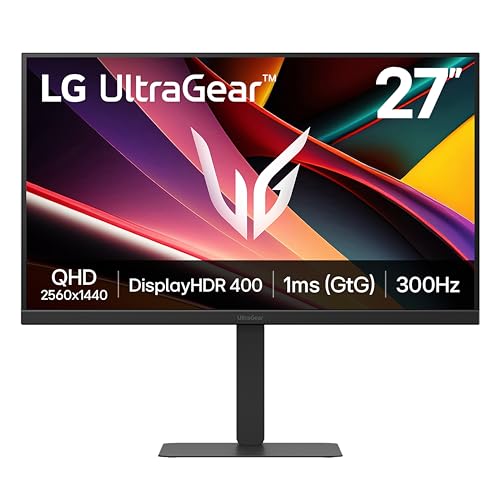
TL;DR: The LG 27G640A-B delivers a 27‑inch QHD IPS panel with a blistering 300 Hz refresh rate, 1 ms response time, and extensive ergonomic adjustments, making it a strong mid‑range gaming choice.
At 27 inches and 2560 × 1440 resolution, the monitor packs a 400 cd/m² typical brightness and a 1300:1 contrast ratio into an IPS‑type LCD. The 300 Hz refresh rate and 1 ms response time aim to keep motion ultra‑smooth, while the 95% DCI‑P3 and 99% sRGB coverage promise vivid colors for both games and content creation.
Weighing 12.1 pounds, the 27G640A-B weighs less than the LG 27GP750-B (13.2 pounds) but more than the LG 27GS50F-B (8.53 pounds). Its stand adds a depth of 239 mm, a touch deeper than the LG 32GS60QC-B’s 226.5 mm, yet it offers height adjustment up to 130 mm, pivot, tilt and swivel—features that outpace the tilt‑only adjustability of the LG 32GS60QC-B.
Reviewers consistently praise the fluid gameplay the 300 Hz panel delivers, and many highlight the fully adjustable stand as “best‑in‑class” for long sessions. On the downside, users note that HDR caps at VESA DisplayHDR 400 with 400 cd/m² peak brightness, limiting its impact, and some have reported dust particles under the panel. Professional reviewers also point out that HDMI 2.1 on this model tops out at 1440p @ 120 Hz, which might restrict console use.
Pros
Cons
Best for: Competitive and esports gamers who need ultra‑high refresh rates, and creators who value IPS color accuracy.
Avoid if: You want premium HDR performance or the best value‑per‑dollar in its price range.
“insanely fluid”
“best‑in‑class”
TL;DR: The LG 27GR95QE-B is a 27‑inch OLED gaming monitor with a 240 Hz refresh rate, 0.03 ms response time and 98.5% DCI‑P3 color coverage, but it carries a premium $549.99 price tag.
What really sets this model apart is its OLED panel delivering a near‑instant 0.03 ms (GtG) response time and a blistering 240 Hz refresh rate at QHD resolution. The screen covers 98.5% of the DCI‑P3 color gamut and can peak at 1000 nits for HDR, while its typical brightness is 200 cd/m² and contrast ratio reaches 1,500,000:1, giving you deep blacks and vivid colors.
Compared with the other five LG monitors in the roundup, the 27GR95QE‑B weighs 16.2 pounds, making it the heaviest, out‑weighing the 27GS50F‑B (8.53 lb) and the 24G411A‑B (7.3 lb) and also heavier than the 27GP750‑B (13.2 lb), 32GS60QC‑B (13.0 lb) and 27G640A‑B (12.1 lb). Its stand depth of 258 mm sits between the deeper 27GP750‑B (291.2 mm) and the shallower 32GS60QC‑B (226.5 mm), while its overall height with stand (574.4 mm) exceeds the 27GS50F‑B (456.05 mm) and the 27G640A‑B (539.1 mm). Feature‑wise, it adds a remote controller, HDMI 2.1, and factory‑calibrated OLED colour, which the other models lack.
Users rave about the monitor’s “zero motion blur” and “perfect blacks,” especially in fast‑paced shooters and simulators, and many appreciate the handy remote for quick OSD tweaks. Professional reviewers highlight the near‑instant response as a standout for competitive play. On the downside, reviewers note the relatively low typical brightness of 200 cd/m² can feel dim in bright rooms, and several owners have reported concerns about OLED burn‑in with static HUD elements. A few also mention occasional HDMI 2.1 stability quirks with certain GPUs, and the lack of built‑in speakers means you’ll need external audio.
Pros
Cons
Best for: Competitive FPS players, sim racers, and console gamers who prioritize ultra‑fast response, deep blacks and vivid colour accuracy.
Avoid if: You need very bright HDR performance, are worried about OLED burn‑in, or require built‑in speakers.
“The blacks are so deep, it feels like the game is alive.”
“Zero motion blur—perfect for competitive shooters.”
TL;DR: The LG 24G411A-B delivers a 23.8‑inch IPS panel with 120 Hz native (up to 144 Hz) refresh, FreeSync/G‑Sync compatibility, and HDR10 at a budget‑friendly $99.99 price.
This monitor’s standout spec is its 120 Hz native refresh rate, which can be over‑clocked to 144 Hz, and a 1 ms motion‑blur reduction response that keeps fast‑paced games looking fluid. The IPS panel covers 99% of the sRGB gamut, and the typical brightness of 250 cd/m² pairs with HDR10 support for brighter highlights.
At 7.3 pounds, it’s lighter than the 27‑inch and 32‑inch LG models in this roundup, which range from 8.53 pounds to 16.2 pounds. Its 23.8‑inch screen is also more compact than the 27‑inch and 32‑inch peers, making it a good fit for tighter desks. While its 120 Hz refresh delivers solid performance, it falls short of the 300 Hz rate of the LG 27G640A-B and the 240 Hz of the LG 27GR95QE-B, positioning it as a balanced mid‑range option rather than a high‑refresh specialist.
Reviewers consistently praise the 99% sRGB coverage and smooth gameplay, noting that the Black Stabilizer and Dynamic Action Sync help spot enemies in darker scenes. Professional reviewers highlight that the combination of G‑Sync compatibility with an IPS panel offers a rare value proposition. Common complaints focus on the tilt‑only stand, which limits ergonomic customization, and the modest 250 cd/m² brightness that limits HDR10 performance. Users also miss built‑in speakers for casual media consumption.
Beyond the refresh rate, the monitor offers a 1500:1 contrast ratio, 5 ms gray‑to‑gray response time, and a 16 W typical power draw, keeping energy use low. The matte anti‑glare coating reduces reflections, and features like Flicker Safe and Reader Mode add eye‑comfort options for long gaming sessions.
Pros
Cons
Best for: Entry-level buyers or those on a tight budget
Avoid if: You need powerful performance or professional‑grade features
Breakdown
LG 32GS60QC-B
Pros
LG 27GP750-B
Pros
LG 27GS50F-B
Pros
Cons
LG 27G640A-B
Pros
Cons
Based on scoring data and product specs
Personalized picks
Best Overall Pick
LG 32GS60QC-B
Best Mid-Range PickBest for: Most users looking for a well-reviewed, reliable mainstream option
LG 27GP750-B
Best for: Buyers willing to invest in a proven, high-quality option
$286.92+$38.61 vs winner
Skip LG 24G411A-B if…
You need powerful performance or professional-grade features
LG 32GS60QC‑B earns the top spot thanks to its 31.5‑inch 1000R curved VA panel, a blazing 180 Hz maximum refresh rate and a 1 ms GtG response that keep fast‑paced action smooth. It delivers QHD 2560 × 1440 resolution, 99 % sRGB colour coverage and HDR10 support, while the Adaptive Sync range of 48–180 Hz eliminates tearing. Coupled with a 4.5‑star rating from 13,337 reviewers and a $250.06 price, it offers a strong performance‑to‑price balance.
The runner‑up, LG 27GP750‑B, is the ideal pick if you need ultra‑high frame rates on a full‑HD IPS screen. Its 240 Hz peak refresh and 1 ms response time give competitive shooters a decisive edge, and the panel’s 99 % sRGB gamut plus HDR10 adds vivid colour. Height adjustment up to 110 mm, tilt from –5° to +15°, and a pivot for portrait mode let you fine‑tune ergonomics, while the typical brightness of 400 cd/m² and 1000:1 contrast keep images clear. Priced at $269.93, it balances premium speed with flexibility.
For tighter budgets, the LG 24G411A‑B at $99.99 provides solid 1080p performance and a compact footprint, making it perfect for small desks. If you’re ready to splurge, the LG 27GR95QE‑B at $549.99 brings top‑tier panel technology and advanced gaming features for the most demanding visual experience.
Choose the LG 32GS60QC‑B today and enjoy a balanced, high‑refresh gaming setup.
The LG 32GS60QC‑B costs about $250, roughly $20 less than the LG 27GP750‑B, and still offers a 180 Hz VA panel with HDR10, a 1000R curve and FreeSync Premium. For most gamers the lower price and immersive curvature make it the better value, especially if you don’t need the extra 240 Hz IPS refresh rate.
Please sign in to leave a review
No reviews yet. Be the first to review!
